Clock Source Schemes
RMII samples data on REF_CLK, so the MAC and the PHY must use the same 50 MHz reference clock. The figure below shows three common clock architectures for a MAC and a PHY. They differ in who generates the clock and in the direction of REF_CLK:
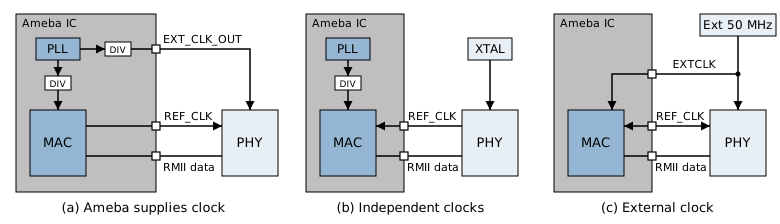
Clock architectures of the MAC and the PHY
Note
REF_CLKcan have only one driver. The bidirectional arrows in the figure mean the direction is selectable, not that both ends drive the signal at the same time.Two independent 50 MHz clocks cannot replace a common
REF_CLK, even if their frequency deviation is small.The source of the MAC operating clock (internal PLL or external clock) is independent of the source of
REF_CLK.
By the origin of the MAC’s 50 MHz clock, the schemes fall into two classes, internal clock source and external clock source, selected in MAC CLOCK SOURCE in Menuconfig.
Internal Clock Source
The MAC’s 50 MHz clock is divided down from the SoC’s internal PLL (Internal clock divided from PLL). The SoC PLL must be divisible by an integer to 50 MHz, so select a system clock configuration in Menuconfig that meets this condition. Otherwise Ethernet does not start, and the log reports that RMII needs 50 MHz.
On top of that, choose one of the following three cases in PHY CLOCK SOURCE according to where the PHY gets its clock:
Case |
Menuconfig option |
REF_CLK direction (MAC side) |
Description |
|---|---|---|---|
Ameba provides 50 MHz |
|
Output |
Ameba outputs 50 MHz to the PHY; the PHY needs no oscillator |
Ameba provides 25 MHz |
|
Output |
Ameba outputs 25 MHz to the PHY; the PHY needs no oscillator |
MAC and PHY use independent clock sources |
|
Input |
The PHY uses its own oscillator and outputs REF_CLK to the MAC |
The 25 MHz in 25M from Ameba is the clock supplied to the PHY input; the RMII REF_CLK remains 50 MHz.
Ameba Provides 50 MHz
Configure the EXTCLK pin (see Pin Configuration) as EXT_CLK_OUT via pin multiplexing. Ameba outputs a 50 MHz clock to the PHY’s XTAL2 input, so the PHY does not need a separate oscillator.
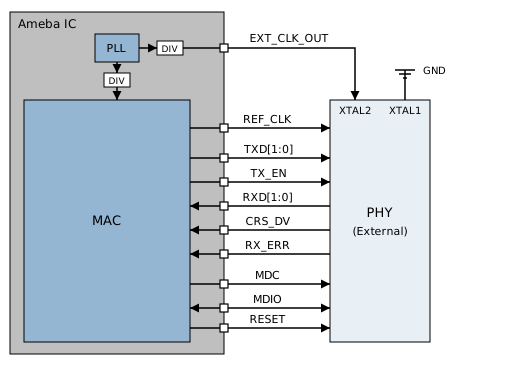
Ameba Supplies the PHY Clock
Note
Pin-saving connection (requires PHY support): instead of EXT_CLK_OUT, connect the MAC’s REF_CLK to the PHY’s XTAL2 as well, leave the PHY’s own REF_CLK pin floating, and tie XTAL1 to GND. The clock is carried on the REF_CLK line, saving the EXTCLK pin and the PHY oscillator.
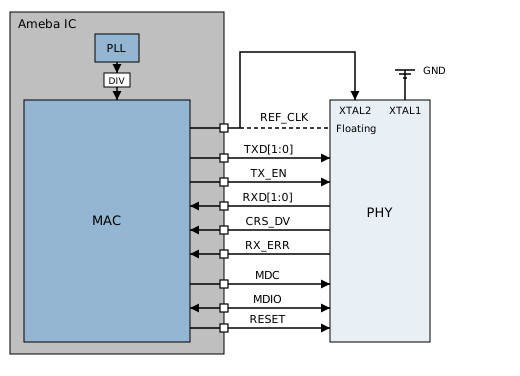
Pin-Saving Connection
Ameba Provides 25 MHz
The wiring is the same as for Ameba provides 50 MHz. The frequency output on the EXTCLK pin must match the input clock required by the PHY in use: select 25M from Ameba in Menuconfig if the PHY requires 25 MHz, or 50M from Ameba if it requires 50 MHz.
MAC and PHY Use Independent Clock Sources
The PHY’s system clock is provided by its own independent oscillator. EXT_CLK_OUT does not need to be configured, and the PHY outputs REF_CLK to the MAC.
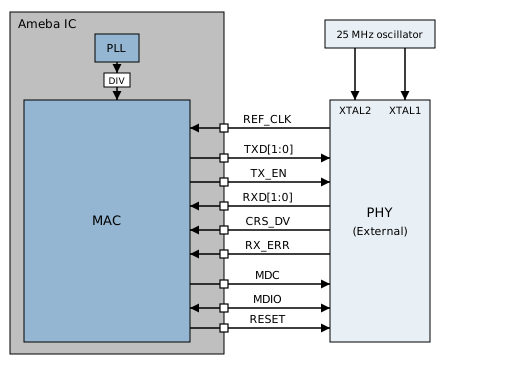
PHY with Its Own Oscillator
External Clock Source
As shown in subfigure (c) of the clock architecture figure, the same external 50 MHz source supplies both the MAC and the PHY. The MAC receives its operating clock through EXTCLK; the PHY receives the same source through a supported external clock input instead of using an independent oscillator. Check the PHY datasheet for the input pin, accepted frequency, and startup configuration.
Select External 50M from the EXTCLK pin in MAC CLOCK SOURCE in Menuconfig. The SDK multiplexes the MAC’s EXTCLK pin as EXT_CLK50M_IN.
EXTCLK is an input in this scheme and cannot also output a 25 MHz/50 MHz clock to the PHY.
The external 50 MHz clock must be stable before the MAC switches clock sources, or the MAC loses its operating clock.
With this scheme
REF_CLKis by default driven by the PHY to the MAC. To have the MAC drive it instead, adjust both the initialization configuration andcfg_refclockin the PHY driver.