WHC Bluetooth
Overview
In this solution, Ameba soc functions as the Bluetooth controller connected to the customer’s Bluetooth Host via low level interface. This solution has the following advantages:
Rich interface options: Establishes transmission channels between Host and Device via UART/SPI/SDIO/USB
Cross-platform compatibility: Supports FreeRTOS and Zephyr as Host development environments
The architecture diagram of the solution is as follows:
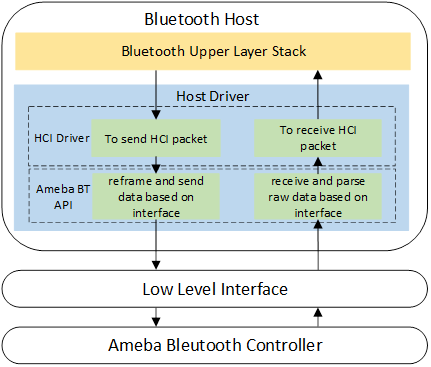
Host driver connects Bluetooth Upper layer stack and low level interface.
Bluetooth Upper layer stack calls transmit API in Host driver when there are HCI packets need to be sent to Bluetooth controller. Then Host driver calls function of low level interface to send out data.
Low level interface calls Host driver’s receive API when data is received from controller. Then Host driver will pass the data received to Bluetooth Upper layer stack.
Host driver will reframe HCI packet when transmitting and parse data when receiving according to different Low level interface requirement connected to Host driver. Low level interface only needs to cover basic data transaction.
WHC Bluetooth File Tree
├─ bluetooth
│  ├─ driver
│  │  ├─ bt_inic
│  │  │  ├─ bt_inic_defs.h
│  │  │  ├─ bt_inic_h4.c
│  │  │  ├─ bt_inic_h5.c
│  │  |  ├─ bt_inic_sdio_dplus.c
│  │  │  ├─ bt_inic_sdio.c
│  │  │  ├─ bt_inic_spi_dev.c
│  │  │  ├─ bt_inic_usb.c
│  │  │  ├─ bt_inic_usbd.c
│  │  │  └─ bt_inic.h
├─ bluetooth
│  ├─ example
│  │  ├─ bt_host
|  │  │  ├─ rtos_driver
|  |  |  │  ├─ host_api
|  |  |  |  │  ├─ sdio
|  |  |  |  │  │  ├─ sdio_if.c
|  |  |  |  │  │  └─ sdio_protocol.c
|  |  |  │  │  ├─ spi
|  |  |  |  │  │  ├─ spi_if.c
|  |  |  |  │  │  └─ spi_protocol.c
|  |  |  |  │  ├─ uart
|  |  |  │  │  │  ├─ h4.c
|  |  |  │  │  │  └─ uart_if.c
|  |  |  │  │  ├─ usb
|  |  |  │  │  │  ├─ usb_if.c
|  |  |  │  │  │  └─ usb_protocol.c
|  │  │  │  |  ├─ bt_inic_defs.h
|  │  │  │  |  ├─ rtk_stack_example.c
|  │  │  │  |  └─ zephyr_stack_example.c
├─ bluetooth
│  ├─ example
│  │  ├─ bt_host
|  │  │  ├─ linux_driver
|  |  |  │  ├─ sdio_dplus
|  |  |  │  │  ├─ rtb_sdio_probe.c
|  |  |  │  │  ├─ rtb_sdio.c
|  |  |  │  │  └─ rtb_sdio.h
|  |  │  │  ├─ sdio_green2
|  |  |  │  │  ├─ btrtk_sdio.c
|  |  |  │  │  └─ btrtk_sdio.h
|  |  |  │  ├─ spi
|  |  │  │  │  ├─ rtb_spi_config.h
|  |  │  │  │  ├─ rtb_spi_probe.c
|  |  │  │  │  ├─ rtb_spi.c
|  |  │  │  │  └─ rtb_spi.h
|  |  │  │  ├─ usb_green2
|  |  │  │  │  ├─ rtk_bt.c
|  |  │  │  │  └─ rtk_bt.h
│  │  │  |  ├─ rtk_coex.c
│  │  │  |  ├─ rtk_coex.h
│  │  │  |  └─ rtk_coex_host_api.h
WHC Bluetooth Porting Guide
Device-Side Driver Porting
TODO
RTOS Driver Porting
Host Driver
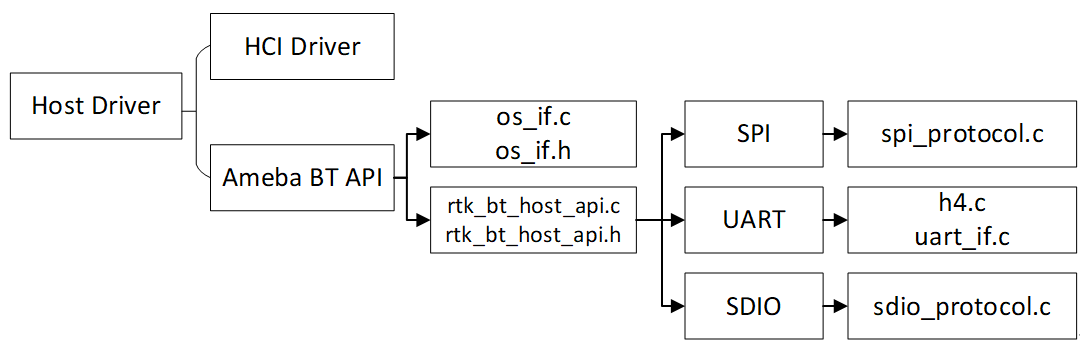
The Host driver consists of two parts: the HCI driver and the Ameba BT API. The HCI driver needs to be implemented by the customer, while the Ameba BT API is provided by us. Bluetooth Host communicates with the Controller by calling Ameba BT API through HCI driver. The code structure of the Host driver is shown as follows:
HCI Driver
Bluetooth upper layer stack transceives data through HCI driver, customer needs to implement this part in their own Host development environment. For FreeRTOS, Customers may place the HCI driver in any directory they prefer, according to their project layout, and modify CMakelist and Config to compile it. Details of the HCI driver are introduced in following steps:
HCI function
Description
HCI open
Bluetooth upper layer stack enables Bluetooth controller through HCI open function, Ameba BT enable API should be called by HCI open function according to the transport protocol to enable Ameba Bluetooth controller.
HCI close
Bluetooth upper layer stack disables Bluetooth controller through HCI close function, Ameba BT disable API should be called by HCI close function to disable Ameba Bluetooth controller.
HCI send
Bluetooth upper layer stack sends HCI packet through HCI send function, Ameba BT send API should be called by HCI send function to send packet to device.
HCI receive
Bluetooth upper layer stack receives HCI packets through HCI receive function, this function will be called by Ameba BT receive API when receiving data from low level interface.
Ameba BT API
The Ameba BT API consists of rtk_bt_host_api.c, rtk_bt_host_api.h, os_if.c, os_if.h, and the various interface-protocol modules. For FreeRTOS, we will provide all the files. Customers may place the Ameba BT API in any directory they prefer, according to their project layout, and modify CMakelist and Config to compile it.
The Ameba BT API functions as the bridge between the HCI driver and the low-level interface. The main functions of the Ameba BT API are as follows
Reframe & Transmit
Accept the HCI packets from the Bluetooth upper layer stack
Encapsulate HCI packets according to the low level interface protocol (H4/H5/SDIO/SPI/USB, etc.)
Pass the encapsulated frames to the low-level interface driver
Receive & Parse
Receive the raw data coming from the low-level interface
Parse HCI packet from raw data
Forward HCI packet to the upper layer stack receive callback
Details of the Ameba BT API are introduced in following steps:
BT API
Description
BT enable
The Ameba BT enable API will register HCI receive callback and interface operations, and send vendor command to enable Ameba Bluetooth controller. Please select the appropriate Ameba BT API based on the interface protocol.
If UART H4 is used, call
bool rtk_bt_host_enable_with_h4(struct hci_low_level_opts *opts, APP_RECV recv), which is described in section 4.1. UART interface is controlled Bluetooth only, so you need to implement low level operations.If SDIO is used, call
bool rtk_bt_host_enable_with_sdio(APP_RECV recv), which is described in section 4.2. SDIO interface is controlled by WiFi instead of Bluetooth, so you need to ensure SDIO interface is enabled when calling this API.If SPI is used, call
bool rtk_bt_host_enable_with_spi(APP_RECV recv), which is described in section 4.3. SPI interface is controlled by WiFi instead of Bluetooth, so you need to ensure SPI interface is enabled when calling this API.BT disable
The Ameba BT disable API
void rtk_bt_host_disable(void)will send vendor command to disable Ameba Bluetooth controller. If low level interface is controlled by WiFi, make sure interface is enabled when calling this API.BT send
The Ameba BT send API
uint16_t rtk_bt_host_send(uint8_t type, uint8_t *buf, uint16_t len)will send HCI packet to device through low level interface according to transport protocol.BT receive
The Ameba BT receive API
void rtk_bt_host_recv_raw(uint8_t *buf, uint16_t len)will receive raw data from low level interface and parse raw data to HCI packet according to protocol used (e.g. H4, H5, SDIO, SPI).This API
void rtk_bt_host_recv(uint8_t type, uint8_t *buf, uint16_t len)will pass the parsed HCI packets to upper layer stack through HCI receive callback.
Low Level Interface
UART Configuration:Note
Only FreeRTOS UART H4 interface driver is ready now !UART interface is controlled by Bluetooth, please refer touart_if.cfor UART interface configuration.SPI Configuration:Note
Only FreeRTOS SPI interface driver is ready now !WiFi and Bluetooth are both over SPI, please refer to WiFi document for SPI interface configuration.SDIO Configuration:Note
Only Zephyr SDIO interface driver is ready now !WiFi and Bluetooth are both over SDIO, please refer to WiFi document for SDIO interface configuration.USB Configuration:Note
USB interface driver is not ready now !
APIs
bool rtk_bt_host_enable_with_h4(struct hci_low_level_opts *opts, APP_RECV recv);
Item
Description
Function
This function is used to register UART interface operations and Upper stack receive callback, and enable H4 protocol.
Parameters
Return
True on success or false on failure
bool rtk_bt_host_enable_with_sdio(APP_RECV recv);
Item
Description
Function
This function is used to register SDIO interface operations and Upper layer stack receive callback.
Parameters
recv: HCI packets received callback of Bluetooth Upperstack
Return
True on success or false on failure
bool rtk_bt_host_enable_with_spi(struct hci_spi _opts *opts, APP_RECV recv);
Item
Description
Function
This function is used to register SPI interface operations and Upper layer stack receive callback.
Parameters
recv: HCI packets received callback of Bluetooth Upperstack
Return
True on success or false on failure
void rtk_bt_host_disable(void);
Item
Description
Function
This function is used to disable bluetooth device.
uint16_t rtk_bt_host_send(uint8_t type, uint8_t *buf, uint16_t len);
Item
Description
Function
This function is used to send HCI packet to device.
Parameters
Return
Actual data length sent to device
void rtk_bt_host_recv(uint8_t *buf, uint16_t len);
Item
Description
Function
This function is used to send the parsed packet from Host driver to Upper layer stack.
Parameters
Item
Description
Function
This function is used to send raw data received from Low level interface to Host driver.
Parameters
Linux Driver Porting
TODO

