Wi-Fi Aware (NAN)
Supported ICs[ RTL8730E ][ RTL8721Dx ][ RTL8721F ]
Note
Realtek Wi-Fi NAN only supports Linux hosts with wpa_supplicant, including WPAoH Mode in Wi-Fi Card mode (WHC Wi-Fi Configuration Options and Operating Modes) and RTL8730E Linux architecture.
Wi-Fi NAN Overview
Wi-Fi Aware, also known as NAN (Neighbor Awareness Networking), is a technical standard certified by the Wi-Fi Alliance. It enables supported devices to quickly discover, connect, and exchange data with other Wi-Fi devices without relying on traditional network infrastructure, Internet connection, or GPS signals. Compared with traditional Wi-Fi Direct, NAN is more energy efficient and effective at the device discovery phase, making it suitable for applications that require continuous awareness of the surrounding environment. This enables a new range of innovative peer-to-peer applications, such as:
Social applications: find nearby friends with similar interests, or join a local game.
Information sharing: quickly share files with all participants in a meeting room.
Local services: receive coupons from nearby stores in a shopping mall, or get detailed information about exhibits in a museum.
The efficiency and low power consumption of Wi-Fi NAN benefit from its unique mechanisms, mainly including the NAN cluster, the service publication/subscription model, and data path establishment.
NAN Cluster
Multiple neighboring NAN devices can automatically form a NAN Cluster, enabling communication between devices in the cluster. Devices inside the cluster share a common time beacon for synchronization.
Devices are not always awake, but instead follow a strict synchronized schedule and only wake up during a very short period called the Discovery Window (DW). During the DW, devices can broadcast their services or listen for services from others. For most of the remaining time, devices stay in low-power sleep mode. This synchronized sleep/wake mechanism is the key to NAN’s low power consumption, avoiding the significant battery drain caused by continuous scanning in traditional Wi-Fi device discovery.
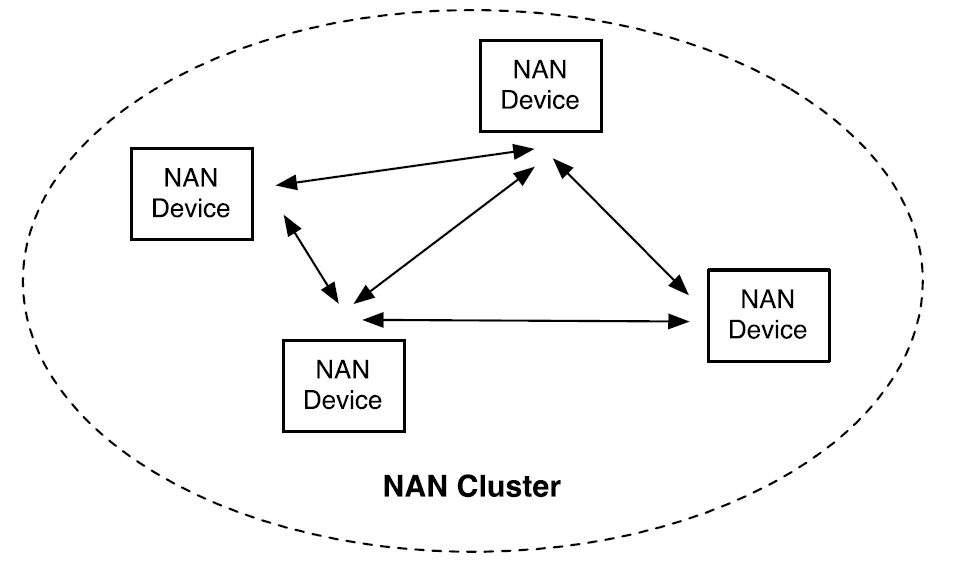
Wi-Fi NAN Cluster
Service Publish/Subscribe Model
Wi-Fi NAN adopts an efficient publish/subscribe model for service discovery:
Publish Service: Devices can act as publishers to broadcast the services they can provide.
Subscribe Service: Other devices (subscribers) listen for particular services of interest.
Service Discovery: When a subscriber receives a published message matching its subscription during a discovery window, the service is successfully discovered.
Establishing NAN Data Path (NDP)
Once successfully subscribed, two devices can choose to establish a NAN Data Path - a direct, peer-to-peer Wi-Fi link, featuring:
High bandwidth: High data rates using Wi-Fi for transmission.
Low latency: Direct connection without AP relay.
Security: WPA2 encryption can be used for data path security.
After NDP establishment, devices can conduct file transfer, video streaming, real-time gaming, and other high-bandwidth, low-latency activities.
Wi-Fi NAN Supported Features
Realtek devices provide comprehensive support for the Wi-Fi NAN protocol and are capable of operating in any role within a NAN network. The specific supported features are as follows:
Core Functional Support
Creating a NAN Cluster: When no available NAN network is nearby, the device can actively initiate a new NAN cluster, assume the master role, broadcast synchronization beacons, and provide the foundation for other devices to join.
Joining a NAN Cluster: The device can automatically scan for and discover existing NAN clusters nearby, synchronize its clock with them, seamlessly integrate into the existing Neighbor Awareness Network, and perform service discovery with other devices.
Publish Service: The device can broadcast (publish) one or more services to allow nearby devices to discover them.
Subscribe Service: The device can subscribe to (search for) specific services and discover devices providing those services.
Establishing Data Paths: Devices can establish either open or encrypted NAN data paths and negotiate time windows for point-to-point data exchange.
NAN Security Support
Supports establishing encrypted data paths between devices. Unicast data frames are protected with WPA2 AES encryption.
Supports NAN Pairing for device authentication, key agreement, distribution, and management.
Supports protection of unicast management frames using PTK.
Supports protection of multicast data frames and management frames using GTK / IGTK.
Supports beacon protection using BIGTK.
Key Features
High bandwidth and low latency data transfer: Ensures excellent data exchange performance based on Wi-Fi technology.
Secure connections: Authenticates and encrypts connections between paired devices at the Wi-Fi layer.
Multiple connections: Supports simultaneous connections with multiple Wi-Fi NAN devices.
Network concurrency: Supports concurrent use of Wi-Fi NAN functionality and traditional Wi-Fi networks (STA mode) without interference.
Robust topology: Employs a fully peer-to-peer topology, so the joining or departure of a single node does not interrupt existing connections between other nodes.
Wi-Fi NAN Porting Guide
Realtek Wi-Fi NAN only supports Linux hosts with wpa_supplicant, including WPAoH Mode in Wi-Fi Card mode (WHC Wi-Fi Configuration Options and Operating Modes) and RTL8730E Linux architecture.
For device-side driver porting, refer to Wi-Fi Card mode . For host-side driver porting, refer to the Linux tab in Wi-Fi Card mode .
In the directory
{SDK}, executesource envsetup.shto set up the compilation environment.Select the target machine and target distro for compilation, such as rtl8730elh-va7 full.
You're building on Linux

Lunch menu... pick a combo:
    1. rtl8730elh-va7-full
    2. rtl8730elh-va7-generic
    3. rtl8730elh-va8-full
    4. rtl8730elh-va8-generic

Which would you like?
After entering the build directory, execute
mfw menuconfig.Find and select .
(Top) -> CONFIG WIFI
----Configuration----
    (X)ENABLE WIFI --->
      ...
      (X) ENABLE NAN
      ( ) ENABLE P2P
Note
If the option cannot be found, make sure the option is enabled.
Open
{SDK}/sources/firmware/component/wifi/whc/whc_host_linux/Makefile, enable the NAN compilation option.export CONFIG_NAN = y export CONFIG_P2P = n export CONFIG_MCC = n export CONFIG_BT_INIC = n export CONFIG_WHC_HCI_IPC = y
Execute
m,mkernel,mfwto generate firmwares, location:{SDK}/images.Use the image tool to download firmwares to the development board.
For device-side driver porting, refer to Wi-Fi Card mode . For host-side driver porting, refer to the Linux tab in Wi-Fi Card mode .
Wi-Fi NAN Programming Interface
nan_test
nan_test is a user-space test script based on the open-source iw library and the proprietary nan_vendor_wrapper library, which allows users to operate Wi-Fi NAN in a straightforward and convenient way.
Its architecture is shown as below:
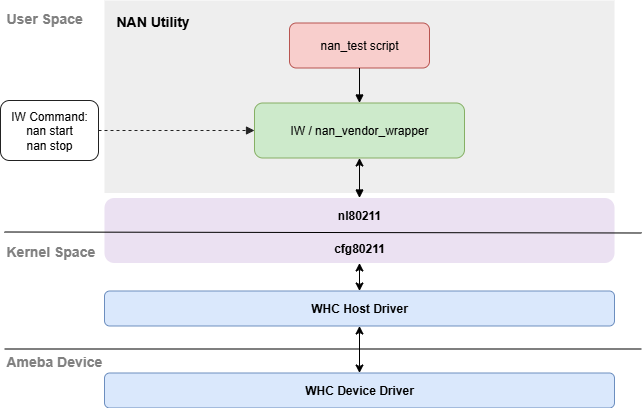
nan_test Architecture
Obtain and Compile
Obtain the SDK
SDK download: SDK Clone
nan_test is located at:
{sdk}/component/wifi/linux_app/nan_utility.Prepare Environment
Install dependencies on Linux:
sudo apt-get install build-essential
Compile nan_test
Copy
nan_utilityto Linux kernel source tree, then open new terminal and compile:cd nan_utility make script
Executable script
nan_testis located innan_utility/script/.
Obtain nan_test
Download SDK: Linux SDK
nan_test is located at
{sdk}/sources/tests/nan/.Prepare Environment
Edit
{sdk}/sources/yocto/meta-realtek/meta-sdk/recipes-core/images/ameba-image-core.bbto addnet-toolsandiproute2libraries to IMAGE_INSTALL.IMAGE_INSTALL += " \ net-tools \ iproute2 \ adbd \ recoveryd \
Recompile and download image to the development board.
Compile nan_test
Use the
bitbakecommand to cross-compile:bitbake rtk-app-nan-test -c cleanall bitbake rtk-app-nan-test
The generated executable scripts are located at
{sdk}/sources/tests/nan/oe-workdir/image/bin/. Copy files from this directory to the PC connected with the development board.On the PC, use TraceTool to execute
usb.sh -r usbd_adbcommand on the development board to initialize the USB adb function.Open a command window on your PC, navigate to the directory containing the nan_test scripts, and use
adbcmd to push the files to the development board.adb push nan_test /usr/sbin/ adb push nan_vendor_wrapper /usr/sbin
On the development board, execute the following commands to add executable permissions to the nan_test scripts.
chmod +x /usr/sbin/nan_test
chmod +x /usr/sbin/nan_vendor_wrapper
Obtain the SDK
SDK download: SDK Clone
nan_test is located at:
{sdk}/component/wifi/linux_app/nan_utility.Prepare Environment
Install dependencies on Linux:
sudo apt-get install build-essential
Compile nan_test
Copy
nan_utilityto Linux kernel source tree, then open new terminal and compile:cd nan_utility make script
Executable script
nan_testis located innan_utility/script/.
Usage Reference
The commands and parameters supported by nan_test are described below.
nan_test -h
Show help message.
nan_test status
Show current NAN status, including the following information:
Module existence
Main interface down/up
NAN interface existence
nan_test init
Init NAN interface. This command registers the nan0 interface. Afterwards, iw dev shows the nan0 interface, which shares the same phy with wlan0.
Example:
nan_test init
nan_test deinit
Deinit NAN interface. This command un-registers the nan0 interface.
Example:
nan_test deinit
nan_test start [pref <value>] [bands [2GHz] [5GHz]]
Start NAN.
Parameters:
- pref:
Master Preference, default pref = 5.
- bands:
Supported bands (publish), 2GHz or 2GHz 5GHz.
Example:
nan_test start pref 5 bands 2GHz 5GHz
nan_test stop
Stop NAN.
nan_test add_func type <publish|subscribe|followup> [solicited] [unsolicited] name <name> [optional param]
Add a NAN function with or without filters.
Parameters:
- type:
The type of the adding service.
- solicited / unsolicited:
Only present when service type is publish, indicating the publish service is solicited or unsolicited.
- name:
Service name from which service id is generated and is not case sensitive. Default name:
org.wifi.nan.test.
Optional parameters:
- info:
Could be a simple buffer or a formatted buffer.
A simple buffer will be appended to SDA attribute.
A formatted buffer started with supported OUI is expected as a well-structured service info and will be appended to SDEA.
Currently, user can only choose one kind of service info for a service, and driver only supports the OUI specified in ref[1].
e.g. type subscribe active srf include list “00:11:22:33:44:55;66:55:44:33:22:11”
- active:
Only present when service type is subscribe, indicating an active subscribe.
- bcast:
Only present when the service is solicited publish, indicating the service is broadcasting as well.
Follow up service parameters (only present when service type is followup):
- flw_up_id:
The instance id of the local publish or subscribe service which this followup service wants to follow.
- flw_up_req_id:
The instance id of the remote publish or subscribe service.
- flw_up_dest:
The nmi of the remote publish or subscribe service.
Service response filter parameters (only present when srf is configured):
- include / exclude:
Indicate the srf is a white list or a black list.
- list <mac1;mac2…>:
Indicate a list for memory comparing with peers’ nmi.
- bm bf_idx bf_len <mac1;mac2…>:
Indicate the method and the components to generate a bloom filter.
e.g. type subscribe active srf include bf 3 16 “00:11:22:33:44:55;66:55:44:33:22:11”
Matching filter parameters:
- rx_filter <str1:str2…>:
Receive matching filter.
- tx_filter <str1:str2…>:
Transmit matching filter.
e.g. 1: type publish solicited rx_filter RTK:ABCD:A23D; type subscribe active tx_filter RTK
e.g. 2: type publish unsolicited tx_filter *:*:*; type subscribe passive rx_filter none
Example:
nan_test add_func type publish unsolicited name android data_path
nan_test add_func type subscribe active name nan_service
nan_test rm_func <cookie>
Remove a NAN function with cookie. The cookie is shown when add_func is executed.
nan_test data_req [req_type <ndp>] [rsp_nan_mac <mac_addr>] [sec] [publish_id <id>] [min_duration <value>] [max_latency <value>] [sec_pmk <key_content | pairing>] [srv_info <hex_data>] [port_num <value>] [hostname <str>]
NAN data request.
Parameters:
- req_type:
Type for data request; only ndp is supported.
- rsp_nan_mac:
The mac address of ndp responder.
- sec:
Present if security data path is required.
- publish_id:
Specify the instance id of the peer service.
Note: if the id is not specified, the first service of rsp_nan_mac will be selected as publish_id.
- min_duration:
Minimum number of available nan slots needed per dw interval (unit: nan slot).
Present if qos is required (check NDL QoS attr in nan spec for more details).
- max_latency:
Maximum nan slots between every two non-contiguous NDL CRBs (unit: nan slots).
Present if qos is required (check NDL QoS attr in nan spec for more details).
- sec_pmk:
Only present when sec is set. Specify the pmk for secured ndp setup.
pmk content: e.g. sec_pmk 123456789ABCDEF0123456789ABCDEF1 (note: the length of pmk should be 32).
pairing: use this value if nan pairing is processed before the ndp setup (the pmk will be generated automatically after nan pairing is completed).
- sec_password:
Only present when sec is set. Specify the password used to extend to the pmk for secured ndp setup.
Note: the max length of password is 32.
- srv_info:
The info should be presented in hex format, and separated by comma.
e.g. srv_info 50,6f,9a,02,00,02,00,58,1b,01,01,00,06
Note: service info could be in various formats, but for the current command set, srv_info is expected as a simple buffer that is going to append to the NDP attribute.
- port_num:
Transport Port; current port on which the service is listening. If this parameter is set, NDPE will append service info with generic service format, and ignore srv_info parameter.
- hostname:
DNS-SD hostname. If this parameter is set, NDPE will append service info with generic service format, and ignore srv_info parameter.
Example:
nan_test data_req req_type ndp rsp_nan_mac 00:11:22:33:44:55:66 publish_id 1
nan_test data_rsp [rsp_mode <peer | auto>] [ndl_rsp <reject | accept>] [data_path_id <id>] [publish_id <id>] [initiator_data_address <mac_addr>] [min_duration <value>] [max_latency <value>] [srv_info <hex_data>] [port_num <value>] [hostname <str>]
NAN data response.
Parameters:
- rsp_mode:
Response mode. Value: peer, auto.
- ndl_rsp:
Response status. Value: reject, accept.
- data_path_id:
Present when the rsp_mode is peer. The ndp id created by the initiator (check ndp attr in nan spec for more details).
- publish_id:
Present when the rsp_mode is auto. The instance id of the peer’s publish service.
- initiator_data_address:
Present when the rsp_mode is peer. The mac addr of initiator.
- min_duration:
Minimum number of available nan slots needed per dw interval (unit: nan slot).
Present if qos is required (check NDL QoS attr in nan spec for more details).
- max_latency:
Maximum nan slots between every two non-contiguous NDL CRBs (unit: nan slots).
Present if qos is required (check NDL QoS attr in nan spec for more details).
- srv_info:
The info should be presented in hex format, and separated by comma.
e.g. srv_info 50,6f,9a,02,00,02,00,58,1b,01,01,00,06
Note: service info could be in various formats, but for the current command set, srv_info is expected as a simple buffer that is going to append to the NDP attribute.
- port_num:
Transport Port; current port on which the service is listening. If this parameter is set, NDPE will append service info with generic service format, and ignore srv_info parameter.
- hostname:
DNS-SD hostname. If this parameter is set, NDPE will append service info with generic service format, and ignore srv_info parameter.
Example:
nan_test data_rsp rsp_mode peer ndl_rsp accept data_path_id 1
nan_test data_end [ndp_id <id>] [initiator_ndi <mac>]
NAN data end.
nan_test set_ipv6
Set own ipv6 link-local address based on mac address via ifconfig. Automatically converts own mac address to ipv6 address.
nan_test set_neigh <dst_mac>
Set neighbor ipv6 link-local address with dst mac address. Automatically converts dst mac address to ipv6 address.
NAN Application Example
To establish a Data Path between NAN devices, prepare two sets of equipment, and complete the NAN porting.
nan_test Example
Note
When executing commands in the example, please replace the MAC addresses with the actual NAN MAC addresses of your devices.
After NAN is started on the device, you can get the address information of the nan0 interface using the ifconfig command, as shown below:
root@raspberrypi:/# ifconfig

nan0: flags=4163<UP,BROADCAST,RUNNING,MULTICAST>  mtu 1500
      inet6 fe80::2e2:4cff:fe00:102d  prefixlen 64  scopeid 0x20<link>
      ether 00:e2:4c:00:10:2d  txqueuelen 1000  (Ethernet)
      RX packets 0  bytes 0 (0.0 B)
      RX errors 0  dropped 0  overruns 0  frame 0
      TX packets 6  bytes 516 (516.0 B)
      TX errors 0  dropped 0 overruns 0  carrier 0  collisions 0
Case 1 - Setup Open NDP
Open NDP allows devices to establish a direct data channel without encryption or authentication, suitable for scenarios with lower security requirements, offering lower latency and simpler setup. The setup flow is shown below:
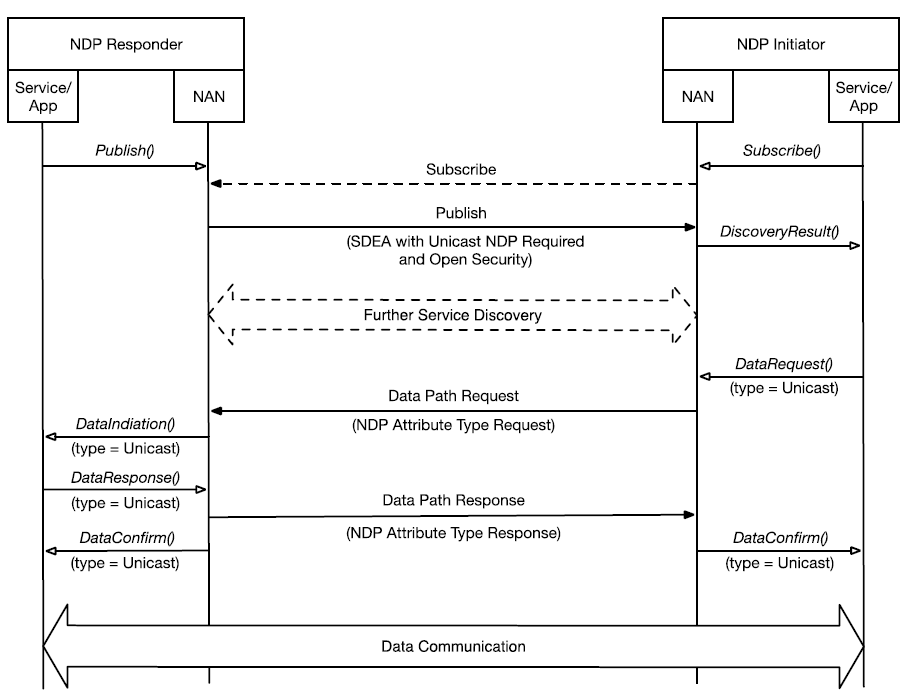
Wi-Fi NAN Open NDP Setup Flow
Execute commands as listed in the following table to establish an open NDP.
Step |
Device A(NDP Responder) MAC: 00:11:22:33:44:55 |
Device B(NDP Initiator) MAC: 66:55:44:33:22:11 |
Description |
|---|---|---|---|
1 |
nan_test init nan_test start pref 128 bands 2GHz 5GHz |
Device A initializes NAN in 2GHz & 5GHz. |
|
2 |
nan_test init nan_test start pref 5 bands 2GHz 5GHz |
Device B initializes NAN in 2GHz & 5GHz. |
|
3 |
nan_test add_func type publish unsolicited name nanservice data_path |
Device A publish an open service unsolicitedly. |
|
4 |
nan_test add_func type subscribe name nanservice |
Device B passively subscribe to the service. |
|
5 |
nan_test data_req req_type ndp rsp_nan_mac 00:11:22:33:44:55 publish_id 1 |
Device B sends a Data Path Request command to Device A to set up NDP. |
|
6 |
nan_test data_rsp rsp_mode peer ndl_rsp accept data_path_id 1 |
Device A accepts NDP request and sends a Data path Response command to set up NDP. |
|
7 |
nan_test set_ipv6 nan_test set_neigh 66:55:44:33:22:11 |
nan_test set_ipv6 nan_test set_neigh 00:11:22:33:44:55 |
Device A & B set self IPv6 link-local addresses and set peer as IPv6 neighbor. |
8 |
ping6 fe80::6655:44ff:fe33:2211%nan0 |
Device A ping Device B via IPv6. |
|
9 |
ping6 fe80::0011:22ff:fe33:4455%nan0 |
Device B ping Device A via IPv6. |
Case 2 - Setup Secure NDP
Secure NDP establishes an encrypted data channel between devices, providing confidentiality and integrity protection for data transmission. The setup flow is shown below:
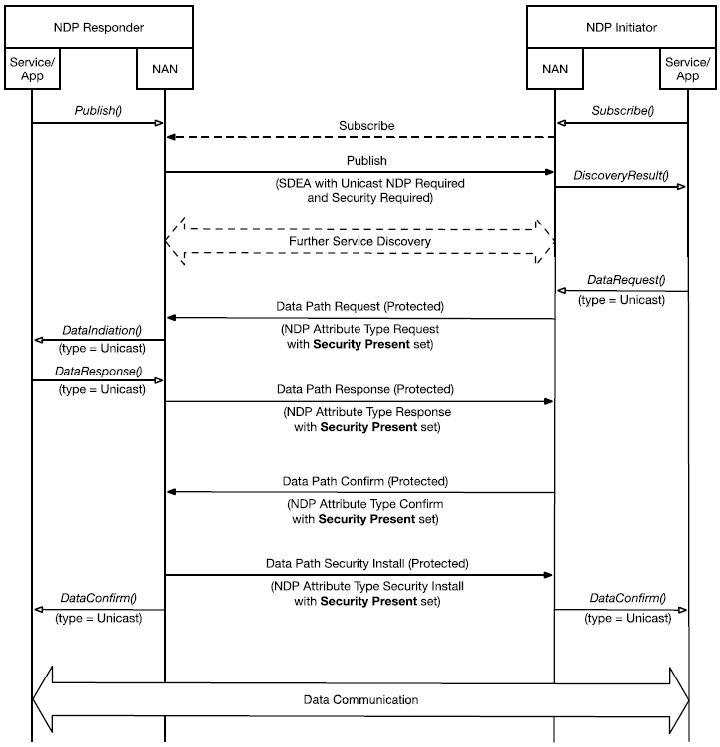
Wi-Fi NAN Secure NDP Setup Flow
Execute commands as listed in the following table to establish a secure NDP.
Step |
Device A(NDP Responder) MAC: 00:11:22:33:44:55 |
Device B(NDP Initiator) MAC: 66:55:44:33:22:11 |
Description |
|---|---|---|---|
1 |
nan_test init nan_test start pref 128 bands 2GHz 5GHz |
Device A initializes NAN in 2GHz & 5GHz. |
|
2 |
nan_test init nan_test start pref 5 bands 2GHz 5GHz |
Device B initializes NAN in 2GHz & 5GHz. |
|
3 |
nan_test add_func type publish unsolicited name nanservice data_path sec_pmk 123456789abcdef0123456789abcdef0 |
Device A publish an open service unsolicitedly and announce it supports ND-TKSA (SDEA with Unicast NDP required and Security Required). |
|
4 |
nan_test add_func type subscribe name nanservice |
Device B passively subscribe to the secure service. |
|
5 |
nan_test data_req req_type ndp rsp_nan_mac 00:11:22:33:44:55 sec publish_id 1 sec_pmk 123456789abcdef0123456789abcdef0 |
Device B sends a Data Path Request command with sec_pmk to Device A to set up NDP. |
|
6 |
nan_test data_rsp rsp_mode peer ndl_rsp accept data_path_id 1 |
Device A accepts NDP request and sends a Data path Response command to set up NDP. |
|
7 |
nan_test set_ipv6 nan_test set_neigh 66:55:44:33:22:11 |
nan_test set_ipv6 nan_test set_neigh 00:11:22:33:44:55 |
Device A & B set self IPv6 link-local addresses and set peer as IPv6 neighbor. |
8 |
iperf -s -i 1 -V |
Device A starts iperf server. |
|
9 |
iperf -c fe80::0011:22ff:fe33:4455%nan0 -i 1 -t 30 -V |
Device B starts iperf client, establishing TCP connection with Device A. |

