Secure Boot
Overview
Secure Boot is a key technology for ensuring the security of IoT devices. Its core purpose is to ensure that devices only run authorized firmware, preventing malicious code injection or illegal firmware tampering. The core method utilizes asymmetric encryption private key signing and public key verification technology: developers use private keys to sign firmware; chips use public keys during startup to verify signatures, thereby ensuring firmware integrity and authenticity.
When the device powers on, the Boot ROM code internally solidified in the chip automatically checks whether the firmware about to run has a legitimate digital signature: If verification passes, the firmware source is confirmed as trusted, and the system continues executing the subsequent startup process; if verification fails, the firmware is considered untrusted, sensitive states are cleared, and startup is terminated.
This process is implemented through the “Chain of Trust” mechanism - the trust relationship starts from tamper-proof hardware (ROM) and extends to the final application firmware through step-by-step signature verification. This ensures that all firmware is trusted throughout the entire operational lifecycle.
Ameba series ICs support different signature algorithms:
Algorithm Type |
Algorithm Parameters |
|---|---|
EdDSA |
ed25519 |
Algorithm Type |
Algorithm Parameters |
|---|---|
EdDSA |
ed25519 |
ECDSA |
secp192r1, secp224r1, secp256r1, bp256r1, secp192k1, secp224k1, secp256k1 |
Algorithm Type |
Algorithm Parameters |
|---|---|
EdDSA |
ed25519 |
ECDSA |
secp192r1, secp224r1, secp256r1, bp256r1, secp192k1, secp224k1, secp256k1 |
Algorithm Type |
Algorithm Parameters |
|---|---|
EdDSA |
ed25519 |
ECDSA |
secp192r1, secp224r1, secp256r1, bp256r1, secp192k1, secp224k1, secp256k1 |
Algorithm Type |
Algorithm Parameters |
|---|---|
EdDSA |
ed25519 |
ECDSA |
secp192r1, secp224r1, secp256r1, bp256r1, secp192k1, secp224k1, secp256k1 |
Algorithm Type |
Algorithm Parameters |
|---|---|
EdDSA |
ed25519 |
ECDSA |
secp192r1, secp224r1, secp256r1, bp256r1, secp192k1, secp224k1, secp256k1 |
Algorithm Type |
Algorithm Parameters |
|---|---|
EdDSA |
ed25519 |
ECDSA |
secp192r1, secp224r1, secp256r1, bp256r1, secp192k1, secp224k1, secp256k1 |
Algorithm Type |
Algorithm Parameters |
|---|---|
EdDSA |
ed25519 |
ECDSA |
secp192r1, secp224r1, secp256r1, secp384r1, bp256r1, bp384r1, bp512r1, secp192k1, secp224k1, secp256k1 |
PQC (Post-Quantum Cryptography) |
ml_dsa_65 |
After understanding the signature algorithms supported by Ameba series ICs, the following section introduces the principles and complete process of Secure Boot.
Secure Boot Principles and Process
Secure Boot starts from the ROT composed of Boot ROM + OTP and is passed level by level. The figure below shows the complete Secure Boot usage process:
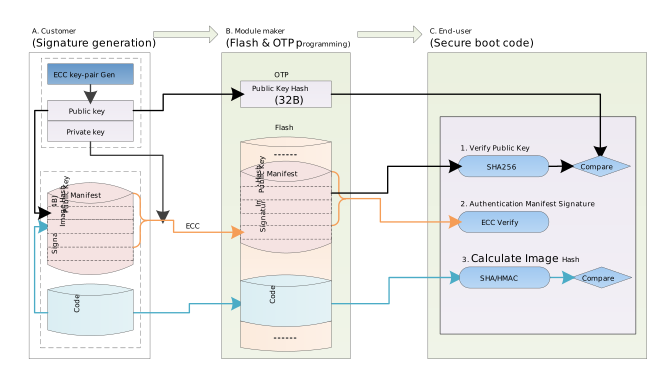
Secure Boot involves three stages: development, mass production, and runtime, completed by different participants at different times:
Development Stage (completed by developers):
Generate asymmetric key pairs: private keys must be strictly kept confidential, and public key hash values are calculated.
Generate signed firmware: use private keys to digitally sign the original firmware, generating a Manifest containing metadata such as public keys, signatures, and original firmware hashes. The Manifest and original firmware are combined to generate signed firmware.
Mass Production Stage (completed by production line):
Burn public key hash values and enable bits: burn the public key hash values generated during the development stage to fixed addresses in the chip OTP. Also burn the Secure Boot enable bit to enable the Secure Boot function.
Burn signed firmware: burn the signed firmware generated during the development stage to the chip’s Flash storage.
Runtime Stage (executed by chip): after the device powers on, Boot ROM verifies the signatures and integrity of firmware at all levels level by level based on the public key hash in OTP. If verification passes, startup continues; if verification fails, sensitive information is cleared and startup is terminated.
Secure Boot Solution
Ameba SDK provides a complete out-of-the-box Secure Boot solution. All complex signature verification mechanisms have been implemented in the SDK, and developers do not need to write code themselves, only needing to configure the SDK according to the user guide. The figure below shows the signature verification process in the chip’s multi-level startup:
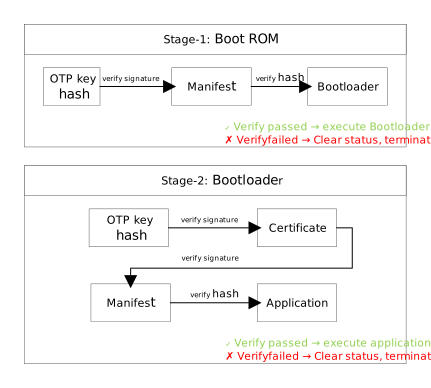
Ameba series ICs adopt a multi-level startup process, sequentially executing the following three independent firmware:
First Stage - Boot ROM: the first code executed after the device powers on is the chip’s internal ROM, which is physically tamper-proof. Boot ROM reads the Bootloader and its Manifest from Flash, uses the OTP public key hash to verify the public key and signature in the Manifest. Then it verifies the Bootloader firmware hash stored in the Manifest. After verification passes, it jumps to execute the Bootloader; if it fails, it clears sensitive states and terminates startup.
Second Stage - Bootloader: a bootloader loaded from Flash, responsible for loading and security verification of subsequent firmware. Bootloader first verifies the signature of the Key Certificate. The certificate contains the application firmware’s public key hash and also allows adding multiple sets of custom public key hash values. After verification passes, Bootloader extracts the public key hash used to verify application firmware from the certificate, then uses that public key hash to verify the application firmware’s Manifest, and finally calculates and compares the application firmware’s hash value.
Third Stage - Application: a user application that runs directly, not responsible for firmware verification.
The first two startup stages both execute in the ARM Secure world. Compared with single-level verification, the three-level verification architecture adopted by Ameba has the following advantages:
Key Isolation: Bootloader and application firmware use different key pairs. Even if the application firmware key is leaked, Bootloader remains secure.
Flexible Updates: application firmware keys are stored in certificates, allowing application key updates without modifying OTP.
Permission Separation: developers can maintain application keys, while OEM manufacturers control Bootloader keys, achieving permission separation.
Verification Process
Manifest Composition and Purpose
In the Secure Boot verification process, the chip needs to read various information from the firmware to complete verification: version number, algorithm, public key, signature, etc. All this information is organized in the Manifest. The Manifest can be understood as the firmware’s “identity description file”: it is a binary format metadata block attached to the header of the executable firmware. The following three parts each have independent Manifests:
Image1 (Bootloader): bootloader, responsible for verifying key certificates and application firmware;
Cert (Key Certificate): key certificate, used to pass the application firmware’s public key hash value;
Image2 (Application): application firmware, user’s application.
Verification Process Details
Secure Boot is built upon the “Chain of Trust” mechanism, where the chain of trust starts from tamper-proof hardware ROM and OTP, and extends to the final application firmware through step-by-step verification. The figure below shows the complete three-level verification process:
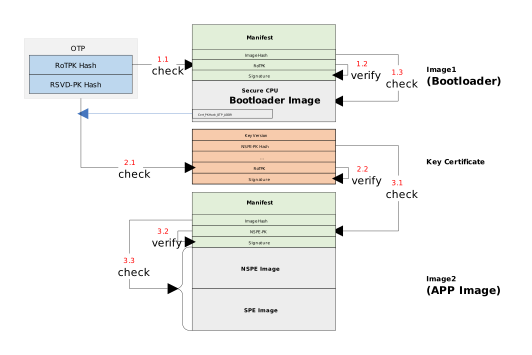
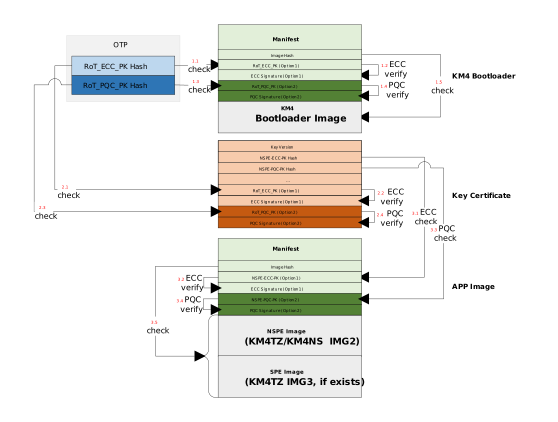
The chip startup verification process varies slightly depending on the mode: Standard ECC mode only verifies ECC signatures, while PQC hybrid mode requires verifying both ECC and PQC signatures. However, in either mode, each level of verification contains three core steps:
Verify public key trustworthiness: calculate the hash value of the public key in the Manifest and compare it with the public key hash value burned in OTP;
Verify Manifest reliability: use the public key to verify the Manifest signature;
Verify firmware reliability: calculate the actual firmware’s hash value and compare it with the firmware hash value generated during the post-build processing stage in the Manifest.
If any step fails, the chip will terminate startup. The specific process is as follows:
First Level : Boot ROM -> Bootloader (image1)
Boot ROM reads the public key hash value from OTP, calculates the hash value of the public key in the Bootloader Manifest and compares them. After they match, use the public key to verify the Manifest signature (the signed content is all Manifest fields except Signature). After signature verification succeeds, read the firmware hash from the Manifest, calculate the actual firmware hash and compare it. After verification passes, jump to execute Bootloader.
Second Level : Bootloader -> Key Certificate (cert)
Bootloader uses the public key in OTP to verify the key certificate. After confirming the certificate’s public key matches the OTP, verify the certificate signature. After signature verification passes, extract the application firmware’s public key hash value from the certificate to establish the trust anchor for subsequent verification. The certificate does not contain executable firmware, so firmware reliability verification is not required.
Third Level : Bootloader -> Application Firmware (image2)
Bootloader uses the public key hash in the certificate to verify the application firmware public key. The subsequent process is the same as the first-level verification.
After clarifying the verification process, the following section introduces the public key hash and algorithm configuration methods.
Parameter Configuration
Parameter Configuration Overview
Secure Boot involves multiple key parameters, covering signature keys, hash algorithms, and storage locations. The table below summarizes the main parameters:
Parameter Name |
Function |
IC Storage Location |
|
|---|---|---|---|
Private Key |
Digitally sign firmware |
sboot_private_key |
Not stored on IC side |
Public Key |
Verify firmware signature during IC boot |
sboot_public_key |
|
Public Key Hash |
Root of trust anchor, verify public key legitimacy |
sboot_public_key_hash |
|
RMA Public Key Hash |
Backup public key hash in RMA mode |
sboot_public_key_hash |
|
HMAC Key |
Firmware hash calculation key (HMAC mode only) |
sboot_hmac_key |
|
Signature Algorithm |
Specify signature type (e.g., ed25519) |
sboot_algorithm |
|
Hash Algorithm |
Specify firmware digest algorithm (e.g., sha256) |
sboot_hash_alg |
|
Secure Boot Enable |
Enable secure boot function |
sboot_enable |
After understanding the overall parameter configuration, the following section details the storage locations and configuration methods for each parameter:
Public Key Hash Storage Details
Secure Boot stores public key hash values through OTP to form a tamper-proof hardware Root of Trust. When the chip starts up, Boot ROM calculates the hash value of the public key in the Manifest and compares it with the public key hash value stored in OTP. After verification passes, the startup process continues to execute. The public key hash values used in the three-level verification process are stored in different locations:
Image1 (Bootloader): public key hash is stored by default in the PK1 area of OTP (physical address 0x320~0x33F)
Cert (Key Certificate):
Under SDK default configuration, the key certificate uses the same PK1 key pair as Bootloader.
When Bootloader and application firmware are developed by different teams, use PK2 to achieve key isolation, ensuring that certificate key leakage does not affect Bootloader security. When using PK2, the public key hash needs to be stored in the PK2 area of OTP (physical address 0x340~0x35F), and modify the chip-specific
ameba_bootcfg.cfile:RTL8721Dx:github source code
RTL8720E:github source code
RTL8710E:github source code
RTL8726E:github source code
RTL8713E:github source code
RTL8730E:github source code
RTL8721F:github source code
/* Default uses PK1. If using PK2 independent key, change to SEC_PKKEY_PK2_0 */
u32 Cert_PKHash_OTP_ADDR = SEC_PKKEY_PK1_0;
Image2 (Application): public key hash is stored in the key certificate and does not need to be burned to OTP. In addition to the default key hash, you can modify the
manifest.json5file to add custom key hashes to the certificate.
OTP configurations for different chips are as follows:
Mode |
Name |
OTP Address |
Size (bits) |
Description |
|---|---|---|---|---|
Normal |
PK1 |
Physical 0x320~0x33F |
256 |
To support different algorithms and curves, public key hash (SHA256) is stored in OTP |
PK2 |
Physical 0x340~0x35F |
256 |
To support different algorithms and curves, public key hash (SHA256) is stored in OTP |
|
PK1_W_Forbidden_EN |
Physical 0x365[1] |
1 |
PK1 cannot be modified after burning |
|
PK2_W_Forbidden_EN |
Physical 0x365[2] |
1 |
PK2 cannot be modified after burning |
|
SECURE_BOOT_EN_PHY |
Physical 0x368[3] |
1 |
Secure boot is enabled when any enable bit is burned
|
|
SECURE_BOOT_EN_LOG |
Logical 0x3[2] |
1 |
||
RMA |
RMA_PK |
Physical 0x720~0x73F |
256 |
Hash value of secure boot public key in RMA mode For security reasons, users can maintain RMA keys different from PK1/PK2 |
RMA_PK_W_Forbidden_EN |
Physical 0x702[2] |
1 |
RMA_PK cannot be modified after burning |
Mode |
Name |
OTP Address |
Size (bits) |
Description |
|---|---|---|---|---|
Normal |
PK1 |
Physical 0x320~0x33F |
256 |
To support different algorithms and curves, public key hash (SHA256) stored in OTP |
PK2 |
Physical 0x340~0x35F |
256 |
To support different algorithms and curves, public key hash (SHA256) stored in OTP |
|
PK1_W_Forbidden_EN |
Physical 0x365[1] |
1 |
PK1 cannot be modified after burning |
|
PK2_W_Forbidden_EN |
Physical 0x365[2] |
1 |
PK2 cannot be modified after burning |
|
SECURE_BOOT_HW_DIS |
Physical 0x368[4] |
1 |
|
|
SECURE_BOOT_EN_PHY |
Physical 0x368[3] |
1 |
Secure boot is enabled after any enable bit is burned
|
|
SECURE_BOOT_EN_LOG |
Logical 0x3[2] |
1 |
||
RMA |
RMA_PK |
Physical 0x720~0x73F |
256 |
Hash of secure boot public key in RMA mode For security reasons, users can maintain RMA keys different from PK1/PK2 |
RMA_PK_W_Forbidden_EN |
Physical 0x702[2] |
1 |
RMA_PK cannot be modified after burning |
Mode |
Name |
OTP Address |
Size (bits) |
Description |
|---|---|---|---|---|
Normal |
PK1 |
Physical 0x320~0x33F |
256 |
To support different algorithms and curves, public key hash (SHA256) stored in OTP |
PK2 |
Physical 0x340~0x35F |
256 |
To support different algorithms and curves, public key hash (SHA256) stored in OTP |
|
PK1_W_Forbidden_EN |
Physical 0x365[1] |
1 |
PK1 cannot be modified after burning |
|
PK2_W_Forbidden_EN |
Physical 0x365[2] |
1 |
PK2 cannot be modified after burning |
|
SECURE_BOOT_HW_DIS |
Physical 0x368[4] |
1 |
|
|
SECURE_BOOT_EN_PHY |
Physical 0x368[3] |
1 |
Secure boot is enabled after any enable bit is burned
|
|
SECURE_BOOT_EN_LOG |
Logical 0x3[2] |
1 |
||
RMA |
RMA_PK |
Physical 0x720~0x73F |
256 |
Hash of secure boot public key in RMA mode For security reasons, users can maintain RMA keys different from PK1/PK2 |
RMA_PK_W_Forbidden_EN |
Physical 0x702[2] |
1 |
RMA_PK cannot be modified after burning |
Mode |
Name |
OTP Address |
Size (bits) |
Description |
|---|---|---|---|---|
Normal |
PK1 |
Physical 0x320~0x33F |
256 |
To support different algorithms and curves, public key hash (SHA256) stored in OTP |
PK2 |
Physical 0x340~0x35F |
256 |
To support different algorithms and curves, public key hash (SHA256) stored in OTP |
|
PK1_W_Forbidden_EN |
Physical 0x365[1] |
1 |
PK1 cannot be modified after burning |
|
PK2_W_Forbidden_EN |
Physical 0x365[2] |
1 |
PK2 cannot be modified after burning |
|
SECURE_BOOT_HW_DIS |
Physical 0x368[4] |
1 |
|
|
SECURE_BOOT_EN_PHY |
Physical 0x368[3] |
1 |
Secure boot is enabled after any enable bit is burned
|
|
SECURE_BOOT_EN_LOG |
Logical 0x3[2] |
1 |
||
RMA |
RMA_PK |
Physical 0x720~0x73F |
256 |
Hash of secure boot public key in RMA mode For security reasons, users can maintain RMA keys different from PK1/PK2 |
RMA_PK_W_Forbidden_EN |
Physical 0x702[2] |
1 |
RMA_PK cannot be modified after burning |
Mode |
Name |
OTP Address |
Size (bits) |
Description |
|---|---|---|---|---|
Normal |
PK1 |
Physical 0x320~0x33F |
256 |
To support different algorithms and curves, public key hash (SHA256) stored in OTP |
PK2 |
Physical 0x340~0x35F |
256 |
To support different algorithms and curves, public key hash (SHA256) stored in OTP |
|
PK1_W_Forbidden_EN |
Physical 0x365[1] |
1 |
PK1 cannot be modified after burning |
|
PK2_W_Forbidden_EN |
Physical 0x365[2] |
1 |
PK2 cannot be modified after burning |
|
SECURE_BOOT_HW_DIS |
Physical 0x368[4] |
1 |
|
|
SECURE_BOOT_EN_PHY |
Physical 0x368[3] |
1 |
Secure boot is enabled after any enable bit is burned
|
|
SECURE_BOOT_EN_LOG |
Logical 0x3[2] |
1 |
||
RMA |
RMA_PK |
Physical 0x720~0x73F |
256 |
Hash of secure boot public key in RMA mode For security reasons, users can maintain RMA keys different from PK1/PK2 |
RMA_PK_W_Forbidden_EN |
Physical 0x702[2] |
1 |
RMA_PK cannot be modified after burning |
Mode |
Name |
OTP Address |
Size (bits) |
Description |
|---|---|---|---|---|
Normal |
PK1 |
Physical 0x320~0x33F |
256 |
To support different algorithms and curves, public key hash (SHA256) stored in OTP |
PK2 |
Physical 0x340~0x35F |
256 |
To support different algorithms and curves, public key hash (SHA256) stored in OTP |
|
PK1_W_Forbidden_EN |
Physical 0x365[1] |
1 |
PK1 cannot be modified after burning |
|
PK2_W_Forbidden_EN |
Physical 0x365[2] |
1 |
PK2 cannot be modified after burning |
|
SECURE_BOOT_HW_DIS |
Physical 0x368[4] |
1 |
|
|
SECURE_BOOT_EN_PHY |
Physical 0x368[3] |
1 |
Secure boot is enabled after any enable bit is burned
|
|
SECURE_BOOT_EN_LOG |
Logical 0x3[2] |
1 |
||
RMA |
RMA_PK |
Physical 0x720~0x73F |
256 |
Hash of secure boot public key in RMA mode For security reasons, users can maintain RMA keys different from PK1/PK2 |
RMA_PK_W_Forbidden_EN |
Physical 0x702[2] |
1 |
RMA_PK cannot be modified after burning |
Mode |
Name |
OTP Address |
Size (bits) |
Description |
|---|---|---|---|---|
Normal |
PK1 |
Physical 0x320~0x33F |
256 |
To support different algorithms and curves, public key hash (SHA256) is stored in OTP |
PK2 |
Physical 0x340~0x35F |
256 |
To support different algorithms and curves, public key hash (SHA256) is stored in OTP |
|
PK1_W_Forbidden_EN |
Physical 0x365[1] |
1 |
PK1 cannot be modified after burning |
|
PK2_W_Forbidden_EN |
Physical 0x365[2] |
1 |
PK2 cannot be modified after burning |
|
SECURE_BOOT_EN_PHY |
Physical 0x368[3] |
1 |
Secure boot is enabled when any enable bit is burned
|
|
SECURE_BOOT_EN_LOG |
Logical 0x3[2] |
1 |
||
RMA |
RMA_PK |
Physical 0x720~0x73F |
256 |
Hash value of secure boot public key in RMA mode For security reasons, users can maintain RMA keys different from PK1/PK2 |
RMA_PK_W_Forbidden_EN |
Physical 0x702[2] |
1 |
RMA_PK cannot be modified after burning |
RTL8720F chip supports three different secure boot signature strategies, selected through different enable bit combinations in OTP:
ECC-only boot: Enable
SECURE_BOOT_EN_PHY(physical address 0x368[3]) orSECURE_BOOT_EN_LOG(logical address 0x3[2]), using traditional ECC digital signature to verify firmware.PQC-only boot: Enable
SECURE_BOOT_PQC_EN_PHY(physical address 0x368[1]) orSECURE_BOOT_PQC_EN_LOG(logical address 0x3[5]), using post-quantum cryptography (ML-DSA-65) signature to verify firmware.Hybrid mode: Enable both ECC and PQC configurations above, firmware must pass both ECC and PQC signature verification. This mode provides the highest level of security protection, capable of defending against both traditional attacks and future quantum computer attacks.
In PQC or hybrid signature modes, there are PK1 / PK2 usage restrictions:
PK1 area (address 0x320~0x33F): Fixed for ECC public key hash, cannot be changed.
PK2 area (address 0x340~0x35F): Fixed for PQC public key hash, cannot be allocated for certificate use.
This differs from the flexible PK2 allocation mechanism of other chips, please pay special attention.
Mode |
Name |
OTP Address |
Size (bits) |
Description |
|---|---|---|---|---|
Normal |
PK1 |
Physical 0x320~0x33F |
256 |
ECC public key hash (SHA256). Fixed for ECC signature verification in PQC mode. |
PK2 |
Physical 0x340~0x35F |
256 |
PQC public key hash (SHA256). Fixed for ML-DSA-65 signature verification. |
|
PK1_W_Forbidden_EN |
Physical 0x365[1] |
1 |
PK1 cannot be modified after burning |
|
PK2_W_Forbidden_EN |
Physical 0x365[2] |
1 |
PK2 cannot be modified after burning |
|
SECURE_BOOT_EN_PHY |
Physical 0x368[3] |
1 |
ECC secure boot physical enable bit. ECC secure boot enabled after burning |
|
SECURE_BOOT_EN_LOG |
Logical 0x3[2] |
1 |
ECC secure boot logical enable bit
|
|
SECURE_BOOT_PQC_EN_PHY |
Physical 0x368[1] |
1 |
PQC secure boot physical enable bit. PQC secure boot enabled after burning |
|
SECURE_BOOT_PQC_EN_LOG |
Logical 0x3[5] |
1 |
PQC secure boot logical enable bit |
|
RMA |
RMA_PK |
Physical 0x720~0x73F |
256 |
Hash of secure boot public key in RMA mode For security reasons, users can maintain RMA keys different from PK1/PK2 |
RMA_PK_W_Forbidden_EN |
Physical 0x702[2] |
1 |
RMA_PK cannot be modified after burning |
Note
PQC signature verification is automatically skipped in RMA state. When chip enters RMA mode, PQC signature verification is not executed regardless of whether PQC enable bit is configured in OTP. If secure boot needs to be enabled in RMA mode, use dedicated RMA public key hash (address 0x720~0x73F).
After completing the OTP configuration of public key hashes, the next step is to select the signature and hash algorithms.
Authentication and Hash Algorithms
Signature and hash algorithm configuration items will be written to the Manifest as algorithm identifiers. Two configuration methods are supported:
Development Stage: when algorithms are not specified in OTP, the chip performs signature verification based on configuration in the firmware Manifest (
manifest.json5).Mass Production Stage: permanently lock hash and signature algorithms in OTP.
The algorithms supported by different chips and OTP configurations are as follows:
Name |
OTP Address |
Length (bit) |
Description |
|---|---|---|---|
SECURE_BOOT_AUTH_ALG |
Physical Address 0x36B[3:0] |
4 |
Specifies signature curve
|
SECURE_BOOT_HASH_ALG |
Physical Address 0x36B[7:4] |
4 |
Specifies hash algorithm
|
Name |
OTP Address |
Length (bits) |
Description |
|---|---|---|---|
SECURE_BOOT_AUTH_ALG |
Physical 0x36B[3:0] |
4 |
Specify signature curve
|
SECURE_BOOT_HASH_ALG |
Physical 0x36B[7:4] |
4 |
Specify hash algorithm
|
Name |
OTP Address |
Length (bits) |
Description |
|---|---|---|---|
SECURE_BOOT_AUTH_ALG |
Physical 0x36B[3:0] |
4 |
Specify signature curve
|
SECURE_BOOT_HASH_ALG |
Physical 0x36B[7:4] |
4 |
Specify hash algorithm
|
Name |
OTP Address |
Length (bits) |
Description |
|---|---|---|---|
SECURE_BOOT_AUTH_ALG |
Physical 0x36B[3:0] |
4 |
Specify signature curve
|
SECURE_BOOT_HASH_ALG |
Physical 0x36B[7:4] |
4 |
Specify hash algorithm
|
Name |
OTP Address |
Length (bits) |
Description |
|---|---|---|---|
SECURE_BOOT_AUTH_ALG |
Physical 0x36B[3:0] |
4 |
Specify signature curve
|
SECURE_BOOT_HASH_ALG |
Physical 0x36B[7:4] |
4 |
Specify hash algorithm
|
Name |
OTP Address |
Length (bits) |
Description |
|---|---|---|---|
SECURE_BOOT_AUTH_ALG |
Physical 0x36B[3:0] |
4 |
Specify signature curve
|
SECURE_BOOT_HASH_ALG |
Physical 0x36B[7:4] |
4 |
Specify hash algorithm
|
Name |
OTP Address |
Length (bits) |
Description |
|---|---|---|---|
SECURE_BOOT_AUTH_ALG |
Physical 0x36B[3:0] |
4 |
Specify signature curve
|
SECURE_BOOT_HASH_ALG |
Physical 0x36B[7:4] |
4 |
Specify hash algorithm
|
Name |
OTP Address |
Length (bits) |
Description |
|---|---|---|---|
SECURE_BOOT_AUTH_ALG |
Physical 0x36B[3:0] |
4 |
Specify ECC signature curve
|
SECURE_BOOT_HASH_ALG |
Physical 0x36B[7:4] |
4 |
Specify hash algorithm
|
Note
PQC signature algorithm currently only supports ML-DSA-65, and does not require OTP specification.
Once the algorithm configuration is locked in OTP, the sboot_algorithm and sboot_hash_alg settings in manifest.json5 must be completely consistent with OTP, otherwise the chip will not be able to start.
This restriction applies to Bootloader, key certificate, and application firmware simultaneously.
HMAC Key
This section only applies to scenarios using HMAC for firmware hash verification. HMAC enhances hash calculation security through keys and requires pre-configuring a unified key in OTP for hash verification of all firmware. Storage location and protection settings are as follows:
Name |
OTP Address |
Size (bits) |
Description |
|---|---|---|---|
S_IPSEC_Key2 |
Physical address 0x220~0x23F |
256 |
HMAC key storage location. |
S_IPSEC_Key2_R_Protection_EN |
Physical address 0x365[5] |
1 |
When set to 0, CPU cannot read the key (prevents key theft). |
S_IPSEC_Key2_W_Protection_EN |
Physical address 0x365[6] |
1 |
When set to 0, the key can no longer be modified (prevents key tampering). |
Usage Instructions
After completing the above parameter configuration, follow the steps below to complete the Secure Boot configuration process. The entire usage process is divided into three stages:
Development Stage: completed by developers, including key generation, project configuration, and firmware compilation;
Mass Production Stage: completed by production line, including firmware burning and OTP configuration;
Runtime Stage: executed by the chip, including device reset and log verification.
Development Stage
1. Generate Key Pairs
Key pairs are the foundation of Secure Boot: private keys are used to sign firmware, and public keys are written to the Manifest for signature verification.
Navigate to the SDK {SDK}/tools/scripts directory. Depending on the signature algorithm, use different key generation commands:
$ python axf2bin.py encrypt keypair -a ed25519 -o keypair.json5
Supported ECC curves: ed25519, secp192r1, secp224r1, secp256r1, bp256r1, secp192k1, secp224k1, secp256k1
Supported PQC algorithms: ml_dsa_65
After script execution, the keypair.json5 file will be generated.
It is recommended to generate different key pairs for application firmware (image2) and Bootloader (image1) to achieve key isolation.
In keypair.json5, the key byte order and public key hash calculation for each algorithm are as follows:
Algorithm |
Private Key Endianness |
Public Key Endianness |
Public Key Hash Algorithm |
Public Key Byte Order for Hash |
|---|---|---|---|---|
ECDSA |
Big-endian |
Big-endian |
SHA-256 |
Big-endian |
Ed25519 |
Little-endian |
Little-endian |
SHA-256 |
Little-endian |
ML-DSA-65 |
Little-endian |
Little-endian |
SHA-256 |
Little-endian |
{
   sboot_algorithm: "ed25519",
   sboot_private_key: "6AA34203018334474B25A0600996CA0968AA6228B886FF234B4EB9628B703C0A",
   sboot_public_key: "E2A0D6500BBF1DD8DC212098C230EB731ECE3A81AA11D0E6E538FA36BBA4FF6E",
   sboot_public_key_hash: "72B2E1CB0E8F715262AF38DFA0E522C95660D0EBFD920F4B1A229845E599C697",
}
{
    sboot_pqc_algorithm: "ml_dsa_65",
    sboot_pqc_private_key: "3502621252147CB758DEEABDBF029A0F655CD4A15B0F11FE378A6F99AFA23B6CE6D473E79F817C0866F9F4CBE6297135BC47B4C0A80231CBEB6CD8EAFDE9992228DEC448703592C8E2F59C37E0D09EF31832C929D6A84FACB9A93249F3B9A4CCDDBFE170D2FD77A33FFD5CC8A6967DA96AC10A37D4A9AC98FBE0003CDC6BE9955475437680243730813388872282081873583157442027348103385655505250303377286068215108687033267305286063402086470512026566306613384520044041547810005644162812664804207047560066674416888877235482885480020426452526742585783230177814472834570608845852345317204620185870443766465831555220486677761162774780563418377815567674774281205511868618252168706665186665644510108183340185510248884813513286704461125717052813165084308761444465256423686723441676020203647187604842271748644646043217074567144647337358771780283065808131746625825001455711260413223122875150413188102487021424132650050626282721871264887781303548458326284050740264176376330020172770172532642365251825471727800246871886573511265152802417470310078885084814864462335854384350444863375382664002544504451751076757347068185451478776783227026436061781721702063861417506247230054706856408431428018713012506231216561080023762422010070102257353515868713446861071028760378828733027083823040466076157434851523488713022007316585101783605607528856356157153573336855337237557115030330642846868052236277468675758103308163378716084532813622448272528304648778787683175301708070534137221204164467846083434218154840418678170080170442455335820501030763607318487722876702207820058278732642661788070440812851165645705152734071210205010723287447806308165476023671804221821223572131522770061418071481768354864613235461571648755554658384615530485733676137450275644134730215586312647118121358215138152341088301733317160146065208200253543588204550037553108041275418362642545774336330761637502415210132177334736358307052384836682003714372438420725187328213156824873441263016618486268074525635263833726621626744387464737334444573534164227758218374632031087572215275188013464464028155012284487257865878720766172850543877670041066430033676108744743018543520125035664531210343620156681426633204136126327723711165226146486102007853432756842470314087547173884486038527124671334865881787221731857185540483540022484305210224514562540765512848747036577624537723235201170851533680544528767764248022466844637783521274414252681503637752542103882668615810577842838320632524363648685141814802487141863448406177686613887558117571625088482118087640415157508566316205021120545508580085760460133317505435870645447572870046523332364536248564580076701402445478204877840128760487366788836727641541707024770070435663420655826450766326162432153516777652832447544004148865038212242741442520304652886340545384264352852550776353550551652367242057313840484337786205765522103208370400723616758107332358873138024234825031245033182358250516026125770621413630848140110260588217816754054513653105520816310651461406714431723068658113381256336838545480865637204536460047642363877071804870403233036784667866705581207108707281250458500644680257007205218726885024532505056044364037050633245123324773754000671606456620304623528CA5380756813FD09803F2ADE26CD8D843ECD5930A1616008870D07A3F985EBF53AB2C3FD26D31A5B9B7EF16A5CA2733719448ABC8C4BD4EA1FBA32C41E27E363F99CF6F1540759FE7793416079831955FBF11E95A9956C2DBB582C899448FE3834E045D0E97E4DC05C6DB4C794A5F250C423EF77C43185E70F6F2D2DAF325516C5BAB18219030762F78DF17623791869366B135BF2DC7F6183DC7FBCE32A113F5D7E7C42EE8E6AC03CA9851320D7D3F933A5BF8E7C335344279E8DDDBD8A19AFFFA73A3756CD0FE922EC37EFA16F40917B0490B5B2E2A33D1A01C5402F5AF3BBFE93CC186E00F7D6219350EB0BF93FAA08EA24BBDA6F371FAA20C128DABDB472F16CEF5DAC809D12BE983CAD453AEF09D74BCCFE8A0DA327B111DCA6F0932127870CA3FE5574519A8149D94C30B0581E9AD9A9AA241190960292BD0B06AC589A097FF5B3DEECA163F74F643CA6F172D857025852A6DFFB47908010E8E6C3008EA4CEE45E4FB258F1B09664913293B0054B016581346E59C404560E6C27C6A36F3619ECB0D9F68C78AAB41BD70DF684199BB44FDABA691E893083DC84ADAE5A84BCBB4F73C48B085FE39EDAD8D8F9FC51FCA6E4E19C788505D06FBA398513FE40FBECD53BB915C6980026E5BBEEC094F378CC067B339093D50D9BF50A323534F42B3AD14092794D9308116C1482D58A7C83CFB3FD71CEFF6A96772ECD75D827EEFE3F8B9E8F5DFC7214E65400C55A61046B27BCBB92F69E08C0D4B0E28C539EE9D42A2E0FD1E784A5082A54265912EA367EBFBE4F1A9F9D9AB4B828167B9A13F5BF171761F3850DD8DD8B5576225D38E098A84138FE0E72124BDCCEC66D031DC6F70615B774AF0E2FF64343D8C4F56EE853074F272DAFB56333F7D6AF2E11FE556A6D6C9AAD3811156E39BCE4E716DA34518776D0EB632180EDBBEF4F4A71084DC7FA7275F0BF6682769D3D707E6169DB1132DB85E501429F0CF846FDB67120079B81A335C4B5B7F780E6996D1ADCCA4816A9026F6E702212F3FEB41812FB2879B16CE6177B75C1859293DFD55D14E33A034402F54CBF60A78C562800C6F066A088C98DAA97DBC0D8384D5BAA869AD174BFA5B27139FB88C74412713731B6684F06D9562D39A7E608FD4B98AA411FB2A92EC071D285FB09D25EB613BD18A3D47B141BEB20D32E3688A108743DBE20B2552D3888AF3DA8ECF507C25EF1B1EDC94568AB3C0C74848665334A9D4488A651327B21208B1A8D31B83DDF7E383481AA231B86BF58B1D63502C2D9621F40F134436DB43BAC11087F7CBF14CE0603BF53EE756B45B1658F90ECB0D8DDAE82597E1E5A0352C833EF90D814DC31BEDE58D0660E62CD119DD59F8464DBA34BA8EB2B11F5A361124E456099D18D85DFC78D4DBD41E33EA8F3A018D20689F0E50BE33F0777A864D281DA9AE87CA122CE18EEFF0A44621542EBEBEC41C5736DE378D11E4AB8AC906921D425D26E176FA86C8925E65CB7E0B8B6E4626415A2E1365C83F86E23E03470B4027E58D685612F680E72BF911BD244CFDE163DD6F82B3E527A61DDACD4A0D60F45B494DDD1995066B2A1FB5F7345C64A95B85455243923FC13DDDE5FAD531C452CE253B6A3BD45BACAA32076C46C29DB99BF83463833EFAAA04AA5D712FBF1BC7594B35DD2B64DC8217C4EA47A2037E7FC57D8656DB7BB89168C53853C885385B5BCCA39622C428EC52EC3F88C8121EBDF3CDDB30E4997A20D0C437F3CD8970B57B8FBE463DB37D967706A9510607B686424AC6C910785423081E2DAC7E0708CD23FBCBB3845B8EBE7F7324B6EA81B0D0474D35F7CE64073464A9FF9F5F995A0C511636F6B846839F481D71039B5DA42EFD21CB216721116A42F0E5E6DE840DA22D98A6A6DF9039F6A0E0A17FCA1BF336CBC781707653021C9DF558592D7C58B7DD9EC4F10CD27682E496645DE7F661099CAFC92CDA1B9BE94BDB6169F96D23316799B39BA491F655D3EDE6343EEB7DFFDD320C194F6A700C874C1BD5F70B20BE44D1653D03525A2D78C8BD23636449266175380AECCA1B339668E2633A18F28C626E8E397E05E5E4DF8050418014ED262144F1142D5F01AF52FCA7C2C6F8AA0639889996B263B31299D29EF70669BA3ADA62919AC1ABEFFAFCAFBF2BC509B271210141B0CDB0D3075C5BFD06FBB4D5C9B94EFCE832CAA806BB417E3199170BA502E17F623E27CE5D6157FEC85B08B3EBD6410A36A4E7E3C7D78D2661837427F07D33B668FE38CF2A028738BC4913205583075DF08417B758D22B8D42AE137B9D0782FBCC1FA0DBF8C902FA1A03A1EC571AE5D0BE78E735B2D3FFB17A422C72F79FA5E42A99594832322A006E5AA84BB6B8E78063FDF4E1BA2EA58F06D8C4A5426381CCAE3E96B97DBD9E46344C9E1F229128BABF815F6AF98952B790379A1BF130981F5EE73FEFE2A9DBBBDC74AB44829A476B5E922672465D6CD52FBAEF7737C8F2BE89568008BAE41933A60A327C9F09431681D9B71F050A756FCA06A611E0CEEF3BFA79C75EC597B6A8652BBF1B10AA505190D8791A71368EA89C727E0C95609FCFC6510C3266B707B0788CA41B4080CE0D1BAC662C252C285460F4F60CD08538D1C17D409869AAA2A2049E98C220A5920ADAA39EBCE6FA7EE3064268CDAC8202B5FBE2F8355686AF3EAC6E3A2888EE14CF366F11D485B587C9A262BC51F87EA95850E96A35C9F2EA1BCE73B15CBD1CD120539057590B2C9A893B6B97F2FC762BF3396984E2989B555F7407844D71DF0FADAC5A85E07ABDCA4D4079EF8A455033F8F2434CF8571074740248D196E68F636C17431F22070E7FA1FE9CFCC0F0CF335DD99392EAA9F61CEB5105A54A78E176C96D9CBF74D29A907E7FB60CE8383133808C71AA98FEF67AB4714B77971FD88D6A128EF602EB8F76EC3013EA715F3F9AE6F4C217E76CA6DFF5FDF0311C05D26BF6EAA02E8895F210B577282D12666A70811B06EAD96D09062B9FE602E11DE0D50496E3FF6B3E5E9313D8A90C67802E74C23B8A5AC0E0E45BE1057EB5D4E035EB742AB8A0CFE061FFC35C093B98A5CDE1FAF85C71F126FAA37597782F5EF1C15F667B9B944197C1291CC970C250948F858E9CD53552A40478BD5F8AF77F743579CD3E41EFF21BF6392749701DC79BD94A6E55A0E714A4EF7A7ACD781AEDD3092BE25D2E472AC547CB08D7D779A9C72229794DF812E0292B420BB60665795EB36DF7E224D71D822BA8C0B5C21002A2BBC294E51426C38029E77F8593E24B3F82591F10FAF3016E9792A20FAC65F564095BF3EE1B5E091327A646E26F93D4E833CE7600764A6E367DA047CA43934FAD9ABA7B76C7D58CC777310ABBD3F2D89A7266CB8B8E0A56E4E2ACA5FDC3210EE443D3F56E8E15B2B031AE28693EC3E9F47B54B9A365C1F86E3E383692A30C588345FF6E445C12D3F28B34380D6784D53DF4CDE94BBC5A8C40C993AF679117746013FB520E231084E18A5CB3E7DA5DDD3DCF09CEE42219A847B9646FE5A0726E8A5674E2D22D6A434873B",
    sboot_pqc_public_key: "3502621252147CB758DEEABDBF029A0F655CD4A15B0F11FE378A6F99AFA23B6C850DCFCD8185CC617CE8480A5A1AAC88FB6D434C2B6F2F48C827867647A52FCAC5251F9464DDE6C1E67577DC74007D81EE11C1467BD1D74D1A50885AB8CE1416B34DBC2348DC31934753E8BBA4042326A262DFFE4434317099DE88244691686FA9E72FE45DFF33302DE60AC34AFA4439909FF573BC9879AF36FC30EB06A23B233FF9546A754FBC164EAA619338E7B1D9F98286079B8CA13281657BDB6FA3E6A7B7F7DAA50E48A085995EF0A3EFB04A7E1144796D9A530667CDC04D26306D73F14B28FCEC7F9B75A9F846F678E02E95FAC00519AE81E69785D08379A491A3F08DEDB2ECC3C6753CA0608E9DEC16D6C0857321CBAD2BFBB6BF24706E41C140A8A24FD62764894D5B5FD2BA6DFEC1C7F0EF63CFAB43D8313F0F4364DF46774B05E671B4EFCCE47826BCA57B03987879A0FEBFABD8D70396777FFBC64D4F804A4925E3C395394F648315C7C4B20D12FB07E5F7B73959479F86DDA10188553CC46C03689A49413B1947369AED0594D1E9AF4B572451F7167C124378A9814D71404888D1DE1BF6839B20B17F48C97EBCBD808E5C84DEAC216C9B7E5EF35940D45B915FF83EECE7FB5F88CC2C100A4908E19B15B1397137E1F04C4F7832B3D2B152FAB69CAD593EE50C226221C845A9439DC5DABA6CB9BAB2C112BA0AD709D951FBBB09A1E3439D5B1DB6DE393F91E0C2DB81B05D49F8869A7734BBD057835F6CEDABE3200A5CAAFEDC9AE01DE887E5F05B9C401C329155DB59A726F97688E361E26666AFD7647C36A9DB3DD867F045DBAAEC4B80DA4FFE9284268C3CEDF5FB90E3EFD9FEADFAEF458390DB4608662C651D7D97C0ABF2E330AA597B58EE113D6FB592F779195C96D178976D50D3EE3F0B8B71908B7122B2BD59D80561755106FCC4067C48997487F65A95D4DE4AACDE458DA47F9DDE7265D9D04B6884909A1D22B973358B7B155E69C5905CA45FFD8F18BC8CA48EA3927CBA3D14AB51781BADB7FF330E02F2C85170CC353E8758705BD5E33A39AF0F6FBEFB2E89515EAE5CE1CD753390338C71921D1B66EDE0FFA23B4D1A5A29682DAB296A0A89B2C5C6068C117F54E0C98534D30E312D1E554F99727B7464DEA17167B08AE7745750CF6BB6CBE8E561B87564DBE4C247A80B73158DF94A1F2EBE6BE407A74A20697AAF3F2F322A083C7E78FF0C7A08227EA63169C9B1283A603DD7B9A04F85C27C922D5810DA5D50E39789466A182BBAB3EEC73C96E3884BA8359E9A0854F2F8EBAE4D7F575D8E5C6FC1C0C2C26460375AB1ECEC09FFDC9836583BEBC0975C39C19142F6C6FB7BC5B5C220E3C25868BE8F6C941AA1C5D97D4F86BC512F77405315BBD674777A74D45EFBF6641AF0B99279E531B36FAFA127D130F6BAE45E1552755010BC2718141E4A4E6175A115EBFFD6F6CFFD401AB2130800F1606B69AE86C381620A394357D71AD2F222BBB7C29F1708275480B8B4AE84EC6FD285DC72853F1C37CBC3128D09603166EAC64BA603D5263A8A030A69550354BA2B12877FD675F0CAD27625E31D6603D013828D4D9A74C35290618BB5E1E2FB16A49308ED61CF05A42D5B8EA3E2793023074343971B382640E536D2DE9F16046F21FFE9839A51D52C1EF7C31171DC2FB809743A75510E5267D5F3B54E3F022E1A7B246A412B547B1EE17FA40B2CEE77203230DCCF5A05C6A6260D2DC5F0944D576C69083D304E28A2CFC866EA23BCBDA7E31391733FC79BB5A6C5589284C91BE9E77F188FEBC929D69F10593CAD730F9D75F485C6450167A7834E6C825EE3B629A40AA270408940EC861A7787CF7479622D42758384B8DD8A7A4274969C2282CAC518490FD15C58FEBBC8807C2D66DA580766B1303383B6E0880A279A08A753D47EC729E2AEDE1AD3D7DFD2A07DABF0031F796D27B123F544FE960625D7A41C476C017DACC1E626BC5F62101EBFC8ABB82BA2FFFFAB5AB62D244661528BA5054B83A01641D3D8441E50C54D6071ED049325844D99763B1E9F4CF546500369E27A3916660F67E86D8F21E269242CC458DFD0B28CD965062C054F1FF3016BC1539E9ADC80A509F1634DDAC8DBA550D1862BAB841C27F0D7BFBC231E3DE63ECAD700AFCC237575E0CCAF9D540146C4D16067ED05090D40A4A6ACACBC2AA76631DFBCFE87814034DA777B570BD27C213AE4982993D3B9B8E42536BAF244D117890F7F27421B04FBE3F0720DA5238F3690256B064678664098AE7460A811491EEFCDEFEFDBFDF0694553574F92E51EC2E5ACF11532A42D883DA3BFBD7BD776CD37BD9AB4B6094BB39FCF88A90C6D767F5A8C600FBE9670D47830238786C11055D9CC5BF90D28EDD270C7CA8494C09C1C66ADA312FBCF3FA5B4339F4BC01A39E9BB2487CD6E90635F43914DA741DAEE6B7DB1573F6AC2947A5ED5552F3E65BF652015EAE65318C257310B44AA2A5FC718BA16F8EAD6E328F548FD3ACD620B7E51A0AD34E87966FC62000C4E401792FD1E1B4CAE01FE685BF2A80A00777923F5DFC4EB875EC9AC3C6823FA6925CEA414737C337BAD7B64A8DD85AE067EFA1CC9135FF444CBB4CB48637E666DADA247EBA196F3459FF9D9B26C39813CE3087A18AB07E855F775E6FE7FAD76BF6D226209607EE15C76BA2CBAA4B327AE96632139A05734E63EBE6B0DE635ABB20A20A77DAA751D2399DC3436696DA38FE27406F5988FE24D5D1F440A84FF38AD172A7DD38974",
    sboot_pqc_public_key_hash: "4DA9F7BA1F56F642CB9AD842605D672F503D87CBDC6CC7407261EAACBC108279",
}
2. Modify Secure Boot Configuration Script
Write key and algorithm configuration to the chip-specific manifest.json5:
github source code
github source code
github source code
github source code
github source code
github source code
github source code
The post-build script will use the keys and algorithms in this file to sign the firmware and write information such as public keys to the firmware’s Manifest.
Different fields in manifest.json5 correspond to different signature verification stages:
image1: first-level verification (Boot ROM verifies Bootloader), storing Bootloader’s signature configuration;cert: second-level verification (Bootloader verifies certificate), storing key certificate’s signature configuration;image2: third-level verification (Bootloader verifies application firmware), storing application firmware’s signature configuration.
Copy the key content from keypair.json5 and overwrite it to the corresponding location in manifest.json5, and enable Secure Boot (sboot_enable: true).
In the example below, image1 and cert use the same PK1 key pair, while image2 uses a different key pair:
{
   version: 1,
   image1: {
      sboot_private_key: "6AA34203018334474B25A0600996CA0968AA6228B886FF234B4EB9628B703C0A",
      sboot_public_key: "E2A0D6500BBF1DD8DC212098C230EB731ECE3A81AA11D0E6E538FA36BBA4FF6E",
      sboot_public_key_hash: "72B2E1CB0E8F715262AF38DFA0E522C95660D0EBFD920F4B1A229845E599C697",
   },

   /* cert/image2 share img_id/img_ver, cert and image3 img are packed in app.bin */
   cert: {
      sboot_private_key: "6AA34203018334474B25A0600996CA0968AA6228B886FF234B4EB9628B703C0A",
      sboot_public_key: "E2A0D6500BBF1DD8DC212098C230EB731ECE3A81AA11D0E6E538FA36BBA4FF6E",
      sboot_public_key_hash: "72B2E1CB0E8F715262AF38DFA0E522C95660D0EBFD920F4B1A229845E599C697",
   },
   image2: {
      sboot_private_key: "9FC60C4CB6162E49C54FB94511497E16F5EB605167836F15DECBB8363B18E243",
      sboot_public_key: "45BABD665908AD5576D9DA4A80287262A4CB1475ACAD543E27A9C2598579FC72",
      sboot_public_key_hash: "1DFC2FE01CA8274F06E2E112D027C3C6FF9CED59EE79944BED46ADE35C44B422",
   },

   ...

   /* ============================ Secure Boot global settings ============================ */
   sboot_enable: true,
   sboot_algorithm: "ed25519",
   sboot_hash_alg: "sha256",
   sboot_hmac_key: ["otp_key_0x220"],

   ...

   /* =================================== OTP key value =================================== */
   /* Only configure when using HMAC */
   otp_key_0x220: "9874918301909234686574856692873911223344556677889900aabbccddeeff",
}
RTL8720F chip supports PQC signature or hybrid signature (ECC + PQC). Additional configuration is required:
Set
version: 2at the beginning ofmanifest.json5to enable PQC support.Add PQC key fields:
image2: {
   /* ECC key configuration (original) */
   sboot_private_key: "9FC60C4CB6162E49...",
   sboot_public_key: "45BABD665908AD55...",
   sboot_public_key_hash: "1DFC2FE01CA8274F...",

   /* PQC key configuration (new) */
   sboot_pqc_private_key: "D0E042A21B549C77E...",
   sboot_pqc_public_key: "D0E042A21B549C77E...",
   sboot_pqc_public_key_hash: "891D4F2F989A9255...",
}
Enable Secure Boot and add global PQC settings at the end of the file:
/* ============================ Secure Boot global PQC settings ============================ */
sboot_enable: true,

/* ECC settings (original) */
sboot_algorithm: "ed25519",
sboot_hash_alg: "sha256",

/* PQC settings (new) */
sboot_pqc_algorithm: "ml_dsa_65",
sboot_pqc_private_key: "3502621252147CB758...",
sboot_pqc_public_key: "3502621252147CB758...",
sboot_pqc_public_key_hash: "4DA9F7BA1F56F642CB9...",
3. Compile Firmware
To prevent TOCTOU attacks, Bootloader (IMG1) does not support XIP and needs to be configured in menuconfig to run IMG1 in SRAM:
$ ameba.py menuconfig

(Top) -> CONFIG Link Option -> IMG1(Bootloader) running on FLASH or SRAM
Execute the compilation command. The SDK script will automatically sign the firmware according to the configuration in manifest.json5:
$ ameba.py build
4. Deploy Flash Loader
After enabling Secure Boot, the chip can only boot from authorized firmware. The Flash Loader (tool firmware used for downloading firmware) is also part of the chain of trust and must be signed with the same key and algorithm as the target firmware.
When sboot_enable: true is set in manifest.json5, the build system automatically signs the Flash Loader during the CMake configuration phase. After building, the signed file is output to:
build_RTLxxx/floader_xxx.bin
Note
Each time you change keys or modify signature and hash algorithms, you must rebuild to generate a Flash Loader matching the new configuration; otherwise, the programming tool will not function correctly.
Copy the floader_xxx.bin to the corresponding path below, overwriting the existing file, based on your programming method:
Programming Method |
Target Path |
|---|---|
ImageTool.exe (GUI tool) |
|
Mass production / VS Code plugin |
|
Production Flashing Stage
5. Burn Secure Boot Related OTP Bits
Warning
CONFIG_ATCMD_SECUREmust be enabled in menuconfig before using AT+SEC commands (disabled by default). Path:CONFIG SHELL -> Enable ATCMD SECURE.OTP burning prerequisite: a normally bootable firmware must exist in the device Flash to send AT commands via serial port. The key strings in the following commands are for example only and should not be used in production.
OTP area can only be written once and cannot be erased or undone. Please carefully verify the address and data before executing write commands.
In the mass production stage, it is recommended to verify on a small number of sample devices before performing batch operations.
Pay special attention to whether OTP addresses are in logical zone or physical zone. For specific OTP operation methods, please refer to OTP Serial Programming Chapter.
Step 5.1: Burn ROT Public Key Hash
Burn the public key hash to OTP to establish a tamper-proof trust anchor.
Find image1 -> sboot_public_key_hash in manifest.json5 and write it to the PK1 area:
AT+SEC=SBOOT_PK,pk1,72B2E1CB0E8F715262AF38DFA0E522C95660D0EBFD920F4B1A229845E599C697
If an independent certificate key is configured (using PK2 to verify Cert), you also need to write the cert public key hash value to PK2 and modify the ameba_bootcfg.c configuration file:
AT+SEC=SBOOT_PK,pk2,XXXXXXXXXXXXXXXXXXXXXXXXXXXXXXXXXXXXXXXXXXXXXXXXXXXXXXXXXXXXXXXX
Note that in PQC or hybrid signature mode, PK2 is fixed for PQC public key hash.
Burn PQC public key hash: find sboot_pqc_public_key_hash in manifest.json5 and write it to the PK2 area:
AT+SEC=SBOOT_PK,pk2,4DA9F7BA1F56F642CB9AD842605D672F503D87CBDC6CC7407261EAACBC108279
In hybrid mode, you also need to burn the ECC public key hash: find image1 -> sboot_public_key_hash in manifest.json5 and write it to the PK1 area:
AT+SEC=SBOOT_PK,pk1,72B2E1CB0E8F715262AF38DFA0E522C95660D0EBFD920F4B1A229845E599C697
Step 5.2: Lock Authentication and Hash Algorithms (optional, recommended for the mass production stage)
This step corresponds to the mass production stage usage described in Authentication and Hash Algorithms,:
write the signature algorithm (sboot_algorithm) and hash algorithm (sboot_hash_alg) used in manifest.json5 into OTP to permanently lock them, preventing the algorithm combination from being changed afterwards.
AT+SEC=SBOOT_ALG,ed25519,sha256
<auth>: authentication (signature) algorithm name. See Authentication and Hash Algorithms, for the available values and per-chip support.<hash>: hash algorithm name. Available values: sha256, sha384, sha512, hmac256, hmac384, hmac512.
Note
Once locked, the sboot_algorithm and sboot_hash_alg settings in
manifest.json5must exactly match the OTP-locked configuration, otherwise the chip will fail to boot.The PQC (ML-DSA-65) signature algorithm is not subject to this OTP restriction and does not require this command.
Step 5.3: Burn HMAC Key (only required for HMAC mode)
This step is only required when sboot_hash_alg in manifest.json5 is set to HMAC. Write the HMAC key:
AT+SEC=SBOOT_HMAC,9874918301909234686574856692873911223344556677889900aabbccddeeff
The command automatically reads back and verifies the OTP after writing.
Step 5.4: Enable Secure Boot
Choose the appropriate enable method based on the current stage:
The development debugging stage is used to verify the signature process and allows disabling Secure Boot by modifying logical OTP after failure. Only need to set the corresponding bit at logical address 0x3:
ECC Secure Boot:
AT+SEC=SBOOT_EN,temp
PQC Secure Boot:
AT+SEC=SBOOT_PQC,temp
Hybrid Signature Mode: enable both ECC and PQC:
AT+SEC=SBOOT_EN,temp
AT+SEC=SBOOT_PQC,temp
To disable the temporary enable above (this has no effect if permanently enabled via perm):
AT+SEC=SBOOT_EN,temp_off
AT+SEC=SBOOT_PQC,temp_off
The mass production delivery stage requires permanently locking Secure Boot, making it tamper-proof.
Permanently enable Secure Boot:
ECC Secure Boot:
AT+SEC=SBOOT_EN,perm
PQC Secure Boot:
AT+SEC=SBOOT_PQC,perm
Hybrid Signature Mode: enable both ECC and PQC:
AT+SEC=SBOOT_EN,perm
AT+SEC=SBOOT_PQC,perm
Lock PK1 and PK2 areas to prevent key hash values from being tampered with:
AT+SEC=SBOOT_PROT,pk1
AT+SEC=SBOOT_PROT,pk2
For complete OTP bit definitions for each chip, please refer to Parameter Configuration,.
6. Download Firmware
Use ImageTool and the signed Flash Loader to download the firmware to the device. At startup, the chip will read this signature information for verification.
Runtime Stage
7. Reset Verification
After startup, check the serial port log to confirm the Secure Boot status.
ECC Secure Boot enabled log:
IMG1 SBOOT EN
PQC Secure Boot enabled log:
IMG1 SBOOT PQC EN
In hybrid signature mode, both ECC and PQC verification logs will be displayed simultaneously.
Secure Boot in RMA State
The above steps cover the Secure Boot configuration under the normal mass production process. When a product needs to be returned to the factory for analysis due to failure, it will enter RMA Return Merchandise Authorization State .
In RMA state, the OTP secure area cannot be read or written, which can protect user confidential information such as keys from leaking. Realtek provides an independent RMA Secure Boot mechanism. The chip only detects whether the current firmware is signed by an “RMA private key”. The Secure Boot verification mechanism in normal mode becomes invalid.
Depending on whether the RMA public key hash value is burned, there are two operating states in RMA mode:
RMA public key hash value burned: Secure Boot is forcibly enabled in RMA mode, only allowing firmware signed by the corresponding RMA private key to run.
RMA public key hash value not burned: Secure Boot is disabled in RMA mode, allowing arbitrary code to run.
It is recommended to maintain RMA keys different from the regular Secure Boot keys (PK1 and PK2). By burning OTP to set a group of public key hashes (physical address 0x720~0x73F) specifically used for RMA mode, permission isolation can be achieved.
Steps to enable RMA Secure Boot:
Burn RMA public key hash value (physical address 0x720):
AT+OTP=WRAW,0x720,0x20,<RMA public key hash value>
Lock RMA public key hash (physical address 0x702):
AT+OTP=WRAW,0x702,0x1,FB
Caution
In RMA state, PQC Secure Boot verification will be automatically skipped, and only RMA ECC Secure Boot verification is performed.
Flash Loader: The Flash Loader used to download firmware in RMA mode must also be re-signed using the RMA key.
HMAC Limitation: If the HMAC algorithm was locked during mass production, this restriction must also be followed in RMA mode. However, due to the user information protection mechanism in RMA state, software cannot read the correct HMAC key in the OTP area and can only read 0xFF. Therefore, when compiling RMA firmware, the HMAC key field in
manifest.json5needs to be filled with all 0xFF.
Note
After entering RMA state, if RSIP is enabled, the RSIP decryption key read at this time will be all Fs, which will prevent the firmware from being decrypted correctly, resulting in a startup error. This problem can be temporarily circumvented by changing the key to all Fs when compiling the firmware.

