Flash XIP Decryption (RSIP)
Overview
Technical Background
Flash XIP decryption is a security mechanism designed to protect chip firmware, aimed at preventing unauthorized reading of firmware. In embedded systems, firmware typically executes in place (XIP, eXecute In Place) from external Flash. If the firmware is not encrypted, attackers can physically read the firmware from Flash to crack and clone it, and copy it to other devices for execution. Such firmware leakage not only causes intellectual property loss but also introduces security risks. Traditional firmware protection schemes typically rely on software encryption or external security chips, but these approaches suffer from performance overhead, increased cost, or insufficient security.
The Ameba series ICs integrate a hardware RSIP (Runtime Secure Image Protection) real-time decryption module inside the chip, achieving firmware protection without affecting system performance.
Security Mechanism
RSIP uses the AES-256 algorithm to encrypt firmware in Flash, preventing firmware from being cracked. AES is a symmetric encryption algorithm where the same key is used for both encryption and decryption. The key is stored in the on-chip OTP area and is protected by read/write protection mechanisms to prevent the key from being extracted or tampered with.
The key and the chip are mutually bound: on one hand, the chip can only run firmware encrypted with the corresponding key; on the other hand, encrypted firmware can only run on a chip that has been programmed with the corresponding key. Even if the firmware is cloned to another device, it cannot run.
During chip operation, RSIP uses the OTP key to decrypt the Flash ciphertext and then provides the plaintext to the CPU. The entire process is automatically completed by hardware and has virtually no impact on system performance. RSIP contains multiple independent decryption channels (Entry), allowing different IV and algorithm modes to be configured for different firmware partitions (such as Bootloader, APP, etc.), achieving risk isolation.
Usage Workflow
The Ameba SDK provides a complete out-of-the-box Flash XIP decryption solution. All complex encryption and decryption mechanisms have been implemented in the SDK. Developers do not need to write code themselves; they only need to configure the SDK according to the user guide. The RSIP usage workflow can be divided into the following three stages:
Development and Production Stage: Developers first generate a random RSIP key, then compile the SDK to produce plaintext firmware, and then a script automatically uses the key to encrypt the plaintext firmware and output ciphertext firmware. Two operations need to be completed on the production line: programming the RSIP key into the chip’s OTP area, and then programming the ciphertext firmware into Flash. This process ensures that firmware is transmitted and stored in encrypted form, and that the key is bound to each chip.
Product Storage and Distribution Stage: After the product leaves the factory, encrypted firmware is stored in Flash. The key in OTP is read/write protected, effectively preventing key leakage. This achieves multiple protections including firmware confidentiality, firmware anti-replacement, and product anti-cloning.
Chip Operation Stage: When the chip powers on and runs, the CPU needs to read instructions and data. At this point, the RSIP module inside the chip uses the key stored in OTP to decrypt the ciphertext data in Flash into plaintext in real time and provide it to the CPU. The entire decryption process is automatically completed by hardware, completely transparent to software, and has virtually no impact on system performance.
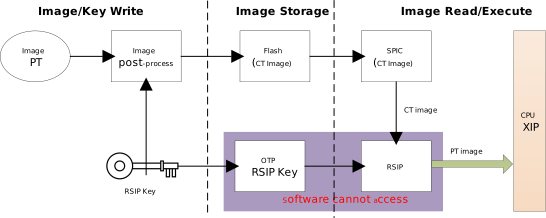
RSIP Usage Workflow Diagram
RSIP supports two key usage modes: “one key per product model” and “one key per device”. The one-key-per-model approach is the recommended scheme, where all devices of the same product model share the same key, and firmware only needs to be encrypted once for mass production use. This scheme, based on the strong AES-256 encryption algorithm and OTP key protection mechanism, can effectively prevent firmware leakage and cloning, meeting the security requirements of the vast majority of application scenarios. Meanwhile, RSIP also supports the one-key-per-device scheme, where each chip uses an independent key and firmware is encrypted individually, suitable for application scenarios with special security level requirements.
RSIP Data Flow
RSIP (Runtime Secure Image Protection) uses AES hardware encryption to prevent unauthorized reading and cloning of firmware stored in Flash. Before introducing RSIP, it is necessary to understand the Flash access mechanism. The SPIC (SPI Controller) has two modes for operating Flash: Auto Mode and User Mode.
User Mode (Read/Write/Erase): Software configures the SPIC control registers to compose serial commands according to the Flash chip datasheet, performing read, write, or erase operations on the Flash.
Auto Mode (Read Only): Master devices such as CPU and DMA can directly read data from Flash through bus addresses. The entire data read process is automatically completed by hardware without software intervention, and supports Flash OTF real-time decryption. The SPIC automatically converts bus read commands into serial read commands that comply with the Flash chip datasheet. After obtaining the raw data, RSIP selects the key and IV based on the access address and performs automatic decryption.
RSIP operates only in Auto Mode. This is because when the CPU executes instructions, it must read Flash through bus addresses, and the RSIP module is located on the bus access path, enabling automatic decryption before data is returned to the CPU. User Mode directly operates the Flash controller, so it cannot trigger the RSIP decryption function.
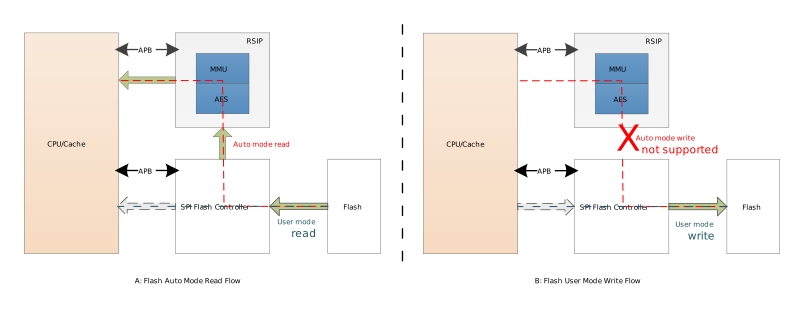
RSIP Data Flow Diagram
Note
The RSIP module itself does not provide data encryption or writing functionality. It only supports real-time decryption in automatic read mode. For data encryption, please use the dedicated hardware: Symmetric Hardware Encryption Engine .
Working Principle
Building on the understanding of the two Flash operation modes, this section introduces the working principle of RSIP and how Entry-based partition protection is achieved. RSIP contains multiple independent channels (called Entries), each protecting an independent memory region in Flash. A typical application scenario is to configure independent encryption channels for different firmware partitions. Different firmware partitions can use different encryption parameters and methods to achieve risk isolation. For example:
Entry 0: Uses IV0 to protect the Bootloader firmware;
Entry 1: Uses IV1 to protect the APP application firmware;
Entry 2~N: Protects other firmware partitions or reserved.
The working principle of RSIP Entry is as follows:
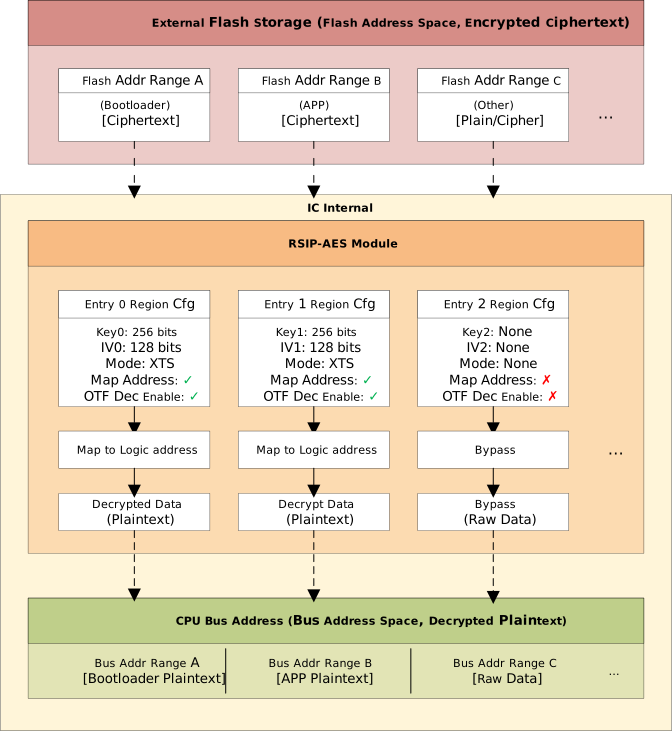
RSIP Entry Working Principle Diagram
Independent Configuration: Each Entry has its own independent key, initialization vector (IV), encryption algorithm configuration (CTR/XTS/GCM), and Enable control bit.
Independent Enable: Only enabled Entry regions will be decrypted; for non-enabled regions, data is passed through directly.
OTF Decryption: When the CPU accesses firmware, RSIP calculates the lower 64 bits of the IV based on the access address (the upper 64 bits of the IV are user-configured), reads the ciphertext from Flash, and automatically decrypts it using the OTP key.
The default SDK already provides RSIP encryption configuration options for all firmware, with each firmware occupying an independent Entry. You can decide whether to enable this protection by modifying the configuration file according to your security requirements.
RSIP Entry implements a hardware architecture for multi-channel decryption, but the required keys and control bits need to be pre-stored in the chip’s OTP area. The next section introduces RSIP OTP configuration.
OTP Configuration
OTP (One-Time Programmable) memory is a non-volatile, tamper-proof storage inside the chip. RSIP keys and control bits need to be pre-stored in the chip’s OTP area. At startup, the hardware automatically loads the keys into the RSIP engine. The Boot ROM code reads the mode and enable information from OTP and configures the RSIP control registers.
RSIP supports multiple AES encryption modes to meet different security level requirements. XTS mode uses dual keys to provide higher encryption security and is the recommended default choice. The OTP configuration addresses and methods for each chip are listed in the following table:
Name |
Address |
Size (bits) |
Default value |
Description |
|---|---|---|---|---|
RSIP Enable |
Logical Map 0x003 bit[3] |
1 |
0 |
Whether RSIP is enabled (used during R&D test phase, can be disabled)
|
RSIP Enable |
Physical Map 0x368 bit[2] |
1 |
1 |
Whether RSIP is enabled (used during mass production, permanently enabled)
|
RSIP Key 1 |
Physical Map 0x2C0 ~ 0x2DF |
256 |
Each Byte 0xFF |
RSIP key is stored in the Secure OTP area and automatically loaded into RSIP at boot |
RSIP Key 2 |
Physical Map 0x2E0 ~ 0x2FF |
256 |
Each Byte 0xFF |
RSIP key is stored in the Secure OTP area and automatically loaded into RSIP at boot |
RSIP Mode |
Physical Map 0x369 bit[1:0] |
2 |
0x3 |
RSIP encryption algorithm mode
|
RSIP Key1 Read Protection |
Physical Map 0x366 bit[7] |
1 |
1 |
|
RSIP Key1 Write Protection |
Physical Map 0x367 bit[0] |
1 |
1 |
|
RSIP Key2 Read Protection |
Physical Map 0x367 bit[1] |
1 |
1 |
|
RSIP Key2 Write Protection |
Physical Map 0x367 bit[2] |
1 |
1 |
|
RSIP Mode Write Protection |
Physical Map 0x367 bit[3] |
1 |
1 |
|
Name |
Address |
Size (bits) |
Default value |
Description |
|---|---|---|---|---|
RSIP Enable |
Logical Map 0x003 bit[3] |
1 |
0 |
Whether RSIP is enabled (used during R&D test phase, can be disabled)
|
RSIP Enable |
Physical Map 0x368 bit[2] |
1 |
1 |
Whether RSIP is enabled (used during mass production, permanently enabled)
|
RSIP Key 1 |
Physical Map 0x2C0 ~ 0x2DF |
256 |
Each Byte 0xFF |
RSIP key is stored in the Secure OTP area and automatically loaded into RSIP at boot |
RSIP Key 2 |
Physical Map 0x2E0 ~ 0x2FF |
256 |
Each Byte 0xFF |
RSIP key is stored in the Secure OTP area and automatically loaded into RSIP at boot |
RSIP Mode |
Physical Map 0x369 bit[1:0] |
2 |
0x3 |
RSIP encryption algorithm mode
|
RSIP Key1 Read Protection |
Physical Map 0x366 bit[7] |
1 |
1 |
|
RSIP Key1 Write Protection |
Physical Map 0x367 bit[0] |
1 |
1 |
|
RSIP Key2 Read Protection |
Physical Map 0x367 bit[1] |
1 |
1 |
|
RSIP Key2 Write Protection |
Physical Map 0x367 bit[2] |
1 |
1 |
|
RSIP Mode Write Protection |
Physical Map 0x367 bit[3] |
1 |
1 |
|
Name |
Address |
Size (bits) |
Default value |
Description |
|---|---|---|---|---|
RSIP Enable |
Logical Map 0x003 bit[3] |
1 |
0 |
Whether RSIP is enabled (used during R&D test phase, can be disabled)
|
RSIP Enable |
Physical Map 0x368 bit[2] |
1 |
1 |
Whether RSIP is enabled (used during mass production, permanently enabled)
|
RSIP Key 1 |
Physical Map 0x2C0 ~ 0x2DF |
256 |
Each Byte 0xFF |
RSIP key is stored in the Secure OTP area and automatically loaded into RSIP at boot |
RSIP Key 2 |
Physical Map 0x2E0 ~ 0x2FF |
256 |
Each Byte 0xFF |
RSIP key is stored in the Secure OTP area and automatically loaded into RSIP at boot |
RSIP Mode |
Physical Map 0x369 bit[1:0] |
2 |
0x3 |
RSIP encryption algorithm mode
|
RSIP Key1 Read Protection |
Physical Map 0x366 bit[7] |
1 |
1 |
|
RSIP Key1 Write Protection |
Physical Map 0x367 bit[0] |
1 |
1 |
|
RSIP Key2 Read Protection |
Physical Map 0x367 bit[1] |
1 |
1 |
|
RSIP Key2 Write Protection |
Physical Map 0x367 bit[2] |
1 |
1 |
|
RSIP Mode Write Protection |
Physical Map 0x367 bit[3] |
1 |
1 |
|
Name |
Address |
Size (bits) |
Default value |
Description |
|---|---|---|---|---|
RSIP Enable |
Logical Map 0x003 bit[3] |
1 |
0 |
Whether RSIP is enabled (used during R&D test phase, can be disabled)
|
RSIP Enable |
Physical Map 0x368 bit[2] |
1 |
1 |
Whether RSIP is enabled (used during mass production, permanently enabled)
|
RSIP Key 1 |
Physical Map 0x2C0 ~ 0x2DF |
256 |
Each Byte 0xFF |
RSIP key is stored in the Secure OTP area and automatically loaded into RSIP at boot |
RSIP Key 2 |
Physical Map 0x2E0 ~ 0x2FF |
256 |
Each Byte 0xFF |
RSIP key is stored in the Secure OTP area and automatically loaded into RSIP at boot |
RSIP Mode |
Physical Map 0x369 bit[1:0] |
2 |
0x3 |
RSIP encryption algorithm mode
|
RSIP Key1 Read Protection |
Physical Map 0x366 bit[7] |
1 |
1 |
|
RSIP Key1 Write Protection |
Physical Map 0x367 bit[0] |
1 |
1 |
|
RSIP Key2 Read Protection |
Physical Map 0x367 bit[1] |
1 |
1 |
|
RSIP Key2 Write Protection |
Physical Map 0x367 bit[2] |
1 |
1 |
|
RSIP Mode Write Protection |
Physical Map 0x367 bit[3] |
1 |
1 |
|
Name |
Address |
Size (bits) |
Default value |
Description |
|---|---|---|---|---|
RSIP Enable |
Logical Map 0x003 bit[3] |
1 |
0 |
Whether RSIP is enabled (used during R&D test phase, can be disabled)
|
RSIP Enable |
Physical Map 0x368 bit[2] |
1 |
1 |
Whether RSIP is enabled (used during mass production, permanently enabled)
|
RSIP Key 1 |
Physical Map 0x2C0 ~ 0x2DF |
256 |
Each Byte 0xFF |
RSIP key is stored in the Secure OTP area and automatically loaded into RSIP at boot |
RSIP Key 2 |
Physical Map 0x2E0 ~ 0x2FF |
256 |
Each Byte 0xFF |
RSIP key is stored in the Secure OTP area and automatically loaded into RSIP at boot |
RSIP Mode |
Physical Map 0x369 bit[1:0] |
2 |
0x3 |
RSIP encryption algorithm mode
|
RSIP Key1 Read Protection |
Physical Map 0x366 bit[7] |
1 |
1 |
|
RSIP Key1 Write Protection |
Physical Map 0x367 bit[0] |
1 |
1 |
|
RSIP Key2 Read Protection |
Physical Map 0x367 bit[1] |
1 |
1 |
|
RSIP Key2 Write Protection |
Physical Map 0x367 bit[2] |
1 |
1 |
|
RSIP Mode Write Protection |
Physical Map 0x367 bit[3] |
1 |
1 |
|
Name |
Address |
Size (bits) |
Default value |
Description |
|---|---|---|---|---|
RSIP Enable |
Logical Map 0x003 bit[3] |
1 |
0 |
Whether RSIP is enabled (used during R&D test phase, can be disabled)
|
RSIP Enable |
Physical Map 0x368 bit[2] |
1 |
1 |
Whether RSIP is enabled (used during mass production, permanently enabled)
|
RSIP Key 1 |
Physical Map 0x2C0 ~ 0x2DF |
256 |
Each Byte 0xFF |
RSIP key is stored in the Secure OTP area and automatically loaded into RSIP at boot |
RSIP Key 2 |
Physical Map 0x2E0 ~ 0x2FF |
256 |
Each Byte 0xFF |
RSIP key is stored in the Secure OTP area and automatically loaded into RSIP at boot |
RSIP Mode |
Physical Map 0x369 bit[1:0] |
2 |
0x3 |
RSIP encryption algorithm mode
|
RSIP Key1 Read Protection |
Physical Map 0x366 bit[7] |
1 |
1 |
|
RSIP Key1 Write Protection |
Physical Map 0x367 bit[0] |
1 |
1 |
|
RSIP Key2 Read Protection |
Physical Map 0x367 bit[1] |
1 |
1 |
|
RSIP Key2 Write Protection |
Physical Map 0x367 bit[2] |
1 |
1 |
|
RSIP Mode Write Protection |
Physical Map 0x367 bit[3] |
1 |
1 |
|
The chip supports two groups of RSIP keys.
Name |
Address |
Size (bits) |
Default |
Description |
|---|---|---|---|---|
RSIP Enable |
Logical Map 0x003 bit[3] |
1 |
0 |
Whether RSIP is enabled (used during R&D test phase, can be disabled). 1: RSIP enabled; 0: RSIP disabled |
RSIP Enable |
Physical Map 0x368 bit[2] |
1 |
1 |
Whether RSIP is enabled (used in mass production, permanently enabled). 0: RSIP enabled; 1: RSIP disabled |
RSIP Group0 Key1 |
Physical Map 0x2C0 ~ 0x2DF |
256 |
0xFF per byte |
RSIP key stored in the secure OTP area and automatically loaded into RSIP at boot |
RSIP Group0 Key2 |
Physical Map 0x2E0 ~ 0x2FF |
256 |
0xFF per byte |
RSIP key stored in the secure OTP area and automatically loaded into RSIP at boot |
RSIP Group1 Key1 |
Physical Map 0x200 ~ 0x21F |
256 |
0xFF per byte |
RSIP key stored in the secure OTP area and automatically loaded into RSIP at boot |
RSIP Group1 Key2 |
Physical Map 0x220 ~ 0x23F |
256 |
0xFF per byte |
RSIP key stored in the secure OTP area and automatically loaded into RSIP at boot |
RSIP Mode |
Physical Map 0x369 bit[1:0] |
2 |
0x3 |
RSIP encryption algorithm mode used by image1. 00/11b: XTS mode; 01/10b: CTR mode |
RSIP Group0 Key1 Read Protection |
Physical Map 0x366 bit[7] |
1 |
1 |
0: Enable read protection for RSIP group0 key1 to prevent it from being read out; 1: Disable read protection |
RSIP Group0 Key1 Write Protection |
Physical Map 0x367 bit[0] |
1 |
1 |
0: Enable write protection for RSIP group0 key1 to prevent being overwritten with all zeros; 1: Disable write protection |
RSIP Group0 Key2 Read Protection |
Physical Map 0x367 bit[1] |
1 |
1 |
0: Enable read protection for RSIP group0 key2 to prevent it from being read out; 1: Disable read protection |
RSIP Group0 Key2 Write Protection |
Physical Map 0x367 bit[2] |
1 |
1 |
0: Enable write protection for RSIP group0 key2 to prevent being overwritten with all zeros; 1: Disable write protection |
RSIP Group1 Key1 Read Protection |
Physical Map 0x365 bit[3] |
1 |
1 |
0: Enable read protection for RSIP group1 key1 to prevent it from being read out; 1: Disable read protection |
RSIP Group1 Key1 Write Protection |
Physical Map 0x365 bit[4] |
1 |
1 |
0: Enable write protection for RSIP group1 key1 to prevent being overwritten with all zeros; 1: Disable write protection |
RSIP Group1 Key2 Read Protection |
Physical Map 0x365 bit[5] |
1 |
1 |
0: Enable read protection for RSIP group1 key2 to prevent it from being read out; 1: Disable read protection |
RSIP Group1 Key2 Write Protection |
Physical Map 0x365 bit[6] |
1 |
1 |
0: Enable write protection for RSIP group1 key2 to prevent being overwritten with all zeros; 1: Disable write protection |
RSIP Mode Write Protection |
Physical Map 0x367 bit[3] |
1 |
1 |
0: Enable write protection for RSIP mode to prevent tampering; 1: Disable write protection |
The chip supports two groups of RSIP keys.
Name |
Address |
Size (bits) |
Default |
Description |
|---|---|---|---|---|
RSIP Enable |
Logical Map 0x003 bit[3] |
1 |
0 |
Whether RSIP is enabled (used during R&D test phase, can be disabled). 1: RSIP enabled; 0: RSIP disabled |
RSIP Enable |
Physical Map 0x368 bit[2] |
1 |
1 |
Whether RSIP is enabled (used in mass production, permanently enabled). 0: RSIP enabled; 1: RSIP disabled |
RSIP Group0 Key1 |
Physical Map 0x2C0 ~ 0x2DF |
256 |
0xFF per byte |
RSIP key stored in the secure OTP area and automatically loaded into RSIP at boot |
RSIP Group0 Key2 |
Physical Map 0x2E0 ~ 0x2FF |
256 |
0xFF per byte |
RSIP key stored in the secure OTP area and automatically loaded into RSIP at boot |
RSIP Group1 Key1 |
Physical Map 0x200 ~ 0x21F |
256 |
0xFF per byte |
RSIP key stored in the secure OTP area and automatically loaded into RSIP at boot |
RSIP Group1 Key2 |
Physical Map 0x220 ~ 0x23F |
256 |
0xFF per byte |
RSIP key stored in the secure OTP area and automatically loaded into RSIP at boot |
RSIP Mode |
Physical Map 0x369 bit[1:0] |
2 |
0x3 |
RSIP encryption algorithm mode used by image1. 00/11b: XTS mode; 01b: CTR mode; 10b: GCM mode |
RSIP Group0 Key1 Read Protection |
Physical Map 0x366 bit[7] |
1 |
1 |
0: Enable read protection for RSIP group0 key1 to prevent it from being read out; 1: Disable read protection |
RSIP Group0 Key1 Write Protection |
Physical Map 0x367 bit[0] |
1 |
1 |
0: Enable write protection for RSIP group0 key1 to prevent being overwritten with all zeros; 1: Disable write protection |
RSIP Group0 Key2 Read Protection |
Physical Map 0x367 bit[1] |
1 |
1 |
0: Enable read protection for RSIP group0 key2 to prevent it from being read out; 1: Disable read protection |
RSIP Group0 Key2 Write Protection |
Physical Map 0x367 bit[2] |
1 |
1 |
0: Enable write protection for RSIP group0 key2 to prevent being overwritten with all zeros; 1: Disable write protection |
RSIP Group1 Key1 Read Protection |
Physical Map 0x365 bit[3] |
1 |
1 |
0: Enable read protection for RSIP group1 key1 to prevent it from being read out; 1: Disable read protection |
RSIP Group1 Key1 Write Protection |
Physical Map 0x365 bit[4] |
1 |
1 |
0: Enable write protection for RSIP group1 key1 to prevent being overwritten with all zeros; 1: Disable write protection |
RSIP Group1 Key2 Read Protection |
Physical Map 0x365 bit[5] |
1 |
1 |
0: Enable read protection for RSIP group1 key2 to prevent it from being read out; 1: Disable read protection |
RSIP Group1 Key2 Write Protection |
Physical Map 0x365 bit[6] |
1 |
1 |
0: Enable write protection for RSIP group1 key2 to prevent being overwritten with all zeros; 1: Disable write protection |
RSIP Mode Write Protection |
Physical Map 0x367 bit[3] |
1 |
1 |
0: Enable write protection for RSIP mode to prevent tampering; 1: Disable write protection |
Usage Guide
The complete RSIP configuration process covers both development and production stages: the development stage generates keys and encrypts firmware, while the production stage burns OTP and encrypted firmware. Each step is introduced in order as follows:
1. Generate Key and IV (Development Stage)
The key and initialization vector (IV) are core configuration items of the AES encryption algorithm, directly determining the security of firmware encryption. The key is used to encrypt and decrypt data, while the IV ensures that identical plaintext produces different ciphertexts at different positions, preventing pattern analysis attacks. The key length is 32 bytes (256 bits), randomly generated by the user and must be kept confidential. The total IV length is 128 bits, where the upper 64 bits need to be randomly generated by the user, and the lower 64 bits are automatically calculated by RSIP based on the firmware access address at runtime, without user specification.
After generating the key and IV, you need to set the RSIP parameters in the Manifest configuration file to compile and generate encrypted firmware.
2. Configure Manifest to Generate Encrypted Firmware (Development Stage)
The Manifest configuration specifies how the post-processing script encrypts the firmware. The ciphertext firmware will correspond to the key stored in OTP. In the chip-specific
manifest.json5configuration file, setrsip_enable: true, and configurersip_mode,rsip_key, andrsip_ivbased on the generated key and IV.RTL8721Dx:github source code
RTL8720E:github source code
RTL8710E:github source code
RTL8726E:github source code
RTL8713E:github source code
RTL8730E:github source code
RTL8721F:github source code
RTL8720F:github source code
In the configuration file, the
image1section corresponds to the Bootloader, and theimage2section corresponds to the user application firmware. The more secure XTS mode is recommended.The configuration examples for each chip are listed in the following table:
RTL8721Dx:Supports one set of RSIP keys. A sample configuration using XTS mode encryption is as follows:
{ version: 1, image1: { rsip_iv: "7ba46d14d709872a", }, ... image2: { rsip_iv: "fcadc141386b60c5", }, ... /* ================================ RSIP global settings =============================== */ rsip_enable: true, /* rsip_mode valid option: 1 (XTS), 0 (CTR) */ rsip_mode: 1, /* rsip_key_group valid option: "rsip_xts_g0", "rsip_ctr_g0" */ rsip_key_group: "rsip_xts_g0", /* rsip key group define, users do not modify */ rsip_xts_g0: ["otp_key_0x2C0", "otp_key_0x2E0"], /* ctr mode not recommend */ rsip_ctr_g0: ["otp_key_0x2E0"], /* =================================== OTP key value =================================== */ otp_key_0x2C0: "E2A0D6500BBF1DD8DC212098C230EB731ECE3A81AA11D0E6E538FA36BBA4FF6E", otp_key_0x2E0: "6AA34203018334474B25A0600996CA0968AA6228B886FF234B4EB9628B703C0A", ... }RTL8720E:Supports one set of RSIP keys. A sample configuration using XTS mode encryption is as follows:
{ version: 1, image1: { rsip_iv: "7ba46d14d709872a", }, ... image2: { rsip_iv: "fcadc141386b60c5", }, ... /* ================================ RSIP global settings =============================== */ rsip_enable: true, /* rsip_mode valid option: 1 (XTS), 0 (CTR) */ rsip_mode: 1, /* rsip_key_group valid option: "rsip_xts_g0", "rsip_ctr_g0" */ rsip_key_group: "rsip_xts_g0", /* rsip key group define, users do not modify */ rsip_xts_g0: ["otp_key_0x2C0", "otp_key_0x2E0"], /* ctr mode not recommend */ rsip_ctr_g0: ["otp_key_0x2E0"], /* =================================== OTP key value =================================== */ otp_key_0x2C0: "E2A0D6500BBF1DD8DC212098C230EB731ECE3A81AA11D0E6E538FA36BBA4FF6E", otp_key_0x2E0: "6AA34203018334474B25A0600996CA0968AA6228B886FF234B4EB9628B703C0A", ... }RTL8710E:Supports one set of RSIP keys. A sample configuration using XTS mode encryption is as follows:
{ version: 1, image1: { rsip_iv: "7ba46d14d709872a", }, ... image2: { rsip_iv: "fcadc141386b60c5", }, ... /* ================================ RSIP global settings =============================== */ rsip_enable: true, /* rsip_mode valid option: 1 (XTS), 0 (CTR) */ rsip_mode: 1, /* rsip_key_group valid option: "rsip_xts_g0", "rsip_ctr_g0" */ rsip_key_group: "rsip_xts_g0", /* rsip key group define, users do not modify */ rsip_xts_g0: ["otp_key_0x2C0", "otp_key_0x2E0"], /* ctr mode not recommend */ rsip_ctr_g0: ["otp_key_0x2E0"], /* =================================== OTP key value =================================== */ otp_key_0x2C0: "E2A0D6500BBF1DD8DC212098C230EB731ECE3A81AA11D0E6E538FA36BBA4FF6E", otp_key_0x2E0: "6AA34203018334474B25A0600996CA0968AA6228B886FF234B4EB9628B703C0A", ... }RTL8726E:Supports one set of RSIP keys. A sample configuration using XTS mode encryption is as follows:
{ version: 1, image1: { rsip_iv: "7ba46d14d709872a", }, ... image2: { rsip_iv: "fcadc141386b60c5", }, ... /* ================================ RSIP global settings =============================== */ rsip_enable: true, /* rsip_mode valid option: 1 (XTS), 0 (CTR) */ rsip_mode: 1, /* rsip_key_group valid option: "rsip_xts_g0", "rsip_ctr_g0" */ rsip_key_group: "rsip_xts_g0", /* rsip key group define, users do not modify */ rsip_xts_g0: ["otp_key_0x2C0", "otp_key_0x2E0"], /* ctr mode not recommend */ rsip_ctr_g0: ["otp_key_0x2E0"], /* =================================== OTP key value =================================== */ otp_key_0x2C0: "E2A0D6500BBF1DD8DC212098C230EB731ECE3A81AA11D0E6E538FA36BBA4FF6E", otp_key_0x2E0: "6AA34203018334474B25A0600996CA0968AA6228B886FF234B4EB9628B703C0A", ... }RTL8713E:Supports one set of RSIP keys. A sample configuration using XTS mode encryption is as follows:
{ version: 1, image1: { rsip_iv: "7ba46d14d709872a", }, ... image2: { rsip_iv: "fcadc141386b60c5", }, ... /* ================================ RSIP global settings =============================== */ rsip_enable: true, /* rsip_mode valid option: 1 (XTS), 0 (CTR) */ rsip_mode: 1, /* rsip_key_group valid option: "rsip_xts_g0", "rsip_ctr_g0" */ rsip_key_group: "rsip_xts_g0", /* rsip key group define, users do not modify */ rsip_xts_g0: ["otp_key_0x2C0", "otp_key_0x2E0"], /* ctr mode not recommend */ rsip_ctr_g0: ["otp_key_0x2E0"], /* =================================== OTP key value =================================== */ otp_key_0x2C0: "E2A0D6500BBF1DD8DC212098C230EB731ECE3A81AA11D0E6E538FA36BBA4FF6E", otp_key_0x2E0: "6AA34203018334474B25A0600996CA0968AA6228B886FF234B4EB9628B703C0A", ... }RTL8730E:Supports one set of RSIP keys. A sample configuration using XTS mode encryption is as follows:
{ version: 1, image1: { rsip_iv: "7ba46d14d709872a", }, ... image2: { rsip_iv: "fcadc141386b60c5", }, ... /* ================================ RSIP global settings =============================== */ rsip_enable: true, /* rsip_mode valid option: 1 (XTS), 0 (CTR) */ rsip_mode: 1, /* rsip_key_group valid option: "rsip_xts_g0", "rsip_ctr_g0" */ rsip_key_group: "rsip_xts_g0", /* rsip key group define, users do not modify */ rsip_xts_g0: ["otp_key_0x2C0", "otp_key_0x2E0"], /* ctr mode not recommend */ rsip_ctr_g0: ["otp_key_0x2E0"], /* =================================== OTP key value =================================== */ otp_key_0x2C0: "E2A0D6500BBF1DD8DC212098C230EB731ECE3A81AA11D0E6E538FA36BBA4FF6E", otp_key_0x2E0: "6AA34203018334474B25A0600996CA0968AA6228B886FF234B4EB9628B703C0A", ... }RTL8721F:Supports two sets of RSIP keys. Supports XTS mode. The sample configuration using XTS mode encryption is as follows:
{ version: 1, image1: { /* rsip_key_group valid option: "rsip_xts_g0", "rsip_xts_g1", "rsip_gcm_g0", "rsip_gcm_g1", "rsip_ctr_g0", "rsip_ctr_g1" */ rsip_key_group: "rsip_xts_g0", rsip_iv: "7ba46d14d709872a", }, ... image2: { /* rsip_key_group valid option: "rsip_xts_g0", "rsip_xts_g1", "rsip_gcm_g0", "rsip_gcm_g1", "rsip_ctr_g0", "rsip_ctr_g1" */ rsip_key_group: "rsip_xts_g1", rsip_iv: "fcadc141386b60c5", }, ... /* ================================ RSIP global settings =============================== */ rsip_enable: true, /* rsip_mode valid option: 2 (GCM), 1 (XTS), 0 (CTR) */ rsip_mode: 1, /* rsip_gcm_tag_len valid option: 4 / 8 / 16 (bytes) */ rsip_gcm_tag_len: 4, /* rsip key group define, users do not modify */ rsip_xts_g0: ["otp_key_0x2C0", "otp_key_0x2E0"], rsip_xts_g1: ["otp_key_0x200", "otp_key_0x220"], rsip_gcm_g0: ["otp_key_0x2E0"], rsip_gcm_g1: ["otp_key_0x220"], /* ctr mode not recommend */ rsip_ctr_g0: ["otp_key_0x2E0"], rsip_ctr_g1: ["otp_key_0x220"], /* =================================== OTP key value =================================== */ otp_key_0x2C0: "E2A0D6500BBF1DD8DC212098C230EB731ECE3A81AA11D0E6E538FA36BBA4FF6E", otp_key_0x2E0: "6AA34203018334474B25A0600996CA0968AA6228B886FF234B4EB9628B703C0A", otp_key_0x200: "c9a8b1f4e7d293b6a5d8f009be6c3d21e4a7b8f5d3b901a984087844c2f7b6e0", otp_key_0x220: "9874918301909234686574856692873911223344556677889900aabbccddeeff", }RTL8720F:Supports two sets of RSIP keys. Supports XTS mode. The sample configuration using XTS mode encryption is as follows:
{
   version: 1,
   image1: {
      /* rsip_key_group valid option: "rsip_xts_g0", "rsip_xts_g1", "rsip_gcm_g0", "rsip_gcm_g1", "rsip_ctr_g0", "rsip_ctr_g1" */
      rsip_key_group: "rsip_xts_g0",
      rsip_iv: "7ba46d14d709872a",
   },
   ...

   image2: {
      /* rsip_key_group valid option: "rsip_xts_g0", "rsip_xts_g1", "rsip_gcm_g0", "rsip_gcm_g1", "rsip_ctr_g0", "rsip_ctr_g1" */
      rsip_key_group: "rsip_xts_g1",
      rsip_iv: "fcadc141386b60c5",
   },
   ...

   /* ================================ RSIP global settings =============================== */
   rsip_enable: true,
   /* rsip_mode valid option: 2 (GCM), 1 (XTS), 0 (CTR) */
   rsip_mode: 1,
   /* rsip_gcm_tag_len valid option: 4 / 8 / 16 (bytes) */
   rsip_gcm_tag_len: 4,
   /* rsip key group define, users do not modify */
   rsip_xts_g0: ["otp_key_0x2C0", "otp_key_0x2E0"],
   rsip_xts_g1: ["otp_key_0x200", "otp_key_0x220"],
   rsip_gcm_g0: ["otp_key_0x2E0"],
   rsip_gcm_g1: ["otp_key_0x220"],
   /* ctr mode not recommend */
   rsip_ctr_g0: ["otp_key_0x2E0"],
   rsip_ctr_g1: ["otp_key_0x220"],

   /* =================================== OTP key value =================================== */
   otp_key_0x2C0: "E2A0D6500BBF1DD8DC212098C230EB731ECE3A81AA11D0E6E538FA36BBA4FF6E",
   otp_key_0x2E0: "6AA34203018334474B25A0600996CA0968AA6228B886FF234B4EB9628B703C0A",
   otp_key_0x200: "c9a8b1f4e7d293b6a5d8f009be6c3d21e4a7b8f5d3b901a984087844c2f7b6e0",
   otp_key_0x220: "9874918301909234686574856692873911223344556677889900aabbccddeeff",
}
After configuration, run
ameba.py buildcommand to recompile the project and generate the encrypted firmware files. Once the encrypted firmware is generated, the development stage work is complete.
3. Burn OTP (Production Stage)
This step enters the production stage. The key is burned into the chip’s OTP area, enabling the chip to decrypt and run the encrypted firmware. Once the key is written to OTP and RSIP is enabled, the chip can only boot from the specific encrypted firmware.
Warning
AT+SEC Command Prerequisite:
CONFIG_ATCMD_SECUREmust be enabled in menuconfig (disabled by default). Path:CONFIG SHELL → Enable ATCMD SECURE. When not enabled, AT+SEC commands are unavailable.OTP Burning Prerequisite: A bootable firmware must already exist in the device Flash so that AT commands can be sent via the serial port. The key strings in the commands below are for example only and must not be used in production.
OTP areas can only be written once and cannot be erased or revoked. Please carefully verify the address and data before executing the write command.
During mass production, it is recommended to verify on a small number of sample units before performing batch operations.
Pay special attention to whether the OTP address is a logical or physical zone. For specific OTP operation methods, please refer to OTP Serial Programming Section.
Based on the chip model, refer to the RSIP OTP table to burn the key and configure the relevant control bits. Below is a configuration example:
Burn the RSIP key to the OTP physical zone. Use the following command to burn the RSIP key. The key in the command is the XTS mode key from the Manifest Configuration Example:
RTL8721Dx:Supports only one key group (grp0). The burn commands differ by RSIP mode: in CTR mode only one key (key1) needs to be burned, while in XTS mode two keys (key1/key2) need to be burned.
CTR mode:
Only one 32-byte key is needed. The command format is
AT+SEC=RSIP_KEY,grp0,ctr,<hex>.AT+SEC=RSIP_KEY,grp0,ctr,E2A0D6500BBF1DD8DC212098C230EB731ECE3A81AA11D0E6E538FA36BBA4FF6EXTS mode:
Use a two-step command sequence to burn two keys. First send key1:
AT+SEC=RSIP_KEY,grp0,xts,E2A0D6500BBF1DD8DC212098C230EB731ECE3A81AA11D0E6E538FA36BBA4FF6EAfter the command returns
KEY1 OK, send key2:AT+SEC=RSIP_KEY2,6AA34203018334474B25A0600996CA0968AA6228B886FF234B4EB9628B703C0AAfter all keys are sent, the keys and the RSIP mode are written to OTP together with automatic read-back verification. If verification fails, an error message is returned. Note: In XTS mode, after the first key is sent, only the
RSIP_KEY2command is accepted until the second key is provided. Reset the device to cancel the pending state. Pay attention to the byte order when burning the key: the most significant byte (MSB) of the key is stored at the highest OTP address. For example, key1 in the command above burns0xE2to OTP address0x2C0,0xA0to0x2C1, and so on. In XTS mode, key2 is burned starting at0x2E0.RTL8720E:Supports only one key group (grp0). The burn commands differ by RSIP mode: in CTR mode only one key (key1) needs to be burned, while in XTS mode two keys (key1/key2) need to be burned.
CTR mode:
Only one 32-byte key is needed. The command format is
AT+SEC=RSIP_KEY,grp0,ctr,<hex>.AT+SEC=RSIP_KEY,grp0,ctr,E2A0D6500BBF1DD8DC212098C230EB731ECE3A81AA11D0E6E538FA36BBA4FF6EXTS mode:
Use a two-step command sequence to burn two keys. First send key1:
AT+SEC=RSIP_KEY,grp0,xts,E2A0D6500BBF1DD8DC212098C230EB731ECE3A81AA11D0E6E538FA36BBA4FF6EAfter the command returns
KEY1 OK, send key2:AT+SEC=RSIP_KEY2,6AA34203018334474B25A0600996CA0968AA6228B886FF234B4EB9628B703C0AAfter all keys are sent, the keys and the RSIP mode are written to OTP together with automatic read-back verification. If verification fails, an error message is returned. Note: In XTS mode, after the first key is sent, only the
RSIP_KEY2command is accepted until the second key is provided. Reset the device to cancel the pending state. Pay attention to the byte order when burning the key: the most significant byte (MSB) of the key is stored at the highest OTP address. For example, key1 in the command above burns0xE2to OTP address0x2C0,0xA0to0x2C1, and so on. In XTS mode, key2 is burned starting at0x2E0.RTL8710E:Supports only one key group (grp0). The burn commands differ by RSIP mode: in CTR mode only one key (key1) needs to be burned, while in XTS mode two keys (key1/key2) need to be burned.
CTR mode:
Only one 32-byte key is needed. The command format is
AT+SEC=RSIP_KEY,grp0,ctr,<hex>.AT+SEC=RSIP_KEY,grp0,ctr,E2A0D6500BBF1DD8DC212098C230EB731ECE3A81AA11D0E6E538FA36BBA4FF6EXTS mode:
Use a two-step command sequence to burn two keys. First send key1:
AT+SEC=RSIP_KEY,grp0,xts,E2A0D6500BBF1DD8DC212098C230EB731ECE3A81AA11D0E6E538FA36BBA4FF6EAfter the command returns
KEY1 OK, send key2:AT+SEC=RSIP_KEY2,6AA34203018334474B25A0600996CA0968AA6228B886FF234B4EB9628B703C0AAfter all keys are sent, the keys and the RSIP mode are written to OTP together with automatic read-back verification. If verification fails, an error message is returned. Note: In XTS mode, after the first key is sent, only the
RSIP_KEY2command is accepted until the second key is provided. Reset the device to cancel the pending state. Pay attention to the byte order when burning the key: the most significant byte (MSB) of the key is stored at the highest OTP address. For example, key1 in the command above burns0xE2to OTP address0x2C0,0xA0to0x2C1, and so on. In XTS mode, key2 is burned starting at0x2E0.RTL8726E:Supports only one key group (grp0). The burn commands differ by RSIP mode: in CTR mode only one key (key1) needs to be burned, while in XTS mode two keys (key1/key2) need to be burned.
CTR mode:
Only one 32-byte key is needed. The command format is
AT+SEC=RSIP_KEY,grp0,ctr,<hex>.AT+SEC=RSIP_KEY,grp0,ctr,E2A0D6500BBF1DD8DC212098C230EB731ECE3A81AA11D0E6E538FA36BBA4FF6EXTS mode:
Use a two-step command sequence to burn two keys. First send key1:
AT+SEC=RSIP_KEY,grp0,xts,E2A0D6500BBF1DD8DC212098C230EB731ECE3A81AA11D0E6E538FA36BBA4FF6EAfter the command returns
KEY1 OK, send key2:AT+SEC=RSIP_KEY2,6AA34203018334474B25A0600996CA0968AA6228B886FF234B4EB9628B703C0AAfter all keys are sent, the keys and the RSIP mode are written to OTP together with automatic read-back verification. If verification fails, an error message is returned. Note: In XTS mode, after the first key is sent, only the
RSIP_KEY2command is accepted until the second key is provided. Reset the device to cancel the pending state. Pay attention to the byte order when burning the key: the most significant byte (MSB) of the key is stored at the highest OTP address. For example, key1 in the command above burns0xE2to OTP address0x2C0,0xA0to0x2C1, and so on. In XTS mode, key2 is burned starting at0x2E0.RTL8713E:Supports only one key group (grp0). The burn commands differ by RSIP mode: in CTR mode only one key (key1) needs to be burned, while in XTS mode two keys (key1/key2) need to be burned.
CTR mode:
Only one 32-byte key is needed. The command format is
AT+SEC=RSIP_KEY,grp0,ctr,<hex>.AT+SEC=RSIP_KEY,grp0,ctr,E2A0D6500BBF1DD8DC212098C230EB731ECE3A81AA11D0E6E538FA36BBA4FF6EXTS mode:
Use a two-step command sequence to burn two keys. First send key1:
AT+SEC=RSIP_KEY,grp0,xts,E2A0D6500BBF1DD8DC212098C230EB731ECE3A81AA11D0E6E538FA36BBA4FF6EAfter the command returns
KEY1 OK, send key2:AT+SEC=RSIP_KEY2,6AA34203018334474B25A0600996CA0968AA6228B886FF234B4EB9628B703C0AAfter all keys are sent, the keys and the RSIP mode are written to OTP together with automatic read-back verification. If verification fails, an error message is returned. Note: In XTS mode, after the first key is sent, only the
RSIP_KEY2command is accepted until the second key is provided. Reset the device to cancel the pending state. Pay attention to the byte order when burning the key: the most significant byte (MSB) of the key is stored at the highest OTP address. For example, key1 in the command above burns0xE2to OTP address0x2C0,0xA0to0x2C1, and so on. In XTS mode, key2 is burned starting at0x2E0.RTL8730E:Supports only one key group (grp0). The burn commands differ by RSIP mode: in CTR mode only one key (key1) needs to be burned, while in XTS mode two keys (key1/key2) need to be burned.
CTR mode:
Only one 32-byte key is needed. The command format is
AT+SEC=RSIP_KEY,grp0,ctr,<hex>.AT+SEC=RSIP_KEY,grp0,ctr,E2A0D6500BBF1DD8DC212098C230EB731ECE3A81AA11D0E6E538FA36BBA4FF6EXTS mode:
Use a two-step command sequence to burn two keys. First send key1:
AT+SEC=RSIP_KEY,grp0,xts,E2A0D6500BBF1DD8DC212098C230EB731ECE3A81AA11D0E6E538FA36BBA4FF6EAfter the command returns
KEY1 OK, send key2:AT+SEC=RSIP_KEY2,6AA34203018334474B25A0600996CA0968AA6228B886FF234B4EB9628B703C0AAfter all keys are sent, the keys and the RSIP mode are written to OTP together with automatic read-back verification. If verification fails, an error message is returned. Note: In XTS mode, after the first key is sent, only the
RSIP_KEY2command is accepted until the second key is provided. Reset the device to cancel the pending state. Pay attention to the byte order when burning the key: the most significant byte (MSB) of the key is stored at the highest OTP address. For example, key1 in the command above burns0xE2to OTP address0x2C0,0xA0to0x2C1, and so on. In XTS mode, key2 is burned starting at0x2E0.RTL8721F:Supports two key groups. image1 (Bootloader) always uses grp0, while image2 (APP) may use either grp0 or grp1. When two key groups are used, image1 and image2 may use different RSIP encryption algorithms.
By default, image2 in the manifest uses grp1, so the two groups need to be burned separately. If image2 needs to use grp0, modify the
rsip_key_groupfield in the manifest, and then only the grp0 key needs to be burned.The burn commands differ by RSIP mode: in CTR mode each group needs only one key (key1), while in XTS mode each group needs two keys (key1/key2). The following are examples using two key groups.
CTR mode:
Each group needs only one 32-byte key. The command format is
AT+SEC=RSIP_KEY,<grp>,<mode>,<hex>.Burn the grp0 key (used by image1):
AT+SEC=RSIP_KEY,grp0,ctr,E2A0D6500BBF1DD8DC212098C230EB731ECE3A81AA11D0E6E538FA36BBA4FF6EBurn the grp1 key (used by image2):
AT+SEC=RSIP_KEY,grp1,ctr,c9a8b1f4e7d293b6a5d8f009be6c3d21e4a7b8f5d3b901a984087844c2f7b6e0XTS mode:
Each group uses a two-step command sequence to burn two keys.
Burn the grp0 keys (used by image1). First send key1:
AT+SEC=RSIP_KEY,grp0,xts,E2A0D6500BBF1DD8DC212098C230EB731ECE3A81AA11D0E6E538FA36BBA4FF6EAfter the command returns
KEY1 OK, send key2:AT+SEC=RSIP_KEY2,6AA34203018334474B25A0600996CA0968AA6228B886FF234B4EB9628B703C0ABurn the grp1 keys (used by image2). First send key1:
AT+SEC=RSIP_KEY,grp1,xts,c9a8b1f4e7d293b6a5d8f009be6c3d21e4a7b8f5d3b901a984087844c2f7b6e0After the command returns
KEY1 OK, send key2:AT+SEC=RSIP_KEY2,9874918301909234686574856692873911223344556677889900aabbccddeeffAfter the second key is sent, both keys and the RSIP mode are written to OTP together with automatic read-back verification. If verification fails, an error message is returned.
Warning
When burning the grp0 key, the RSIP encryption mode field in the OTP physical area (0x369 bit[1:0]) is programmed according to the input mode. Once burned it cannot be changed, so decide which mode to use in advance. This field is only effective for image1 (Bootloader); the encryption mode of image2 (APP) is determined by the manifest.
Note
In XTS mode, after the first key is sent, only the
RSIP_KEY2command is accepted until the second key is provided. Reset the device to cancel the pending state.Pay attention to the byte order when burning the key: the most significant byte (MSB) of the key is stored at the highest OTP address. The grp0 keys are burned starting at
0x2C0(key1) and0x2E0(key2); the grp1 keys are burned starting at0x200(key1) and0x220(key2).RTL8720F:Supports two key groups. image1 (Bootloader) always uses grp0, while image2 (APP) may use either grp0 or grp1. When two key groups are used, image1 and image2 may use different RSIP encryption algorithms.
By default, image2 in the manifest uses grp1, so the two groups need to be burned separately. If image2 needs to use grp0, modify the
rsip_key_groupfield in the manifest, and then only the grp0 key needs to be burned.The burn commands differ by RSIP mode: in CTR/GCM mode each group needs only one key (key1), while in XTS mode each group needs two keys (key1/key2). The following are examples using two key groups.
CTR/GCM mode:
Each group needs only one 32-byte key. The command format is
AT+SEC=RSIP_KEY,<grp>,<mode>,<hex>.Burn the grp0 key (used by image1):
AT+SEC=RSIP_KEY,grp0,ctr,E2A0D6500BBF1DD8DC212098C230EB731ECE3A81AA11D0E6E538FA36BBA4FF6EBurn the grp1 key (used by image2):
AT+SEC=RSIP_KEY,grp1,ctr,c9a8b1f4e7d293b6a5d8f009be6c3d21e4a7b8f5d3b901a984087844c2f7b6e0XTS mode:
Each group uses a two-step command sequence to burn two keys.
Burn the grp0 keys (used by image1). First send key1:
AT+SEC=RSIP_KEY,grp0,xts,E2A0D6500BBF1DD8DC212098C230EB731ECE3A81AA11D0E6E538FA36BBA4FF6EAfter the command returns
KEY1 OK, send key2:AT+SEC=RSIP_KEY2,6AA34203018334474B25A0600996CA0968AA6228B886FF234B4EB9628B703C0ABurn the grp1 keys (used by image2). First send key1:
AT+SEC=RSIP_KEY,grp1,xts,c9a8b1f4e7d293b6a5d8f009be6c3d21e4a7b8f5d3b901a984087844c2f7b6e0After the command returns
KEY1 OK, send key2:AT+SEC=RSIP_KEY2,9874918301909234686574856692873911223344556677889900aabbccddeeffAfter the second key is sent, both keys and the RSIP mode are written to OTP together with automatic read-back verification. If verification fails, an error message is returned.
Warning
When burning the key, the RSIP encryption mode field in the OTP physical area (0x369 bit[1:0]) is programmed according to the input mode. Once burned it cannot be changed, so decide which mode to use in advance. This field is only effective for image1 (Bootloader); the encryption mode of image2 (APP) is determined by the manifest.
Note
In XTS mode, after the first key is sent, only the
RSIP_KEY2command is accepted until the second key is provided. Reset the device to cancel the pending state.Pay attention to the byte order when burning the key: the most significant byte (MSB) of the key is stored at the highest OTP address. The grp0 keys are burned starting at
0x2C0(key1) and0x2E0(key2); the grp1 keys are burned starting at0x200(key1) and0x220(key2).Select and Enable RSIP Mode. Choose one of the following configuration methods based on your use case:
Temporary Enable for Development:Logical zone OTP configuration is modifiable. During the development stage, RSIP protection can be disabled later, facilitating debugging. The default OTP value is already configured for XTS mode. You only need to enable RSIP:
AT+SEC=RSIP_EN,tempTo disable RSIP temporarily enabled above (this has no effect if permanently enabled via
perm):AT+SEC=RSIP_EN,temp_offPermanent Enable for Mass Production:The production stage requires configuring the physical zone OTP for permanent locking. Once locked, the RSIP function and its configuration cannot be changed. First, enable key read/write protection to prevent key leakage or tampering. XTS mode uses two keys, and both must be protected:
AT+SEC=RSIP_PROT,grp0,rwIf grp1 keys are used (RTL8721F/RTL8720F default manifest uses grp1 for image2), also protect grp1:
AT+SEC=RSIP_PROT,grp1,rwThen lock the RSIP mode to prevent subsequent modification:
AT+SEC=RSIP_LOCKFinally, permanently enable RSIP:
AT+SEC=RSIP_EN,permAfter completing the OTP burning, burn the encrypted firmware to Flash, then reset the development board for verification.
4. Burn Encrypted Firmware (Production Stage)
Use ImageTool or other programming tools to burn the encrypted firmware generated during the development stage to the chip’s Flash memory. At this point, the Flash stores the encrypted ciphertext firmware. Even if an attacker physically reads the Flash, they can only obtain undecryptable ciphertext data.
5. Reset and Run (Testing Stage)
After firmware burning is complete, reset the development board for verification. If the RSIP encrypted firmware is successfully loaded, you will see the
OTF ENmessage in the boot log, indicating that the RSIP real-time decryption function is properly enabled. The boot log examples for each chip are listed in the following table:RTL8721Dx:ROM:[V1.0] FLASH RATE:1, Pinmux:1 OTF EN IMG1(OTA1) VALID, ret: 0 IMG1 ENTRY[3000ad39:0] [KM4] [MODULE_BOOT-LEVEL_INFO]:IMG1 ENTER MSP:[30009fe4] [KM4] [MODULE_BOOT-LEVEL_INFO]:IMG1 SECURE STATE: 1 [KM4] [MODULE_BOOT-LEVEL_INFO]:Flash ID: c8-65-17 [KM4] [MODULE_BOOT-LEVEL_INFO]:Flash Read 4IO [KM4] FLASH HandShake[0x1 OK] [KM4] IMG2 OTF EN [KM4] [MODULE_BOOT-LEVEL_INFO]:KM0 XIP IMG[0c000000:5020] [KM4] [MODULE_BOOT-LEVEL_INFO]:KM0 SRAM[20040000:da0] [KM4] [MODULE_BOOT-LEVEL_INFO]:KM0 PSRAM[0c005dc0:20] [KM4] [MODULE_BOOT-LEVEL_INFO]:KM0 BOOT[20004d00:40] [KM4] IMG2 OTF EN [KM4] [MODULE_BOOT-LEVEL_INFO]:KM4 XIP IMG[0e000000:6d60] [KM4] [MODULE_BOOT-LEVEL_INFO]:KM4 SRAM[20010000:60] [KM4] [MODULE_BOOT-LEVEL_INFO]:KM4 PSRAM[0e006dc0:20] [KM4] [MODULE_BOOT-LEVEL_INFO]:IMG2 BOOT from OTA 1 [KM4] [MODULE_BOOT-LEVEL_INFO]:Start NonSecure @ 0xe000115 ... [KM0] [MODULE_BOOT-LEVEL_INFO]:KM0 BOOT UP [KM4] [MODULE_BOOT-LEVEL_INFO]:VTOR: 20005000, VTOR_NS:0 [KM0] [MODULE_BOOT-LEVEL_INFO]:KM0 APP_START [KM4] [MODULE_BOOT-LEVEL_INFO]:KM4 APP START [KM0] [MODULE_BOOT-LEVEL_INFO]:KM0 CPU CLK: 40000000 Hz [KM4] [MODULE_BOOT-LEVEL_INFO]:IMG2 SECURE STATE: 0 [KM0] [MODULE_BOOT-LEVEL_INFO]:KM0 VTOR:0x20000000 [KM4] [MODULE_BOOT-LEVEL_INFO]:KM4 BOOT REASON: 0Note
The secure firmware (image3) is encrypted and decrypted through RDP, not using the RSIP feature. For related information, please refer to Secure Firmware Protection .
RTL8720E:FLASHRATE:1 OTF EN IMG1(OTA1) VALID, ret: 0 IMG1 ENTRY[3000af9d:0] [MODULE_BOOT-LEVEL_INFO]:IMG1 ENTER MSP:[30009fec] [MODULE_BOOT-LEVEL_INFO]:IMG1 SECURE STATE: 1 [MODULE_BOOT-LEVEL_INFO]:Flash ID: c8-40-19 [MODULE_BOOT-LEVEL_INFO]:Flash Read 4IO FLASH HandShake[0x1 OK] [MODULE_BOOT-LEVEL_INFO]:PSRAM Ctrl CLK: 500000000 Hz [MODULE_BOOT-LEVEL_INFO]:Init WB PSRAM CalNmin = 9 CalNmax = 1f WindowSize = 17 phase: 1 IMG2 OTF EN [MODULE_BOOT-LEVEL_INFO]:KR4 XIP IMG[0c000000:6d520] [MODULE_BOOT-LEVEL_INFO]:KR4 PSRAM[60180000:1744] [MODULE_BOOT-LEVEL_INFO]:KR4 SRAM[0c06ec64:20] [MODULE_BOOT-LEVEL_INFO]:KR4 BOOT[20040000:40] [MODULE_BOOT-LEVEL_INFO]:KR4 PMC[20004c20:160] IMG2 OTF EN [MODULE_BOOT-LEVEL_INFO]:KM4 XIP IMG[0e000000:49440] [MODULE_BOOT-LEVEL_INFO]:KM4 PSRAM[60000000:1ae0] [MODULE_BOOT-LEVEL_INFO]:KM4 SRAM[0e04af20:20] [MODULE_BOOT-LEVEL_INFO]:KR4 PMC[20004e00:200] [MODULE_BOOT-LEVEL_INFO]:IMG2 BOOT from OTA 1Note
The secure firmware (image3) is encrypted and decrypted through RDP and does not use the RSIP feature. For details, refer to Secure Firmware Protection .
RTL8710E:FLASHRATE:1 OTF EN IMG1(OTA1) VALID, ret: 0 IMG1 ENTRY[3000af9d:0] [MODULE_BOOT-LEVEL_INFO]:IMG1 ENTER MSP:[30009fec] [MODULE_BOOT-LEVEL_INFO]:IMG1 SECURE STATE: 1 [MODULE_BOOT-LEVEL_INFO]:Flash ID: c8-40-19 [MODULE_BOOT-LEVEL_INFO]:Flash Read 4IO FLASH HandShake[0x1 OK] [MODULE_BOOT-LEVEL_INFO]:PSRAM Ctrl CLK: 500000000 Hz [MODULE_BOOT-LEVEL_INFO]:Init WB PSRAM CalNmin = 9 CalNmax = 1f WindowSize = 17 phase: 1 IMG2 OTF EN [MODULE_BOOT-LEVEL_INFO]:KR4 XIP IMG[0c000000:6d520] [MODULE_BOOT-LEVEL_INFO]:KR4 PSRAM[60180000:1744] [MODULE_BOOT-LEVEL_INFO]:KR4 SRAM[0c06ec64:20] [MODULE_BOOT-LEVEL_INFO]:KR4 BOOT[20040000:40] [MODULE_BOOT-LEVEL_INFO]:KR4 PMC[20004c20:160] IMG2 OTF EN [MODULE_BOOT-LEVEL_INFO]:KM4 XIP IMG[0e000000:49440] [MODULE_BOOT-LEVEL_INFO]:KM4 PSRAM[60000000:1ae0] [MODULE_BOOT-LEVEL_INFO]:KM4 SRAM[0e04af20:20] [MODULE_BOOT-LEVEL_INFO]:KR4 PMC[20004e00:200] [MODULE_BOOT-LEVEL_INFO]:IMG2 BOOT from OTA 1Note
The secure firmware (image3) is encrypted and decrypted through RDP and does not use the RSIP feature. For details, refer to Secure Firmware Protection .
RTL8726E:FLASHRATE:1 OTF EN IMG1(OTA1) VALID, ret: 0 IMG1 ENTRY[3000af9d:0] [MODULE_BOOT-LEVEL_INFO]:IMG1 ENTER MSP:[30009fec] [MODULE_BOOT-LEVEL_INFO]:IMG1 SECURE STATE: 1 [MODULE_BOOT-LEVEL_INFO]:Flash ID: c8-40-19 [MODULE_BOOT-LEVEL_INFO]:Flash Read 4IO FLASH HandShake[0x1 OK] [MODULE_BOOT-LEVEL_INFO]:PSRAM Ctrl CLK: 500000000 Hz [MODULE_BOOT-LEVEL_INFO]:Init WB PSRAM CalNmin = 9 CalNmax = 1f WindowSize = 17 phase: 1 IMG2 OTF EN [MODULE_BOOT-LEVEL_INFO]:KR4 XIP IMG[0c000000:6d520] [MODULE_BOOT-LEVEL_INFO]:KR4 PSRAM[60180000:1744] [MODULE_BOOT-LEVEL_INFO]:KR4 SRAM[0c06ec64:20] [MODULE_BOOT-LEVEL_INFO]:KR4 BOOT[20040000:40] [MODULE_BOOT-LEVEL_INFO]:KR4 PMC[20004c20:160] IMG2 OTF EN [MODULE_BOOT-LEVEL_INFO]:KM4 XIP IMG[0e000000:49440] [MODULE_BOOT-LEVEL_INFO]:KM4 PSRAM[60000000:1ae0] [MODULE_BOOT-LEVEL_INFO]:KM4 SRAM[0e04af20:20] [MODULE_BOOT-LEVEL_INFO]:KR4 PMC[20004e00:200] [MODULE_BOOT-LEVEL_INFO]:IMG2 BOOT from OTA 1Note
The secure firmware (image3) is encrypted and decrypted through RDP and does not use the RSIP feature. For details, refer to Secure Firmware Protection .
RTL8713E:FLASHRATE:1 OTF EN IMG1(OTA1) VALID, ret: 0 IMG1 ENTRY[3000af9d:0] [MODULE_BOOT-LEVEL_INFO]:IMG1 ENTER MSP:[30009fec] [MODULE_BOOT-LEVEL_INFO]:IMG1 SECURE STATE: 1 [MODULE_BOOT-LEVEL_INFO]:Flash ID: c8-40-19 [MODULE_BOOT-LEVEL_INFO]:Flash Read 4IO FLASH HandShake[0x1 OK] [MODULE_BOOT-LEVEL_INFO]:PSRAM Ctrl CLK: 500000000 Hz [MODULE_BOOT-LEVEL_INFO]:Init WB PSRAM CalNmin = 9 CalNmax = 1f WindowSize = 17 phase: 1 IMG2 OTF EN [MODULE_BOOT-LEVEL_INFO]:KR4 XIP IMG[0c000000:6d520] [MODULE_BOOT-LEVEL_INFO]:KR4 PSRAM[60180000:1744] [MODULE_BOOT-LEVEL_INFO]:KR4 SRAM[0c06ec64:20] [MODULE_BOOT-LEVEL_INFO]:KR4 BOOT[20040000:40] [MODULE_BOOT-LEVEL_INFO]:KR4 PMC[20004c20:160] IMG2 OTF EN [MODULE_BOOT-LEVEL_INFO]:KM4 XIP IMG[0e000000:49440] [MODULE_BOOT-LEVEL_INFO]:KM4 PSRAM[60000000:1ae0] [MODULE_BOOT-LEVEL_INFO]:KM4 SRAM[0e04af20:20] [MODULE_BOOT-LEVEL_INFO]:KR4 PMC[20004e00:200] [MODULE_BOOT-LEVEL_INFO]:IMG2 BOOT from OTA 1Note
The secure firmware (image3) is encrypted and decrypted through RDP and does not use the RSIP feature. For details, refer to Secure Firmware Protection .
RTL8730E:ROM:[V1.1] FLASHRATE:1 BOOT FROM NOR OTF EN IMG1(OTA1) VALID, ret: 0 IMG1 ENTRY[30003f45:0] [BOOT-I] KM4 BOOT REASON 0: Initial Power on [BOOT-I] NP Freq 333 MHz [BOOT-I] AP Freq 1200 MHz [BOOT-I] LP Freq 40 MHz [BOOT-I] IMG1 ENTER MSP:[30002fdc] [BOOT-I] Build Time: May 30 2025 17:07:30 [BOOT-I] IMG1 SECURE STATE: 1 [FLASH-I] Flash ID: c8-40-17 (Capacity: 64M-bit) [FLASH-I] Flash Read 4IO [FLASH-I] SPIC CLK: 200000000 Hz [FLASH-I] start_idx:6, end_idx:24, middle_idx:15, final_phase_idx:1, final_shift_idx:5 [FLASH-I] FLASH CALIB[0x4 OK] [BOOT-I] Init PSRAM [PSRAM-I] PSRAM Ctrl CLK: 500000000 Hz [PSRAM-I] CalNmin = 1 CalNmax = 16 WindowSize = 16 phase: 2 [BOOT-I] IMG2 OTF EN [BOOT-I] KM0 XIP IMG[0c000000:20] [BOOT-I] KM0 SRAM[23002000:16060] [BOOT-I] KM0 DRAM[0c016080:20] [BOOT-I] IMG2 OTF EN [BOOT-I] KM4 XIP IMG[0d000000:20] [BOOT-I] KM4 SRAM[0d000020:20] [BOOT-I] KM4 DRAM[60000000:599c0] [BOOT-I] IMG2 OTF EN [BOOT-I] AP XIP IMG[0e000000:20] [BOOT-I] AP BL1 SRAM[3001fde0:40] [BOOT-I] AP BL1 DRAM[70180000:3c80] [BOOT-I] AP FIP[702fffe0:ac300] [BOOT-I] IMG2(OTA1) VALID, ret: 1 [BOOT-I] IMG2 BOOT from OTA 1, Version: 1.1 [BOOT-I] IMG2 BOOT from OTA 1RTL8721F:21:52:16.681 [BOOT-I] ROM:[V1.0] 21:52:16.681 [BOOT-I] Boot from Flash 21:52:16.681 [BOOT-I] FLASH RATE:1, Pinmux:0 21:52:16.696 [BOOT-I] BOOT FROM NOR 21:52:16.696 [BOOT-I] IMG1 OTF EN 21:52:16.696 [BOOT-I] IMG1(OTA1) VALID, ret: 0, Version: 1.1 21:52:16.696 [BOOT-I] IMG1 ENTRY [30006629:0] 21:52:16.696 [BOOT-I] AP BOOT REASON 0: 21:52:16.696 [BOOT-A] Initial Power on 21:52:16.696 [KM4] [BOOT-I] IMG1 ENTER MSP:[30000fe0] 21:52:16.696 [KM4] [BOOT-I] Build Time: Oct 28 2024 20:47:09 21:52:16.696 [KM4] [BOOT-I] IMG1 SECURE STATE: 1 21:52:16.696 [KM4] [FLASH-I] Flash ID: ef-40-17 (Capacity: 64M-bit) 21:52:16.696 [KM4] [FLASH-I] Flash Read 4IO 21:52:16.696 [KM4] [BOOT-I] IMG2 OTF EN 21:52:16.696 [KM4] [BOOT-I] NP XIP IMG[04000000:6b20] 21:52:16.747 [KM4] [BOOT-I] NP SRAM[2004ffe0:9e0] 21:52:16.747 [KM4] [BOOT-I] NP PSRAM[04007500:20] 21:52:16.747 [KM4] [BOOT-I] NP ENTRY[20004580:60] 21:52:16.747 [KM4] [BOOT-I] IMG2 OTF EN 21:52:16.747 [KM4] [BOOT-I] AP XIP IMG[02000000] 21:59:46.985 [KM4] [BOOT-I] IMG3 OTF EN 21:59:46.985 [KM4] [BOOT-I] AP IMG3[30045000:1600] 21:59:46.985 [KM4] [BOOT-I] AP NSC[20040000:1480]Note
The secure firmware (image3) uses RSIP for decryption. For related information, please refer to Secure Firmware Protection .
RTL8720F:21:52:16.681 [BOOT-I] ROM:[V1.0] 21:52:16.681 [BOOT-I] Boot from Flash 21:52:16.681 [BOOT-I] FLASH RATE:1, Pinmux:0 21:52:16.696 [BOOT-I] BOOT FROM NOR 21:52:16.696 [BOOT-I] IMG1 OTF EN 21:52:16.696 [BOOT-I] IMG1(OTA1) VALID, ret: 0, Version: 1.1 21:52:16.696 [BOOT-I] IMG1 ENTRY [30006629:0] 21:52:16.696 [BOOT-I] AP BOOT REASON 0: 21:52:16.696 [BOOT-A] Initial Power on 21:52:16.696 [KM4] [BOOT-I] IMG1 ENTER MSP:[30000fe0] 21:52:16.696 [KM4] [BOOT-I] Build Time: Oct 28 2024 20:47:09 21:52:16.696 [KM4] [BOOT-I] IMG1 SECURE STATE: 1 21:52:16.696 [KM4] [FLASH-I] Flash ID: ef-40-17 (Capacity: 64M-bit) 21:52:16.696 [KM4] [FLASH-I] Flash Read 4IO 21:52:16.696 [KM4] [BOOT-I] IMG2 OTF EN 21:52:16.696 [KM4] [BOOT-I] NP XIP IMG[04000000:6b20] 21:52:16.747 [KM4] [BOOT-I] NP SRAM[2004ffe0:9e0] 21:52:16.747 [KM4] [BOOT-I] NP PSRAM[04007500:20] 21:52:16.747 [KM4] [BOOT-I] NP ENTRY[20004580:60] 21:52:16.747 [KM4] [BOOT-I] IMG2 OTF EN 21:52:16.747 [KM4] [BOOT-I] AP XIP IMG[02000000] 21:59:46.985 [KM4] [BOOT-I] IMG3 OTF EN 21:59:46.985 [KM4] [BOOT-I] AP IMG3[30045000:1600] 21:59:46.985 [KM4] [BOOT-I] AP NSC[20040000:1480]Note
The secure firmware (image3) uses RSIP for decryption. For related information, please refer to Secure Firmware Protection .
Mass Production Guide
This section introduces the RSIP mass production configuration scheme based on the dual-partition mechanism.
Both the Bootloader (image1) and APP (image2) firmware adopt a dual-partition design: OTA1 stores the unencrypted production tool firmware, and OTA2 stores the encrypted product firmware.
The advantage of this scheme is that the entire mass production process requires only a single Flash burn, i.e., the unencrypted production tool firmware (first partition) and the encrypted product firmware (second partition) are burned at the same time. This avoids the traditional two-step approach of first burning unencrypted firmware to configure OTP and then re-burning encrypted firmware, simplifying the mass production process.
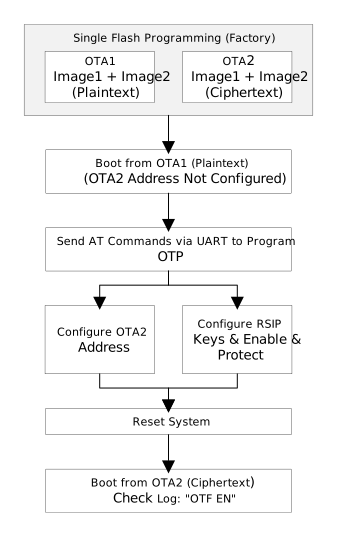
RSIP Mass Production Enable Flow
The above flow utilizes the dual-partition mechanism to achieve firmware switching: on the first boot, since the second partition address is not configured, the system boots from the first partition; the first partition firmware completes the OTP configuration and enables RSIP. After reset, the first partition (plaintext firmware) cannot execute correctly, and the system automatically attempts to run the encrypted firmware from the second partition, ensuring the exclusive executability of the encrypted firmware.
The specific implementation steps are as follows:
1. Firmware Preparation and Burning
Prepare two firmware images and burn them to the chip Flash in a single operation during mass production. The first partition contains the unencrypted production tool firmware, and the second partition contains the encrypted product firmware.
After burning, since the second partition address has not yet been configured in OTP, the chip will boot from the first partition.
2. Burn OTP via First Partition Firmware
After the first partition firmware boots, use AT commands via the serial port to complete the following configurations in order:
Configure the second partition address: Write the firmware Flash address to OTP to enable the product firmware. For detailed address configuration methods and calculation formulas, please refer to BOOT OTA and Flash Layout Modification Guide.
Configure RSIP key and enable: Follow the permanent enable procedure for the production stage in Usage Guide Step 3 to complete the RSIP configuration, including burning the key, configuring key read/write protection, locking the encryption mode and enabling mode write protection, and burning the physical enable bit.
Warning
OTP can only be written once. Please verify the address and data before burning. It is recommended to verify on sample units before batch operations.
3. Reset to Switch to Encrypted Firmware
After completing the OTP configuration, reset the system. At this point, the second partition address is configured, RSIP is enabled with the correct key, and the first partition (plaintext firmware) cannot execute correctly. The system will automatically attempt to boot from the encrypted firmware in the second partition. The boot log should display
OTF EN, indicating that the RSIP real-time decryption function is working properly.
Troubleshooting
If you encounter issues after enabling RSIP, please refer to the following table for troubleshooting:
Phenomenon |
Possible Cause |
Solution |
|---|---|---|
Reset boot failure after enabling RSIP |
RSIP function not successfully enabled |
Check the OTP configuration to confirm the RSIP Enable bit is correctly set. |
RSIP key burning failed |
After burning the key, the command automatically reads back and verifies. If verification fails, check whether
the key in OTP matches the key configured in |
|
Burned firmware is not encrypted |
Confirm that |
|
Boot log does not show “OTF EN” |
RSIP function not enabled or configuration not taken effect |
Check the OTP logical or physical enable bits to ensure the RSIP function is enabled, and confirm that a system reset has been performed. |

