WHC Wi-Fi Low Power
WHC Low Power Introduction
When the Host is idle, power consumption can be reduced via standby mode. The core interaction flow is shown below:
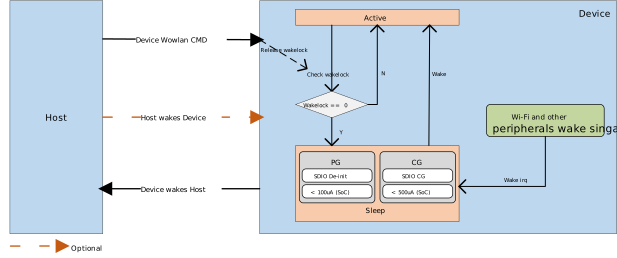
The interaction between Device and Host in low-power mode consists of the following three parts:
Device Wowlan Cmd
Host can trigger Device to enter low-power state via interrupts or messages through CUST_PATH:
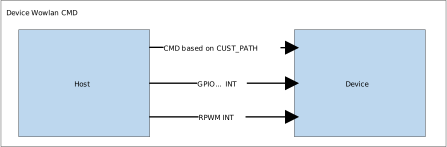
Trigger Type |
Interface |
Description |
|---|---|---|
CUST_PATH |
ALL |
Sends customized commands via CUST_PATH |
RPWM INT |
SDIO |
Triggered by SDIO-specific interrupt |
Other INT |
ALL |
Uses GPIO general external interrupt (high compatibility) |
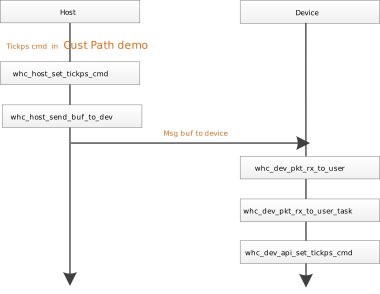
CUST_PATH
For implementation, refer to the tickps command in the Cust Path demo.
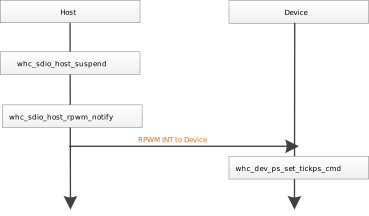
RPWM INT
Ameba SDK automatically triggers RPWM interrupt during host suspend to notify Device to enter low-power mode.
Implementation function: whc_sdio_host_rpwm_notify.
Other INT
For other interrupts (e.g., GPIO), refer to RPWM INT.
Host Wakes Device
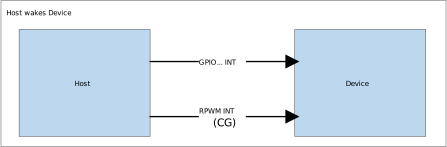
Host selects interrupt type based on Device’s low-power mode (CG/PG):
Interrupt |
Device State |
Interface |
Description |
|---|---|---|---|
CUST_PATH |
Active |
None |
CUST_PATH only responds when Device is Active |
RPWM INT |
CG |
SDIO |
Triggers RPWM interrupt via SDIO-specific signal |
Other INT |
CG/PG |
ALL |
Uses GPIO or other interrupts |
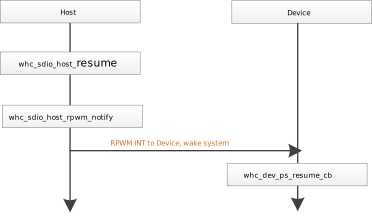
RPWM INT
Ameba SDK automatically triggers RPWM interrupt during host resume to wake Device from CG state.
Implementation function: whc_sdio_host_rpwm_notify.
Other INT
For other interrupts (e.g., GPIO), refer to: RPWM INT
Device Wakes Host
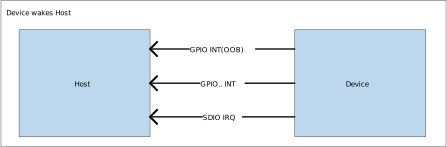
Device wakes Host via interrupts, with methods depending on Host hardware support:
Interrupt |
Description |
|---|---|
SDIO INT |
Standard packet trigger (no additional code adaptation required) |
Other INT |
Uses GPIO or other interrupts (high compatibility) |
WHC Low Power API
API Header Files
whc_host_linux/app/whc_cust_path_demo/whc_host_app_api.h
component/wifi/whc/whc_dev/whc_dev_powersave.h
API Reference
whc_host_set_ps_cmd
void whc_host_set_ps_cmd(struct whc_ps_cmd *pcmd, char *cmd_arg)
{
   if (strcmp(cmd_arg, "r") == 0) {
      pcmd->type = WHC_CMD_TICKPS_R;
   } else if (strcmp(cmd_arg, "a") == 0) {
      pcmd->type = WHC_CMD_TICKPS_A;
   } else if (strcmp(cmd_arg, "cg") == 0) {
      pcmd->type = WHC_CMD_TICKPS_TYPE_CG;
   } else if (strcmp(cmd_arg, "pg") == 0) {
      pcmd->type = WHC_CMD_TICKPS_TYPE_PG;
   }

   return;
}
Item |
Description |
|---|---|
Function |
Parses user input and fills the low-power command structure |
Parameters |
|
Return |
None |
whc_dev_tickps_cmd
void whc_dev_tickps_cmd(struct whc_ps_cmd *ps_cmd)
{
   uint8_t subtype = ps_cmd->type;
   whc_dev_ps_set_tickps_cmd(subtype);

   return;
}
Item |
Description |
|---|---|
Function |
Parses the host command field whc_ps_cmd |
Parameters |
ps_cmd: Command structure containing the type |
Return |
None |
whc_dev_ps_set_tickps_cmd
void whc_dev_ps_set_tickps_cmd(u8 subtype)
{
   if (subtype == WHC_CMD_TICKPS_R) {
      /* dev enter low power mode after release lock */
      pmu_release_wakelock(PMU_OS);
      pmu_release_wakelock(PMU_WHC_WIFI);
   } else if (subtype == WHC_CMD_TICKPS_A) {
      pmu_acquire_wakelock(PMU_OS);
      pmu_acquire_wakelock(PMU_WHC_WIFI);
   } else if (subtype == WHC_CMD_TICKPS_TYPE_PG) {
      /* set sleep type to pg */
      pmu_set_sleep_type(SLEEP_PG);
   } else if (subtype == WHC_CMD_TICKPS_TYPE_CG) {
      /* set sleep type to cg */
      pmu_set_sleep_type(SLEEP_CG);
   }
Item |
Description |
|---|---|
Function |
Configures PMU low-power states based on host commands |
Parameters |
subtype: Host command type |
Return |
None |
whc_dev_ps_resume_cb
void whc_dev_ps_resume_cb(void)
{
   /* acquire wakelock to prevent dev enter low power mode */
   whc_dev_ps_set_tickps_cmd(WHC_CMD_TICKPS_A);
#if defined (CONFIG_FW_DRIVER_COEXIST) && CONFIG_FW_DRIVER_COEXIST
   extern void wifi_hal_system_resume_wlan(void);
   /* resume wlan */
   wifi_hal_system_resume_wlan();
#endif
}
Item |
Description |
|---|---|
Function |
Device-side resume callback after wakeup |
Parameters |
None |
Return |
None |
WHC Low Power Operation Flow
Configure the device’s sleep type, referring to the tickps command in the Cust Path demo.
Identify wireless physical interface (find phy field):
rfkill list.Enable any-packet wakeup:
sudo iw phy <phyname> wowlan enable any(replace actual phyname).Verify WoWLAN configuration:
sudo iw phy <phyname> wowlan show.Initiate system suspend
echo mem | sudo tee /sys/power/state.
Note
phyname may change to phy1/phyN after rmmod, re-validate steps 1-3 after module reload.
Before running the WoWLAN test, please execute
rmmod btsdioorrmmod btusbfirst to unload the kernel auto-loaded KO module.
Configure the device’s sleep type, referring to
tickpscommand in the Cust Path demo.Pre-set wakeup triggers on the device side, for example: receiving IPv4/IPv6 packets on specific ports (with TCP/IP on Device-side filtering support), or triggering GPIO interrupts (hardware-level wakeup mechanism).
Notify the device of the host’s impending low-power mode transition, referring to
setrdycommand in the Cust Path demo.The host safely enters low-power mode.
Programming Guide for Ameba as WHC Host
Configure the device’s sleep type, referring to
tickpscommand in the Cust Path demo.Configure the sleep type of Host, referring to command
AT+TICKPSin AT Command.Preset wake-up triggers on the device side.
Notify the device of the host’s impending low-power mode transition, referring to
setrdycommand in the Cust Path demo.The host safely enters low-power mode.
Note
For other RTOS Host platforms, please contact us.

