Wi-Fi Power Saving
Introduction
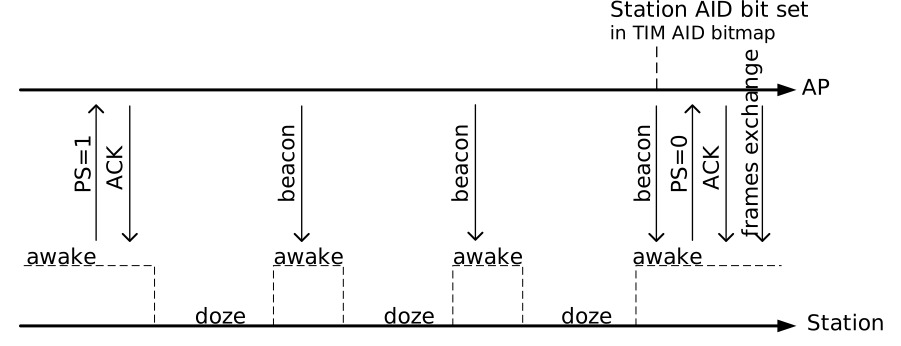
The Wi-Fi STA power-saving modes defined in the IEEE 802.11 specification include the following key features:
Enter doze state when no data is being sent or received.
enter awake state for receiving AP beacon frame
Utilizes beacon TIM (Traffic Indication Map) for data management
During the station’s sleep period, it cannot receive any data frames. Therefore, the AP must buffer any pending frames, and the STA must periodically wake up to check for beacon frames.
The Wi-Fi timeline of power-saving mode is illustrated below:
Based on the above standard IEEE 802.11 power saving mechanism, the Ameba SoC provides three Wi-Fi power-saving modes:
Mode |
Full name |
Description |
|---|---|---|
IPS |
Inactive Power Save |
Implements a complete power-down state when not connected. |
LPS |
Legacy Power Save |
Switches between awake and doze states under Wi-Fi connection, periodically turns the transceiver on or off for power saving. |
WoWLAN |
Wake on Wireless LAN |
Allows the SoC system to enter Sleep Mode while maintaining Wi-Fi connectivity. The system can be woken up by unicast packets, broadcast/multicast packets (optional), or AP disconnect event. |
IPS Mode
The IPS (Inactive Power Save) mode is specifically designed for scenarios where the device is not connected to a Wi-Fi network. It enables the device to enter a sleep state during periods of inactivity, thereby significantly extending battery life.
IPS generally supports two distinct sleep level:
Wi-Fi Power Off: In this state, the Wi-Fi module is completely powered down to achieve maximum power savings.
Power Gating (PG) Mode: This state utilizes power gating techniques, which allows for a much faster exit from IPS mode upon wakeup.
Programming Interface
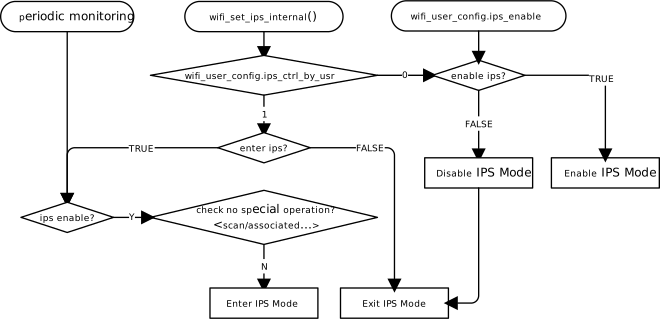
Ameba Wi-Fi controls the IPS behavior using the wifi_set_ips_internal() function and a set of related parameters. The IPS control flow is depicted below:
Parameter |
Type |
Value |
Description |
Default |
|---|---|---|---|---|
ips_enable |
u8 |
0/1 |
Disable/Enable IPS |
1 |
ips_level |
u8 |
RTW_IPS_WIFI_OFF |
Wi-Fi power off in IPS |
RTW_IPS_WIFI_OFF |
RTW_IPS_WIFI_PG |
Wi-Fi power gating in IPS |
|||
ips_ctrl_by_usr |
u8 |
0 |
Enable/Disable IPS via API |
0 |
1 |
Enter/Exit IPS mode via API |
Parameter |
Type |
Value |
Description |
Default |
|---|---|---|---|---|
ips_enable |
u8 |
0/1 |
Disable/Enable IPS |
1 |
ips_level |
u8 |
RTW_IPS_WIFI_OFF |
Wi-Fi power off in IPS |
RTW_IPS_WIFI_OFF |
RTW_IPS_WIFI_PG |
Not Support |
|||
ips_ctrl_by_usr |
u8 |
0 |
Enable/Disable IPS via API |
0 |
1 |
Enter/Exit IPS mode via API |
Parameter |
Type |
Value |
Description |
Default |
|---|---|---|---|---|
ips_enable |
u8 |
0/1 |
Disable/Enable IPS |
1 |
ips_level |
u8 |
RTW_IPS_WIFI_OFF |
Wi-Fi power off in IPS |
RTW_IPS_WIFI_OFF |
RTW_IPS_WIFI_PG |
Not Support |
|||
ips_ctrl_by_usr |
u8 |
0 |
Enable/Disable IPS via API |
0 |
1 |
Enter/Exit IPS mode via API |
Parameter |
Type |
Value |
Description |
Default |
|---|---|---|---|---|
ips_enable |
u8 |
0/1 |
Disable/Enable IPS |
1 |
ips_level |
u8 |
RTW_IPS_WIFI_OFF |
Wi-Fi power off in IPS |
RTW_IPS_WIFI_OFF |
RTW_IPS_WIFI_PG |
Not Support |
|||
ips_ctrl_by_usr |
u8 |
0 |
Enable/Disable IPS via API |
0 |
1 |
Enter/Exit IPS mode via API |
Parameter |
Type |
Value |
Description |
Default |
|---|---|---|---|---|
ips_enable |
u8 |
0/1 |
Disable/Enable IPS |
1 |
ips_level |
u8 |
RTW_IPS_WIFI_OFF |
Wi-Fi power off in IPS |
RTW_IPS_WIFI_OFF |
RTW_IPS_WIFI_PG |
Not Support |
|||
ips_ctrl_by_usr |
u8 |
0 |
Enable/Disable IPS via API |
0 |
1 |
Enter/Exit IPS mode via API |
Parameter |
Type |
Value |
Description |
Default |
|---|---|---|---|---|
ips_enable |
u8 |
0/1 |
Disable/Enable IPS |
1 |
ips_level |
u8 |
RTW_IPS_WIFI_OFF |
Wi-Fi power off in IPS |
RTW_IPS_WIFI_OFF |
RTW_IPS_WIFI_PG |
Not Support |
|||
ips_ctrl_by_usr |
u8 |
0 |
Enable/Disable IPS via API |
0 |
1 |
Enter/Exit IPS mode via API |
Parameter |
Type |
Value |
Description |
Default |
|---|---|---|---|---|
ips_enable |
u8 |
0/1 |
Disable/Enable IPS |
1 |
ips_level |
u8 |
RTW_IPS_WIFI_OFF |
Wi-Fi power off in IPS |
RTW_IPS_WIFI_OFF |
RTW_IPS_WIFI_PG |
Not Support |
|||
ips_ctrl_by_usr |
u8 |
0 |
Enable/Disable IPS via API |
0 |
1 |
Enter/Exit IPS mode via API |
Parameter |
Type |
Value |
Description |
Default |
|---|---|---|---|---|
ips_enable |
u8 |
0/1 |
Disable/Enable IPS |
1 |
ips_level |
u8 |
RTW_IPS_WIFI_OFF |
Wi-Fi power off in IPS |
RTW_IPS_WIFI_OFF |
RTW_IPS_WIFI_PG |
Not Support |
|||
ips_ctrl_by_usr |
u8 |
0 |
Enable/Disable IPS via API |
0 |
1 |
Enter/Exit IPS mode via API |
Refer to the table below for the behavior of each combination:
ips_enable |
ips_ctrl_by_usr |
wifi_set_ips_internal |
Behavior |
|---|---|---|---|
0 |
0 |
Y |
Dynamically enables/disables IPS.
|
0 |
1 |
Y |
IPS is disabled. |
0 |
X |
N |
IPS is disabled. |
1 |
0 |
Y |
Dynamically enables/disables IPS.
|
1 |
1 |
Y |
Dynamically enter/exit IPS mode.
|
1 |
X |
N |
IPS is enabled.
|
LPS Mode
The core idea of LPS (Legacy Power Save) mode is to allow a client station (STA) to enter a low-power sleep state while associated with an Access Point (AP) but with no active data traffic. During this sleep period, the AP buffers any incoming downstream data intended for the STA, thus conserving the STA’s power.
An STA operating in LPS mode must periodically wake up to listen for beacon frames broadcast by the AP. By examining the Traffic Indication Map (TIM) element within these beacons, the STA can determine if the AP has buffered data for it. If the TIM indicates that data is pending, the STA will remain awake to communicate with the AP and retrieve the buffered frames. Otherwise, it can return to sleep until the next scheduled wakeup.

Parameter |
Type |
Value |
Description |
Default |
|---|---|---|---|---|
lps_enable |
u8 |
0 / 1 |
Disable/Enable LPS |
1 |
lps_listen_interval |
u8 |
0 |
Wakes up at each Target Beacon Transmission Time (TBTT) to receive the beacon frame. |
0 |
> 0 |
Configure the interval for receiving beacon frames, unit: 102.4ms (TBTT interval) |
WoWLAN Mode
Under WoWLAN (Wake on Wireless LAN), the whole SoC enters Low-Power Sleep Mode when the system is idle, while Wi-Fi keeps the established connection alive. WoWLAN is built on top of LPS and reuses exactly the same beacon-listening mechanism as LPS Mode. The difference between the two is:
LPS: Only the Wi-Fi RF sleeps during the beacon intervals.
WoWLAN: On top of that, the whole SoC is powered off / clock-gated. Most of the Wi-Fi subsystem modules (RF, BB, and part of the MAC) are powered off / clock-gated, and only a small amount of logic keeps running on the 32K clock.
WoWLAN Overall Flow
On a dual-core (AP + NP) architecture, the sleep and wake-up coordination flow of WoWLAN is illustrated below:
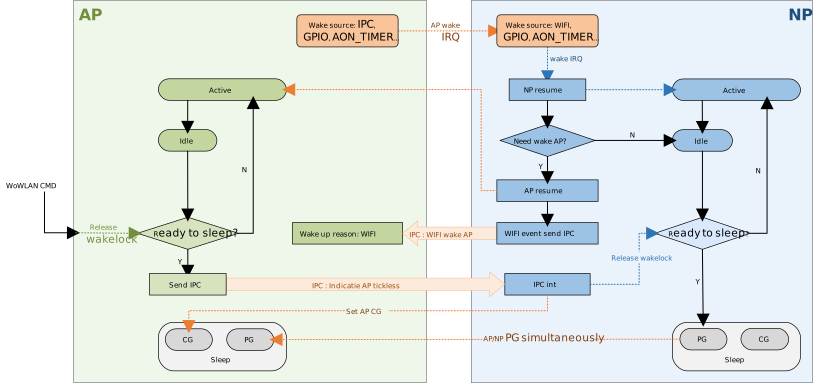
NP: Runs the Wi-Fi driver, responsible for maintaining the connection, parsing received packets, and deciding whether the AP needs to be woken up.
AP: Runs the application and the protocol stack (such as lwIP), handling the business logic.
WoWLAN Entry Flow
The application releases the OS wakelock to enter WoWLAN mode in one of the following two ways:
Execute the
AT+TICKPS=RcommandAT+TICKPS=TYPE,PG # Optional, set the sleep type to PG (default) or CG AT+TICKPS=R # Release the OS wakelock, allowing the system to enter sleep
Call
pmu_release_wakelock()
The AP transitions from Active to Idle and passes the wakelock check in the idle task.
The AP sends a tickless IPC message to the NP, and then enters WFE.
After receiving the IPC message, the NP gates the AP’s clock (AP CG) and releases its own wakelock.
After the NP transitions from Active to Idle, it enters sleep. If the sleep type is PG, the PMC also powers off the AP.
Wi-Fi wakes up periodically as configured to receive Beacons, thus maintaining the Wi-Fi connection.
WoWLAN Wake-up Flow
Wi-Fi Wake-up
By default, the SDK configures the Wi-Fi interrupt WIFI_FISR_FESR_IRQ as the wake-up source of the NP. While the system is asleep, the NP resumes after the Wi-Fi RX interrupt is triggered, parses the received packet, and decides whether the AP needs to be woken up:
If not needed (for example, the packet can be handled by Wi-Fi itself), the NP goes back to sleep after processing, and the AP stays asleep unaffected.
If needed, the NP resumes the AP and the Wi-Fi driver. After the AP resumes, it learns via the IPC interrupt that the wake-up reason is Wi-Fi, and continues to process the business logic.
The reasons that can wake up the AP and the Wi-Fi driver fall into the following categories:
Category |
Description |
|---|---|
Wi-Fi decides to disconnect |
After consecutive Beacon losses, Null Data is sent to probe the AP; consecutive
missing ACKs indicate a disconnection, triggering a wake-up for reconnection.
|
Link teardown frame |
A Deauth / Disassoc frame is received from the AP. |
Unicast packet received |
A unicast data / management frame is received (TCP, UDP, ICMP, ARP, EAPOL-Key, Action, etc.). |
Broadcast/multicast packet received |
This category of wake-up can be toggled via the |
AP Wake-up
Wake-up sources such as GPIO and AON Timer can be configured for the AP separately. Refer to Developer Configuration of Low Power for the configuration method. When such an event occurs, the PMC first wakes up the NP, which then restores the AP’s clock.
After wake-up, there is no need to re-initialize the protocol stack. The established TCP/UDP connections and sockets are all preserved, and the application thread can directly send and receive data.
WoWLAN Mode for Video
Supported ICs[RTL8735C]
Overview
WoWLAN for Video is a keep-alive mechanism for video ICs. The system involves three processors that collaborate to maintain network connectivity while minimizing power consumption:
AP (CA32): Configures WoWLAN parameters, enables WoWLAN mode, and then suspends. After a wakeup event, the AP retrieves the wakeup reason from the NP. On subsequent cycles, the AP may optionally resume the existing keep-alive connection rather than establishing a new one.
NP (CM4): Handles all Layer-3 network activity. It maintains a keep-alive connection to a remote server using lwIP (TCP, TLS, MQTT, WSS, etc.), monitors incoming packets for wakeup patterns, and wakes the AP when a wakeup event occurs. The NP also implements reconnection logic with exponential backoff for both server-side (L3) and WiFi (L2) errors.
FP (WiFi firmware / KM0): Operates at the WiFi MAC layer and is responsible for beacon tracking. The FP monitors beacon reception from the associated AP. When a link-layer event occurs — such as a beacon timeout or receipt of a deauthentication/disassociation frame — the FP notifies the NP via IPC so the NP can take appropriate action (close the server connection and let the NP handle WiFi reconnection).
While the AP is suspended, the NP and FP remain active. The NP releases its wakelocks after entering the keep-alive loop, allowing the system to reach the lowest possible power state. The FP continues beacon tracking independently and uses IPC to signal the NP when link-layer conditions change. This cooperative scheme allows the overall system to achieve significantly lower power consumption while staying connected to the network.
The three processors communicate through IPC channels. All IPC message types are defined in the kaipc_msg_type enum (wowlan_ipccfg.h).
WoWLAN for Video is typically used together with keep-alive bridge mode: the NP maintains the keep-alive connection on its own, letting the AP suspend while the network connection stays up. See the subsection below for details.
Keep-Alive Bridge Mode
In keep-alive bridge mode, each core has its own lwIP stack: the AP (CA32) serves the application sockets, while the NP (CM4) owns the Wi-Fi driver. When keep-alive is enabled, the keep-alive socket runs on the NP, so it maintains the connection by itself while the host stays in a low-power state.
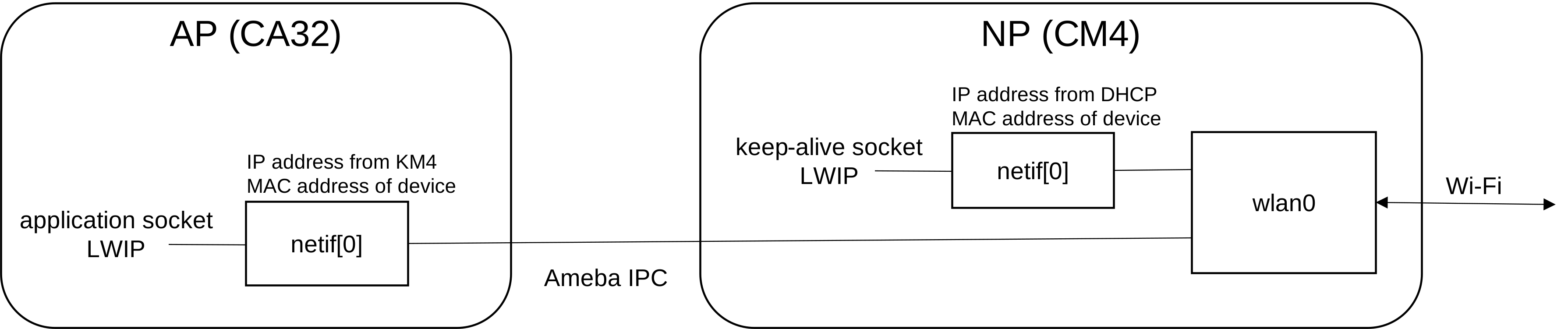
NP (CM4) runs the Wi-Fi driver and its own lwIP/DHCP client. It takes the IP address from DHCP and uses the device MAC address; its
netif[0]sends packets directly towlan0.AP (CA32) runs application sockets on its own lwIP. It shares the same IP and MAC address as the NP, and its
netif[0]reacheswlan0through Ameba IPC.
Since both cores share one IP/MAC on wlan0, every packet received from wlan0 must be dispatched to the correct stack. The NP wlan driver classifies each packet and delivers it to the NP lwIP, the AP, or both.
Packet Dispatch Rules
For each packet received from wlan0:
Forward to |
Packet type |
|---|---|
NP (CM4) |
|
AP (CA32) |
|
Both (NP + AP) |
|
TCP Local Port Range
The TCP local-port range is split between the two cores, so a socket’s local port already identifies which stack owns it:
Core |
Config |
TCP local port range |
|---|---|---|
NP (CM4) |
|
|
AP (CA32) |
|
|
Any TCP flow whose destination port falls in the NP range belongs to an NP socket and is forwarded to the NP; all other TCP flows go to the AP. Because every socket the NP opens is assigned a local port in the NP range automatically, keep-alive sockets — plain TCP, MQTT, WSS, and so on — are automatically routed to the NP with no per-socket configuration.
Enabling the Keep-Alive Bridge
The keep-alive bridge is enabled by CONFIG_WHC_DEV_TCPIP_KEEPALIVE (on by default for WHC_IPC). When it is enabled, the NP initializes the bridge automatically at boot: a constructor under init/np/ calls bridge_dispatch_init() before the application starts, so no application code is required. This registers the packet classifier that routes each wlan0 packet according to the tables above. Any TCP socket the NP opens is then kept on the NP automatically by local-port range, so keep-alive sockets (plain TCP, MQTT, WSS) need no per-socket setup. See the bridge_dispatch example for a reference keep-alive heartbeat implementation.
API Reference
bridge_dispatch_init
void bridge_dispatch_init(void);
Registers the packet classifier and enables the keep-alive bridge. TCP flows whose destination port falls in the NP range are then routed to the NP lwIP automatically, so keep-alive sockets need no per-socket setup. The function takes no parameters. When CONFIG_WHC_DEV_TCPIP_KEEPALIVE is enabled, a constructor under init/np/ calls it automatically at boot, so applications normally do not need to call it themselves.
WOWLANCFG Structure
All WoWLAN parameters are passed between AP and NP through the WOWLANCFG structure defined in wowlan_ipccfg.h:
#define MAX_WAKEUP_PATTERNS_NUM    8
#define MAX_WAKEUP_PATTERN_LENGTH  64

typedef struct {
    uint8_t  dtim;
    uint8_t  type;
    uint32_t interval;
    uint32_t retry_interval;
    uint32_t retry_cnt;
    char     wakeup_pattern[MAX_WAKEUP_PATTERNS_NUM][MAX_WAKEUP_PATTERN_LENGTH];
    uint8_t  pattern_num;
    uint8_t  pattern_len[MAX_WAKEUP_PATTERNS_NUM];
    uint32_t pattern_offset[MAX_WAKEUP_PATTERNS_NUM];
    uint8_t  fp_wakeup_reason;
    uint8_t  np_wakeup_reason;
    uint8_t  resume;
} WOWLANCFG;
Field |
Type |
Description |
|---|---|---|
|
u8 |
DTIM interval for LPS listen interval (e.g. |
|
u8 |
Keep-alive protocol type (see |
|
u32 |
TCP keepalive idle time in seconds before sending probes |
|
u32 |
Interval in seconds between keepalive probes |
|
u32 |
Maximum number of keepalive probes before declaring failure |
|
char[][] |
Wakeup pattern strings; array size is
|
|
u8 |
Number of active wakeup patterns |
|
u8[] |
Length in bytes of each wakeup pattern |
|
u32[] |
Byte offset within the received packet to start matching |
|
u8 |
Wakeup reason reported by FP (WiFi firmware); non-zero on wakeup |
|
u8 |
Wakeup reason reported by NP; non-zero on wakeup |
|
u8 |
Set to |
The WOWLANPATTERN helper type is used to define wakeup patterns in wowlan_cfg.c:
typedef struct {
    const char *pattern;   /* pattern byte string */
    uint8_t     len;       /* pattern length in bytes */
    uint8_t     offset;    /* byte offset within received packet for matching */
} WOWLANPATTERN;
keep_alive_type Enum
enum keep_alive_type {
    TCP_PROTOCOL_KA = 0,
    TCP_TLS_KA,
    MQTT_KA,
    WSS_KA,
    TOTAL_KA_NUM
};
Wakeup Reason Codes (NP)
The np_wakeup_reason field is written by the NP keep-alive handler to indicate why the NP exited the keep-alive loop. For the two defined macros the value is fixed; all other values are lwIP errno codes returned directly from the socket layer (e.g. ETIMEDOUT, ECONNRESET).
Macro |
Value |
Description |
|---|---|---|
|
0xFC |
Keep-alive ACK timeout; retry count exceeded |
|
0xFD |
Received TCP FIN from server |
|
0xFE |
Received packet matching a configured wakeup pattern |
other |
errno |
lwIP socket errno (e.g. |
Wakeup Reason Codes (FP)
The fp_wakeup_reason field is written by the NP after receiving an IPC notification from the FP (WiFi firmware). It reflects link-layer events detected by the FP during beacon tracking.
Macro |
Value |
Description |
|---|---|---|
|
0x08 |
FP received a deauthentication or disassociation frame from the associated AP |
|
0x10 |
WiFi firmware decided to disconnect (e.g. beacon timeout — consecutive beacons missed) |
AP Work Flow
The figure below gives an overview of the keep-alive flow between the AP and the NP, so you can grasp the overall architecture at a glance. The detailed AP and NP behavior follows.
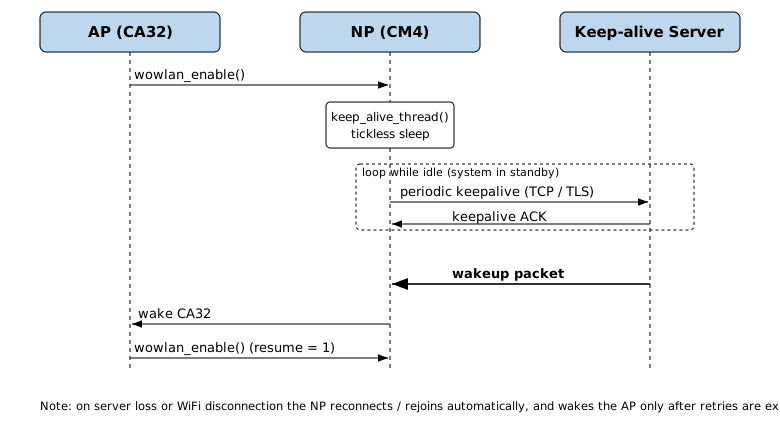
The AP-side entry point is wowlan_tickless_task() on the CA32 core. The overall flow is:
On boot, the AP notifies the NP via IPC and waits for the NP to reply with the wakeup reason.
It inspects the wakeup reason:
Zero — first boot. The AP sends the configuration with
resume = 0, so the NP creates a new keep-alive thread and a fresh connection.Non-zero — woken from WoWLAN. Only an
RX_Wakeup_Patternreason setsresume = 1to reuse the existing connection; for other reasons (FP disconnection, TCP errors, etc.) the NP creates a fresh keep-alive thread.
It fills the default parameters via
wowlan_set_default_parameter()and callswowlan_enable(), which sends the configuration to the NP via IPC and then enters FreeRTOS tickless sleep.
From this point the NP manages the keep-alive loop and wakes the AP when a wakeup event occurs.
NP Work Flow
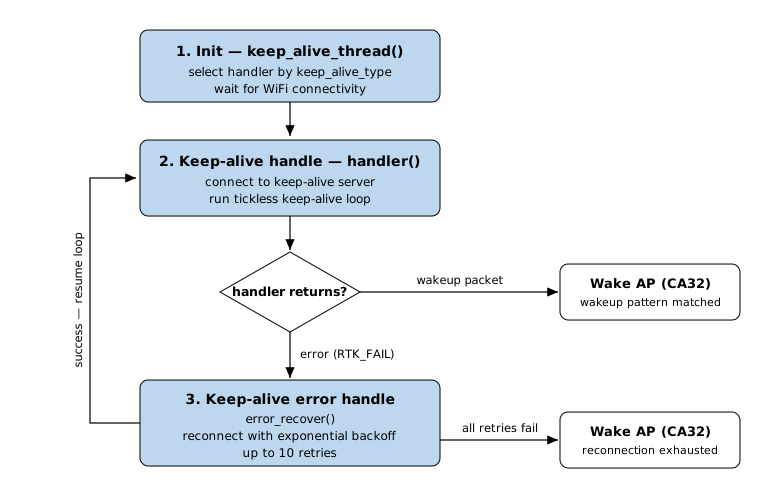
The NP (CM4) handles all Layer-3 network activity using lwIP (the keep-alive loop and wakeup path are shown in the flow figure above).
The keep-alive thread keep_alive_thread() selects a handler according to the configured keep_alive_type, waits for WiFi connectivity, then runs the tickless keep-alive loop. When the handler returns, it reacts based on the outcome:
Wakeup packet received — wakes the AP (CA32) and waits for it to resume.
L3 error (server connection failure,
fp_wakeup_reason == 0) — reconnects with exponential backoff; after up toSERVER_RECONN_MAX_RETRY(10) attempts the NP wakes the AP.L2 error (WiFi disconnection,
fp_wakeup_reason != 0) — rejoins WiFi for up to 50 seconds; on success it resumes the keep-alive, on timeout it wakes the AP.
The figure below summarizes the NP keep-alive flow — initialization, the keep-alive handler, and the error-recovery handler:
A custom keep-alive protocol can be added by defining a new keep_alive_type value and registering its callbacks through the WOWLANCB structure:
typedef struct {
    int (*handler)(WOWLANCFG *config);        /* keep-alive main handler; RTK_SUCCESS on wakeup, RTK_FAIL on error */
    int (*error_recover)(WOWLANCFG *config);  /* called when handler fails; RTK_SUCCESS to retry, RTK_FAIL to wake AP */
} WOWLANCB;

extern void (*wowlan_close_server_conn_cb)(void);  /* type-specific callback to close the server connection */
AP API Reference
The following APIs are available on the AP (CA32) side. Header: wowlan_ipccfg.h.
wowlan_set_default_parameter
void wowlan_set_default_parameter(WOWLANCFG *param);
Populates a WOWLANCFG structure with the WoWLAN configuration to be sent to the NP. Implemented in wowlan_cfg.c — modify this function to change keep-alive parameters and wakeup patterns.
Param |
Direction |
Description |
|---|---|---|
|
out |
Pointer to a |
Default settings configured by this function:
param->dtim           = 10;
param->type           = TCP_TLS_KA;      /* default is TLS keep-alive */
param->interval       = 240;   /* TCP keepalive idle, seconds */
param->retry_interval = 5;     /* probe interval, seconds    */
param->retry_cnt      = 12;    /* max probes                 */

/* Wakeup patterns — up to MAX_WAKEUP_PATTERNS_NUM entries, each defined in wowlan_patterns[]:
   { pattern string, length, byte offset within received packet }       */
static const WOWLANPATTERN wowlan_patterns[] = {
    {"wakeup1", 7, 3},
    {"wakeup2", 7, 3},
    {"wakeup3", 7, 3},
    {"wakeup4", 7, 3},
    {"wakeup5", 7, 3},
    {"wakeup6", 7, 3},
    {"wakeup7", 7, 3},
    {"wakeup8", 7, 3},
};
param->pattern_num = sizeof(wowlan_patterns) / sizeof(wowlan_patterns[0]);
for (int i = 0; i < param->pattern_num; i++) {
    if (param->pattern_num > MAX_WAKEUP_PATTERNS_NUM) {
        break;
    }
    memcpy(param->wakeup_pattern[i], wowlan_patterns[i].pattern,
           wowlan_patterns[i].len);
    param->pattern_len[i]    = wowlan_patterns[i].len;
    param->pattern_offset[i] = wowlan_patterns[i].offset;
}
Note
The default keep-alive type is TCP_TLS_KA (TLS). To use plain TCP keep-alive instead, change this to TCP_PROTOCOL_KA.
wowlan_enable
void wowlan_enable(WOWLANCFG *param);
Sends the WOWLANCFG configuration to the NP via IPC. This triggers the NP to start the keep-alive thread. After this call the AP may enter tickless sleep.
Param |
Direction |
Description |
|---|---|---|
|
in |
Pointer to filled |
wowlan_get_wakeup_reason
void wowlan_get_wakeup_reason(WOWLANCFG *param);
Reads the wakeup reason from the IPC message buffer sent by the NP.
Param |
Direction |
Description |
|---|---|---|
|
out |
Pointer to |
wowlan_ap_wakeup_notification
void wowlan_ap_wakeup_notification(void);
Sends an IPC message to the NP to notify that the AP has just woken up. The NP will respond by sending the stored wakeup reason back to the AP.
NP API Reference
The following APIs are available on the NP (CM4) side. Headers: wowlan_ipccfg.h and keep_alive.h.
wowlan_report_wakeup_reason
void wowlan_report_wakeup_reason(WOWLANCFG *param);
Sends the wakeup reason back to the AP via IPC. Called by the NP after receiving the AP wakeup notification.
Param |
Direction |
Description |
|---|---|---|
|
in |
Pointer to |
wowlan_get_wifi_cfg / wowlan_set_wifi_cfg
void wowlan_get_wifi_cfg(WOWLANCFG *cfg);
void wowlan_set_wifi_cfg(WOWLANCFG *cfg);
Helper functions on the NP to read and write the locally cached WOWLANCFG. The NP uses these to persist the configuration received from the AP across IPC events.
wowlan_parser_wakeup_pattern
int wowlan_parser_wakeup_pattern(uint8_t *payload, uint32_t pkt_len, WOWLANCFG *param);
Checks whether a received packet payload matches any of the configured wakeup patterns.
Param |
Direction |
Description |
|---|---|---|
|
in |
Pointer to received packet data |
|
in |
Length of the received packet in bytes |
|
in |
Pointer to |
Return value |
|
Build the WoWLAN for Video Example
SW Configuration
Enable
CONFIG_STANDARD_TICKLESSin menuconfig:./ameba.py menuconfigNavigate to:
(Top) → Tickless Development → CONFIG TICKLESS DEVELOP → Enable Tickless for Wowlan
Set
SERVER_IPandSERVER_PORTin the corresponding keep-alive source file to match your server.Customize wakeup patterns and keep-alive parameters in
wowlan_set_default_parameter()(wowlan_cfg.c).The default keep-alive type is
TCP_TLS_KA(TLS). To use plain TCP instead, change toTCP_PROTOCOL_KA:param->dtim = 10; param->type = TCP_TLS_KA; /* or TCP_PROTOCOL_KA for plain TCP */ param->interval = 240; param->retry_interval = 5; param->retry_cnt = 12;
Wakeup patterns are defined in the
wowlan_patterns[]array inwowlan_cfg.c. Each entry specifies a byte string to match, its length, and the byte offset within the received packet at which matching starts. Both the pattern content and the number of patterns can be freely adjusted to match the application’s requirements. The defaultWOWLANCFGstructure accommodates up toMAX_WAKEUP_PATTERNS_NUMpatterns with a maximum length ofMAX_WAKEUP_PATTERN_LENGTHbytes each; to exceed these limits, adjust the macro values inwowlan_ipccfg.h:#define MAX_WAKEUP_PATTERNS_NUM 8 #define MAX_WAKEUP_PATTERN_LENGTH 64 char wakeup_pattern[MAX_WAKEUP_PATTERNS_NUM][MAX_WAKEUP_PATTERN_LENGTH]; uint8_t pattern_len[MAX_WAKEUP_PATTERNS_NUM]; uint32_t pattern_offset[MAX_WAKEUP_PATTERNS_NUM];
static const WOWLANPATTERN wowlan_patterns[] = {
    /* { pattern,   length, offset } */
    {"wakeup1",  7,  3},
    {"wakeup2",  7,  3},
    {"wakeup3",  7,  3},
    {"wakeup4",  7,  3},
    {"wakeup5",  7,  3},
    {"wakeup6",  7,  3},
    {"wakeup7",  7,  3},
    {"wakeup8",  7,  3},
    /* add or modify entries as needed */
};
Build and Flash
Run the following command from the SDK root to build the wowlan_tickless example:
./ameba.py build -a wowlan_tickless
After a successful build, download the images to the board using Ameba Image Tool.
Example source files are located at:
example/network_protocol/wowlan_tickless/
Source code used by the example:
component/soc/amebapro3/sw/wowlan_ap/      (AP side)
component/soc/amebapro3/sw/wowlan_np/      (NP side)
Run the Example
After flashing and booting, connect to a WiFi AP using the AT command:
AT+WLCONN=ssid,<your_ssid>,pw,<your_password>
Wait for the [$]wifi got ip message, then the WoWLAN tickless thread starts automatically and connects to the keep-alive server.
Note
Ensure the keep-alive server at SERVER_IP:SERVER_PORT is reachable before the WoWLAN thread starts. The NP will wait for a valid IP address before attempting to connect.