Media
Overview
A media player is one of the most common building blocks in embedded audio applications, used to play back audio from local storage or over the network. The Media Framework provides a unified MediaPlayer C interface that defines the complete playback lifecycle — create → set data source → prepare → control → release — so that application code no longer needs to care about the underlying container format or decoder.
Compared to calling individual decoder libraries directly, MediaPlayer internally encapsulates multi-protocol data source access, container demuxing, audio decoding, render synchronization, and automatic buffering. It reports state changes, buffering progress, and errors to the application through event callbacks. The framework is modular and Kconfig-driven, so only the formats and third-party decoders actually needed have to be enabled, keeping ROM/RAM footprint under control across SoCs with different capabilities.
Features
Media Framework delivers desktop/mobile-class playback capability on lightweight IoT devices:
Unified C API — MediaPlayer hides the differences between container formats and data sources. Whether the input is a prompt WAV on LittleFS, an MP3 ringtone in flash, or an HTTPS AAC stream from the cloud, the application code is virtually identical.
Mainstream audio format coverage — Supports demuxing and decoding of WAV, MP3, AAC, M4A, FLAC, AMR, and OGG (Vorbis / Opus); each format can be enabled or disabled independently.
Multiple media sources — Local file systems (LittleFS / FAT / USB / SD), HTTP/HTTPS streaming, and application-defined StreamSource.
Sync and async preparation — Prepare is convenient for short local files; PrepareAsync parses headers and buffers in the background without blocking the caller, dramatically improving perceived latency on network sources.
Complete playback control — Start / Pause / Stop / Seek / Loop / SetVolume / SetSpeed, plus queries such as GetCurrentTime / GetDuration / IsPlaying.
Callback-based events — Three channels — OnStateChanged, OnInfo, OnError — report state transitions, buffering information, and unrecoverable errors, making UI updates and retry logic straightforward.
Trimmable footprint — Kconfig-based menuconfig lets users enable only the formats and third-party libraries they need.
System Architecture
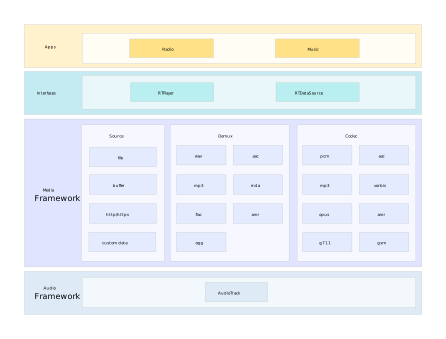
System architecture
Responsibilities by layer:
Layer |
Description |
|---|---|
Application Layer |
User application code that calls the Public C API. |
Public API Layer |
The four header files under |
Media Framework |
Support data acquisition, demuxing, decoding, and render synchronization. |
Audio HAL |
I2S driver and amplifier control, abstracted behind AudioService. |
Realtek Ameba SoC |
Hardware layer. |
Integration only requires including the headers under interfaces/media/ and linking against Media Framework.
Supported Formats
MediaPlayer supports the following audio formats:
Audio format |
Description |
File types |
|---|---|---|
AAC |
Mono/stereo content with standard sample rates from 8 kHz to 96 kHz. |
ADTS raw AAC (.aac) |
MP3 |
Mono/stereo, 8 kbps ~ 320 kbps, constant (CBR) or variable bit-rate (VBR). |
MP3 (.mp3) |
PCM/WAVE |
8-, 16-, 24-bit and float linear PCM, sample rates 8 kHz to 96 kHz. |
WAVE (.wav) |
FLAC |
Mono/stereo (no multichannel), up to 48 kHz. 16-bit recommended; 24-bit supported without dither. |
FLAC (.flac) |
M4A |
Mono/stereo content with standard sample rates from 8 kHz to 96 kHz. |
MPEG-4 (.m4a) |
OGG-Opus |
Low-latency speech codec, 6 ~ 510 kbps, suitable for real-time comms and voice. |
Ogg (.ogg) |
OGG-Vorbis |
Open general-purpose audio format, quality comparable to AAC — music/podcasts. |
Ogg (.ogg) |
AMR |
AMR-NB (narrow-band) / AMR-WB (wide-band) speech codec — voice messages, calls. |
AMR (.amr) |
Configuration
Media Framework is modular and Kconfig-driven. Audio formats and third-party decoder libraries can be selected as needed to balance features against firmware size.
Basic Configuration
Run ./menuconfig.py from the project root and navigate to:
Audio Config  --->
  [*] Enable Audio Framework        # AUDIO_FWK_MENU
      Select Audio Interfaces  --->
        (X) Mixer                   # Mixer mode recommended
  [*] Enable Media Player           # MEDIA_PLAYER_MENU (auto-selects AUDIO_FWK_MENU)
Selecting MEDIA_PLAYER_MENU automatically pulls in AUDIO_FWK_MENU. The Audio Framework provides the underlying AudioService, which must be initialized (AudioService_Init()) before any MediaPlayer usage.
Audio Format Configuration
Audio Config  --->
  [*] Enable Media Player  --->
      Media Formats  ---> # Select as needed
        [*] WAV
        [*] MP3
        [*] AAC
        [*] M4A
        [*] FLAC
        [*] AMR
        [*] OGG  --->
              OGG Codec  --->
                [*] Vorbis
                [*] Opus
Each format maps to an independent demux + codec module; enabling a format also selects the third-party libraries it depends on. Enabling only the formats you actually use noticeably reduces firmware size.
Third-Party Library Configuration
Kconfig option |
Library |
Purpose |
|---|---|---|
THIRD_PARTY_HAAC_MENU |
FDK-AAC |
AAC and M4A decoding |
THIRD_PARTY_FLAC_MENU |
libFLAC |
FLAC lossless decoding |
THIRD_PARTY_OPUS_MENU |
libopus |
Opus encoding/decoding |
THIRD_PARTY_TREMOLO_MENU |
Tremolo |
OGG Vorbis decoding |
THIRD_PARTY_GSM_MENU |
libgsm |
AMR-NB / AMR-WB decoding |
Third-party libraries are auto-selected when the corresponding format is enabled. They can also be toggled manually under the Third Party Libraries menu.
Getting Started
This chapter walks through the full MediaPlayer usage flow in the natural order: create → set data source → prepare → control → release.
Creating a Player
Any code using MediaPlayer must first initialize the audio service, then allocate a player instance. AudioService_Init brings up the underlying HAL, launches the render thread, and loads default audio effect settings. Call it once, early in system startup:
#include "media/media_player.h"
#include "audio/audio_service.h"

AudioService_Init();   // Call once per process lifetime.

MediaPlayer *player = MediaPlayer_Create();
The instance returned by MediaPlayer_Create is in the IDLE state. It is strongly recommended to call MediaPlayer_SetCallback() immediately after creation; otherwise early events produced during Prepare / Start (such as PREPARED or BUFFERING_START) will be dropped because there is no listener yet.
Setting the Data Source
MediaPlayer offers two mutually exclusive ways to feed data. For most use cases the URL form is sufficient — the prefix selects the underlying data path:
MediaPlayer_SetDataSource(player, "lfs://res/welcome.mp3");            // LittleFS
MediaPlayer_SetDataSource(player, "fat://music/song.flac");            // FAT / SD
MediaPlayer_SetDataSource(player, "http://example.com/audio.aac");     // HTTP
MediaPlayer_SetDataSource(player, "https://cdn.example.com/song.m4a"); // HTTPS + TLS
When the data does not come from a URL (e.g. Bluetooth audio frames, encrypted containers, application-owned buffers), implement the StreamSource interface and hand it over to the player:
StreamSource *source = MyDataSource_Create(buffer, length);
MediaPlayer_SetStreamSource(player, source);
Regardless of which method is used, the data source must be set while the player is in the IDLE state. To switch tracks, first call MediaPlayer_Reset() to return the state machine to IDLE.
Preparing the Player
Mode |
Function |
Blocks |
Completion notification |
Recommended for |
|---|---|---|---|---|
Sync |
MediaPlayer_Prepare() |
Yes |
Function returns when done. |
Debugging, simple |
Async |
MediaPlayer_PrepareAsync() |
No |
OnStateChanged(MEDIA_PLAYER_PREPARED) |
Production code |
Why PrepareAsync feels faster. Once called, the player enters the PREPARING state immediately, and the SDK completes network connection, format probing, and decoder initialization on an internal thread. The caller thread is not blocked; completion is delivered via callback. The underlying preparation is not actually faster — the win is that blocking is moved off the caller thread to the looper thread. For network streams, preparation may take hundreds of milliseconds to a few seconds (TCP handshake, TLS negotiation, initial buffering). If the UI or business main loop waits synchronously, the user sees an obvious stall. PrepareAsync returns immediately, so the app can keep refreshing the UI, responding to input, or playing a transition animation while preparation runs in the background — dramatically reducing perceived “press-play-to-first-sound” latency. PrepareAsync is strongly recommended for network playback; the synchronous form is fine for short local files where code brevity matters more.
Async preparation example (recommended for network streams):
static volatile int g_prepared = 0;

void OnStateChanged(const MediaPlayerCallback *cb,
                    const MediaPlayer *player, int state)
{
    if (state == MEDIA_PLAYER_PREPARED) {
        g_prepared = 1;
    }
}

MediaPlayer_PrepareAsync(player);
while (!g_prepared) {          /* Use a semaphore instead of polling in real code. */
    rtos_time_delay_ms(20);
}
MediaPlayer_Start(player);
Sync preparation example (recommended for small local files):
if (MediaPlayer_Prepare(player) == AUDIO_OK) {
    MediaPlayer_Start(player);
}
Controlling the Player

Player state machine
API |
Valid states |
Description |
|---|---|---|
MediaPlayer_Start() |
PREPARED / PAUSED / REWIND_COMPLETE |
Start or resume playback |
MediaPlayer_Pause() |
STARTED |
Pause; current position preserved |
MediaPlayer_Stop() |
STARTED / PAUSED / PLAYBACK_COMPLETE |
Stop playback |
MediaPlayer_Seek(msec) |
PREPARED / STARTED / PAUSED |
Seek to a specific millisecond |
MediaPlayer_SetLooping(1) |
Any valid state |
Loop playback |
MediaPlayer_SetVolume(l, r) |
STARTED and beyond |
Set L/R channel volume (0.0–1.0) |
MediaPlayer_SetSpeed(spd, pitch) |
STARTED |
Change speed/pitch (1.0 = normal) |
MediaPlayer_GetCurrentTime(&ms) |
STARTED / PAUSED |
Current playback position (ms) |
MediaPlayer_GetDuration(&ms) |
PREPARED and beyond |
Total duration; live streams: -1 |
MediaPlayer_IsPlaying() |
Any |
1 = playing |
MediaPlayer_Reset() |
STOPPED and beyond |
Reset to IDLE; can SetDataSource again |
Valid state transitions
Current state |
Allowed operation |
Target state |
|---|---|---|
IDLE |
SetDataSource / SetStreamSource |
IDLE |
IDLE |
Prepare |
PREPARED |
IDLE |
PrepareAsync |
PREPARING |
IDLE |
Destroy |
— |
PREPARING |
Prepare complete |
PREPARED |
PREPARED |
Start |
STARTED |
PREPARED |
Reset |
IDLE |
STARTED |
Pause |
PAUSED |
STARTED |
Stop |
STOPPED |
STARTED |
Seek complete |
REWIND_COMPLETE |
STARTED |
Playback complete |
PLAYBACK_COMPLETE |
REWIND_COMPLETE |
Start |
STARTED |
PAUSED |
Start |
STARTED |
PAUSED |
Stop |
STOPPED |
STOPPED |
Reset |
IDLE |
PLAYBACK_COMPLETE |
Reset |
IDLE |
ERROR |
Reset |
IDLE |
Complete playback flow:
AudioService_Init();

MediaPlayer *player = MediaPlayer_Create();
/* cb must remain valid for the entire lifetime of the player. Do NOT use a stack
   variable. Heap-allocate or use a static/global; free it only after MediaPlayer_Destory. */
MediaPlayerCallback *cb = malloc(sizeof(MediaPlayerCallback));
cb->OnStateChanged = OnStateChanged;
cb->OnInfo = OnInfo;
cb->OnError = OnError;
MediaPlayer_SetCallback(player, cb);

MediaPlayer_SetDataSource(player, "lfs://audio/demo.mp3");
MediaPlayer_PrepareAsync(player);
/* Wait for PREPARED callback ... */

MediaPlayer_Start(player);

int64_t duration = 0;
MediaPlayer_GetDuration(player, &duration);

/* After PLAYBACK_COMPLETE ... */
MediaPlayer_Stop(player);
/* Wait for STOPPED callback ... */

MediaPlayer_Reset(player);
MediaPlayer_Destory(player);
free(cb);
Releasing the Player
The release order must be followed strictly: Stop → (wait for STOPPED) → Reset → Destory.
MediaPlayer_Stop(player);
/* After OnStateChanged(MEDIA_PLAYER_STOPPED) ... */

MediaPlayer_Reset(player);
MediaPlayer_Destory(player);

/* StreamSource must be freed AFTER MediaPlayer_Destory returns. */
if (stream_source) {
    MyStreamSource_Destroy((MyStreamSource *)stream_source);
}
free(cb);
Note
The StreamSource Destory must be called only after MediaPlayer_Destory() returns — the SDK may still be reading data before then.
Player Events
MediaPlayer reports three categories of events to the application via the MediaPlayerCallback struct: state changes, informational updates, and errors. This chapter covers how callbacks are registered, key rules to follow, and the three individual callbacks.
Registering Callbacks
Populate a MediaPlayerCallback struct and call MediaPlayer_SetCallback() before SetDataSource().
/* cb must outlive the player instance. Do NOT use a stack variable.
   Heap-allocate or use a static/global; free it only after MediaPlayer_Destory. */
MediaPlayerCallback *cb = malloc(sizeof(MediaPlayerCallback));
cb->OnStateChanged = my_on_state_changed;
cb->OnInfo         = my_on_info;
cb->OnError        = my_on_error;
MediaPlayer_SetCallback(player, cb);
Callback Usage Notes
Timing
Callbacks must be registered before
MediaPlayer_Prepare/MediaPlayer_PrepareAsync; otherwise critical states such asMEDIA_PLAYER_PREPAREDmay be missed.The
MediaPlayerCallbackstruct must remain valid for the entire lifetime of the player. Do not use a stack variable.
Thread safety
All three callbacks are dispatched from an internal Player Core thread — not the caller’s thread. Take a lock when accessing shared application state from inside a callback.
Callbacks for the same player instance are serialized; they will not fire concurrently.
Memory management
The
listenerandplayerpointers passed to a callback are owned by the framework and are only guaranteed valid until the callback returns. Do not free them and do not store them in a long-lived container outside the callback.To hand an event off to another thread, copy it into a queue/message — do not save the raw pointer.
Avoiding deadlocks
The callback executes on the player’s internal message loop. Do not synchronously call
MediaPlayer_Stop/MediaPlayer_Reset/MediaPlayer_Destoryfrom within a callback — doing so deadlocks against the internal state machine.To drive the player based on an event, dispatch the action asynchronously via an application-level task or message.
Callbacks should return quickly. Push blocking work (file I/O, network, UI refresh) to your own worker thread.
Player State Changes: OnStateChanged
void OnStateChanged(const MediaPlayerCallback *cb,
                    const MediaPlayer *player, int state)
{
    switch (state) {
    case MEDIA_PLAYER_IDLE:              /* 0 - Initial / after Reset       */ break;
    case MEDIA_PLAYER_PREPARING:         /* 1 - PrepareAsync in progress    */ break;
    case MEDIA_PLAYER_PREPARED:          /* 2 - Preparation complete        */ break;
    case MEDIA_PLAYER_STARTED:           /* 3 - Playing                     */ break;
    case MEDIA_PLAYER_PAUSED:            /* 4 - Paused                      */ break;
    case MEDIA_PLAYER_STOPPED:           /* 5 - Stopped                     */ break;
    case MEDIA_PLAYER_PLAYBACK_COMPLETE: /* 6 - End of stream               */ break;
    case MEDIA_PLAYER_REWIND_COMPLETE:   /* 7 - Seek complete               */ break;
    case MEDIA_PLAYER_ERROR:             /* 8 - Unrecoverable error         */ break;
    }
}
state values (enum MediaPlayerStates):
Value |
Meaning |
Trigger |
|---|---|---|
MEDIA_PLAYER_IDLE (0) |
Idle |
After creation / after Reset |
MEDIA_PLAYER_PREPARING (1) |
Preparing |
Emitted right after PrepareAsync |
MEDIA_PLAYER_PREPARED (2) |
Ready |
Prepare complete; Start allowed |
MEDIA_PLAYER_STARTED (3) |
Playing |
Start succeeded |
MEDIA_PLAYER_PAUSED (4) |
Paused |
Pause succeeded |
MEDIA_PLAYER_STOPPED (5) |
Stopped |
Stop succeeded |
MEDIA_PLAYER_PLAYBACK_COMPLETE (6) |
Ended |
Reached EOS, not looping |
MEDIA_PLAYER_REWIND_COMPLETE (7) |
Seek done |
Seek completed |
MEDIA_PLAYER_ERROR (8) |
Error |
Followed by an OnError call |
Player Info: OnInfo
void OnInfo(const MediaPlayerCallback *cb,
            const MediaPlayer *player, int info, int extra)
{
    switch (info) {
    case MEDIA_PLAYER_INFO_BUFFERING_START:        /* 0 - Buffering started (playback paused) */ break;
    case MEDIA_PLAYER_INFO_BUFFERING_END:          /* 1 - Buffering ended (playback resumed)  */ break;
    case MEDIA_PLAYER_INFO_BUFFERING_INFO_UPDATE:  /* 2 - extra = buffered percentage         */ break;
    case MEDIA_PLAYER_INFO_NOT_REWINDABLE:         /* 3 - Live stream, Seek not supported     */ break;
    }
}
info values (enum MediaPlayerInfos):
Value |
Meaning |
extra |
|---|---|---|
MEDIA_PLAYER_INFO_BUFFERING_START (0) |
Buffering started (data underflow) |
Reserved |
MEDIA_PLAYER_INFO_BUFFERING_END (1) |
Buffering ended (playback resumed) |
Reserved |
MEDIA_PLAYER_INFO_BUFFERING_INFO_UPDATE (2) |
Buffering progress update |
Buffered percentage (0–100) |
MEDIA_PLAYER_INFO_NOT_REWINDABLE (3) |
Data source is not seekable (e.g. live) |
Reserved |
Applications typically use these events to show a “buffering” indicator or disable the seek bar.
Player Errors: OnError
void OnError(const MediaPlayerCallback *cb,
             const MediaPlayer *player, int error, int extra)
{
    if (error == MEDIA_PLAYER_ERROR_UNKNOWN) {
        /* Log and notify the business layer to retry or prompt the user. */
    }
}
error values (enum MediaPlayerErrors):
Value |
Meaning |
extra |
|---|---|---|
MEDIA_PLAYER_ERROR_UNKNOWN (0) |
Generic unrecoverable error (data source failure, decode fault, state-machine anomaly) |
Internal framework error code, usually matching
|
Note
Only the generic MEDIA_PLAYER_ERROR_UNKNOWN code is exposed publicly. The specific root cause (network disconnect, corrupted file, decode failure, out-of-memory, …) has to be inferred from the extra field together with the SDK’s serial log.
After OnError fires, the player enters the MEDIA_PLAYER_ERROR state and must be recovered via Reset or Destory before it can be used again.
Media Sources
MediaPlayer supports three families of media sources: local files (LittleFS / FAT / VFS / …), network streams (HTTP/HTTPS), and application-defined StreamSource.
Local Files
A URL prefix selects the underlying storage backend (availability depends on hardware and driver configuration):
Prefix |
File system |
Example |
|---|---|---|
lfs:// |
LittleFS (built-in flash) |
lfs://audio/prompt.wav |
fat:// |
FAT (SD card / USB mass storage) |
fat://music/song.mp3 |
vfs:// |
VFS (unified mount for multiple FS) |
vfs://usb/song.flac |
Note
SD-card and USB storage must be mounted to the corresponding FATFS/VFS path from the SDK side before use. USB audio devices additionally require USB Host + Mass Storage support to be enabled in Kconfig.
URL form:
MediaPlayer_SetDataSource(player, "lfs://audio/alarm.wav");
MediaPlayer_SetDataSource(player, "fat://sdcard/music.flac");
The file source additionally supports playing a sub-range via query parameters (local files only):
MediaPlayer_SetDataSource(player, "lfs://music/song.mp3?offset=1024&size=204800");
HTTP/HTTPS Streaming
The http:// and https:// prefixes are supported. Networking and the HTTP client component must be enabled in the SDK.
MediaPlayer_SetDataSource(player, "http://music.example.com/song.mp3");
MediaPlayer_SetDataSource(player, "https://music.example.com/song.mp3");
MediaPlayer_PrepareAsync(player); /* Async form strongly recommended. */
HTTP Stream Buffering
HTTP stream buffering happens in two independent phases, each governed by its own threshold parameter.
Phase 1: Preparation (Prepare / PrepareAsync)
After calling PrepareAsync(), the SDK opens the HTTP connection in the background and starts receiving data. Once the buffered duration exceeds the buffering_initial_time threshold, the SDK fires OnStateChanged(PREPARED) to signal that playback can begin. During buffering the SDK continuously reports progress through OnInfo(BUFFERING_INFO_UPDATE, percent).

HTTP buffering — preparation phase
Note
Key parameter: buffering_initial_time (preparation-phase threshold)
Default: 5000 ms — PREPARED is emitted after 5 s of buffered audio.
Recommended: ≥ 5000 ms for live streams (avoids start-up stalls); a smaller value for on-demand files speeds up first-frame playback.
The SDK continuously reports progress through
OnInfo(BUFFERING_INFO_UPDATE, percent)during the preparation phase — useful for driving a loading UI.PREPARED is not delivered until the threshold is met. The application must not call
Start()before receiving PREPARED.
Phase 2: Playing
If a network stall during playback causes the buffer to underflow, the SDK automatically pauses playback internally and fires BUFFERING_START. Downloading continues; once the buffered duration recovers past the buffering_resume_time threshold, the SDK resumes playback automatically and fires BUFFERING_END. No application intervention is required.

HTTP buffering — playing phase
Note
Key parameter: buffering_resume_time (playing-phase resume threshold)
Default: 2000 ms — playback resumes and BUFFERING_END fires once 2 s of buffer is available.
Recommended: ≥ 2000 ms for live streams; smaller for on-demand to resume faster.
When the buffer underflows, the SDK internally pauses decoding and reports BUFFERING_START — no polling needed from the application.
Weak-network recovery: the SDK has built-in TCP reconnection;
read_retry_time_mscontrols the retry backoff.
Default parameters:
Parameter |
Default |
Description |
|---|---|---|
Buffer size |
256 KB |
Upper bound of the network receive buffer |
buffering_initial_time |
5000 ms |
Preparation threshold (triggers PREPARED) |
buffering_resume_time |
2000 ms |
Playing-phase resume threshold (BUFFERING_END) |
Socket connect timeout |
500 ms |
TCP connect timeout |
Send timeout |
2000 ms |
HTTP request send timeout |
Receive timeout |
2000 ms |
HTTP data receive timeout |
Read retry interval |
5000 ms |
Wait between retries after network interruption |
Callback sequence during buffering:
OnInfo(MEDIA_PLAYER_INFO_BUFFERING_START) — SDK internally paused (buffer underflow).
OnInfo(MEDIA_PLAYER_INFO_BUFFERING_INFO_UPDATE, percent) — Buffering progress.
OnInfo(MEDIA_PLAYER_INFO_BUFFERING_END) — Buffer refilled; playback resumed.
Monitoring Live Playback
Use
MEDIA_PLAYER_INFO_BUFFERING_START/MEDIA_PLAYER_INFO_BUFFERING_ENDto drive a “buffering” UI state.Use the
extrafield ofMEDIA_PLAYER_INFO_BUFFERING_INFO_UPDATE(0–100) to update the buffering progress bar.Live streams have no fixed duration:
MediaPlayer_GetDuration()returns -1 andMEDIA_PLAYER_INFO_NOT_REWINDABLEis reported. The application should disable seek operations.Frequent
MEDIA_PLAYER_INFO_BUFFERING_STARTevents during playback signal insufficient bandwidth — prompt the user or drop to a lower bitrate.
Live streams (Icecast / HTTP Live) do not support random access. The SDK notifies the application via callback:
void OnInfo(const MediaPlayerCallback *cb,
            const MediaPlayer *player, int info, int extra)
{
    if (info == MEDIA_PLAYER_INFO_NOT_REWINDABLE) {
        g_is_live_stream = 1;  /* Disable seek bar; don't call Seek(). */
    }
    if (info == MEDIA_PLAYER_INFO_BUFFERING_INFO_UPDATE) {
        printf("Buffering: %d%%\n", extra);
    }
}
Custom Data Source (StreamSource)
StreamSource lets the application supply arbitrary in-memory audio data; the SDK pulls bytes on demand through function pointers.
typedef struct StreamSource StreamSource;
struct StreamSource {
    int32_t (*CheckPrepared)(const StreamSource *source);
    ssize_t (*ReadAt)(const StreamSource *source, off_t offset, void *data, size_t size);
    int32_t (*GetLength)(const StreamSource *source, off_t *size);
};
Implementation Notes
CheckPrepared — Confirms during the Prepare phase that the upstream data path is ready. Return
AUDIO_OKto allow reads; returnAUDIO_ERR_NO_INITto make the framework report failure.ReadAt — Copy up to
sizebytes fromoffsetintodataand return the actual number of bytes read. Special return values:0 — End of stream.
STREAM_SOURCE_EOF — End of stream (equivalent to 0; either can be used).
STREAM_SOURCE_READ_AGAIN — No data yet; ask the framework to retry (typical for real-time pull streams).
Any other negative value — Hard error.
GetLength — Write the total length into
*size:Known length: return
AUDIO_OK.Unknown (live): return
STREAM_SOURCE_UNKNOWN_LENGTH. The framework will disable seek and notify the app viaMEDIA_PLAYER_INFO_NOT_REWINDABLE.
Usage Example
#include "media/stream_source.h"

typedef struct {
    StreamSource base;       /* Must be the first member. */
    const char  *data;
    int          data_length;
    int          all_ready;  /* 1 = all data available */
} MySource;

static int32_t my_check_prepared(const StreamSource *s)
{
    MySource *src = (MySource *)s;
    return src->data ? AUDIO_OK : AUDIO_ERR_NO_INIT;
}

static ssize_t my_read_at(const StreamSource *s, off_t offset,
                          void *buf, size_t size)
{
    MySource *src = (MySource *)s;
    if (offset >= src->data_length) {
        if (!src->all_ready)
            return (ssize_t)STREAM_SOURCE_READ_AGAIN;
        return (ssize_t)STREAM_SOURCE_EOF;
    }
    size_t avail = (size_t)(src->data_length - (int)offset);
    if (size > avail) size = avail;
    memcpy(buf, src->data + offset, size);
    return (ssize_t)size;
}

static int32_t my_get_length(const StreamSource *s, off_t *out)
{
    MySource *src = (MySource *)s;
    *out = src->data_length;
    return src->all_ready ? STREAM_SOURCE_OK : STREAM_SOURCE_UNKNOWN_LENGTH;
}

StreamSource *MySource_Create(const char *data, int len)
{
    MySource *src = calloc(1, sizeof(MySource));
    src->base.CheckPrepared = my_check_prepared;
    src->base.ReadAt        = my_read_at;
    src->base.GetLength     = my_get_length;
    src->data       = data;
    src->data_length = len;
    src->all_ready  = 1;
    return (StreamSource *)src;
}

/* Wire it up: */
StreamSource *src = MySource_Create(audio_buf, audio_buf_len);
MediaPlayer_SetStreamSource(player, src);
MediaPlayer_PrepareAsync(player);
Notes
Item |
Description |
|---|---|
Random access |
The SDK may call ReadAt at arbitrary offsets (seek returns to a prior offset). Random access must be supported. |
READ_AGAIN |
If data is not ready yet, return STREAM_SOURCE_READ_AGAIN. The SDK will retry rather than hold a lock waiting. |
Unknown length |
While GetLength returns STREAM_SOURCE_UNKNOWN_LENGTH the SDK treats the source as a stream. Return STREAM_SOURCE_OK once all data has been appended. |
Lifetime |
The StreamSource object must not be freed until MediaPlayer_Destory() has returned. |
Thread safety |
ReadAt and GetLength are invoked on the SDK’s internal thread. Lock any shared state accessed inside them. |
Player Commands
The player CLI is a command-line debugging tool built on top of the Media SDK. It can be driven from the serial console to test playback end-to-end.
Enable via menuconfig:
Audio Config  --->
  CONFIG AUDIO CMD  --->
    [*] player
Command-line options:
Option |
Description |
Example |
|---|---|---|
-f <path/url> |
File path or HTTP URL to play |
-f lfs://audio/test.mp3 |
-s 0/1 |
Use StreamSource mode? |
-s 1 |
-v <float> |
Initial volume (0.0 ~ 1.0) |
-v 0.8 |
Examples:
player -f http://192.168.1.100/test.mp3
player -f lfs://audio/alarm.wav
player -f buffer -s 1
FAQ
Q: Out of memory when playing a long file?
A: Use streaming playback — the SDK decodes in chunks and never loads the whole file at once. Enable only the formats you actually need (Kconfig-based trimming).
Q: Seek does not work?
A: Some streaming formats (live streams, certain HTTP servers) do not support seeking. Check for MEDIA_PLAYER_INFO_NOT_REWINDABLE — if received, disable seek in the UI. For local files, make sure the file is intact (e.g. MP3 VBR files require a valid Xing/VBRI header).
Q: PrepareAsync times out; PREPARED callback never fires?
A: For HTTP, prepared_timeout_ms defaults to 2000 ms — increase it on weak networks. For StreamSource, make sure CheckPrepared returns AUDIO_OK (data is actually ready).
Q: How to build a play queue (gapless playlist)?
A: When OnStateChanged(MEDIA_PLAYER_PLAYBACK_COMPLETE) fires, signal your business thread via a semaphore and run: Stop → (wait for STOPPED) → Reset → SetDataSource → PrepareAsync → (wait for PREPARED) → Start. Never run these steps directly from the callback thread.
API Reference
This chapter lists the complete signatures, parameters, and return values of the public MediaPlayer API.
Lifecycle
Function |
Description |
|---|---|
MediaPlayer *MediaPlayer_Create(void) |
Create an instance; NULL on error |
void MediaPlayer_Destory(MediaPlayer *player) |
Destroy and free resources |
int32_t MediaPlayer_Reset(MediaPlayer *player) |
Reset to the IDLE state |
Data Source
MediaPlayer_SetDataSource
int32_t MediaPlayer_SetDataSource(MediaPlayer *player, const char *url);
Parameter |
Description |
|---|---|
player |
MediaPlayer instance |
url |
File path or HTTP/HTTPS URL |
Return value |
Meaning |
|---|---|
AUDIO_OK |
Success |
AUDIO_ERR_INVALID_OPERATION |
Not in the IDLE state |
AUDIO_ERR_UNKNOWN_ERROR |
Internal error |
MediaPlayer_SetStreamSource
int32_t MediaPlayer_SetStreamSource(MediaPlayer *player, StreamSource *source);
Parameter |
Description |
|---|---|
player |
MediaPlayer instance |
source |
User-implemented StreamSource pointer |
Return values are the same as SetDataSource.
Preparation
Function |
Description |
|---|---|
int32_t MediaPlayer_Prepare(MediaPlayer *player) |
Synchronous prepare; blocks until PREPARED or error |
int32_t MediaPlayer_PrepareAsync(MediaPlayer *player) |
Asynchronous prepare; returns immediately, result via OnStateChanged |
Playback Control
Function |
Parameters |
Valid states |
|---|---|---|
int32_t MediaPlayer_Start(MediaPlayer*) |
— |
PREPARED / PAUSED / REWIND_COMPLETE |
int32_t MediaPlayer_Pause(MediaPlayer*) |
— |
STARTED |
int32_t MediaPlayer_Stop(MediaPlayer*) |
— |
STARTED / PAUSED / PLAYBACK_COMPLETE |
int32_t MediaPlayer_Seek(MediaPlayer*, int64_t msec) |
msec: target position (ms) |
PREPARED / STARTED / PAUSED |
int32_t MediaPlayer_SetLooping(MediaPlayer*, int8_t loop) |
loop: 1=loop, 0=one-shot |
Any |
int32_t MediaPlayer_SetVolume(MediaPlayer*, float l, float r) |
0.0–1.0 |
STARTED and beyond |
int32_t MediaPlayer_SetSpeed(MediaPlayer*, float s, float p) |
1.0 = normal |
STARTED |
Status Query
Function |
Description |
|---|---|
int32_t MediaPlayer_GetCurrentTime(MediaPlayer*, int64_t *msec) |
Current playback position (ms) |
int32_t MediaPlayer_GetDuration(MediaPlayer*, int64_t *msec) |
Total duration (ms); live streams: -1 |
int MediaPlayer_IsPlaying(MediaPlayer*) |
1 = playing, 0 = not playing |
Callbacks
void MediaPlayer_SetCallback(MediaPlayer *player, MediaPlayerCallback *callbacks);
MediaPlayerCallback struct:
struct MediaPlayerCallback {
    void (*OnStateChanged)(const MediaPlayerCallback*, const MediaPlayer*, int state);
    void (*OnInfo)(const MediaPlayerCallback*, const MediaPlayer*, int info, int extra);
    void (*OnError)(const MediaPlayerCallback*, const MediaPlayer*, int error, int extra);
};
StreamSource
struct StreamSource {
    int32_t (*CheckPrepared)(const StreamSource *source);
    ssize_t (*ReadAt)(const StreamSource *source, off_t offset, void *data, size_t size);
    int32_t (*GetLength)(const StreamSource *source, off_t *size);
};
StreamSource return codes:
Constant |
Value |
Meaning |
|---|---|---|
STREAM_SOURCE_OK |
0 |
Success |
STREAM_SOURCE_READ_AGAIN |
-1001 |
Data not available yet; retry later |
STREAM_SOURCE_FAIL |
-1002 |
Operation failed |
STREAM_SOURCE_EOF |
-1003 |
End of data |
STREAM_SOURCE_UNKNOWN_LENGTH |
-1004 |
Total length unknown |
Parcel
Function |
Description |
|---|---|
Parcel *Parcel_Create(void) |
Create an empty Parcel |
void Parcel_Destroy(Parcel *p) |
Destroy and free |
Parcel_WriteBool / Parcel_ReadBool |
bool read/write |
Parcel_WriteInt8 / Parcel_ReadInt8 |
int8 read/write |
Parcel_WriteInt16 / Parcel_ReadInt16 |
int16 read/write |
Parcel_WriteInt32 / Parcel_ReadInt32 |
int32 read/write |
Parcel_WriteInt64 / Parcel_ReadInt64 |
int64 read/write |
Parcel_WriteUint8 / Parcel_ReadUint8 |
uint8 read/write |
Parcel_WriteUint16 / Parcel_ReadUint16 |
uint16 read/write |
Parcel_WriteUint32 / Parcel_ReadUint32 |
uint32 read/write |
Parcel_WriteUint64 / Parcel_ReadUint64 |
uint64 read/write |
Parcel_WriteFloat / Parcel_ReadFloat |
float |
Parcel_WriteDouble / Parcel_ReadDouble |
double |
Parcel_WritePointer / Parcel_ReadPointer |
Pointer value storage |
Parcel_WriteBuffer(p, data, size) |
Write an arbitrary byte block |
void *Parcel_ReadBuffer(p, length) |
Read a byte block (returns internal pointer) |
Parcel_WriteCString(p, str) |
Write a null-terminated string (with length) |
char *Parcel_ReadCString(p) |
Read a string (Parcel-owned; do not free) |
Note
Read order must match write order. Pointers returned by ReadBuffer / ReadCString are owned by the Parcel and become invalid once the Parcel is destroyed.

