Introduction
Power Architecture
SoC has an advanced Power Management Controller (PMC), which can flexibly power up different power domains of the chip, to achieve the best balance between chip performance and power consumption.
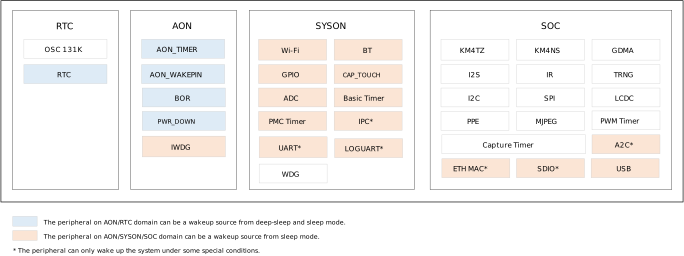
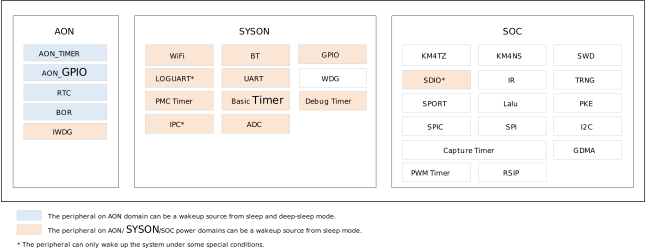
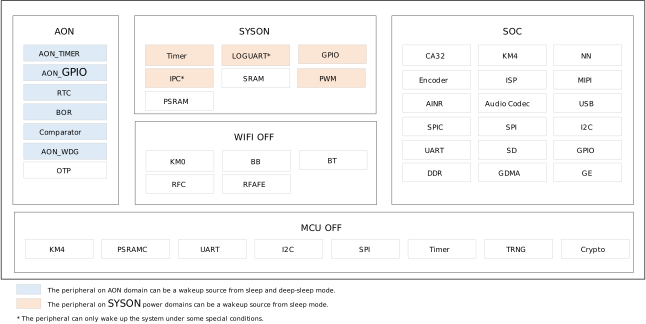
There are generally three main power domains in the digital system of the SoC: AON, SYSON, and SOC.
Functions in different power domains will be turned off differently in different power-saving modes.
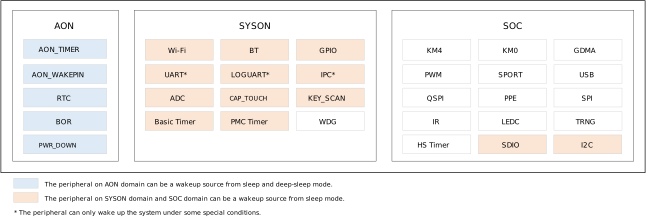
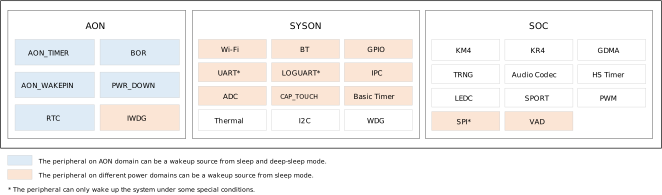
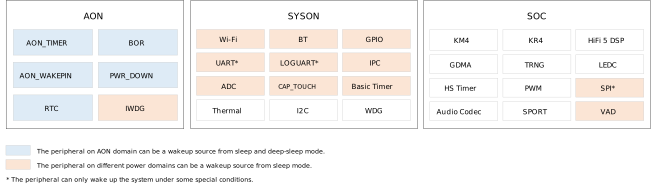
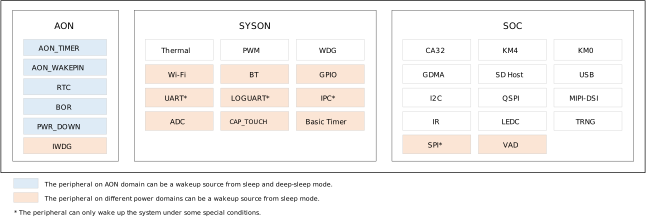
Note
The RTC power domain is unique to the RTL8721F. Throughout all the operation modes described in this document, the RTC and AON domains maintain identical working states. As such, no distinction is made between them.
Power Saving Mode
Ameba SoC supports two low power modes:
Sleep mode
Clock Gating (CG): Shuts off the clock to the SOC domain while retaining its power supply.
Power Gating (PG): Shuts off the power supply to the SOC domain.
Deep Sleep mode
Shuts off the power supply to both the SYSON domain and SOC domain. Compared to sleep mode, deep-sleep mode turns off more power domains, resulting in lower power consumption.
Tickless is a low power feature of FreeRTOS. When the system is idle, the CPU will be paused (without disabling clock and power). Both sleep mode and deep sleep mode workflows are based on Tickless.
The following table explains power-saving related terms.
Mode |
AON |
SYSON |
SOC |
Description |
|---|---|---|---|---|
Tickless |
ON |
ON |
ON |
|
Sleep |
ON |
ON |
CG:ON PG:OFF |
|
Deep Sleep |
ON |
OFF |
OFF |
|
Power Saving Software Architecture
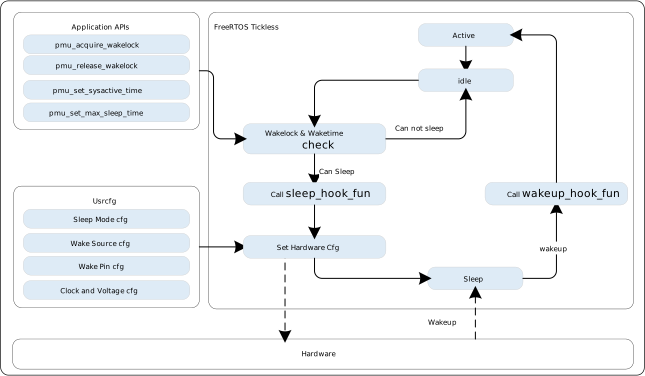
As shown in the figure, the implementation of Ameba’s low power consumption feature mainly consists of the following parts:
usrcfg: This file is directly edited by developers for modifications, mainly to set:
Which peripherals to enable sleep wake-up function for, and which MCU Core to wake up
Which pins to enable deep sleep wake-up function for
The system voltage after entering sleep mode
Whether to turn off certain clocks after entering sleep mode, which mainly depends on whether the peripherals with wake-up function enabled need these clocks
Sleep lock (wakelock):
If a sleep lock is in a locked state, the system cannot sleep. Only when all wakelocks are released can the system possibly enter sleep mode
Can be used to protect certain program segments from accidentally entering sleep mode midway (due to waiting)
Active time setting:
Prevents the system from entering sleep mode for a certain period of time
Used to protect certain behaviors (especially when the end point of the behavior has multiple branches) from accidentally entering sleep mode midway. A conservative active time can be estimated and set at the beginning of the behavior
Sleep hook setting:
Set a sleep hook for a certain peripheral or program
All sleep hooks will be called before the MCU actually sleeps
Wake hook setting:
Set a wake hook for a certain peripheral or program
All wake hooks will be called after the MCU wakes up, before running system threads
Tickless for FreeRTOS
The FreeRTOS supports a low-power feature called Tickless. It is implemented in an idle task which has the lowest priority. That is, it is invoked when there is no other task under running.
Note
configUSE_TICKLESS_IDLE must be enabled for power-saving application because sleep mode flow is based on Tickless.
Unlike the original FreeRTOS, We don’t wake up based on the xEpectedIdleTime.
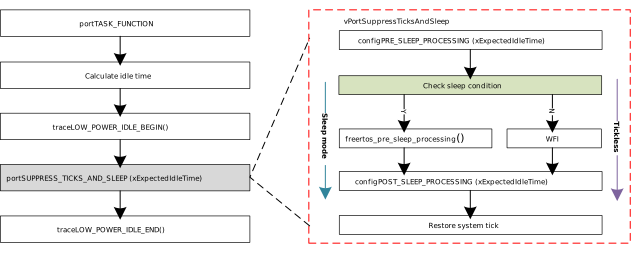
FreeRTOS Tickless in an idle task
The figure above shows idle task code flow. In idle task, it will check sleep conditions (wakelock, sysactive_time) to determine whether needs to enter sleep mode or not.
If not, the CPU will execute an ARM instruction WFI (wait for interrupt) which makes the CPU suspend until the interrupt happens. Normally systick interrupt resumes it. This is the software Tickless.
If yes, it will execute the function
freertos_pre_sleep_processing()to enter sleep mode or deep-sleep mode.
Note
Even FreeRTOS time control like software timer or vTaskDelay is set, it still enters the sleep mode if meeting the requirement as long as the idle task is executed.

