TrustZone Secure Processing Environment (SPE)
Overview
Ameba SoC employs Arm TrustZone technology to implement hardware-level security isolation, establishing an SPE (Secure Processing Environment) within the chip. Through the TrustZone mechanism, the system physically isolates secure firmware from normal applications at the hardware level. Once the TrustZone protection mechanism is enabled and locked, even if code in the non-secure environment obtains the highest system execution privilege, it cannot bypass the underlying hardware restrictions to steal or tamper with secure resources.
Key Concepts
Before diving into the underlying hardware mechanisms, developers should first understand the following firmware classification concepts at the software level and their correspondence within the Ameba heterogeneous multi-core architecture:
Heterogeneous Multi-Core Architecture: Different processor cores (Masters) have different physical security attributes:
Secure CPU (e.g., KM4TZ, CA32): Equipped with full TrustZone hardware extensions, capable of dynamically switching between Secure World and Non-Secure World, and responsible for managing system security policies.
Non-Secure CPU (e.g., KM4NS, KM0, KR4, DSP): Lacks security extensions, is hardware-fixed to operate in Non-Secure state, and all bus access requests it issues carry a “non-secure” label by default.
Firmware Classification: In the Ameba SDK, system firmware is divided into two isolated domains:
Secure Firmware: Runs in the Secure World and can access all system resources (including both secure and non-secure resources). It is primarily responsible for managing core keys, performing cryptographic operations, secure boot verification, and configuring system security boundaries. Secure firmware consists of two parts: image1 and image3. image1 is the Bootloader for the KM4TZ core, executing firmware loading and verification in Secure mode; image3 is an independent secure firmware providing security services. Both run in the Secure World.
Normal Firmware: Known as image2 in the Ameba SDK, it runs in the Non-Secure World and can only access memory and peripherals classified as non-secure, or request security services from the secure world through dedicated NSC (Non-Secure Callable) interfaces. The regular RTOS, network protocol stacks, and business logic all run in this domain.
RDP Read Protection: To further enhance the security of image3 (secure firmware), Ameba introduces the RDP (Read Protection) mechanism. TrustZone provides runtime isolation, while RDP ensures static storage security:
Encrypted firmware storage: Secure firmware is stored in Flash in encrypted form and is automatically decrypted by hardware at runtime for execution.
Physical read protection: Even if an attacker gains physical access to the Flash chip, they cannot directly read the plaintext content of the secure firmware.
Firmware clone prevention: The encrypted firmware is bound to the chip’s internal OTP key, preventing the firmware from being copied to another chip for execution.
Hardware Isolation Mechanism
Arm TrustZone establishes a complete hardware protection chain by deploying interception mechanisms at three core nodes along the system bus: the initiator, the transport, and the receiver:
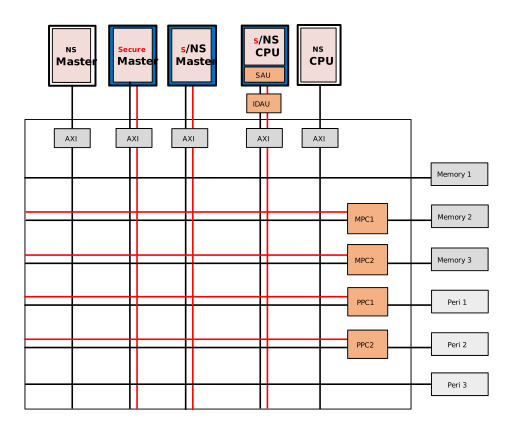
1. Initiator (Master): Security State Determination
All masters and slaves in the system are connected to the AXI bus. When a Master initiates a memory or peripheral access, its security attribute is determined as follows:
CPU Masters (e.g., KM4TZ): Based on the current CPU operating state (Secure or Non-Secure), combined with its internal IDAU (hardwired security address mapping) and SAU (software-configurable Security Attribution Unit), the corresponding security label is automatically applied to the access.
Masters without security extensions (e.g., KR4, DSP): These masters are hardware-fixed to operate in Non-Secure state, and all bus access requests they issue carry a “non-secure” label by default. They cannot issue Secure requests.
Masters with security extensions (e.g., GDMA, Crypto Engine, and other IPs): These peripherals do not have an SAU unit, and their security attributes depend entirely on dedicated configuration registers. To issue Secure requests, the Secure CPU (KM4TZ) must pre-configure their security control registers to grant Secure permission. Otherwise, all bus requests from these devices are Non-Secure requests.
2. Transport (Bus): Security Attribute Propagation
The AXI bus protocol includes dedicated standard signal bits for conveying the privilege and security attributes of an access. The core signal is
AxPROT[1]:
AxPROT[1] = 0: Indicates Secure Access
AxPROT[1] = 1: Indicates Non-Secure Access
Regardless of whether the initiator is a CPU or DMA, the AXI bus interconnect matrix carries this hardware signal and transparently propagates it to the target peripheral.
3. Receiver (Slave): Access Permission Interception
Before a request carrying the
AxPROTlabel reaches its target, it must pass through a final validation by hardware checkers:
Memory (SRAM/Flash/DRAM): Guarded by the MPC (Memory Protection Controller). The MPC internally records the security attribute classification of each physical memory segment. If a non-secure request attempts to access a memory block marked as secure, the MPC will intercept the access at the hardware level and report an error.
Peripherals: Guarded by the PPC (Peripheral Protection Controller), which controls whether a specific peripheral (e.g., a UART or SPI group) is restricted to the secure world only.
Peripherals with built-in security authentication: Some IPs have the hardware capability to parse
AxPROTsignals internally, without requiring an external PPC. They can implement fine-grained security control at the internal register level.
System Boot and Security Lockdown
To ensure that the configuration of the hardware checkers (MPC, PPC, etc.) cannot be maliciously tampered with, Ameba adopts a strict secure boot and lockdown process.
Boot Sequence
Secure CPU wakes up first: After the chip powers on or resets, the Secure CPU (KM4TZ) with the highest privilege starts first. At this point, the system is in the Secure World.
Initialize security boundaries: The Bootloader (image1) running on KM4TZ reads the developer’s preset configuration, initializes the SAU, and configures the system-wide MPC and PPC to complete the security boundary partitioning.
Execute configuration lockdown (Lock): After all security boundaries are set, KM4TZ executes the lockdown operation.
Lockdown Mechanism
The lockdown operation writes a lock flag to specific registers of the security control hardware (such as MPC’s
IDAU_LOCKor PPC’sPPC_LOCK). Once locked:
All security configuration registers of the hardware component are physically frozen.
Not only can the Non-Secure World not modify the configuration, but even the Secure World’s KM4TZ can no longer make changes.
The only way to unlock is through a hardware-level system Reset.
In the Ameba SDK’s default implementation, the Bootloader (image1) locks the MPC when configuring it, while the PPC remains unlocked. This means that the MPC’s memory security partitioning cannot be changed after boot, while the PPC’s peripheral ownership configuration can be dynamically adjusted at runtime by the secure firmware.
Architectural Characteristics
Based on the hardware isolation mechanism and boot lockdown process described above, the SPE established by Ameba SoC through Arm TrustZone technology has the following characteristics:
Hardware Isolation: The isolation mechanism is deeply embedded in the chip’s physical layer. All access interception is directly adjudicated by underlying hardware controllers.
Zero Performance Overhead: Hardware-level security attribute validation is processed in parallel with actual data address transfers. Enabling TrustZone protection and intercepting unauthorized access adds virtually no system bus latency, achieving both high security and high performance.
Flexible Configuration: The system does not fix all memory and peripheral security boundaries at the factory. Developers can adjust the size of secure and non-secure memory according to product requirements, and freely define the security attributes of each peripheral node to accommodate diverse application scenarios.
Note
For more TrustZone technical details, please refer to the official ARM documentation: ARM Cortex-M TrustZone
For RDP firmware encryption methods, please refer to Read Protection .
Cortex-M Security Services
This section introduces the Cross-World Call mechanism and the configuration method for peripheral interrupt security attributes. By properly using these mechanisms, developers can achieve efficient collaboration between the Secure World and the Non-Secure World while ensuring the security of core system assets. Additionally, the security attributes of peripheral interrupts must be correctly configured to ensure that interrupts from critical peripherals can only be serviced by the Secure World.
NSC Call Mechanism
Use Case: Implementing Bidirectional Communication Between Secure and Non-Secure Worlds
In practical development, functional logic frequently needs to cross the TrustZone boundary. For example: a non-secure side RTOS application needs to call the AES algorithm library in the Secure World for encryption (non-secure calling secure); or a secure side low-level driver, after processing core logic, needs to trigger a callback function on the non-secure side to log information (secure calling non-secure). Due to hardware isolation constraints, non-secure code cannot directly address and call secure functions. To safely and controllably meet bidirectional communication requirements, TrustZone introduces the NSC (Non-Secure Callable) mechanism.
Mechanism and Principles
The compiler generates a layer of Secure Gateway Veneers for specially marked secure functions. These veneer instructions are placed in a dedicated NSC memory region. When non-secure code wants to call a secure service, it must first jump to the veneer instruction in the NSC region. The veneer instruction switches the processor state to “secure” and then jumps to the actual secure function body for execution. After execution completes, the hardware automatically restores the state and returns to the Non-Secure World. This mechanism ensures that the non-secure side can only access explicitly exposed APIs and cannot maliciously probe other code or data in the Secure World.
Configuration and Code Practice
The following code demonstrates a complete cross-world interaction flow: the non-secure side registers a callback function and triggers a secure side service; after the secure side processes it, it performs a cross-world callback to the non-secure side function.
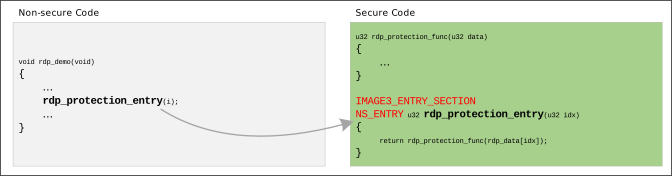
Step 1: Secure Side Exposing APIs and Callback Registration (Secure World Code)
In the Secure World, functions must be declared using the NS_ENTRY macro (which uses cmse_nonsecure_entry internally) to expose them to the Non-Secure World. Additionally, the IMAGE3_ENTRY_SECTION attribute must be used to ensure the function entry is placed in the NSC memory segment.
/* secure_src.c */

/* 1. Declare a cross-world callback pointer type using the cmse_nonsecure_call attribute */
typedef rdp_callback_t __attribute__((cmse_nonsecure_call)) rdp_ns_callback_t;

static rdp_ns_callback_t *g_rdp_callback = NULL;

/* 2. API exposed to the non-secure side: receives and registers a non-secure callback function */
IMAGE3_ENTRY_SECTION
NS_ENTRY void rdp_service_init(rdp_callback_t *callback) {
    if (callback != NULL) {
        /* Use cmse_nsfptr_create to convert the non-secure function pointer */
        g_rdp_callback = (rdp_ns_callback_t *)cmse_nsfptr_create(callback);
    }
}

/* 3. API exposed to the non-secure side: triggers a secure service, and the secure side calls the non-secure callback */
IMAGE3_ENTRY_SECTION
NS_ENTRY uint32_t rdp_callback_process(uint32_t idx) {
    if (g_rdp_callback == NULL) return 0;

    uint32_t secure_data = 0; /* ... logic for obtaining or processing secure data is omitted ... */

    /* Cross-world call: Secure World calls the Non-Secure World callback function */
    return g_rdp_callback(secure_data);
}
Step 2: Non-Secure Side Allocating Secure Stack and Invoking (Non-Secure World Code)
Before calling any NSC function, the non-secure side must first allocate a secure stack for the current task; otherwise, a hardware exception will be triggered.
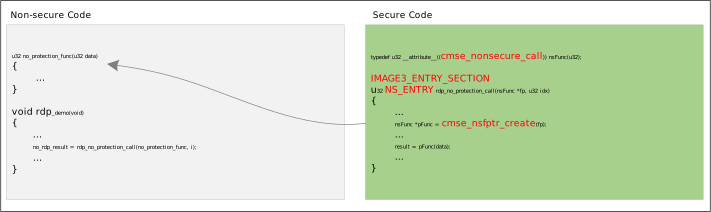
/* example_rdp_service.c */

/* 1. Implement the non-secure side callback handler */
static uint32_t my_callback(uint32_t data) {
    /* ... logic for processing data from the Secure World is omitted ... */
    return data;
}

/* 2. Non-secure side task execution flow */
static void rdp_demo(void) {
    /* [Critical] Allocate secure context (secure stack) for the current non-secure task
     * This must be done before calling any secure side API! */
    rtos_create_secure_context(1024);

    /* Call NSC API: register the non-secure callback to the Secure World */
    rdp_service_init(my_callback);

    /* Call NSC API: trigger the secure service, the secure side will call back my_callback */
    uint32_t result = rdp_callback_process(0);

    rtos_task_delete(NULL);
}
The SDK provides a complete reference example, located at {SDK}\example\peripheral\raw\RDP\rdp_service.
Caution
Secure stack allocation: Non-secure tasks created through
rtos_task_create()do not allocate a secure stack by default. Since the execution of NSC secure functions requires a secure stack, non-secure tasks must explicitly callrtos_create_secure_context()to allocate space before calling secure functions; otherwise, a Hard Fault will occur.Menuconfig enablement: Before developing TrustZone features, the
CONFIG_TRUSTZONEoption must be enabled in Menuconfig. If not enabled, CPUs with Security functionality will run all code in the Secure World by default.
Interrupt Security Attribute Configuration
Use Case: Protecting Critical Peripheral Interrupts from Being Hijacked
When customers run core Secure Timers in the Secure World, or use the Crypto Engine to process sensitive data, they must ensure that interrupts generated by these peripherals can only be serviced by the Secure World. If interrupt permissions are open, the non-secure side OS could maliciously hijack the interrupt or accidentally clear the interrupt flag at a critical moment, resulting in system crashes or sensitive data leakage.
Underlying Mechanism and Principles
TrustZone hardware supports configuring security attributes for each independent interrupt source (IRQ). When the hardware triggers an interrupt, the CPU dispatches it based on this attribute:
Secure interrupt: Forced jump to the Secure World vector table, handled by the secure ISR. The Non-Secure World cannot intercept, mask, or tamper with it.
Non-secure interrupt: Jump to the Non-Secure World vector table, handled by the non-secure ISR.
Configuration and Code Practice
By default, interrupts that are not specifically configured in the system have “non-secure” attributes. To protect critical peripherals, developers must explicitly call the core API in the Secure World initialization code to assign them as secure interrupts.
/* Secure World peripheral interrupt initialization code */
void Secure_Timer_Init(void) {
    /* 1. Configure Timer hardware-related registers (omitted)... */

    /* 2. Force-set a specific interrupt source (e.g., TIMER5_IRQn) to secure attribute
     * Note: NVIC_ClearTargetState() is a TrustZone-specific API */
    NVIC_ClearTargetState(TIMER5_IRQn);

    /* 3. Register the secure ISR and enable the interrupt */
    InterruptRegister(Secure_Timer_ISR, TIMER5_IRQn, NULL, 5);
    InterruptEn(TIMER5_IRQn, 5);
}
Note
NVIC_ClearTargetState() involves core system security permissions and can only be called in the Secure World. Calling it from the non-secure side will be intercepted by hardware.
MPC and PPC Configuration
In a TrustZone system, security boundaries exist not only at the code execution level but also require isolation protection at the hardware bus level. MPC is responsible for partitioning security attributes for physical memory regions, while PPC is responsible for controlling security attributes of peripherals. Both intercept illegal access requests in real time at the bus slave side, ensuring that secure resources cannot be stolen or tampered with by non-secure master devices or non-secure code.
In actual development, developers often need to adjust the security attributes of memory regions or peripherals. For example, sharing a memory buffer between the secure world and the non-secure world, or dedicating a specific I2C interface exclusively to the secure world. This section introduces the configuration methods for MPC and PPC.
MPC Configuration
Business Scenario: Cross-World Shared Memory Data
Suppose a customer has allocated an 8KB buffer in a specific SRAM region to store data packets collected by the non-secure side, which are then handed over to the secure side for decryption. To enable the non-secure side’s OS and DMA to successfully transfer data to this memory without triggering a Bus Fault, we need to relax the access permissions of this specific memory from “secure read/write only” to “non-secure read/write”.
Underlying Mechanism and Principle
MPC is responsible for partitioning security attributes for physical memory regions. It intercepts illegal accesses at the bus level in real time: if the memory is secure, read/write requests from non-secure master devices will trigger a bus error.
At system boot, the Bootloader reads a preset MPC configuration table and writes it to hardware registers. The start and end addresses of MPC Entries must be 4K-aligned (hardware ignores the lower 12 bits of the address), and each MPC supports up to 8 Entries. Address ranges not covered by any configuration default to Secure attributes.
Configuration and Code Practice
To modify memory attributes, developers need to directly modify the configuration table file ameba_boot_trustzonecfg.c in the SDK source code, and insert a new Entry into the corresponding mpc_config array.
github source code
github source code
github source code
github source code
github source code
github source code
Configuration rules:
Locate the MPC array that corresponds to the target physical memory (see the mapping table below)
Insert the new entry before the
0xFFFFFFFF(End Flag) at the end of the arrayEnsure the configuration specifies
MPC_NS(Non-Secure) andMPC_RW(Read/Write)After adding the new Entry, move the End Flag to the new position
Code example: Based on the default configuration, set the 8KB address space from 0x20010000 - 0x20011FFF to non-secure read/write:
/* ameba_boot_trustzonecfg.c */
const TZ_CFG_TypeDef mpc1_config[MPC_ENTRYS_NUM] =                  /* Security configuration for sram S1/S2 */
{
//  Start                       End                 CTRL
   {0x20000000,                 0x20006FFF,         MPC_RW | MPC_NS},   /* entry0: MSP_NS, ... */
   {0x20008000,                 0x20008FFF,         MPC_RW | MPC_NS},   /* entry1: KM0_RTOS_STATIC_0_NS */
   {(u32)__km4_bd_ram_start__,  0x20100000 - 1,     MPC_RW | MPC_NS},   /* entry2: BD_RAM_NS*/

   /* Insert customer-defined 8KB non-secure shared memory region here */
   {0x20010000,                 0x20012000 - 1,     MPC_RW | MPC_NS},   /* entry3: User Shared Buffer (NS) */
   {0xFFFFFFFF,                 0xFFFFFFFF,         MPC_RW | MPC_NS},   /* entry4: End Flag (marks end of configuration) */
   {0xFFFFFFFF,                 0xFFFFFFFF,         MPC_RW | MPC_NS},   /* entry5: TODO */
   {0xFFFFFFFF,                 0xFFFFFFFF,         MPC_RW | MPC_NS},   /* entry6: TODO */
   {0xFFFFFFFF,                 0xFFFFFFFF,         MPC_RW | MPC_NS},   /* entry7: TODO */
};
The number of MPC Entries varies across different chips. The MPC description for each chip is as follows:
mpc1_config: SRAM
mpc2_config: PSRAM
mpc1_config: SRAM0
mpc2_config: SRAM1
mpc3_config: PSRAM
mpc1_config: SRAM0
mpc2_config: SRAM1
mpc3_config: PSRAM
mpc1_config: DDR / PSRAM
mpc2_config: SRAM
mpc1_config: Flash (supports TrustZone firmware XIP execution)
mpc2_config: SRAM
mpc3_config: PSRAM
mpc1_config: Flash (supports TrustZone firmware XIP execution)
mpc2_config: SRAM
mpc3_config: PSRAM
MPC Lock Mechanism: Each MPC group has an independent lock register (such as IDAU1_LOCK) used to lock the configuration and prevent runtime tampering:
When
1is written to the lock register, the corresponding MPC configuration is lockedAfter locking, all registers of that MPC (including the lock register itself) can no longer be modified until system reset
After locking, it cannot be unlocked by writing
0; the only way to unlock is through system reset
For security reasons, the default SDK KM4TZ Bootloader automatically sets the hardware MPC_LOCK register after initializing the MPC configuration described above.
PPC Configuration
Business Scenario: Exclusive Peripheral Control
Similar to memory protection, a customer may need to use a specific I2C interface to connect an external hardware security chip. In this case, any read or write operations by non-secure master devices to the peripheral registers must be completely prohibited.
Underlying Mechanism and Principle
PPC is responsible for security filtering at the peripheral bus level:
When a peripheral is configured as Secure, the hardware only allows access requests from the secure side master devices; read/write operations from the non-secure side are directly blocked by hardware
When a peripheral is configured as Non-Secure, both sides can freely access it
At power-up, the Bootloader automatically performs default initialization configuration for some peripherals. Users can also modify configuration items at runtime through APIs in the secure world.
Configuration and Code Practice
The Bootloader provides a set of default initial configurations for various peripherals at power-up. If developers need to adjust the ownership of a specific peripheral, they can dynamically modify it through SDK-provided APIs during the secure world initialization phase (such as early in the main() function).
/* Secure world initialization code */
#include "ameba_soc.h"

void Secure_Peripheral_Protection_Init(void) {
    // Call TZ_ConfigSlaveSecurity to adjust peripheral permissions
    // Example 1: Configure UART0 as accessible only by the secure world (ENABLE = Secure state)
    TZ_ConfigSlaveSecurity(UART0_DEV, ENABLE);

    // Example 2: Open I2C1 for non-secure world use (DISABLE = Non-Secure state)
    // TZ_ConfigSlaveSecurity(I2C1_DEV, DISABLE);

    // Optional: Manually lock PPC configuration (see lock mechanism description below)
    // HAL_WRITE32(SYSTEM_CTRL_BASE, REG_PPC_LOCK, 1);
}
The peripheral lists and specific macro definitions for each IC are as follows:
Function signature TZ_ConfigSlaveSecurity(PPC_PeripheralId Perip, u32 Status) :
Statuscan be set toSECUREorNON_SECURE.PPC_PeripheralIdis defined incomponent/soc/amebadplus/fwlib/include/ameba_trustzone.h. The available enumeration values forPeripare shown in the following table:
Peripheral Name |
PPC_PeripheralId |
|---|---|
WIFI |
SECFG_WIFI_CFG |
BT |
SECFG_BT_CFG |
SECURE_ENGINE |
SECFG_SECURE_ENGINE |
GDMA0 |
SECFG_GDMA0_CFG |
PPE |
SECFG_PPE_CFG |
SDIO |
SECFG_SDIO_CFG |
SPI0 |
SECFG_SPI0 |
SPI1 |
SECFG_SPI1 |
PSRAM_PHY |
SECFG_PSRAM_PHY |
PSRAM_SPIC_USERMODE |
SECFG_PSRAM_SPIC_USERMODE |
SPIC_USERMODE |
SECFG_SPIC_USERMODE |
QSPI |
SECFG_QSPI |
SPORT0_I2S |
SECFG_SPORT0_I2S |
SPORT1_I2S |
SECFG_SPORT1_I2S |
OTPC |
SECFG_OTPC_CFG |
SYSON |
SECFG_SYSON |
UART0 |
SECFG_UART0 |
UART1 |
SECFG_UART1 |
UART2_BT |
SECFG_UART2_BT |
UART3_LOG |
SECFG_UART3_LOG |
GPIOA_B |
SECFG_GPIOA_B |
ADC |
SECFG_ADC |
CAP_TOUCH |
SECFG_CAP_TOUCH |
KEY_SCAN |
SECFG_KEY_SCAN |
IPC |
SECFG_IPC |
DBG_TIMER |
SECFG_DBG_TIMER |
PMC_TIMER_0_1 |
SECFG_PMC_TIMER_0_1 |
TIMER0_7_BASIC |
SECFG_TIMER0_7_BASIC |
TIMER8_9_PULSE_PWM_TIMER10_11 |
SECFG_TIMER8_9_PULSE_PWM_TIMER10_11 |
TRNG_PORT1_PORT2 |
SECFG_TRNG_PORT1_PORT2 |
RXI300 |
SECFG_RXI300 |
RSIP |
SECFG_RSIP |
LEDC |
SECFG_LEDC |
PDM |
SECFG_PDM |
IR |
SECFG_IR |
I2C0 |
SECFG_I2C0 |
I2C1 |
SECFG_I2C1 |
Function signature TZ_ConfigSlaveSecurity(PPC_PeripheralId Perip, u32 Status) :
Statuscan be set toSECUREorNON_SECURE.PPC_PeripheralIdis defined incomponent/soc/amebalite/fwlib/include/ameba_trustzone.h. The available enumeration values forPeripare shown in the following table:
Peripheral Name |
PPC_PeripheralId |
|---|---|
PSRAM_USERMODE |
SECFG_PSRAM_USERMODE |
SPIC_USERMODE |
SECFG_SPIC_USERMODE |
BT_CFG |
SECFG_BT_CFG |
OTPC |
SECFG_OTPC |
PSRAM_PHY |
SECFG_PSRAM_PHY |
SYSON |
SECFG_SYSON |
RXI300 |
SECFG_RXI300 |
UART0 |
SECFG_UART0 |
UART1 |
SECFG_UART1 |
UART2 |
SECFG_UART2 |
UART3_BT |
SECFG_UART3_BT |
UART4_LOG |
SECFG_UART4_LOG |
LEDC |
SECFG_LEDC |
TRNG_PORT1_2 |
SECFG_TRNG_PORT1_2 |
AUDIO_CODEC |
SECFG_AUDIO_CODEC |
TIMER0_7_BASIC |
SECFG_TIMER0_7_BASIC |
TIMER8_14 |
SECFG_TIMER8_14 |
GPIOA_B |
SECFG_GPIOA_B |
RTC |
SECFG_RTC |
ADC_ADC_COMP |
SECFG_ADC_ADC_COMP |
THERMAL |
SECFG_THERMAL |
CAP_TOUCH |
SECFG_CAP_TOUCH |
WDG |
SECFG_WDG |
IPC |
SECFG_IPC |
SDM32K |
SECFG_SDM32K |
AUDIO_CFG |
SECFG_AUDIO_CFG |
WIFI_CFG |
SECFG_WIFI_CFG |
RSVD |
SECFG_RSVD |
SPORT0_I2S |
SECFG_SPORT0_I2S |
SPORT1_I2S |
SECFG_SPORT1_I2S |
AES |
SECFG_AES |
SHA |
SECFG_SHA |
GDMA0_CFG |
SECFG_GDMA0_CFG |
SPI0 |
SECFG_SPI0 |
SPI1 |
SECFG_SPI1 |
I2C0 |
SECFG_I2C0 |
I2C1 |
SECFG_I2C1 |
DBG_TIMER |
SECFG_DBG_TIMER |
ECDSA |
SECFG_ECDSA |
Function signature TZ_ConfigSlaveSecurity(PPC_PeripheralId Perip, u32 Status) :
Statuscan be set toSECUREorNON_SECURE.PPC_PeripheralIdis defined incomponent/soc/amebalite/fwlib/include/ameba_trustzone.h. The available enumeration values forPeripare shown in the following table:
Peripheral Name |
PPC_PeripheralId |
|---|---|
PSRAM_USERMODE |
SECFG_PSRAM_USERMODE |
SPIC_USERMODE |
SECFG_SPIC_USERMODE |
BT_CFG |
SECFG_BT_CFG |
OTPC |
SECFG_OTPC |
PSRAM_PHY |
SECFG_PSRAM_PHY |
SYSON |
SECFG_SYSON |
RXI300 |
SECFG_RXI300 |
UART0 |
SECFG_UART0 |
UART1 |
SECFG_UART1 |
UART2 |
SECFG_UART2 |
UART3_BT |
SECFG_UART3_BT |
UART4_LOG |
SECFG_UART4_LOG |
LEDC |
SECFG_LEDC |
TRNG_PORT1_2 |
SECFG_TRNG_PORT1_2 |
AUDIO_CODEC |
SECFG_AUDIO_CODEC |
TIMER0_7_BASIC |
SECFG_TIMER0_7_BASIC |
TIMER8_14 |
SECFG_TIMER8_14 |
GPIOA_B |
SECFG_GPIOA_B |
RTC |
SECFG_RTC |
ADC_ADC_COMP |
SECFG_ADC_ADC_COMP |
THERMAL |
SECFG_THERMAL |
CAP_TOUCH |
SECFG_CAP_TOUCH |
WDG |
SECFG_WDG |
IPC |
SECFG_IPC |
SDM32K |
SECFG_SDM32K |
AUDIO_CFG |
SECFG_AUDIO_CFG |
WIFI_CFG |
SECFG_WIFI_CFG |
RSVD |
SECFG_RSVD |
SPORT0_I2S |
SECFG_SPORT0_I2S |
SPORT1_I2S |
SECFG_SPORT1_I2S |
AES |
SECFG_AES |
SHA |
SECFG_SHA |
GDMA0_CFG |
SECFG_GDMA0_CFG |
SPI0 |
SECFG_SPI0 |
SPI1 |
SECFG_SPI1 |
I2C0 |
SECFG_I2C0 |
I2C1 |
SECFG_I2C1 |
DBG_TIMER |
SECFG_DBG_TIMER |
ECDSA |
SECFG_ECDSA |
Function signature TZ_ConfigSlaveSecurity(PPC_PeripheralId Perip, u32 Status) :
Statuscan be set toSECUREorNON_SECURE.PPC_PeripheralIdis defined incomponent/soc/amebasmart/fwlib/include/ameba_trustzone.h. The available enumeration values forPeripare shown in the following table:
Peripheral Name |
PPC_PeripheralId |
|---|---|
SPORT3_I2S |
SECFG_SPORT3_I2S |
SPORT2_I2S |
SECFG_SPORT2_I2S |
SPORT1_I2S |
SECFG_SPORT1_I2S |
SPORT0_I2S |
SECFG_SPORT0_I2S |
VAD |
SECFG_VAD |
AUDIO_CDEDC |
SECFG_AUDIO_CDEDC |
TIMER |
SECFG_TIMER |
TRNG |
SECFG_TRNG |
LEDC |
SECFG_LEDC |
UART3_BT |
SECFG_UART3_BT |
UART2 |
SECFG_UART2 |
UART1 |
SECFG_UART1 |
UART0 |
SECFG_UART0 |
DDRC |
SECFG_DDRC |
PSRAM_CTRL |
SECFG_PSRAM_CTRL |
RXI300_HS |
SECFG_RXI300_HS |
HS_SYSON |
SECFG_HS_SYSON |
I2C2 |
SECFG_I2C2 |
I2C1 |
SECFG_I2C1 |
IR |
SECFG_IR |
ECDSA |
SECFG_ECDSA |
ED25519 |
SECFG_ED25519 |
RSA |
SECFG_RSA |
MIPI_DSI |
SECFG_MIPI_DSI |
SPI1 |
SECFG_SPI1 |
SPI0 |
SECFG_SPI0 |
GDMA0_CFG |
SECFG_GDMA0_CFG |
LCDC_CFG |
SECFG_LCDC_CFG |
SDEMMC |
SECFG_SDEMMC |
SHA |
SECFG_SHA |
AES |
SECFG_AES |
USBOTG_CFG |
SECFG_USBOTG_CFG |
WIFI |
SECFG_WIFI_CFG |
ZIGBEE |
SECFG_ZIGBEE |
DDR_BSTC |
SECFG_DDR_BSTC |
DDR_PHY |
SECFG_DDR_PHY |
BT_CFG |
SECFG_BT_CFG |
Function signature TZ_ConfigSlaveSecurity(PPC_Id ppc_idx, u32 msk_bit, u32 Status) :
ppc_idx:0corresponds to thePPC1_REGregister;1corresponds to thePPC2_REGregister;2corresponds to thePPC3_REGregister.msk_bit: The filecomponent/soc/amebagreen2/fwlib/include/ameba_rxi300.hdefines the PPC bit fields for the three registersPPC1_REG,PPC2_REG, andPPC3_REG. The available values for themsk_bitparameter are shown in the following table:Status:SECUREorNON_SECURE.
Peripheral Name |
msk_bit Parameter |
|
|
PPE |
RXI300_BIT_PPE_CFG |
AES_SHA_DMA |
RXI300_BIT_AES_SHA_DMA |
SHA |
RXI300_BIT_SHA_CFG |
AES |
RXI300_BIT_AES_CFG |
SPI1 |
RXI300_BIT_SPI1 |
SPI0 |
RXI300_BIT_SPI0 |
GDMA0 |
RXI300_BIT_GDMA0_CFG |
PSRAM_PHY |
RXI300_BIT_PSRAM_PHY |
PSRAM_SPIC_USERMODE |
RXI300_BIT_PSRAM_SPIC_USERMODE |
SPIC_USER_MODE |
RXI300_BIT_SPIC_USER_MODE |
ECC |
RXI300_BIT_ECC_CFG |
RMII |
RXI300_BIT_RMII_CFG |
SPORT0_I2S |
RXI300_BIT_SPORT0_I2S |
SDIO_HOST_DFG |
RXI300_BIT_SDIO_HOST_DFG |
SDIO_DEVICE |
RXI300_BIT_SDIO_DEVICE_CFG |
MJPEG |
RXI300_BIT_MJPEG_CFG |
LCDC |
RXI300_BIT_LCDC_CFG |
PKE |
RXI300_BIT_PKE_CFG |
USB |
RXI300_BIT_USB_CFG |
WIFI |
RXI300_BIT_WIFI_CFG |
|
|
TIMER_0_3_BASIC |
RXI300_BIT_TIMER_0_3_BASIC |
PMC_TIMER_0_1 |
RXI300_BIT_PMC_TIMER_0_1 |
DGB_TIMER |
RXI300_BIT_DGB_TIMER |
THERMAL |
RXI300_BIT_THERMAL |
IPC |
RXI300_BIT_IPC |
SHA_KEY_MANAGE |
RXI300_BIT_SHA_KEY_MANAGE |
CAP_TOUCH |
RXI300_BIT_CAP_TOUCH |
ADC_COMP |
RXI300_BIT_ADC_COMP |
GPIO_A_B_C |
RXI300_BIT_GPIO_A_B_C |
UART4_LOG |
RXI300_BIT_UART4_LOG |
UART3_BT |
RXI300_BIT_UART3_BT |
UART2 |
RXI300_BIT_UART2 |
UART1 |
RXI300_BIT_UART1 |
UART0 |
RXI300_BIT_UART0 |
SYSON_NS |
RXI300_BIT_SYSON_NS |
AES_KEY_MANAGE |
RXI300_BIT_AES_KEY_MANAGE |
OTPC_CFG |
RXI300_BIT_OTPC_CFG |
|
|
CPU_OST_CFG |
RXI300_BIT_CPU_OST_CFG |
PDM |
RXI300_BIT_PDM |
I2C1 |
RXI300_BIT_I2C1 |
I2C0 |
RXI300_BIT_I2C0 |
IR |
RXI300_BIT_IR |
CAN1 |
RXI300_BIT_CAN1 |
CAN0 |
RXI300_BIT_CAN0 |
RSIP |
RXI300_BIT_RSIP |
RXI300 |
RXI300_BIT_RXI300 |
TRNG_POR1_PORT2 |
RXI300_BIT_TRNG_POR1_PORT2 |
TIMER_4_8_PULSE_PWM_TIMER |
RXI300_BIT_TIMER_4_8_PULSE_PWM_TIMER |
Function signature TZ_ConfigSlaveSecurity(PPC_Id ppc_idx, u32 msk_bit, u32 Status) :
ppc_idx:0corresponds to thePPC1_REGregister;1corresponds to thePPC2_REGregister;2corresponds to thePPC3_REGregister.msk_bit: The filecomponent/soc/RTL8720F/fwlib/include/ameba_rxi300.hdefines the PPC bit fields for the three registersPPC1_REG,PPC2_REG, andPPC3_REG. The available values for themsk_bitparameter are shown in the following table:Status:SECUREorNON_SECURE.
Peripheral Name |
msk_bit Parameter |
|
|
PPE |
RXI300_BIT_PPE_CFG |
AES_SHA_DMA |
RXI300_BIT_AES_SHA_DMA |
SHA |
RXI300_BIT_SHA_CFG |
AES |
RXI300_BIT_AES_CFG |
SPI1 |
RXI300_BIT_SPI1 |
SPI0 |
RXI300_BIT_SPI0 |
GDMA0 |
RXI300_BIT_GDMA0_CFG |
PSRAM_PHY |
RXI300_BIT_PSRAM_PHY |
PSRAM_SPIC_USERMODE |
RXI300_BIT_PSRAM_SPIC_USERMODE |
SPIC_USER_MODE |
RXI300_BIT_SPIC_USER_MODE |
ECC |
RXI300_BIT_ECC_CFG |
RMII |
RXI300_BIT_RMII_CFG |
SPORT0_I2S |
RXI300_BIT_SPORT0_I2S |
SDIO_HOST_DFG |
RXI300_BIT_SDIO_HOST_DFG |
SDIO_DEVICE |
RXI300_BIT_SDIO_DEVICE_CFG |
MJPEG |
RXI300_BIT_MJPEG_CFG |
LCDC |
RXI300_BIT_LCDC_CFG |
PKE |
RXI300_BIT_PKE_CFG |
USB |
RXI300_BIT_USB_CFG |
WIFI |
RXI300_BIT_WIFI_CFG |
|
|
TIMER_0_3_BASIC |
RXI300_BIT_TIMER_0_3_BASIC |
PMC_TIMER_0_1 |
RXI300_BIT_PMC_TIMER_0_1 |
DGB_TIMER |
RXI300_BIT_DGB_TIMER |
THERMAL |
RXI300_BIT_THERMAL |
IPC |
RXI300_BIT_IPC |
SHA_KEY_MANAGE |
RXI300_BIT_SHA_KEY_MANAGE |
CAP_TOUCH |
RXI300_BIT_CAP_TOUCH |
ADC_COMP |
RXI300_BIT_ADC_COMP |
GPIO_A_B_C |
RXI300_BIT_GPIO_A_B_C |
UART4_LOG |
RXI300_BIT_UART4_LOG |
UART3_BT |
RXI300_BIT_UART3_BT |
UART2 |
RXI300_BIT_UART2 |
UART1 |
RXI300_BIT_UART1 |
UART0 |
RXI300_BIT_UART0 |
SYSON_NS |
RXI300_BIT_SYSON_NS |
AES_KEY_MANAGE |
RXI300_BIT_AES_KEY_MANAGE |
OTPC_CFG |
RXI300_BIT_OTPC_CFG |
|
|
CPU_OST_CFG |
RXI300_BIT_CPU_OST_CFG |
PDM |
RXI300_BIT_PDM |
I2C1 |
RXI300_BIT_I2C1 |
I2C0 |
RXI300_BIT_I2C0 |
IR |
RXI300_BIT_IR |
CAN1 |
RXI300_BIT_CAN1 |
CAN0 |
RXI300_BIT_CAN0 |
RSIP |
RXI300_BIT_RSIP |
RXI300 |
RXI300_BIT_RXI300 |
TRNG_POR1_PORT2 |
RXI300_BIT_TRNG_POR1_PORT2 |
TIMER_4_8_PULSE_PWM_TIMER |
RXI300_BIT_TIMER_4_8_PULSE_PWM_TIMER |
PPC Lock Mechanism:
Unlike MPC’s automatic locking at boot, the default Bootloader does not enable the PPC_LOCK lock, so code can dynamically switch peripheral permissions at runtime.
However, during the product mass production phase, it is recommended that customers manually set PPC_LOCK to 1 after completing all TZ_ConfigSlaveSecurity calls during secure initialization, finalize the configuration and prevent malicious tampering during runtime.
When
1is written toPPC_LOCK, the PPC configuration is lockedAfter locking, PPC registers can no longer be modified until system reset
After locking, it cannot be unlocked by writing
0; the only way to unlock is through system reset
Security Control for Special Peripherals:
The following peripherals implement more granular security management mechanisms internally, allowing finer-grained access control over registers or functions:
Timer
TRNG (True Random Number Generator)
Watchdog
OTP (One-Time Programmable Memory)
GDMA (General Purpose DMA)
Crypto Engine (SHA/AES)
It is recommended to configure the PPC attributes of the above peripherals as non-secure and leverage the peripherals’ internal security control policies for fine-grained management to achieve greater flexibility. For specific configuration methods, please refer to the corresponding chapters in the user manual.
TrustZone Layout Configuration
This chapter introduces the address mapping mechanism of TrustZone, helping developers understand how secure code and non-secure code access the same physical memory through different address windows.
Understanding how IDAU and SAU work is helpful for comprehending the bus address partitioning scheme. In most cases, the SDK has automatically configured these parameters based on the chip’s memory layout, so developers do not need to adjust them manually.
This chapter also covers a practical scenario: when the secure firmware size increases and causes a “region is full” compilation error, how to resolve the issue by adjusting the secure region size.
SAU and IDAU Joint Arbitration
TrustZone works through two attribute units, IDAU and SAU, to set security attributes for the Secure CPU’s bus address space. SAU/IDAU only monitors access addresses from the CPU and does not monitor other bus master devices (such as DMA). This section introduces the working mechanism of both and their joint arbitration rules.
IDAU: Hardware-Fixed Base Mapping
IDAU (Implementation-Defined Attribution Unit) is fixed by the chip vendor during hardware design, providing a fixed security attribute mapping. IDAU uses address bit[28] to distinguish security attributes:
bit[28] = 0: Non-secure address space
bit[28] = 1: Secure address space
Taking SRAM and PSRAM as examples, the address space partitioning is as follows:
SRAM
0x2000_0000 ~ 0x2FFF_FFFF: Non-secure window (bit[28] = 0)
0x3000_0000 ~ 0x3FFF_FFFF: Secure window (bit[28] = 1)
PSRAM
0x6000_0000 ~ 0x6FFF_FFFF: Non-secure window (bit[28] = 0)
0x7000_0000 ~ 0x7FFF_FFFF: Secure window (bit[28] = 1)
Key point: The secure window and non-secure window map to the same physical memory, but the security attributes carried during access are different.
SAU: Software-Configurable Attribute Unit
SAU (Security Attribution Unit) can be configured through software to assign secure or non-secure attributes to address spaces.
SAU characteristics:
At system power-up, SAU defaults the entire address space to secure attributes
SAU provides multiple Entries that can configure specified address spaces as Non-Secure (NS) or Non-Secure Callable (NSC)
Security attribute levels: S (Secure, highest) > NSC (Non-Secure Callable, medium) > NS (Non-Secure, lowest)
Access Attribute Determination Rules
When the CPU accesses an address, the process for determining whether the access is Secure or Non-Secure is as follows:
IDAU determination: provides hardware-fixed security attributes based on address bit[28]
SAU determination: provides security attributes based on software configuration
Joint arbitration: the higher security level of the two is used as the final result
Security attribute levels: S (Secure) > NSC (Non-Secure Callable) > NS (Non-Secure)
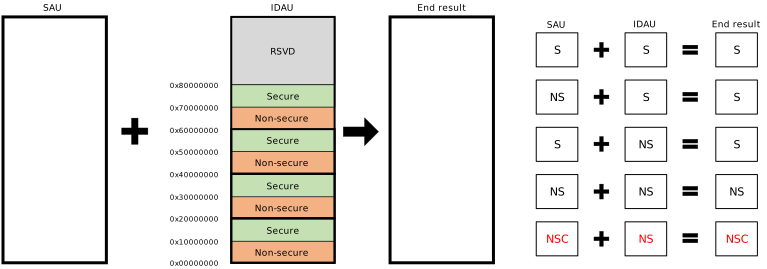
IDAU and SAU Joint Arbitration Rules
Note
At system power-up, SAU defaults the entire address space to secure, so all address accesses during the boot phase are secure.
SAU Configuration File Location
SAU configuration is automatically generated based on the actual memory layout:
The configuration array is located in the
sau_configarray in the chip-specificameba_boot_trustzonecfg.cfile:RTL8721Dx:github source code
RTL8720E:github source code
RTL8726E:github source code
RTL8730E:github source code
RTL8721F:github source code
RTL8720F:github source code
The number of SAU Entries may vary across different chip models
SAU configuration is automatically loaded and executed by the Bootloader during SDK initialization
In most application scenarios, developers do not need to manually modify the SAU configuration. For the default TrustZone layout of different ICs, please refer to RAM Layout and Configuration .
Development Phase: Secure Region Size Configuration
Business Scenario: Secure Firmware Size Expansion Causes Compilation Failure
As the business evolves, customers add a large amount of private key processing logic and core security algorithm code (stored in image3) during development. This often causes linker errors indicating insufficient Secure RAM space during compilation (Linker Error: region is full). In this case, developers need to allocate more memory from the non-secure region quota to the secure region.
Underlying Mechanism and Principle
After TrustZone is enabled, the code, data, and stack of the secure firmware (image3) need to be allocated to the secure memory region. The SDK controls the secure region size through TZ_S_SIZE: it represents the total size of the entire TrustZone (TZ) region, configured via Kconfig (unit: KB), with a default value of 64KB. The TZ region uniformly hosts Secure Gateway Veneers (jump instruction tables), NSC function entities, and core secure code and data.
To ensure MPC works correctly, the TZ region size (i.e. TZ_S_SIZE) must be a multiple of 4KB.
Configuration Method
The specific files and steps to modify for different platforms are as follows:
Configuration Steps
Select Secure Firmware Running Location
Run
ameba.py menuconfig, and navigate to to select the running location of image3。Adjust Secure Area Size
Run
ameba.py menuconfig, and navigate to to configure the secure area size:Configuration
Description
TZ_S_SIZE
Total size of the TrustZone (TZ) region, which uniformly hosts NSC veneers, Entry function bodies, and core secure code/data. Default value is 64KB.
After configuration, ensure that the total secure area size is a multiple of 4KB to meet the MPC 4K alignment requirement.
Configuration Steps
Select Secure Firmware Running Location
Run
ameba.py menuconfig, and navigate to to select the running location of image3。Adjust Secure Area Size
Run
ameba.py menuconfig, and navigate to to configure the secure area size:Configuration
Description
TZ_S_SIZE
Total size of the TrustZone (TZ) region, which uniformly hosts NSC veneers, Entry function bodies, and core secure code/data. Default value is 64KB.
After configuration, ensure that the total secure area size is a multiple of 4KB to meet the MPC 4K alignment requirement.
Configuration Steps
Select Secure Firmware Running Location
Run
ameba.py menuconfig, and navigate to to select the running location of image3。Adjust Secure Area Size
Run
ameba.py menuconfig, and navigate to to configure the secure area size:Configuration
Description
TZ_S_SIZE
Total size of the TrustZone (TZ) region, which uniformly hosts NSC veneers, Entry function bodies, and core secure code/data. Default value is 64KB.
After configuration, ensure that the total secure area size is a multiple of 4KB to meet the MPC 4K alignment requirement.
It is recommended to use Cortex-A Secure Services .
Configuration Steps
Select Secure Firmware Running Location
Run
ameba.py menuconfig, and navigate to to select the running location of image3。Note
When image3 is configured to XIP mode, the entry, NSC gateway veneers (.gnu.sgstubs), text, and rodata sections are all executed in Flash (XIP). Only the data, bss, and sections explicitly marked as SRAM-resident (.sram.only.*, .non.dram.*, etc.) remain in SRAM, saving SRAM space.
Adjust Secure Area Size
Run
ameba.py menuconfig, and navigate to to configure the secure area size:Configuration
Description
TZ_S_SIZE
Total size of the TrustZone (TZ) region, which uniformly hosts NSC veneers, Entry function bodies, and core secure code/data. Default value is 64KB.
The TZ region size (TZ_S_SIZE) must be a multiple of 4KB to meet the MPC 4K alignment requirement.
Configuration Steps
Select Secure Firmware Running Location
Run
ameba.py menuconfig, and navigate to to select the running location of image3。Note
When image3 is configured to XIP mode, the entry, NSC gateway veneers (.gnu.sgstubs), text, and rodata sections are all executed in Flash (XIP). Only the data, bss, and sections explicitly marked as SRAM-resident (.sram.only.*, .non.dram.*, etc.) remain in SRAM, saving SRAM space.
Adjust Secure Area Size
Run
ameba.py menuconfig, and navigate to to configure the secure area size:Configuration
Description
TZ_S_SIZE
Total size of the TrustZone (TZ) region, which uniformly hosts NSC veneers, Entry function bodies, and core secure code/data. Default value is 64KB.
The TZ region size (TZ_S_SIZE) must be a multiple of 4KB to meet the MPC 4K alignment requirement.
Practical Example: ECDSA Secure Signing Service
This section demonstrates a TrustZone application scenario based on the MbedTLS cryptographic library: private key isolation and secure signing service.
The complete project code is located in the {SDK}\example\peripheral\raw\RDP\rdp_ecdsa directory of the SDK.
Business Requirements and Core Challenges
In IoT security, the device’s “private key” is the highest secret. If the digital signature logic runs in the non-secure world (OS side), an attacker who exploits a system vulnerability can easily steal the private key from memory and forge the device identity.
TrustZone Solution: Using the NSC cross-world invocation mechanism, the private key generation, storage, and the entire ECDSA signing algorithm are encapsulated within the Secure World. The Non-Secure World only needs to provide the “data to be signed” and allocate buffers for receiving results. After the Secure World completes the signing, only the “signature result” and “public key” are returned to the Non-Secure World. This way, even if the non-secure side is fully compromised, an attacker still cannot access the actual private key.
Interaction Design and Invocation Flow
To pass multiple parameters (message, signature result buffer, public key buffer, etc.) between the two worlds, the best practice is to define a shared data structure and pass a structure pointer for interaction.
The complete invocation flow is as follows:
Non-Secure Side: Prepare the plaintext message, allocate buffers for the signature result, and pack them into a request structure.
Non-Secure Side: Perform a cross-world call to the NSC API exposed by the Secure Side, passing the structure pointer.
Secure Side: Validate parameters, extract the plaintext, and perform ECDSA signature computation using the isolated and protected private key.
Secure Side: Write the computed signature and public key into the buffers specified by the structure, then return to the Non-Secure Side.
Non-Secure Side: Use the obtained public key and signature to verify the message in the non-secure environment.
Core Code Implementation
1. Define the Shared Data Structure for Cross-World Communication (Header File)
Both sides need a commonly recognized data structure for parameter passing.
/* ecdsa_sign_service.h */
typedef struct {
    const unsigned char *message;       /* [Input] Plaintext message to be signed */
    size_t message_len;                 /* [Input] Message length */
    unsigned char *signature;           /* [Output] Buffer for storing the signature */
    size_t *sig_len;                    /* [Output] Actual generated signature length */
    unsigned char *public_key_raw;      /* [Output] Buffer for storing the public key */
    size_t *pub_key_len;                /* [Output] Actual public key length */
} ecdsa_sign_req_t;
2. NSC Service Wrapper in the Secure World
On the Secure Side, the NSC entry function is decoupled from the actual cryptographic logic. The NSC function is only responsible for parameter validation and request routing.
/* secure_ecdsa_service.c */

/* Internal actual signing function (contains complex MbedTLS logic, not exposed to Non-Secure Side) */
static int ecdsa_do_sign(const unsigned char *message, size_t message_len,
                         unsigned char *signature, size_t *sig_len,
                         unsigned char *public_key_raw, size_t *pub_key_len) {
    /* 1. Initialize MbedTLS context, generate/load protected private key (omitted) */
    /* 2. Compute plaintext hash (omitted) */
    /* 3. Sign using mbedtls_ecdsa_write_signature (omitted) */
    /* 4. Copy signature result and public key back to the memory pointed by input parameters */
    return 0; // Return success
}

/* NSC gateway function exposed to Non-Secure Side */
IMAGE3_ENTRY_SECTION
NS_ENTRY int ecdsa_secure_sign(ecdsa_sign_req_t *req) {
    /* [Critical Step]: Pointer and parameter validity check */
    if (req == NULL || req->message == NULL || req->signature == NULL ||
        req->sig_len == NULL || req->public_key_raw == NULL || req->pub_key_len == NULL) {
        RTK_LOGE(TAG, "Invalid request parameters\n");
        return -1;
    }

    /* After parameter validation passes, delegate the work to the internal secure function */
    return ecdsa_do_sign(req->message, req->message_len,
                         req->signature, req->sig_len,
                         req->public_key_raw, req->pub_key_len);
}
3. Service Invocation from the Non-Secure World
Before invoking the signing service, a task in the Non-Secure World must allocate a sufficiently large secure stack, then assemble the request and call the NSC function.
/* example_rdp_ecdsa.c */

static void ecdsa_tz_demo(void) {
    int ret;
    const char *message = "Hello from Non-Secure World!";
    unsigned char signature[MBEDTLS_ECDSA_MAX_LEN];
    size_t sig_len = 0;
    unsigned char public_key_raw[65];
    size_t pub_key_len = 0;
    ecdsa_sign_req_t req;

    /* 1. [Core] Allocate sufficient secure stack for the current task
     * Cryptographic operations (especially asymmetric encryption) require significant stack space on the Secure Side */
    rtos_create_secure_context(4096);

    /* 2. Assemble the request structure, providing input data and output buffers */
    req.message = (const unsigned char *)message;
    req.message_len = strlen(message);
    req.signature = signature;
    req.sig_len = &sig_len;
    req.public_key_raw = public_key_raw;
    req.pub_key_len = &pub_key_len;

    /* 3. Cross-world call: request the Secure World to perform signing */
    RTK_LOGI(TAG, "Calling secure world for signing...\n");
    ret = ecdsa_secure_sign(&req);
    if (ret != 0) {
        RTK_LOGE(TAG, "Secure signing failed!\n");
        goto end;
    }

    /* 4. After receiving the signature and public key from the Secure World, verify in the Non-Secure Side */
    ret = ecdsa_ns_verify((const unsigned char *)message, strlen(message),
                          signature, sig_len, public_key_raw, pub_key_len);
    if (ret == 0) {
        RTK_LOGI(TAG, "Sign in Secure World, Verify in Non-Secure World: SUCCESS!\n");
    }

end:
    rtos_task_delete(NULL);
}
Caution
Increase secure stack allocation: Since cryptographic libraries such as MbedTLS consume significant stack memory at runtime, the
sizeparameter ofrtos_create_secure_context(size)should be set to 2048 bytes or 4096 bytes before a non-secure task calls complex secure services. Otherwise, a stack overflow on the Secure Side is very likely to occur.Beware of pointer vulnerabilities (Secure pointer validation): In production-grade code, the Secure Side should not only check whether pointers are NULL, but also use hardware-provided address validation mechanisms (such as
cmse_check_address_range) to ensure that pointers passed from the Non-Secure Side actually point to non-secure memory. This prevents attackers from using maliciously crafted pointers to trick the Secure Side into overwriting its own memory data.
Secure World (Image3) Development Constraints
This section lists development constraints that are specific to Image3 (Secure World firmware). These constraints arise from the hardware isolation and register banking design of Armv8-M TrustZone-M and differ fundamentally from assumptions that hold in bare-metal or single-world RTOS development.
Warning
The constraints below are mandatory. Assumptions common in bare-metal or NS RTOS development— such as “disabling interrupts creates a system-wide atomic section” or “standard C library functions are safe to call”—do not hold in the Secure World.
# |
Constraint |
Requirement |
|---|---|---|
1 |
No newlib malloc |
Prefer static allocation; use a security-reviewed Secure allocator with bounds and integrity checks when dynamic allocation is unavoidable; never let NS-supplied parameters drive Secure memory allocation. |
2 |
Banked interrupt-mask registers |
Masking interrupts on the Secure side only affects Secure interrupts and does not block NS scheduling; cross-world mutual exclusion requires combining |
3 |
NS pointer and length validation |
Validate all NS-supplied pointers with check length, alignment, and integer overflow ( |
4 |
C library re-entrancy |
Avoid functions with hidden global state ( use reentrant variants and maintain a Secure-side library allow/deny list. |
5 |
Banked stack and system registers |
|
6 |
FPU context isolation |
Enable clear registers explicitly after sensitive computations. |
7 |
Secure Gateway calling convention |
Declare entries with NS function pointers; clean sensitive register residue before returning to NS; never expose Secure function addresses to the NS world. |
8 |
Debug isolation and Fault attribution |
Disable Secure debug authorization in production images; implement configure |
9 |
No assumption on preemption timing |
Do not design logic that relies on long uninterrupted execution; keep Secure critical sections short and reentrant. |
The following subsections explain the rationale behind each constraint in detail.
No Dynamic Memory Allocation via newlib malloc
newlib’s malloc/free uses a global heap, is non-reentrant, and lacks heap-integrity checks.
A heap corruption event in the Secure World (overflow, dangling pointer) contaminates the Secure
memory layout, breaks asset isolation, and creates an exploitable attack surface.
Requirements
Prefer static allocation (buffers whose size is determined at compile time).
When dynamic allocation is genuinely required, use a security-reviewed dedicated Secure allocator that includes bounds checking and integrity validation.
Never use NS-supplied pointers or lengths to drive Secure-side memory allocation.
Banked Interrupt-Mask Registers
PRIMASK, FAULTMASK, and BASEPRI each have separate Secure and Non-Secure instances on
Armv8-M. Calling __disable_irq() in the Secure World writes only PRIMASK_S and has no
effect on PRIMASK_NS.
Consequences
NS SysTick, PendSV, and other NS interrupts remain active.
The NS RTOS scheduler (PendSV) can trigger task switches during any S→NS boundary crossing.
Disabling interrupts on the Secure side is not equivalent to a system-wide atomic operation.
Requirements
Do not assume that a Secure interrupt-disable creates a system-wide critical section.
Cross-world shared-resource mutual exclusion must combine
AIRCR.PRIS, NVIC target-stateconfiguration, and an explicit synchronization protocol.
NS Pointer and Length Validation
When a Secure Gateway (SG) is invoked from the NS world, the supplied pointer may reference Secure memory or an out-of-bounds address. Using an unvalidated NS-supplied pointer to read or write memory in the Secure World effectively grants the NS world unauthorized access to Secure assets—a confused deputy attack.
Requirements
Validate all NS-supplied pointers using
cmse_check_address_range(backed by the TT/TTAinstructions) to confirm that the target range is NS-accessible.
Check the length for alignment and verify that
ptr + lendoes not wrap around (integeroverflow).
Never trust any boundary information provided by the NS world without independent verification.
/* Validate an NS-supplied buffer before dereferencing it in the Secure World */
if (cmse_check_address_range(buf, len,
        CMSE_NONSECURE | CMSE_MPU_READ) == NULL) {
    return ERR_INVALID_NS_PTR;   /* reject pointers that are invalid or target Secure memory */
}
C Library Re-entrancy
Functions such as strtok, non-thread-local errno, rand, localtime, and the
printf family rely on hidden global or static state. Under S/NS context switches or multiple
re-entry paths within the Secure World, this state can be silently corrupted or leak sensitive data.
Requirements
Use reentrant variants (e.g.,
strtok_r) or write dedicated replacements.Maintain a Secure-side C library allow/deny list and review it when updating the toolchain.
Avoid formatted conversion functions that use hidden internal buffers when processing sensitive data in the Secure World.
Banked Stack Pointers and System Registers
The following resources have independent Secure and Non-Secure instances:
MSP_S / PSP_S,MSPLIM_S / PSPLIM_SCONTROL_S,VTOR_S(vector table base register),SysTick_SCertain
SCBfields (each world maintains its own view)
Requirements
Secure exceptions use the Secure stack; never assume the Secure and NS worlds share a stack or vector table.
Initialize
MSPLIM_S / PSPLIM_Scorrectly to enable hardware Secure stack-overflow detection.Handle the
EXC_RETURNvalue correctly when returning from Secure exceptions to ensure the processor restores the right context.
FPU Context Isolation
If both the Secure and NS worlds use the FPU, residual Secure data remaining in registers S0–S31 and FPSCR after a world switch can be read by NS code, constituting a side-channel information leak.
Requirements
Set
FPCCR.TSandFPCCR.CLRONRETso that FPU registers are automatically cleared on exception return.Explicitly zero FPU registers after security-sensitive floating-point computations.
Secure Gateway Calling Convention
The S↔NS boundary is a primary attack target. Residual values in general-purpose registers and incomplete return paths can expose Secure information to the NS world.
Requirements
Declare Secure entry functions with
__attribute__((cmse_nonsecure_entry))(theNS_ENTRYmacro); the CMSE-capable toolchain then generates the correct SG veneer automatically.Use
cmse_nsfptr_createwhen storing or invoking an NS function pointer; verify that bit[0] is 0 (NS target) before calling.Clear sensitive residue from general-purpose registers before returning to NS. The compiler handles caller-saved registers in CMSE mode; callee-saved registers must be managed explicitly.
Never expose Secure function addresses directly to the NS world.
Debug Isolation and Fault Attribution
Secure debug access can be disabled in production by configuring DAUTHCTRL / DBGEN.
SecureFault, and certain BusFault / HardFault conditions, are routed to and handled by the Secure
World.
Requirements
Disable Secure debug authorization in production images to prevent reading Secure assets through a debug probe.
Configure
AIRCR.BFHFNMINSand related control bits to specify fault attribution clearly.Implement
SecureFault_Handlerin the Secure World to handle Secure faults gracefully.
No Assumption on Preemption Timing
The NS world has its own scheduler and SysTick_NS. Secure execution can be preempted at any
S→NS boundary crossing—compounding the banked interrupt-mask limitation described above.
Requirements
Do not design Secure-side logic that depends on prolonged uninterrupted execution.
Keep Secure critical operations short, reentrant, and free of long critical-section dependencies.
Cortex-A Security Services
In the Ameba multi-core SoC architecture, the Cortex-A (CA32) core runs a macro-kernel OS (such as Linux or a large-scale RTOS) and uses the SMC (Secure Monitor Call) mechanism to trigger CPU privileged exceptions for TrustZone world switching.
This section introduces the SMC secure call mechanism of the Cortex-A core and the implementation of security services within the ATF (Arm Trusted Firmware) framework.
SMC Cross-World Invocation Mechanism
Use Case: Cortex-A Non-Secure World Accessing Secure Resources
Application layers or kernel drivers running in the Cortex-A non-secure world (EL0/EL1) typically cannot directly address memory protected by TrustZone. When they need to perform the following operations, they must cross the hardware isolation boundary:
Key retrieval: Read the device root key stored in OTP/eFuse.
Hardware cryptographic operations: Request the secure world’s Crypto Engine to process sensitive data.
Power and state management: Wake up or suspend CPU cores through the PSCI specification.
To accomplish this, the Arm architecture provides the SMC instruction as the sole “legal standard interface” for the non-secure world to access the secure world.
Mechanism and Principles
The Cortex-A SMC mechanism primarily relies on CPU registers (x0 ~ x7) to pass parameters and return values. The complete execution flow is as follows:
Trigger exception: Non-secure world code executes the
SMCassembly instruction, stores the “Function ID” in thex0register, and places business parameters inx1~x7.Trap into monitor: The CPU immediately triggers a synchronous exception, forcing a switch to the highest EL3 (Secure Monitor level).
Routing and dispatch: ATF (Arm Trusted Firmware) running at EL3 takes over the system, parses the ID in
x0, and routes the request to the Secure Service in BL32 for processing.Process and return: After the secure service completes execution, it writes the results to the
x0~x3registers and uses theERETinstruction to downgrade the CPU and return control to the non-secure world.
ATF and Secure Service Software Framework
ARM Trusted Firmware (ATF) provides a reference implementation of Cortex-A secure world software:
BL1/BL2: Secure boot phase, loads and verifies subsequent firmware
Secure Monitor (BL31): Resident at EL3, handles SMC calls and world switching
Secure Service (BL32): Secure code, hosts user-defined security services (such as key management, cryptographic operations, etc.)
ATF follows the Arm standard interface specifications:
Power State Coordination Interface (PSCI): CPU power management (power on/off, suspend and wake)
SMC Calling Convention (SMCC): Defines the function ID space partitioning and parameter passing rules
Configuration and Code Practice
Based on the ARM SMCC (SMC Calling Convention) specification, the Function IDs for vendor-defined custom services must fall within the 0x8200_0000 ~ 0x8200_FFFF range.
The complete reference project provided by the SDK is located at {SDK}\example\peripheral\raw\CA32Trustzone\.
Step 1: Secure World Reception and Processing (BL32 Secure Service Side)
In the secure world, we need to register a Handler to intercept the corresponding Function ID, process the business logic, and use the SMC_RET macro to write the results back to registers.
/* rtk_svc_setup.c - Runs in secure world (BL32 Secure Service) */

/* Define a custom service ID compliant with the SMCC specification */
#define RTK_SMC_TEST_SERVICE  0x82000001

/* SMC exception handling dispatch center */
static uintptr_t rtk_smc_handler(uint32_t smc_fid,
                                 u_register_t x1, u_register_t x2,
                                 u_register_t x3, u_register_t x4,
                                 void *cookie, void *handle,
                                 u_register_t flags)
{
    uint32_t status = 0;
    uint32_t secure_data = 0;

    switch (smc_fid) {
        case RTK_SMC_TEST_SERVICE:
            /* --- Execute your secure business logic here --- */
            /* Example: perform the corresponding operation based on input parameter x1,
               and produce secure data */
            if (x1 == 0 /* SECURE_REG_READ */) {
                secure_data = 0x5A5A; // Simulate confidential data read from secure memory
                status = 0;           // 0 indicates success
            } else {
                status = -1;          // Failure status
            }

            /* SMC_RET2 macro: store status code in x0(a0), data in x1(a1),
               and return to the non-secure world */
            SMC_RET2(handle, status, secure_data);
            break;

        default:
            /* Reject unknown IDs */
            SMC_RET1(handle, SMC_UNK);
    }
}
Step 2: Non-Secure World Invocation (OS / App Side)
On the non-secure side, simply include the standard arm_smccc_res structure and call the encapsulated arm_smccc_smc interface to trigger the above flow.
/* example_CA32Trustzone.c - Runs in non-secure world (EL0/EL1) */
#include "ameba_soc.h"

/* Standard ARM SMC result structure (mapped to x0~x3 registers) */
struct arm_smccc_res {
    unsigned long a0;  /* Maps to x0: typically used as status code */
    unsigned long a1;  /* Maps to x1: business data 1 */
    unsigned long a2;  /* Maps to x2: business data 2 */
    unsigned long a3;  /* Maps to x3: business data 3 */
};

/* Low-level assembly wrapper interface for triggering SMC */
extern void __arm_smccc_smc(unsigned long a0, unsigned long a1,
                            unsigned long a2, unsigned long a3,
                            unsigned long a4, unsigned long a5,
                            unsigned long a6, unsigned long a7,
                            struct arm_smccc_res *res, void *quirk);
#define arm_smccc_smc(...) __arm_smccc_smc(__VA_ARGS__, NULL)

/* Business-layer invocation example */
static void invoke_secure_test(void)
{
    struct arm_smccc_res res;
    unsigned long cmd = 0; /* SECURE_REG_READ */

    /* Initiate the call:
     * Parameter 1 (a0) = Function ID (0x82000001)
     * Parameter 2 (a1) = cmd (0)
     * Parameter 9      = pointer to the structure for receiving return values */
    arm_smccc_smc(0x82000001, cmd, 0, 0, 0, 0, 0, 0, &res);

    /* Parse the results returned from the secure world */
    if (res.a0 == 0) {
        printf("SMC Call Success! Secure Value: 0x%lx\n", res.a1);
    } else {
        printf("SMC Call Failed! Error code: %lu\n", res.a0);
    }
}
Warning
When the CPU enters monitor mode via SMC, all interrupt requests are masked until the CPU returns to the non-secure state. This means:
During an SMC call, the system cannot respond to any external interrupts (including high-priority interrupts)
Secure service code must execute and return as quickly as possible to avoid prolonged CPU occupation
For scenarios involving large data transfers or time-consuming operations, consider implementing them in the Cortex-M (KM4TZ) Image3 secure world instead, and notify CA32 of completion status through non-secure callbacks, thereby preserving CA32 real-time responsiveness
When adding new services, ensure that the Function ID does not conflict with ATF reserved IDs or other SiP services
References

