Keypad Matrix
Supported ICs[ RTL8721Dx ]
Introduction
As a keyboard scanning device, Keypad Matrix provides freely configurable row and column numbers, supporting up to an 8 x 8 key matrix.
Keypad Matrix supports the following features:
Configurable number of rows and columns to accommodate various keypad sizes
Multi-key detection, allowing up to 6 keys to be pressed simultaneously
Two working modes: event-driven mode and regular scanning mode
Stuck key detection
Low power mode and wakeup functionality
Block Diagram
The block diagram of Keypad Matrix is illustrated in the following figure.
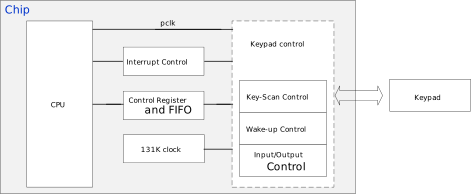
Keypad Matrix contains 5 key components:
Interrupt Control: control and manage interrupts
Registers and FIFO: configure Keypad Matrix parameters and FIFO
Clock: 131KHz clock for key-stuck detection and low-power wake-up
Keypad Control: scanning logic, wakeup control, and input/output control
Keypad: 16 GPIOs for 8x8 array implementation
Keypad
The rows and columns of Keypad Matrix are configurable, with both the maximum number of columns and rows supported up to 8.
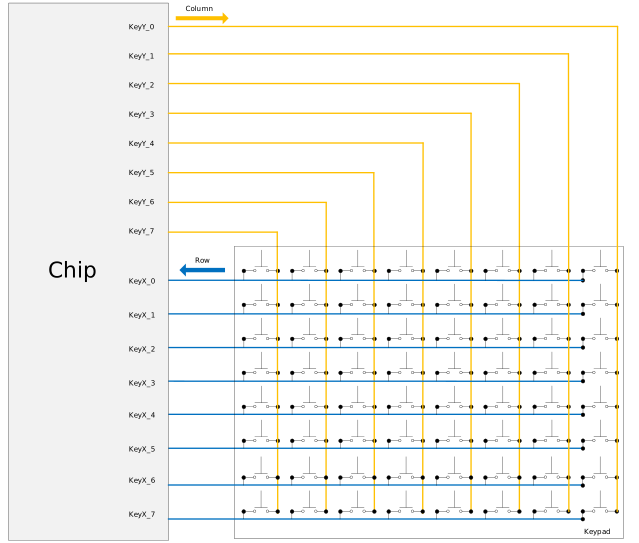
8x8 Key Matrix Configuration
After a key is pressed, the complete scanning process is as follows:
In the initial state, all columns output a low level, and all rows are configured as inputs with internal pull-ups.
When one or more keys are pressed (creating a short circuit between a row and a column), the input level of the corresponding row changes from high to low. This triggers the internal state machine to start the keypad scanning process, in order to determine the row and column of the pressed key(s).
The state machine sets the first column to output low while all other columns are set to high impedance (Hi-Z), then scans all rows to detect which keys are pressed. Next, it sets the second column to output low, with all other columns in Hi-Z, and repeats this process until all columns have been scanned.
After two complete scans of the entire key matrix, the pressed keys are finally confirmed.
When all keys are released, Keypad Matrix still performs two full scans of the matrix. Once it confirms that no key is pressed, the scanning ends and the state machine stops.
The following figure illustrates the scan timing sequence after a key is pressed on a 2 x 2 keypad.
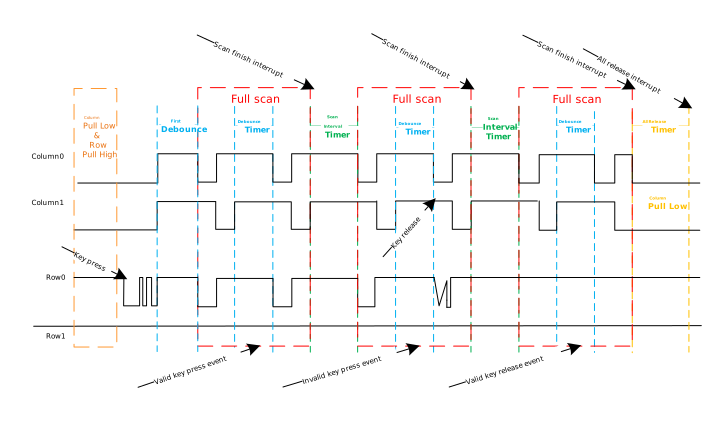
Keypad Scan Timing
There are three configurable timers used in the keypad scanning process:
Debounce Timer: Two consecutive full keypad scans constitute one complete scan cycle; a debounce timer runs between these two keypad scans. Additionally, there is an extra debounce timing before the first full keypad scan.
Scan Interval Timer: There is a waiting period defined by the scan interval timer between two consecutive complete scan cycles.
All Keys Released Timer: When all keys are released, Keypad Matrix will still perform a complete scan cycle (two rounds of full keypad scans). Once scanning confirms that no keys are pressed, the release timer starts. After this timer expires, the state machine will stop.
Work Mode
Keypad Matrix contains two work modes: Event Trigger Mode and Regular Scan Mode.
Work mode |
Description |
|---|---|
Event Trigger |
A key press/release event is stored in the FIFO only once during each key press/release operation |
Regular Scan |
At each complete scan cycle, any key press event is stored in the FIFO until the key is released. |
The following figure shows the difference in FIFO items between Event Trigger Mode and Regular Scan Mode during a key press and release.
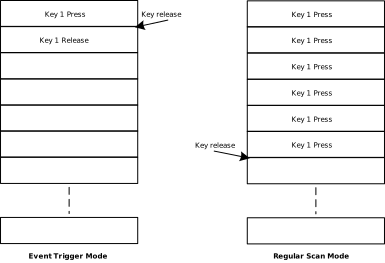
In most cases, the event-driven mode is more commonly used. In this mode, continuous scanning is not required; the key matrix is only scanned when a key state change is detected.
FIFO Mechanism
The FIFO of Keypad Matrix has a depth of 16 and an entry width of 12 bits. The FIFO structure of Keypad Matrix is illustrated below.

Bit |
Indication |
Description |
|---|---|---|
[8] |
Event |
|
[7:4] |
Row index |
|
[3:0] |
Column index |
|
Key Stuck Detection
In actual use, key sticking may occur. If a key is not released in time, the Keypad Matrix state machine will continue to scan and cannot enter the IDLE state.
To address this issue, Keypad Matrix supports automatic detection of stuck keys.
Stuck Key Detection: When this feature is enabled, if the duration of a key press exceeds the configured threshold, the key will be considered a stuck key and a stuck key interrupt will be triggered. Users can mask the row of the stuck key in the stuck key interrupt handler.
Stuck Key Masking: The status of stuck keys can be obtained by reading the stuck key status register. By setting the default state of the row containing the stuck key, when Keypad Matrix scans this row, it will consider that no keys are pressed in that row, allowing the system to smoothly enter the IDLE state.
Stuck Key UnMask: There are two methods:
Once the stuck key is released, a stuck key interrupt will be triggered. Users can unmask the stuck key’s row in this interrupt handler.
When a key in a non-stuck row is pressed, the scan state machine is triggered and a scan interrupt is generated. Users can unmask the stuck key’s row in the interrupt handler.
Note
After a stuck key is masked:
Pressing other keys in the same row as the stuck key will not trigger the Keypad Matrix scan state machine.
Only keys in the row of non-stuck keys can trigger the Keypad Matrix scan state machine. After the scan state machine is awakened, if the mask state on the stuck key’s row has not been cleared, other keys in that row still cannot be recognized, while keys in non-stuck rows are recognized normally.
Usage
Normal Operation
To use Keypad Matrix in either Event Trigger Mode or Regular Scan Mode, perform the following steps:
Configure the pin multiplexing for Keypad Matrix keypads.
Set the column pins to no pull and configure the column pin multiplexing function.
PAD_PullCtrl(pad_colx, GPIO_PuPd_NOPULL);
Pinmux_Config(pad_colx, PINMUX_FUNCTION_KEY_COLx);
Set the row pins to pull-up and configure the row pin multiplexing function.
PAD_PullCtrl(pad_rowx, GPIO_PuPd_UP);
Pinmux_Config(pad_rowx, PINMUX_FUNCTION_KEY_ROWx);
Initialize Keypad Matrix parameters.
Select the number of key rows and columns (one bit corresponds to one row or column) according to keypads, and set work mode to Event Trigger Mode or Regular Scan Mode, etc.
Event Trigger Mode:KeyScan_StructInit(&KeyScan_InitStruct); KeyScan_InitStruct.KS_ColSel = 0xFF; //8 columns KeyScan_InitStruct.KS_RowSel = 0xFF; //8 rows KeyScan_InitStruct.KS_WorkMode = KS_EVENT_TRIGGER_MODE; KeyScan_Init(KeyScan, &KeyScan_InitStruct);
Regular Scan Mode:KeyScan_StructInit(&KeyScan_InitStruct); KeyScan_InitStruct.KS_ColSel = 0xFF; //8 columns KeyScan_InitStruct.KS_RowSel = 0xFF; //8 rows KeyScan_InitStruct.KS_WorkMode = KS_REGULAR_SCAN_MODE; KeyScan_Init(KeyScan, &KeyScan_InitStruct);
Enable Keypad Matrix interrupt and register Keypad Matrix interrupt handler.
Enable Keypad Matrix.
KeyScan_Cmd(KeyScan, ENABLE);
Wait for the Keypad Matrix interrupt and handle items.
Key Stuck Handling
When a stuck key occurs, perform the following steps:
Configure the pin multiplexing for Keypad Matrix keypads.
Set the column pins to no pull and configure the column pin multiplexing function.
PAD_PullCtrl(pad_colx, GPIO_PuPd_NOPULL);
Pinmux_Config(pad_colx, PINMUX_FUNCTION_KEY_COLx);
Set the row pins to pull-up and configure the row pin multiplexing function.
PAD_PullCtrl(pad_rowx, GPIO_PuPd_UP);
Pinmux_Config(pad_rowx, PINMUX_FUNCTION_KEY_ROWx);
Initialize Keypad Matrix parameters.
Select the number of key rows and columns (one bit corresponds to one row or column) according to keypads, and set work mode to Regular Scan Mode, etc.
KeyScan_StructInit(&KeyScan_InitStruct);
KeyScan_InitStruct.KS_ColSel = 0xFF;  //8 columns
KeyScan_InitStruct.KS_RowSel = 0xFF;  //8 rows
KeyScan_Init(KeyScan, &KeyScan_InitStruct);
Enable the Keypad Matrix stuck key auto-detection function.
KeyScan_StuckAutoCmd(KeyScan, ENABLE);
Set the stuck time threshold and configure the stuck row detection time and interval.
KeyScan_SetStuckThreshold(KeyScan, 10);  //stuck time threshold: 10ms
KeyScan_StuckPeriodicalPull(KeyScan,2000,4000);//pull time:2000us, no pull time:4000us
Enable the Keypad Matrix stuck key and all default interrupts, and register the Keypad Matrix interrupt handler.
Enable Keypad Matrix.
KeyScan_Cmd(KeyScan, ENABLE);
Wait for the Keypad Matrix interrupt and handle it.
In the stuck key event interrupt, get the row status, set the default row status to indicate the stuck row, and mask all keys in the stuck row.
row_status = KeyScan_GetStuckRow(KeyScan);
KeyScan_SetStuckRow(KeyScan, row_status);
In all default interrupts, reset the row default status to its initial value, disable all default interrupts, enable the scan event interrupt and the all-release interrupt. Then, other keys except the stuck key can work normally.
KeyScan_INTConfig(KeyScan, KS_BIT_ALL_DEFAULT_INT_MASK, DISABLE);
KeyScan_SetStuckRow(KeyScan, 0);
KeyScan_INTConfig(KeyScan, KS_BIT_ALL_RELEASE_INT_MASK | KS_BIT_SCAN_EVENT_INT_MASK, ENABLE);
Pressing or releasing keys other than the stuck key will generate the corresponding interrupts normally.
Raw API
KSCAN Exported Types
-
struct KeyScan_InitTypeDef
KSCAN Init structure definition.
Public Members
-
u32 KS_ClkDiv
Specifies KeyScan clock divider. Scan_clk = Bus clock/(KS_ClkDiv+1). This parameter must be set to a value in the 0x0-0xfff range.
-
u32 KS_WorkMode
Specifies the KeyScan operating mode. This parameter can be a value of KSCAN Work Mode Definitions
-
u32 KS_RowSel
Specifies which rows are active. This parameter must be set to a value in the 0x1-0xff range.
-
u32 KS_ColSel
Specifies which columns are active. This parameter must be set to a value in the 0x1-0xff range.
-
u32 KS_DebounceCnt
Specifies the debounce counter value. Debounce timer = (KS_DebounceCnt + 1) * Scan_clk. This parameter must be set to a value in the 0x0-0xfff range.
-
u32 KS_IntervalCnt
Specifies the scan interval counter value. Interval timer = (KS_IntervalCnt + 1) * Scan_clk. This parameter must be set to a value in the 0x0-0xfff range.
-
u32 KS_ReleaseCnt
Specifies the all-release counter value. Release timer = (KS_ReleaseCnt + 1) * Scan_clk. This parameter must be set to a value in the 0x0-0xfff range.
-
u32 KS_LimitLevel
Specifies the maximum number of keys that can be pressed simultaneously. This parameter can be a value of KSCAN FIFO Limit Level Control
-
u32 KS_ThreholdLevel
Specifies the KeyScan FIFO threshold level for the KS_FIFO_FULL interrupt. This parameter can be a value of KSCAN FIFO Threshold Level Control
-
u32 KS_OverCtrl
Specifies KeyScan FIFO over control. This parameter can be a value of KSCAN FIFO Overflow Control
-
u32 KS_ClkDiv
KSCAN Exported Constants
KSCAN All Interrupt Clear
/* Clear bits for all KSCAN interrupts. */
#define KS_BIT_ALL_INT_CLR (KS_BIT_ALL_DEFAULT_INT_CLR | \
    KS_BIT_STUCK_INT_CLR | \
    KS_BIT_FIFO_LIMIT_INT_CLR | \
    KS_BIT_FIFO_OV_INT_CLR | \
    KS_BIT_SCAN_FINISH_INT_CLR | \
    KS_BIT_ALL_RELEASE_INT_CLR)
KSCAN All Interrupt Mask
/* Mask bits for all KSCAN interrupts. */
#define KS_BIT_ALL_INT_MSK (KS_BIT_ALL_DEFAULT_INT_MASK | \
    KS_BIT_STUCK_EVENT_INT_MASK | \
    KS_BIT_SCAN_EVENT_INT_MASK | \
    KS_BIT_FIFO_LIMIT_INT_MASK | \
    KS_BIT_FIFO_OV_INT_MASK | \
    KS_BIT_FIFO_FULL_INT_MASK | \
    KS_BIT_SCAN_FINISH_INT_MASK | \
    KS_BIT_FIFO_NOTEMPTY_INT_MASK | \
    KS_BIT_ALL_RELEASE_INT_MASK)
KSCAN FIFO Limit Level Control
/* Check if FIFO limit level value is valid. */
#define IS_KS_FIFO_LIMIT_LEVEL ((DATA_NUM) <= 6)
KSCAN FIFO Overflow Control
/* Reject new data when FIFO full. */
#define KS_FIFO_OVER_CTRL_DIS_NEW ((u32)0x00000000)

/* Discard oldest data when FIFO full. */
#define KS_FIFO_OVER_CTRL_DIS_LAST ((u32)0x00000001)

/* Check if FIFO overflow control value is valid. */
#define IS_KS_FIFO_OVER_CTRL (((CTRL) == KS_FIFO_OVER_CTRL_DIS_NEW) || \
    ((CTRL) == KS_FIFO_OVER_CTRL_DIS_LAST))
KSCAN FIFO Threshold Level Control
/* Check if FIFO threshold level value is valid. */
#define IS_KS_FIFO_TH_LEVEL (((DATA_NUM) > 0) && ((DATA_NUM) < 16))
KSCAN Peripheral Definitions
/* Check if KSCAN peripheral is valid. */
#define IS_KEYSCAN_ALL_PERIPH ((PERIPH) == KEYSCAN_DEV || (PERIPH) == KEYSCAN_DEV_S)
KSCAN Work Mode Definitions
/* Regular scan mode selection. */
#define KS_REGULAR_SCAN_MODE ((u32)0x00000000)

/* Event trigger mode selection. */
#define KS_EVENT_TRIGGER_MODE ((u32)0x00000001)

/* Check if KSCAN work mode is valid. */
#define IS_KS_WORK_MODE (((MODE) == KS_REGULAR_SCAN_MODE) || \
    ((MODE) == KS_EVENT_TRIGGER_MODE))
KSCAN Exported Functions
-
void KeyScan_ClearFIFOData(KSCAN_TypeDef *KeyScan)
Clear the FIFO data.
- Parameters:
KeyScan – selected KeyScan peripheral.
-
void KeyScan_ClearINT(KSCAN_TypeDef *KeyScan, u32 KeyScan_IT)
Clear the specified KeyScan interrupt pending bits.
- Parameters:
KeyScan – selected KeyScan peripheral.
KeyScan_IT –
specifies the KeyScan interrupt to be cleared. This parameter can be one or combinations of the following values:
KS_BIT_ALL_DEFAULT_INT_CLR: all default flag
KS_BIT_STUCK_INT_CLR: Stuck event interrupt flag
KS_BIT_FIFO_LIMIT_INT_CLR: FIFO limit interrupt flag
KS_BIT_FIFO_OV_INT_CLR: FIFO overflow interrupt flag
KS_BIT_SCAN_FINISH_INT_CLR: Scan finish interrupt flag
KS_BIT_ALL_RELEASE_INT_CLR: All Release interrupt flag
Note
KS_BIT_SCAN_EVENT_INT_STATUS is automatically cleared by hardware when the data is read.
KS_BIT_FIFO_FULL_INT_STATUS is automatically cleared by hardware when the buffer level goes below the KS_FIFO_TH_LEVEL threshold.
KS_BIT_FIFO_NOTEMPTY_INT_STATUS is automatically cleared by hardware when the FIFO is empty.
-
void KeyScan_Cmd(KSCAN_TypeDef *KeyScan, u8 NewState)
Enable or disable the specified KeyScan peripheral.
- Parameters:
KeyScan – selected KeyScan peripheral.
NewState – new state of the KeyScan peripheral. This parameter can be: ENABLE or DISABLE.
-
u8 KeyScan_GetDataNum(KSCAN_TypeDef *KeyScan)
Get the number of entries in the KeyScan FIFO.
- Parameters:
KeyScan – selected KeyScan peripheral.
- Returns:
Number of entries currently in the KeyScan FIFO.
-
bool KeyScan_GetFIFOState(KSCAN_TypeDef *KeyScan, u32 KeyScan_Flag)
Get the status of the KeyScan FIFO.
- Parameters:
KeyScan – selected KeyScan peripheral.
KeyScan_Flag –
specifies the flag to check. This parameter can be one of the following values:
KS_BIT_FIFO_FULL
KS_BIT_FIFO_EMPTY
- Returns:
The new state of the specified flag:
TRUE: flag is set
FALSE: flag is not set
-
u32 KeyScan_GetINT(KSCAN_TypeDef *KeyScan)
Get KeyScan interrupt status.
- Parameters:
KeyScan – selected KeyScan peripheral.
- Returns:
Interrupt status.
-
u32 KeyScan_GetRawINT(KSCAN_TypeDef *KeyScan)
Get KeyScan Raw Interrupt Status.
- Parameters:
KeyScan – selected KeyScan peripheral.
- Returns:
Raw interrupt status.
-
u32 KeyScan_GetStuckRow(KSCAN_TypeDef *KeyScan)
Get the stuck-row default status.
- Parameters:
KeyScan – selected KeyScan peripheral.
- Returns:
Default status of row0 to row7:
1: row stuck
0: row not stuck
-
void KeyScan_INTConfig(KSCAN_TypeDef *KeyScan, u32 KeyScan_IT, u8 newState)
Enable or disable the specified KeyScan interrupt sources.
- Parameters:
KeyScan – selected KeyScan peripheral.
KeyScan_IT –
specifies the KeyScan interrupt sources to be enabled or masked. This parameter can be one or combinations of the following values:
KS_BIT_ALL_DEFAULT_INT_MASK: Unmask all default interrupt
KS_BIT_STUCK_EVENT_INT_MASK: Unmask Stuck event interrupt
KS_BIT_SCAN_EVENT_INT_MASK: Unmask Scan event interrupt
KS_BIT_FIFO_LIMIT_INT_MASK: Unmask FIFO limit interrupt
KS_BIT_FIFO_OV_INT_MASK: Unmask FIFO overflow interrupt
KS_BIT_FIFO_FULL_INT_MASK: Unmask FIFO full interrupt
KS_BIT_SCAN_FINISH_INT_MASK: Unmask scan finish interrupt
KS_BIT_FIFO_NOTEMPTY_INT_MASK: Unmask FIFO nonempty interrupt
KS_BIT_ALL_RELEASE_INT_MASK: Unmask All Release interrupt
newState – new state of the specified KeyScan interrupt sources. This parameter can be: ENABLE or DISABLE.
-
void KeyScan_Init(KSCAN_TypeDef *KeyScan, KeyScan_InitTypeDef *KeyScan_InitStruct)
Initialize the KeyScan peripheral according to the specified parameters in the KeyScan_InitStruct.
- Parameters:
KeyScan – selected KeyScan peripheral.
KeyScan_InitStruct – pointer to a KeyScan_InitTypeDef structure that contains the configuration information for the specified KeyScan peripheral.
-
void KeyScan_Read(KSCAN_TypeDef *KeyScan, u32 *outBuf, u8 count)
Read data from KeyScan FIFO.
- Parameters:
KeyScan – selected KeyScan peripheral.
outBuf – buffer to save data read from KeyScan FIFO.
count – number of entries to read.
-
void KeyScan_SetColRow(KSCAN_TypeDef *KeyScan, u32 column_sel, u32 row_sel)
Set the active columns and rows for KeyScan.
- Parameters:
KeyScan – selected KeyScan peripheral.
column_sel – Specifies which columns are active. This parameter must be set to a value in the 0x1-0xff range.
row_sel – Specifies which rows are active. This parameter must be set to a value in the 0x1-0xff range.
-
void KeyScan_SetStuckRow(KSCAN_TypeDef *KeyScan, u32 Status)
Set the stuck-row default status.
- Parameters:
KeyScan – selected KeyScan peripheral.
Status – row default status. one bit one row, bit 0 means row0, bit 7 means row7. 1: row stuck 0: row not stuck
-
void KeyScan_SetStuckThreshold(KSCAN_TypeDef *KeyScan, u32 ThresholdMs)
Set the stuck key detection time threshold.
- Parameters:
KeyScan – selected KeyScan peripheral.
ThresholdMs – stuck key detection time threshold in milliseconds. ThresholdMs = (Threshold +1)* Scan_clk(ms). Threshold must be set to a value in the 0x0-0x7fffffff range.
-
void KeyScan_StructInit(KeyScan_InitTypeDef *KeyScan_InitStruct)
Fill each KeyScan_InitStruct member with its default value.
- Parameters:
KeyScan_InitStruct – pointer to an KeyScan_InitTypeDef structure which will be initialized.
-
void KeyScan_StuckAutoCmd(KSCAN_TypeDef *KeyScan, u8 NewState)
Enable or disable the KeyScan stuck auto check function.
- Parameters:
KeyScan – selected KeyScan peripheral.
NewState – new state of the KeyScan stuck auto check function. This parameter can be: ENABLE or DISABLE.
-
void KeyScan_StuckPeriodicalPull(KSCAN_TypeDef *KeyScan, u32 PullUpUs, u32 NoPullUs)
Set the stuck-row periodic detection timing.
- Parameters:
KeyScan – selected KeyScan peripheral.
PullUpUs – stuck-row detection pull-up time in microseconds. PullUpUs = (PullUpCnt +1)* clk_131k(us), max value is 15625us. PullUpCnt must be set to a value in the 0x0-0x7ff range.
NoPullUs – stuck-row detection no-pull time in microseconds. When NoPullUs is 0, disable stuck-row detection. When NoPullUs is not 0, NoPullUs = (NoPullCnt +1)* clk_131k(us), max value is 31250us. NoPullUs can be set to a value in the 0x0-0xfff range.