Audio Device Solution
Overview
USB Audio Class (UAC) protocol defines the standard interface and functional control specifications for USB audio devices (such as USB headphones, microphones, sound cards, and other audio interface devices).
Ameba, based on the official UAC protocol standards released by USB-IF, implements comprehensive USB audio device functionality, capable of providing the system with convenient and high-quality audio data transmission capabilities.
Features
Supports USB hot-plug
Supports fully customizable descriptors
Supports volume/mute control
Supports full-duplex audio data transmission.
Supports configuring parameters such as speed mode
Application Scenarios
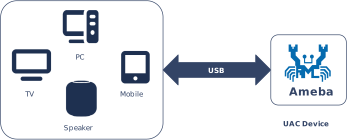
As a standard USB audio device, Ameba establishes a full-duplex, high-speed data link with host systems. It manages real-time audio playback and microphone record while acting as a wireless protocol gateway. By bridging USB audio streams to Wi-Fi or Bluetooth modules, Ameba supports diverse use cases. For example,
Wi-Fi Wireless Multi-channel Audio System: Ameba acts as a USB audio receiver, obtaining multi-channel audio data from a host device (e.g., TV/PC), and multicasts or unicasts it via Wi-Fi to multiple subordinate playback devices. Each playback device parses and plays the audio stream of a designated channel, collectively building a wireless surround sound system.
Bluetooth Audio Transmitter (Dongle): Ameba serves as a USB sound card plugged into a PC, acquires the audio data being played by the system, and forwards the audio stream to Bluetooth headphones or speakers via its onboard Bluetooth protocol stack.
Smart home voice terminals: Processes USB audio commands and local microphone array data simultaneously, ideal for high-fidelity smart speakers and professional conferencing systems.
Supported Audio Formats
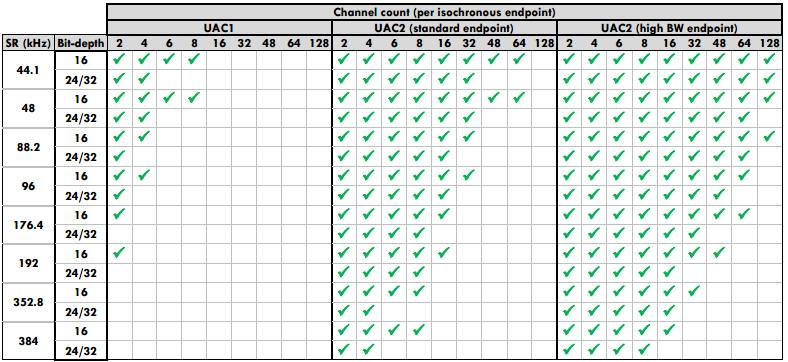
Different UAC protocol versions (1.0/2.0) have differences in audio format support. A specific overview is shown in the figure below:
Protocol Stack Support Details
The Ameba USB protocol stack provides a complete UAC device class driver, supporting various mainstream audio formats and sample rates. The specific supported features and parameters are as follows:
UAC 2.0 (High/Full-Speed) class driver, speaker-only, supports following configurable audio parameters:
Sample Rate |
Bit-depth |
Channel Count |
|||
|---|---|---|---|---|---|
2 |
4 |
6 |
8 |
||
44.1 |
16 |
Y |
Y |
Y |
Y |
24/32 |
Y |
Y |
Y |
Y |
|
48 |
16 |
Y |
Y |
Y |
Y |
24/32 |
Y |
Y |
Y |
Y |
|
96 |
16 |
Y |
Y |
||
24/32 |
Y |
Y |
|||
192 |
16 |
Y |
|||
24/32 |
Y |
||||
Supports volume/mute control
Fully customizable descriptors
Supports full-duplex audio data transmission.
Supports hot-plug
Support speed mode configuration
Note
USB core driver doesn’t support UAC 2.0 high-bandwidth endpoints, max one isochronous OUT transfer per microframe is allowed.
The supported audio formats depend on the whole path of UAC host/device and hardware/software frameworks
UAC 1.0 (Full-Speed) class driver, speaker-only, supports following configurable audio parameters:
Sample Rate (kHz) |
Bit-depth |
Channel Count |
|||
|---|---|---|---|---|---|
2 |
4 |
6 |
8 |
||
44.1 |
16 |
Y |
Y |
Y |
Y |
24/32 |
Y |
Y |
|||
48 |
16 |
Y |
Y |
Y |
Y |
24/32 |
Y |
Y |
|||
96 |
16 |
Y |
Y |
||
24/32 |
Y |
||||
192 |
16 |
Y |
|||
24/32 |
|||||
Supports volume/mute control
Fully customizable descriptors
Supports hot-plug
Support speed mode configuration
Note
The supported audio formats depend on the whole path of UAC host/device and hardware/software frameworks
Protocol Introduction
UAC (USB Audio Class) is a universal audio device class standard defined by USB-IF, aimed at standardizing the encapsulation and transmission of digital audio data streams over USB interfaces. USB audio devices (such as USB speakers, headphones, and microphones) can be automatically recognized as standard audio input/output terminals in the host system through standard interfaces for data transmission and function control, without the need to install proprietary drivers.
Version Comparison
USB-IF has officially released multiple versions of the UAC protocol. The download links for the specification documents of the mainstream versions are shown in the table below:
Version |
Specification Document |
|---|---|
1.0 |
|
2.0 |
Terminology Definitions
The following table defines common technical terms related to UAC used in this document:
Term |
Description |
|---|---|
AC Interface (Audio Control Interface) |
Responsible for managing the topology of the audio device (e.g., Input/Output Terminals, Feature Units) and issuing control commands (such as volume adjustment and mute) via the Control Endpoint. |
AS Interface (Audio Streaming Interface) |
Responsible for the actual transmission of audio payload data, typically using Isochronous endpoints. An AS Interface can contain multiple Alternate Settings, each corresponding to different sample rates, bit depths, or channel configurations. |
Terminal Type |
Identifies the physical or logical attributes of an audio signal source or sink (e.g., USB Streaming Terminal represents a USB data stream, Speaker Terminal represents a physical speaker). |
Feature Unit |
A processing node within the audio topology that provides specific audio control capabilities (e.g., master volume adjustment, channel gain, mute control). |
Sample Rate / Bit Resolution |
Core parameters of the audio format. Common combinations in UAC 1.0 include 48 kHz / 16-bit, 44.1 kHz / 16-bit, etc. |
Definitions of common audio technology terms used in this document are as follows:
Terms |
Introduction |
|---|---|
PCM |
Pulse Code Modulation, audio data is a raw stream. |
Channel |
A channel sound is an independent audio signal captured or played in different positions, so the number of channels is the number of sound sources. |
Bit Depth |
Bit depth represents the bits effectively used in the process of audio signals. Sampling depth shows the resolution of the sound. The larger the value, the higher the resolution. |
Sample rate |
The audio sampling rate refers to the number of frames that the signal is sampled per second. The higher the sampling frequency, the higher quality the sound will be. |
Protocol Framework
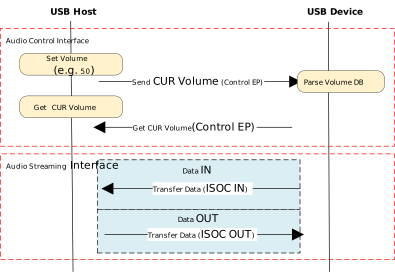
The UAC system architecture supports audio data transmission and control by defining different interface sets. Logically, UAC device interfaces are primarily divided into two major categories: Audio Control Interface and Audio Streaming Interface.
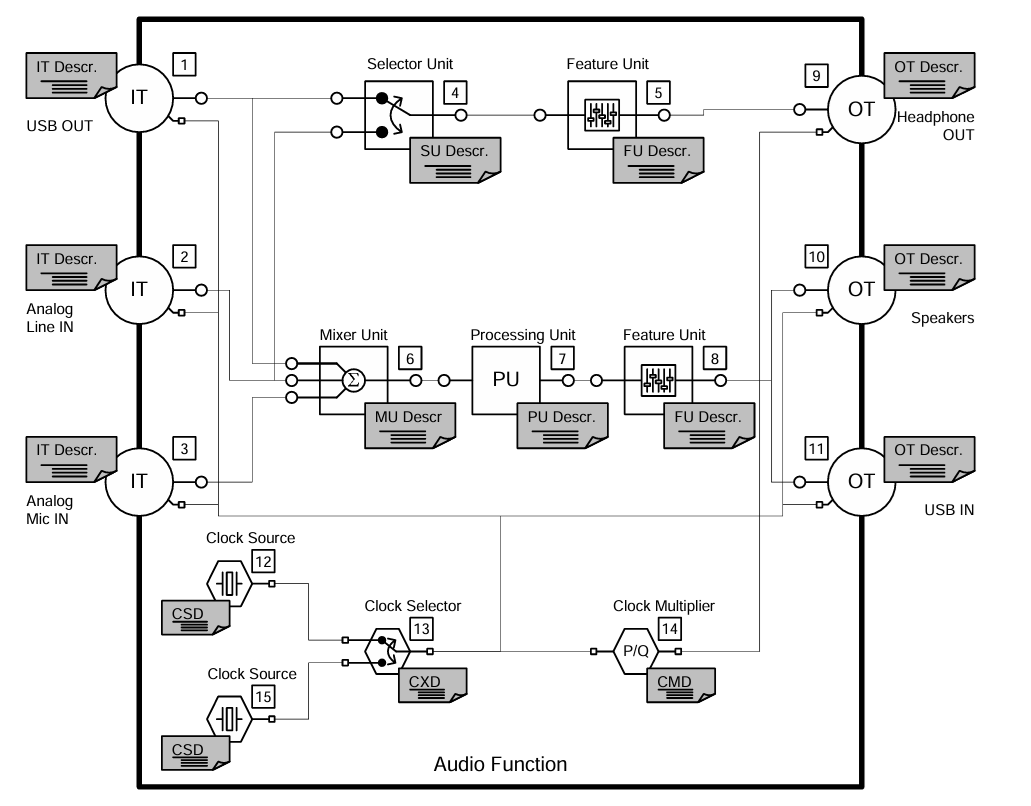
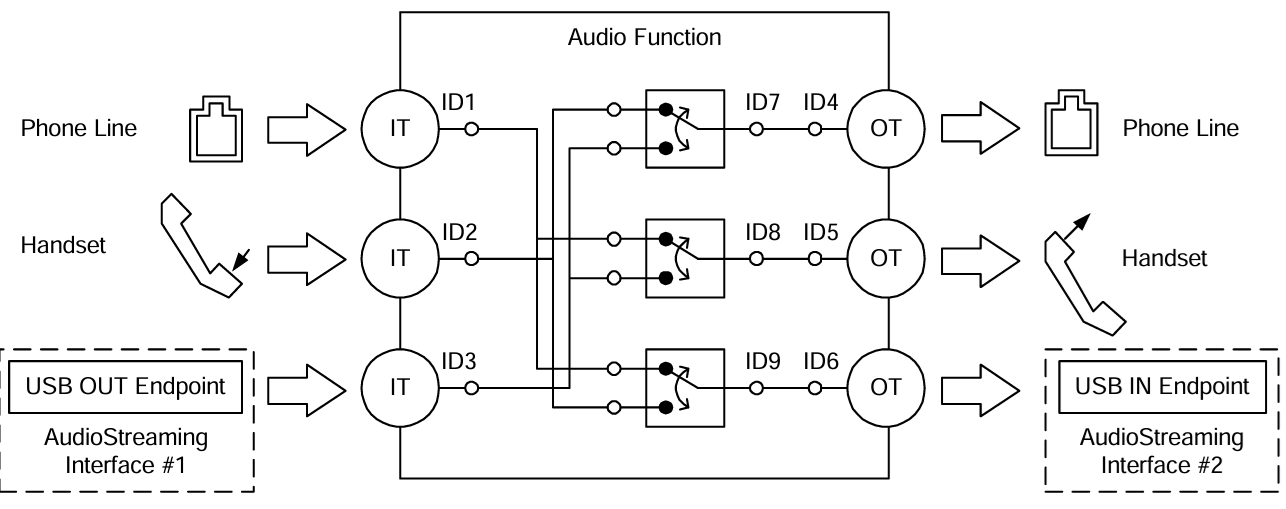
Audio Control (AC) Interface:
Responsible for managing the overall functional behavior of the audio device, such as volume adjustment, mute control, input source selection, etc.
An AC interface contains a defined internal topology that describes the flow and processing of audio signals from the Input Terminal to the Output Terminal.
Audio Streaming (AS) Interface:
Responsible for transmitting the actual audio payload data.
A UAC device can contain multiple AS interfaces, each configurable to transmit audio data with different formats, sampling rates, or bit depths.
Protocol Interaction Example:
Descriptor Structure
In addition to adhering to standard USB descriptors (such as Device Descriptor, Configuration Descriptor, Endpoint Descriptor), UAC devices also define Class-Specific Descriptors. These descriptors are categorized based on their associated interface into Class-Specific Control Interface Descriptors and Class-Specific Audio Streaming Interface Descriptors.
There are differences in descriptor definitions between different protocol versions:
Descriptor Topology
Device Descriptor
└── Identifies basic device information (USB Version 2.00)

Configuration Descriptor
├── Contains total length of the entire configuration, power supply information, etc.
│
├── Interface Association Descriptor (IAD)
│       └── Binds audio control and streaming interfaces into a single functional unit
│
├── Audio Control (AC) Interface Descriptor (Interface 0)
│       ├── Standard Interface Descriptor (Interface 0, Control Class)
│       └── Class-Specific Descriptor Collection
│               ├── Audio Control Interface Header (declares UAC version)
│               ├── Clock Source (internal clock or external clock)
│               ├── Clock Source (internal clock or external clock)
│               ├── Input Terminal (source of audio stream)
│               ├── Feature Unit (volume/mute controls, etc.)
│               ├── Output Terminal (destination of audio stream)
│               ├── Input Terminal (source of audio stream)
│               ├── Feature Unit (volume/mute controls, etc.)
│               └── Output Terminal (destination of audio stream)
│
├── Audio Streaming (AS) Interface Descriptor (Interface 1)
│       ├── Alternate Setting 0: Control transfer active state (control transfer only)
│       │
│       ├── Alternate Setting 1: Data transfer active state (with data endpoint)
│       │ ├── Standard Interface Descriptor (Interface 1, Streaming Class)
│       │ ├── Class-Specific AS Interface (associated USB streaming terminal, audio format, number of channels)
│       │ ├── Format Descriptor (audio format and bit width)
│       │ ├── Standard Endpoint Descriptor (ISO OUT endpoint)
│       │ └── Class-Specific Endpoint Descriptor (no special control)
│       │
│       ├── Alternate Setting 2
│       │ ...... Can configure multiple different setting as needed
│
└── Audio Streaming (AS) Interface Descriptor (Interface 2)
        ├── Alternate Setting 0: Control transfer active state (control transfer only)
        │
        ├── Alternate Setting 1: Data transfer active state (with data endpoint)
        │ ├── Standard Interface Descriptor (Interface 2, Streaming Class)
        │ ├── Class-Specific AS Interface (associated USB streaming terminal, audio format, number of channels)
        │ ├── Format Descriptor (audio format and bit width)
        │ ├── Standard Endpoint Descriptor (ISO IN endpoint)
        │ └── Class-Specific Endpoint Descriptor (no special control)
        │
        ├── Alternate Setting 2
        │ ...... Can configure multiple different setting as needed

Device Qualifier Descriptor
└── Device information while running in another speed mode

Other Speed Configuration Descriptor
├── Configuration information while running in another speed mode.
│
├── Interface Association Descriptor (IAD)
│       └── Binds audio control and streaming interfaces into a single functional unit
│
├── Audio Control (AC) Interface Descriptor (Interface 0)
│       ├── Standard Interface Descriptor (Interface 0, Control Class)
│       └── Class-Specific Descriptor Collection
│               ├── Audio Control Interface Header (declares UAC version)
│               ├── Clock Source (internal clock or external clock)
│               ├── Clock Source (internal clock or external clock)
│               ├── Input Terminal (source of audio stream)
│               ├── Feature Unit (volume/mute controls, etc.)
│               ├── Output Terminal (destination of audio stream)
│               ├── Input Terminal (source of audio stream)
│               ├── Feature Unit (volume/mute controls, etc.)
│               └── Output Terminal (destination of audio stream)
│
├── Audio Streaming (AS) Interface Descriptor (Interface 1)
│       ├── Alternate Setting 0: Control transfer active state (control transfer only)
│       │
│       ├── Alternate Setting 1: Data transfer active state (with data endpoint)
│       │ ├── Standard Interface Descriptor (Interface 1, Streaming Class)
│       │ ├── Class-Specific AS Interface (associated USB streaming terminal, audio format, number of channels)
│       │ ├── Format Descriptor (audio format and bit width)
│       │ ├── Standard Endpoint Descriptor (ISO OUT endpoint)
│       │ └── Class-Specific Endpoint Descriptor (no special control)
│       │
│       ├── Alternate Setting 2
│       │ ...... Can configure multiple different setting as needed
│
└── Audio Streaming (AS) Interface Descriptor (Interface 2)
        ├── Alternate Setting 0: Control transfer active state (control transfer only)
        │
        ├── Alternate Setting 1: Data transfer active state (with data endpoint)
        │ ├── Standard Interface Descriptor (Interface 2, Streaming Class)
        │ ├── Class-Specific AS Interface (associated USB streaming terminal, audio format, number of channels)
        │ ├── Format Descriptor (audio format and bit width)
        │ ├── Standard Endpoint Descriptor (ISO IN endpoint)
        │ └── Class-Specific Endpoint Descriptor (no special control)
        │
        ├── Alternate Setting 2
        │ ...... Can configure multiple different setting as needed
UAC Audio Control (AC) Interface Descriptor
Audio Control Interface Header
Audio Control Interface Header Descriptor
├── bLength            : 1 byte  → Total descriptor length (fixed = 9)
├── bDescriptorType    : 1 byte  → 0x24 (CS_INTERFACE)
├── bDescriptorSubtype : 1 byte  → 0x01 (HEADER)
├── bcdADC             : 2 bytes → Audio Device Class Specification Release Number
├── bCategory          : 1 byte  → Indicates the classification/function of the device
├── wTotalLength       : 2 bytes → Total length of all AC Class-Specific descriptors, including this one
└── bmControls         : 1 byte  → Bitmap indicating the availability of non-addressable control functions
Clock Source Descriptor
Clock Source Descriptor
├── bLength            : 1 byte  → Total descriptor length (fixed = 8)
├── bDescriptorType    : 1 byte  → 0x24 (CS_INTERFACE)
├── bDescriptorSubtype : 1 byte  → 0x0A (Clock Source)
├── bClockID           : 1 byte  → Unique Clock ID, ranging from 1 to 255
├── bmAttributes       : 1 byte  → Clock type (0=Internal, 1=External)
├── bmControls         : 1 byte  → Bitmap indicating the control attributes of the clock
└── iClockSource       : 1 byte  → String descriptor index
Input Terminal Descriptor
Input Terminal Descriptor
├─ bLength                : 1 byte   → Total descriptor length (fixed = 17)
├─ bDescriptorType        : 1 byte   → 0x24 (CS_INTERFACE)
├─ bDescriptorSubtype     : 1 byte   → 0x02 (INPUT_TERMINAL)
├─ bTerminalID            : 1 byte   → Unique ID of this terminal (referenced in topology)
├─ wTerminalType          : 2 bytes  → Terminal type (little-endian)
│                           ├─ 0x0101 = USB Streaming (Host audio stream input)
│                           └─ Other values refer to UAC2.0 Appendix B (e.g., Microphone)
├─ bAssocTerminal         : 1 byte   → Associated Output Terminal ID (0 = no pairing)
├─ bCSourceID             : 1 byte   → Associated Clock Source ID
├─ bNrChannels            : 1 byte   → Number of logical output channels (e.g., 2 = stereo)
├─ bmChannelConfig        : 4 bytes  → Spatial location bitmap for channels
├─ iChannelNames          : 1 byte   → String index for channel names
├─ bmControls             : 2 byte   → Control bitmap
└─ iTerminal              : 1 byte   → String index for describing this terminal
Feature Unit Descriptor
Feature Unit Descriptor
├─ bLength                : 1 byte   → otal descriptor length in bytes
│                                      = 6 + (1 + bNrChannels) × 4
├─ bDescriptorType        : 1 byte   → = 0x24 (CS_INTERFACE)
├─ bDescriptorSubtype     : 1 byte   → = 0x06 (FEATURE_UNIT)
├─ bUnitID                : 1 byte   → Unique ID of this Feature Unit
├─ bSourceID              : 1 byte   → ID of the connected Source Unit or Terminal
├─ bmaControls[0]         : 4 bytes  → Master Channel Control Bitmap
├─ bmaControls[1]         : 4 bytes  → Logical Channel 1 Control Bitmap
├─ bmaControls[2]         : 4 bytes  → Logical Channel 2 Control Bitmap
│    ⋮
├─ bmaControls[N]         : 4 bytes  → Logical Channel N Control Bitmap (Total bNrChannels entries)
└─ iFeature               : 1 byte   → String descriptor index
Output Terminal Descriptor
Output Terminal Descriptor
├─ bLength                : 1 byte   → Total descriptor length (fixed = 12 bytes)
├─ bDescriptorType        : 1 byte   → 0x24 (CS_INTERFACE)
├─ bDescriptorSubtype     : 1 byte   → 0x03 (OUTPUT_TERMINAL)
├─ bTerminalID            : 1 byte   → Unique ID of this terminal
├─ wTerminalType          : 2 bytes  → Terminal type
│                           ├─ 0x0301 = Speaker
│                           ├─ 0x0302 = Headphones
│                           ├─ 0x0603 = SPDIF
│                           └─ Other values refer to Appendix B
├─ bAssocTerminal         : 1 byte   → Associated Input Terminal ID
├─ bSourceID              : 1 byte   → ID of the connected Source Unit or Terminal
├─ bCSourceID             : 1 byte   → Associated Clock Source ID
└─ iTerminal              : 1 byte   → String index for describing this terminal
Audio Streaming Interface Descriptor
Class-Specific AS Interface Descriptor
Class-Specific AS Interface Descriptor
├─ bLength                : 1 byte   → Fixed as 0x10 (16 bytes)
├─ bDescriptorType        : 1 byte   → 0x24(CS_INTERFACE)
├─ bDescriptorSubtype     : 1 byte   → 0x01(AS_GENERAL)
├─ bTerminalLink          : 1 byte   → Associated Terminal ID (Input or Output Terminal)
├─ bmControls             : 1 bytes  → Bitmap of endpoint control capabilities
├─ bFormatType            : 1 byte   → Format type
│                           └─ 0x01 = FORMAT_TYPE_I(PCM)
├─ bmFormats              : 4 bytes  → Bitmap of supported audio formats
├─ bNrChannels            : 1 bytes  → Number of supported audio channels
├─ bmChannelConfig        : 4 bytes  → Supported audio channel configuration bitmap
└─ iChannelNames          : 1 byte   → String index for channel names
Audio Streaming Format Type Descriptor
Audio Streaming Format Type Descriptor
├─ bLength            : 1 byte   → Total length of descriptor in bytes (6 bytes)
├─ bDescriptorType    : 1 byte   → = 0x24(CS_INTERFACE)
├─ bDescriptorSubtype : 1 byte   → = 0x02(FORMAT_TYPE)
├─ bFormatType        : 1 byte   → = 0x01(FORMAT_TYPE_I)
├─ bSubslotSize       : 1 byte   → Container size for each audio sample (in bytes)
│                                   • Typical values: 1, 2, 3, 4
├─ bBitResolution     : 1 byte   → Number of valid bits in each sample(≤ bSubslotSize × 8)
└─                                  • Example: 16 represents 16-bit PCM
Descriptor Topology
Device Descriptor
└── Identifies basic device information (USB Version 1.10)

Configuration Descriptor
├── Contains total length of the entire configuration, power supply information, etc.
│
├── Audio Control (AC) Interface Descriptor (Interface 0)
│       ├── Standard Interface Descriptor (AlternateSetting 0, Control Class)
│       └── Class-Specific Descriptor Collection
│               ├── Audio Control Interface Header (declares UAC version)
│               ├── Input Terminal (source of audio stream)
│               ├── Feature Unit (volume/mute controls, etc.)
│               ├── Output Terminal (destination of audio stream)
│               ├── Input Terminal (source of audio stream)
│               ├── Feature Unit (volume/mute controls, etc.)
│               └── Output Terminal (destination of audio stream)
│
├── Audio Streaming (AS) Interface Descriptor (Interface 1)
│       ├── Alternate Setting 0: Control transfer active state (control transfer only)
│       │
│       ├── Alternate Setting 1: Data transfer active state (with data endpoint)
│       │ ├── Standard Interface Descriptor (Interface 1, Streaming Class)
│       │ ├── Class-Specific AS Interface (associated USB streaming terminal)
│       │ ├── Format Descriptor (audio format:channel, bit width and frequency)
│       │ ├── Standard Endpoint Descriptor (ISO OUT endpoint)
│       │ └── Class-Specific Endpoint Descriptor (no special control)
│       │
│       ├── Alternate Setting 2
│       │ ...... Can configure multiple different setting as needed
│
└── Audio Streaming (AS) Interface Descriptor  (Interface 2)
        ├── Alternate Setting 0: Control transfer active state (control transfer only)
        │
        ├── Alternate Setting 1: Data transfer active state (with data endpoint)
        │ ├── Standard Interface Descriptor (Interface 2, Streaming Class)
        │ ├── Class-Specific AS Interface (associated USB streaming terminal)
        │ ├── Format Descriptor (audio format:channel, bit width and frequency)
        │ ├── Standard Endpoint Descriptor (ISO IN endpoint)
        │ └── Class-Specific Endpoint Descriptor (no special control)
        │
        ├── Alternate Setting 2
        │ ...... Can configure multiple different setting as needed
UAC Audio Control (AC) Interface Descriptor
Audio Control Interface Header
Audio Control Interface Header Descriptor
├── bLength            : 1 byte  → Total descriptor length (typically 9 + bInCollection × 1)
├── bDescriptorType    : 1 byte  → 0x24 (CS_INTERFACE)
├── bDescriptorSubtype : 1 byte  → 0x01 (HEADER)
├── bcdADC             : 2 bytes → Audio Device Class Specification Release Number (0x0100)
├── wTotalLength       : 2 byte  → Total number of bytes for all AC descriptors (including this header and all Unit/Terminal descriptors)
├── baInterfaceNr(1)   : 1 byte  → Interface number of the first AudioStreaming or MIDIStreaming interface in the Collection.
│    ⋮
└── baInterfaceNr(N)   : 1 byte  → Interface number of the last AudioStreaming or MIDIStreaming interface in the Collection.
Input Terminal Descriptor
Clock Source Descriptor
├── bLength            : 1 byte  → Total descriptor length (fixed = 12)
├── bDescriptorType    : 1 byte  → 0x24 (CS_INTERFACE)
├── bDescriptorSubtype : 1 byte  → 0x0A (Clock Source)
├── bTerminalID        : 1 byte  → Constant uniquely identifying the Terminal within the audio function.
├── wTerminalType      : 2 bytes → Constant characterizing the type of Terminal.
├── bAssocTerminal     : 1 byte  → D of the Output Terminal to which this Input Terminal is associated.
├── bNrChannels        : 1 byte  → Number of logical output channels in the Terminal’s output audio channel cluster.
├── wChannelConfig     : 2 bytes → Describes the spatial location of the logical channels.
├── iChannelNames      : 1 byte  → Index of a string descriptor, d
└── iTerminal          : 1 byte  → String descriptor index
Feature Unit Descriptor
Feature Unit Descriptor
├─ bLength                : 1 byte   → otal descriptor length in bytes = 7+(ch+1)*n
├─ bDescriptorType        : 1 byte   → = 0x24 (CS_INTERFACE)
├─ bDescriptorSubtype     : 1 byte   → = 0x06 (FEATURE_UNIT)
├─ bUnitID                : 1 byte   → Unique ID of this Feature Unit
├─ bSourceID              : 1 byte   → ID of the connected Source Unit or Terminal
├─ bControlSize           : 1 byte   → Size in bytes of an element of the bmaControls() array: n
├─ bmaControls[0]         : n bytes  → A bit set to 1 indicates that the mentioned Control is supported for master channel
├─ bmaControls[1]         : n bytes  → A bit set to 1 indicates that the mentioned Control is supported for logical channel1
│    ⋮
├─ bmaControls[N]         : n bytes  → A bit set to 1 indicates that the mentioned Control is supported for logical channel ch
└─ iFeature               : 1 byte   → String descriptor index
Output Terminal Descriptor
Output Terminal Descriptor
├─ bLength                : 1 byte   → Total descriptor length (fixed = 9 bytes)
├─ bDescriptorType        : 1 byte   → 0x24 (CS_INTERFACE)
├─ bDescriptorSubtype     : 1 byte   → 0x03 (OUTPUT_TERMINAL)
├─ bTerminalID            : 1 byte   → Unique ID of this terminal
├─ wTerminalType          : 2 bytes  → Terminal type
│                           ├─ 0x0301 = Speaker
│                           ├─ 0x0302 = Headphones
│                           ├─ 0x0603 = SPDIF
│                           └─ Other values refer to Appendix B
├─ bAssocTerminal         : 1 byte   → Associated Input Terminal ID
├─ bSourceID              : 1 byte   → ID of the connected Source Unit or Terminal
└─ iTerminal              : 1 byte   → String index for describing this terminal
Audio Streaming Interface Descriptor
Class-Specific AS Interface Descriptor
Class-Specific AS Interface Descriptor
├─ bLength                : 1 byte   → Fixed as 0x07 (7 bytes)
├─ bDescriptorType        : 1 byte   → 0x24(CS_INTERFACE)
├─ bDescriptorSubtype     : 1 byte   → 0x01(AS_GENERAL)
├─ bTerminalLink          : 1 byte   → Associated Terminal ID (Input or Output Terminal)
├─ bDelay                 : 1 bytes  → Delay introduced by this interface (in number of frames)
└─ wFormatTag             : 2 byte   → Audio data format (e.g., 0x0001 = PCM)
Audio Streaming Format Type Descriptor
Audio Streaming Format Type Descriptor
├─ bLength            : 1 byte   → Total length of descriptor in bytes (8 + (num_freq × 3))
├─ bDescriptorType    : 1 byte   → = 0x24(CS_INTERFACE)
├─ bDescriptorSubtype : 1 byte   → = 0x02(FORMAT_TYPE)
├─ bFormatType        : 1 byte   → = 0x01(FORMAT_TYPE_I)
├─ bNrChannels        : 1 byte   → Number of channels (e.g., 2)
├─ bSubslotSize       : 1 byte   → Container size for each audio sample (in bytes)
│                                   • Typical values: 1, 2, 3, 4
├─ bBitResolution     : 1 byte   → Number of valid bits in each sample(≤ bSubslotSize × 8)
├─                                  • Example: 16 represents 16-bit PCM
├─ bSamFreqType       : 1 byte   → sampling frequency count
└─ tSamFreq(n)        : 3×n byte → Sample rates in little-endian 3-byte format
Note
For detailed field definitions, please refer to the official USB-IF UAC protocol documentation.
Class-Specific Requests
The control requests issued by the UAC host to the device are categorized into Standard Requests and Class-Specific Requests.
This section primarily introduces the Class-Specific Requests unique to UAC. These requests are used to implement the distinctive features of audio devices and mainly include Audio Control Requests (targeting AC interfaces) and Audio Streaming Requests (targeting AS interfaces).
Audio Control Requests (AC Requests)
AC Requests are class-specific control transfers sent by the host over Endpoint 0 to dynamically configure and manage audio functionality within a USB audio device.
AudioControl Type |
Required |
Description |
|---|---|---|
Mute Control Request |
Optional |
Manipulate the mute control in the Feature Unit of the audio function |
Volume Control Request |
Optional |
Manipulate the volume control in the Feature Unit of the audio function |
Sampling Frequency Control |
Optional |
Manipulate the actual sampling frequency of the clock signal. |
Mixer Unit Control Request |
Optional |
Manipulate the control inside a Mixer Unit of the audio function |
Terminal Control Request |
Optional |
Manipulate the control inside a Mixer Unit of the audio function |
Selector Unit Control Request |
Optional |
Manipulate the control inside a Selector Unit of the audio function |
Effect Unit Control Request |
Optional |
Manipulate the Controls inside an Effect Unit of the audio function |
Processing Unit Control Request |
Optional |
Manipulate the Controls inside a Processing Unit of the audio function |
Extension Unit Control Requests |
Optional |
Manipulate the Controls inside an Extension Unit of the audio function |
Audio Streaming Requests (AS Requests)
AS Requests are class-specific control transfers issued by the host over Endpoint 0 to configure and manage parameters related to audio data streams, pecifically those associated with an Audio Streaming Interface.
AudioStreaming Type |
Required |
Description |
|---|---|---|
Interface Control Request |
Optional |
Manipulate the Controls inside an AudioStreaming interface of the audio function |
Encoder Control Request |
Optional |
Manipulate the Encoder Controls inside an AudioStreaming interface of the audio function |
Decoder Control Request |
Optional |
Manipulate the Decoder Controls inside an AudioStreaming interface of the audio function |
Endpoint Control Request |
Optional |
Manipulate the Controls inside an AudioStreaming endpoint of the audio function |
Audio Control Requests (AC Requests)
Audio Control Requests (AC Requests) are class-specific control transfers sent by the host over Endpoint 0 to dynamically configure and manage audio functionality within a USB audio device.
AudioControl Type |
Required |
Description |
|---|---|---|
Mute Control Request |
Optional |
Manipulate the mute control in the Feature Unit of the audio function |
Volume Control Request |
Optional |
Manipulate the volume control in the Feature Unit of the audio function |
Mixer Unit Control Request |
Optional |
Manipulate the control inside a Mixer Unit of the audio function |
Selector Unit Control Request |
Optional |
Manipulate the control inside a Selector Unit of the audio function |
Processing Unit Control Request |
Optional |
Manipulate the Controls inside a Processing Unit of the audio function |
Extension Unit Control Requests |
Optional |
Manipulate the Controls inside an Extension Unit of the audio function |
Audio Streaming Requests (AS Requests)
Audio Streaming Requests (AS Requests) are class-specific control transfers issued by the host over Endpoint 0 to configure and manage parameters related to audio data streams, pecifically those associated with an Audio Streaming Interface.
AudioStreaming Type |
Required |
Description |
|---|---|---|
Interface Control Request |
Optional |
Manipulate the Controls inside an AudioStreaming interface of the audio function |
Endpoint Control Request |
Optional |
Describe the requests that the audio function can support for its AudioStreaming endpoint |
Data Transmission Format
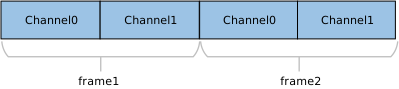
UAC audio data streams typically use Linear PCM encoding and are encapsulated in a Multi-Channel Interleaved format. The specific data arrangement depends on the number of channels and bit depth.
For more details on supported formats, please refer to Supported Audio Formats .
An example of 2-Channel interleaved data is shown below:
An example of 4-Channel interleaved data is shown below:

An example of N-Channel interleaved data is shown below:

Note
Channel Alignment Rule:
The UAC protocol typically requires the transmitted number of channels to be a power of two (e.g., 2, 4, 8, 16, etc.). If the actual physical channel count (e.g., 10 channels) does not comply with this rule, it must be rounded up to the nearest power of two (configured for transmission as 16 channels). The extra channel positions are filled with invalid data.
Class Driver
Note
This module implements a standard USB audio playback device (USB speaker) only. For bidirectional audio streaming (playback and record), refer to the HID + UAC composite device implementation.
Source Code Path: {SDK}/component/usb/device/composite/usbd_composite_uac2.c
Descriptor Implementation
This section presents the UAC class-specific descriptor structures defined at the driver layer. These structures correspond to the standard descriptor definitions in the USB protocol specification.
Device Descriptor
└─ USB Version 2.00

Configuration Descriptor(Interfaces 2)
│
├─ Interface Association Descriptor (IAD)
├── Binds audio control and streaming interfaces into a single functional unit
│
├─ AudioControl Interface (IF 0, Alt 0)
│  ├─ Audio Control Interface Header (Header 2.0, desktop speaker)
│  ├─ Clock Source (ID=0x15, Internal, Sync to SOF)
│  ├─ Input Terminal (ID=0x01, USB Streaming)
│  ├─ Feature Unit (ID=0x05, Mute+Volume, 8 ch)
│  └─ Output Terminal (ID=0x09, Speaker, clocked=0x15)
│
└─ AudioStreaming Interface (IF 1)
   ├─ Alt 0: Inactive (no endpoints)
   │
   ├─ Alt 1: 16-bit | 2 ch | PCM
   │        AS Interface: TerminalLink(0x01) channels(2)
   │        AS Format: BitResolution(16)
   │        Endpoint: ISO OUT, maxpkt=0x001C (28 bytes)
   │
   ├─ Alt 2: 16-bit | 4 ch | PCM
   │        AS Interface: TerminalLink(0x01) channels(4)
   │        AS Format: BitResolution(16)
   │        Endpoint: ISO OUT, maxpkt=0x0038 (56 bytes)
   │
   ├─ Alt 3: 16-bit | 6 ch | PCM
   │        AS Interface: TerminalLink(0x01) channels(6)
   │        AS Format: BitResolution(16)
   │        Endpoint: ISO OUT, maxpkt=0x0054 (84 bytes)
   │
   ├─ Alt 4: 16-bit | 8 ch | PCM
   │        AS Interface: TerminalLink(0x01) channels(8)
   │        AS Format: BitResolution(16)
   └        Endpoint: ISO OUT, maxpkt=0x0070 (112 bytes)

Device Qualifier Descriptor
└─ USB 2.0

Other Speed Configuration Descriptor(Interfaces 2)
│
├─ Interface Association Descriptor (IAD)
├── Binds audio control and streaming interfaces into a single functional unit
│
├─ AudioControl Interface (IF 0, Alt 0)
│  ├─ Audio Control Interface Header (Header 2.0, desktop speaker)
│  ├─ Clock Source (ID=0x15, Internal, Sync to SOF)
│  ├─ Input Terminal (ID=0x01, USB Streaming)
│  ├─ Feature Unit (ID=0x05, Mute+Volume, 8 ch)
│  └─ Output Terminal (ID=0x09, Speaker, clocked=0x15)
│
└─ AudioStreaming Interface (IF 1)
   ├─ Alt 0: Inactive (no endpoints)
   │
   ├─ Alt 1: 16-bit | 2 ch | PCM
   │        AS Interface: TerminalLink(0x01) channels(2)
   │        AS Format: BitResolution(16)
   │        Endpoint: ISO OUT, maxpkt=0x00C4 (196 bytes)
   │
   ├─ Alt 2: 16-bit | 4 ch | PCM
   │        AS Interface: TerminalLink(0x01) channels(4)
   │        AS Format: BitResolution(16)
   │        Endpoint: ISO OUT, maxpkt=0x0188 (392 bytes)
   │
   ├─ Alt 3: 16-bit | 6 ch | PCM
   │        AS Interface: TerminalLink(0x01) channels(6)
   │        AS Format: BitResolution(16)
   │        Endpoint: ISO OUT, maxpkt=0x024C (588 bytes)
   │
   ├─ Alt 4: 16-bit | 8 ch | PCM
   │        AS Interface: TerminalLink(0x01) channels(8)
   │        AS Format: BitResolution(16)
   └        Endpoint: ISO OUT, maxpkt=0x0310 (784 bytes)
Device Descriptor
└─ USB Version 1.10

Configuration Descriptor(Interfaces 2)
│
├─ AudioControl Interface (Interfaces 0, Alt 0)
│  ├─ Audio Control Interface Header (bcdADC 0x0110)
│  ├─ Input Terminal (ID=0x01, USB Streaming)
│  ├─ Feature Unit (ID=0x05, Mute+Volume, 8 ch)
│  └─ Output Terminal (ID=0x09, Speaker)
│
└─ AudioStreaming Interface (Interfaces 1)
   ├─ Alt 0: Inactive (no endpoints)
   │
   ├─ Alt 1: 16-bit | 2 ch | PCM
   │        AS Interface: TerminalLink(0x01)
   │        AS Format: Channels(2), BBitResolution(16), SamFreq(44100,48000)
   │        Endpoint: ISO OUT, maxpkt=0x00C4 (196 bytes)
   │
   ├─ Alt 2: 16-bit | 4 ch | PCM
   │        AS Interface: TerminalLink(0x01)
   │        AS Format: Channels(4), BitResolution(16), SamFreq(44100,48000)
   │        Endpoint: ISO OUT, maxpkt=0x0188 (392 bytes)
   │
   ├─ Alt 3: 16-bit | 6 ch | PCM
   │        AS Interface: TerminalLink(0x01)
   │        AS Format: Channels(6), BitResolution(16), SamFreq(44100,48000)
   │        Endpoint: ISO OUT, maxpkt=0x024C (588 bytes)
   │
   ├─ Alt 4: 16-bit | 8 ch | PCM
   │        AS Interface: TerminalLink(0x01)
   │        AS Format: Channels(8), BitResolution(16), SamFreq(44100,48000)
   └        Endpoint: ISO OUT, maxpkt=0x0310 (784 bytes)
Implementation of Class-Specific Requests
The driver has implemented the core class-specific requests defined by the UAC specification, primarily including Sampling Frequency Control, Volume Control, and Mute Control.
Developers can refer to the existing implementation to extend other types of requests. The UAC driver source code path is: {SDK}/component/usb/device/uac
Audio Control Requests (AC Requests)
AudioControl Type |
Required |
Note |
|---|---|---|
Mute Control Request |
Optional |
Control the Current Sound Mute Function |
Volume Control Request |
Optional |
Control the Current Sound Volume Function |
Sampling Frequency Control Request |
Optional |
Control the Current Sound Sampling Frequency Function |
Audio Streaming Requests (AS Requests)
AudioStreaming Type |
Required |
Note |
|---|---|---|
Interface Control Request |
Optional |
Switching between different interfaces to choose the different audio format. |
Audio Control Requests (AC Requests)
AudioControl Type |
Required |
Note |
|---|---|---|
Mute Control Request |
Optional |
Control the Current Sound Mute Function |
Volume Control Request |
Optional |
Control the Current Sound Volume Function |
Sampling Frequency Control Request |
Optional |
Control the Current Sound Sampling Frequency Function |
Audio Streaming Requests (AS Requests)
AudioStreaming Type |
Required |
Note |
|---|---|---|
Interface Control Request |
Optional |
Switching between different interfaces to choose the different audio format. |
Endpoint Configurations
Endpoint Type |
Count |
Description |
|---|---|---|
Control IN/OUT |
1 |
Handle host control requests |
Isochronous OUT |
1 |
Audio data reception |
Isochronous IN |
1 |
Audio data transmission |
API Reference
For detailed function prototypes and usage, please refer to the Device class driver API
Application Example
Application Design
This section outlines the complete usage flow of the UAC driver, covering core aspects such as initialization, hot-plug management, audio data processing, and configuration changes.
Driver Initialization
Define the configuration structure, register callback functions, and then call the initialization interface to load the USB device core and the UAC class driver.
/*
        Configure different USB speeds according to different UAC applications
        UAC 1.0 only support full speed, while UAC 2.0 can support both full speed and high speed
*/
static usbd_config_t uac_cfg = {
        .speed = CONFIG_USBD_UAC_SPEED,
        .isr_priority = INT_PRI_MIDDLE,
};

static usbd_uac_cb_t uac_cb = {
        .in = {.enable = 1,},                      /* Audio out params */
        .out = {.enable = 0,},                     /* Audio in params */
        .init = uac_cb_init,                       /* USB init callback */
        .deinit = uac_cb_deinit,                   /* USB deinit callback */
        .setup = uac_cb_setup,                     /* USB setup callback */
        .set_config = uac_cb_set_config,           /* USB set_config callback */
        .status_changed = uac_cb_status_changed,   /* USB status change callback */
        .mute_changed = uac_cb_mute_changed,       /* Audio mute change callback */
        .volume_changed = uac_cb_volume_changed,   /* Audio volume change callback */
        .format_changed = uac_cb_format_changed,   /* Audio format change callback */
};

int ret = 0;

/**
 * Initialize USB device core driver with configuration.
 * param[in] cfg: USB device configuration.
 * return 0 on success, non-zero on failure.
 */
ret = usbd_init(&uac_cfg);
if (ret != HAL_OK) {
        return;
}

/**
 * Initializes class driver with application callback handler.
 * param[in] cb: Pointer to the user-defined callback structure.
 * return 0 on success, non-zero on failure.
 */
ret = usbd_uac_init(&uac_cb);
if (ret != HAL_OK) {
        /**
         * Deinitialize USB device core driver.
         * return 0 on success, non-zero on failure.
         */
        usbd_deinit();

        return;
}
Hot-Plug Event Handling
Monitor USB connection status changes (connected/disconnected) by registering the status_changed callback function. It is recommended to use a semaphore to notify a dedicated task thread for processing, avoiding time-consuming operations within interrupt context.
Please refer to Device Connection Status Detection for more details. Example code is provided below:
/* USB status change callback */
static usbd_uac_cb_t uac_cb = {
        .status_changed = uac_cb_status_changed,
};

/* Callback executed in ISR context */
static void uac_cb_status_changed(u8 old_status, u8 status)
{
        uac_attach_status = status;
        rtos_sema_give(uac_attach_status_changed_sema);
}

/* Thread handling the state machine */
static void uac_hotplug_thread(void *param)
{
        int ret = 0;
        UNUSED(param);

        for (;;) {
                if (rtos_sema_take(uac_attach_status_changed_sema, RTOS_SEMA_MAX_COUNT) == RTK_SUCCESS) {
                        if (uac_attach_status == USBD_ATTACH_STATUS_DETACHED) {
                                RTK_LOGS(TAG, RTK_LOG_INFO, "DETACHED\n");

                                /* Clean up resources */
                                usbd_uac_deinit();
                                ret = usbd_deinit();
                                if (ret != 0) {
                                        break;
                                }

                                /* Re-initialize for next connection */
                                ret = usbd_init(&uac_cfg);
                                if (ret != 0) {
                                        break;
                                }
                                ret = usbd_uac_init(&uac_cb);
                                if (ret != 0) {
                                        usbd_deinit();
                                        break;
                                }
                        } else if (uac_attach_status == USBD_ATTACH_STATUS_ATTACHED) {
                                RTK_LOGS(TAG, RTK_LOG_INFO, "ATTACHED\n");
                        } else {
                                RTK_LOGS(TAG, RTK_LOG_INFO, "INIT\n");
                        }
                }
        }
        RTK_LOGS(TAG, RTK_LOG_INFO, "Hotplug thread fail\n");
        rtos_task_delete(NULL);
}
Audio Data Reception Flow
Once UAC starts, the host (Host) will issue configuration requests and begin transmitting the audio stream. The processing flow is as follows:
Respond to Format Changes
The host triggers the format_changedcallback when issuing configurations. Parameters like sample rate and bit width should be saved here.
static void uac_cb_format_changed(u32 sampling_freq, u8 ch_cnt, u8 byte_width)
{
        if (sampling_freq != 0U) {
                out.sampling_freq = sampling_freq;
        }
        if (ch_cnt != 0U) {
                out.ch_cnt = ch_cnt;
        }
        if (byte_width != 0U) {
                out.byte_width = byte_width;
        }

        ...
}
Configure and Start Data Reception
Call
usbd_uac_config()to apply new parameters, and callusbd_uac_start_play()to initiate data reception. It is recommended to check the startup status in a loop to handle unstable cable connections.
usbd_uac_config(&(out), 0, 0);

do {
        if (usbd_uac_start_play() == HAL_OK) {
                break;
        }
} while (uac_attach_status == USBD_ATTACH_STATUS_ATTACHED);

if(uac_attach_status != USBD_ATTACH_STATUS_ATTACHED ) {
        RTK_LOGS(TAG, RTK_LOG_INFO, "USB Detached\n");
        return;
}
Read Audio Data
Use
usbd_uac_read()to read data from the buffer.
while (!audio_task_stop) {
        read_dat_len = usbd_uac_read(recv_buf, USB_AUDIO_BUF_SIZE, 500);
        if (read_dat_len > 0) {
                total_len += read_dat_len;
        } else {
                rtos_time_delay_ms(1);
        }
}
Note
For the complete playback logic (including interaction with hardware Codec), please refer to the SDK example code: {SDK}/example/usb/usbd_uac/example_usbd_uac.c. Ensure that CONFIG_USBD_AUDIO_EN is set to 1.
Dynamic Audio Format Switching
If the user changes audio settings on the Host side (e.g., switching from 48kHz to 96kHz in Windows), the device must gracefully restart the stream.
Stop Playback: Set the stop flag in the callback function
uac_cb_format_changed()to notify the loop to exit data reading.Stop Interface: Call
usbd_uac_stop_play()to stop receiving data.Reconfigure: Call
usbd_uac_config()to apply the new audio parameters.Restart Playback: Call
usbd_uac_start_play()to start receiving data and resume the data reading loop.
/* In callback: Signal stop */
static void uac_cb_format_changed(u32 sampling_freq, u8 ch_cnt, u8 byte_width)
{
        .......
        audio_task_stop = 1;
}

/* In task loop: Handle restart */
// 1. Exit read loop
while (!audio_task_stop) {
        read_dat_len = usbd_uac_read(recv_buf, USB_AUDIO_BUF_SIZE, 500);
        ......
}

// 2. Stop UAC interface
usbd_uac_stop_play();

// 3. Re-configure
usbd_uac_config(&(out), 0, 0);

// 4. Restart UAC interface
do {
        if (usbd_uac_start_play() == HAL_OK) {
                break;
        }
} while (uac_attach_status == USBD_ATTACH_STATUS_ATTACHED);

if(uac_attach_status != USBD_ATTACH_STATUS_ATTACHED ) {
        RTK_LOGS(TAG, RTK_LOG_INFO, "USB Detached\n");
        return;
}

// 5. Resume reading
while (!audio_task_stop) {
        read_dat_len = usbd_uac_read(recv_buf, USB_AUDIO_BUF_SIZE, 500);
        ....
}
Driver Deinitialization
Release resources in the reverse order of initialization when audio functionality is no longer needed or during system shutdown.
/* Deinitialize UAC class driver. */
usbd_uac_deinit();

/* Deinitialize USB device core driver. */
usbd_deinit();
Operation method
This section introduces a complete USB Audio Class (UAC) speaker application example, demonstrating how to configure the Ameba development board as a USB audio output device via the UAC protocol stack.
When the development board is connected to a PC, the system recognizes it as a speaker. Digital audio streams played on the PC are transmitted to the development board via USB and output in analog form via the onboard Codec/speaker.
The example code path is: {SDK}/example/usb/usbd_uac. It provides a complete reference solution for developers designing custom USB audio products.
Note
This example requires XDK (Extended Development Kit) support. For XDK download, please refer to SDK Download.
Configuration and Compilation
Compilation and Flashing
Execute the following commands in the SDK root directory to configure the environment, select the target SoC, compile the project, and flash the generated
Imagefile to the development board.# Initialize environment (required for every new terminal) source env.sh or env.bat(Windows system) # Select Target SoC (replace xxx with your specific SoCs) ameba.py soc xxx ameba.py build -a usbd_uac -p
Confirmation of Menuconfig configuration
If compilation fails, please execute
ameba.py menuconfigand confirm thatUSBD UACandAudio Frameworkhave been selected.- Choose `CONFIG USB --->`: [*] Enable USB USB Mode (Device) ---> - Choose UAC version 1.0 or 2.0 : [*] UAC Select UAC Version (UAC 2.0) ---> - Choose `CONFIG APPLICATION --->` `Audio Config --->`: [*] Enable Audio Framework Select Audio Interfaces (PassThrough) --->
Note
If audio playback is not smooth, change the Audio Framework configuration to Select Audio Interfaces (Mixer). Refer to the audio module for more information.
Result Verification
Start the Device
Reboot the development board and monitor the serial log. The following initialization message should be displayed:
[UAC-I] USBD uac demo start
Connect to Host
Connect the development board to a PC (e.g., a Windows computer) using a USB cable.
System Recognition
The audio device named
"Realtek UAC Device speaker device"should appear in the Windows Sound settings.
Note
If the Ameba audio device is not visible, open the computer’s sound control panel and locate the “Realtek UAC Device speaker device”.
Ensure it is Enabled (if not, right-click and select
Enable).Set it as the default device (right-click and select
Set as Default Device).
Format Switching Test
Try switching between different bit depths and sample rates (e.g., 16-bit 48000Hz) to verify that the device successfully re-negotiates the connection and plays audio normally.