USB Introduction
Overview
Supported ICs[ RTL8721Dx ][ RTL8730E ][ RTL8721F ][RTL8735C]
USB (Universal Serial Bus) is a standard serial communication interface designed to interconnect host controllers and peripheral devices.
The complete USB specification suite, including electrical, mechanical, and protocol layer documentation, is accessible at http://www.usb.org/developers.
Features
Compatibility: Fully compliant with USB 2.0 High-speed (480 Mbps) and Full-speed (12 Mbps) specifications.
Supported USB host solutions:
CDC ACM: Enables bidirectional transparent data transmission for serial communication, data acquisition, custom protocols and etc.
CDC ECM: Interfaces with Ethernet modules to act as a Network Interface Card (NIC) or a bridge for network routing.
MSC: Supports Mass Storage Class devices (e.g., USB flash drives, card readers) for smart speakers, data logging, OTA updates and etc.
UAC: Supports USB Audio Class devices (e.g., Type-C headsets) for audio output and volume control.
UVC: Interoperates with USB cameras, supporting MJPEG, H.264, and YUV formats for image capture and video streaming in smart locks, surveillance systems and etc.
Composite hosts:
CDC ACM + CDC ECM: Supports 4G cellular modules for IoT gateways, mobile hotspots and etc.
HID + UAC: Integrates Human Interface Device and Audio control for unified inline remote, recording, and playback management.
Vendor: Allows custom driver implementation beyond standard USB classes to meet highly customized application requirements.
Supported USB device solutions:
CDC ACM: Functions as a virtual COM port for bidirectional transparent data transmission.
HID: Emulates standard peripherals like keyboards and mice for rich human-machine interaction.
MSC: Maps SD cards or Flash memory as external mass storage media.
UAC: Acts as a USB audio device for audio playback.
Composite devices:
CDC ACM + HID: Simultaneous data transmission and interaction control.
CDC ACM + MSC: Simultaneous data transmission and mass storage.
CDC ACM + UAC: Simultaneous data transmission and audio playback.
HID + UAC: Simultaneous interaction control, audio recording, and audio playback..
Vendor: Supports customized development for non-standard device classes.
Advanced features:
Dual-Role switching: Supports dynamic switching between USB Host and Device roles.
Highly customizable device mode: Full customization of USB descriptors, including VID/PID, string descriptors, and endpoint mapping.
Flexible host enumeration: Features customizable device matching strategies (e.g., matching by VID/PID or specific Class/Protocol), automatic descriptor parsing, and adaptive speed negotiation.
Configurable core parameters: Allows adjustment of speed modes, Data FIFO (DFIFO) depth (dedicated FIFO mode only), and scheduling priorities for the USB ISR and core threads.
Note
The RTL8721Dx supports Full-speed Device mode only.
Hardware Configurations
Supports device mode
Supports USB 2.0 full-speed (12 Mbps) mode
Supports DMA mode
Endpoint configurations:
EP0: INOUT (for Control transfer only)
EP1: IN
EP2: OUT
EP3: IN
EP4: OUT
EP5: INOUT
Note
One and only one periodic IN endpoint is supported.
Shared FIFO with following configurations:
Total FIFO depth: 768 DWORD
Shared receive FIFO: 472 DWORD (max)
Shared non-periodic transmit FIFO: 32 DWORD (max)
Dedicated periodic transmit FIFO: 256 DWORD (max)
Note
8 DWORD FIFO shall be reserved for DMA registers in DMA mode.
Supports host, device and OTG modes
Supports USB 2.0 high-speed (480 Mbps) and full-speed (12 Mbps) modes
Supports DMA mode
Endpoint configurations in device mode:
EP0: INOUT (for Control transfer only)
EP1: IN
EP2: OUT
EP3: IN
EP4: OUT
EP5: INOUT
Note
One and only one periodic IN endpoint is supported.
Supports 8 channels/pipes in host mode
Shared FIFO with following configurations:
Total FIFO depth: 1024 DWORD
Host mode:
Shared receive FIFO: 512 DWORD (max)
Shared non-periodic transmit FIFO: 256 DWORD (max)
Shared periodic transmit FIFO: 256 DWORD (max)
Device mode:
Shared RX FIFO: 512 DWORD (max)
Shared non-periodic transmit FIFO: 256 DWORD (max)
Dedicated periodic transmit FIFO: 256 DWORD (max)
Note
8 DWORD FIFO shall be reserved for DMA registers in DMA mode.
Integrated UTMI+ PHY
External hub connection support in host mode
Automatic ping in host mode
Supports host and device modes
Supports USB 2.0 high-speed (480 Mbps) and full-speed (12 Mbps) modes
Supports DMA mode
Endpoint configurations in device mode:
EP0: INOUT (for Control transfer only)
EP1: IN
EP2: INOUT
EP3: INOUT
EP4: IN
EP5: OUT
EP6: INOUT
EP7: OUT
Supports 12 channels/pipes in host mode
Shared FIFO with following configurations:
Total FIFO depth: 1024 DWORD
Host mode:
Shared receive FIFO: 1024 DWORD (max)
Shared non-periodic transmit FIFO: 1024 DWORD (max)
Shared periodic transmit FIFO: 1024 DWORD (max)
Device mode:
Shared RX FIFO: 1024 DWORD (max)
6 dedicated transmit FIFOs for device IN transfers, max depth of each Tx FIFO:
Tx FIFO 0: 32
Tx FIFO 1: 16
Tx FIFO 2: 256
Tx FIFO 3: 32
Tx FIFO 4: 256
Tx FIFO 5: 128
Note
12 DWORD FIFO shall be reserved for DMA registers in DMA mode.
Integrated UTMI+ PHY
External hub connection support in host mode
Automatic ping in host mode
Supports host and device modes
Supports USB 2.0 high-speed (480 Mbps) and full-speed (12 Mbps) modes
Supports DMA mode
Endpoint configurations in device mode:
EP0: INOUT (for Control transfer only)
EP1: IN
EP2: OUT
EP3: IN
EP4: OUT
EP5: INOUT
Supports 8 channels/pipes in host mode
Dedicated FIFO with following configurations:
Total FIFO depth: 2240 DWORD
Host mode:
Shared receive FIFO: 2240 DWORD (max)
Shared non-periodic transmit FIFO: 1024 DWORD (max)
Shared periodic transmit FIFO: 1024 DWORD (max)
Device mode:
Shared RX FIFO: 2240 DWORD (max)
4 dedicated transmit FIFOs for device IN transfers (EP0~EP3), max depth of each Tx FIFO:
Tx FIFO 0: 256
Tx FIFO 1: 768
Tx FIFO 2: 768
Tx FIFO 3: 256
Note
12 DWORD FIFO shall be reserved for DMA registers in DMA mode.
Integrated UTMI+ PHY
External hub connection support in host mode
Automatic ping in host mode
Software Stack Overview
Software Architecture
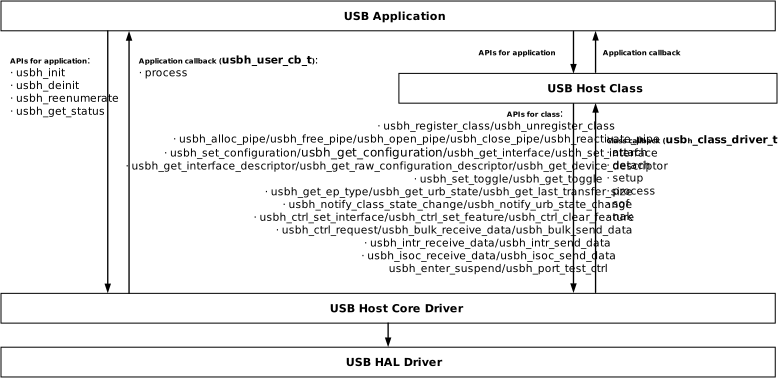
The architecture of USB software stack:
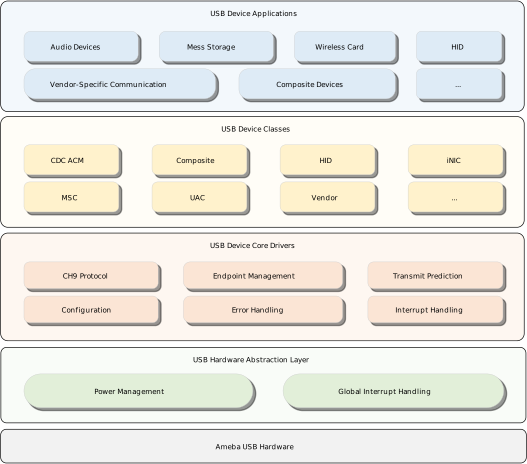
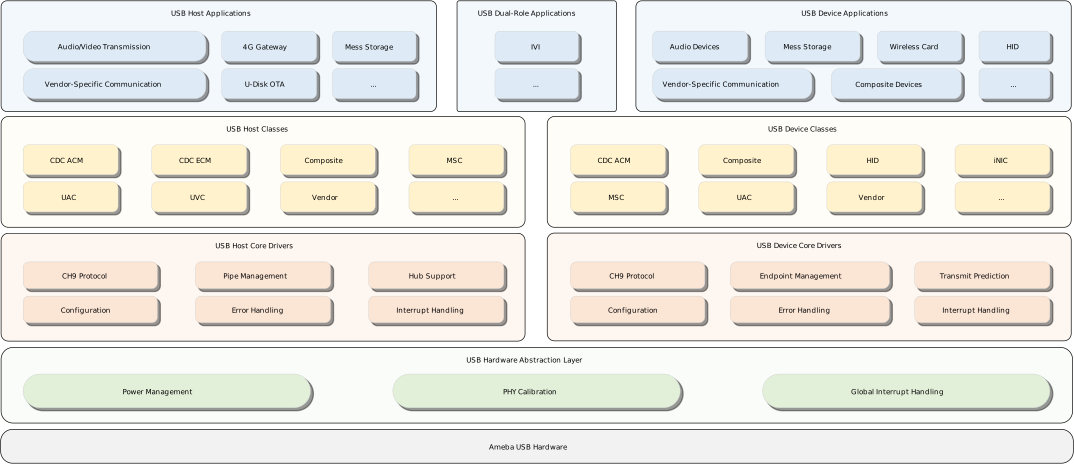
Where:
USB HAL driver: Implements SoC-specific hardware driver for power management and phy calibration, exposing unified HAL API to upper-layer core drivers.
USB host/device core drivers: Integrates USB IP-specific hardware driver, host/device controller driver, enumeration state machine and transfer scheduling algorithms, exposing unified core API for designers to develop classes and applications.
USB host/device class drivers: Delivers USB-IF class-compliant drivers via class-specific API, enabling rapid deployment of standard USB solutions.
USB host/device applications: Provides reference designs for USB solutions.
USB HAL driver
USB HAL driver implements SoC-specific USB power management, interrupt handling and phy calibration interfaces, defines system-level preprocessor constants, exposes unified HAL API to upper-layer drivers.
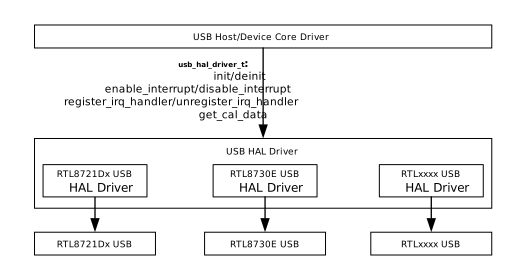
Note
USB HAL driver is built into USB host/device/DRD core library as default and customization is not allowed.
USB PHY calibration data is determined by Realtek during manufacturing and developer-side re-calibration is not allowed, for suspected calibration-related compatibility issues (e.g., USB enumeration failures, intermittent disconnection/reconnection issues), contact Realtek FAE for help.
USB Device Core Driver
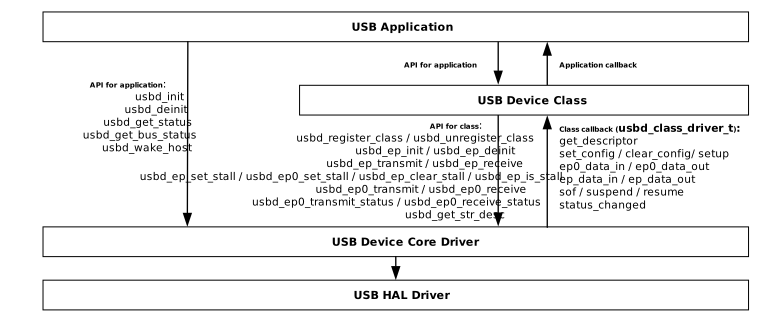
USB Host Core Driver
File Organization
USB Path Aliases
For simplicity, the following path aliases are used in the subsequent descriptions.
Alias |
Path |
|---|---|
|
{SDK}/component/soc/amebaxxx/fwlib/include |
|
{SDK}/component/usb |
|
{SDK}/component/usb/device |
|
{SDK}/component/usb/host |
|
{SDK}/example/usb |
|
{SDK}/component/soc/amebaxxx/project/project_xxx/lib/application |
USB HAL Driver
Path |
Description |
|---|---|
|
USB HAL API definition header file |
USB Core Driver
Path |
Description |
|
USB common core driver API definition header file |
|
USB device core driver API definition header file |
|
USB device core driver static library file |
Path |
Description |
|
USB common core driver API definition header file |
|
USB device core driver API definition header file |
|
USB host core driver API definition header file |
|
USB DRD core driver static library file for DRD solution |
|
USB device core driver static library file for device solution |
|
USB host core driver static library file for host solution |
Path |
Description |
|
USB common core driver API definition header file |
|
USB device core driver API definition header file |
|
USB host core driver API definition header file |
|
USB DRD core driver static library file for DRD solution |
|
USB device core driver static library file for device solution |
|
USB host core driver static library file for host solution |
Path |
Description |
|---|---|
|
USB common core driver API definition header file |
|
USB device core driver API definition header file |
|
USB host core driver API definition header file |
|
USB DRD core driver static library file for DRD solution |
|
USB device core driver static library file for device solution |
|
USB host core driver static library file for host solution |
USB Class Driver
Path |
Description |
|---|---|
|
CDC ACM device class driver |
|
Composite device class driver |
|
HID device class driver |
|
INIC device class driver (non-standard) |
|
MSC device class driver |
|
UAC device class driver |
|
Vendor-specific device class driver |
|
CDC ACM host class driver |
|
CDC ECM host class driver |
|
MSC host class driver |
|
UVC host class driver |
|
Vendor-specific host class driver |
USB Application
Path |
Description |
|---|---|
|
Transparent communication device example based on CDC ACM device class |
|
Composite device example based on CDC ACM and HID device classes |
|
Composite device example based on CDC ACM and UAC device classes |
|
Composite device example based on HID and UAC device classes |
|
HID device example |
|
INIC device example |
|
Mass storage device example based on MSC device classes |
|
Audio device example based on UAC device classes |
|
Vendor-specific device example |
|
Transparent communication host example based on CDC ACM host class |
|
Ethernet communication host example based on CDC ECM host class |
|
Mass storage host example based on MSC host classe |
|
Video host example based on UVC host classe |
|
Vendor-specific host example |
|
Ethernet communication bridge example based on CDC ECM host class |
|
DRD example based on MSC host class and MSC device classe |
Host Solutions, refer to Host Solutions
Device Solutions, refer to Device Solutions
USB Certification
USB certification generally refers to USB-IF certification, i.e. USB-IF compliance testing, which validates devices against USB-IF electrical, protocol and functional requirements to ensure interoperability, security and reliability. Certified devices are authorized to use USB logos.
While USB-IF certification is not mandatory, it is required when:
Products intend to use USB logos
Marketing materials claim USB specification compliance or certification
For certification procedures and requirements, refer to https://www.usb.org documentation or contact USB-IF authorized test labs.
Additional Compliance Requirements for USB Devices:
FCC/CE: Mandatory for USB devices sold in EU/US markets
ISO 26262: Required for automotive USB devices (functional safety)
Windows Logo Program: Necessary for “Certified for Windows” branding
MFi: Mandatory for Apple-specific USB accessories
Compliance Test Guide
Overview
The USB Electrical Compliance Test is the USB-IF-defined certification standard (Compliance Test Suite, CTS) for verifying that the electrical characteristics of USB devices, hosts, or hubs meet the specification requirements. The Eye Diagram Test is one of the core test items within this suite, designed to evaluate physical layer signal quality, including signal jitter, eye opening, rise/fall times, voltage levels, and SE0 characteristics.
Important
This document covers only the eye diagram test flow, including test firmware compilation and operation commands. For the complete CTS certification (including protocol tests, electrical tests, and all other items), refer to the USB-IF official specifications and test plans.
Official Specifications Reference: https://www.usb.org/usb2
Scope of Application
This test solution applies to the entire Ameba series platform, supporting the following operating environments:
Linux
RTOS
Zephyr
To verify that a product meets the USB eye diagram test requirements, use the test firmware and command set provided below.
Build Test Firmware
The USB eye diagram test firmware can be compiled directly from the SDK. Select the appropriate build steps based on the test mode:
The eye diagram test firmware can be compiled using code from the project or from SDK examples. The following uses CDC ACM as an example:
Modify the source code to disable hotplug:
Open
example/usb/usbd_cdc_acm/example_usbd_cdc_acm.cand confirmCONFIG_USBD_CDC_ACM_HOTPLUGis set to0(hotplug must be disabled during the eye diagram test to avoid interference):#define CONFIG_USBD_CDC_ACM_HOTPLUG 0Build the CDC ACM example:
ameba.py build -a usbd_cdc_acm -p
For build environment setup, refer to SDK Guide .
After compilation, flash the firmware to the device. Refer to the Flash Programming Guide for flashing instructions.
Prepare a CDC ACM-compatible host (e.g., Windows 11) as the test peer device.
Reboot the board to start the eye diagram test.
The eye diagram test firmware can be compiled using code from the project or from SDK examples. The following uses MSC as an example:
Modify the source code to disable hotplug:
Open
example/usb/usbh_msc/example_usbh_msc.cand confirmCONFIG_USBH_MSC_HOTPLUGis set to0(hotplug must be disabled during the eye diagram test to avoid interference):#define CONFIG_USBH_MSC_HOTPLUG 0Build the MSC example:
ameba.py build -a usbh_msc -p
For build environment setup, refer to SDK Guide .
After compilation, flash the firmware to the device. Refer to the Flash Programming Guide for flashing instructions.
Prepare a USB flash drive as the test peer device.
Refer to the Host command table in the Test Command Set section below, and enter the corresponding commands via the serial terminal to trigger each test item.
Test Command Set
After flashing the test firmware, send the following test commands to the development board via the serial terminal. Select the appropriate command table based on the test mode (Device / Host):
Type |
Command |
Description |
|---|---|---|
RESET |
AT+RST |
Reboot the test board A mandatory step before executing any test case. It clears residual states to ensure the system starts from a deterministic initial environment. |
Type |
Command |
Description |
|---|---|---|
RESET |
AT+RST |
Reboot the test board A mandatory prerequisite for all test cases to clear residual states and ensure a known initial system environment. |
TEST_J |
AT+USBH=tmod,1 |
Drive the bus continuously to J-state Used to measure static voltage levels on data lines when not dynamically driven. |
TEST_K |
AT+USBH=tmod,2 |
Drive the bus continuously to K-state Used to measure static voltage levels on data lines when not dynamically driven. |
TEST_SE0_NAK |
AT+USBH=tmod,3 |
Perform SE0 and NAK handshake test Verifies that the device maintains High-Speed mode stability during EP0 communication without falsely triggering a reset. |
TEST_PACKET |
AT+USBH=tmod,4 |
Transmit test packets continuously Evaluates physical layer signal quality, including eye opening, jitter, and rise/fall times. |
SUSPEND |
AT+USBH=suspend |
Enter Suspend mode The USB Host halts all bus activity. |
RESUME |
AT+USBH=resume |
Resume Normal operation The USB Host issues a wake-up signal to notify the device to resume communication. |
Technical Support
For technical issues during testing, contact the Technical Support Team for professional assistance.

