Transparent Communication Device Solution
Overview
The USB CDC ACM (Communication Device Class - Abstract Control Model) protocol employs the USB Bulk Transfer mechanism to provide a generic high-speed data pass-through channel, suitable for real-time transmission of high-throughput data streams and command interaction.
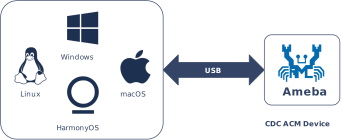
Ameba implements CDC ACM functionality in compliance with USB-IF standards, establishing a bidirectional transparent data transmission link. The Host can exchange raw data directly with Ameba’s internal logic or backend peripherals via the standard USB interface, effectively masking and abstracting the underlying transmission details.
Features
Compatible with standard host terminal tools such as PuTTY/TeraTerm
Supports hot-plug
Fully customizable descriptors
Configurable bulk transfer lengths/transfer buffer size/speed mode
Optional interrupt IN endpoint flexible for compatibility and bandwidth optimization
Supports bidirectional communication through virtual COM port, supports synchronous or asynchronous echo
Application Scenarios
Functioning as a USB data pass-through bridge, Ameba establishes a high-speed data link between the master device (Host, such as a PC or embedded host) and the external world via the USB interface. By combining this with other peripheral interfaces, it enables several typical applications:
Sensor Acquisition and Robot Control: Ameba acts as a high-performance sensor node, collecting high-speed environmental or motion data from the front end. This data is uploaded in real-time to the robot control system via the USB channel, supporting zero-packet-loss transmission of high-frequency raw data and rapid dispatch of closed-loop control commands.
Device Management and Firmware Maintenance: Geared towards the lifecycle management of IoT devices, management terminals can establish communication with the device via the CDC channel. This facilitates parameter configuration, operational status diagnostics, and supports firmware upgrades (OTA) and maintenance through this data link.
Wireless Data Gateway: Leveraging its integrated Wi-Fi and Bluetooth modules, Ameba serves as a wireless bridge. It transparently forwards data streams received from the Host via USB to the wireless network, providing plug-and-play wireless access capabilities for industrial control hosts or management terminals that lack native wireless functionality.
Protocol Introduction
CDC (Communication Device Class) is a standard for general communication devices defined by the USB specification. Within its PSTN (Public Switched Telephone Network) subclass, the most commonly used is ACM (Abstract Control Model). It defines a standardized set of commands for controlling communication parameters, such as:
Set baud rate (such as 9600, 115200)
Configure data bits, stop bits, and parity bits
Control DTR/RTS and other line status signals
It is through ACM that a USB CDC device can be recognized by the host as a standard “virtual serial port”.
Protocol Document
The USB-IF has officially released the CDC (Class Driver Control) basic protocol and PSTN (Public Switched Telephone Network) sub-class specifications. During the development process, please refer to the following core documents:
Specification type |
Document |
|---|---|
CDC (Communication Device Class Basic Protocol) |
|
PSTN (PSTN Subclass) |
PSTN specification is included in the aforementioned CDC zip file. |
Protocol Framework
The CDC ACM architecture utilizes a dual-interface mechanism to separate control flow from data flow, and logically binds them into a single functional unit via the Union Functional Descriptor.
Communication Class Interface (CCI)
Responsible for device management control and signaling interaction.
Control transmission: Transmit specific requests through the default control endpoint.
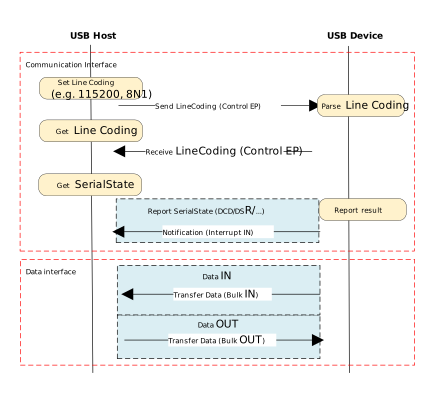
The host primarily sends PSTN control commands, with core instructions including SetLineCoding for configuring baud rate/data bits, and SetControlLineState for controlling RTS/DTR handshake signals.
Interrupt transmission: Utilizing interrupt input endpoints to achieve asynchronous status notification from the device to the host.
A typical application is to report changes in hardware signal status such as DCD, DSR, or Ring in real-time through SERIAL_STATE.
Data Class Interface (DCI)
Responsible for carrying application-layer payload data streams. This interface is typically configured as a pair of bulk endpoints (Bulk IN/Bulk OUT), serving solely as a transparent data transmission channel without involving the parsing or processing of control commands.
Example of protocol interaction:
Descriptor Structure
In addition to adhering to standard USB descriptors (such as device descriptor, configuration descriptor, and endpoint descriptor), CDC ACM devices also define Class-Specific Functional Descriptors to specify the capabilities of the abstract control model.
CDC ACM Descriptor Topology
The following example illustrates the descriptor topology using a High Speed configuration.
Device Descriptor
└── Identifies basic device information (Class: 0x02 CDC, SubClass: 0x02 ACM)

Configuration Descriptor
├── Includes total length, power attributes (Self-powered), etc.
│
├── Communication Class Interface Descriptor (Interface 0)
│   ├── Standard Interface Descriptor (Class: 0x02, SubClass: 0x02, Protocol: 0x01 AT Commands)
│   │
│   ├── Class-Specific Functional Descriptors (Defines ACM capabilities)
│   │   ├── Header Functional Descriptor (Declares CDC Spec version)
│   │   ├── Call Management Functional Descriptor (Call handling capabilities)
│   │   ├── ACM Functional Descriptor (Line coding & state capabilities)
│   │   └── Union Functional Descriptor (Binds Interface 0 and Interface 1)
│   │
│   └── Standard Endpoint Descriptor (Interrupt IN)
│       └── Used for Serial State notifications
│
├── Data Class Interface Descriptor (Interface 1)
│   ├── Standard Interface Descriptor (Class: 0x0A Data, SubClass: 0x00, Protocol: 0x00)
│   │
│   ├── Standard Endpoint Descriptor (Bulk OUT)
│   │   └── Host -> Device Data Stream
│   │
│   └── Standard Endpoint Descriptor (Bulk IN)
│       └── Device -> Host Data Stream
│
├── Device Qualifier Descriptor
│   └── Device information for other speed modes
│
└── Other Speed Configuration Descriptor
    └── Configuration information for Full Speed mode
Functional Descriptor
In the communication interface, the CDC must include the following special “function descriptor” header:
Header Functional Descriptor: Indicates the CDC version.
Call Management Functional Descriptor: Indicates how the device handles call management.
Abstract Control Management Functional Descriptor: Indicates which commands (such as Set_Line_Coding) are supported.
Union Functional Descriptor: specifies which one is the Master interface and which one is the Slave interface.
Header Functional Descriptor
Header Functional Descriptor
├── bLength            : 1 byte   → Total descriptor length (Fixed = 5 bytes)
├── bDescriptorType    : 1 byte   → 0x24 (CS_INTERFACE: Class-Specific Interface)
├── bDescriptorSubtype : 1 byte   → 0x00 (HEADER)
└── bcdCDC             : 2 bytes  → USB Class Definitions for Communication Devices Specification Release Number
                                    • 0x0110 = Release 1.10 (Common for ACM)
Call Management Functional Descriptor
Call Management Functional Descriptor
├── bLength            : 1 byte   → Total descriptor length (Fixed = 5 bytes)
├── bDescriptorType    : 1 byte   → 0x24 (CS_INTERFACE)
├── bDescriptorSubtype : 1 byte   → 0x01 (CALL_MANAGEMENT)
├── bmCapabilities     : 1 byte   → The capabilities that this configuration supports:
│                                   • Bit 0 = 0: Device does not handle call management itself
│                                   • Bit 0 = 1: Device handles call management itself
│                                   • Bit 1 = 0: Call management commands does not sent over Data Class Interface
│                                   • Bit 1 = 1: Call management commands can be sent over Data Class Interface
│                                   • Bits 2-7: Reserved (Reset to zero)
└── bDataInterface     : 1 byte   → Interface number of Data Class interface optionally used for call management
                                    (Zero if no data interface is used)
ACM Functional Descriptor
Abstract Control Management (ACM) Functional Descriptor
├── bLength            : 1 byte   → Total descriptor length (Fixed = 4 bytes)
├── bDescriptorType    : 1 byte   → 0x24 (CS_INTERFACE)
├── bDescriptorSubtype : 1 byte   → 0x02 (ABSTRACT_CONTROL_MANAGEMENT)
└── bmCapabilities     : 1 byte   → The capabilities that this configuration supports:
                                    • Bit 0: Comm_Feature (Supports Set_Comm_Feature, Clear_Comm_Feature, Get_Comm_Feature)
                                    • Bit 1: Line_Coding (Supports Set_Line_Coding, Set_Control_Line_State, Get_Line_Coding, Serial_State)
                                    • Bit 2: Send_Break (Supports Send_Break)
                                    • Bit 3: Network_Connection (Supports Network_Connection)
                                    • Bits 4-7: Reserved (Reset to zero)
Union Functional Descriptor
Union Functional Descriptor
├── bLength            : 1 byte   → Total descriptor length (3 + Number of slave interfaces)
├── bDescriptorType    : 1 byte   → 0x24 (CS_INTERFACE)
├── bDescriptorSubtype : 1 byte   → 0x06 (UNION)
├── bMasterInterface   : 1 byte   → The interface number of the Communication or Data Class interface
│                                   (Designated as the controlling interface for the union)
└── bSlaveInterface0   : 1 byte   → Interface number of the first subordinate interface in the union
│    ⋮
└── bSlaveInterface(N) : 1 byte   → Interface number of the last subordinate interface in the union
Note
For specifications regarding the CDC ACM transfer protocol, please refer to USB CDC ACM Specification 。
Class-Specific Requests
Control requests for CDC ACM devices are categorized into Standard Requests and Class-Specific Requests.
This section primarily introduces the class-specific requests unique to CDC ACM and utilized for implementing core functionalities such as serial port parameter configuration and flow control signal management for virtual serial ports.
Request Name |
Requirement |
Description |
|---|---|---|
SEND_ENCAPSULATED_COMMAND |
Required |
The host sends an encapsulated command to the device. The data format must adhere to the control protocol supported by the device (e.g., AT command set). |
GET_ENCAPSULATED_RESPONSE |
Required |
The host retrieves response data for an encapsulated command from the device. The response format adheres to the protocol supported by the device. |
SET_COMM_FEATURE |
Optional |
Sets the status of a specific communication feature. The target feature is specified by a feature selector. |
GET_COMM_FEATURE |
Optional |
Queries the current setting status of a specific communication feature. |
CLEAR_COMM_FEATURE |
Optional |
Clears the setting of a specific communication feature, resetting it to the default state. |
SET_LINE_CODING |
Optional (+) |
The host configures line coding properties for async serial communication (e.g., baud rate, stop bits, parity, data bits). |
GET_LINE_CODING |
Optional (+) |
The host queries the currently configured line coding properties for asynchronous serial communication. |
SET_CONTROL_LINE_STATE |
Optional |
The host controls the state of RS-232/V.24 standard control signals (e.g., DTR and RTS signal levels). |
SEND_BREAK |
Optional |
The host requests the device to generate a “Break” signal of a specific duration on the transmission end, simulating an RS-232 style line break. |
Note
The above requests all belong to Communications Class specific requests.
For Analog Modem applications, although the specification lists requests marked with
(+)as optional, it is strongly recommended to implement these requests to ensure compatibility.
Class Driver
Driver Descriptor Structures
This section presents the CDC ACM class-specific descriptor structures defined at the driver layer. These structures correspond to the standard descriptor definitions within the USB protocol specification.
Device Descriptor
└─ USB Version 2.00 (CDC ACM)

Configuration Descriptor (Interfaces 2)
│
├─ Communication Interface (IF 0, CCI)
│  ├─ Header Functional (CDC 1.10)
│  ├─ Call Management Functional (Data IF=1, Handled by Host)
│  ├─ ACM Functional (Cap=0x02: Line Coding & Serial State)
│  ├─ Union Functional (Master=0, Slave=1)
│  └─ Endpoint: INTR IN, maxpkt=HS_INTR_SIZE, Interval=HS_Interval
│
└─ Data Interface (IF 1, DCI)
   ├─ Endpoint: BULK OUT, maxpkt=0x0200 (512 bytes)
   └─ Endpoint: BULK IN,  maxpkt=0x0200 (512 bytes)

Device Qualifier Descriptor
└─ USB 2.0

Other Speed Configuration Descriptor (Interfaces 2)
│
├─ Communication Interface (IF 0, CCI)
│  ├─ Header Functional (CDC 1.10)
│  ├─ Call Management Functional (Data IF=1, Handled by Host)
│  ├─ ACM Functional (Cap=0x02: Line Coding & Serial State)
│  ├─ Union Functional (Master=0, Slave=1)
│  └─ Endpoint: INTR IN, maxpkt=FS_INTR_SIZE, Interval=FS_Interval
│
└─ Data Interface (IF 1, DCI)
   ├─ Endpoint: BULK OUT, maxpkt=0x0040 (64 bytes)
   └─ Endpoint: BULK IN,  maxpkt=0x0040 (64 bytes)
Class-Specific Request Implementation
The driver implements the core Class-Specific Requests defined by the CDC ACM specification, primarily including:
SET_LINE_CODING
GET_LINE_CODING
SET_CONTROL_LINE_STATE
Note
Developers may refer to the existing implementation to extend other types of requests. The CDC ACM driver source code is located at: {SDK}/component/usb/device/cdc_acm
Endpoint Configuration
Endpoint |
Count |
Description |
|---|---|---|
Control IN/OUT Endpoint |
1 |
EP0, used to handle standard requests and CDC class-specific requests sent by the USB Host. |
Interrupt IN Endpoint |
1 |
Used to send serial state notifications (SERIAL_STATE) to the USB Host. |
Bulk OUT Endpoint |
1 |
Used to receive downstream data streams from the USB Host. |
Bulk IN Endpoint |
1 |
Used to send upstream data streams to the USB Host. |
API Reference
Application Example
Application Design
This section outlines the complete usage workflow of the CDC ACM driver, covering core aspects such as initialization, hot-plug management, data echo processing, and virtual serial port parameter configuration.
Driver Initialization
Define the configuration structure and register callback functions, then invoke the initialization interface to load the USB device core and the CDC ACM class driver.
// Do not change the settings unless indeed necessary
#define CONFIG_CDC_ACM_BULK_IN_XFER_SIZE            2048U
#define CONFIG_CDC_ACM_BULK_OUT_XFER_SIZE           2048U

static usbd_config_t cdc_acm_cfg = {
    .speed = CONFIG_USBD_CDC_ACM_SPEED,
    .isr_priority = INT_PRI_MIDDLE,
    .intr_use_ptx_fifo  = 0U,
};

static usbd_cdc_acm_cb_t cdc_acm_cb = {
    .init = cdc_acm_cb_init,                       /* USB init callback */
    .deinit = cdc_acm_cb_deinit,                   /* USB deinit callback */
    .setup = cdc_acm_cb_setup,                     /* USB setup callback */
    .received = cdc_acm_cb_received,               /* USB received callback */
    .status_changed = cdc_acm_cb_status_changed,   /* USB status change callback */
};

int ret = 0;

/**
    * Initialize USB device core driver with configuration.
    * param[in] cfg: USB device configuration.
    * return 0 on success, non-zero on failure.
    */
ret = usbd_init(&cdc_acm_cfg);
if (ret != HAL_OK) {
    return;
}

/**
    * Initializes class driver with application callback handler.
    * param[in] bulk_out_xfer_size: BULK OUT xfer buffer malloc length.
    * param[in] bulk_in_xfer_size: BULK IN xfer buffer malloc length.
    * param[in] cb: Pointer to the user-defined callback structure.
    * return 0 on success, non-zero on failure.
    */
ret = usbd_cdc_acm_init(CONFIG_CDC_ACM_BULK_OUT_XFER_SIZE, CONFIG_CDC_ACM_BULK_IN_XFER_SIZE, &cdc_acm_cb);
if (ret != HAL_OK) {
    /**
        * Deinitialize USB device core driver.
        * return 0 on success, non-zero on failure.
        */
    usbd_deinit();

    return;
}
Hot-Plug Event Handling
Monitor USB connection status changes (connection/disconnection) by registering the status_changed callback function. It is recommended to use a semaphore to notify a dedicated task thread for processing, thereby avoiding the execution of time-consuming operations within the interrupt context.
Refer to Device Connection Status Detection for further details. The example code is shown below:
/* USB status change callback */
static usbd_cdc_acm_cb_t cdc_acm_cb = {
    .status_changed = cdc_acm_cb_status_changed
};

/* Callback executed in ISR context */
static void cdc_acm_cb_status_changed(u8 old_status, u8 status)
{
    RTK_LOGS(TAG, RTK_LOG_INFO, "Status change: %d -> %d \n", old_status, status);

    cdc_acm_attach_status = status;
    rtos_sema_give(cdc_acm_attach_status_changed_sema);
}

/* Thread handling the state machine */
static void cdc_acm_hotplug_thread(void *param)
{
    int ret = 0;
    UNUSED(param);

    for (;;) {
        if (rtos_sema_take(cdc_acm_attach_status_changed_sema, RTOS_SEMA_MAX_COUNT) == RTK_SUCCESS) {
                if (cdc_acm_attach_status == USBD_ATTACH_STATUS_DETACHED) {
                    RTK_LOGS(TAG, RTK_LOG_INFO, "DETACHED\n");

                    /* Clean up resources */
                    usbd_cdc_acm_deinit();
                    ret = usbd_deinit();
                    if (ret != 0) {
                        break;
                    }

                    /* Re-initialize for next connection */
                    ret = usbd_init(&cdc_acm_cfg);
                    if (ret != 0) {
                        break;
                    }
                    ret = usbd_cdc_acm_init(CONFIG_CDC_ACM_BULK_OUT_XFER_SIZE, CONFIG_CDC_ACM_BULK_IN_XFER_SIZE, &cdc_acm_cb);
                    if (ret != 0) {
                        usbd_deinit();
                        break;
                    }
                } else if (cdc_acm_attach_status == USBD_ATTACH_STATUS_ATTACHED) {
                    RTK_LOGS(TAG, RTK_LOG_INFO, "ATTACHED\n");
                } else {
                    RTK_LOGS(TAG, RTK_LOG_INFO, "INIT\n");
                }
        }
    }
    RTK_LOGS(TAG, RTK_LOG_INFO, "Hotplug thread fail\n");
    rtos_task_delete(NULL);
}
Data Transmission and Reception
Upon successful enumeration of CDC ACM, the Host sends data via the virtual serial port. The driver supports both synchronous and asynchronous data processing modes, controlled by the macro CONFIG_USBD_CDC_ACM_ASYNC_XFER.
Data Reception Callback
All data from the Host is passed in via the cdc_acm_cb_received callback function.
Synchronous Echo (Sync Echo)
If asynchronous transfer is not enabled,
usbd_cdc_acm_transmit()is called directly within the reception callback to echo the received data back to the Host.Asynchronous Transfer (Async Transfer)
If asynchronous transfer is enabled, received data is stored in the cdc_acm_async_xfer_buf ring buffer, and the transmission thread cdc_acm_xfer_thread is woken up via a semaphore. This thread is responsible for sending data in packets to avoid time-consuming operations or blocking within the interrupt context.
/* In callback: Echo immediately */
static int cdc_acm_cb_received(u8 *buf, u32 len)
{
    /* Directly transmit received data back to host */
    return usbd_cdc_acm_transmit(buf, len);
}
/* In callback: Buffer data & Trigger Task */
static int cdc_acm_cb_received(u8 *buf, u32 len)
{
    // 1. Check if transfer is currently busy
    if (cdc_acm_async_xfer_busy) {
        return HAL_BUSY;
    }

    // 2. Copy data to internal buffer
    // (Logic for buffer overflow check omitted...)
    memcpy(..., buf, len);

    // 3. If buffer full, signal the transfer thread
    if (buffer_is_full) {
        rtos_sema_give(cdc_acm_async_xfer_sema);
    }

    return HAL_OK;
}

/* In task thread: Handle Transmission */
static void cdc_acm_xfer_thread(void *param)
{
    for (;;) {
        // 1. Wait for signal from callback
        if (rtos_sema_take(cdc_acm_async_xfer_sema, RTOS_SEMA_MAX_COUNT) == RTK_SUCCESS) {

            cdc_acm_async_xfer_busy = 1; // Set busy flag

            // 2. Loop until all buffered data is sent
            while (data_remaining > 0) {

                // Try to transmit a chunk (Bulk size)
                ret = usbd_cdc_acm_transmit(xfer_buf, chunk_size);

                if (ret == HAL_OK) {
                    // Advance buffer pointer
                    ......
                } else {
                    // 3. If HW is busy, retry after delay
                    rtos_time_delay_us(200);
                }
            }

            // 4. Transmission complete, clear flag
            cdc_acm_async_xfer_busy = 0;
        }
    }
}
Note
For the complete data transmission and reception logic, please refer to the SDK example code: {SDK}/example/usb/usbd_cdc_acm/example_usbd_cdc_acm.c.
Driver De-initialization
When the CDC ACM function is no longer needed or during system shutdown, release resources in the reverse order of initialization.
/* Deinitialize CDC ACM class driver. */
usbd_cdc_acm_deinit();

/* Deinitialize USB device core driver. */
usbd_deinit();
Operation method
This section introduces a complete USB CDC ACM (Virtual COM Port) echo example, demonstrating how to implement bidirectional character communication between a PC and the development board using the CDC ACM protocol stack.
The example code path is: {SDK}/example/usb/usbd_cdc_acm. It can serve as a baseline reference for USB-to-Serial pass-through or Command Line Interface (CLI) implementation.
Configuration and Compilation
Compilation and Flashing
Execute the following commands in the SDK root directory to configure the environment, select the target SoC, compile the project, and flash the generated
Imagefile to the development board.# Initialize environment (required for every new terminal) source env.sh or env.bat(Windows system) # Select Target SoC (replace xxx with your specific SoCs) ameba.py soc xxx ameba.py build -a usbd_cdc_acm -p
Confirmation of Menuconfig configuration
If compilation fails, please execute
ameba.py menuconfigand confirm thatUSBD CDC ACMhas been selected.- Choose `CONFIG USB --->`: [*] Enable USB USB Mode (Device) ---> [*] CDC ACM
Result Verification
Start Device
Reboot the development board and observe the serial log; the following startup information should be displayed:
[ACM-I] USBD CDC ACM demo start
Connect to Host
Connect the development board to a PC (e.g., Windows computer) using a USB cable.
Serial Communication Test
Launch any serial debugging tool (e.g., Tera Term or Realtek Trace Tool) and open the virtual serial port corresponding to the Ameba development board’s USB port.
Attempt to send any character message to the development board. Observe the terminal interface; the development board should echo the received message back to the Host exactly as received.
Note
For Windows 7/XP Host users, the system may not automatically install the driver. Please manually install the CDC ACM driver file RtkUsbCdcAcmSetup.INF.
Before installation, ensure that the INF file contains the VID/PID values used by the current CDC ACM class, such as:
[DeviceList]
%DESCRIPTION%=DriverInstall, USB\VID_0BDA&PID_8720
%DESCRIPTION%=DriverInstall, USB\VID_0BDA&PID_8721
%DESCRIPTION%=DriverInstall, USB\VID_0BDA&PID_8722
%DESCRIPTION%=DriverInstall, USB\VID_0BDA&PID_8730
%DESCRIPTION%=DriverInstall, USB\VID_0BDA&PID_8006
%DESCRIPTION%=DriverInstall, USB\VID_0BDA&PID_8061
; Add support for new VID/PID

