HID Device Solution
Overview
The USB Human Interface Device (HID) protocol is a standard interface specification defined by USB-IF for connecting human-computer interaction devices (such as keyboards, mice, game controllers, touchscreens, etc.).
The Ameba platform, based on the official USB-IF standards, implements a fully functional USB HID device-side protocol stack. This solution provides the system with a stable, low-latency human-computer interaction interface and supports highly flexible custom configurations.
Features
Supports USB hot-plug
Supports fully customizable descriptors
Simulate basic keyboard key presses and mouse movement events
Unidirectional/Bidirectional Communication Support:
Mouse: Supports unidirectional reporting of HID data (Input Report).
Keyboard: Supports bidirectional HID data communication (Input & Output Report), capable of handling host-sent LED status controls (e.g., “Caps Lock” indicator).
Supports configuring parameters such as speed mode
Application Scenarios
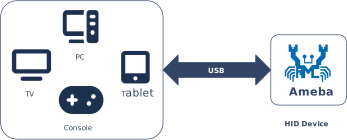
As a USB HID device, Ameba can send standard input reports to a host (such as a PC, tablet, or smart TV) via a USB interface. Leveraging its built-in Wi-Fi and Bluetooth® capabilities, Ameba enables various innovative cross-protocol, cross-medium applications. For example,
Wireless Peripheral Adapter (Dongle): Ameba acts as a USB receiver (dongle) plugged into the host. It receives data from remote wireless keyboards/mice via Wi-Fi or Bluetooth, converts it into standard USB HID packets, and transparently transmits them to the host, enabling plug-and-play wireless peripherals.
IoT Smart Control Gateway: Ameba serves as a bridge between physical input and digital control. It reads signals from local physical buttons, knobs, or sensors and maps them to standard input commands via the USB HID protocol or converts them into network control instructions, enabling precise control over smart home and industrial equipment.
Game Controller Adapter: Supports connecting non-standard interface game controllers (such as old console controllers or custom arcade joysticks) to Ameba. The internal protocol stack converts their signals into standard HID game controller reports, ensuring compatibility with PCs or modern gaming consoles.
Protocol Introduction
The HID (Human Interface Device) protocol is a standard interface and data transmission specification defined within the USB specification framework, specifically designed for human-computer interaction devices. This protocol defines the data interaction format and control response mechanism between the host and the device.
Common devices that comply with the HID standard include:
Input Devices: Keyboards, mice, gamepads, digitizers (touchscreens/drawing tablets).
Control Devices: Consumer electronics control knobs (e.g., volume adjustment), system sleep buttons, etc.
Protocol Documentation
USB-IF has officially released the core HID protocol specification and Usage Tables for defining device functionality. Developers can refer to the following core documents:
Specification Type |
Document |
|---|---|
HID Core Protocol |
|
HID Usage Tables |
Terminology Definitions
The definitions of general HID technical terms used in this document are as follows:
Terms |
Description |
|---|---|
Report |
The basic unit of data transmitted between an HID device and the host. The structure of the data packet is defined by the Report Descriptor. |
Usage |
An identifier describing the specific meaning of data. For example, defining whether a data bit represents a “left-click” or the “X-axis coordinate”. |
Collection |
A logical structure that groups related input/output data items. For example, grouping a mouse’s X-axis, Y-axis, and buttons into a “mouse” collection. |
Item |
The basic building block of a report descriptor, categorized into Main items, Global items, and Local items. The higher the sampling frequency, the higher quality the sound will be. |
Protocol Framework
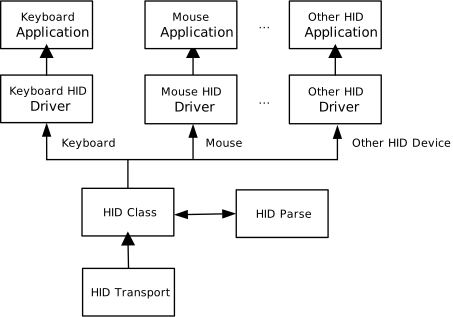
The HID protocol stack adopts a layered architecture designed to decouple low-level USB transport details from upper-layer application logic. The system architecture mainly consists of the following core components: the USB core transport driver, the HID class driver, and HID applications for specific types.
Component Responsibilities
HID Application
Located at the top of the architecture, responsible for handling specific business logic. For example: collecting sensor data and packaging it into mouse coordinate reports, or receiving keyboard LED control commands and driving GPIOs to light the indicators.
HID Class Driver
Implements the Device Class Definition for HID 1.11 specification. Its main responsibilities include: parsing and constructing HID protocol-specific data packets, managing the Report Descriptor, and handling Class-Specific Requests.
USB Core & Transfer Driver
Responsible for handling the standard USB enumeration process, endpoint management, and low-level packet scheduling, shielding the upper layers from differences in hardware controllers.
Communication Mechanism
HID devices achieve low-latency or low-bandwidth interaction through specific Endpoint configurations. In terms of logical functionality, HID interfaces primarily rely on the following two transfer methods:
Control Pipe
Mapped Endpoint: Default control endpoint 0 (Endpoint 0).
Enumeration & Configuration: Transmits standard USB descriptors (Device, Configuration, Interface Descriptors) as well as HID-specific HID Descriptors and Report Descriptors.
Class-Specific Requests: Handles HID protocol control commands, such as Set Idle (set idle rate).
Low-Frequency Data Transfer: When the device is not configured with an Interrupt OUT endpoint, the host sends Output Reports (e.g., setting keyboard “Caps Lock” LED state) via Control Transfer.
Interrupt Pipe
Functional Description: Utilizes USB’s polling mechanism to ensure real-time data transmission.
Interrupt IN: Mandatory. Responsible for real-time transmission of asynchronous data generated by the device (e.g., key press, mouse movement, touchscreen coordinates) to the host.
Interrupt OUT: Optional. Responsible for the host sending low-latency downstream data to the device. Commonly used in scenarios requiring high real-time feedback, such as force feedback vibration commands for gamepads. If this endpoint is not defined, downstream data will fall back to the Control Pipe for transmission.
Descriptor Structure
In addition to adhering to standard USB descriptors, HID devices introduce their own unique descriptor system. The most crucial ones are the HID Descriptor and the Report Descriptor.
HID Descriptor Topology
Device Descriptor
└── Identifies basic device information (USB Version 2.00)

Configuration Descriptor
├── Contains total length of the entire configuration, power supply information, etc.
│
└── Interface Descriptor (Interface 0)
        ├── Standard Interface Descriptor (Interface 0, Human Interface Device)
        ├── HID Descriptor(HID Version, bNumDescriptors, etc)
        │       └── Report Descriptor()
        ├── Endpoint Descriptor(Interrupt In)
        └── Endpoint Descriptor(Interrupt Out)

Device Qualifier Descriptor
└── Device information while running in another speed mode

Other Speed Configuration Descriptor
├── Configuration information while running in another speed mode.
│
└── Interface Descriptor (Interface 0)
        ├── Standard Interface Descriptor (Interface 0, Human Interface Device)
        ├── HID Descriptor(HID Version, bNumDescriptors, etc)
        │       └── Report Descriptor()
        ├── Endpoint Descriptor(Interrupt In)
        └── Endpoint Descriptor(Interrupt Out)
HID Descriptor
Located within the configuration descriptor set, it informs the host about which subordinate descriptors (usually the report descriptor) this interface contains and their lengths.
HID Descriptor
├── bLength            : 1 byte  → Total descriptor length
├── bDescriptorType    : 1 byte  → 0x21 (HID Descriptor)
├── bcdADC             : 2 bytes → HID Version
├── bCountryCode       : 1 byte  → Numeric expression identifying country code of the localized hardware
├── bNumDescriptors    : 1 byte  → Numeric expression specifying the number of class descriptors
│                        └─ (always at least one i.e. Report descriptor.)
├── bDescriptorType    : 1 byte  → Constant name identifying type of class descriptor.
└── wDescriptorLength  : 2 byte  → Numeric expression that is the total size of the Report descriptor.
Report Descriptor
This is a character stream composed of specific Items, not a fixed structure.
It flexibly defines the data format, length, usage, and physical range that the device can generate or receive. The host must parse this descriptor to understand the data sent by the device.
Report Descriptor
├── Usage Page (Generic Desktop)
├── Usage (Keyboard)
├── Collection (Application)
│       ├── Usage Page (Key Codes)
│       ├── Usage Minimum (224)
|       ├── Usage Maximum (231)
│       ├── Logical Minimum (0)
│       ├── Logical Maximum (1)
│       ├── Report Count (8)
│       ├── Report Size (1)
│       ├── Input (Data, Variable, Absolute)   ; Modifier keys (8 bits, 1 per modifier)
│       ├── Report Count (1)
│       ├── Report Size (8)
│       ├── Input (Constant, Variable, Absolute) ; Reserved byte
|       |
│       ├── Usage Page (LEDs)
│       ├── Logical Minimum (0)
│       ├── Logical Maximum (1)
│       ├── Report Count (5)
│       ├── Report Size (1)
│       ├── Usage Minimum (Num Lock)
│       ├── Usage Maximum (Kana)
│       ├── Output (Data, Variable, Absolute)  ; 5 LED control bits
│       ├── Report Count (1)
│       ├── Report Size (3)
│       ├── Output (Constant, Variable, Absolute) ; Padding 3 bits
│       │
│       └── ....... Can configure multiple different setting as needed
│
└── End Collection
Note
Writing HID Report Descriptors is very flexible and complex. It is recommended to use the HID Descriptor Tool provided by USB-IF for generation and validation.
Class-Specific Requests
Control requests for HID devices are divided into Standard Requests and Class-Specific Requests.
This section mainly introduces HID-specific Class-Specific Requests, which are primarily used to manage report status and protocol behavior. The support requirements for different types of devices for these requests are shown in the table below:
Device Type |
Get Report |
Set Report |
Get Idle |
Set Idle |
Get Protocol |
Set Protocol |
|---|---|---|---|---|---|---|
Boot Mouse |
Mandatory |
Optional |
Optional |
Optional |
Mandatory |
Mandatory |
Non-Boot Mouse |
Mandatory |
Optional |
Optional |
Optional |
Optional |
Optional |
Boot Keyboard |
Mandatory |
Optional |
Mandatory |
Mandatory |
Mandatory |
Mandatory |
Non-Boot Keyboard |
Mandatory |
Optional |
Mandatory |
Mandatory |
Optional |
Optional |
Other Device |
Mandatory |
Optional |
Optional |
Optional |
Optional |
Optional |
Data Transmission Format
Unlike the fixed PCM stream in UAC (USB Audio Class), the data format for HID is entirely dynamically defined by the Report Descriptor.
The following is an example of a typical data structure for a standard keyboard:
Keyboard Input Report
Used to send keypress data to the host. The following is a data example for pressing “Left Shift” + “A”:
Filed |
Length(bits) |
Offset(bits) |
Value |
|---|---|---|---|
Left Ctrl |
1 |
0 |
0 |
Left Shift |
1 |
1 |
1 |
Left Alt |
1 |
2 |
0 |
Left GUI |
1 |
3 |
0 |
Right Ctrl |
1 |
4 |
0 |
Right Shift |
1 |
5 |
0 |
Right Alt |
1 |
6 |
0 |
Right GUI |
1 |
7 |
0 |
Pading |
8 |
8 |
0 |
Key |
48 |
16 |
0x04 |
Keyboard Output Report
Used by the host to control keyboard LED status. The following is a data example for turning on the “Caps Lock” light:
Filed |
Length(bits) |
Offset(bits) |
Value |
|---|---|---|---|
Num Lock |
1 |
0 |
0 |
Caps Lock |
1 |
1 |
1 |
Scroll Lock |
1 |
2 |
0 |
Compose |
1 |
3 |
0 |
Kana |
1 |
4 |
0 |
Note
Report ID:
The UAC protocol typically requires the transmitted number of channels to be a power of two (e.g., 2, 4, 8, 16, etc.). If the actual physical channel count (e.g., 10 channels) does not comply with this rule, it must be rounded up to the nearest power of two (configured for transmission as 16 channels). The extra channel positions are filled with invalid data.
Class Driver
This section details the internal implementation specifics of the HID class driver, including the hierarchical structure of descriptors, the support status for class-specific requests, and the endpoint configuration scheme.
Driver Descriptor Structure
The descriptor topology defined within the HID class driver is shown below. These structures strictly adhere to the USB 2.0 protocol specification and HID class definitions.
Device Descriptor
└── Identifies basic device information (USB Version 2.00)

Configuration Descriptor
├── Contains total length of the entire configuration, power supply information, etc.
│
└── Interface Descriptor (Interface 0)
        ├── Standard Interface Descriptor (Interface 0, Human Interface Device)
        ├── HID Descriptor(HID Version, bNumDescriptors, etc)
        │       └── Report Descriptor()
        └── Endpoint Descriptor(Interrupt In)

Device Qualifier Descriptor
└── Device information while running in another speed mode

Other Speed Configuration Descriptor
├── Configuration information while running in another speed mode.
│
└── Interface Descriptor (Interface 0)
        ├── Standard Interface Descriptor (Interface 0, Human Interface Device)
        ├── HID Descriptor(HID Version, bNumDescriptors, etc)
        │       └── Report Descriptor()
        └── Endpoint Descriptor(Interrupt In)
Device Descriptor
└── Identifies basic device information (USB Version 2.00)

Configuration Descriptor
├── Contains total length of the entire configuration, power supply information, etc.
│
└── Interface Descriptor (Interface 0)
        ├── Standard Interface Descriptor (Interface 0, Human Interface Device)
        ├── HID Descriptor(HID Version, bNumDescriptors, etc)
        │       └── Report Descriptor()
        ├── Endpoint Descriptor(Interrupt In)
        └── Endpoint Descriptor(Interrupt Out)

Device Qualifier Descriptor
└── Device information while running in another speed mode

Other Speed Configuration Descriptor
├── Configuration information while running in another speed mode.
│
└── Interface Descriptor (Interface 0)
        ├── Standard Interface Descriptor (Interface 0, Human Interface Device)
        ├── HID Descriptor(HID Version, bNumDescriptors, etc)
        │       └── Report Descriptor()
        ├── Endpoint Descriptor(Interrupt In)
        └── Endpoint Descriptor(Interrupt Out)
Implementation of Class-Specific Requests
This driver stack complies with the USB HID 1.11 specification and has implemented the basic framework for core Class-Specific Requests.
The driver layer has completed the underlying message communication, protocol parsing, and data transmission flow. Developers do not need to focus on USB protocol details; they only need to reference the existing source code architecture and implement specific business logic in the provided interfaces. Source code path: {SDK}/component/usb/device/hid
Class-Specific Request Type |
Note |
|---|---|
Get Report |
The driver has completed the request response flow. Note: The default implementation returns zero data. The specific Report content must be populated at the application layer. |
Set Report |
The driver has received the data packet. Developers need to implement the specific processing logic for data (Output/Feature Report) sent by the host. |
Get Idle |
Standard implementation. |
Set Idle |
Standard implementation. |
Get Protocol |
Used to query the current protocol mode (Boot/Report). |
Set Protocol |
The driver has parsed the request. Developers need to perform corresponding state switching based on the protocol mode (Boot or Report) sent by the host. |
Endpoint Configurations
Endpoint |
Quantity |
Description |
|---|---|---|
Control IN/OUT |
1 |
EP0, used to handle standard enumeration requests sent by the USB host,descriptor retrieval, and HID class-specific control requests. |
Interrupt IN |
1 |
Used for the device to report data to the host in real-time (e.g., mouse movement). |
Endpoint |
Quantity |
Description |
|---|---|---|
Control IN/OUT |
1 |
EP0, used to handle standard enumeration requests sent by the USB host,descriptor retrieval, and HID class-specific control requests. |
Interrupt IN |
1 |
Used for the device to report data to the host in real-time (e.g., keypress values). |
Interrupt OUT |
1 |
Used to receive downstream keyboard message data from the USB host(e.g., host turning on the “Caps Lock” light). |
API Reference
For detailed function prototypes and usage, please refer to the Device class driver API
Application Example
Application Design
This section details the complete development process for the HID driver, covering driver initialization, hotplug management, data transmission mechanisms, and resource release.
Driver Initialization
Define the configuration structure, register callback functions, and then call the initialization interface to load the USB device core and the UAC class driver.
Configuration: Configure USB speed mode and interrupt priority.
Callback Registration: Define the user callback structure
usbd_hid_usr_cb_tand mount handler functions for each stage.Core Initialization: Call
usbd_init()to initialize the USB core.Class Driver Init: Call
usbd_hid_init()to initialize the HID class driver.
/*
 * 1. Configure USB speed (High Speed or Full Speed) and interrupt priority.
 */
static usbd_config_t hid_cfg = {
    .speed = CONFIG_USBD_HID_SPEED,
    .isr_priority = INT_PRI_MIDDLE,
};

/*
 * 2. Define user callbacks for HID events.
 */
static usbd_hid_usr_cb_t hid_usr_cb = {
    .init = hid_cb_init,                     /* USB init callback */
    .deinit = hid_cb_deinit,                 /* USB deinit callback */
    .setup = hid_cb_setup,                   /* USB setup callback */
    .transmitted = hid_cb_transmitted,       /* Data transmission complet callback */
    .received = hid_cb_received,             /* Data reception callback */
    .status_changed = hid_cb_status_changed, /* Connection status change callbac */
};

int ret = 0;

/**
 * Initialize USB device core driver with configuration.
 */
ret = usbd_init(&hid_cfg);
if (ret != HAL_OK) {
    return;
}

/*
 * 4. Initialize HID class driver. 512 is the transfer buffer size.
 */
ret = usbd_hid_init(512, &hid_usr_cb);
if (ret != HAL_OK) {
    /* If class driver init fails, clean up the core driver */
    usbd_deinit();

    return;
}
Hot-Plug Event Handling
To ensure system robustness, it is recommended to monitor USB connection and disconnection events by registering the status_changed callback function.
Note
Do not directly perform time-consuming resource release or re-initialization operations within an interrupt callback (ISR). It is recommended to use a semaphore to notify a dedicated task thread for processing.
Refer to Device Connection Status Detection for more details. Example code is shown below:
/* USB status change callback */
static usbd_hid_usr_cb_t hid_usr_cb = {
    .status_changed = hid_cb_status_changed,
};

/* Callback executed in ISR context */
static void hid_cb_status_changed(u8 old_status, u8 status)
{
    hid_attach_status = status;
    rtos_sema_give(hid_attach_status_changed_sema);
}

/* Thread Context: Handle the state machine */
static void hid_hotplug_thread(void *param)
{
    int ret = 0;
    UNUSED(param);

    for (;;) {
        /* Wait for status change signal */
        if (rtos_sema_take(hid_attach_status_changed_sema, RTOS_SEMA_MAX_COUNT) == RTK_SUCCESS) {
            if (hid_attach_status == USBD_ATTACH_STATUS_DETACHED) {
                RTK_LOGS(TAG, RTK_LOG_INFO, "DETACHED\n");

                /* 1. Clean up HID class resources */
                usbd_hid_deinit();

                /* 2. De-initialize USB core */
                ret = usbd_deinit();
                if (ret != 0) {
                    break;
                }

                /* 3. Re-initialize for next connection */
                ret = usbd_init(&hid_cfg);
                if (ret != 0) {
                    break;
                }
                ret = usbd_hid_init(512, &hid_usr_cb);
                if (ret != 0) {
                    usbd_deinit();
                    break;
                }
            } else if (hid_attach_status == USBD_ATTACH_STATUS_ATTACHED) {
                RTK_LOGS(TAG, RTK_LOG_INFO, "ATTACHED\n");
            } else {
                RTK_LOGS(TAG, RTK_LOG_INFO, "INIT\n");
            }
        }
    }

    rtos_task_delete(NULL);
}
HID Report Sending Process (Input Report)
When the device acts as a data producer (e.g., mouse movement, keyboard keystroke), it needs to actively send Input Reports to the host. The sending process:
Wait for device ready: Monitor the semaphore triggered by the
hid_cb_setup()callback to ensure the host has completed enumeration.Construct report data: Fill the data buffer according to the format defined by the HID Report Descriptor.
Send data: Use
usbd_hid_send_data()to send the data.
/* Mouse data structure (Defined by Report Descriptor) */
typedef struct {
    u8 left;     //left button. 0: release, 1: press
    u8 right;    //right button. 0: release, 1: press
    u8 middle;   //wheel button. 0: release, 1: press
    char x_axis; //x-axis pixels. relative value from -127 to 127, positive for right and negative for left
    char y_axis; //y-axis pixels. relative value from -127 to 127, positive for up and negative for down
    char wheel;  //scrolling units. relative value from -127 to 127, positive for up and negative for down.
} usbd_hid_mouse_data_t;

/* Mouse moving data */
static usbd_hid_mouse_data_t mdata[] = {
    {0,   0,   0,  50,   0,   0},    //move the cursor 50 pixels to the right
    {0,   0,   0,   0,  50,   0},    //move the cursor down 50 pixels
    {0,   0,   0, -50,   0,   0},    //move the cursor 50 pixels to the left
    {0,   0,   0,   0, -50,   0},    //move the cursor up 50 pixels
    {0,   0,   0,   0,   0,   5},    //scroll up for 5 units
    {0,   0,   0,   0,   0,  -5},    //scroll down for 5 units
    {0,   0,   1,   0,   0,   0},    //middle button pressed
    {0,   0,   0,   0,   0,   0},    //middle button released
    {0,   1,   0,   0,   0,   0},    //right button pressed
    {0,   0,   0,   0,   0,   0},    //right button released
    {0,   0,   0,  -5,   0,   0},    //move the cursor 5 pixels to the left
    {1,   0,   0,   0,   0,   0},    //left button pressed
    {0,   0,   0,   0,   0,   0},    //left button released
};

/* Callback when device is configured by Host */
static void hid_cb_setup(void)
{
    rtos_sema_give(hid_connect_sema);
}

/* Send function */
static void hid_send_device_data(void *pdata)
{
    u8 byte[4];
    usbd_hid_mouse_data_t *data = (usbd_hid_mouse_data_t *)pdata;

    memset(byte, 0, 4);

    if (data->left != 0) {
        byte[0] |= USBD_HID_MOUSE_BUTTON_LEFT;
    }
    if (data->right != 0) {
        byte[0] |= USBD_HID_MOUSE_BUTTON_RIGHT;
    }
    if (data->middle != 0) {
        byte[0] |= USBD_HID_MOUSE_BUTTON_MIDDLE;
    }

    byte[0] |= USBD_HID_MOUSE_BUTTON_RESERVED;
    byte[1] = data->x_axis;
    byte[2] = data->y_axis;
    byte[3] = data->wheel;

    usbd_hid_send_data(byte, 4);
}

static void hid_send_data_func(void)
{
    /* Wait for USB configured */
    rtos_sema_take(hid_connect_sema, RTOS_SEMA_MAX_COUNT);

    u32 array_len = sizeof(mdata) / sizeof(usbd_hid_mouse_data_t);

    do {
        for (i = 0; i < array_len; i++) {
            /* Wait for previous transfer to complete */
            rtos_sema_take(hid_transmit_sema, RTOS_SEMA_MAX_COUNT);

            /* Send the mouse data out */
            hid_send_device_data(&mdata[i]);

            /* Force 1000ms of sleep to slow down movement */
            rtos_time_delay_ms(1000);
        }

        rtos_time_delay_ms(5 * 1000); //next loop
    } while (++loop < CONFIG_USBD_HID_CONSTANT_LOOP);
}
HID Report Receiving Process (Output Report)
When the host sends control commands to the device (e.g., turning on the keyboard CapsLock light, controller vibration), the device side needs to handle Output Reports through a callback function. The processing flow:
Register callback: Register
hid_cb_received()during initialization.Parse data: In the callback function, read the data length and content, and parse the corresponding HID Report ID (if it exists).
Perform action: Parse the protocol payload and control the corresponding hardware.
/* Define callbacks for HID receive. */
static usbd_hid_usr_cb_t hid_usr_cb = {
    .received = hid_cb_received,
};

/* Callback for received data (executed in ISR context) */
static void hid_cb_received(u8 *buf, u32 len)
{
    /* Example: Parse Keyboard LED status */
    if (len == 1) {
        u8 led_status = buf[0];
        /* Control GPIO based on led_status bits (NumLock, CapsLock, etc.) */
    }
}
Note
To test the Output Report function, ensure that USBD_HID_DEVICE_TYPE in {SDK}/component/usb/device/hid/usbd_hid.h is configured as a device type that supports bidirectional communication (e.g., USBD_HID_KEYBOARD_DEVICE).
Driver Deinitialization
When the system shuts down or HID functionality is no longer needed, resources should be released in the reverse order of initialization to prevent memory leaks.
/* 1. Deinitialize HID class driver first */
usbd_hid_deinit();

/* 2. Deinitialize USB device core driver */
usbd_deinit();
Operation method
This section uses a USB Mouse Simulator as an example to demonstrate how to configure the Ameba development board as a USB HID device.
Functional Description
Device Type: Standard USB HID Mouse.
Behavior: After connecting to a PC, the development board will automatically simulate mouse movement trajectories.
Source Path:
{SDK}/example/usb/usbd_hid. This provides a complete reference solution for developers designing custom USB keyboards, mice, game controllers, and other products.
Configuration and Compilation
Compilation and Flashing
Execute the following commands in the SDK root directory to configure the environment, select the target SoC, compile the project, and flash the generated
Imagefile to the development board.# Initialize environment (required for every new terminal) source env.sh or env.bat(Windows system) # Select Target SoC (replace xxx with your specific SoCs) ameba.py soc xxx ameba.py build -a usbd_hid -p
Confirmation of Menuconfig configuration
If compilation fails, please execute
ameba.py menuconfigand confirm thatUSBD HIDhas been selected.- Choose `CONFIG USB --->`: [*] Enable USB USB Mode (Device) ---> [*] HID
Result Verification
Start the Device
Reboot the development board and observe the serial port log. The following startup information should be displayed:
[HID-I] USBD HID demo start
Connect to Host
Use a USB cable to connect the development board to a PC (e.g., a Windows computer).
Function Test
The default example code configures the development board as a USB mouse.
Observed Phenomenon: After a successful connection, the mouse cursor on the PC screen will automatically begin moving (the movement trajectory is defined by an array in the Example code).
Data Flow: This process verifies the Input Report transmission function from Device -> Host (Device to Host).
Note
If the cursor does not move, please check:
Hardware Connection: Ensure the USB cable is properly plugged in and that it supports data transfer (not a power-only charging cable).
Device Conflict: Check if any other physical mouse or virtual mouse driver is interfering with the cursor movement.
Enumeration Status: … (translation of the final phrase would continue here based on the incomplete original text, e.g., “check the enumeration status in the device manager.”)
If you have modified the example code configuration (USBD_HID_DEVICE_TYPE) to a keyboard device, you can perform the following bidirectional communication tests.
Uplink Input Test (Input Report)
Open any text editor (e.g., Notepad) on the PC.
The development board will automatically simulate keyboard input of characters (e.g., “aA”) and output them in a loop.
Note
If “aA” does not appear in Notepad, please check:
Hardware Connection: Ensure the USB cable is properly plugged in and that it supports data transfer (not a power-only charging cable).
Device Conflict: Check if any other physical mouse or virtual mouse driver is interfering with the cursor movement.
Enumeration Status: Check the PC’s Device Manager for any USB devices marked with a yellow exclamation point.
Input Mode: Please switch to the English input method. Other input methods may display an input pop-up window.
Downlink Output Test (Output Report)
This test verifies control message transmission from Host -> Device.
Press the “Caps Lock” key on the PC keyboard.
Observe the serial port log on the development board.
Expected Result: The log should print the received control message
RX 1 byte(s): 0x02. According to the Keyboard Output Report specification, parsing this value reveals it corresponds to the “Caps Lock” LED command, proving that the device successfully received the host’s Output Report.
Note
Currently, only Mouse and Keyboard HID devices are supported. To support other devices, the corresponding Report Descriptor needs to be replaced in the code.

