Mass Storage Device Solution
Overview
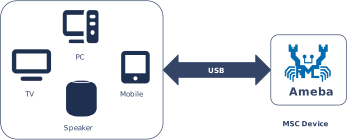
The USB Mass Storage Class (MSC) protocol defines the standard interface and transmission specifications for USB mass storage devices (such as U disks and SD card readers).
Based on the official MSC protocol standard released by USB-IF, Ameba implements complete USB storage device functionality. It supports interaction with the host via the SCSI (Small Computer System Interface) command set, providing efficient capabilities for reading, writing, erasing, and querying the status of storage media.
Features
Supports Bulk-Only Transport (BOT) protocol
Supports Svarious storage medium
RAM
SD Card (SD Mode: using SDIO interface)
SD Card (SPI Mode: using SPI interface)
External Flash
Supports USB hot-plug
Supports fully customizable descriptors
Supports configuring parameters such as speed mode
Application Scenarios
As a USB storage device, Ameba supports flexible access and management of various storage media. It can be combined with wireless connection technologies, such as Wi-Fi and Bluetooth, to implement diverse data storage and interaction solutions. For example,
Personal Storage and Wireless Expansion: Ameba can function as a standard U disk or SD/TF card reader for file transfer, system boot disk creation, and in-car media playback. When combined with Wi-Fi or Bluetooth, it upgrades to a “Wireless USB Drive,” allowing mobile phones or PCs to access storage content via a wireless network, breaking the physical limitations of traditional wired connections.
Multimedia Device Data Bridging: In applications such as digital cameras, dashcams, or digital multimedia players (MP3/MP4), Ameba emulates internal storage or expansion cards as a generic USB drive. When connected to a PC, users can manage photos, videos, and music files directly via drag-and-drop.
Convenient Firmware Upgrade: When connected to a PC, the device is recognized as a storage drive. Users simply need to drag the new firmware file (e.g., in
.binor.uf2format) into the drive. The device automatically verifies the file and completes the system update, significantly lowering the maintenance barrier for end-users.Smart Industrial Data Logger: Addressing data acquisition needs in industrial, agricultural, or scientific research fields, Bluetooth is used for low-power parameter configuration (e.g., modifying sampling frequency or file naming rules). When processing massive amounts of historical data, the device connects to a PC via the USB interface for high-speed export, balancing configuration flexibility with transmission efficiency.
Protocol Introduction
The MSC protocol defines the transmission and control functionalities required to implement storage devices under the USB specification. Common devices that adhere to this standard include USB flash drives, external hard drives, and card readers.
Descriptor Structure
In addition to complying with standard USB descriptor specifications (such as Device Descriptors, Configuration Descriptors, and Endpoint Descriptors), MSC devices are required to:
Declare the communication protocol used (e.g., SCSI) via the Interface Descriptor.
Encapsulate transmission commands and data through bulk endpoints.
The following section illustrates a standard USB MSC descriptor structure based on the Bulk-Only Transport (BOT) mode utilizing the SCSI command set:
Device Descriptor
└── Identifies basic device information

Configuration Descriptor
└── Contains total length of the entire configuration, power supply information, etc.
│
└── Interface Descriptor(Interface 0, Alternate Setting 0)
    ├── bInterfaceClass: 0x08 (Mass Storage)
    ├── bInterfaceSubClass: 0x06 (SCSI transparent command set)
    ├── bInterfaceProtocol: 0x50 (Bulk-Only Transport)
    └── bNumEndpoints: 2 (2 Endpoints)
        ├── Endpoint Descriptor(BULK IN)
        └── Endpoint Descriptor(BULK OUT)

Device Qualifier Descriptor
└── Device information while running in another speed mode

Other Speed Configuration Descriptor
├── Configuration information while running in another speed mode.
│
└── Interface Descriptor(Interface 0, Alternate Setting 0)
    ├── bInterfaceClass: 0x08 (Mass Storage)
    ├── bInterfaceSubClass: 0x06 (SCSI transparent command set)
    ├── bInterfaceProtocol: 0x50 (Bulk-Only Transport)
    └── bNumEndpoints: 2 (2 Endpoints)
        ├── Endpoint Descriptor(BULK IN)
        └── Endpoint Descriptor(BULK OUT)
Protocol document
The USB-IF has officially released the MSC-class basic protocol and specifications for the BOT transfer protocol. During the development process, please refer to the following core documents:
For the MSC BOT transfer protocol specification, please refer to Mass Storage Bulk Only
For the SCSI command set used in the BOT transmission process, please refer to https://www.t10.org/. The following two specifications are of primary concern:
Specification
Description
Documentation
SCSI Primary Commands (SPC)
Basic commands common to all SCSI devices
SCSI Block Commands (SBC)
Specific commands for block storage devices (hard disks, USB drives, SSDs)
Software and Hardware Architecture
The figure below illustrates the software and hardware layers that commands and data traverse between the host and the device.
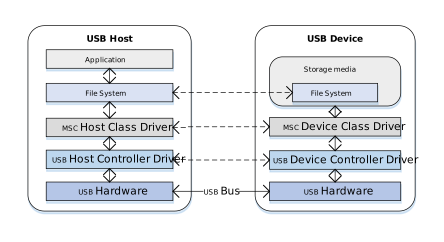
Taking a read operation as an example, when a user reads a file from a U disk, the process is as follows:
Host Side:
Application Request: The user initiates a file read request within an application (e.g., File Manager).
File System Conversion: The file system converts the filename and offset into a Logical Block Address (LBA) read request and generates a standard SCSI READ command.
Protocol Encapsulation: The host MSC class driver encapsulates the SCSI command into the command packet format defined by the MSC protocol.
Hardware Transmission: The USB host controller driver transmits the data packet to the bus via the physical USB port.
Device Side:
Hardware Reception: The USB device controller receives the data packet from the physical port.
Protocol Parsing: The MSC device class driver verifies the integrity of the packet and parses the encapsulated SCSI command.
Media Access: Based on the parsed command parameters (such as LBA address and length), data is read from the underlying storage medium (e.g., an SD card).
Data and Status Return: The read data is returned to the host, followed by the command execution status response.
BOT Transmission Flow
Once the MSC device is connected to the host and enumeration is complete, if it is identified as a Mass Storage device supporting BOT (Bulk-Only Transport) mode, all subsequent data communication occurs exclusively through bulk endpoints. Bulk transfers are not strictly time-critical, ensuring maximum data integrity.
According to the MSC BOT transmission protocol specification, all transfers follow a three-stage “Command -> Data -> Status” flow:
CBW (Command Block Wrapper): Sent from the host to the device. It encapsulates the specific SCSI command (e.g., READ, WRITE, INQUIRY).
Data (Data Stage): Transfers the actual file or control data. (The direction depends on the SCSI command type; for commands without data interaction, this stage is omitted).
CSW (Command Status Wrapper): Sent from the device to the host. It reports the execution result of the previous CBW command (Success, Failure, or Phase Error).
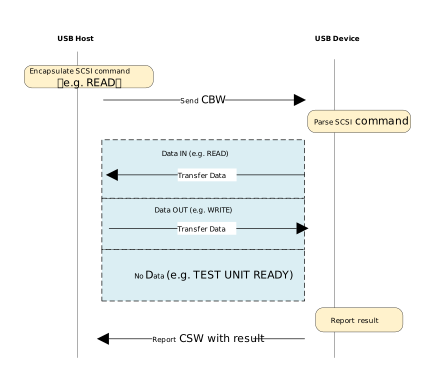
The data transmission process is as follows:
Host Initiates Request: The host MSC class driver encapsulates the SCSI command into a CBW packet and sends it to the device via the Bulk OUT endpoint.
Device Parsing and Execution: The device receives the CBW packet, performs a validity check, and parses the SCSI command. If the CBW is valid, the device operates on the underlying physical storage medium according to the command:
Write Operation (e.g., WRITE): Receives the data stream sent by the host via the Bulk OUT endpoint and writes it to the storage medium.
Read Operation (e.g., READ): Reads data from the storage medium and transmits it back to the host via the Bulk IN endpoint.
No-Data Command (e.g., TEST UNIT READY): Skips the data stage and proceeds directly to the status stage.
Device Returns Status: After data transmission is complete (or if no data transmission is required), the device sends a CSW packet via the Bulk IN endpoint to report the command execution result to the host.
Host Confirms Completion: The host parses the received CSW packet and checks the
bCSWStatusfield to confirm whether the command was executed successfully, thereby concluding the operation.
Class-Specific Requests
Control requests for MSC devices are categorized into Standard Requests and Class-Specific Requests.
This section focuses on the Class-Specific Requests unique to the MSC BOT specification. These requests are used to implement specific storage functions. There are only two such requests:
MSC Class-Specific Request |
Requirement |
Description |
|---|---|---|
Bulk-Only Mass Storage Reset |
Mandatory |
Resets the device interface and associated endpoints. |
Get Max LUN |
Mandatory |
Queries the maximum number of Logical Units supported by the device. |
SCSI Commands
The primary MSC BOT SCSI commands are listed below:
SCSI Command |
Requirement |
Description |
|---|---|---|
INQUIRY |
Mandatory |
The first command sent by the host to query device information. |
REQUEST_SENSE |
Mandatory |
Sent by the host to retrieve detailed error information whenever a command fails. |
TEST_UNIT_READY |
Mandatory |
Checks if the device is ready. |
READ_CAPACITY(10) |
Mandatory |
Queries the capacity of the storage medium. |
READ(10) |
Mandatory |
The core command for reading data. |
WRITE(10) |
Mandatory |
The core command for writing data. |
MODE_SENSE(6) |
Optional |
Queries specific device parameters, such as caching policy or write- protection status. |
ALLOW_MEDIUM_REMOVAL |
Optional |
Used to allow or prevent medium removal, implementing the “Safely Remove Hardware” feature. |
START_STOP_UNIT |
Optional |
Used to load or eject the medium. |
VERIFY(10) |
Optional |
Requests the device to verify that specified blocks are readable without transferring data. |
READ_FORMAT_CAPACITIES |
Optional |
Provides more detailed capacity and format information than READ_CAPACITY. |
Note
For detailed information on the SCSI standard, please refer to the official documentation.
Class Driver
Descriptor Implementation
This section presents the MSC class descriptor structures defined at the driver layer. These structures correspond to the standard descriptor definitions in the USB protocol specification.
Device Descriptor
└── Identifies basic device information

Configuration Descriptor
└── Contains total length of the entire configuration, power supply information, etc.
│
└── Interface Descriptor(Interface 0, Alternate Setting 0)
    ├── bInterfaceClass: 0x08 (Mass Storage)
    ├── bInterfaceSubClass: 0x06 (SCSI transparent command set)
    ├── bInterfaceProtocol: 0x50 (Bulk-Only Transport)
    └── bNumEndpoints: 2 (2 Endpoints)
        ├── Endpoint Descriptor(BULK IN)
        └── Endpoint Descriptor(BULK OUT)

Device Qualifier Descriptor
└── Device information while running in another speed mode

Other Speed Configuration Descriptor
├── Configuration information while running in another speed mode.
│
└── Interface Descriptor(Interface 0, Alternate Setting 0)
    ├── bInterfaceClass: 0x08 (Mass Storage)
    ├── bInterfaceSubClass: 0x06 (SCSI transparent command set)
    ├── bInterfaceProtocol: 0x50 (Bulk-Only Transport)
    └── bNumEndpoints: 2 (2 Endpoints)
        ├── Endpoint Descriptor(BULK IN)
        └── Endpoint Descriptor(BULK OUT)
Full customization of device descriptors is supported. Refer to Device Descriptor Customization .
Endpoint Configurations
Endpoint |
Count |
Description |
|---|---|---|
Control IN/OUT Endpoint |
1 |
Handles control requests sent by the USB host. |
Bulk IN Endpoint |
1 |
Sends data to the USB host. |
Bulk OUT Endpoint |
1 |
Receives data from the USB host. |
Implementation of Class-Specific Requests
The driver implements two Class-Specific Requests for MSC.
MSC Class-Specific Request |
Description |
|---|---|
Bulk-Only Mass Storage Reset |
Resets the BOT transmission state and prepares to receive the next CSW. |
Get Max LUN |
The driver currently supports only one Logical Unit. |
SCSI Command Implementation
The SCSI commands implemented by the driver under the MSC BOT specification are listed below. Developers can refer to existing implementations to extend other commands.
SCSI Command |
Description |
|---|---|
INQUIRY |
Returns constant MSC device information. |
REQUEST_SENSE |
Sent by the host to retrieve detailed error information whenever a command fails. |
TEST_UNIT_READY |
Indicates if the device is ready to receive the next command. |
READ_CAPACITY(10) |
Returns the capacity of the storage medium. |
READ(10) |
Reads from the storage medium. |
WRITE(10) |
Writes data to the storage medium. |
MODE_SENSE(6) |
Returns constant MSC device parameters. |
ALLOW_MEDIUM_REMOVAL |
The MSC driver does not support medium removal and returns success directly. |
START_STOP_UNIT |
The MSC driver does not support loading/ejecting media; the medium is usable once initialized. |
VERIFY(10) |
Checks if the specified block address is within a reasonable range. |
READ_FORMAT_CAPACITIES |
Provides more detailed capacity and format information than READ_CAPACITY. |
MODE_SENSE(10) |
Returns more constant MSC device parameters than MODE_SENSE(6). |
MODE_SELECT(6) |
Does not allow the host to modify internal parameters; the driver returns success directly. |
MODE_SELECT(10) |
Same implementation as MODE_SELECT(6). |
READ(12) |
Same implementation as READ(10). |
WRITE(12) |
Same implementation as WRITE(10). |
API Reference
For detailed function prototypes and usage, please refer to the Driver API
Application Example
Application Design
This section outlines the complete usageflow of the MSC driver, covering core stages such as initialization and hot-plug management.
Driver Initialization
Define the configuration structure and callback functions, then call the initialization interface to initialize the underlying storage, the USB device core and the MSC class driver.
static usbd_config_t usbd_msc_cfg = {
    .speed = CONFIG_USBD_MSC_SPEED,
    .isr_priority = INT_PRI_MIDDLE,
};

static usbd_msc_cb_t usbd_msc_cb = {
    .status_changed = usbd_msc_cb_status_changed  /* USB status change callback. */
};

int ret = 0;
ret = usbd_msc_disk_init();    /* Initializes the underlying storage disk. */
if (ret != HAL_OK) {
    return;
}

ret = usbd_init(&usbd_msc_cfg);     /* Initialize USB device core driver with configuration. */
if (ret != HAL_OK) {
    usbd_msc_disk_deinit();
    return;
}

ret = usbd_msc_init(&usbd_msc_cb);  /* Initializes the MSC device class. */
if (ret != HAL_OK) {
    usbd_msc_disk_deinit();
    usbd_deinit();
    return;
}
USB Hot-plug Event Handling
Monitor USB connection status changes (connected/disconnected) by registering the status_changed callback function.
Refer to Device Connection Status Detection for more details.
Note
It is recommended to use a semaphore to notify a dedicated task thread for processing, avoiding time-consuming operations within the interrupt context.
static u8 msc_usb_attach_status;
static rtos_sema_t msc_usb_status_changed_sema;

static usbd_msc_cb_t usbd_msc_cb = {
    .status_changed = usbd_msc_cb_status_changed   /* USB status change callback. */
};

/* Callback executed in ISR context */
static void usbd_msc_cb_status_changed(u8 old_status, u8 status)
{
  RTK_LOGS(TAG, RTK_LOG_INFO, "USB status change: %d -> %d\n", old_status, status);
  msc_usb_attach_status = status;
  rtos_sema_give(msc_usb_status_changed_sema);
}

/* Thread handling the state machine */
static void msc_usb_hotplug_thread(void *param)
{
  int ret = 0;

  UNUSED(param);

  for (;;) {
    if (rtos_sema_take(msc_usb_status_changed_sema, RTOS_SEMA_MAX_COUNT) == RTK_SUCCESS) {
      if (msc_usb_attach_status == USBD_ATTACH_STATUS_DETACHED) {
        RTK_LOGS(TAG, RTK_LOG_INFO, "DETACHED\n");
        /* Clean up resources */
        usbd_msc_deinit();
        ret = usbd_deinit();
        if (ret != 0) {
          break;
        }
        usbd_msc_disk_deinit();
        RTK_LOGS(TAG, RTK_LOG_INFO, "Free heap: 0x%x\n", rtos_mem_get_free_heap_size());

        /* Re-initialize for next connection */
        usbd_msc_disk_init();
        ret = usbd_init(&msc_cfg);
        if (ret != 0) {
          break;
        }
        ret = usbd_msc_init(&msc_cb);
        if (ret != 0) {
          usbd_deinit();
          break;
        }
      } else if (msc_usb_attach_status == USBD_ATTACH_STATUS_ATTACHED) {
        RTK_LOGS(TAG, RTK_LOG_INFO, "ATTACHED\n");
      } else {
        RTK_LOGS(TAG, RTK_LOG_INFO, "INIT\n");
      }
    }
  }
  RTK_LOGS(TAG, RTK_LOG_ERROR, "Hotplug thread fail\n");
  rtos_task_delete(NULL);
}
Driver Deinitialization
When storage functionality is no longer needed or during system shutdown, release resources in the reverse order of initialization.
/* De-initializes the underlying storage disk. */
usbd_msc_disk_deinit();
/* Deinitialize MSC device class driver. */
usbd_msc_deinit();
/* Deinitialize USB device core driver. */
usbd_deinit();
Operation method
This section introduces a complete USB Mass Storage Class (MSC) application example, demonstrating how to configure the Ameba development board as a USB storage device using the MSC protocol stack.
When the development board is connected to a USB host (e.g., a PC), the system recognizes it as a removable disk. The host can directly read from and write to the storage media (e.g., SD card) on the board via the USB interface, supporting USB hot-plugging.
The example code path is: {SDK}/example/usb/usbd_msc. It provides a complete design reference for developers designing custom USB storage products.
Note
Use the SD card hot-swap function with caution. Hot-swapping during data transmission carries the risk of file system corruption and data loss.
Configuration and Compilation
Compilation and Flashing
Execute the following commands in the SDK root directory to configure the environment, select the target SoC, compile the project, and flash the generated
Imagefile to the development board.# Initialize environment (required for every new terminal) source env.sh or env.bat(Windows system) # Select Target SoC (replace xxx with your specific SoCs) ameba.py soc xxx ameba.py build -a usbd_msc -p
Confirmation of Menuconfig configuration
If compilation fails, please execute
ameba.py menuconfigand confirm thatUSBD MSCand storage medium have been selected.- Choose `CONFIG USB --->`: [*] Enable USB USB Mode (Device) ---> [*] MSC Select storage media (RAM) --->
Verification
Device Startup
Reset the development board and observe the serial log; it should display the following startup message:
[MSC-I] USBD MSC demo start
Connect to Host
Connect the development board to a PC (or other host devices supporting USB MSC) using a USB cable.
System Recognition
A new removable disk drive should automatically appear in the PC’s file manager. Users can double-click to open the drive and perform read/write operations on files to verify that data transmission is working correctly.
Note
When using RAM as the storage medium, it must be formatted before it can be used normally.

