Ethernet Communication Device Solution
Overview
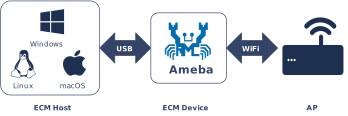
The Ethernet Control Model (ECM) within the USB Communication Device Class (CDC) defines a standard protocol for transmitting Ethernet frames over a USB interface. In Device mode, Ameba emulates a standard USB network adapter. When connected, the USB host (another Ameba board, a PC, or any host supporting CDC ECM) loads the driver and recognizes it as a local network interface.
The Ameba platform integrates a USB-IF compliant CDC ECM Device protocol stack, enabling seamless integration with the system’s built-in LwIP network stack. In this configuration, Ameba operates with a static IP and includes a built-in DHCP Server that automatically assigns an IP address to the connected USB host, providing plug-and-play functionality.
Features
Emulates a standard USB Ethernet adapter with native host-side support (Linux/macOS require no additional drivers, Windows 10+ has built-in support)
Built-in DHCP Server automatically assigns an IP address to the CDC ECM host
Device uses a static IP, ensuring stable network addressing for debugging and management scenarios
Deep integration with the LwIP protocol stack, abstracted as a standard network interface (Netif)
Supports USB hot plugging – automatic re-enumeration and DHCP reassignment after disconnection and reconnection
Fully customizable descriptors, including device MAC address, VID/PID, etc.
Application Scenarios
As a USB Device, Ameba presents a virtual Ethernet interface to the connected host and acts as the default gateway, providing network services:
Embedded Network Debug Terminal: The CDC ECM host establishes a TCP/IP channel over USB without requiring a dedicated Ethernet port, enabling log monitoring, parameter configuration, and OTA firmware updates.
USB Wireless Gateway: Leveraging Ameba’s built-in Wi-Fi module, the USB host accesses the wireless network through Ameba, which also serves as a DHCP Server and network routing gateway.
Inter-board High-speed Communication: Two Ameba boards connected directly via USB – one running CDC ECM Device (this solution) and the other running CDC ECM Host – establish a high-speed, low-latency Ethernet channel for multi-module coordination or data passthrough.
Protocol Introduction
The Communication Device Class (CDC) is a general standard defined by the USB specification for communication devices. As a subclass, the Ethernet Control Model (ECM) specifically defines how to encapsulate and transmit Ethernet data frames over a USB interface, enabling a USB device to be recognized by the operating system as a standard Network Interface Controller (NIC).
Protocol Documentation
The USB-IF officially publishes the base CDC class protocol and the ECM subclass specification. Please refer to the following core documents during development:
Specification Type |
Document |
|---|---|
CDC 1.2 (Communication Class Base Protocol) |
|
ECM 1.2 (Ethernet Control Model) |
Included as ECM120.pdf within the CDC 1.2 zip archive above. |
Terminology
Common CDC ECM technical terms used in this document are defined as follows:
Term |
Description |
|---|---|
CCI (Communication Class Interface) |
The interface used for managing device connection status, sending control commands, and receiving network status notifications (e.g., cable plug/unplug). It typically utilizes Control and Interrupt endpoints. |
DCI (Data Class Interface) |
The interface used for the actual transmission of Ethernet packets. It typically utilizes Bulk IN and Bulk OUT endpoints. |
Ethernet Frame |
The data payload transmitted by CDC ECM, usually following the IEEE 802.3 standard (containing Destination MAC, Source MAC, EtherType, and Payload). |
Notification |
Asynchronous events actively reported by the device to the host via the Interrupt endpoint, such as NETWORK_CONNECTION (link status change) or CONNECTION_SPEED_CHANGE. |
Functional Descriptor |
CDC-specific descriptors embedded within the standard configuration descriptor. They describe the specific capabilities of the network device (e.g., MAC address, maximum segment size). |
Protocol Framework
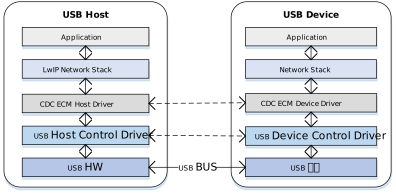
The CDC ECM Host protocol stack adopts a layered architecture designed to decouple the USB transport layer from the LwIP network protocol stack.
Component Responsibilities
Network Application Layer
Located at the top of the architecture; represents specific network applications.
LwIP/Network Stack
The network stack is unaware of underlying USB details. It operates on an abstract standard network interface (Netif) to provide network services to upper layers, handling TCP/IP, UDP, DHCP, and other network layer logic.
CDC ECM Class Driver
The core middleware implementing the behavior defined by the ECM specification:
Enumeration Parsing: Parses CDC functional descriptors to retrieve the MAC address.
Control Management: Configures the Packet Filter and handles network status interrupt notifications.
Data Tx/Rx: Encapsulates pbufs from the network stack into USB transfer requests (URB/Transfer) and restores received USB packets into Ethernet frames for LwIP.
USB Core & HCD (Host Controller Driver)
The low-level driver responsible for standard USB enumeration, endpoint management, and physical data transmission scheduling (e.g., DMA operations), abstracting hardware controller differences from the class driver.
Communication Mechanism
A standard CDC ECM device typically consists of two USB Interfaces, associated via a Union Functional Descriptor:
Communication Interface (CCI) - Control & Notification
Control Transfer
Mapped Endpoint: Default Control Endpoint 0.
Enumeration & Configuration: Transmits standard USB descriptors and CDC-specific functional descriptors.
Class-Specific Requests: Handles ECM protocol control commands. The most critical is SetEthernetPacketFilter, used to configure the device to receive broadcast, multicast, or unicast packets.
Interrupt Transfer
Interrupt IN: Mandatory. Used by the device to send Notifications to the host.
Typical Applications:
NETWORK_CONNECTION: Reports cable insertion (Link Up) or removal (Link Down) status. CONNECTION_SPEED_CHANGE: Reports current upstream and downstream connection speeds.
Data Interface (DCI) - Bulk Pipes
The Data Interface typically contains two Alternate Settings, which is a key design point of the ECM protocol:
Alt Setting 0: Idle Mode. Contains no endpoints. When the network is disconnected or the driver is not loaded, the host should switch the interface to this mode to save bus bandwidth.
Alt Setting 1: Active Mode**. Contains a pair of Bulk endpoints (Bulk IN / Bulk OUT).
Bulk IN: Device -> Host. Uploads received network data packets.
Bulk OUT: Host -> Device. Sends Ethernet frames to be forwarded to the network.
Descriptor Structure
In the standard configuration descriptor, CDC ECM devices use Class-Specific Interface Descriptors to define network capabilities in detail. These are collectively referred to as Functional Descriptors.
CDC ECM Descriptor Topology
Device Descriptor
└── Identifies basic device information (USB Version 2.00)

Configuration Descriptor
├── Contains total length of the entire configuration, power supply information, etc.
│
├── CDC Control (CDC Control) Interface Descriptor (Interface 0)
│       ├── Standard Interface Descriptor (AlternateSetting 0, Control Class)
│       ├── Header Functional Descriptor
│       ├── Union Functional Descriptor
│       ├── Ethernet Networking Functional Descriptor
│       └── Endpoint Descriptor(Interrupt IN)
│
└── CDC Data (CDC-Data) Interface Descriptor (Interface 1)
        ├── Alternate Setting 0: Control transfer active state (control transfer only)
        │
        ├── Alternate Setting 1: Data transfer active state (with data endpoint)
        ├── Endpoint Descriptor(Bulk In)
        └── Endpoint Descriptor(Bulk Out)

Device Qualifier Descriptor
└── Device information while running in another speed mode

Other Speed Configuration Descriptor
├── Configuration information while running in another speed mode.
│
├── CDC Control (CDC Control) Interface Descriptor (Interface 0)
│       ├── Standard Interface Descriptor (AlternateSetting 0, Control Class)
│       ├── Header Functional Descriptor
│       ├── Union Functional Descriptor
│       ├── Ethernet Networking Functional Descriptor
│       └── Endpoint Descriptor(Interrupt IN)
│
└── CDC Data (CDC-Data) Interface Descriptor (Interface 1)
        ├── Alternate Setting 0: Control transfer active state (control transfer only)
        │
        ├── Alternate Setting 1: Data transfer active state (with data endpoint)
        ├── Endpoint Descriptor(Bulk In)
        └── Endpoint Descriptor(Bulk Out)
Functional Descriptors Details
Header Functional Descriptor
Header Functional Descriptor
├── bLength (1 byte): Fixed 0x05
├── bDescriptorType (1 byte): 0x24 (CS_INTERFACE)
├── bDescriptorSubtype (1 byte): 0x00 (HEADER)
└── bcdCDC (2 bytes): CDC specification version
Union Functional Descriptor
Union Functional Descriptor
├── bLength (1 byte): 0x05 + n (n = number of subordinate interfaces)
├── bDescriptorType (1 byte): 0x24 (CS_INTERFACE)
├── bDescriptorSubtype (1 byte): 0x06 (UNION)
├── bControlInterface (1 byte): Master interface number
└── bSubordinateInterface[n] (n bytes): One or more slave interface numbers
Ethernet Networking Functional Descriptor
Ethernet Networking Functional Descriptor
├── bLength (1 byte): Total descriptor length
├── bDescriptorType (1 byte): 0x24 (CS_INTERFACE)
├── bDescriptorSubtype (1 byte): 0x0F
├── iMACAddress (1 byte): MAC address string index
├── bmEthernetStatistics (4 bytes): Supported statistics counters
├── wMaxSegmentSize (2 bytes): Maximum frame size (e.g., 1518)
├── wNumberMCFilters (2 bytes): Multicast filtering capability
└── bNumberPowerFilters (1 byte): Number of wake patterns
Class-Specific Requests
The CDC ECM Host driver controls device behavior by sending the following requests via Control Endpoint 0.
Request |
Requirement |
Description |
|---|---|---|
SendEncapsulatedCommand |
Optional |
Sends an encapsulated command. |
GetEncapsulatedResponse |
Optional |
Retrieves an encapsulated response. |
SetEthernetMulticastFilters |
Optional |
Sets the multicast address filter list. |
SetEthernetPowerManagementPatternFilter |
Optional |
Configures power management patterns (e.g., Wake-on-LAN/WoL). |
GetEthernetPowerManagementPatternFilter |
Optional |
Retrieves the power management pattern filter. |
SetEthernetPacketFilter |
Mandatory |
Sets the packet filter.
|
GetEthernetStatistic |
Optional |
Retrieves device transmission statistics (e.g., dropped packets, error frames). |
Data Transmission Format
Data transmission in CDC ECM is straightforward. The USB Payload is the raw Ethernet Frame, without additional header encapsulation (unlike RNDIS or NCM). The figure below shows a full Ethernet frame (1514 bytes) being split into 3 USB packets for transmission.

Note
ZLP (Zero Length Packet)
If the length of the transmitted Ethernet frame is exactly a multiple of the endpoint’s wMaxPacketSize (e.g., 512 bytes in High Speed), the host or device must send a Zero Length Packet (ZLP) to indicate the end of the transfer.
Class Driver
Driver Descriptor Structure
This section describes the CDC ECM class-specific descriptor structures defined in the driver layer, corresponding to the standard descriptor definitions in the USB CDC 1.2 specification.
Device Descriptor
└─ USB Version 2.00 (CDC ECM)

Configuration Descriptor (Interfaces 2)
│
├─ Communication Interface (IF 0, CCI)
│  ├─ Header Functional (CDC 1.20)
│  ├─ Union Functional (Master=0, Slave=1)
│  ├─ Ethernet Networking Functional (MAC Address String Index)
│  └─ Endpoint: INTR IN, maxpkt=16, Interval=8
│
└─ Data Interface (IF 1, DCI)
   ├─ Endpoint: BULK OUT, maxpkt=0x0200 (512 bytes)
   └─ Endpoint: BULK IN,  maxpkt=0x0200 (512 bytes)

Device Qualifier Descriptor
└─ USB 2.0

Other Speed Configuration Descriptor (Interfaces 2)
│
├─ Communication Interface (IF 0, CCI)
│  ├─ Header Functional (CDC 1.20)
│  ├─ Union Functional (Master=0, Slave=1)
│  ├─ Ethernet Networking Functional (MAC Address String Index)
│  └─ Endpoint: INTR IN, maxpkt=16, Interval=8
│
└─ Data Interface (IF 1, DCI)
   ├─ Endpoint: BULK OUT, maxpkt=0x0040 (64 bytes)
   └─ Endpoint: BULK IN,  maxpkt=0x0040 (64 bytes)
Endpoint Configuration
Endpoint |
Count |
Description |
|---|---|---|
Control IN/OUT |
1 |
EP0, used for handling standard requests and CDC class-specific requests from the host. |
Interrupt IN |
1 |
Belongs to the Communication Interface (CCI), used for actively reporting network notifications to the host (e.g., NetworkConnection, SpeedChange). |
Bulk OUT |
1 |
Belongs to the Data Interface (DCI), used for receiving Ethernet frames from the host (downstream). |
Bulk IN |
1 |
Belongs to the Data Interface (DCI), used for sending Ethernet frames from Ameba to the host (upstream). |
Key Data Structures
The driver exposes two main structures:
Contains device-specific private configuration. The current version includes the following field:
mac_value: Pointer to a 6-byte MAC address buffer. The Device side provides this MAC address to the Host via the iMACAddress string index in the descriptor. The Host sets it as the MAC of its local LwIP network interface.
Application callback collection. Contains a
privprivate data pointer and the following event callbacks:
init/deinit: Called during driver initialization and deinitialization.
setup: Handles class-specific SETUP requests (called in ISR context; do not perform time-consuming operations).
received: Called when Bulk OUT data arrives (dispatched from the dedicated RX thread context).
status_changed: Called when the USB connection status changes (called in ISR context; do not perform time-consuming operations).
API Reference
Application Example
Application Design
This section outlines the complete workflow for the CDC ECM driver, covering driver loading, hotplug management, network link state monitoring, Ethernet frame transmission/reception, and driver unloading.
Loading the Driver
Define the configuration structure, MAC address private data, and callbacks, then call the initialization interfaces in sequence to load the USB Device core driver and the CDC ECM class driver.
Step-by-Step Description:
MAC Configuration: Provide a 6-byte device MAC address via
usbd_cdc_ecm_priv_data_t.mac_value. This MAC address is advertised to the host through the descriptor and synchronized to the LwIP network interface.Load Core Driver: Call
usbd_init()to initialize the USB Device core driver.Load Class Driver: Call
usbd_cdc_ecm_init()to register callbacks and start the class driver.
// USB speed
#ifdef CONFIG_SUPPORT_USB_FS_ONLY
#define CONFIG_USBD_CDC_ECM_SPEED   USB_SPEED_FULL
#else
#define CONFIG_USBD_CDC_ECM_SPEED   USB_SPEED_HIGH
#endif

/*
 * Configure hardware-specific FIFO depth and interrupt settings.
 * Values vary by SoC; refer to SDK defaults for your target chip.
 */
static usbd_config_t cdc_ecm_cfg = {
    .speed = CONFIG_USBD_CDC_ECM_SPEED,
    .isr_priority = INT_PRI_MIDDLE,
    .ext_intr_enable = USBD_SOF_INTR,
};

/* Device MAC address (6 bytes). */
static u8 dongle_mac[6] = {0x02, 0x11, 0x22, 0x33, 0x44, 0x55};

/*
 * Private data: supplies the device MAC address to the class driver.
 * The MAC is also exported to the host via the Ethernet Networking
 * Functional descriptor's iMACAddress string.
 */
static usbd_cdc_ecm_priv_data_t ecm_priv = {
    .mac_value = dongle_mac,
};

static usbd_cdc_ecm_cb_t cdc_ecm_cb = {
    .priv = &ecm_priv,
    .init = cdc_ecm_cb_init,                       /* Initialization callback */
    .deinit = cdc_ecm_cb_deinit,                   /* De-initialization callback */
    .setup = cdc_ecm_cb_setup,                     /* Class SETUP request callback */
    .received = cdc_ecm_cb_received,               /* Bulk OUT data received callback */
    .status_changed = cdc_ecm_cb_status_changed,   /* USB attach status change callback */
};

int ret = 0;

/**
 * Initialize USB device core driver.
 * param[in] cfg: USB device hardware configuration.
 * return 0 on success, non-zero on failure.
 */
ret = usbd_init(&cdc_ecm_cfg);
if (ret != HAL_OK) {
    return;
}

/**
 * Initialize CDC ECM class driver with application callbacks.
 * param[in] cb: Pointer to user callback structure (includes priv MAC config).
 * return 0 on success, non-zero on failure.
 */
ret = usbd_cdc_ecm_init(&cdc_ecm_cb);
if (ret != HAL_OK) {
    usbd_deinit();
    return;
}
Hotplug Event Handling
Monitor USB connection status changes (attach/detach) by registering the status_changed callback. It is recommended to use a semaphore to notify a dedicated task thread for processing, avoiding time-consuming operations in interrupt context.
Refer to Device Connection Status Detection for more details. The following is example code:
/* USB attach status change callback — runs in ISR context */
static void cdc_ecm_cb_status_changed(u8 old_status, u8 status)
{
    /*
     * State transitions:
     *   INIT(0) -> ATTACHED(1): cold boot, device enumerated for the first time.
     *   ATTACHED(1) -> DETACHED(2): host disconnects, suspends, or system sleeps.
     *   DETACHED(2) -> ATTACHED(1): hot-plug in, remote wakeup, or host resumes.
     */
    cdc_ecm_attach_status = status;
    cdc_ecm_attach_old_status = old_status;

    if (cdc_ecm_attach_status_changed_sema != NULL) {
        rtos_sema_give(cdc_ecm_attach_status_changed_sema);
    }

    /* Mark link as down immediately on detach so the link-state thread
     * can stop the DHCP server without waiting for the next poll. */
    if (status == USBD_ATTACH_STATUS_DETACHED) {
        cdc_ecm_link_disconnected = 1;
    }
}

/* Hotplug detection thread — runs in task context */
static void cdc_ecm_hotplug_thread(void *param)
{
    int ret = 0;
    UNUSED(param);

    cdc_ecm_hotplug_thread_running = 1;

    while (cdc_ecm_hotplug_thread_running) {
        if (rtos_sema_take(cdc_ecm_attach_status_changed_sema, RTOS_SEMA_MAX_COUNT) != RTK_SUCCESS) {
            continue;
        }

        RTK_LOGS(TAG, RTK_LOG_INFO, "Status change %d -> %d\n", cdc_ecm_attach_old_status, cdc_ecm_attach_status);

        if (cdc_ecm_attach_status == USBD_ATTACH_STATUS_DETACHED) {
            RTK_LOGS(TAG, RTK_LOG_INFO, "DETACHED\n");

            /* Tear down the stack in reverse init order */
            usbd_cdc_ecm_deinit();

            ret = usbd_deinit();
            if (ret != HAL_OK) {
                RTK_LOGS(TAG, RTK_LOG_ERROR, "Deinit core fail %d\n", ret);
                break;
            }

            rtos_time_delay_ms(100);
            RTK_LOGS(TAG, RTK_LOG_INFO, "Free heap 0x%x\n", rtos_mem_get_free_heap_size());

            /* Re-initialize for the next connection */
            ret = usbd_init(&cdc_ecm_cfg);
            if (ret != HAL_OK) {
                break;
            }

            ret = usbd_cdc_ecm_init(&cdc_ecm_cb);
            if (ret != HAL_OK) {
                usbd_deinit();
                break;
            }

            RTK_LOGS(TAG, RTK_LOG_INFO, "Reinit done\n");
        } else if (cdc_ecm_attach_status == USBD_ATTACH_STATUS_ATTACHED) {
            RTK_LOGS(TAG, RTK_LOG_INFO, "Attached\n");
        }
    }

    cdc_ecm_hotplug_thread_running = 0;
    rtos_task_delete(NULL);
}
Network Link State Monitoring
The link state monitoring thread ecm_link_change_thread runs independently, polling usbd_cdc_ecm_get_connect_status() to track whether the host has activated the data interface (Alt-Setting 1).
Link UP Flow:
Retrieve the device MAC address via
usbd_cdc_ecm_get_mac_str()and write it to the LwIP network interface.Call
lwip_set_ip()to configure the device with a static IP / netmask / gateway (default192.168.45.1/24).Call
netifapi_netif_set_link_up/set_up/set_defaultto activate the network interface.Call
dhcps_init()+dhcps_start()to start the built-in DHCP Server, which automatically assigns an IP to the USB host.
Link DOWN Flow:
Call
dhcps_stop()+dhcps_deinit()to stop the DHCP Server.Call
netifapi_netif_set_down/set_link_downto bring the network interface down.
static u8 dhcp_server_mac[6] = {0x02, 0x11, 0x22, 0x33, 0x44, 0x56};
/*
 * Link-state monitoring thread.
 * Polls usbd_cdc_ecm_get_connect_status() every 1 s to track whether
 * the host has activated the data interface (alt-setting 1).
 * When the link comes up it assigns a static IP, brings up the LwIP netif,
 * and starts the built-in DHCP server so the host obtains an IP automatically.
 * When the link goes down it tears down the DHCP server and brings the netif down.
 */
static void ecm_link_change_thread(void *param)
{
    eth_state_t ethernet_state = ETH_STATUS_IDLE;
    u8 link_is_up = 0;
    u8 *mac;
    UNUSED(param);

    while (1) {
        link_is_up = usbd_cdc_ecm_get_connect_status();

        /* cdc_ecm_link_disconnected is set to 1 in the status_changed ISR
         * callback on DETACH, forcing link_is_up to 0 immediately. */
        if (cdc_ecm_link_disconnected) {
            cdc_ecm_link_disconnected = 0;
            link_is_up = 0;
        }

        if (link_is_up && (ethernet_state < ETH_STATUS_INIT)) {
            /* --- Link UP: configure netif and start DHCP server --- */
            if (!dhcp_server_started) {

                /* Copy MAC address into LwIP netif */
                memcpy(pnetif_usb_eth->hwaddr, dhcp_server_mac, 6);
                pnetif_usb_eth->hwaddr_len = ETHARP_HWADDR_LEN;

                /* Assign static IP / netmask / gateway */
                u32 ip_addr = CONCAT_TO_UINT32(192, 168, 45, 1);
                u32 netmask = CONCAT_TO_UINT32(255, 255, 255, 0);
                u32 gw      = CONCAT_TO_UINT32(192, 168, 45, 1);
                lwip_set_ip(NETIF_USB_ETH_INDEX, ip_addr, netmask, gw);

                RTK_LOGS(TAG, RTK_LOG_INFO, "Device IP: 192.168.45.1\n");

                /* Activate netif */
                netifapi_netif_set_link_up(pnetif_usb_eth);
                netifapi_netif_set_up(pnetif_usb_eth);
                netifapi_netif_set_default(pnetif_usb_eth);

                /* Start DHCP server — host receives an IP from Ameba */
                dhcps_init(pnetif_usb_eth);
                dhcps_start(pnetif_usb_eth);

                RTK_LOGS(TAG, RTK_LOG_INFO, "DHCP Server started\n");
                ethernet_state = ETH_STATUS_INIT;
            }
        } else if (!link_is_up && (ethernet_state >= ETH_STATUS_INIT)) {
            ethernet_state = ETH_STATUS_DEINIT;
            // USB disconnected, stop DHCP server
            if (dhcp_server_started) {
                RTK_LOGS(TAG, RTK_LOG_INFO, "Stopping USB ECM DHCP Server...\n");

                // 1. Stop DHCP service first
                dhcps_stop(pnetif_usb_eth);
                dhcps_deinit(pnetif_usb_eth);

                // 2. Bring down network interface (similar to WHC stop ap)
                netifapi_netif_set_down(pnetif_usb_eth);
                netifapi_netif_set_link_down(pnetif_usb_eth);

                dhcp_server_started = 0;
                RTK_LOGS(TAG, RTK_LOG_INFO, "DHCP Server stopped\n");
            }
        } else {
            rtos_time_delay_ms(1000);
        }
    }
}
Ethernet Input Process (RX)
When the host sends Ethernet frames to Ameba, the data arrives through the Bulk OUT endpoint. The class driver’s dedicated RX thread triggers the received callback.
Process Description:
USB Reception: The class driver uses a ping-pong buffer (ping-pong rx_buf) mechanism. The ISR places the frame into an idle buffer, and the RX thread passes the buffer pointer to the callback, avoiding memory operations inside the ISR.
Deliver to Stack: The callback calls
netif_adapter_usb_eth_recv(), which handles pbuf allocation andnetif->input()invocation, delivering the Ethernet frame to the LwIP protocol stack for processing.
/*
 * Bulk OUT received callback — called by the class driver when the
 * host sends an ethernet frame to Ameba.
 * Delegates directly to the USB Ethernet netif adapter which allocates
 * a pbuf and hands the frame up to LwIP for IP/ARP processing.
 */
static int cdc_ecm_cb_received(u8 *buf, u32 length)
{
    if (buf == NULL || length == 0) {
        return HAL_ERR_PARA;
    }

    /* netif_adapter_usb_eth_recv() wraps pbuf allocation + netif->input().
     * It must NOT be called from an ISR context. The class driver
     * dispatches this callback from its dedicated RX thread. */
    netif_adapter_usb_eth_recv(buf, length);

    return HAL_OK;
}
Ethernet Output Process (TX)
When the LwIP protocol stack has packets to send to the USB host, it calls the registered linkoutput function, which ultimately invokes usbd_cdc_ecm_transmit().
Process Description:
When the
blockparameter is1, the function blocks, waiting for the Bulk IN transfer completion semaphore before returning; when0, it returns immediately.If USB is not connected (
bulk_tx_blockis set), the function returns safely to prevent deadlock.
/*
 * Transmit an ethernet frame to the host via Bulk IN endpoint.
 * This wrapper is registered as the LwIP netif's linkoutput function
 * by the USB Ethernet adapter layer (rltk_usb_eth_init).
 *
 * param[in] buf:   Pointer to the raw ethernet frame buffer.
 * param[in] len:   Frame length in bytes.
 * param[in] block: 1 = blocking (waits for transfer completion semaphore);
 *                  0 = non-blocking (returns immediately after submit).
 */
int usb_ethernet_transmit(u8 *buf, u32 len, u8 block)
{
    return usbd_cdc_ecm_transmit(buf, len, block);
}
Note
For the complete transmission and reception logic, please refer to the SDK example code: {SDK}/example/usb/usbd_cdc_ecm/example_usbd_cdc_ecm.c.
Driver Unloading
When CDC ECM functionality is no longer needed or during system shutdown, release resources in the reverse order of driver loading.
/* Deinitialize CDC ECM class driver. */
usbd_cdc_ecm_deinit();

/* Deinitialize USB device core driver. */
usbd_deinit();
Usage Example
This section demonstrates Ameba acting as a USB CDC ECM Device connected to another Ameba board, showing how to configure Ameba as a USB Ethernet adapter. The peer device (CDC ECM Host) automatically obtains an IP address and completes network connectivity tests.
The peer device is another Ameba board running the CDC ECM Host example (see CDC ECM Host Solution ).
Example Path: {SDK}/example/usb/usbd_cdc_ecm
Configuration & Compilation
Compile and Flash
Execute the following commands in the SDK root directory to configure the environment, select the target SoC, compile the project, and flash the generated
Imagefile to the development board:# Initialize environment (required for every new terminal) source env.sh or env.bat(Windows system) # Select Target SoC (replace xxx with your specific SoC) ameba.py soc xxx ameba.py build -a usbd_cdc_ecm -p
Menuconfig Configuration
If compilation fails, run
ameba.py menuconfigand confirm thatUSBD CDC ECMis selected:- Choose `CONFIG USB --->`: [*] Enable USB USB Mode (Device) ---> [*] CDC ECM
Result Verification
Start Device
Reboot the development board. The serial log should display the driver startup information:
[ECM-I] ECM demo start
[ECM-I] Enter link status task!
[ECM-I] Attached
[ECM-I] USB ECM MAC: 00:11:22:33:44:55
[ECM-I] Device IP: 192.168.45.1
[ECM-I] DHCP Server started
Note
The
Attached,Device IP, andDHCP Server startedlogs appear only after the USB cable is connected.Connect the Peer Device
Connect the development board’s USB port to the peer host (another Ameba board) using a USB cable. The hardware topology is as follows:
[Ameba (CDC ECM Device)] ---USB Cable--- [Ameba (CDC ECM Host)]
Functional Testing
After successful USB enumeration, the host side automatically obtains an IP address from Ameba’s built-in DHCP Server (subnet
192.168.45.0/24).Ping Test (AT+PING)
Execute the Ping command on the Ameba serial terminal to send packets to the host IP and verify bidirectional connectivity. See Ping Test for details.
Network Bandwidth Test (AT+IPERF)
Use the iPerf tool to test USB Ethernet channel throughput. See Network Bandwidth Test for details.

