Ethernet Communication Host Solution
Overview
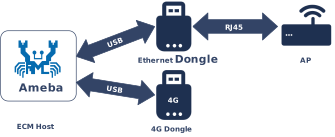
The Ethernet Control Model (ECM) within the USB Communication Device Class (CDC) defines a standard protocol for transmitting Ethernet frames over a USB interface. In Host mode, the system uses this protocol to identify and drive external USB network devices—such as USB-to-Ethernet adapters and LTE cellular modules—abstracting them into local network interfaces.
The Ameba platform integrates a USB-IF compliant CDC ECM Host protocol stack, capable of seamless integration with the system’s built-in LwIP network stack. This solution provides flexible network expansion capabilities, enabling devices to easily access wired LANs or 4G cellular networks via the USB interface.
Features
Supports standard CDC ECM devices (such as USB network cards, LTE modules)
Deep integration with the LwIP protocol stack, abstracted as a standard network interface (Netif)
Supports composite devices, capable of parallel processing of multiple interface functions (such as AT commands + networking)
Supports USB hot plugging
Optimize bulk transmission to provide high-performance data throughput
Application Scenarios
Acting as a USB Host, Ameba is responsible for enumerating, configuring, and loading drivers for connected CDC ECM devices. This allows users to flexibly extend connectivity without modifying board-level hardware designs. For example,
Wired Ethernet Expansion (USB-to-Ethernet): Ameba drives external standard USB-to-Ethernet adapters (supporting mainstream chip solutions like Realtek RTL815x) via the USB interface. This provides plug-and-play wired access for hardware platforms lacking native Ethernet ports.
4G Cellular Access (LTE Dongle): Ameba connects to ECM-enabled 4G modules or USB dongles. The protocol stack converts USB data streams into standard network packets, enabling internet access via cellular networks. This is ideal for outdoor IoT gateways or vehicular terminals requiring mobile backhaul or Wi-Fi link backup.
Dual-Interface Routing and Bridging: By combining Ameba’s native Wi-Fi interface with the USB-expanded physical channel, the platform acts as a network hub. It can perform data forwarding, load balancing, or failover between interfaces, functioning as a simple wireless router or dual-port bridge.
Protocol Introduction
The Communication Device Class (CDC) is a general standard defined by the USB specification for communication devices. As a subclass, the Ethernet Control Model (ECM) specifically defines how to encapsulate and transmit Ethernet data frames over a USB interface, enabling a USB device to be recognized by the operating system as a standard Network Interface Controller (NIC).
Protocol Documentation
The USB-IF officially publishes the base CDC class protocol and the ECM subclass specification. Please refer to the following core documents during development:
Specification Type |
Document |
|---|---|
CDC 1.2 (Communication Class Base Protocol) |
|
ECM 1.2 (Ethernet Control Model) |
Included as ECM120.pdf within the CDC 1.2 zip archive above. |
Terminology
Common CDC ECM technical terms used in this document are defined as follows:
Term |
Description |
|---|---|
CCI (Communication Class Interface) |
The interface used for managing device connection status, sending control commands, and receiving network status notifications (e.g., cable plug/unplug). It typically utilizes Control and Interrupt endpoints. |
DCI (Data Class Interface) |
The interface used for the actual transmission of Ethernet packets. It typically utilizes Bulk IN and Bulk OUT endpoints. |
Ethernet Frame |
The data payload transmitted by CDC ECM, usually following the IEEE 802.3 standard (containing Destination MAC, Source MAC, EtherType, and Payload). |
Notification |
Asynchronous events actively reported by the device to the host via the Interrupt endpoint, such as NETWORK_CONNECTION (link status change) or CONNECTION_SPEED_CHANGE. |
Functional Descriptor |
CDC-specific descriptors embedded within the standard configuration descriptor. They describe the specific capabilities of the network device (e.g., MAC address, maximum segment size). |
Protocol Framework
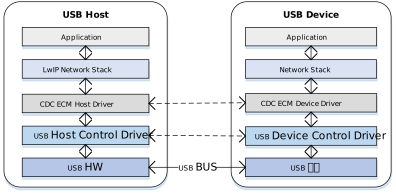
The CDC ECM Host protocol stack adopts a layered architecture designed to decouple the USB transport layer from the LwIP network protocol stack.
Component Responsibilities
Network Application Layer
Located at the top of the architecture; represents specific network applications.
LwIP/Network Stack
The network stack is unaware of underlying USB details. It operates on an abstract standard network interface (Netif) to provide network services to upper layers, handling TCP/IP, UDP, DHCP, and other network layer logic.
CDC ECM Class Driver
The core middleware implementing the behavior defined by the ECM specification:
Enumeration Parsing: Parses CDC functional descriptors to retrieve the MAC address.
Control Management: Configures the Packet Filter and handles network status interrupt notifications.
Data Tx/Rx: Encapsulates pbufs from the network stack into USB transfer requests (URB/Transfer) and restores received USB packets into Ethernet frames for LwIP.
USB Core & HCD (Host Controller Driver)
The low-level driver responsible for standard USB enumeration, endpoint management, and physical data transmission scheduling (e.g., DMA operations), abstracting hardware controller differences from the class driver.
Communication Mechanism
A standard CDC ECM device typically consists of two USB Interfaces, associated via a Union Functional Descriptor:
Communication Interface (CCI) - Control & Notification
Control Transfer
Mapped Endpoint: Default Control Endpoint 0.
Enumeration & Configuration: Transmits standard USB descriptors and CDC-specific functional descriptors.
Class-Specific Requests: Handles ECM protocol control commands. The most critical is SetEthernetPacketFilter, used to configure the device to receive broadcast, multicast, or unicast packets.
Interrupt Transfer
Interrupt IN: Mandatory. Used by the device to send Notifications to the host.
Typical Applications:
NETWORK_CONNECTION: Reports cable insertion (Link Up) or removal (Link Down) status. CONNECTION_SPEED_CHANGE: Reports current upstream and downstream connection speeds.
Data Interface (DCI) - Bulk Pipes
The Data Interface typically contains two Alternate Settings, which is a key design point of the ECM protocol:
Alt Setting 0: Idle Mode. Contains no endpoints. When the network is disconnected or the driver is not loaded, the host should switch the interface to this mode to save bus bandwidth.
Alt Setting 1: Active Mode**. Contains a pair of Bulk endpoints (Bulk IN / Bulk OUT).
Bulk IN: Device -> Host. Uploads received network data packets.
Bulk OUT: Host -> Device. Sends Ethernet frames to be forwarded to the network.
Descriptor Structure
In the standard configuration descriptor, CDC ECM devices use Class-Specific Interface Descriptors to define network capabilities in detail. These are collectively referred to as Functional Descriptors.
CDC ECM Descriptor Topology
Device Descriptor
└── Identifies basic device information (USB Version 2.00)

Configuration Descriptor
├── Contains total length of the entire configuration, power supply information, etc.
│
├── CDC Control (CDC Control) Interface Descriptor (Interface 0)
│       ├── Standard Interface Descriptor (AlternateSetting 0, Control Class)
│       ├── Header Functional Descriptor
│       ├── Union Functional Descriptor
│       ├── Ethernet Networking Functional Descriptor
│       └── Endpoint Descriptor(Interrupt IN)
│
└── CDC Data (CDC-Data) Interface Descriptor (Interface 1)
        ├── Alternate Setting 0: Control transfer active state (control transfer only)
        │
        ├── Alternate Setting 1: Data transfer active state (with data endpoint)
        ├── Endpoint Descriptor(Bulk In)
        └── Endpoint Descriptor(Bulk Out)

Device Qualifier Descriptor
└── Device information while running in another speed mode

Other Speed Configuration Descriptor
├── Configuration information while running in another speed mode.
│
├── CDC Control (CDC Control) Interface Descriptor (Interface 0)
│       ├── Standard Interface Descriptor (AlternateSetting 0, Control Class)
│       ├── Header Functional Descriptor
│       ├── Union Functional Descriptor
│       ├── Ethernet Networking Functional Descriptor
│       └── Endpoint Descriptor(Interrupt IN)
│
└── CDC Data (CDC-Data) Interface Descriptor (Interface 1)
        ├── Alternate Setting 0: Control transfer active state (control transfer only)
        │
        ├── Alternate Setting 1: Data transfer active state (with data endpoint)
        ├── Endpoint Descriptor(Bulk In)
        └── Endpoint Descriptor(Bulk Out)
Functional Descriptors Details
Header Functional Descriptor
Header Functional Descriptor
├── bLength (1 byte): Fixed 0x05
├── bDescriptorType (1 byte): 0x24 (CS_INTERFACE)
├── bDescriptorSubtype (1 byte): 0x00 (HEADER)
└── bcdCDC (2 bytes): CDC specification version
Union Functional Descriptor
Union Functional Descriptor
├── bLength (1 byte): 0x05 + n (n = number of subordinate interfaces)
├── bDescriptorType (1 byte): 0x24 (CS_INTERFACE)
├── bDescriptorSubtype (1 byte): 0x06 (UNION)
├── bControlInterface (1 byte): Master interface number
└── bSubordinateInterface[n] (n bytes): One or more slave interface numbers
Ethernet Networking Functional Descriptor
Ethernet Networking Functional Descriptor
├── bLength (1 byte): Total descriptor length
├── bDescriptorType (1 byte): 0x24 (CS_INTERFACE)
├── bDescriptorSubtype (1 byte): 0x0F
├── iMACAddress (1 byte): MAC address string index
├── bmEthernetStatistics (4 bytes): Supported statistics counters
├── wMaxSegmentSize (2 bytes): Maximum frame size (e.g., 1518)
├── wNumberMCFilters (2 bytes): Multicast filtering capability
└── bNumberPowerFilters (1 byte): Number of wake patterns
Class-Specific Requests
The CDC ECM Host driver controls device behavior by sending the following requests via Control Endpoint 0.
Request |
Requirement |
Description |
|---|---|---|
SendEncapsulatedCommand |
Optional |
Sends an encapsulated command. |
GetEncapsulatedResponse |
Optional |
Retrieves an encapsulated response. |
SetEthernetMulticastFilters |
Optional |
Sets the multicast address filter list. |
SetEthernetPowerManagementPatternFilter |
Optional |
Configures power management patterns (e.g., Wake-on-LAN/WoL). |
GetEthernetPowerManagementPatternFilter |
Optional |
Retrieves the power management pattern filter. |
SetEthernetPacketFilter |
Mandatory |
Sets the packet filter.
|
GetEthernetStatistic |
Optional |
Retrieves device transmission statistics (e.g., dropped packets, error frames). |
Data Transmission Format
Data transmission in CDC ECM is straightforward. The USB Payload is the raw Ethernet Frame, without additional header encapsulation (unlike RNDIS or NCM). The figure below shows a full Ethernet frame (1514 bytes) being split into 3 USB packets for transmission.

Note
ZLP (Zero Length Packet)
If the length of the transmitted Ethernet frame is exactly a multiple of the endpoint’s wMaxPacketSize (e.g., 512 bytes in High Speed), the host or device must send a Zero Length Packet (ZLP) to indicate the end of the transfer.
Class Driver
This section details the internal implementation of the CDC ECM Host driver, covering the driver framework, supported class-specific requests, and endpoint resource allocation schemes.
Implementation Details
The USB Host CDC ECM driver stack adopts a modular design, enabling efficient interaction between the network protocol stack and the USB hardware controller via a layered architecture. This architecture ensures data transmission stability and system scalability.
The system is divided into several core modules based on functional responsibilities:
Network Protocol Stack Adapter Layer
Responsible for Encapsulation & Decapsulation of Network Layer Packets.
Acting as the interface layer between the USB driver and the TCP/IP stack (LwIP), it functions effectively as the Data Link Layer:
TX (Data Producer): Receives PBUF data packets from LwIP and converts them into USB transfer requests.
RX (Data Consumer): Receives Ethernet frames reported by the USB lower layer, encapsulates them into PBUFs, and submits them to LwIP for upper-layer protocol processing.
CDC ECM Driver Architecture
This is the core component of the CDC ECM class driver. It is fully compliant with the USB CDC ECM specification and implements the essential logic for interaction between the Host and the ECM device. Key responsibilities include:
Enumeration & Configuration Parsing: Identifies CDC communication and data interfaces, parses device descriptors, and extracts key parameters such as the MAC address.
Network Control Management: Manages device behavior via the Control Endpoint, such as configuring Packet Filters and multicast lists.
Data Tx/Rx Abstraction: Provides standardized data transmission/reception APIs, serving as a bridge between the upper network stack (LwIP) and the underlying USB transport.
Self-Healing Mechanism: Immediately triggers recovery processes upon detecting transmission anomalies (e.g., timeouts or blocking), ensuring automatic network connection restoration and uninterrupted communication.
USB Core Driver
Handles real-time hardware interrupts, standard USB enumeration, transfer management, and low-level physical data transmission scheduling.
Core Interaction Interfaces
The ECM Host class driver serves as a crucial bridge in the system architecture. Its implementation logic revolves around three core interaction interfaces:
Host Class Driver Callback API: The class driver interacts with the underlying USB Core by defining and registering a standard
usbh_class_driver_tstructure.Application Callback API: The class driver provides an asynchronous event notification mechanism to upper-layer applications via the
usbh_cdc_ecm_state_cb_tcallback structure.Application API: When the application layer invokes these APIs, the driver transitions its internal state machine, thereby triggering and scheduling data transfers.
Loading and Unloading the Class Driver
These two functions are responsible for allocating and freeing memory resources, as well as registering and unregistering the class driver with the USB Core.
usbh_cdc_ecm_init() is the top-level function for loading the CDC ECM host class driver. It primarily performs the following tasks:
Saves the user-provided callback functions and invokes the user’s
initcallback.Saves the ECM private data structure (
usbh_cdc_ecm_priv_data_t) configured by the user.Allocates the necessary memory resources for control transfers.
Parses the private data passed from the application layer and stores it internally for subsequent specific use cases.
Calls
usbh_register_class()to register the cdc_ecm class driver with the USB Host Core.
Example:
int usbh_cdc_ecm_init(usbh_cdc_ecm_state_cb_t *cb, usbh_cdc_ecm_priv_data_t *priv)
{
    /* 1. Save the frame count param */
    if (priv == NULL) {
        USBH_ECM_FREE_MEM(cdc->led_array);
        cdc->led_cnt = 0;
    } else {
        if (priv->mac_value) {
            usbh_cdc_ecm_set_dongle_mac(priv->mac_value);
        }
        if ((priv->led_array != NULL) && (priv->led_cnt > 0)) {
            usbh_cdc_ecm_set_dongle_led_array(priv->led_array, priv->led_cnt);
        }
    }

    /* 2. Allocate memory */
    cdc->dongle_ctrl_buf = (u8 *)usb_os_malloc(CDC_ECM_MAC_STRING_LEN);

    /* 3. Save the user callback and call the user's ``init`` callback */
    if (cb != NULL) {
        cdc->cb = cb;
        if (cb->init != NULL) {
            ret = cb->init();
            if (ret != HAL_OK) {
            RTK_LOGS(TAG, RTK_LOG_ERROR, "User init err %d\n", ret);
            return ret;
            }
        }
    }

    /* 4. Register class driver*/
    usbh_register_class(&usbh_cdc_ecm_driver);

    return HAL_OK;
}
usbh_cdc_ecm_deinit() is the top-level function for unloading the cdc_ecm host class driver. It is strictly responsible for resource cleanup:
Calls
usbh_unregister_class()to unregister the cdc_ecm class driver.Forcefully closes all open pipes if the device remains connected.
Frees all memory resources allocated during the initialization phase.
Inspects the TX status to guarantee the safe return of upper-layer data read operations.
Invokes the user’s
deinitcallback to notify the application layer of the uninstallation event.
Example:
int usbh_cdc_ecm_deinit(void)
{
    /* 1.Reset ethernet connect status*/
    cdc->eth_hw_connect = 0;

    /* 2. Unregister class driver*/
    usbh_unregister_class(&usbh_cdc_ecm_driver);

    /* 3. Close all open pipes */
    usbh_cdc_ecm_deinit_all_pipe();

    /* 4. Free memory */
    usbh_cdc_ecm_deinit_ep_buf();
    USBH_ECM_FREE_MEM(cdc->dongle_ctrl_buf);
    USBH_ECM_FREE_MEM(cdc->led_array);

    /* 5. Release the tx lock to prevent the Tx API from blocking. */
    usbh_cdc_ecm_tx_status_check();
    usb_os_sema_delete(cdc->bulk_tx_sema);

    /* 6. Call the user's ``deinit`` callback  */
    if ((cdc->cb != NULL) && (cdc->cb->deinit != NULL)) {
        cdc->cb->deinit();
    }

    return ret;
}
Connection and Disconnection Handling
When the USB Core detects the attachment or detachment of a device matching the cdc_ecm class, it automatically triggers the corresponding callback functions.
usbh_cdc_ecm_attach is a critical step in the device enumeration phase. It parses interface descriptors and allocates pipe resources:
Find CDC Control Interface: Parses and retrieves the MAC address string index, interrupt endpoint information, etc.
Find CDC Data Interface: Parses and retrieves the interface index and pipe information for network data.
Open Pipes: Allocates and opens status detection pipes and data transmission/reception pipes based on the acquired descriptor information.
Initialize State Machine: Sets the device state to
CDC_ECM_STATE_IDLE, indicating readiness to receive data.Notify Application Layer: Invokes the user’s
attachcallback to report the connection status to the application layer.
static int usbh_cdc_ecm_attach(usb_host_t *host)
{
    /* 1. Parse descriptors to get Ctrl and Data information */
    status = usbh_cdc_ecm_parse_interface_desc(host);
    if (status) {
        return status;
    }

    /* 2. Open the pipe for steaming transfer */
    /* control in */
    pipe_info = &(cdc->intr_rx);
    if (pipe_info->valid) {
        usbh_open_pipe(host, &(pipe_info->pipe), &(pipe_info->ep_desc));
        pipe_info->buf = (u8 *)usb_os_malloc(pipe_info->pipe.ep_mps);
        pipe_info->buf_len = pipe_info->pipe.ep_mps;
        pipe_info->pipe.xfer_state = USBH_EP_XFER_START;
        cdc->intr_check_tick = pipe_info->pipe.ep_interval;
    }

    /* bulk out */
    pipe_info = &(cdc->bulk_tx);
    if (pipe_info->valid) {
        usbh_open_pipe(host, &(pipe_info->pipe), &(pipe_info->ep_desc));
    }

    /* bulk in */
    pipe_info = &(cdc->bulk_rx);
    if (pipe_info->valid) {
        usbh_open_pipe(host, &(pipe_info->pipe), &(pipe_info->ep_desc));
        /* ecm use bulk, the max ethernet packet size is 1542, malloc (512*3) to rx a whole ethernet packet*/
        pipe_info->buf = (u8 *)usb_os_malloc(USBH_CDC_ECM_BULK_BUF_MAX_SIZE);
        pipe_info->buf_len = USBH_CDC_ECM_BULK_BUF_MAX_SIZE;
        pipe_info->pipe.xfer_state = USBH_EP_XFER_START;
    }

    /* 3. Initialize the state machine */
    cdc->state = CDC_ECM_STATE_IDLE;

    /* 4. Notify the user layer */
    if ((cdc->cb != NULL) && (cdc->cb->attach != NULL)) {
        cdc->cb->attach();
    }
    return HAL_OK;
}
usbh_cdc_ecm_detach is invoked when the device is unplugged. Its core responsibility is to clean up the connection state and notify the upper-layer application that the device has been removed.
static int usbh_cdc_ecm_detach(usb_host_t *host)
{
    /* 1. Reset xfer status */
    cdc->state = CDC_ECM_STATE_IDLE;

    /* 3. Deinit all pipes */
    usbh_cdc_ecm_deinit_all_pipe();

    /* 3. Notify the user layer */
    if ((cdc->cb != NULL) && (cdc->cb->detach != NULL)) {
        cdc->cb->detach();
    }

    return HAL_OK;
}
Class Driver State Machine
The usbh_cdc_ecm_process callback function acts as the central state machine processor for the host-side CDC ECM class.
Unlike the device side, which passively responds to requests, the host-side driver must proactively maintain the device state. Its core duty is to manage the lifecycle of the class driver and orchestrate transfer tasks.
State Machine Management and Scheduling
usbh_cdc_ecm_process coordinates control transfers (e.g., retrieving the MAC address) and data transfers based on the current state of the class driver.
State Enum |
Description |
Key Actions |
|---|---|---|
CDC_ECM_STATE_IDLE |
Idle State |
Waits for user commands or data transfer requests. |
CDC_ECM_STATE_PRE_SETTING |
Control Transfer |
Invokes corresponding control processing functions based on the current stage (e.g., Get MAC, Set MAC). |
CDC_ECM_STATE_TRANSFER |
Data Transfer |
Dispatches tasks to specific TX/RX processing functions based on the Pipe ID. |
CDC_ECM_STATE_ERROR |
Error State |
Attempts to send a Clear Feature request to recover communication. |
Control Transfer Dispatching Example
When in the CDC_ECM_STATE_PRE_SETTING state, the state machine dispatches tasks to specific control transfer processing functions according to the triggering event.
Example:
case CDC_ECM_STATE_PRE_SETTING:
    /* Ctrl Request */
    req_status = usbh_cdc_ecm_ctrl_setting(host);
    if (req_status == HAL_OK) {
        RTK_LOGS(TAG, RTK_LOG_INFO, "ECM alt setting finish %d\n", cdc->intr_rx.pipe.pipe_num);
        cdc->state = CDC_ECM_STATE_TRANSFER;
        usbh_notify_class_state_change(host, cdc->intr_rx.pipe.pipe_num);
    } else {
        usbh_notify_class_state_change(host, 0);
    }
break;
Data Transfer Dispatching Example
When in the CDC_ECM_STATE_TRANSFER state, the state machine dispatches data processing tasks to specific TX/RX handling functions based on the triggered Pipe ID.
Example:
case CDC_ECM_STATE_TRANSFER:
    /* Bulk Tx Pipe */
    if (msg == cdc->bulk_tx.pipe.pipe_num) {
        cdc->next_xfer = 0;
        usbh_cdc_ecm_process_bulk_out(host);
        if (cdc->next_xfer) {
            usbh_notify_class_state_change(host, cdc->bulk_tx.pipe.pipe_num);
        }
    }
    /* Bulk Rx Pipe */
    else if (msg == cdc->bulk_rx.pipe.pipe_num) {
        cdc->next_xfer = 0;
        usbh_cdc_ecm_process_bulk_in(host);
        if (cdc->next_xfer) {
            usbh_notify_class_state_change(host, cdc->bulk_rx.pipe.pipe_num);
        }
    }
    /* Intr In Pipe */
    else if (msg == cdc->intr_rx.pipe.pipe_num) {
        cdc->next_xfer = 0;
        usbh_cdc_ecm_process_intr_in(host);
        if (cdc->next_xfer) {
            usbh_notify_class_state_change(host, cdc->intr_rx.pipe.pipe_num);
        }
    }
    break;
Error Recovery Mechanism
Should an error occur during other state processing operations, the driver will attempt to send a Clear Feature request to the device in an effort to restore communication and return to the IDLE state.
Example:
/* ... Error state ... */
case CDC_ECM_STATE_ERROR:
    /* Error recovery mechanism */
    ret = usbh_ctrl_clear_feature(host, 0x00U);
    if (ret == HAL_OK) {
        cdc->xfer_state = CDC_ECM_STATE_IDLE;
    }
break;
Data Transfer Processing
CDC ECM data interaction is broadly divided into two categories: CDC Control Transfer and CDC Data Transfer.
CDC Control Transfer
Responsible for managing and configuring the functional behavior of the CDC ECM device. The driver implements the following state machine flows to process various configuration requests:
case CDC_ECM_STATE_GET_MAC_STR:
    /* get Mac String */
    state = usbh_cdc_ecm_get_mac_str(host);
    if (state == HAL_OK) {
        cdc->sub_status ++;
    } else if (state != HAL_BUSY) {
        RTK_LOGS(TAG, RTK_LOG_INFO, "Get MAC fail error[%d]\n", state);
        usb_os_sleep_ms(10);
    }
    break;
case CDC_ECM_STATE_CTRL_ALT_SETTING:
    /* Set Interface */
    state = usbh_cdc_ecm_process_set_alt(host);
    if (state == HAL_OK) {
        cdc->sub_status++;
    } else if (state != HAL_BUSY) {
        RTK_LOGS(TAG, RTK_LOG_ERROR, "ECM alt setting err\n");
        usb_os_sleep_ms(100);
    }
    break;
CDC-DATA Transfer:
CDC ECM network data stream transmission encompasses the reporting of network status and the actual transmission/reception of network data. Network status transfer utilizes Interrupt (INTR) transfers, whereas network data transfer relies on Bulk (BULK) transfers.
Code example(Logic for retrieving network status via INTR transfer):
static int cdc_ecm_cb_intr_receive(u8 *buf, u32 length)
{
    if (buf && length >= 8) {
        if (length == 8 && buf[0] == 0xA1 && buf[1] == CDC_ECM_NOTIFY_NETWORK_CONNECTION) {
            /* parse to get the value */
        }
        else if (length == 16 && buf[0] == 0xA1 && buf[1] == CDC_ECM_NOTIFY_CONNECTION_SPEED_CHANGE) {
            /*/* parse to get the value */
        }
    }
    return HAL_OK;
}

static void usbh_cdc_ecm_process_intr_in(usb_host_t *host)
{
    usbh_pipe_t *ep = &(cdc->intr_rx->pipe);

    switch (ep->xfer_state) {
    case USBH_EP_XFER_START:
        /* 1. Do Transfer */
        ep->xfer_buf = pipe_info->buf;
        ep->xfer_len = pipe_info->buf_len;
        usbh_transfer_data(host, ep);
        ep->tick = usbh_get_tick(host);
        pipe_info->busy_tick = usbh_get_tick(host);
        ep->xfer_state = USBH_EP_XFER_BUSY;
        break;

    case USBH_EP_XFER_BUSY:
        /* 2. Check the urb state */
        urb_state = usbh_get_urb_state(host, ep);
        switch (urb_state) {
        case USBH_URB_DONE:
            /* 2.1. Xfer Complete */
            len = usbh_get_last_transfer_size(host, ep);
            if (len > 0) {
                cdc_ecm_cb_intr_receive(ep->xfer_buf, len);
            }
            break;

        case USBH_URB_BUSY:
            /* 2.2 Handle urb busy status */
            if (usbh_get_elapsed_ticks(host, pipe_info->busy_tick) >= cdc->intr_check_tick) {
                ep->xfer_state = USBH_EP_XFER_IDLE;
            }
            break;

        case USBH_URB_ERROR:
        case USBH_URB_STALL:
            /* 2.3 Handle error status */
            ep->xfer_state = USBH_EP_XFER_IDLE;
            break;

        case USBH_URB_IDLE:
            /* 2.4 Check idle time */
            if (usbh_get_elapsed_ticks(host, ep->tick) >= cdc->intr_check_tick) {
                ep->xfer_state = USBH_EP_XFER_IDLE;
            }
            break;
        }
        break;
    }
}
Code example (Logic for receiving data via BULK transfer):
static void usbh_cdc_ecm_process_bulk_in_req(usb_host_t *host, usbh_cdc_ecm_pipe_info_t *pipe_info)
{
    ep->xfer_buf = pipe_info->buf;
    ep->xfer_len = pipe_info->buf_len;

    usbh_transfer_data(host, ep);
    ep->xfer_state = USBH_EP_XFER_BUSY;
    tick = usbh_get_tick(host);
    ep->tick = tick;
    pipe_info->busy_tick = tick;
}

static void usbh_cdc_ecm_process_bulk_in(usb_host_t *host)
{
    usbh_pipe_t *ep = &(cdc->bulk_rx->pipe);

    switch (ep->xfer_state) {
    case USBH_EP_XFER_START:
        /* 1. Do Transfer */
        usbh_cdc_ecm_process_bulk_in_req(host, pipe_info);
        break;

    case USBH_EP_XFER_BUSY:
        /* 2. Check the urb state */
        urb_state = usbh_get_urb_state(host, ep);
        switch (urb_state) {
        case USBH_URB_DONE:
        /* 2.1. Xfer Complete */
        len = usbh_get_last_transfer_size(host, ep);
        cdc_ecm_cb_bulk_receive(ep->xfer_buf, len);
        usbh_cdc_ecm_process_bulk_in_req(host, pipe_info);
        break;

        case USBH_URB_BUSY:
            /* 2.2 Handle urb busy status */
            if (usbh_get_elapsed_ticks(host, pipe_info->busy_tick) >= USB_BULK_IN_NAK_CHECK_MAX_CNT) {
                if (usbh_check_nak_timeout(host, ep->pipe_num, USB_BULK_IN_NAK_CHECK_CNT) == HAL_OK) {
                    RTK_LOGS(TAG, RTK_LOG_ERROR, "BULK in 1\n");
                    usbh_prepare_retransfer(host, ep->pipe_num);
                    ep->xfer_state = USBH_EP_XFER_START;
                } else {
                    usbh_increase_busy_cnt(host, ep->pipe_num, 1);
                    usbh_enable_nak_interrupt(host, ep->pipe_num);
                    pipe_info->busy_tick = usbh_get_tick(host);
                }
            }
            break;

        case USBH_URB_ERROR:
        /* 2.3 Handle error status */
        ep->xfer_state = USBH_EP_XFER_START;
        pipe_info->busy_tick = usbh_get_tick(host);;
        ep->tick = usbh_get_tick(host);
        break;

        case USBH_URB_STALL:
        /* 2.4 Handle stall status */
        usbh_cdc_ecm_process_bulk_in_req(host, pipe_info);
        break;

        case USBH_URB_IDLE:
        /* 2.5 Check idle time */
        if (usbh_get_elapsed_ticks(host, ep->tick) >= (USB_BULK_IN_IDLE_MAX_CNT)) {
            usbh_prepare_retransfer(host, ep->pipe_num);
            usbh_cdc_ecm_process_bulk_in_req(host, pipe_info);
        }
        break;

    default:
        ep->xfer_state = USBH_EP_XFER_START;
        break;
    }
}
Code example (Logic for transmitting data via BULK transfer):
static void usbh_cdc_ecm_process_bulk_out(usb_host_t *host)
{
    usbh_pipe_t *ep = &(cdc->bulk_tx->pipe);

    switch (ep->xfer_state) {
    case USBH_EP_XFER_START:
        /* 1. Do Transfer */
        ep->xfer_buf = pipe_info->buf;
        ep->xfer_len = pipe_info->buf_len;
        ep->xfer_state = USBH_EP_XFER_BUSY;
        usbh_transfer_data(host, ep);

        ep->tick = usbh_get_tick(host);
        pipe_info->busy_tick = ep->tick;
        break;

    case USBH_EP_XFER_BUSY:
        /* 2. Check the urb state */
        urb_state = usbh_get_urb_state(host, ep);
        switch (urb_state) {
        case USBH_URB_DONE:
            /* 2.1. Xfer Complete */
            if (ep->trx_zlp) { //ZLP
                ep->trx_zlp = 0U;
                ep->xfer_len = 0U;
                ep->xfer_buf = NULL;
                ep->xfer_state = USBH_EP_XFER_START;
            } else {
                ep->xfer_state = USBH_EP_XFER_IDLE;
                cdc_ecm_cb_bulk_send(urb_state);
            }
            break;

        case USBH_URB_BUSY:
            /* 2.2 Handle urb busy status */
            if (usbh_get_elapsed_ticks(host, pipe_info->busy_tick) >= USB_BULK_OUT_BUSY_MAX_CNT) { ///timeout 5ms
                if (usbh_check_nak_timeout(host, ep->pipe_num, USB_BULK_OUT_BUSY_CHECK_CNT) == HAL_OK) { // loong time not get the nak
                    usbh_prepare_retransfer(host, ep->pipe_num);
                    ep->xfer_state = USBH_EP_XFER_START;
                } else {
                    usbh_increase_busy_cnt(host, ep->pipe_num, 1);
                    usbh_enable_nak_interrupt(host, ep->pipe_num);
                    pipe_info->busy_tick = usbh_get_tick(host);
                }
            }
            break;

        case USBH_URB_ERROR:
            /* 2.3 Handle error status */
            ep->xfer_state = USBH_EP_XFER_START;
            break;

        case USBH_URB_STALL:
            /* 2.4 Handle stall status */
            ep->xfer_state = USBH_EP_XFER_IDLE;
            cdc_ecm_cb_bulk_send(urb_state);
            break;

        case USBH_URB_IDLE:
            /* 2.4 Check idle time */
            if (usbh_get_elapsed_ticks(host, ep->tick) >= (USB_BULK_OUT_IDLE_MAX_CNT)) {
                usbh_prepare_retransfer(host, ep->pipe_num);
                ep->xfer_state = USBH_EP_XFER_START;
            }
            break;
        }
        break;
    }
}
Application APIs
These interfaces are exposed for upper-layer applications to retrieve device information, configure operational parameters, and initiate data transfers.
Configuration Interfaces
usbh_cdc_ecm_choose_config():Selects a specific interface configuration for the current CDC ECM class driver.usbh_cdc_ecm_check_config_desc():Validates whether the currently connected device conforms to the CDC ECM specification.usbh_cdc_ecm_usb_is_ready():Verifies if the USB device has successfully completed the Setup phase and is ready for operation.usbh_cdc_ecm_get_connect_status():Retrieves the device’s network connection status (e.g., whether the Ethernet cable is physically connected).
Data Stream Interfaces
usbh_cdc_ecm_send_data(): Dispatches network data packets to the device, returning upon completion of the transmission.
Class-Specific Request Implementation
The driver stack strictly adheres to the USB CDC ECM 1.2 specification, encapsulating the composition and transmission processes for core Class-Specific Requests.
The driver layer implements default logic for SetEthernetPacketFilter, SetEthernetMulticastFilters, and GetEthernetStatistic. Developers can refer to the source code to implement extensions for other request types.
Source Path: {SDK}/component/usb/host/cdc_ecm
Request Type |
Notes |
|---|---|
SetEthernetPacketFilter |
Sets the Ethernet Packet Filter Used to control which types of network packets the device receives (e.g., Unicast, Broadcast, Multicast, or Promiscuous Mode). |
SetEthernetMulticastFilters |
Sets the Multicast Address Filter When the upper network stack (e.g., IGMP) needs to listen to specific multicast groups, this request pushes the list of Multicast MAC addresses down to the device. |
GetEthernetStatistic |
Retrieves Ethernet Statistics Used to read internal statistical counters maintained by the device (e.g., successful TX/RX frames, CRC errors, dropped packets). This is typically used for network diagnostics. |
Endpoint Configuration
During the device enumeration phase, the CDC ECM Host driver parses the configuration descriptor and automatically looks up and allocates corresponding endpoint resources based on interface types to establish complete communication pipes.
Pipe Type |
Description |
|---|---|
Control IN/OUT |
Default Control Endpoint 0 (EP0). Used for sending Standard USB Requests and CDC Class-Specific Control Requests (e.g., SetEthernetPacketFilter). |
Interrupt IN |
Interrupt Input Endpoint. Belongs to the Communication Interface (CCI). Used to receive active network notifications reported by the device (e.g., NetworkConnection for cable plug/unplug status). |
Bulk IN |
Bulk Input Endpoint. Belongs to the Data Interface (DCI). Used to receive network data packets uploaded by the device (RX Data). |
Bulk OUT |
Bulk Output Endpoint. Belongs to the Data Interface (DCI). Used to send network data packets to the device (TX Data). |
API Reference
For detailed function prototypes and usage, please refer to the Device class driver API
Application Example
CDC ECM Host Driver Development Guide
This section provides a detailed guide to the full development process for the CDC ECM Host driver, covering driver initialization, hotplug management, network data transmission/reception mechanisms, and resource release.
Driver Initialization
Before using the CDC ECM Host driver, developers must define the configuration structure, register callback functions, and then sequentially call the core interfaces to start the USB Host Controller and the ECM Class Driver.
Step-by-Step Description:
Hardware Configuration: Set the USB speed mode (High Speed/Full Speed) and configure interrupt/task priorities.
Callback Registration: Define user callback structures to hook processing functions for various stages (Connect, Disconnect, Data Transfer).
Core Initialization: Call
usbh_init()to initialize the USB Core stack.Class Driver Loading: Call
usbh_cdc_ecm_init()to initialize the CDC ECM Class Driver.
/*
 * 1. Configure USB speed (High Speed or Full Speed) ,isr priority and main task priority.
 */
static usbh_config_t usbh_ecm_cfg = {
        .speed = USB_SPEED_HIGH,
        .isr_priority = USBH_ECM_ISR_PRIORITY,
        .main_task_priority = USBH_ECM_MAIN_THREAD_PRIORITY,
};
/*
 * Define USB user-level callbacks.
 */
static usbh_user_cb_t usbh_ecm_usr_cb = {
        .process = cdc_ecm_cb_process,            /* USB callback to handle class-independent events in the application */
        .validate = cdc_ecm_cb_device_check,      /* USB callback to validate a device when multiple devices are connected to a hub */
};

/*
 * 2. Define user callbacks for CDC ECM events.
 */
static usbh_cdc_ecm_state_cb_t cdc_ecm_usb_cb = {
        .init   = cdc_ecm_cb_init,                /* USB init callback */
        .deinit = cdc_ecm_cb_deinit,              /* USB deinit callback */
        .attach = cdc_ecm_cb_attach,              /* USB attach callback */
        .detach = cdc_ecm_cb_detach,              /* USB detach callback */
        .setup  = cdc_ecm_cb_setup,               /* USB setup callback */
        .bulk_send     = cdc_ecm_cb_bulk_send,    /* Data transmission complet callback */
        .bulk_received = cdc_ecm_cb_bulk_receive, /* Data transmission complet callback */
        .intr_received = cdc_ecm_cb_intr_receive, /* Data transmission complet callback */
};

int ret = 0;

/**
 * 3. Initialize USB host core driver with configuration.
 */
ret = usbh_init(&usbh_ecm_cfg, &usbh_ecm_usr_cb);
if (ret != HAL_OK) {
        return;
}

/*
 * 4. Initialize CDC ECM class driver.
 */
ret = usbh_cdc_ecm_init(&cdc_ecm_usb_cb);
if (ret != HAL_OK) {
        /* If class driver init fails, clean up the core driver */
        usbh_deinit();

        return;
}
Hotplug Event Handling
As a host, the system must robustly handle the dynamic insertion and removal of USB network adapters. The SDK natively supports hotplug mechanisms and coordinates with the LwIP protocol stack to manage network interface states (e.g., DHCP restart, default route switching).
Handling Logic:
Device Detach: Triggers a callback to release a semaphore. The application thread captures this signal, executes de-initialization, and frees heap memory.
Device Attach: The USB Core detects the device and re-executes the enumeration and driver loading process.
Link Status Maintenance: Monitors the physical link (Link Up/Down) status. Based on the status, it triggers DHCP requests or releases the IP and configures routing.
/* USB detach callback */
static usbh_cdc_ecm_state_cb_t cdc_ecm_usb_cb = {
        .detach = cdc_ecm_cb_detach,
};

/* Callback executed in main task */
static void cdc_ecm_cb_detach(void)
{
        cdc_ecm_is_ready = 0;
        usb_os_sema_give(cdc_ecm_detach_sema);
}

static int usbh_cdc_ecm_doinit(void)
{
        int status;

        status = usbh_init(&usbh_ecm_cfg, &usbh_ecm_usr_cb);
        if (status != HAL_OK) {
                RTK_LOGS(TAG, RTK_LOG_ERROR, "Host init fail %d\n", status);
                return USBH_CORE_INIT_FAIL;
        }

        status = usbh_cdc_ecm_init(&cdc_ecm_usb_cb, params);
        if (status != HAL_OK) {
                RTK_LOGS(TAG, RTK_LOG_ERROR, "Init driver fail %d\n", status);
                return USBH_CLASS_INIT_FAIL;
        }

        return HAL_OK;
}

/* Thread Context: Handle the state machine */
static void ecm_hotplug_thread(void *param)
{
        int ret = 0;

        UNUSED(param);

        for (;;) {
                usb_os_sema_take(cdc_ecm_detach_sema, USB_OS_SEMA_TIMEOUT);
                RTK_LOGS(TAG, RTK_LOG_INFO, "Hot plug\n");

                /* Stop transfer, release resource */
                usbh_cdc_ecm_deinit();
                usbh_deinit();
                usbh_cdc_ecm_tx_status_check();
                usbh_ecm_timer_unregister();

                RTK_LOGS(TAG, RTK_LOG_INFO, "Free heap size: 0x%08x\n", usb_os_get_free_heap_size());

                /* Re-init */
                ret = usbh_cdc_ecm_doinit();
                if (ret != HAL_OK) {
                        RTK_LOGS(TAG, RTK_LOG_ERROR, "Init fail %d\n", ret);
                        break;
                }
        }
}

/**
  * Get ecm device connect status
  */
int usbh_cdc_ecm_get_connect_status(void)//1 up
{
        u8 ret1 = cdc_ecm_is_ready;
        u8 ret2 = ecm_hw_connect;
        int ret = ret1 & ret2;

        return ret;;
}

/* Link Status Task */
static void ecm_link_change_thread(void *param)
{
        u8 *mac;
        u32 dhcp_status = 0;
        u8 link_is_up = 0;
        eth_state_t ethernet_unplug = ETH_STATUS_IDLE;

        UNUSED(param);
        RTK_LOGS(TAG, RTK_LOG_INFO, "Enter link status task!\n");

        cdc_ecm_do_init();

        while (1) {
                link_is_up = usbh_cdc_ecm_get_connect_status();

                if (1 == link_is_up && (ethernet_unplug < ETH_STATUS_INIT)) {   // unlink -> link
                        RTK_LOGS(TAG, RTK_LOG_INFO, "Do DHCP\n");

                        ...

                        dhcp_status = LwIP_IP_Address_Request(NETIF_ETH_INDEX);
                        if (DHCP_ADDRESS_ASSIGNED == dhcp_status) {
                                netifapi_netif_set_default(pnetif_eth); //Set default gw to ether netif
                                RTK_LOGS(TAG, RTK_LOG_INFO, "Switch to link\n");
                        } else {
                                RTK_LOGS(TAG, RTK_LOG_INFO, "DHCP Fail\n");
                        }
                } else if (0 == link_is_up && (ethernet_unplug >= ETH_STATUS_INIT)) {   // link -> unlink
                        ethernet_unplug = ETH_STATUS_DEINIT;
                        netif_set_default(pnetif_sta);  //switch to other netif
                        RTK_LOGS(TAG, RTK_LOG_INFO, "Swicth to unlink\n");
                } else {
                        rtos_time_delay_ms(1000);
                }
        }
}
Ethernet Output Process (TX)
When the upper LwIP protocol stack has packets to send, it calls the usbh_cdc_ecm_send_data() interface provided by the USB CDC ECM Class Driver.
Process Description:
Submit Request: LwIP calls the send function; the driver layer calls
usbh_cdc_ecm_bulk_send()to submit a Bulk OUT transfer request.Wait for Completion: The driver blocks via
usb_os_sema_take(), waiting for the transfer completion semaphore.USB Transfer: The USB Core handles the low-level DMA transfer, sending data to the device.
Callback Release: Upon transfer completion, the
cdc_ecm_cb_bulk_send()callback is triggered, releasing the semaphore.Return to Upper Layer: The function acquires the semaphore and returns to LwIP, indicating the transmission is complete.
static usbh_cdc_ecm_state_cb_t cdc_ecm_usb_cb = {
        .bulk_send     = cdc_ecm_cb_bulk_send,
};

/* USB transfer finish callback */
static int cdc_ecm_cb_bulk_send(usbh_urb_state_t state)
{
        usb_os_sema_give(cdc_ecm_tx_sema);
        if (state != USBH_URB_DONE) {
                RTK_LOGS(TAG, RTK_LOG_ERROR, "BULK TX fail %d\n", state);
        }

        return HAL_OK;
}

/* Tansfer APi, used for LwIP */
int usbh_cdc_ecm_send_data(u8 *buf, u32 len)
{
        int ret;
        u8 retry_cnt = 0;

        while (1) {
                ret = usbh_cdc_ecm_bulk_send(buf, len);
                if (ret == HAL_OK) {
                        //success
                        break;
                }
                if (++retry_cnt > 100) {
                        RTK_LOGS(TAG, RTK_LOG_ERROR, "TX drop(%d)\n", len);
                        ret = HAL_ERR_UNKNOWN;
                        break;
                } else {
                        usb_os_delay_ms(1);
                }
        }

        /* *wait cdc_ecm_cb_bulk_send to give the sema */
        if (ret == HAL_OK) {
                usb_os_sema_take(cdc_ecm_tx_sema, USB_OS_SEMA_TIMEOUT);
        }

        return ret;
}
Ethernet Input Process (RX)
When the USB network adapter receives network data, it uploads it to the host via the Bulk IN endpoint.
Process Description:
Register Callback: During initialization,
ethernetif_mii_recv()is registered as the reception handler for the Class Driver.USB Reception: After the low-level driver completes a Bulk IN transfer,
cdc_ecm_cb_bulk_receive()is triggered.Data Delivery: The callback function invokes
ethernetif_mii_recv().PBUF Encapsulation: LwIP
pbufis allocated, and the received raw data is copied into the pbuf payload.Submit to Stack: The
netif->input()function is called to deliver the packet to the TCP/IP stack for processing.
static usbh_cdc_ecm_state_cb_t cdc_ecm_usb_cb = {
    .bulk_received = cdc_ecm_cb_bulk_receive,
};

report_data = ethernetif_mii_recv;

static int cdc_ecm_cb_bulk_receive(u8 *buf, u32 length)
{
    if ((report_data != NULL) && (length > 0)) {
        report_data(buf, length);
    }

    return HAL_OK;
}

void ethernetif_mii_recv(u8 *buf, u32 frame_len)
{
    struct eth_drv_sg sg_list[MAX_ETH_DRV_SG];
    struct pbuf *p, *q;
    u32 total_len = frame_len;
    struct netif *netif = pnetif_eth;

    memcpy((u8*)RX_BUFFER, buf, frame_len);

    /* Allocate buffer to store received packet */
    p = pbuf_alloc(PBUF_RAW, total_len, PBUF_POOL);
    if (p == NULL) {
        RTK_LOGW(TAG, "\n\r[%s]Cannot allocate pbuf to receive packet(%d)\n", __func__, total_len);
        return;
    }

    /* Create scatter list */
    for (q = p; q != NULL && sg_len < MAX_ETH_DRV_SG; q = q->next) {
        sg_list[sg_len].buf = (unsigned int) q->payload;
        sg_list[sg_len++].len = q->len;
    }
    rltk_mii_recv(sg_list, sg_len);

    /* Pass received packet to the interface */
    if (ERR_OK != netif->input(p, netif)) {
        pbuf_free(p);
    }
}
Driver Unloading
When the system shuts down or switches modes, resources should be released in the reverse order of initialization.
/* 1. Deinitialize CDC ECM class driver first */
usbh_cdc_ecm_deinit();

/* 2. Deinitialize USB host core driver */
usbh_deinit();
Usage Example
This section demonstrates how to configure the Ameba development board as a USB CDC ECM Host and access the network via an external USB-to-Ethernet Adapter.
The Ameba identifies the Dongle, obtains an IP address via DHCP, and performs Ping and iPerf tests.
Example Path: {SDK}/example/usb/usbh_cdc_ecm (Provides a complete design reference for developers implementing network routing features).
Configuration & Compilation
Compile and Flash
Execute the following commands in the SDK root directory to configure the environment, select the target SoC, compile the project, and flash the generated
Imagefile to the development board.# Initialize environment (required for every new terminal) source env.sh or env.bat(Windows system) # Select Target SoC (replace xxx with your specific SoCs) ameba.py soc xxx ameba.py build -a usbh_cdc_ecm -p
Confirmation of Menuconfig configuration
If compilation fails, please execute
ameba.py menuconfigand confirm thatUSBH CDC ECMhas been selected.- Choose `CONFIG USB --->`: [*] Enable USB USB Mode (Host) ---> [*] CDC ECM Select USB Ethernet (USB Ethernet) --->
Result Verification
Start Device
Reboot the development board. The serial log should show successful initialization:
[ECM-I] USBH ECM demo start
Connect Network Adapter
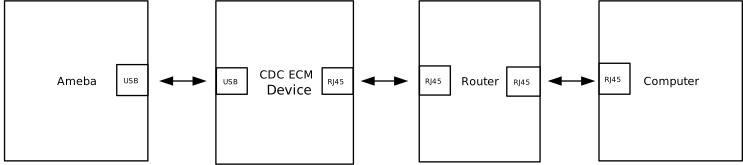
Insert the USB Network Adapter into the development board and connect the Ethernet cable.
Hardware Topology:
Function Test
Query Network Status (AT+WLSTATE)
Check if the IP address has been successfully obtained. See AT+WLSTATE for details.
AT+WLSTATE

[+WLSTATE]: _AT_WLAN_INFO_
WLAN0 Status: Running
==============================
....

Interface ethernet
==============================
MAC => 00:e0:4c:58:64:18
IP  => 192.168.31.87
GW  => 192.168.31.1
MSK  => 255.255.255.0
Ping Test (AT+PING)
Test connectivity with the gateway. See Ping Test for details.
AT+PING=192.168.31.1

[+PING]: _AT_WLAN_PING_TEST_

OK

[MEM] After do cmd, available heap 2978368

#

[ping_test] PING 192.168.31.1 32(60) bytes of data

[ping_test] 32 bytes from 192.168.31.1: icmp_seq=1 time=0 ms

[ping_test] 32 bytes from 192.168.31.1: icmp_seq=2 time=0 ms

[ping_test] 32 bytes from 192.168.31.1: icmp_seq=3 time=0 ms

[ping_test] 32 bytes from 192.168.31.1: icmp_seq=4 time=0 ms

[ping_test] 4 packets transmitted, 4 received, 0% packet loss, average 0 ms
[ping_test] min: 0 ms, max: 0 ms
Uplink Input Test (RX Test)
Ameba: Server (Receiver) PC: Client (Sender) See AT+IPERF for details.
EVB:

AT+IPERF=-s,-i,1
[+IPERF]: _AT_WLAN_IPERF1_TCP_TEST_

OK

[MEM] After do cmd, available heap 2977792

#
Start TCP server! id = [0]
tcp_server_func: Create socket fd = 0
tcp_server_func: Bind socket successfully
tcp_server_func: Listen port 5001
tcp_server_func: Accept connection successfully
tcp_s: id[0] Receive 9383 KBytes in 1000 ms, 76866 Kbits/sec
tcp_s: id[0] Receive 11391 KBytes in 1000 ms, 93323 Kbits/sec
tcp_s: id[0] Receive 11400 KBytes in 1000 ms, 93393 Kbits/sec
tcp_s: id[0] Receive 11393 KBytes in 1000 ms, 93334 Kbits/sec
tcp_s: id[0] Receive 11324 KBytes in 1000 ms, 92774 Kbits/sec
tcp_s: [END] id[0] Totally receive 55040 KBytes in 5013 ms, frame_num = 38604, 89943 Kbits/sec
TCP server stopped!
PC:

C:\Users\test\Desktop>iperf-2-1-9-win.exe -c 192.168.31.87 -i 1 -t 5
------------------------------------------------------------
Client connecting to 192.168.31.87, TCP port 5001
TCP window size: 64.0 KByte (default)
------------------------------------------------------------
[  1] local 192.168.31.234 port 53419 connected with 192.168.31.87 port 5001
[ ID] Interval       Transfer     Bandwidth
[  1] 0.00-1.00 sec  9.25 MBytes  77.6 Mbits/sec
[  1] 1.00-2.00 sec  11.1 MBytes  93.3 Mbits/sec
[  1] 2.00-3.00 sec  11.1 MBytes  93.3 Mbits/sec
[  1] 3.00-4.00 sec  11.1 MBytes  93.3 Mbits/sec
[  1] 4.00-5.00 sec  11.0 MBytes  92.3 Mbits/sec
[  1] 0.00-5.01 sec  53.8 MBytes  89.9 Mbits/sec
Downlink Output Test (TX Test)
Ameba: Client (Sender) PC: Server (Receiver) See AT+IPERF for details.
EVB:

AT+IPERF=-c,192.168.31.234,-i,1,-t,5
[+IPERF]: _AT_WLAN_IPERF1_TCP_TEST_

OK

[MEM] After do cmd, available heap 2977792

#
Start TCP client! id = [0]
tcp_client_func: Server IP=192.168.31.234, port=5001
tcp_client_func: Create socket fd = 0
tcp_client_func: Connect to server successfully
tcp_c: id[0] Send 11317 KBytes in 1000 ms, 92715 Kbits/sec
tcp_c: id[0] Send 11326 KBytes in 1000 ms, 92785 Kbits/sec
tcp_c: id[0] Send 11343 KBytes in 1000 ms, 92926 Kbits/sec
tcp_c: id[0] Send 11379 KBytes in 1000 ms, 93218 Kbits/sec
tcp_c: id[0] Send 11332 KBytes in 1000 ms, 92832 Kbits/sec
tcp_c: [END] id[0] Totally send 56709 KBytes in 5001 ms, 92893 Kbits/sec
tcp_client_func: Close client socket
TCP client stopped!
PC:

Desktop>iperf-2-1-9-win.exe -s -i 1
------------------------------------------------------------
Server listening on TCP port 5001
TCP window size: 64.0 KByte (default)
------------------------------------------------------------
[  1] local 192.168.31.234 port 5001 connected with 192.168.31.87 port 56481
[ ID] Interval       Transfer     Bandwidth
[  1] 0.00-1.00 sec  11.1 MBytes  92.8 Mbits/sec
[  1] 1.00-2.00 sec  11.1 MBytes  92.8 Mbits/sec
[  1] 2.00-3.00 sec  11.1 MBytes  92.9 Mbits/sec
[  1] 3.00-4.00 sec  11.1 MBytes  93.2 Mbits/sec
[  1] 4.00-5.00 sec  11.1 MBytes  92.8 Mbits/sec
[  1] 0.00-5.00 sec  55.4 MBytes  92.9 Mbits/sec

