Audio Host Solution
Overview
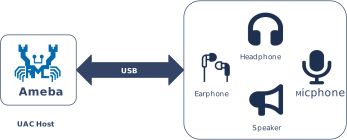
The USB Audio Class (UAC) specification defines the industry standard for transmitting audio data over USB interfaces. In Host mode, the Ameba platform utilizes this protocol to identify, configure, and drive external USB audio devices.
The current UAC Host stack on the Ameba platform is optimized for Audio Playback scenarios. It integrates a UAC 1.0 compliant protocol stack (verified against USB-IF standards), abstracting external USB UAC devices into local system audio output interfaces. This solution supports plug-and-play functionality and seamlessly integrates with the system’s built-in audio processing framework, providing convenient and high-quality audio output expansion capabilities for embedded devices.
Features
The Ameba UAC Host driver is designed to deliver stable and compatible audio output. Key features include:
Broad Device Compatibility: Fully supports USB devices compliant with the UAC 1.0 standard, such as USB speakers, USB headsets, and USB-to-3.5mm audio adapters.
Automatic Enumeration & Configuration: Automatically parses device descriptors, identifies audio streaming endpoints, and establishes Isochronous transfer channels without manual intervention.
Mainstream Audio Format Support: Please refer to the Supported Audio Formats section for detailed specifications.
Deep System Integration: Exposes a unified API to upper-layer applications, effectively abstracting and masking underlying USB protocol details.
Hot-Plug Support: Supports dynamic plug-and-play and removal of USB peripherals during runtime without requiring a system reboot.
Application Scenarios
As a USB Host, the Ameba platform handles the complexity of enumerating UAC devices, parsing audio descriptors, and maintaining stable data transmission channels. This solution is ideal for embedded applications that demand high-quality audio playback with minimal development overhead, including:
Smart Audio Terminals: Devices that require voice prompts, advertisement broadcasting, or public address functionality via external UAC devices (e.g., active speakers or headphones).
Digital Signage & Kiosks: Systems that combine local storage or network streaming to play background music or multimedia commentary through high-fidelity USB audio peripherals to enhance user experience.
IoT Audio Gateways: Lightweight audio response nodes that receive audio commands or content from Wi-Fi/Cloud sources and output them through generic USB audio devices.
Protocol Introduction
Note
The current host solution only supports UAC 1.0
UAC (USB Audio Class) is a universal audio device class standard defined by USB-IF, aimed at standardizing the encapsulation and transmission of digital audio data streams over USB interfaces. USB audio devices (such as USB speakers, headphones, and microphones) can be automatically recognized as standard audio input/output terminals in the host system through standard interfaces for data transmission and function control, without the need to install proprietary drivers.
Version Comparison
USB-IF has officially released multiple versions of the UAC protocol. The download links for the specification documents of the mainstream versions are shown in the table below:
Version |
Specification Document |
|---|---|
1.0 |
|
2.0 |
Terminology Definitions
The following table defines common technical terms related to UAC used in this document:
Term |
Description |
|---|---|
AC Interface (Audio Control Interface) |
Responsible for managing the topology of the audio device (e.g., Input/Output Terminals, Feature Units) and issuing control commands (such as volume adjustment and mute) via the Control Endpoint. |
AS Interface (Audio Streaming Interface) |
Responsible for the actual transmission of audio payload data, typically using Isochronous endpoints. An AS Interface can contain multiple Alternate Settings, each corresponding to different sample rates, bit depths, or channel configurations. |
Terminal Type |
Identifies the physical or logical attributes of an audio signal source or sink (e.g., USB Streaming Terminal represents a USB data stream, Speaker Terminal represents a physical speaker). |
Feature Unit |
A processing node within the audio topology that provides specific audio control capabilities (e.g., master volume adjustment, channel gain, mute control). |
Sample Rate / Bit Resolution |
Core parameters of the audio format. Common combinations in UAC 1.0 include 48 kHz / 16-bit, 44.1 kHz / 16-bit, etc. |
Definitions of common audio technology terms used in this document are as follows:
Terms |
Introduction |
|---|---|
PCM |
Pulse Code Modulation, audio data is a raw stream. |
Channel |
A channel sound is an independent audio signal captured or played in different positions, so the number of channels is the number of sound sources. |
Bit Depth |
Bit depth represents the bits effectively used in the process of audio signals. Sampling depth shows the resolution of the sound. The larger the value, the higher the resolution. |
Sample rate |
The audio sampling rate refers to the number of frames that the signal is sampled per second. The higher the sampling frequency, the higher quality the sound will be. |
Protocol Framework
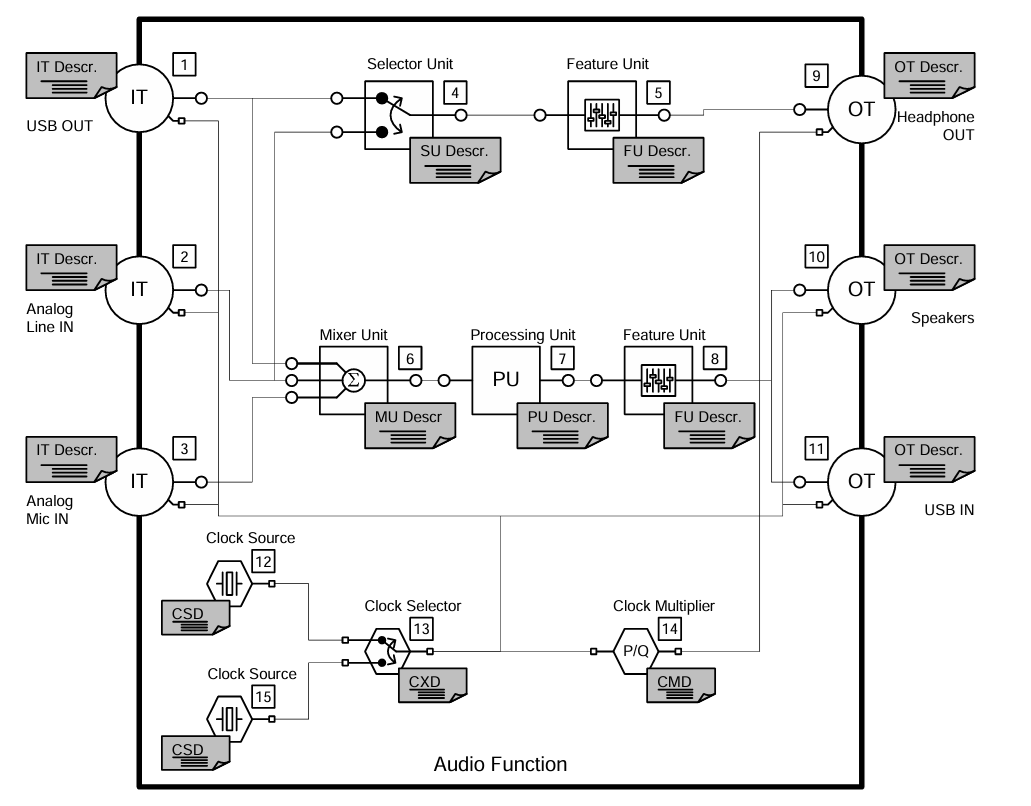
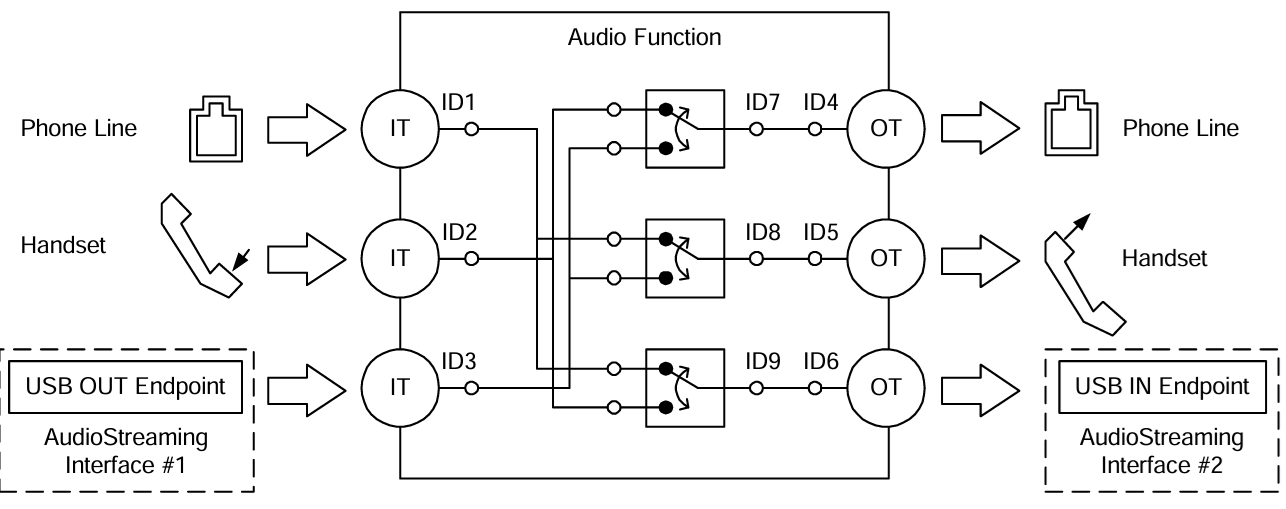
The UAC system architecture supports audio data transmission and control by defining different interface sets. Logically, UAC device interfaces are primarily divided into two major categories: Audio Control Interface and Audio Streaming Interface.
Audio Control (AC) Interface:
Responsible for managing the overall functional behavior of the audio device, such as volume adjustment, mute control, input source selection, etc.
An AC interface contains a defined internal topology that describes the flow and processing of audio signals from the Input Terminal to the Output Terminal.
Audio Streaming (AS) Interface:
Responsible for transmitting the actual audio payload data.
A UAC device can contain multiple AS interfaces, each configurable to transmit audio data with different formats, sampling rates, or bit depths.
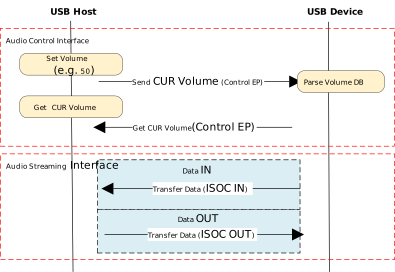
Protocol Interaction Example:
Descriptor Structure
In addition to adhering to standard USB descriptors (such as Device Descriptor, Configuration Descriptor, Endpoint Descriptor), UAC devices also define Class-Specific Descriptors. These descriptors are categorized based on their associated interface into Class-Specific Control Interface Descriptors and Class-Specific Audio Streaming Interface Descriptors.
There are differences in descriptor definitions between different protocol versions:
Descriptor Topology
Device Descriptor
└── Identifies basic device information (USB Version 2.00)

Configuration Descriptor
├── Contains total length of the entire configuration, power supply information, etc.
│
├── Interface Association Descriptor (IAD)
│       └── Binds audio control and streaming interfaces into a single functional unit
│
├── Audio Control (AC) Interface Descriptor (Interface 0)
│       ├── Standard Interface Descriptor (Interface 0, Control Class)
│       └── Class-Specific Descriptor Collection
│               ├── Audio Control Interface Header (declares UAC version)
│               ├── Clock Source (internal clock or external clock)
│               ├── Clock Source (internal clock or external clock)
│               ├── Input Terminal (source of audio stream)
│               ├── Feature Unit (volume/mute controls, etc.)
│               ├── Output Terminal (destination of audio stream)
│               ├── Input Terminal (source of audio stream)
│               ├── Feature Unit (volume/mute controls, etc.)
│               └── Output Terminal (destination of audio stream)
│
├── Audio Streaming (AS) Interface Descriptor (Interface 1)
│       ├── Alternate Setting 0: Control transfer active state (control transfer only)
│       │
│       ├── Alternate Setting 1: Data transfer active state (with data endpoint)
│       │ ├── Standard Interface Descriptor (Interface 1, Streaming Class)
│       │ ├── Class-Specific AS Interface (associated USB streaming terminal, audio format, number of channels)
│       │ ├── Format Descriptor (audio format and bit width)
│       │ ├── Standard Endpoint Descriptor (ISO OUT endpoint)
│       │ └── Class-Specific Endpoint Descriptor (no special control)
│       │
│       ├── Alternate Setting 2
│       │ ...... Can configure multiple different setting as needed
│
└── Audio Streaming (AS) Interface Descriptor (Interface 2)
        ├── Alternate Setting 0: Control transfer active state (control transfer only)
        │
        ├── Alternate Setting 1: Data transfer active state (with data endpoint)
        │ ├── Standard Interface Descriptor (Interface 2, Streaming Class)
        │ ├── Class-Specific AS Interface (associated USB streaming terminal, audio format, number of channels)
        │ ├── Format Descriptor (audio format and bit width)
        │ ├── Standard Endpoint Descriptor (ISO IN endpoint)
        │ └── Class-Specific Endpoint Descriptor (no special control)
        │
        ├── Alternate Setting 2
        │ ...... Can configure multiple different setting as needed

Device Qualifier Descriptor
└── Device information while running in another speed mode

Other Speed Configuration Descriptor
├── Configuration information while running in another speed mode.
│
├── Interface Association Descriptor (IAD)
│       └── Binds audio control and streaming interfaces into a single functional unit
│
├── Audio Control (AC) Interface Descriptor (Interface 0)
│       ├── Standard Interface Descriptor (Interface 0, Control Class)
│       └── Class-Specific Descriptor Collection
│               ├── Audio Control Interface Header (declares UAC version)
│               ├── Clock Source (internal clock or external clock)
│               ├── Clock Source (internal clock or external clock)
│               ├── Input Terminal (source of audio stream)
│               ├── Feature Unit (volume/mute controls, etc.)
│               ├── Output Terminal (destination of audio stream)
│               ├── Input Terminal (source of audio stream)
│               ├── Feature Unit (volume/mute controls, etc.)
│               └── Output Terminal (destination of audio stream)
│
├── Audio Streaming (AS) Interface Descriptor (Interface 1)
│       ├── Alternate Setting 0: Control transfer active state (control transfer only)
│       │
│       ├── Alternate Setting 1: Data transfer active state (with data endpoint)
│       │ ├── Standard Interface Descriptor (Interface 1, Streaming Class)
│       │ ├── Class-Specific AS Interface (associated USB streaming terminal, audio format, number of channels)
│       │ ├── Format Descriptor (audio format and bit width)
│       │ ├── Standard Endpoint Descriptor (ISO OUT endpoint)
│       │ └── Class-Specific Endpoint Descriptor (no special control)
│       │
│       ├── Alternate Setting 2
│       │ ...... Can configure multiple different setting as needed
│
└── Audio Streaming (AS) Interface Descriptor (Interface 2)
        ├── Alternate Setting 0: Control transfer active state (control transfer only)
        │
        ├── Alternate Setting 1: Data transfer active state (with data endpoint)
        │ ├── Standard Interface Descriptor (Interface 2, Streaming Class)
        │ ├── Class-Specific AS Interface (associated USB streaming terminal, audio format, number of channels)
        │ ├── Format Descriptor (audio format and bit width)
        │ ├── Standard Endpoint Descriptor (ISO IN endpoint)
        │ └── Class-Specific Endpoint Descriptor (no special control)
        │
        ├── Alternate Setting 2
        │ ...... Can configure multiple different setting as needed
UAC Audio Control (AC) Interface Descriptor
Audio Control Interface Header
Audio Control Interface Header Descriptor
├── bLength            : 1 byte  → Total descriptor length (fixed = 9)
├── bDescriptorType    : 1 byte  → 0x24 (CS_INTERFACE)
├── bDescriptorSubtype : 1 byte  → 0x01 (HEADER)
├── bcdADC             : 2 bytes → Audio Device Class Specification Release Number
├── bCategory          : 1 byte  → Indicates the classification/function of the device
├── wTotalLength       : 2 bytes → Total length of all AC Class-Specific descriptors, including this one
└── bmControls         : 1 byte  → Bitmap indicating the availability of non-addressable control functions
Clock Source Descriptor
Clock Source Descriptor
├── bLength            : 1 byte  → Total descriptor length (fixed = 8)
├── bDescriptorType    : 1 byte  → 0x24 (CS_INTERFACE)
├── bDescriptorSubtype : 1 byte  → 0x0A (Clock Source)
├── bClockID           : 1 byte  → Unique Clock ID, ranging from 1 to 255
├── bmAttributes       : 1 byte  → Clock type (0=Internal, 1=External)
├── bmControls         : 1 byte  → Bitmap indicating the control attributes of the clock
└── iClockSource       : 1 byte  → String descriptor index
Input Terminal Descriptor
Input Terminal Descriptor
├─ bLength                : 1 byte   → Total descriptor length (fixed = 17)
├─ bDescriptorType        : 1 byte   → 0x24 (CS_INTERFACE)
├─ bDescriptorSubtype     : 1 byte   → 0x02 (INPUT_TERMINAL)
├─ bTerminalID            : 1 byte   → Unique ID of this terminal (referenced in topology)
├─ wTerminalType          : 2 bytes  → Terminal type (little-endian)
│                           ├─ 0x0101 = USB Streaming (Host audio stream input)
│                           └─ Other values refer to UAC2.0 Appendix B (e.g., Microphone)
├─ bAssocTerminal         : 1 byte   → Associated Output Terminal ID (0 = no pairing)
├─ bCSourceID             : 1 byte   → Associated Clock Source ID
├─ bNrChannels            : 1 byte   → Number of logical output channels (e.g., 2 = stereo)
├─ bmChannelConfig        : 4 bytes  → Spatial location bitmap for channels
├─ iChannelNames          : 1 byte   → String index for channel names
├─ bmControls             : 2 byte   → Control bitmap
└─ iTerminal              : 1 byte   → String index for describing this terminal
Feature Unit Descriptor
Feature Unit Descriptor
├─ bLength                : 1 byte   → otal descriptor length in bytes
│                                      = 6 + (1 + bNrChannels) × 4
├─ bDescriptorType        : 1 byte   → = 0x24 (CS_INTERFACE)
├─ bDescriptorSubtype     : 1 byte   → = 0x06 (FEATURE_UNIT)
├─ bUnitID                : 1 byte   → Unique ID of this Feature Unit
├─ bSourceID              : 1 byte   → ID of the connected Source Unit or Terminal
├─ bmaControls[0]         : 4 bytes  → Master Channel Control Bitmap
├─ bmaControls[1]         : 4 bytes  → Logical Channel 1 Control Bitmap
├─ bmaControls[2]         : 4 bytes  → Logical Channel 2 Control Bitmap
│    ⋮
├─ bmaControls[N]         : 4 bytes  → Logical Channel N Control Bitmap (Total bNrChannels entries)
└─ iFeature               : 1 byte   → String descriptor index
Output Terminal Descriptor
Output Terminal Descriptor
├─ bLength                : 1 byte   → Total descriptor length (fixed = 12 bytes)
├─ bDescriptorType        : 1 byte   → 0x24 (CS_INTERFACE)
├─ bDescriptorSubtype     : 1 byte   → 0x03 (OUTPUT_TERMINAL)
├─ bTerminalID            : 1 byte   → Unique ID of this terminal
├─ wTerminalType          : 2 bytes  → Terminal type
│                           ├─ 0x0301 = Speaker
│                           ├─ 0x0302 = Headphones
│                           ├─ 0x0603 = SPDIF
│                           └─ Other values refer to Appendix B
├─ bAssocTerminal         : 1 byte   → Associated Input Terminal ID
├─ bSourceID              : 1 byte   → ID of the connected Source Unit or Terminal
├─ bCSourceID             : 1 byte   → Associated Clock Source ID
└─ iTerminal              : 1 byte   → String index for describing this terminal
Audio Streaming Interface Descriptor
Class-Specific AS Interface Descriptor
Class-Specific AS Interface Descriptor
├─ bLength                : 1 byte   → Fixed as 0x10 (16 bytes)
├─ bDescriptorType        : 1 byte   → 0x24(CS_INTERFACE)
├─ bDescriptorSubtype     : 1 byte   → 0x01(AS_GENERAL)
├─ bTerminalLink          : 1 byte   → Associated Terminal ID (Input or Output Terminal)
├─ bmControls             : 1 bytes  → Bitmap of endpoint control capabilities
├─ bFormatType            : 1 byte   → Format type
│                           └─ 0x01 = FORMAT_TYPE_I(PCM)
├─ bmFormats              : 4 bytes  → Bitmap of supported audio formats
├─ bNrChannels            : 1 bytes  → Number of supported audio channels
├─ bmChannelConfig        : 4 bytes  → Supported audio channel configuration bitmap
└─ iChannelNames          : 1 byte   → String index for channel names
Audio Streaming Format Type Descriptor
Audio Streaming Format Type Descriptor
├─ bLength            : 1 byte   → Total length of descriptor in bytes (6 bytes)
├─ bDescriptorType    : 1 byte   → = 0x24(CS_INTERFACE)
├─ bDescriptorSubtype : 1 byte   → = 0x02(FORMAT_TYPE)
├─ bFormatType        : 1 byte   → = 0x01(FORMAT_TYPE_I)
├─ bSubslotSize       : 1 byte   → Container size for each audio sample (in bytes)
│                                   • Typical values: 1, 2, 3, 4
├─ bBitResolution     : 1 byte   → Number of valid bits in each sample(≤ bSubslotSize × 8)
└─                                  • Example: 16 represents 16-bit PCM
Descriptor Topology
Device Descriptor
└── Identifies basic device information (USB Version 1.10)

Configuration Descriptor
├── Contains total length of the entire configuration, power supply information, etc.
│
├── Audio Control (AC) Interface Descriptor (Interface 0)
│       ├── Standard Interface Descriptor (AlternateSetting 0, Control Class)
│       └── Class-Specific Descriptor Collection
│               ├── Audio Control Interface Header (declares UAC version)
│               ├── Input Terminal (source of audio stream)
│               ├── Feature Unit (volume/mute controls, etc.)
│               ├── Output Terminal (destination of audio stream)
│               ├── Input Terminal (source of audio stream)
│               ├── Feature Unit (volume/mute controls, etc.)
│               └── Output Terminal (destination of audio stream)
│
├── Audio Streaming (AS) Interface Descriptor (Interface 1)
│       ├── Alternate Setting 0: Control transfer active state (control transfer only)
│       │
│       ├── Alternate Setting 1: Data transfer active state (with data endpoint)
│       │ ├── Standard Interface Descriptor (Interface 1, Streaming Class)
│       │ ├── Class-Specific AS Interface (associated USB streaming terminal)
│       │ ├── Format Descriptor (audio format:channel, bit width and frequency)
│       │ ├── Standard Endpoint Descriptor (ISO OUT endpoint)
│       │ └── Class-Specific Endpoint Descriptor (no special control)
│       │
│       ├── Alternate Setting 2
│       │ ...... Can configure multiple different setting as needed
│
└── Audio Streaming (AS) Interface Descriptor  (Interface 2)
        ├── Alternate Setting 0: Control transfer active state (control transfer only)
        │
        ├── Alternate Setting 1: Data transfer active state (with data endpoint)
        │ ├── Standard Interface Descriptor (Interface 2, Streaming Class)
        │ ├── Class-Specific AS Interface (associated USB streaming terminal)
        │ ├── Format Descriptor (audio format:channel, bit width and frequency)
        │ ├── Standard Endpoint Descriptor (ISO IN endpoint)
        │ └── Class-Specific Endpoint Descriptor (no special control)
        │
        ├── Alternate Setting 2
        │ ...... Can configure multiple different setting as needed
UAC Audio Control (AC) Interface Descriptor
Audio Control Interface Header
Audio Control Interface Header Descriptor
├── bLength            : 1 byte  → Total descriptor length (typically 9 + bInCollection × 1)
├── bDescriptorType    : 1 byte  → 0x24 (CS_INTERFACE)
├── bDescriptorSubtype : 1 byte  → 0x01 (HEADER)
├── bcdADC             : 2 bytes → Audio Device Class Specification Release Number (0x0100)
├── wTotalLength       : 2 byte  → Total number of bytes for all AC descriptors (including this header and all Unit/Terminal descriptors)
├── baInterfaceNr(1)   : 1 byte  → Interface number of the first AudioStreaming or MIDIStreaming interface in the Collection.
│    ⋮
└── baInterfaceNr(N)   : 1 byte  → Interface number of the last AudioStreaming or MIDIStreaming interface in the Collection.
Input Terminal Descriptor
Clock Source Descriptor
├── bLength            : 1 byte  → Total descriptor length (fixed = 12)
├── bDescriptorType    : 1 byte  → 0x24 (CS_INTERFACE)
├── bDescriptorSubtype : 1 byte  → 0x0A (Clock Source)
├── bTerminalID        : 1 byte  → Constant uniquely identifying the Terminal within the audio function.
├── wTerminalType      : 2 bytes → Constant characterizing the type of Terminal.
├── bAssocTerminal     : 1 byte  → D of the Output Terminal to which this Input Terminal is associated.
├── bNrChannels        : 1 byte  → Number of logical output channels in the Terminal’s output audio channel cluster.
├── wChannelConfig     : 2 bytes → Describes the spatial location of the logical channels.
├── iChannelNames      : 1 byte  → Index of a string descriptor, d
└── iTerminal          : 1 byte  → String descriptor index
Feature Unit Descriptor
Feature Unit Descriptor
├─ bLength                : 1 byte   → otal descriptor length in bytes = 7+(ch+1)*n
├─ bDescriptorType        : 1 byte   → = 0x24 (CS_INTERFACE)
├─ bDescriptorSubtype     : 1 byte   → = 0x06 (FEATURE_UNIT)
├─ bUnitID                : 1 byte   → Unique ID of this Feature Unit
├─ bSourceID              : 1 byte   → ID of the connected Source Unit or Terminal
├─ bControlSize           : 1 byte   → Size in bytes of an element of the bmaControls() array: n
├─ bmaControls[0]         : n bytes  → A bit set to 1 indicates that the mentioned Control is supported for master channel
├─ bmaControls[1]         : n bytes  → A bit set to 1 indicates that the mentioned Control is supported for logical channel1
│    ⋮
├─ bmaControls[N]         : n bytes  → A bit set to 1 indicates that the mentioned Control is supported for logical channel ch
└─ iFeature               : 1 byte   → String descriptor index
Output Terminal Descriptor
Output Terminal Descriptor
├─ bLength                : 1 byte   → Total descriptor length (fixed = 9 bytes)
├─ bDescriptorType        : 1 byte   → 0x24 (CS_INTERFACE)
├─ bDescriptorSubtype     : 1 byte   → 0x03 (OUTPUT_TERMINAL)
├─ bTerminalID            : 1 byte   → Unique ID of this terminal
├─ wTerminalType          : 2 bytes  → Terminal type
│                           ├─ 0x0301 = Speaker
│                           ├─ 0x0302 = Headphones
│                           ├─ 0x0603 = SPDIF
│                           └─ Other values refer to Appendix B
├─ bAssocTerminal         : 1 byte   → Associated Input Terminal ID
├─ bSourceID              : 1 byte   → ID of the connected Source Unit or Terminal
└─ iTerminal              : 1 byte   → String index for describing this terminal
Audio Streaming Interface Descriptor
Class-Specific AS Interface Descriptor
Class-Specific AS Interface Descriptor
├─ bLength                : 1 byte   → Fixed as 0x07 (7 bytes)
├─ bDescriptorType        : 1 byte   → 0x24(CS_INTERFACE)
├─ bDescriptorSubtype     : 1 byte   → 0x01(AS_GENERAL)
├─ bTerminalLink          : 1 byte   → Associated Terminal ID (Input or Output Terminal)
├─ bDelay                 : 1 bytes  → Delay introduced by this interface (in number of frames)
└─ wFormatTag             : 2 byte   → Audio data format (e.g., 0x0001 = PCM)
Audio Streaming Format Type Descriptor
Audio Streaming Format Type Descriptor
├─ bLength            : 1 byte   → Total length of descriptor in bytes (8 + (num_freq × 3))
├─ bDescriptorType    : 1 byte   → = 0x24(CS_INTERFACE)
├─ bDescriptorSubtype : 1 byte   → = 0x02(FORMAT_TYPE)
├─ bFormatType        : 1 byte   → = 0x01(FORMAT_TYPE_I)
├─ bNrChannels        : 1 byte   → Number of channels (e.g., 2)
├─ bSubslotSize       : 1 byte   → Container size for each audio sample (in bytes)
│                                   • Typical values: 1, 2, 3, 4
├─ bBitResolution     : 1 byte   → Number of valid bits in each sample(≤ bSubslotSize × 8)
├─                                  • Example: 16 represents 16-bit PCM
├─ bSamFreqType       : 1 byte   → sampling frequency count
└─ tSamFreq(n)        : 3×n byte → Sample rates in little-endian 3-byte format
Note
For detailed field definitions, please refer to the official USB-IF UAC protocol documentation.
Class-Specific Requests
The control requests issued by the UAC host to the device are categorized into Standard Requests and Class-Specific Requests.
This section primarily introduces the Class-Specific Requests unique to UAC. These requests are used to implement the distinctive features of audio devices and mainly include Audio Control Requests (targeting AC interfaces) and Audio Streaming Requests (targeting AS interfaces).
Audio Control Requests (AC Requests)
AC Requests are class-specific control transfers sent by the host over Endpoint 0 to dynamically configure and manage audio functionality within a USB audio device.
AudioControl Type |
Required |
Description |
|---|---|---|
Mute Control Request |
Optional |
Manipulate the mute control in the Feature Unit of the audio function |
Volume Control Request |
Optional |
Manipulate the volume control in the Feature Unit of the audio function |
Sampling Frequency Control |
Optional |
Manipulate the actual sampling frequency of the clock signal. |
Mixer Unit Control Request |
Optional |
Manipulate the control inside a Mixer Unit of the audio function |
Terminal Control Request |
Optional |
Manipulate the control inside a Mixer Unit of the audio function |
Selector Unit Control Request |
Optional |
Manipulate the control inside a Selector Unit of the audio function |
Effect Unit Control Request |
Optional |
Manipulate the Controls inside an Effect Unit of the audio function |
Processing Unit Control Request |
Optional |
Manipulate the Controls inside a Processing Unit of the audio function |
Extension Unit Control Requests |
Optional |
Manipulate the Controls inside an Extension Unit of the audio function |
Audio Streaming Requests (AS Requests)
AS Requests are class-specific control transfers issued by the host over Endpoint 0 to configure and manage parameters related to audio data streams, pecifically those associated with an Audio Streaming Interface.
AudioStreaming Type |
Required |
Description |
|---|---|---|
Interface Control Request |
Optional |
Manipulate the Controls inside an AudioStreaming interface of the audio function |
Encoder Control Request |
Optional |
Manipulate the Encoder Controls inside an AudioStreaming interface of the audio function |
Decoder Control Request |
Optional |
Manipulate the Decoder Controls inside an AudioStreaming interface of the audio function |
Endpoint Control Request |
Optional |
Manipulate the Controls inside an AudioStreaming endpoint of the audio function |
Audio Control Requests (AC Requests)
Audio Control Requests (AC Requests) are class-specific control transfers sent by the host over Endpoint 0 to dynamically configure and manage audio functionality within a USB audio device.
AudioControl Type |
Required |
Description |
|---|---|---|
Mute Control Request |
Optional |
Manipulate the mute control in the Feature Unit of the audio function |
Volume Control Request |
Optional |
Manipulate the volume control in the Feature Unit of the audio function |
Mixer Unit Control Request |
Optional |
Manipulate the control inside a Mixer Unit of the audio function |
Selector Unit Control Request |
Optional |
Manipulate the control inside a Selector Unit of the audio function |
Processing Unit Control Request |
Optional |
Manipulate the Controls inside a Processing Unit of the audio function |
Extension Unit Control Requests |
Optional |
Manipulate the Controls inside an Extension Unit of the audio function |
Audio Streaming Requests (AS Requests)
Audio Streaming Requests (AS Requests) are class-specific control transfers issued by the host over Endpoint 0 to configure and manage parameters related to audio data streams, pecifically those associated with an Audio Streaming Interface.
AudioStreaming Type |
Required |
Description |
|---|---|---|
Interface Control Request |
Optional |
Manipulate the Controls inside an AudioStreaming interface of the audio function |
Endpoint Control Request |
Optional |
Describe the requests that the audio function can support for its AudioStreaming endpoint |
Data Transmission Format
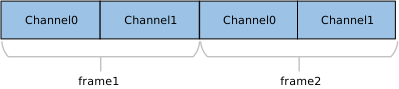
UAC audio data streams typically use Linear PCM encoding and are encapsulated in a Multi-Channel Interleaved format. The specific data arrangement depends on the number of channels and bit depth.
For more details on supported formats, please refer to Supported Audio Formats .
An example of 2-Channel interleaved data is shown below:
An example of 4-Channel interleaved data is shown below:

An example of N-Channel interleaved data is shown below:

Note
Channel Alignment Rule:
The UAC protocol typically requires the transmitted number of channels to be a power of two (e.g., 2, 4, 8, 16, etc.). If the actual physical channel count (e.g., 10 channels) does not comply with this rule, it must be rounded up to the nearest power of two (configured for transmission as 16 channels). The extra channel positions are filled with invalid data.
Class Driver
This section details the internal architecture of the USB Host UAC 1.0 driver stack, the responsibilities of key modules, support for class-specific requests, and the allocation strategy for underlying channel resources.
Driver Framework
The USB Host UAC 1.0 driver stack adopts a layered modular design, facilitating efficient interaction between the audio subsystem and the USB hardware controller through clearly defined interfaces. The architecture is specifically optimized for real-time Isochronous Transfer (ISOC) processing to ensure the stable output of high-fidelity audio streams.
The system is organized from top to bottom into the following core functional modules:
Audio Adapter Layer
Acting as middleware between the USB driver and the upper-layer audio framework, this layer is primarily responsible for:
Write Operations: Functioning as a data producer, it reads PCM data from the upper-layer audio buffer and writes it into the UAC Class Driver’s ring buffer.
Control Interaction: Maps upper-layer application operations, such as volume adjustment and mute toggling, to the corresponding UAC Class Driver control APIs.
UAC Class Driver Architecture
This is the core component of the UAC implementation, composed of protocol handling logic and Ringbuffer Management.
Enumeration & Configuration Parsing: Automatically identifies Audio Control (AC) and Audio Streaming (AS) interfaces, parsing parameters such as Terminal Types, Feature Units, sample rates, and bit depths.
Stream Management: Dynamically selects the appropriate Alternate Setting for the AS interface based on target audio parameters and activates the corresponding Isochronous OUT endpoint.
Buffer Scheduling: Maintains a ring buffer to handle data packetization and scheduling, ensuring a continuous, jitter-free data supply.
Protocol Encapsulation: Encapsulates standard USB requests and UAC class-specific requests (e.g., SET_CUR) to control the device.
USB Core Driver
Handles real-time hardware interrupts, standard USB enumeration, transfer management, and low-level physical data transmission scheduling.
Core Interaction Interfaces
The UAC Host Class Driver serves as a bridge within the system architecture. Its implementation logic revolves around three core interaction interfaces:
Host Class Driver Callback API: The class driver interacts with the underlying USB Core by defining and registering a standard usbh_class_driver_t structure.
Application-Facing Callback API: The class driver provides an asynchronous event notification mechanism to upper-layer applications via the usbh_uac_cb_t callback structure.
Application-Facing API: When the application layer calls these APIs, the driver switches its internal state machine to initiate data transmission scheduling.
Driver Callback Mechanism:
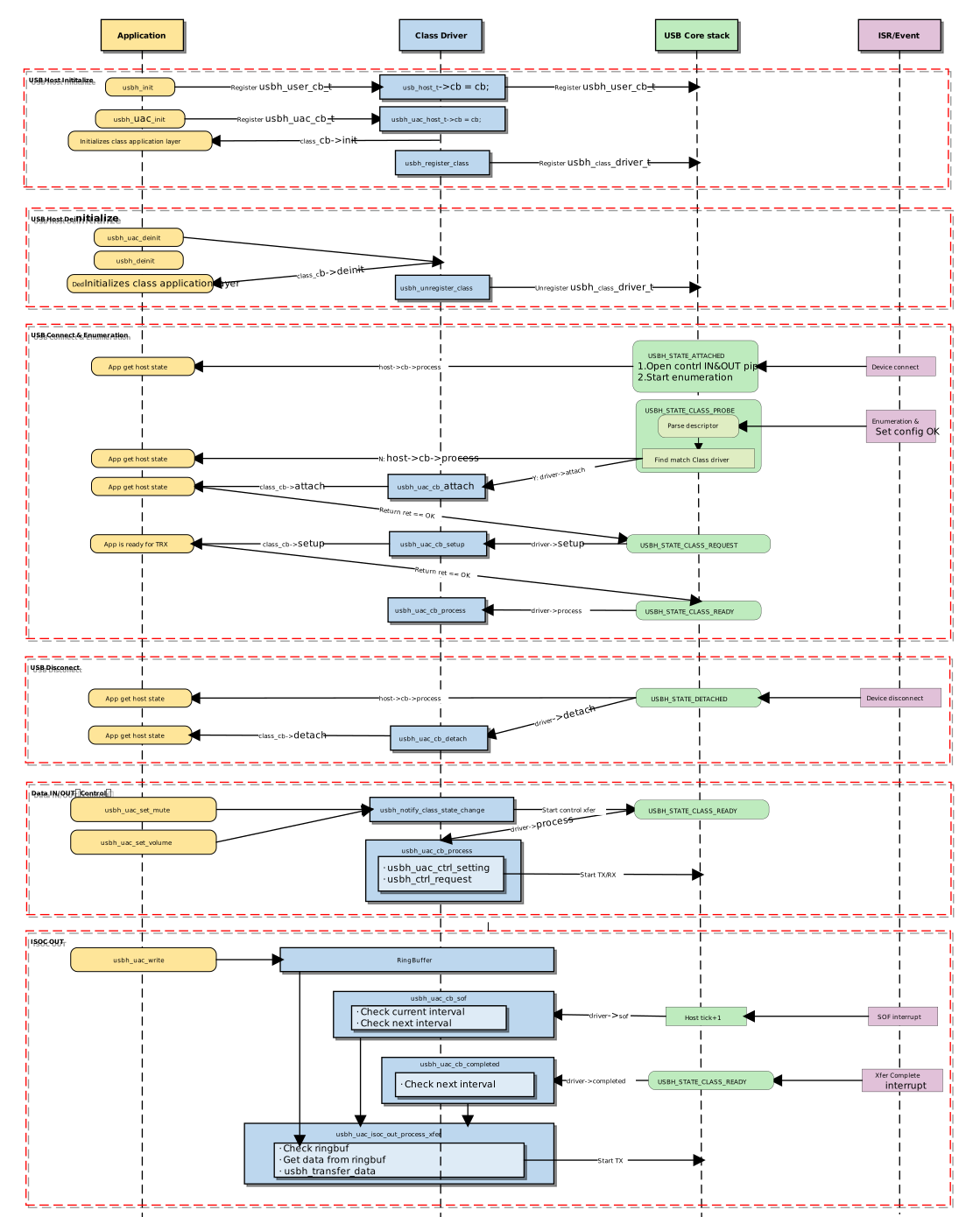
Init and Deinit the Class Driver
These functions manage memory resource allocation and deallocation, as well as the registration and deregistration of the class driver with the USB Core.
usbh_uac_init() is the top-level function for loading the UAC Host Class Driver. It performs the following tasks:
Save Callbacks: Stores the user-provided callback functions and invokes the user’s
initcallback.Save Parameters: Saves the user-configured frame count
frame_cntfor the ring buffer.Allocate Memory: Allocates memory buffers for control transfers and TX audio transmission.
Register Driver: Calls
usbh_register_class()to register the UAC class driver with the USB Host Core.
Example:
int usbh_uac_init(usbh_uac_cb_t *cb, int frame_cnt)
{
    /* 1. Save the frame count param */
    uac->frame_cnt = frame_cnt;

    /* 2. Allocate memory */
    uac->audio_ctrl_buf = (u8 *)usb_os_malloc(UBSH_UAC_AUDIO_CTRL_BUF_MAX_LEN);
    uac->isoc_tx_buf = (u8 *)usb_os_malloc(USBH_UAC_ISOC_BUF_LENGTH);

    /* 3. Save the user callback and call the user's ``init`` callback */
    if (cb != NULL) {
      uac->cb = cb;
      if (cb->init != NULL) {
        ret = cb->init();
        if (ret != HAL_OK) {
          RTK_LOGS(TAG, RTK_LOG_ERROR, "User init err %d\n", ret);
          return ret;
        }
      }
    }

    /* 4. Register class driver*/
    usbh_register_class(&usbh_uac_driver);

    return HAL_OK;
}
usbh_uac_deinit() is the top-level function used to unload the UAC host class driver, responsible for cleaning up resources.
Call
usbh_uac_stop_play()to notify the UAC class driver to stop data transmission.Call
usbh_unregister_class()to unregister the UAC class driver.Invokes the user’s
deinitcallback to notify the application layer.Forcibly closes all open pipes (ISOC OUT) if the device is currently connected.
Frees all previously allocated memory, including the ring buffer, descriptor parsing memory, etc.
Example:
int usbh_uac_deinit(void)
{
   /* 1. Stop ISOC data transmission */
   usbh_uac_stop_play();

  /* 2. Unregister class driver*/
  usbh_unregister_class(&usbh_uac_driver);

  /* 3. Call the user's ``deinit`` callback  */
  if ((uac->cb != NULL) && (uac->cb->deinit != NULL)) {
    uac->cb->deinit();
  }

  /* 4. Close all open pipes */
  usbh_uac_deinit_all_pipe();

  /* 5. Free ringbuffer */
  usbh_uac_ep_buf_ctrl_deinit(&(uac->isoc_out));

  /* 6. Free memory */
  if (uac->audio_ctrl_buf != NULL) {
      usb_os_mfree(uac->audio_ctrl_buf);
      uac->audio_ctrl_buf = NULL;
  }
  if (uac->isoc_tx_buf != NULL) {
      usb_os_mfree(uac->isoc_tx_buf);
      uac->isoc_tx_buf = NULL;
  }
  /****/

  return ret;
}
Attach & Detach Handling
Callbacks are triggered when the USB Core detects the insertion or removal of a device matching the UAC class.
usbh_uac_cb_attach is a critical step in device enumeration, responsible for parsing interface descriptors and allocating pipe resources:
Find AC Interface: Parses and retrieves audio control information, including volume ranges and mute capabilities.
Find AS Interface: Parses and retrieves audio format information and endpoint descriptors.
Open Pipe: Allocates and opens the ISOC OUT pipe based on the retrieved descriptor information.
Initialize State Machine: Sets the initial state to UAC_STATE_GET_MUTE to prepare for fetching audio information.
Notify Application: Calls the user attach callback to inform the application layer of the connection status.
static int usbh_uac_cb_attach(usb_host_t *host)
{
  /* 1. Parse descriptors to get AC and AS information */
  status = usbh_uac_parse_interface_desc(host);
  if (status) {
    return status;
  }

  /* 2. Open the pipe for steaming transfer */
  if (uac->as_isoc_out) {
      as_itf = uac->as_isoc_out;
      as_itf->choose_alt_idx = 0;

      pipe = &(as_itf->pipe);
      ep_desc = &(as_itf->itf_info_array[as_itf->choose_alt_idx].ep_desc);

      usbh_open_pipe(host, pipe, ep_desc);
  }

  /* 3. Initialize the state machine */
  uac->ctrl_state = UAC_STATE_GET_MUTE;

  /* 4. Notify the user layer */
  if ((uac->cb != NULL) && (uac->cb->attach != NULL)) {
      uac->cb->attach();
  }
  return HAL_OK;
}
usbh_uac_cb_detach is called when the device is removed. It is responsible for notifying the upper-layer application that the device has been removed.
static int usbh_uac_cb_detach(usb_host_t *host)
{
  /* 1. Notify the user layer */
  if ((uac->cb != NULL) && (uac->cb->detach != NULL)) {
      uac->cb->detach();
  }

  /* 2. Reset xfer status */
  uac->xfer_state = UAC_STATE_IDLE;

  return HAL_OK;
}
Class Driver State Machine
The usbh_uac_cb_process callback is the core state machine handler for the UAC class on the Host side.
Unlike the Device side, which passively responds to requests, the Host driver must actively maintain the device state. Its primary responsibilities are managing the lifecycle state of the class driver and dispatching transfer tasks.
State Management and Scheduling
usbh_uac_cb_process manages the scheduling of control transfers (e.g., sample rate configuration) and data transfers based on the current class driver state.
State Enum |
Description |
Key Action |
|---|---|---|
IDLE |
Idle State |
Waits for user commands or data transfer requests. |
TRANSFER |
Data Transferring |
Dispatches tasks to specific TX/RX handlers based on pipe numbers. |
ERROR |
Error State |
Attempts to Clear Feature on endpoints to restore communication. |
Transfer Dispatch Example
When in the TRANSFER state, processing is dispatched to specific transfer handlers based on the pipe ID triggering the event.
Example:
case UAC_STATE_TRANSFER:
     /* Distribute transmission tasks according to pipe numbers */
     if (event.msg.pipe_num == 0) {
         ret = usbh_uac_ctrl_setting(host, 0);      // Handle ctrl message transfer
     }
  break;
Error Recovery
If an error occurs during state processing, the driver attempts to send a Clear Feature request and reset to the IDLE state.
Example:
/* ... Error state ... */
case UAC_STATE_ERROR:
    /* Error recovery mechanism */
    ret = usbh_ctrl_clear_feature(host, 0x00U);
    if (ret == HAL_OK) {
        uac->xfer_state = UAC_STATE_IDLE;
    }
break;
Data Transfer Processing
UAC data transfer is categorized into two types: Audio Control Transfer and Audio Streaming Transfer .
Audio Control Transfer
Responsible for managing the functional behavior of the audio device. The driver implements a state machine flow to handle configuration requests in the following sequence:
case UAC_STATE_SET_OUT_ALT:
    ret = usbh_uac_process_set_out_alt(host);
    if (ret == HAL_OK) {
        uac->ctrl_state = UAC_STATE_SET_OUT_FREQ;
    } else if (ret != HAL_BUSY) {
        RTK_LOGS(TAG, RTK_LOG_ERROR, "OUT alt err\n");
        uac->ctrl_state = UAC_STATE_SET_OUT_FREQ;
    }
    break;
case UAC_STATE_SET_OUT_FREQ:
    ret = usbh_uac_process_set_out_freq(host);
    if (ret == HAL_OK) {
        uac->ctrl_state = UAC_STATE_CTRL_IDLE;
        ret_status = HAL_OK;
    } else if (ret != HAL_BUSY) {
        RTK_LOGS(TAG, RTK_LOG_ERROR, "OUT freq err\n");
        uac->ctrl_state = UAC_STATE_CTRL_IDLE;
        ret_status = HAL_OK;
    }
    break;
case UAC_STATE_SET_MUTE:
    ret = usbh_uac_process_set_mute(host);
    if (ret == HAL_OK) {
        uac->ctrl_state = UAC_STATE_CTRL_IDLE;
        ret_status = HAL_OK;
    } else if (ret != HAL_BUSY) {
        RTK_LOGS(TAG, RTK_LOG_ERROR, "Set mute err\n");
        uac->ctrl_state = UAC_STATE_CTRL_IDLE;
        ret_status = HAL_OK;
    }
    break;
case UAC_STATE_SET_VOLUME:
    ret = usbh_uac_process_set_volume(host);
    if (ret == HAL_OK) {
        uac->ctrl_state = UAC_STATE_CTRL_IDLE;
        ret_status = HAL_OK;
    } else if (ret != HAL_BUSY) {
        RTK_LOGS(TAG, RTK_LOG_ERROR, "Set vol err\n");
        uac->ctrl_state = UAC_STATE_CTRL_IDLE;
        ret_status = HAL_OK;
    }
    break;
Audio Streaming Transfer (ISOC):
To ensure real-time performance and low latency for audio streams, the UAC Class Driver utilizes USB hardware interrupt mechanisms (Start of Frame SOF or Transfer Completed) to precisely trigger the scheduling of the next frame of data.
Completed Interrupt: Triggered when the current data has been successfully sent to the bus.
Compact Scheduling: When the endpoint transfer interval (bInterval) is 1 (transmission required every frame), the driver maximizes bandwidth utilization and minimizes latency by immediately filling and submitting the request for the next frame within the Completed callback of the previous frame.
SOF (Start Of Frame) Interrupt: Triggered at the start of each USB frame.
Interval Scheduling: When the endpoint transfer interval (bInterval) is greater than 1 (transmission every N frames), the driver uses the SOF interrupt counter to track frame numbers. Once the scheduled interval is reached, it immediately prepares and submits the next data transfer request.
Code Example (Completed Callback Logic):
static usbh_class_driver_t usbh_uac_driver = {
    .completed = usbh_uac_cb_completed,
};

static int usbh_uac_cb_completed(usb_host_t *host, u8 pipe_num)
{
    u32 cur_frame = usbh_get_current_frame_number(host);

    if (pdata_ctrl->next_xfer == 1) {
        /* Check if this is the audio streaming pipe */
        if ((uac->as_isoc_out) && (pipe_num == uac->as_isoc_out->pipe.pipe_num)) {
            pipe->xfer_state = USBH_EP_XFER_IDLE;

            /* If ring buffer has data, prepare next transfer */
            if (!usb_ringbuf_is_empty(&(pdata_ctrl->buf_manager))) {

                /* Trigger next xfer logic: check if interval is met */
                if (usbh_uac_frame_num_dec(usbh_uac_frame_num_inc(cur_frame, 1), pipe->frame_num) >= pipe->ep_interval) {
                    usbh_uac_isoc_out_process_xfer(host, cur_frame);
                } else {
                    /* Wait for next SOF if interval not met yet */
                    pipe->xfer_state = USBH_EP_XFER_WAIT_SOF;
                }
            } else {
                /* Buffer empty, go idle */
                pipe->xfer_state = USBH_EP_XFER_IDLE;
            }
        }
    }

    return HAL_OK;
}
Code Example (SOF Callback Logic):
static usbh_class_driver_t usbh_uac_driver = {
    .sof = usbh_uac_cb_sof,
};

/**
  * @brief  SOF (Start of Frame) callback handler for UAC.
  *         Responsible for scheduling ISOC transfers when bInterval > 1.
  */
static int usbh_uac_cb_sof(usb_host_t *host)
{
    u32 cur_frame = usbh_get_current_frame_number(host);

    /* Check if audio streaming is active */
    if (pdata_ctrl->next_xfer == 1) {
        /* Check Condition 1: Standard Interval Check
                Has the time elapsed since the last transfer met the endpoint interval? */
        /* Check Condition 2: Pre-scheduling (Lookahead)
               If the previous transfer finished early (state is WAIT_SOF), check if the
               NEXT frame (cur_frame + 1) will hit the interval target.
               This allows preparing data slightly ahead of time. */
        if ((usbh_get_elapsed_frame_cnt(host, pipe->frame_num) >= pipe->ep_interval) ||
            ((pipe->xfer_state == USBH_EP_XFER_WAIT_SOF) &&
             (usbh_uac_frame_num_dec(usbh_uac_frame_num_inc(cur_frame, 1), pipe->frame_num) >= pipe->ep_interval))) {
            /* Execute transfer if either condition is met */
            usbh_uac_isoc_out_process_xfer(host, cur_frame);
        }
    }

    return HAL_OK;
}
Application-Facing APIs
These interfaces are provided to the upper-layer application for information retrieval, device configuration, and data transmission.
Configuration APIs
usbh_uac_get_alt_setting():Returns a list of all audio formats supported by the current UAC device.usbh_uac_set_alt_setting():Selects a format from the supported list and configures the device via the UAC class driver.usbh_uac_set_volume():Sets the volume. Parameter range is 0-100; the driver converts this to a dB value sent to the device.usbh_uac_set_mute():Enables or disables mute mode.
Data Streaming APIs
usbh_uac_write():Writes PCM data into the driver’s internal ring buffer. The class driver automatically fragments large data packets into smaller packets that fit the USB frame size based on the audio format.usbh_uac_start_play():Initiates the playback process; the driver begins extracting data from the ring buffer and sending it.usbh_uac_stop_play():Stops playback and terminates the ISOC OUT transmission.
Class-Specific Request Implementation
The driver stack includes built-in encapsulation for core requests defined by the USB Audio Class 1.0 specification. The current implementation focuses on Audio Playback scenarios and enables control requests targeting Feature Units by default.
Developers can view the source code at {SDK}/component/usb/host/uac and extend it to support additional request types as needed.
Request Type |
Note |
|---|---|
Mute Control |
Sends a SET_CUR request to the Mute Control Selector of a Feature Unit to mute/unmute audio. |
Volume Control |
Sends a SET_CUR request to the Volume Control Selector of a Feature Unit to set gain values. |
Pipe Configuration
During the device enumeration phase, the driver parses the configuration descriptor. When an Audio Streaming (AS) Interface is detected as active, the driver automatically requests the corresponding USB pipe resources.
Pipe Type |
Usage Description |
|---|---|
Control IN/OUT Pipe |
Used for standard device requests (enumeration, configuration) and UAC class-specific requests (volume, sample rate settings). |
Isochronous OUT Pipe |
Belongs to the Active Alternate Setting (typically Alt 1) of the Audio Streaming (AS) Interface. Used by the Host to send PCM audio data streams (TX Data) to the UAC device. |
API Reference
Application Example
Application Design
This section details the process required to develop a complete USB UAC 1.0 Host application, covering driver initialization, hot-plug event handling, audio data writing mechanisms, and resource release strategies.
Driver Initialization
Before using the UAC 1.0 Host driver, hardware parameter configuration, callback registration, and core protocol stack initialization must be completed in the specified sequence.
Step-by-Step Description:
Hardware Configuration: Configure the USB speed mode (Full Speed) and interrupt/task priorities.
Callback Registration: Define user callback structures and mount handlers for various stages (connection, disconnection, data transmission).
Core Startup:Call
usbh_init()andusbh_uac_init()sequentially to start the protocol stack.
/*
 * 1. Configure USB speed (Full Speed) ,isr priority and main task priority.
 */
static usbh_config_t usbh_cfg = {
    .speed = USB_SPEED_FULL,
    .isr_priority = INT_PRI_MIDDLE,
    .main_task_priority = USBH_UAC_MAIN_THREAD_PRIORITY,
    .ext_intr_enable = USBH_SOF_INTR,
};
/*
 * Define USB user-level callbacks.
 */
static usbh_user_cb_t usbh_usr_cb = {
    .process = usbh_uac_cb_process,            /* USB callback to handle class-independent events in the application */
};

/*
 * 2. Define user callbacks for UAC events.
 */
static usbh_uac_cb_t usbh_uac_cfg = {
    .init   = usbh_uac_cb_init,                /* USB init callback */
    .deinit = usbh_uac_cb_deinit,              /* USB deinit callback */
    .attach = usbh_uac_cb_attach,              /* USB attach callback */
    .detach = usbh_uac_cb_detach,              /* USB detach callback */
    .setup  = usbh_uac_cb_setup,               /* USB setup callback */
    .isoc_transmitted     = usbh_uac_cb_isoc_transmitted,    /* Data transmission complet callback */
};

int ret = 0;

/**
 * 3. Initialize USB host core driver with configuration.
 */
ret = usbh_init(&usbh_cfg, &usbh_usr_cb);
if (ret != HAL_OK) {
    return;
}

/*
 * 4. Initialize UAC class driver.
 */
ret = usbh_uac_init(&usbh_uac_cfg, USBH_UAC_FRAME_CNT);
if (ret != HAL_OK) {
    /* If class driver init fails, clean up the core driver */
    usbh_deinit();

    return;
}
Hot-Plug Event Handling
The system must possess a robust hot-plug handling mechanism to cope with the dynamic removal and re-insertion of UAC devices. The SDK provides standard state machine and callback mechanisms to notify the upper-layer application.
Handling Logic:
Detach: Triggers a callback to release a semaphore. The application thread captures this, executes de-initialization, and frees heap memory.
Attach: The USB Core detects the device and re-executes the enumeration and driver loading process.
/* USB detach callback */
static usbh_uac_cb_t usbh_uac_cfg = {
    .detach = usbh_uac_cb_detach,
};

/* Callback executed in main task */
static int usbh_uac_cb_detach(void)
{
    RTK_LOGS(TAG, RTK_LOG_INFO, "DETACH\n");
    rtos_sema_give(usbh_uac_detach_sema);
    usbh_uac_is_ready = 0;
    return HAL_OK;
}

/* Thread Context: Handle the state machine */
static void usbh_uac_hotplug_thread(void *param)
{
    int ret = 0;

    UNUSED(param);

    for (;;) {
        usb_os_sema_take(usbh_uac_detach_sema, USB_OS_SEMA_TIMEOUT);
        RTK_LOGS(TAG, RTK_LOG_INFO, "Hot plug\n");

        /* Stop transfer, release resource */
        usbh_uac_deinit();
        usbh_deinit();

        rtos_time_delay_ms(10);
        RTK_LOGS(TAG, RTK_LOG_INFO, "Free heap size: 0x%08x\n", usb_os_get_free_heap_size());

        /* Re-init */
        ret = usbh_init(&usbh_cfg, &usbh_usr_cb);
        if (ret != HAL_OK) {
            break;
        }

        ret = usbh_uac_init(&usbh_uac_cfg, USBH_UAC_FRAME_CNT);
        if (ret < 0) {
            usbh_deinit();
            break;
        }
    }
}
Audio Data Stream Mechanism
The UAC Class Driver utilizes a Ring Buffer mechanism to buffer audio data generated by the upper-layer application and drives continuous data transmission via SOF (Start of Frame) or Transfer Complete interrupts.
Audio Write
The upper-layer application calls the usbh_uac_write() interface to fill PCM data into the ring buffer. If the buffer is full, this function will block and wait based on the configured timeout_ms.
static int usbh_uac_write_ring_buf(usbh_uac_buf_ctrl_t *pdata_ctrl, u8 *buffer, u32 size, u32 *written_len)
{
    u32 written_size = handle->written;

    /* Fill it into the end of the data that was not completed last time to form a whole package */
    if (written_size) {
        xfer_len = usbh_uac_next_packet_size(pdata_ctrl);
        can_copy_len = xfer_len - written_size;
        copy_len = size < can_copy_len ? size : can_copy_len;

        usb_ringbuf_write_partial(handle, buffer, copy_len);
        offset += copy_len;
        *written_len += copy_len;

        if (size >= can_copy_len) {
            size -= copy_len;
            usb_ringbuf_finish_write(handle);
            pdata_ctrl->sample_accum = pdata_ctrl->last_sample_accum;
        } else {
            return 0;
        }
    }

    /* Fill the entire package in a cycle */
    do {
        if (usb_ringbuf_is_full(handle)) {
            return 1;
        }

        xfer_len = usbh_uac_next_packet_size(pdata_ctrl);

        if (size >= xfer_len) {
            usb_ringbuf_add_tail(handle, buffer + offset, xfer_len);

            *written_len += xfer_len;
            size -= xfer_len;
            offset += xfer_len;

            pdata_ctrl->sample_accum = pdata_ctrl->last_sample_accum;
        } else {
            break;
        }
    } while (1);

    /* Write the remaining data at the end */
    if (size > 0) {
        if (usb_ringbuf_is_full(handle)) {
            return 1;
        }

        usb_ringbuf_write_partial(handle, buffer + offset, size);

        *written_len += size;
    }
    return 0;
}

/* Tansfer APi, used for Audio */
u32 usbh_uac_write(u8 *buffer, u32 size, u32 timeout_ms)
{
    /* check usb status */
    if (usbh_uac_usb_status_check() != HAL_OK) {
        return 0;
    }

    /* loop to write data to the ringbuffer */
    while (written_len < size && pdata_ctrl->next_xfer) {

        if (usb_ringbuf_is_full()) {
            if (usbh_uac_wait_isoc_with_status_check(pdata_ctrl, timeout_ms) != HAL_OK) {
                break;
            }
        }

        try_len = size - written_len;
        just_written = 0;

        usbh_uac_write_ring_buf(pdata_ctrl, buffer + written_len, try_len, &just_written);

        if (just_written > 0) {
            written_len += just_written;
            last_zero = 0;
        } else {
            //wait sema and retry
            last_zero = 1;
        }
    }

    return written_len;
}
Audio Output
The underlying driver automatically retrieves data from the ring buffer via interrupt callbacks and sends it to the USB bus.
SOF Interrupt: Triggered periodically (every 1ms). It checks if the current frame number reaches the transmission Interval. If so, it retrieves data from the RingBuffer and submits the transfer.
Commplete Interrupt: Triggered after the previous transfer completes. It checks if the RingBuffer has remaining data; if so, it schedules the transmission task for the next frame.
static usbh_class_driver_t usbh_uac_driver = {
    .sof = usbh_uac_cb_sof,
    .completed = usbh_uac_cb_completed,
};

static void usbh_uac_isoc_out_process_xfer(usb_host_t *host, u32 cur_frame)
{
    if (!usb_ringbuf_is_empty(&(pdata_ctrl->buf_list))) {
        /* check valid data */
        pbuf = usb_ringbuf_get_head(&(pdata_ctrl->buf_list));
        if (pbuf && pbuf->buf_len > 0) {
            pipe->frame_num = usbh_uac_frame_num_inc(cur_frame, 1);
            pipe->xfer_buf = pbuf->buf;
            pipe->xfer_len = pbuf->buf_len;
            usbh_transfer_data(host, pipe);
            pipe->xfer_state = USBH_EP_XFER_BUSY;
        }
}

static int usbh_uac_cb_sof(usb_host_t *host)
{
    /* this class right not just support isoc out */
    if (pdata_ctrl->next_xfer == 1) {
        /* check the condition for transmission */
        if ((usbh_get_elapsed_frame_cnt(host, pipe->frame_num) >= pipe->ep_interval) ||
            ((pipe->xfer_state == USBH_EP_XFER_WAIT_SOF) &&
             (usbh_uac_frame_num_dec(usbh_uac_frame_num_inc(cur_frame, 1), pipe->frame_num) >= pipe->ep_interval))) {
            usbh_uac_isoc_out_process_xfer(host, cur_frame);
        }
    }
    return HAL_OK;
}

static int usbh_uac_cb_completed(usb_host_t *host, u8 pipe_num)
{
    if (pdata_ctrl->next_xfer == 1) {
        if ((uac->as_isoc_out) && (pipe_num == uac->as_isoc_out->pipe.pipe_num)) {
            usbh_uac_isoc_out_process_complete(host);
            if (!usb_ringbuf_is_empty(&(pdata_ctrl->buf_list))) {
                /* trigger next xfer after binterval */
                if (usbh_uac_frame_num_dec(usbh_uac_frame_num_inc(cur_frame, 1), pipe->frame_num) >= pipe->ep_interval) {
                    usbh_uac_isoc_out_process_xfer(host, cur_frame);
                } else {
                    pipe->xfer_state = USBH_EP_XFER_WAIT_SOF;
                }
            } else {
                /* TX ISOC OUT token only when play*/
                pipe->xfer_state = USBH_EP_XFER_IDLE;
            }
        }
    }

    return HAL_OK;
}
Driver Deinit
When the system shuts down or a full reset of the USB stack is required, resources must be released strictly in the reverse order: Class Driver first, then Core Driver, to avoid memory leaks or pointer errors.
/* 1. Deinitialize UAC class driver first */
usbh_uac_deinit();

/* 2. Deinitialize USB host core driver */
usbh_deinit();
Operation method
This section uses the scenario of Ameba connecting to a USB Headset for audio playback to demonstrate how to configure the Ameba development board as a USB UAC 1.0 Host and output audio through an external standard USB headset.
Default Behavior: Identify UAC Device -> Configure as 48 kHz / 16-bit / 2-channels -> Loop playback of a preset PCM audio clip.
Path:
{SDK}/example/usb/usbh_uac, This provides a complete design reference for developers creating products such as voice announcement systems or audio gateways.
Note
This example requires XDK (Extended Development Kit) support. For XDK download, please refer to SDK Download.
Configuration and Compilation
Compilation and Flashing
Execute the following commands in the SDK root directory to configure the environment, select the target SoC, compile the project, and flash the generated
Imagefile to the development board.# Initialize environment (required for every new terminal) source env.sh or env.bat(Windows system) # Select Target SoC (replace xxx with your specific SoCs) ameba.py soc xxx ameba.py build -a usbh_uac -p
Confirmation of Menuconfig configuration
If compilation fails, please execute
ameba.py menuconfigand confirm thatUSBH UAChas been selected.- Choose `CONFIG USB --->`: [*] Enable USB USB Mode (Host) ---> [*] UAC
Result Verification
Start Device
Reset the development board and observe the serial log (Log UART). When the following log appears, the USB Host initialization is successful:
[UAC-I] USBH UAC demo start
Connect Device
Insert a UAC 1.0 compatible USB headset into the development board.
Functional Tests
Auto Play Test
Upon successful connection, the system will automatically begin audio stream transmission.
Expected Result: The preset audio clip is heard through the headphones (defaults to looping 60 times, 1 second per loop).
Note
The loop count configuration can be modified in
example_usbh_uac.c.Mute Control Test
Enter the following commands in the serial console:
uach_mute 1:Mute the headphones.
uach_mute 0:Unmute and restore sound.
Volume Control Test
Enter the following commands in the serial console:
uach_vol 10:Set volume to 10% (lower volume).
uach_vol 90:Set volume to 90% (higher volume).

