The USB Vendor Class (Vendor Specific) leverages the openness of the USB specification to allow for vendor-defined private protocols or requests, supporting developers in flexibly defining configurations and transfer types.
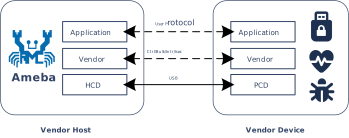
Ameba provides a reference example for designing a host-side vendor driver based on the underlying USB protocol stack, enabling the establishment of a highly flexible and exclusive data channel with customized USB devices.
As a Vendor host, developers can develop private command sets and specific format data based on this to interact with Vendor devices, achieving customized control and functional expansion beyond the limitations of standard Host classes.
As a USB host with high customizability, Ameba can establish a dedicated control and communication channel between the host and the device through the Vendor interface, breaking through the functional limitations of standard classes and enabling the following typical applications, such as:
Custom protocol communication: Define a private command set and data frame format for dedicated communication between devices and hosts (such as parameter configuration, fault diagnosis, and status inquiry).
Secure firmware upgrade: Utilize a customized Vendor protocol to transmit firmware, enabling a private and secure upgrade mechanism.
Special peripheral control: Controls non-standard USB devices (such as specific sensors, dongles, or custom IO expansion boards).
Please refer to the corresponding section of the vendor device solution:
Protocol Introduction
.
The Vendor class does not have an officially unified USB class standard specification.
Its descriptor structure, command requests, and endpoint usage are all defined by the vendor and require a host-side driver or application for parsing.
The Vendor descriptor structure can contain standard device descriptors, configuration descriptors, device qualifier descriptors, other speed configuration descriptors, and string descriptors.
For detailed descriptor customization items, please refer to
Device Descriptor Customization
.
For Vendor devices, there are several key points to note regarding descriptors:
The class code bDeviceClass for Vendor devices is set to 0xFF/0x00. Hosts usually do not automatically load generic drivers (such as HID or MSC) but instead look for a dedicated driver matching the VID/PID.
      Device Descriptor
      |  bDeviceClass: 0xFF/0x00      (0xFF: Vendor Specific Class, 0x00: Interface-based Class)
      |  bDeviceSubClass: 0xFF/0x00   (Vendor Specific SubClass)
      |  bDeviceProtocol: 0xFF/0x00   (Vendor Specific Protocol)
      |  idVendor                     (Vendor ID, e.g. 0x0BDA is for Realtek)
      |  idProduct                    (Product ID)
      |  ...
The interface class code bInterfaceClass can be set to 0xFF to indicate a custom function class. Functional differentiation in composite devices typically occurs at the interface level.
  Interface Descriptor
  |  bInterfaceClass: 0xFF      (0xFF: Vendor Specific Class)
  |  bInterfaceSubClass         (Vendor Specific SubClass)
  |  bInterfaceProtocol         (Vendor Specific Protocol)
  |  ...
For example: A composite device has both standard MSC functionality and Vendor custom functionality.
Although string descriptors are not unique to the Vendor specification, in Vendor requests, string descriptors are often used to convey serial numbers (iSerialNumber) or specific firmware version information.
For example: The three fields iManufacturer/iProduct/iSerialNumber in the device descriptor are set to 1, 2, 3 respectively.
Device Descriptor
├── iManufacturer : 1  ──┐
├── iProduct      : 2  ──┤ (Index)
├── iSerialNumber : 3  ──┘
│
└── USB String Table
    │
    ├── String Descriptor     (Index 0: Must be read first!)
    │   └── LANGID Code Array (Language ID Array)
    │       └── 0x0409        (English - United States)
    │
    ├── String Descriptor     (Index 1: Pointed by `iManufacturer` index)
    │   └── "Realtek Semiconductor Corp." (Unicode)
    │
    ├── String Descriptor     (Index 2: Pointed by the `iProduct` index)
    │   └── "Realtek USB Vendor Device" (Unicode)
    │
    ├── String Descriptor      (Index 3: Pointed by the `iSerialNumber` index)
    │   └── "00E04C000001" (Unicode)
    │       ├── Funtion 1: Distinguish devices (Instance ID)
    │       └── Funtion 2: Function binding of USB composite device
    │
    └── String Descriptor     (Index 4/5/6/...: Optional/Customizable)
    │   ├── "FW_Ver_1.0"      (Firmware version information)
    │   └── "MAC_ADDR_..."    (Network Configuration)
    |
    │    ...
iSerialNumber: For Vendor devices, it is strongly recommended to implement this string and ensure the string value is unique.
Importance: For Vendor devices, if there is no serial number string, Windows hosts may consider it a new device and reload the driver every time the device is plugged into a different USB port.
Uniqueness: Ensure that the serial number of each chip is different, otherwise two devices of the same model plugged in simultaneously may conflict.
For Vendor devices, besides the conventional Manufacturer/Product names, using iSerialNumber for device identification is a high-frequency and critical usage.
Custom Strings: For Vendor devices, because there are no standard class restrictions, vendors often utilize unused string indices to pass firmware information or configurations.
Scenario A: Firmware Version Number
Index 4 can be defined as the firmware version string (e.g., “FW_Ver_1.0”).
Host mass production tools do not need to send complex Vendor requests; they can directly send the standard request GET_DESCRIPTOR (String, Index=4) to read the version number. This is very efficient during factory testing.
Scenario B: MAC Address (Commonly used in Network Cards)
For USB network cards, the MAC address is usually stored in eFuse or Flash.
Some firmware implementations will convert the MAC address into an ASCII string and place it in iSerialNumber, or in a dedicated custom index for upper-layer applications to read.
The USB protocol divides control request types into three categories:
Standard: Universal commands that all USB devices must support (e.g., GET_DESCRIPTOR, SET_ADDRESS).
Class: Commands defined by specific device classes (e.g., GET_REPORT for HID class, Bulk-OnlyReset for MSC class).
Vendor: This is the space left by USB-IF for vendors to use freely. As long as the host and device agree, any command can be defined (e.g., read/write registers, download firmware, enter factory mode, etc.).
All control transfers start with an 8-byte SETUP packet. Bits[6:5] of the first byte bmRequestType in the SETUP packet determine whether it is a Vendor request:
Bit Position
Field Name
Description & Values
Bit 7
Direction
0: Host to Device (OUT)
1: Device to Host (IN)
Bit 6..5
Request Type
00: Standard
01: Class
10: Vendor
11: Reserved
Bit 4..0
Recipient
00000: Device
00001: Interface
00010: Endpoint
00011: Other
When developing Vendor requests, special attention should be paid to the following key points to ensure the device responds correctly to control requests from the host:
Request Type Check: When processing the SETUP packet, the device must parse the bmRequestType field and confirm that its Type field is 10(i.e.,Vendortype).
Avoid Request Value Conflict: To prevent confusion between custom bRequest values and USB standard requests (e.g., 0x06: GET_DESCRIPTOR), it is recommended to maintain a clear request value definition table to ensure all custom requests have unique and clear identifiers.
Data Direction Control: Strictly adhere to Bit 7 (i.e., the Direction bit) of bmRequestType. If the host sends an OUT request but wLength > 0 and Bit 7 is IN, it may cause a device STALL or bus error; therefore, ensure direction consistency.
Endpoint Usage Specification: All Vendor requests are transmitted via the control endpoint by default, so the implementation should ensure that the control request processing logic is correctly bound to that endpoint.
Application Scenarios for Vendor Requests
Vendor requests allow users to flexibly implement proprietary configuration, state management, and data flow control for devices via custom control transfer commands.
For example, the following three application scenarios:
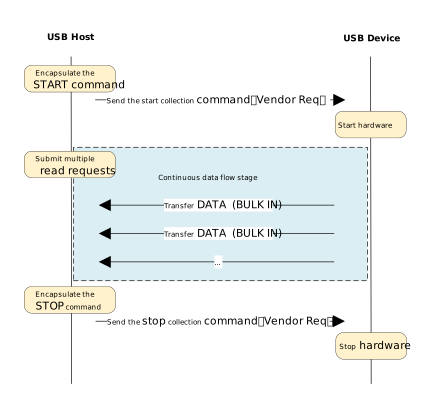
High-Performance Streaming:
High-Performance Streaming
This scenario is suitable for high-bandwidth, continuous data transmission applications, such as high-speed data acquisition instruments.
Working Mechanism:
Control Channel (Vendor Request): Used for sending low-frequency commands such as start/stop controls and parameter configuration.
Data Channel (BULK IN): Continuously and efficiently reports data to the host via bulk endpoints.
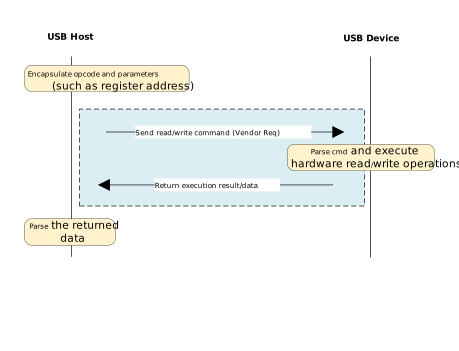
Command-Response Model:
Command-Response Model
This scenario is suitable for lightweight control applications, such as USB to GPIO/I2C/SPI bridges and device parameter configuration tools.
Working Mechanism:
Control Channel (Vendor Request): All operations are completed on EP0.
Command as Request: Directly utilizes the bRequest and wValue fields in the SETUP packet to carry opcodes and parameters, without occupying additional endpoint resources.
Control Transfer Atomicity: Each interaction is a complete control transfer transaction, consisting of three stages: Setup, Data (optional), and Status.
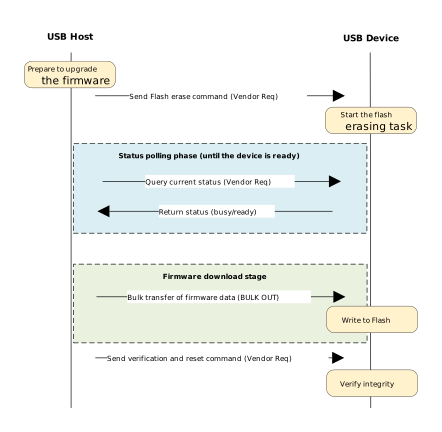
Private Firmware Update:
Private Firmware Update
This scenario combines the flexibility of control transfers with the high throughput of bulk transfers to implement device OTA (Over-the-Air) or DFU (Device Firmware Upgrade) functions via custom protocols, featuring state machine management and reliability verification mechanisms.
Working Mechanism:
Control Channel (Vendor Request): Responsible for sending critical control commands (such as Flash erase, status inquiry, verification, reset) to ensure process controllability.
Data channel (BULK OUT): Responsible for transmitting large blocks of firmware binary data, enhancing writing efficiency.
The protocol stack provides a design reference example for a Vendor Class (vendor-defined class) host driver.
Unlike standard class drivers such as HID or MSC, it does not bind to specific industry protocols, but provides a flexible basic framework, granting developers great freedom to customize private USB communication protocols.
The driver architecture adopts a layered design, consisting of three core layers from top to bottom:
User Application Layer: Implements specific business logic. Users can interact with the driver by simply registering a callback structure, and send or receive data using encapsulated interfaces, without needing to concern themselves with the underlying USB protocol details.
Vendor Class Driver Layer: (The core implementation of this driver example) built on top of the USB host core stack, serving as an intermediary layer connecting the underlying hardware with the upper-level applications. It is responsible for managing channel resources, maintaining state machines, and handling various data transfers. It serves as the primary foundation for developers to conduct secondary development.
Core Driver Layer: Responsible for low-level USB hardware interrupt handling, bus enumeration, transfer request (URB) scheduling, and standard protocol stack management.
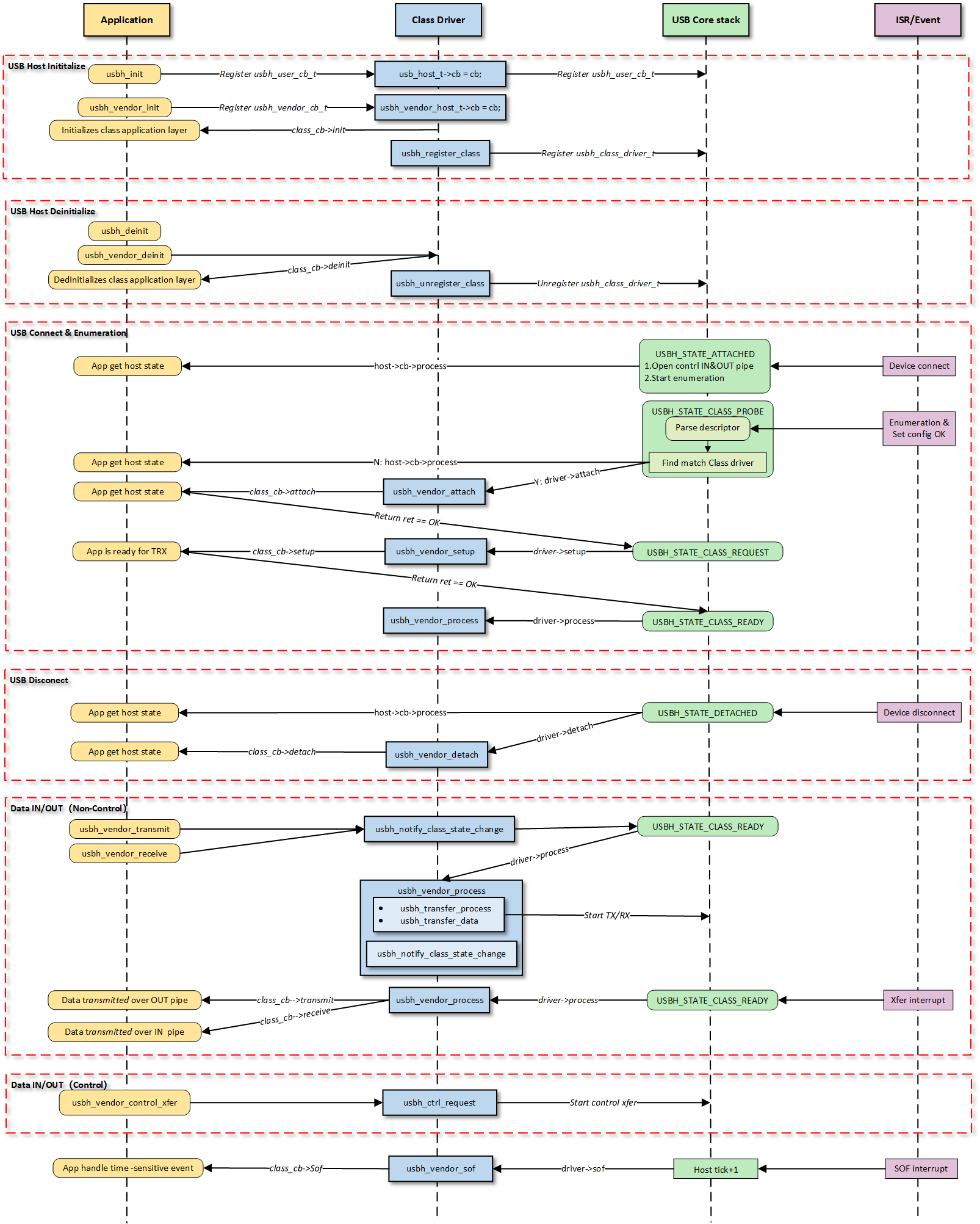
The Vendor Class Driver plays a pivotal role in the system architecture, connecting the upper and lower layers. Its core interaction logic mainly revolves around the following three interfaces:
Host Class Driver Callback API: The class driver interacts with the underlying USB Core by registering the standard usbh_class_driver_t structure.
Application-Facing Callback API: Provides asynchronous event notifications (such as connection, disconnection, data reception) to the upper-layer application via the usbh_vendor_cb_t registered by the application layer during initialization.
Application-Facing API: Functional interfaces provided for the application layer to call. Upon calling, the driver switches its internal state machine status and initiates data transfer scheduling.
The figure above illustrates the execution flow of callback functions at different levels and does not list all calling scenarios.
Class Driver Callback Functions
The class driver needs to define a standard usbh_class_driver_t structure.
This serves as a unified entry point registered with the USB Core and is the primary method for the Core layer to notify the Class layer that “an event has occurred.”
id_table: Supported device ID list. The core layer uses this table to match with the inserted device to determine whether to load this driver.
attach: Called after device connection and successful matching.
detach: Called when the device is disconnected.
setup: Called when enumeration is complete and the class request phase begins. Used to send class-specific standard control requests to complete necessary configuration before the device enters the data transfer state.
process: The state machine processing function executed after the class driver is ready.
sof: Called during SOF interrupts. Used to handle logic with strict timing requirements, primarily for isochronous transfers.
completed: Called when a transfer on a pipe completes.
Application Layer Callback Functions
The Vendor class driver application layer callback structure usbh_vendor_cb_t is implemented by the user layer. Generally, the following APIs can be implemented:
API
Description
init
Called during class driver initialization to initialize application-related resources.
deinit
Called during class driver de-initialization to release application-related resources.
attach
Called when the class driver executes the attach callback to handle device connection
events at the application layer.
detach
Called when the class driver executes the detach callback to handle device disconnection
events at the application layer.
setup
Called when the class driver executes the setup callback, indicating that the application
layer class driver is ready for data transfer.
receive
Called when the class driver receives IN data, used by the application layer to process
data reported by the device.
transmit
Called when the class driver OUT data transfer completes, used by the application
layer to obtain the OUT transfer status.
usbh_vendor_init() is the top-level function used to load the Vendor Class Driver.
Execute User Callback Initialization: If a user init callback is registered, it is called first, giving the upper-layer application an opportunity to execute application-specific initialization logic.
Register Class Driver: Calls usbh_register_class() to register the defined usbh_class_driver_t class driver instance with the Host Core Driver, making the host ready to respond to enumeration.
Example:
typedefstruct{usbh_vendor_xfer_tbulk_in_xfer;//BULK IN pipe xfer.// Other pipe xfer if exit.usbh_vendor_cb_t*cb;//User callback.usb_host_t*host;//USB host core.usbh_vendor_state_tstate;//Class Driver state.}usbh_vendor_host_t;/* Define Vendor host */staticusbh_vendor_host_tusbh_vendor_host;/* Define Vendor Class Driver */staticusbh_class_driver_tusbh_vendor_driver={.id_table=vendor_devs,.attach=usbh_vendor_attach,.detach=usbh_vendor_detach,.setup=usbh_vendor_setup,.process=usbh_vendor_process,.sof=usbh_vendor_sof,};intusbh_vendor_init(usbh_vendor_cb_t*cb){usbh_vendor_host_t*vendor=&usbh_vendor_host;/* 1. Execute User Init Callback */if(cb!=NULL){vendor->cb=cb;if(cb->init!=NULL){ret=cb->init();if(ret!=HAL_OK){RTK_LOGS(TAG,RTK_LOG_ERROR,"User init err %d\n",ret);returnret;}}}/* 2. Register Class Driver */usbh_register_class(&usbh_vendor_driver);returnHAL_OK;}
Deinit:
usbh_vendor_deinit() is the top-level function used to unload the Vendor Class Driver.
Execute User Callback Cleanup: If a user deinit callback is registered, it is called first to inform the upper-layer application to clean up user-layer private resources or logic.
Reset State Machine: Sets the driver state machine status to IDLE.
Release All Pipes and Resources: Force closes all open pipes via usbh_close_pipe() and cleans up all resources allocated during initialization to prevent memory leaks or pipe occupation.
Unregister Class Driver: Calls usbh_unregister_class() to remove the Vendor driver from the USB Core Stack. After this operation, the device will no longer respond to relevant USB events.
Example:
intusbh_vendor_deinit(void){usbh_vendor_host_t*vendor=&usbh_vendor_host;/* 1. Execute User Deinit Callback */if((vendor->cb!=NULL)&&(vendor->cb->deinit!=NULL)){vendor->cb->deinit();}/* 2. Set the state of the drive state machine to IDLE. */vendor->state=VENDOR_STATE_IDLE;/* 3. Close all pipelines */usbh_vendor_deinit_all_pipe();/* 4. Release all resources */usbh_vendor_deinit_all_xfer();/*5. Unregister Class Driver */usbh_unregister_class(&usbh_vendor_driver);returnHAL_OK;}
The connection and disconnection of devices are automatically detected by the USB Core, which then calls the corresponding callbacks of the class driver for resource management.
Attach:
Device Connection
When the Core layer enumerates a Vendor device matching the usbh_dev_id_t, the usbh_vendor_attach callback is invoked. The main responsibilities of this phase are:
Obtain and parse the corresponding interface descriptor.
Open the corresponding pipe via usbh_open_pipe() based on the endpoint descriptor.
Initialize the transfer management structure usbh_vendor_xfer_t corresponding to each pipe.
Call the user attach callback to inform the application layer.
Example:
staticintusbh_vendor_attach(usb_host_t*host){usbh_vendor_host_t*vendor=&usbh_vendor_host;usbh_itf_data_t*itf_data;usbh_dev_id_tdev_id={0,};/* 1. Sets up device identification parameters to match a vendor class interface */dev_id.bInterfaceClass=VENDOR_CLASS_CODE;dev_id.bInterfaceSubClass=VENDOR_SUBCLASS_CODE;dev_id.bInterfaceProtocol=VENDOR_PROTOCOL;dev_id.mMatchFlags=USBH_DEV_ID_MATCH_ITF_INFO;//Core only needs to match interface information (ignore VID/PID)/* 2. Search for interfaces that match the dev_id rule in the devices associated with the host */itf_data=usbh_get_interface_descriptor(host,&dev_id);if(itf_data==NULL){// Match failure: Although the device is connected, there is no driver supporting the InterfaceRTK_LOGS(TAG,RTK_LOG_ERROR,"Get itf desc fail\n");returnHAL_ERR_PARA;}else{/* 3. If found, initializes the vendor host with the host pointer and sets the state to transfer */vendor->host=host;vendor->state=VENDOR_STATE_XFER;/* 4. Get data in/out endpoints */usbh_vendor_get_endpoints(host,itf_data->itf_desc_array);/* 5. Calls the `attach` callback function if it exists */if((vendor->cb!=NULL)&&(vendor->cb->attach!=NULL)){vendor->cb->attach();}returnHAL_OK;}}
Detach:
Device Disconnection
When the device is unplugged, the usbh_vendor_detach callback is invoked. The main responsibilities of this phase are:
Call the user detach callback to inform the application layer.
Example:
staticintusbh_vendor_detach(usb_host_t*host){UNUSED(host);usbh_vendor_host_t*vendor=&usbh_vendor_host;/* 1. Reset the state of the driver state machine to IDLE */vendor->state=VENDOR_STATE_IDLE;/* 2. Close all pipes in turn */usbh_vendor_deinit_all_pipe();/* 3. Calls the `detach` callback function if it exist */if((vendor->cb!=NULL)&&(vendor->cb->detach!=NULL)){vendor->cb->detach();}returnHAL_OK;}
In the USB host driver, the attach callback function collaborates with the usbh_dev_id_t structure to complete the critical process from “generic device connection” to “specific interface binding”.
The matching process is as follows:
Define Matching Rules: By configuring the usbh_dev_id_t structure, specify target device characteristics (such as Class Code, Protocol, etc.).
Match Flags: Use mMatchFlags for precise control over the matching strategy (e.g., matching only VID/PID, or specific Class/SubClass).
Flexibility: Precisely control whether to match the entire device or a specific interface within the device (this is especially important for composite devices).
Developers adapt according to the actual connected Vendor devices.
The USB Core iterates through all interface descriptors of the currently connected device and compares them with the passed usbh_dev_id_t rules. If a match is successful, it returns the pointer to the corresponding interface descriptor.
The usbh_vendor_process callback function is the core state machine handler for the Vendor Class on the host side. Unlike the passive response on the device side, the host-side driver needs to actively maintain device status.
The USB host class driver uses a state machine to manage data transfer processing, with the driver state updated by API calls and underlying interrupt feedback.
The state machine generally contains three core states:
VENDOR_STATE_IDLE (Idle State): Standby state after system initialization or disconnection, waiting for new transfer requests or event triggers.
VENDOR_STATE_XFER (Data Transfer State): Core data processing state; dispatches and processes corresponding transfer events based on the Pipe Number in the event message.
VENDOR_STATE_ERROR (Error Handling State): Exception handling state; attempts error recovery via standard requests (Clear Feature).
Example:
switch(vendor->state){caseVENDOR_STATE_IDLE:breakcaseVENDOR_STATE_XFER:/* Distribute and process according to the pipe number */if(event.msg.pipe_num==vendor->bulk_in_xfer.pipe.pipe_num){usbh_vendor_bulk_process_rx(host);}elseif(event.msg.pipe_num==vendor->isoc_out_xfer.pipe.pipe_num){usbh_vendor_isoc_process_tx(host);}/* Deal with other pipe */break;caseVENDOR_STATE_ERROR:/* Try to recover */if(usbh_ctrl_clear_feature(host,0x00U)==HAL_OK){vendor->state=VENDOR_STATE_IDLE;// Restoration successful, reset to IDLE}break;}
This section provides a detailed introduction to the data transfer processing flow in the Vendor class driver.
Host-side transfers are mainly divided into three stages: TRX API -> Process -> Callback:
Initiation of Transfer Request: The application layer proactively initiates OUT (transmit) or IN (receive) transfer requests by calling APIs.
State Machine Management: The driver manages data interaction with the device by maintaining a transfer state machine.
Callback Notification: Notifies the application layer via usbh_vendor_cb_t callbacks upon transfer completion or error. This callback mechanism decouples the application layer from the low-level driver, eliminating the need for the application to poll and wait.
Calls the user receive callback function to pass the data up to the application layer.
Note
BULK IN ZLP Handling
If a zero-length packet is received, the receive callback is triggered as well, so the application layer needs to check for and handle the ZLP case.
Note
USB DMA requires the data buffer address to be aligned with the Cache line, so the transmit/receive buffer addresses passed down by the application layer must be address-aligned.
Special Processing Logic
BULK ZLP Handling
In Bulk transfers, if the data length is exactly an integer multiple of the MPS (Maximum Packet Size), the driver automatically flags trx_zlp to automatically receive/send a ZLP after the data to terminate the transfer.
Isochronous transfers are time-sensitive and rely on SOF interrupts to handle timing control for isochronous transfers.
SOF Callback: The usbh_vendor_sof callback function is triggered at the beginning of each frame to track the current frame number.
Transmission Scheduling: Ensure that data packets are submitted strictly within the correct (micro)frames at regular intervals.
When the TX processing function determines that there is still transmission to be done, it will set the channel status to USBH_EP_XFER_WAIT_SOF.
Verify the frame interval during the SOF callback, and call usbh_notify_class_state_change() to trigger the core scheduling for actual data transmission when the conditions are met.
Example:
staticintusbh_vendor_sof(usb_host_t*host){usbh_vendor_host_t*vendor=&usbh_vendor_host;/* 1.Obtain the current frame number for ISOC scheduling */intcur_frame=usbh_get_current_frame_number(host);/* 2. Waiting for the correct SOF interval to start next transfer - if cur_frame - last frame_num >= interval, means we should trigger a xfer ASAP. - if xfer_state = USBH_EP_XFER_WAIT_SOF, it means that last xfer has been done, so in sof intr, we should check whether the next frame will be the xfer frame */if((usbh_get_elapsed_frame_cnt(host,pipe->frame_num)>=pipe->ep_interval)||((pipe->xfer_state==USBH_EP_XFER_WAIT_SOF)&&(cur_frame-out_xfer->cur_frame)%pipe->ep_interval==0)){//3. Set next transfer parameters: e.g. buffer and length//4. Start next transferusbh_notify_class_state_change(host,pipe->pipe_num);}returnHAL_OK;}
During the device enumeration phase (in the usbh_vendor_attach callback function), the Vendor Host Driver parses the configuration descriptor and automatically searches for and requests corresponding transfer resources based on the interface descriptor, establishing complete data and control pipes.
The pipe configuration in this example is as follows:
This section provides a detailed introduction to the complete development process of the Vendor application, covering core aspects such as driver loading, hotplug handling, how to establish transmission, and how to process data.
However, the data content transmitted (such as Loopback test data) carries no specific business meaning. Developers can base on this framework:
Define private command set: Replace the test data in the example and implement specific private protocol parsing logic.
Adjust resource allocation: Adjust the FIFO size and buffer size based on the actual business throughput.
Before using the Vendor driver, configuration structures must be defined and callback functions registered. Subsequently, initialization interfaces are called to load the USB core driver and the Vendor class driver.
Step Description:
Hardware Configuration: Configure USB speed modes (High Speed/Full Speed), interrupt priorities, etc.
Callback Registration: Define the user callback structure usbh_vendor_cb_t and usbh_user_cb_t mount processing functions for various stages.
Core Initialization: Call usbh_init() to initialize the USB core driver.
Class Driver Initialization: Call usbh_vendor_init() to initialize the Vendor class driver.
Example:
staticusbh_config_tusbh_cfg={.speed=USB_SPEED_HIGH,.ext_intr_enable=USBH_SOF_INTR,.isr_priority=INT_PRI_MIDDLE,.main_task_priority=3U,.tick_source=USBH_SOF_TICK,};staticusbh_vendor_cb_tvendor_usr_cb={.attach=vendor_cb_attach,.detach=vendor_cb_detach,.setup=vendor_cb_setup,.transmit=vendor_cb_transmit,.receive=vendor_cb_receive,};staticusbh_user_cb_tusbh_usr_cb={.process=vendor_cb_process};intret=0;/* Initialize USB host core driver with configuration. */ret=usbh_init(&usbh_cfg,&usbh_usr_cb);if(ret!=HAL_OK){return;}/* Initialize class driver with application callback handler. */ret=usbh_vendor_init(&vendor_usr_cb);if(ret!=HAL_OK){/* If class driver init fails, clean up the core driver */usbh_deinit();return;}
Once the Vendor host enumeration is successful, APIs can be called to start data transfer.
The following process applies to BULK, INTR, and ISOC transfer. BULK transfer is used as an example here.
static__IOintvendor_is_ready=0;staticrtos_sema_tvendor_bulk_send_sema;staticrtos_sema_tvendor_bulk_receive_sema;staticu8vendor_bulk_loopback_tx_buf[USBH_VENDOR_BULK_LOOPBACK_BUF_SIZE]__attribute__((aligned(CACHE_LINE_SIZE)));staticu8vendor_bulk_loopback_rx_buf[USBH_VENDOR_BULK_LOOPBACK_BUF_SIZE]__attribute__((aligned(CACHE_LINE_SIZE)));staticusbh_vendor_cb_tvendor_usr_cb={.setup=vendor_cb_setup,.transmit=vendor_cb_transmit,.receive=vendor_cb_receive,};staticintvendor_cb_setup(void){vendor_is_ready=1;returnHAL_OK;}/*** @brief USB Vendor transmit callback function* @param ep_type transmission type (BULK, INTERRUPT, ISOC)* @return HAL status*/staticintvendor_cb_transmit(u8ep_type){//Release the different semaphore according to different transmission, e.g. transmission typeswitch(ep_type){caseUSB_CH_EP_TYPE_BULK:rtos_sema_give(vendor_bulk_send_sema);break;//Other transmissiondefault:break;}returnHAL_OK;}/*** @brief USB Vendor receive callback function* @param ep_type transmission type (BULK, INTERRUPT, ISOC)* @param buf Received data buffer* @param len Length of received data* @param status Transfer status* @return HAL status*/staticintvendor_cb_receive(u8ep_type,u8*buf,u32len,intstatus){// Get endpoint maximum packet size for each typeu16vendor_bulk_in_mps=usbh_vendor_get_bulk_ep_mps();switch(ep_type){caseUSB_CH_EP_TYPE_BULK:// 1. Check if transfer transfer is complete successfully// 2. Reset total length and signal completionrtos_sema_give(vendor_bulk_receive_sema);}else{RTK_LOGS(TAG,RTK_LOG_ERROR,"%d RX fail: %d\n",ep_type,status);}break;}returnHAL_OK;}/*---------------- BULK TRX Test --------------------*//*1. Wait for device to be ready for data transfer*/while(1){if(vendor_is_ready){/* Check if device is ready */rtos_time_delay_ms(10);break;}}/* 2. BULK TX test *//* Initiate transfer with TX configuration: transfer length and times */usbh_vendor_bulk_transmit(vendor_bulk_loopback_tx_buf,USBH_VENDOR_BULK_LOOPBACK_BUF_SIZE,USBH_VENDOR_BULK_LOOPBACK_CNT);/* 3. Wait for transfer completion semaphore */if(rtos_sema_take(vendor_bulk_send_sema,RTOS_SEMA_MAX_COUNT)==RTK_SUCCESS){// Success indicates transfer completion}/* 4. BULK RX test *//* Initiate transfer with RX configuration: transfer length and times */usbh_vendor_bulk_receive(vendor_bulk_loopback_rx_buf,USBH_VENDOR_BULK_LOOPBACK_BUF_SIZE,USBH_VENDOR_BULK_LOOPBACK_CNT);/* 5. Wait for transfer completion semaphore */if(rtos_sema_take(vendor_bulk_receive_sema,RTOS_SEMA_MAX_COUNT)==RTK_SUCCESS){// Success indicates transfer completion}
The handling methods in the receive callback differ for the three transfer types upon successful reception:
Bulk IN Transfer:
Processing Logic:
Data received via bulk transfer is accumulated until specific conditions are met before releasing the semaphore.
This is primarily because the protocol mandates that when a bulk transfer length is a multiple of the MPS (Max Packet Size), a Zero Length Packet (ZLP) must be appended to mark the end of the transfer.
The user layer needs to distinguish this situation, so it waits for a complete packet sequence or specific termination conditions (such as a ZLP, a short packet, or a full buffer) to confirm the completion of a full transfer.
This mechanism ensures data integrity and correctness, preventing subsequent processing before data is fully received.
Example:
staticintvendor_cb_receive(u8ep_type,u8*buf,u32len,intstatus){/* 1. Get endpoint maximum packet size of BULK IN endpoint */u16vendor_bulk_in_mps=usbh_vendor_get_bulk_ep_mps();switch(ep_type){caseUSB_CH_EP_TYPE_BULK:/* 2. Check if transfer was successful */if(status==HAL_OK){/* 3 Update total received length */vendor_bulk_total_rx_len+=len;/* 4. Determine if transfer is complete based on: Zero-length packet (ZLP)/Short packet (not multiple of MPS)/ Buffer full condition */if((len==0)||(len%vendor_bulk_in_mps)||((len%vendor_bulk_in_mps==0)&&(len<USBH_VENDOR_BULK_LOOPBACK_BUF_SIZE))||(vendor_bulk_total_rx_len>USBH_VENDOR_BULK_LOOPBACK_BUF_SIZE)){/* 5. Reset total length and signal completion */vendor_bulk_total_rx_len=0;rtos_sema_give(vendor_bulk_receive_sema);}}else{RTK_LOGS(TAG,RTK_LOG_ERROR,"%d RX fail: %d\n",ep_type,status);}break;}returnHAL_OK;}
Interrupt IN Transfer:
Processing Logic:
Handling interrupt transfers is relatively simple, primarily based on short packet detection.
When the received data length is less than or equal to the MPS, it usually indicates the end of a complete transfer cycle.
This design aligns with the characteristics of interrupt transfers—small data volume and periodicity—allowing timely identification of transfer completion.
Example:
staticintvendor_cb_receive(u8ep_type,u8*buf,u32len,intstatus){/* 1. Get endpoint maximum packet size of Interrupt IN endpoint */u16vendor_intr_in_mps=usbh_vendor_get_intr_ep_mps();switch(ep_type){caseUSB_CH_EP_TYPE_INTR:/* 2. Check if transfer was successful */if(status==HAL_OK){/* 3. Update total received length */vendor_intr_total_rx_len+=len;/* 4. Determine if transfer is complete based on: Short packet (less than MPS) with data received */if(((len<vendor_intr_in_mps)&&(vendor_intr_total_rx_len>0))||(vendor_intr_total_rx_len>=USBH_VENDOR_INTR_LOOPBACK_BUF_SIZE)){///*5. Reset total length and signal completion */vendor_intr_total_rx_len=0;rtos_sema_give(vendor_intr_receive_sema);}}else{// Log error if transfer failedRTK_LOGS(TAG,RTK_LOG_ERROR,"%d RX fail: %d\n",ep_type,status);}break;}returnHAL_OK;}
Isochronous IN Transfer:
Processing Logic:
Isochronous transfers use an immediate semaphore release mechanism.
Since isochronous transfers are typically used for real-time data transfer (e.g., audio or video streams), timeliness is more critical than data integrity.
The upper layer is notified immediately upon receiving each data packet to ensure real-time requirements are met.
Example:
staticintvendor_cb_receive(u8ep_type,u8*buf,u32len,intstatus){switch(ep_type){caseUSB_CH_EP_TYPE_ISOC:// For isochronous transfers, immediately signal completionrtos_sema_give(vendor_isoc_rxdone_sema);break;}returnHAL_OK;}
Note
Buffers allocated for transfer and reception must be Cache-line aligned.
For the complete data transfer logic, please refer to the SDK example code: {SDK}/example/usb/usbh_vendor/example_usbh_vendor.c.
This section introduces a complete Vendor host loopback example, demonstrating how to implement custom bidirectional data communication with the device via the Vendor protocol stack.
The example code path is: {SDK}/example/usb/usbh_vendor. It provides provides a complete reference solution for developers to design custom vendor products.
Execute the following commands in the SDK root directory to configure the environment, select the target SoC, compile the project, and flash the generated Image file to the development board.
# Initialize environment (required for every new terminal)sourceenv.shorenv.bat(Windowssystem)# Select Target SoC (replace xxx with your specific SoCs)
ameba.pysocxxx
ameba.pybuild-ausbh_vendor-p
Confirmation of Menuconfig configuration
If compilation fails, please execute ameba.pymenuconfig and confirm that USBHVENDOR has been selected.
- Choose `CONFIG USB --->`:

  [*] Enable USB
      USB Mode (host)  --->
  [*] Vendor