Mass Storage Host Solution
Overview
The USB Mass Storage Class (MSC) protocol establishes a standard communication specification between a host and mass storage devices.
Ameba has implemented a complete USB MSC host protocol stack based on the official MSC protocol standards released by the USB-IF. It supports interaction with MSC devices via the SCSI (Small Computer System Interface) command set, enabling stable and high-speed file reading and writing.
Features
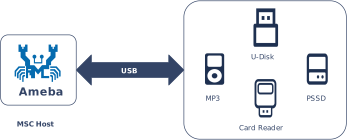
Supports standard MSC devices (such as U-disks, SD card readers, etc.)
The maximum supported storage capacity is 32GB
Supports read and write operations of the FAT32 file system
Supports USB hot-plug
Automatically parses descriptors and adapts to speed modes
Configurable parameters such as BULK transfer length
Application Scenarios
As a USB storage host, Ameba can mount external mass storage devices via the USB interface. By combining this with network technologies to implement various data interactive applications. For example,
Smart Network Storage / Private Cloud: Combines network technology to bridge local storage with cloud connectivity, supporting automatic bidirectional file synchronization and secure remote access based on DDNS/VPN, to build a lightweight home private cloud.
Industrial IoT Gateway: Caches sensor data or serial logs to USB storage devices in unstable network environments (e.g., mines, offshore), and automatically executes resume-from-break uploads to the cloud once connectivity is restored, ensuring the integrity and reliability of industrial data.
AI Media Library & Storage Expansion: Utilizes external storage to house massive media files or AI knowledge bases, overcoming internal Flash capacity limitations to enable local offline retrieval and low-cost functional expansion.
Hardware Security Token: During startup or privilege verification, the device scans a connected U disk for specific encrypted certificates or License files; upon successful validation, it activates advanced system privileges, acting as a physically isolated, low-cost hardware authorization lock.
Protocol Introduction
The MSC protocol defines the transmission and control functionalities required to implement storage devices under the USB specification. Common devices that adhere to this standard include USB flash drives, external hard drives, and card readers.
Descriptor Structure
In addition to complying with standard USB descriptor specifications (such as Device Descriptors, Configuration Descriptors, and Endpoint Descriptors), MSC devices are required to:
Declare the communication protocol used (e.g., SCSI) via the Interface Descriptor.
Encapsulate transmission commands and data through bulk endpoints.
The following section illustrates a standard USB MSC descriptor structure based on the Bulk-Only Transport (BOT) mode utilizing the SCSI command set:
Device Descriptor
└── Identifies basic device information

Configuration Descriptor
└── Contains total length of the entire configuration, power supply information, etc.
│
└── Interface Descriptor(Interface 0, Alternate Setting 0)
    ├── bInterfaceClass: 0x08 (Mass Storage)
    ├── bInterfaceSubClass: 0x06 (SCSI transparent command set)
    ├── bInterfaceProtocol: 0x50 (Bulk-Only Transport)
    └── bNumEndpoints: 2 (2 Endpoints)
        ├── Endpoint Descriptor(BULK IN)
        └── Endpoint Descriptor(BULK OUT)

Device Qualifier Descriptor
└── Device information while running in another speed mode

Other Speed Configuration Descriptor
├── Configuration information while running in another speed mode.
│
└── Interface Descriptor(Interface 0, Alternate Setting 0)
    ├── bInterfaceClass: 0x08 (Mass Storage)
    ├── bInterfaceSubClass: 0x06 (SCSI transparent command set)
    ├── bInterfaceProtocol: 0x50 (Bulk-Only Transport)
    └── bNumEndpoints: 2 (2 Endpoints)
        ├── Endpoint Descriptor(BULK IN)
        └── Endpoint Descriptor(BULK OUT)
Protocol document
The USB-IF has officially released the MSC-class basic protocol and specifications for the BOT transfer protocol. During the development process, please refer to the following core documents:
For the MSC BOT transfer protocol specification, please refer to Mass Storage Bulk Only
For the SCSI command set used in the BOT transmission process, please refer to https://www.t10.org/. The following two specifications are of primary concern:
Specification
Description
Documentation
SCSI Primary Commands (SPC)
Basic commands common to all SCSI devices
SCSI Block Commands (SBC)
Specific commands for block storage devices (hard disks, USB drives, SSDs)
Software and Hardware Architecture
The figure below illustrates the software and hardware layers that commands and data traverse between the host and the device.
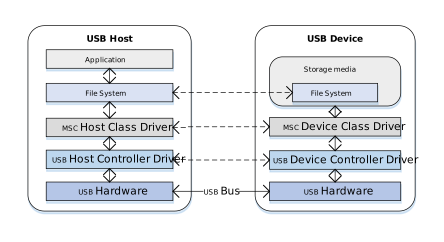
Taking a read operation as an example, when a user reads a file from a U disk, the process is as follows:
Host Side:
Application Request: The user initiates a file read request within an application (e.g., File Manager).
File System Conversion: The file system converts the filename and offset into a Logical Block Address (LBA) read request and generates a standard SCSI READ command.
Protocol Encapsulation: The host MSC class driver encapsulates the SCSI command into the command packet format defined by the MSC protocol.
Hardware Transmission: The USB host controller driver transmits the data packet to the bus via the physical USB port.
Device Side:
Hardware Reception: The USB device controller receives the data packet from the physical port.
Protocol Parsing: The MSC device class driver verifies the integrity of the packet and parses the encapsulated SCSI command.
Media Access: Based on the parsed command parameters (such as LBA address and length), data is read from the underlying storage medium (e.g., an SD card).
Data and Status Return: The read data is returned to the host, followed by the command execution status response.
BOT Transmission Flow
Once the MSC device is connected to the host and enumeration is complete, if it is identified as a Mass Storage device supporting BOT (Bulk-Only Transport) mode, all subsequent data communication occurs exclusively through bulk endpoints. Bulk transfers are not strictly time-critical, ensuring maximum data integrity.
According to the MSC BOT transmission protocol specification, all transfers follow a three-stage “Command -> Data -> Status” flow:
CBW (Command Block Wrapper): Sent from the host to the device. It encapsulates the specific SCSI command (e.g., READ, WRITE, INQUIRY).
Data (Data Stage): Transfers the actual file or control data. (The direction depends on the SCSI command type; for commands without data interaction, this stage is omitted).
CSW (Command Status Wrapper): Sent from the device to the host. It reports the execution result of the previous CBW command (Success, Failure, or Phase Error).
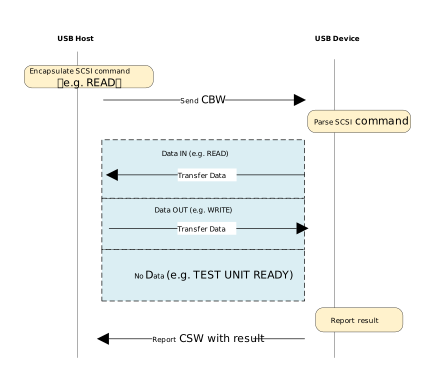
The data transmission process is as follows:
Host Initiates Request: The host MSC class driver encapsulates the SCSI command into a CBW packet and sends it to the device via the Bulk OUT endpoint.
Device Parsing and Execution: The device receives the CBW packet, performs a validity check, and parses the SCSI command. If the CBW is valid, the device operates on the underlying physical storage medium according to the command:
Write Operation (e.g., WRITE): Receives the data stream sent by the host via the Bulk OUT endpoint and writes it to the storage medium.
Read Operation (e.g., READ): Reads data from the storage medium and transmits it back to the host via the Bulk IN endpoint.
No-Data Command (e.g., TEST UNIT READY): Skips the data stage and proceeds directly to the status stage.
Device Returns Status: After data transmission is complete (or if no data transmission is required), the device sends a CSW packet via the Bulk IN endpoint to report the command execution result to the host.
Host Confirms Completion: The host parses the received CSW packet and checks the
bCSWStatusfield to confirm whether the command was executed successfully, thereby concluding the operation.
Class-Specific Requests
Control requests for MSC devices are categorized into Standard Requests and Class-Specific Requests.
This section focuses on the Class-Specific Requests unique to the MSC BOT specification. These requests are used to implement specific storage functions. There are only two such requests:
MSC Class-Specific Request |
Requirement |
Description |
|---|---|---|
Bulk-Only Mass Storage Reset |
Mandatory |
Resets the device interface and associated endpoints. |
Get Max LUN |
Mandatory |
Queries the maximum number of Logical Units supported by the device. |
SCSI Commands
The primary MSC BOT SCSI commands are listed below:
SCSI Command |
Requirement |
Description |
|---|---|---|
INQUIRY |
Mandatory |
The first command sent by the host to query device information. |
REQUEST_SENSE |
Mandatory |
Sent by the host to retrieve detailed error information whenever a command fails. |
TEST_UNIT_READY |
Mandatory |
Checks if the device is ready. |
READ_CAPACITY(10) |
Mandatory |
Queries the capacity of the storage medium. |
READ(10) |
Mandatory |
The core command for reading data. |
WRITE(10) |
Mandatory |
The core command for writing data. |
MODE_SENSE(6) |
Optional |
Queries specific device parameters, such as caching policy or write- protection status. |
ALLOW_MEDIUM_REMOVAL |
Optional |
Used to allow or prevent medium removal, implementing the “Safely Remove Hardware” feature. |
START_STOP_UNIT |
Optional |
Used to load or eject the medium. |
VERIFY(10) |
Optional |
Requests the device to verify that specified blocks are readable without transferring data. |
READ_FORMAT_CAPACITIES |
Optional |
Provides more detailed capacity and format information than READ_CAPACITY. |
Note
For detailed information on the SCSI standard, please refer to the official documentation.
Class Driver
The USB protocol stack provides a standard MSC host class driver based on the BOT (Bulk-Only Transport) protocol, utilizing the SCSI command set.
Pipe Configuration
Count |
Description |
|---|---|
2 |
Control IN/OUT Transfer |
1 |
Bulk IN Transfer |
1 |
Bulk OUT Transfer |
Class-Specific Request Implementation
The driver implements two Class-Specific Requests for MSC.
MSC Class-Specific Request |
Description |
|---|---|
Bulk-Only Mass Storage Reset |
The host requests a reset of the transfer when a BOT transfer error occurs. |
Get Max LUN |
After the device is connected, the host queries the number of Logical Units supported by the device. |
SCSI Command Implementation
The SCSI commands implemented by the driver under the MSC BOT specification are listed below. Developers can refer to existing implementations to extend other commands.
INQUIRY
REQUEST_SENSE
TEST_UNIT_READY
READ_CAPACITY(10)
READ(10)
WRITE(10)
FatFS Disk Driver API
The class driver defines a FatFS disk driver USB_disk_Driver typed with ll_diskio_drv:
API |
Description |
|---|---|
disk_initialize |
Initializes USB disk |
disk_deinitialize |
Deinitializes USB disk |
disk_status |
Returns disk status (RES_OK/RES_ERROR) |
disk_read |
Reads data from USB disk (sector-aligned) |
disk_write |
Writes data to USB disk (requires _USE_WRITE set in FatFS) |
disk_ioctl |
Implements FatFS IO control commands:
|
API Reference
For detailed function prototypes and usage, please refer to the Driver API
Application Example
Application Design
Driver Initialization
Use the following example code to define the configuration structure and callback functions, then invoke the initialization interface to initialize the USB host core and the MSC class driver.
static usbh_config_t usbh_cfg = {
  .speed = USB_SPEED_HIGH,
  .ext_intr_enable = USBH_SOF_INTR,
  .isr_priority = INT_PRI_MIDDLE,
  .main_task_priority = 3U,
  .tick_source = USBH_SOF_TICK,
  }

static usbh_msc_cb_t usbh_msc_usr_cb = {
  .attach = usbh_msc_cb_attach,                  /* USB device attach callback */
  .setup = usbh_msc_cb_setup,                    /* USB device setup done, indicate that device is ready for bulk transfer */
};

static usbh_user_cb_t usbh_usr_cb = {
  .process = usbh_msc_cb_process
};

int ret = 0;
ret = usbh_init(&usbh_cfg, &usbh_usr_cb);   /* Initialize USB host core driver with configuration and user callback. */
if (ret != HAL_OK) {
    return;
}

ret = usbh_msc_init(&usbh_msc_usr_cb);          /* Initializes the MSC host class with MSC class user callback. */
if (ret != HAL_OK) {
    usbd_msc_disk_deinit();
    return;
}
File Read And Write
Perform file read and write operations on the device after initialization.
static rtos_sema_t msc_attach_sema;
static __IO int msc_is_ready = 0;

static int usbh_msc_cb_attach(void)
{
  RTK_LOGS(TAG, RTK_LOG_INFO, "ATTACH\n");
  rtos_sema_give(msc_attach_sema);
  return HAL_OK;
}

static int usbh_msc_cb_setup(void)
{
  RTK_LOGS(TAG, RTK_LOG_INFO, "SETUP\n");
  msc_is_ready = 1;
  return HAL_OK;
}

static int usbh_msc_cb_process(usb_host_t *host, u8 msg)
{
  UNUSED(host);

  switch (msg) {
  case USBH_MSG_DISCONNECTED:
    msc_is_ready = 0;
    break;
  case USBH_MSG_CONNECTED:
    break;
  default:
    break;
  }

  return HAL_OK;
}

static u32 filenum = 0;
static u8 *msc_wt_buf;
static u8 *msc_rd_buf;
FATFS fs;
FIL f;
int drv_num = 0;
char logical_drv[4];
char path[64] = {'0'};
u32 br;
u32 bw;

rtos_sema_create(&msc_attach_sema, 0U, 1U);

msc_wt_buf = (u8 *)rtos_mem_zmalloc(USBH_MSC_TEST_BUF_SIZE);
if (msc_wt_buf == NULL) {
  RTK_LOGS(TAG, RTK_LOG_ERROR, "Fail to alloc test buf\n");
  goto exit_deinit;
}

msc_rd_buf = (u8 *)rtos_mem_zmalloc(USBH_MSC_TEST_BUF_SIZE);
if (msc_rd_buf == NULL) {
  RTK_LOGS(TAG, RTK_LOG_ERROR, "Fail to alloc test buf\n");
  goto exit_deinit;
}

/* Register USB disk driver to fatfs*/
drv_num = FATFS_RegisterDiskDriver(&USB_disk_Driver);
if (drv_num < 0) {
  RTK_LOGS(TAG, RTK_LOG_ERROR, "Fail to register\n");
  goto exit_deinit;
}

logical_drv[0] = drv_num + '0';
logical_drv[1] = ':';
logical_drv[2] = '/';
logical_drv[3] = 0;

while (1) {
  if (msc_is_ready) {
    rtos_time_delay_ms(10);  /* Wait for MSC device is ready for class-specific communication */
    break;
  }
}

/* Mount logical drive */
if (f_mount(&fs, logical_drv, 1) != FR_OK) {
  RTK_LOGS(TAG, RTK_LOG_ERROR, "Fail to mount logical drive\n");
  FATFS_UnRegisterDiskDriver(drv_num);
  goto exit_deinit;
}

while (1) {
  if (rtos_sema_take(msc_attach_sema, RTOS_SEMA_MAX_COUNT) != RTK_SUCCESS) {
    RTK_LOGS(TAG, RTK_LOG_ERROR, "Fail to take sema\n");
    continue;                /* Wait for MSC device attach*/
  }
}

/* Construct the device file path */
strcpy(path, logical_drv);
sprintf(&path[3], "TEST%ld.DAT", filenum);

/* Open test file */
f_open(&f, path, FA_OPEN_ALWAYS | FA_READ | FA_WRITE);
/* Write the data from a buffer to an opened file */
f_write(&f, (void *)msc_wt_buf, USBH_MSC_TEST_BUF_SIZE, (UINT *)&bw);
/* Move the file pointer to the file head */
f_lseek(&f, 0);
/* Read data from an opened file to a buffer */
f_read(&f, (void *)msc_rd_buf, USBH_MSC_TEST_BUF_SIZE, (UINT *)&br);
/* Close source file */
f_close(&f);

exit_deinit:

  rtos_sema_delete(msc_attach_sema);

  if (msc_wt_buf) {
    rtos_mem_free(msc_wt_buf);
  }
  if (msc_rd_buf) {
    rtos_mem_free(msc_rd_buf);
  }

  usbh_msc_deinit();
  usbh_deinit();
  return;
Driver Deinitialization
When storage functionality is no longer needed or during system shutdown, release resources in the reverse order of initialization.
/* Deinitialize MSC host class driver. */
usbh_msc_deinit();
/* Deinitialize USB host core driver. */
usbh_deinit();
Operation method
This section introduces a complete USB Mass Storage (MSC) application example, which demonstrates how to configure the Ameba development board as a USB storage host through the MSC protocol stack.
When the development board is connected to a standard MSC device such as a U-disk supporting the FAT32 format, the host can recognize it and perform simple file read and write tests based on FatFS.
Example path: {SDK}/example/usb/usbh_msc. It provides a complete design reference for developers designing custom USB storage host products.
Configuration and Compilation
Compilation and Flashing
Execute the following commands in the SDK root directory to configure the environment, select the target SoC, compile the project, and flash the generated
Imagefile to the development board.# Initialize environment (required for every new terminal) source env.sh or env.bat(Windows system) # Select Target SoC (replace xxx with your specific SoCs) ameba.py soc xxx ameba.py build -a usbh_msc -p
Confirmation of Menuconfig configuration
If compilation fails, please execute
ameba.py menuconfigand confirm thatUSBH MSChas been selected.- Choose `CONFIG USB --->`: [*] Enable USB USB Mode (Host) ---> [*] MSC
Verification
Device Startup
Reset the development board and observe the serial log; it should display the following startup message:
[MSC-I] USBH MSC demo start
[MSC-I] Register USB disk
[MSC-I] FatFS USB W/R performance test start...
Connect to Device
Connect a U-disk (formatted as FatFS) to the USB port of the development board using a OTG cable.
Recognition and Testing
The Ameba development board will identify the MSC device and perform read/write performance tests.
[USBH-A] Device attached,speed 0
[USBH-A] PID: 0x6545
[USBH-A] VID: 0x0930
[USBH-A] Address 1 assigned
[USBH-A] MFG: TOSHIBA
[USBH-A] PROD: TransMemory
[USBH-A] SN: C03FD5F7715FE3417000DE76
[USBH-A] Enum done, total 1 cfg
[USBH-A] Switch to itf: 0
[USBH-A] Class: 0x08
[USBH-A] SubClass: 0x06
[USBH-A] Protocol: 0x50
[MSC-I] ATTACH
[MSC-I] Max lun 1
[MSC-I] Lun 0
[MSC-I] SETUP
[MSC-I] Open file: 0:/TEST0.DAT
[MSC-I] W test: size 512, round 20...
[MSC-I] W rate 204.0 KB/s for 20 round @ 49 ms
[MSC-I] R test: size = 512 round = 20...
[MSC-I] R rate 476.1 KB/s for 20 round @ 21 ms
[MSC-I] W test: size 1024, round 20...
[MSC-I] W rate 540.5 KB/s for 20 round @ 37 ms
[MSC-I] R test: size = 1024 round = 20...
[MSC-I] R rate 800.0 KB/s for 20 round @ 25 ms
[MSC-I] W test: size 2048, round 20...
[MSC-I] W rate 655.7 KB/s for 20 round @ 61 ms
[MSC-I] R test: size = 2048 round = 20...
[MSC-I] R rate 1212.1 KB/s for 20 round @ 33 ms
[MSC-I] W test: size 4096, round 20...
[MSC-I] W rate 1095.8 KB/s for 20 round @ 73 ms
[MSC-I] R test: size = 4096 round = 20...
[MSC-I] R rate 1600.0 KB/s for 20 round @ 50 ms
[MSC-I] FatFS USB W/R performance test done
[MSC-I] File close OK

