Wi-Fi R-NAPT
Supported ICs[ RTL8721F ]
Wi-Fi R-NAPT Usage Guide
This chapter is based on example_rnapt.c to describe R-NAPT configuration and usage. For solution principles, refer to Wi-Fi R-NAPT.
Note
Refer to CLI Build and Download for compilation and flashing.
Supported Network Interfaces
R-NAPT supports the following four physical interfaces, each configurable as WAN (upstream) or LAN (downstream) as needed.
Wi-Fi STA (WAN only)
Connects to the upstream router and serves as the WAN uplink after obtaining an IP address. Fast Reconnect must be disabled in Wi-Fi User Configuration :
wifi_user_config.fast_reconnect_en = 0;
Wi-Fi SoftAP (LAN only)
Operates in hotspot mode, accepting downstream wireless clients as a LAN downlink interface.
Ethernet (WAN / LAN)
As WAN: connects to an upstream router/switch (must provide DHCP service)
As LAN: connects to a PC or other device (DHCP service provided by Ameba)
For configuration, refer to Ethernet .
USB ECM (WAN / LAN)
Supports both USB Host and USB Device operating modes.
As WAN: connects to the upstream network via USB
As LAN: provides network access to downstream devices via USB
For configuration, refer to USB CDC ECM .
Interface Configuration
All interface configurations are described by the rnapt_netif_config_t struct defined in rnapt_netif.h and declared as global variables in example_rnapt.c.
rnapt_netif_config_t Field Description
Field |
Type |
Description |
|---|---|---|
|
|
Interface role: |
|
|
IP acquisition method: |
|
|
Routing priority; higher value means higher priority as default gateway |
|
|
Custom IP configuration pointer; |
|
|
Interface description string (e.g., |
|
Function pointer |
User callback invoked when link state changes; |
|
|
User data pointer passed to the callback function |
WAN/LAN Role and IP Mode Constraints
The valid combinations of role and ip_method are as follows:
Role |
Allowed ip_method |
Description |
|---|---|---|
|
|
WAN interface does not allow |
|
|
LAN interface does not allow |
Priority Configuration
The priority field determines the default gateway selection order in multi-WAN scenarios; higher value means higher priority. The following recommended values are predefined in example_rnapt.h:
Macro |
Value |
Use Case |
|---|---|---|
|
103 |
Ethernet as WAN |
|
102 |
Wi-Fi STA as WAN |
|
101 |
USB-ETH as WAN |
|
0 |
LAN interface (fixed lowest priority) |
IP Address Configuration
Method A: Custom IP
Define an rnapt_ip_info_t struct and assign it to the ip_info field:
static const rnapt_ip_info_t g_ap_custom_ip = {
    .ip      = { .addr = PP_HTONL(LWIP_MAKEU32(192, 168, 39, 1)) },
    .gw      = { .addr = PP_HTONL(LWIP_MAKEU32(192, 168, 39, 1)) },
    .netmask = { .addr = PP_HTONL(LWIP_MAKEU32(255, 255, 255, 0)) }
};

const rnapt_netif_config_t g_rnapt_ap_netif_config = {
    .role      = RNAPT_ROLE_LAN,
    .ip_method = RNAPT_IP_METHOD_DHCP_SERVER,
    .priority  = RNAPT_ROUTE_PRIO_LAN,
    .ip_info   = &g_ap_custom_ip,
    .if_desc   = "AP",
    /* ... */
};
Note
If the specified custom IP subnet conflicts with an existing interface, the system automatically allocates a non-conflicting IP from the address pool (192.168.43.x ~ 192.168.254.x) and prints the following warning:
[R-NAPT-W] [AP] Custom IP subnet conflicts, auto-allocating...
Netif 1 alloc IP: 192.168.43.1
Method B: Automatic IP Allocation
Set ip_info to NULL; the system handles allocation automatically. LAN interfaces are assigned non-conflicting IPs from the pool; WAN interfaces obtain IPs via DHCP from the upstream router.
const rnapt_netif_config_t g_rnapt_eth_netif_config = {
    .role      = RNAPT_ROLE_LAN,
    .ip_method = RNAPT_IP_METHOD_DHCP_SERVER,
    .priority  = RNAPT_ROUTE_PRIO_LAN,
    .ip_info   = NULL,   /* auto-allocate */
    .if_desc   = "ETH",
    /* ... */
};
Wi-Fi Configuration
Wi-Fi interfaces (STA and SoftAP) pass Wi-Fi parameters via the rnapt_wifi_config_t struct, provided as the second argument to rnapt_netif_start(). For Ethernet and USB-ETH interfaces, pass NULL.
/* STA: connect to upstream router */
static const rnapt_wifi_config_t g_sta_wifi_config = {
    .ssid     = "AmebaWiFi",
    .password = "12345678",
    .channel  = 0          /* 0 means auto-scan channel */
};
rnapt_netif_start(sta_netif, (void *)&g_sta_wifi_config);

/* SoftAP: create hotspot */
static const rnapt_wifi_config_t g_ap_wifi_config = {
    .ssid     = "AmebaRouter",
    .password = "12345678",
    .channel  = 0          /* 0 means auto-select channel */
};
rnapt_netif_start(ap_netif, (void *)&g_ap_wifi_config);
Status Callback
Each interface supports registering a user callback, triggered when the link state (up/down) changes.
Callback function prototype:
void user_netif_status_cb(rnapt_netif_t *netif, bool is_active, void *user_data);
netif: the interface whose state changedis_active:true= link up,false= link downuser_data: user-defined data pointer registered with the callback
Method 1: Register via config struct
const rnapt_netif_config_t g_rnapt_sta_netif_config = {
    /* ... */
    .status_callback    = user_netif_status_cb,
    .callback_user_data = NULL
};
Method 2: Set dynamically
rnapt_netif_set_status_callback(netif, user_netif_status_cb, user_data);
Expected Run Result
The following log is based on a typical configuration with STA as WAN and both AP and ETH as LAN.
1. System Initialization
[R-NAPT-APP-A] ========================================
[R-NAPT-APP-A]             R-NAPT Example
[R-NAPT-APP-A] ========================================
2. STA connects to upstream router (WAN)
[R-NAPT-I] [STA] Created (role=WAN, ip_method=0, prio=102)
[R-NAPT-I] [STA] Connecting to 'AmebaWiFi'...
[R-NAPT-I] [STA] LINK UP - ACTIVE
[R-NAPT-APP-A] [USER-CB] STA Link UP
[R-NAPT-I] [STA] WAN got new IP, reinitializing NAPT
[R-NAPT-I] Default GW changed to: 192.168.39.9 (STA, prio=102)
[$]wifi got ip:"192.168.39.9"
3. AP startup (with IP conflict auto-handling)
[R-NAPT-W] [AP] Custom IP subnet conflicts, auto-allocating...
Netif 1 alloc IP: 192.168.43.1
[R-NAPT-I] [AP] Created (role=LAN, ip_method=1, prio=0)
[R-NAPT-I] [AP] LINK UP - ACTIVE
[R-NAPT-APP-A] [USER-CB] AP Link UP
AP’s custom IP 192.168.39.1 and STA’s obtained IP 192.168.39.9 are in the same 192.168.39.x subnet. The system automatically detects the conflict and reallocates to 192.168.43.1.
4. After Ethernet cable is connected
[R-NAPT-I] [ETH] LINK UP - ACTIVE
[R-NAPT-APP-A] [USER-CB] ETH Link UP
[R-NAPT-I] [ETH] DHCP Server started: 192.168.44.1
[$]assign client ip:"192.168.44.100",hwaddr:"00:e0:4c:b7:23:66"
5. Final status summary
[R-NAPT-A] ========== R-NAPT Status ==========
[R-NAPT-A] [STA] UP: IP=192.168.39.9  GW=192.168.39.1  Role=WAN  Method=DHCP-Client  Prio=102  [DEFAULT GW]
[R-NAPT-A] [AP]  UP: IP=192.168.43.1  GW=192.168.43.1  Role=LAN  Method=DHCP-Server  Prio=0
[R-NAPT-A] [ETH] UP: IP=192.168.44.1  GW=192.168.44.1  Role=LAN  Method=DHCP-Server  Prio=0
[R-NAPT-A] ====================================
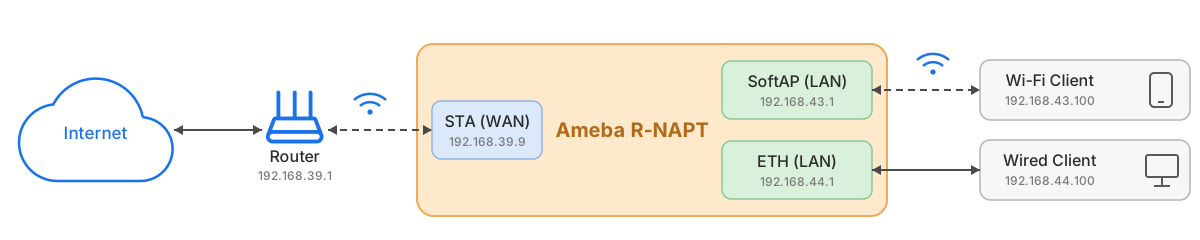
LAN-side devices can then access the internet through Ameba’s NAT forwarding:
Wi-Fi client (192.168.43.100) → AP  → NAT → STA (192.168.39.9) → Internet
Wired client  (192.168.44.100) → ETH → NAT → STA (192.168.39.9) → Internet

