Wi-Fi R-NAPT

Wi-Fi R-NAPT
Seamless packet forwarding across physical interfaces, sharing internet access among diverse devices
Overview
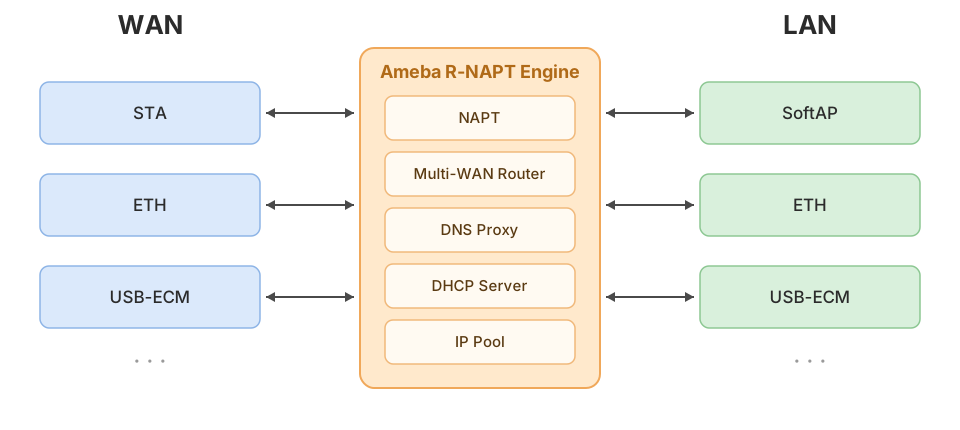
R-NAPT is a lightweight network routing and bridging middleware running on the Ameba RTOS platform. Built on Wi-Fi, Ethernet, USB ECM, and other physical interfaces together with the LwIP stack, it introduces NAPT address translation, DNS proxying, and a unified network interface management mechanism, enabling Ameba devices to act as compact routers — forwarding packets seamlessly across different physical network interfaces and sharing internet access.
Each physical interface is uniformly abstracted as a LwIP netif instance and assigned a WAN (upstream wide-area network) or LAN (downstream local-area network) routing role, flexibly supporting various network topologies such as Wi-Fi routers, wired-to-wireless hotspots, and 4G routers.
Advantages

Wi-Fi STA/SoftAP, Ethernet, USB ECM, and other interfaces are all managed under the R-NAPT framework. Each interface can be independently configured with a WAN or LAN role and an IP acquisition method, supporting flexible combinations of network topologies.

Multiple LAN-side devices share a single WAN public IP to access the internet via NAPT. Packet addresses and ports are automatically translated, and the forwarding process is completely transparent to downstream devices.

Multiple WAN interfaces (STA, Ethernet, etc.) can coexist simultaneously. The system always uses the highest-priority active interface as the default route and automatically switches whenever a WAN interface changes state.

LAN-side clients use the device's gateway IP as the DNS server. DNS queries are proxied and forwarded to the upstream WAN-side server. The upstream DNS address is automatically updated when the WAN interface IP changes, keeping domain name resolution continuously available.

Each LAN interface runs an independent DHCP Server instance, assigning IP addresses, gateways, and DNS information to connected devices. The DHCP services across multiple LAN interfaces are fully independent and do not interfere with each other.

Subnet conflicts are automatically detected when a LAN interface initializes or when a WAN interface obtains a new IP. Upon detecting a conflict, the system automatically reallocates the IP for that LAN interface and restarts the DHCP service.
Application Scenarios
Scenario 1: Wi-Fi Router
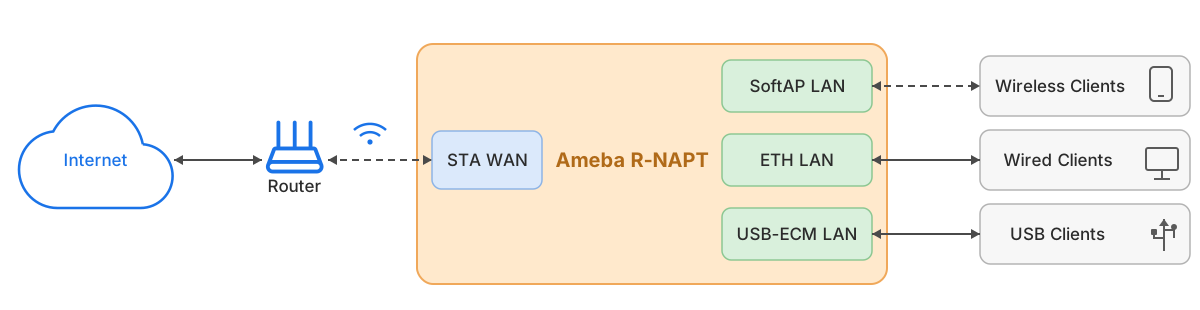
The Ameba device connects to an upstream router via Wi-Fi STA. Downstream mobile devices or PCs can access the internet by connecting to the SoftAP hotspot, Ethernet port, or USB-ECM interface provided by the Ameba device, extending wireless coverage and enabling multi-device internet sharing.
Scenario 2: Wired-to-Wireless Hotspot
The Ameba device connects to a wired broadband network via Ethernet or USB-ECM. Mobile devices or PCs can access the internet by connecting to the SoftAP hotspot provided by the Ameba device. This is typically used to convert a fixed wired broadband or industrial Ethernet connection into a Wi-Fi hotspot for mobile clients.



Recommended IC Models
| Features | Filter | RTL8721Dx | RTL8720E | RTL8710E | RTL8726E | RTL8713E | RTL8730E | RTL8721F | RTL872xD | RTL8735B |
|---|---|---|---|---|---|---|---|---|---|---|
| Application Processor |
Cortex-M | Cortex-M | Cortex-M | Cortex-M | Cortex-M | Cortex-A | Cortex-M | Cortex-M | Cortex-M | |
| DSP | ||||||||||
| ISP | ||||||||||
| Arm TrustZone | ||||||||||
| Dual Band | ||||||||||
| Wi-Fi 6 | ||||||||||
| R-MESH | ||||||||||
| Ultra-low Power | ||||||||||
| Ethernet | ||||||||||
| BT Dual Mode | ||||||||||
| HMI | ||||||||||
| Audio ADC | ||||||||||
| Audio DAC | ||||||||||
| SDIO Host | ||||||||||
| SD/EMMC Host | ||||||||||
| USB | ||||||||||
|
BT Dedicated Antenna |
||||||||||
| CAN |
