Using AT Commands via USB Interface
Overview
In Host Control Mode, the USB peripheral interface is used for data transmission to fulfill plug-and-play and high compatibility requirements.
The master device and AT device connect in the following modes:
Mode 1: Master as USB Host, AT device as USB Device
Mode 2: Master as USB Device, AT device as USB Host
Both parties use the USB CDC-ACM protocol for AT command interaction. Configuration steps:
Refer to AT Configuration Modification to specify the USB interface for the AT module.
Menuconfig to enter
CONFIG USBsettings and selectUSB ModeandCDC ACM.
Note
USB Modeparameter definition in atcmd_config.json:0: USB Device
1: USB Host
This parameter must match the configuration in Menuconfig.
Master Reference Examples
Select the corresponding example based on the master role:
USB Host Mode: USBH Master-Side Example. Requires AT module in USB Device Mode.
USB Device Mode: USBD Master-Side Example. Requires AT module in USB Host Mode.
These examples demonstrate full USB host-device communication flow. It is recommended to run these code samples before development to verify connection and configuration correctness. Subsequently, adapt them to specific MCU platforms based on the reference code.
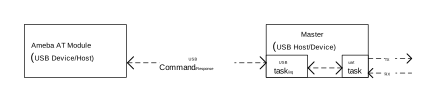
The example code adds a UART task to receive AT commands and print responses. Overall data flow:
Note
USB Host initialization requires waiting for device enumeration to complete.
TT Mode Watermark Notification
When the AT module works as USB Device and the data in Transparent Transmission (TT) Mode mode is ≥ 80KB, the watermark messages are not sent on the bulk data channel as [$][TT]:High Watermark / [$][TT]:Low Watermark text. They are sent as CDC-ACM SERIAL_STATE notifications on the interrupt endpoint instead:
The 2-byte notification data following the 8-byte notification header is
HW(high watermark, pause transmission) orLW(low watermark, resume transmission).The master must receive notifications from the interrupt endpoint to get the watermark messages. In the USBH master-side example, enable
CONFIG_USBH_CDC_ACM_NOTIFYand refer tousbh_notify_task().
When the AT module works as USB Host, no watermark message is sent. The AT module stops receiving when its buffer is full, and the master’s transmission is blocked by the bus.
Communication Speed
For USB link speed testing, refer to AT+TEST command.
Note
USB link speed is affected by:
AT module’s USB role (Host/Device)
AT module’s supported USB speed mode (Full-Speed/High-Speed)