Boot Flow Details
Understanding the system boot flow helps in grasping the working principle and key configuration points of RDP:
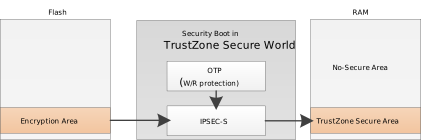
When RDP is enabled, the Flash encrypted area stores the encrypted TrustZone secure firmware, and the address field in the Image Header specifies the secure address to be loaded to. After the system boots from secure ROM, the subsequent boot process runs entirely within the TrustZone Secure world. The key peripherals (OTP, decryption engine, DMA, etc.) and memory used during the boot process are all security-isolated through MPC and PPC, ensuring the security of the firmware loading flow.
The boot flow for each chip is as follows:
Flash address security isolation is not supported. Encrypted firmware is decrypted using a symmetric hardware crypto engine. During system boot, the firmware is fully decrypted and loaded into secure RAM, then executed by the CPU. RDP Flow Details:
Key Loading: The RDP key in OTP is automatically loaded into the symmetric hardware crypto engine by hardware.
Firmware Read: The internal secure DMA reads the encrypted firmware from external Flash in chunks.
Hardware Decryption: The symmetric hardware crypto engine performs the decryption operation and transfers the data to the protected secure RAM area via secure DMA.
Execution: The CPU jumps to the secure RAM and begins executing the secure firmware.
Flash address security isolation is not supported. Encrypted firmware is decrypted using a symmetric hardware crypto engine. During system boot, the firmware is fully decrypted and loaded into secure RAM, then executed by the CPU. RDP Flow Details:
Key Loading: The RDP key in OTP is automatically loaded into the symmetric hardware crypto engine by hardware.
Firmware Read: The internal secure DMA reads the encrypted firmware from external Flash in chunks.
Hardware Decryption: The symmetric hardware crypto engine performs the decryption operation and transfers the data to the protected secure RAM area via secure DMA.
Execution: The CPU jumps to the secure RAM and begins executing the secure firmware.
Flash address security isolation is not supported. Encrypted firmware is decrypted using a symmetric hardware crypto engine. During system boot, the firmware is fully decrypted and loaded into secure RAM, then executed by the CPU. RDP Flow Details:
Key Loading: The RDP key in OTP is automatically loaded into the symmetric hardware crypto engine by hardware.
Firmware Read: The internal secure DMA reads the encrypted firmware from external Flash in chunks.
Hardware Decryption: The symmetric hardware crypto engine performs the decryption operation and transfers the data to the protected secure RAM area via secure DMA.
Execution: The CPU jumps to the secure RAM and begins executing the secure firmware.
Flash address security isolation is not supported. Encrypted firmware is decrypted using a symmetric hardware crypto engine. During system boot, the firmware is fully decrypted and loaded into secure RAM, then executed by the CPU. RDP Flow Details:
Key Loading: The RDP key in OTP is automatically loaded into the symmetric hardware crypto engine by hardware.
Firmware Read: The internal secure DMA reads the encrypted firmware from external Flash in chunks.
Hardware Decryption: The symmetric hardware crypto engine performs the decryption operation and transfers the data to the protected secure RAM area via secure DMA.
Execution: The CPU jumps to the secure RAM and begins executing the secure firmware.
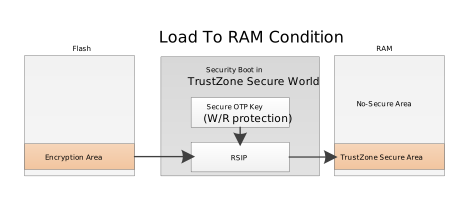
Supports Flash address security isolation, with encrypted firmware using the RSIP hardware engine. In addition to loading firmware into RAM for execution, it also supports XIP (eXecute In Place) mode, which enables real-time decryption and execution directly from Flash without loading the entire firmware into RAM.
RDP Flow Details:
Flash Security Configuration: First, configure the logical address of the secure firmware as a secure region through Flash MPC, blocking access from the non-secure world.
Key Loading: The RDP key in OTP is automatically loaded into the RSIP engine by hardware, followed by RSIP Entry configuration.
Execution Mode Selection: Two execution modes are supported.
XIP Execution: When the CPU runs secure code from Flash in the secure world, the RSIP automatically decrypts the firmware into plaintext and returns it to the CPU, without loading the firmware into RAM. This is suitable for scenarios with large firmware and limited RAM space.
RAM Execution: Software reads the encrypted firmware from Flash into secure RAM via RSIP, which automatically decrypts it into plaintext during the read process. The CPU then runs the secure firmware from RAM. This is suitable for scenarios requiring higher execution performance.
Execution: The CPU jumps to the secure address and begins executing the secure firmware.
OTP Configuration
OTP (One Time Programmable) is used to store the RDP key and enable control bits, serving as the hardware foundation for RDP functionality. During boot, the Bootloader checks the enable bits in OTP to determine whether RDP is enabled.
OTP can only be written once. Before configuring, carefully verify the addresses and data. Configuration order: burn the key first, then burn the enable bits.
Use the IPSEC-S hardware engine with OTP keys to decrypt secure firmware. The RDP-related OTP configurations are as follows:
Name |
OTP Address |
Size (bits) |
Description |
|---|---|---|---|
RDP_EN_PHY |
Physical addr 0x368[5] |
1 |
Permanent enable bit. Once programmed, RDP is enabled and cannot be revoked. Used in the mass production stage. |
RDP_EN_LOG |
Logical addr 0x3[4] |
1 |
Revocable enable bit. Once programmed, RDP is enabled and can be disabled later. Used in the development and debugging stage. |
S_IPSEC_Key1 (RDP) |
Physical addr 0x200 ~ 0x21F |
256 |
Stores the RDP key. |
S_IPSEC_Key1_R_Protection_EN |
Physical addr 0x365[3] |
1 |
Read protection enable. Once programmed, the CPU cannot read the key, preventing key exposure. |
S_IPSEC_Key1_W_Forbidden_EN |
Physical addr 0x365[4] |
1 |
Write protection enable. Once programmed, the key cannot be modified, preventing key tampering. |
Note
The most significant byte of the RDP OTP key is stored at the highest address.
For example, if the key string in Manifest.json5 is otp_key_0x200: c9a8b1f4e7d293b6a5d8f009be6c3d21e4a7b8f5d3b901a984087844c2f7b6e0, the value 0xc9 should be programmed into eFuse 0x200, 0xa8 into 0x201, and so on.
Use the IPSEC-S hardware engine with OTP keys to decrypt secure firmware. The RDP-related OTP configurations are as follows:
Name |
OTP Address |
Size (bits) |
Description |
|---|---|---|---|
RDP_EN_PHY |
Physical addr 0x368[5] |
1 |
Permanent enable bit. Once programmed, RDP is enabled and cannot be revoked. Used in the mass production stage. |
RDP_EN_LOG |
Logical addr 0x3[4] |
1 |
Revocable enable bit. Once programmed, RDP is enabled and can be disabled later. Used in the development and debugging stage. |
S_IPSEC_Key1 (RDP) |
Physical addr 0x200 ~ 0x21F |
256 |
Stores the RDP key. |
S_IPSEC_Key1_R_Protection_EN |
Physical addr 0x365[3] |
1 |
Read protection enable. Once programmed, the CPU cannot read the key, preventing key exposure. |
S_IPSEC_Key1_W_Forbidden_EN |
Physical addr 0x365[4] |
1 |
Write protection enable. Once programmed, the key cannot be modified, preventing key tampering. |
Note
The most significant byte of the RDP OTP key is stored at the highest address.
For example, if the key string in Manifest.json5 is otp_key_0x200: c9a8b1f4e7d293b6a5d8f009be6c3d21e4a7b8f5d3b901a984087844c2f7b6e0, the value 0xc9 should be programmed into eFuse 0x200, 0xa8 into 0x201, and so on.
Use the IPSEC-S hardware engine with OTP keys to decrypt secure firmware. The RDP-related OTP configurations are as follows:
Name |
OTP Address |
Size (bits) |
Description |
|---|---|---|---|
RDP_EN_PHY |
Physical addr 0x368[5] |
1 |
Permanent enable bit. Once programmed, RDP is enabled and cannot be revoked. Used in the mass production stage. |
RDP_EN_LOG |
Logical addr 0x3[4] |
1 |
Revocable enable bit. Once programmed, RDP is enabled and can be disabled later. Used in the development and debugging stage. |
S_IPSEC_Key1 (RDP) |
Physical addr 0x200 ~ 0x21F |
256 |
Stores the RDP key. |
S_IPSEC_Key1_R_Protection_EN |
Physical addr 0x365[3] |
1 |
Read protection enable. Once programmed, the CPU cannot read the key, preventing key exposure. |
S_IPSEC_Key1_W_Forbidden_EN |
Physical addr 0x365[4] |
1 |
Write protection enable. Once programmed, the key cannot be modified, preventing key tampering. |
Note
The most significant byte of the RDP OTP key is stored at the highest address.
For example, if the key string in Manifest.json5 is otp_key_0x200: c9a8b1f4e7d293b6a5d8f009be6c3d21e4a7b8f5d3b901a984087844c2f7b6e0, the value 0xc9 should be programmed into eFuse 0x200, 0xa8 into 0x201, and so on.
Use the IPSEC-S hardware engine with OTP keys to decrypt secure firmware. The RDP-related OTP configurations are as follows:
Name |
OTP Address |
Size (bits) |
Description |
|---|---|---|---|
RDP_EN_PHY |
Physical addr 0x368[5] |
1 |
Permanent enable bit. Once programmed, RDP is enabled and cannot be revoked. Used in the mass production stage. |
RDP_EN_LOG |
Logical addr 0x3[4] |
1 |
Revocable enable bit. Once programmed, RDP is enabled and can be disabled later. Used in the development and debugging stage. |
S_IPSEC_Key1 (RDP) |
Physical addr 0x200 ~ 0x21F |
256 |
Stores the RDP key. |
S_IPSEC_Key1_R_Protection_EN |
Physical addr 0x365[3] |
1 |
Read protection enable. Once programmed, the CPU cannot read the key, preventing key exposure. |
S_IPSEC_Key1_W_Forbidden_EN |
Physical addr 0x365[4] |
1 |
Write protection enable. Once programmed, the key cannot be modified, preventing key tampering. |
Note
The most significant byte of the RDP OTP key is stored at the highest address.
For example, if the key string in Manifest.json5 is otp_key_0x200: c9a8b1f4e7d293b6a5d8f009be6c3d21e4a7b8f5d3b901a984087844c2f7b6e0, the value 0xc9 should be programmed into eFuse 0x200, 0xa8 into 0x201, and so on.
Use the RSIP hardware engine with OTP keys to decrypt secure firmware. RSIP is configured with two sets of OTP keys for user selection. The RDP-related OTP configuration is as follows:
Name |
OTP Address |
Size (bits) |
Description |
|---|---|---|---|
RDP_EN_PHY |
Physical 0x368[5] |
1 |
Permanent enable bit. Once burned, the RDP feature is enabled and cannot be revoked. Used in the mass production stage. |
RDP_EN_LOG |
Logical 0x3[4] |
1 |
Revocable enable bit. Once burned, the RDP feature is enabled and can be disabled later. Used in the development and debugging stage. |
For the RSIP key locations in OTP and their corresponding read/write protection bits, please refer to RSIP OTP Section.
Key Group Selection:
RSIP is configured with two sets of OTP keys for user selection. The bootloader code uses the first key set (RSIP_KEY_NUM0) by default. To use the second key set, modify the code in component/soc/amebagreen2/loader/bootloader/boot_security_km4tz.c by changing RSIP_KEY_NUM0 to RSIP_KEY_NUM1. After modification, the bootloader must be recompiled.
int BOOT_DecRDPImg(u32 SrcAddr, Manifest_TypeDef *Manifest, SubImgInfo_TypeDef *SubImgInfo, u8 *Cnt)
{
      ...
      /* check RSIP enable bit and set RSIP */
      BOOT_RSIPIvSet(Manifest, RSIP_IV3);

      FIH_CALL(BOOT_ROM_OTFCheck, fih_rc, LogAddr, (u32)__km4tz_img3_text_end__, RSIP_IV3, RSIP_REGION3,
                  RSIP_KEY_NUM0, IMG3_GCM_TagBase, Manifest->RSIPConfig, MANIFEST_SECURE_IMG3_ID);
      ...
}
Note
The most significant byte of the RDP OTP key is stored at the highest address.
For example, if the key string in Manifest.json5 is otp_key_0x2C0: E2A0D6500BBF1DD8DC212098C230EB731ECE3A81AA11D0E6E538FA36BBA4FF6E, the value 0xE2 should be burned to eFuse 0x2C0, 0xA0 to 0x2C1, and so on.
Enabling Method
RDP enabling is divided into three phases. Please execute them in order:
Development phase: SDK configuration and firmware compilation
Production phase: OTP burning and firmware programming
Production line verification phase: Verify that RDP is properly enabled
Development Phase
Step 1: Enable TrustZone
The secure RAM region size is configured by default in the SDK. Users can adjust the region size by modifying the
TZ_S_SIZEmacro definition in the linker scriptameba_layout.ldunder the project directory, based on the firmware size.
Step 2: Configure Secure Firmware Encryption Parameters
Configure the secure firmware Manifest file to specify the encryption parameters. The configuration file is
<SDK>\component\soc\amebadxxx\project\manifest.json5:RTL8721Dx:The post-processing script will generate an AES-CBC encrypted RDP firmware based on the keys in the configuration file.
Configuration Items
rdp_enable: Enable RDP encryption
rdp_iv: Initialization vector for AES-CBC encryption
otp_key_0x200: RDP key, must match the key programmed in OTPConfiguration Steps
Set
rdp_enableto 1 in image3 to enable RDP encryption.Fill in
rdp_ivwith a length of 8 bytes (AES-CBC requires a 16-byte IV; the remaining 8 bytes reusersip_ivfrom image2).Fill in
otp_key_0x200with a length of 32 bytes, which must match the OTP key programmed during production.{ ... image2: { rsip_iv: "213253647586a7b8", }, image3: { rdp_enable: 1, rdp_iv: "0123456789abcdef", rdp_key: "otp_key_0x200", }, /* =================================== OTP key value =================================== */ ... otp_key_0x200: "c9a8b1f4e7d293b6a5d8f009be6c3d21e4a7b8f5d3b901a984087844c2f7b6e0", ... }RTL8720E:The post-processing script will generate an AES-CBC encrypted RDP firmware based on the keys in the configuration file.
Configuration Items
rdp_enable: Enable RDP encryption
rdp_iv: Initialization vector for AES-CBC encryption
otp_key_0x200: RDP key, must match the key programmed in OTPConfiguration Steps
Set
rdp_enableto 1 in image3 to enable RDP encryption.Fill in
rdp_ivwith a length of 8 bytes (AES-CBC requires a 16-byte IV; the remaining 8 bytes reusersip_ivfrom image2).Fill in
otp_key_0x200with a length of 32 bytes, which must match the OTP key programmed during production.{ ... image2: { rsip_iv: "213253647586a7b8", }, image3: { rdp_enable: 1, rdp_iv: "0123456789abcdef", rdp_key: "otp_key_0x200", }, /* =================================== OTP key value =================================== */ ... otp_key_0x200: "c9a8b1f4e7d293b6a5d8f009be6c3d21e4a7b8f5d3b901a984087844c2f7b6e0", ... }RTL8726E:The post-processing script will generate an AES-CBC encrypted RDP firmware based on the keys in the configuration file.
Configuration Items
rdp_enable: Enable RDP encryption
rdp_iv: Initialization vector for AES-CBC encryption
otp_key_0x200: RDP key, must match the key programmed in OTPConfiguration Steps
Set
rdp_enableto 1 in image3 to enable RDP encryption.Fill in
rdp_ivwith a length of 8 bytes (AES-CBC requires a 16-byte IV; the remaining 8 bytes reusersip_ivfrom image2).Fill in
otp_key_0x200with a length of 32 bytes, which must match the OTP key programmed during production.{ ... image2: { rsip_iv: "213253647586a7b8", }, image3: { rdp_enable: 1, rdp_iv: "0123456789abcdef", rdp_key: "otp_key_0x200", }, /* =================================== OTP key value =================================== */ ... otp_key_0x200: "c9a8b1f4e7d293b6a5d8f009be6c3d21e4a7b8f5d3b901a984087844c2f7b6e0", ... }RTL8730E:The post-processing script will generate an AES-CBC encrypted RDP firmware based on the keys in the configuration file.
Configuration Items
rdp_enable: Enable RDP encryption
rdp_iv: Initialization vector for AES-CBC encryption
otp_key_0x200: RDP key, must match the key programmed in OTPConfiguration Steps
Set
rdp_enableto 1 in image3 to enable RDP encryption.Fill in
rdp_ivwith a length of 8 bytes (AES-CBC requires a 16-byte IV; the remaining 8 bytes reusersip_ivfrom image2).Fill in
otp_key_0x200with a length of 32 bytes, which must match the OTP key programmed during production.{ ... image2: { rsip_iv: "213253647586a7b8", }, image3: { rdp_enable: 1, rdp_iv: "0123456789abcdef", rdp_key: "otp_key_0x200", }, /* =================================== OTP key value =================================== */ ... otp_key_0x200: "c9a8b1f4e7d293b6a5d8f009be6c3d21e4a7b8f5d3b901a984087844c2f7b6e0", ... }RTL8721F:The post-processing script will generate an RDP firmware encrypted using the specified RSIP mode (XTS, GCM) based on the configuration.
Encryption Mode Selection
XTS mode: Suitable for data encryption with high security, recommended for use
GCM mode: Supports integrity verification, suitable for scenarios requiring both confidentiality and integrity
CTR mode: Not recommended
Configuration Item Description
rsip_enable: Enable RSIP encryption function
rsip_mode: Select encryption mode (2=GCM, 1=XTS, 0=CTR)
rsip_key_group: Select key group
otp_key_0xXXX: RSIP key, must match the key burned in OTPConfiguration Steps
Set
rsip_enableto 1 to enable the RSIP encryption function.
image3inherits the RSIP encryption configuration from image1 by default (image1 is also secure firmware). Users can also remove theinherit_fromkeyword from image3 and add RSIP encryption configuration separately in image3.The
otp_key_0xXXXkey length must be 32 bytes and must be consistent with the RSIP OTP key burned during the production phase.{ version: 1, image1: { ... /* rsip_key_group valid option: "rsip_xts_g0", "rsip_xts_g1", "rsip_gcm_g0", "rsip_gcm_g1", "rsip_ctr_g0", "rsip_ctr_g1" */ rsip_key_group: "rsip_xts_g0", rsip_iv: "0102030405060708", ... }, ... image3: { inherit_from: "image1", }, ... /* ================================ RSIP globle settings =============================== */ rsip_enable: 1, /* rsip_mode valid option: 2 (GCM), 1 (XTS), 0 (CTR) */ rsip_mode: 1, /* rsip_gcm_tag_len valid option: 4 / 8 / 16 (bytes) */ rsip_gcm_tag_len: 4, /* rsip key group define, users do not modify */ rsip_xts_g0: ["otp_key_0x2C0", "otp_key_0x2E0"], rsip_xts_g1: ["otp_key_0x200", "otp_key_0x220"], rsip_gcm_g0: ["otp_key_0x2E0"], rsip_gcm_g1: ["otp_key_0x220"], /* ctr mode not recommend */ rsip_ctr_g0: ["otp_key_0x2E0"], rsip_ctr_g1: ["otp_key_0x220"], /* =================================== OTP key value =================================== */ otp_key_0x2C0: "E2A0D6500BBF1DD8DC212098C230EB731ECE3A81AA11D0E6E538FA36BBA4FF6E", otp_key_0x2E0: "6AA34203018334474B25A0600996CA0968AA6228B886FF234B4EB9628B703C0A", otp_key_0x200: "c9a8b1f4e7d293b6a5d8f009be6c3d21e4a7b8f5d3b901a984087844c2f7b6e0", otp_key_0x220: "9874918301909234686574856692873911223344556677889900aabbccddeeff", }
Step 3: Compile Firmware
Recompile the project. The post-processing script will automatically generate the encrypted secure firmware based on the key in the configuration file. The encrypted secure firmware will be automatically integrated at the end of app.bin.
After completing the development phase configuration, the firmware is ready. Proceed to the production phase for OTP burning and firmware programming.
Production Phase
Note
CONFIG_ATCMD_SECURE must be enabled in menuconfig before using AT+SEC commands. Path: CONFIG SHELL → Enable ATCMD SECURE (disabled by default).
RDP mass production requires using the mass production tool firmware to perform OTP burning. This is because the encrypted application firmware depends on the correctly configured key in OTP to boot. Before OTP configuration is complete, the encrypted application firmware cannot run properly. The RDP mass production flow is similar to RSIP. For detailed procedures, please refer to the Flash XIP Decryption (RSIP) Mass Production Guide section in the Application Note.
Step 4: Burn RDP Key
The RDP key is used to encrypt the secure firmware. The hardware uses this key to decrypt the firmware during boot.
RTL8721Dx:The RDP key must be programmed when the device enters the mass production stage.
Note
CONFIG_ATCMD_SECUREmust be enabled in menuconfig before using AT+SEC commands. Path:CONFIG SHELL → Enable ATCMD SECURE(disabled by default).Use the following command to program the RDP key:
AT+SEC=RDP_KEY,c9a8b1f4e7d293b6a5d8f009be6c3d21e4a7b8f5d3b901a984087844c2f7b6e0The RDP key must be 32 bytes in length. The value above is an example; please generate a random key. The command automatically reads back and verifies the OTP after writing. If verification fails, an error message is returned.
Once the key is confirmed to be correctly programmed, set the key read-protection and write-protection bits:
AT+SEC=RDP_PROT,rwThis operation sets both
S_IPSEC_Key1_R_Protection_EN(prevents the key from being read) andS_IPSEC_Key1_W_Forbidden_EN(prevents the key from being tampered with).RTL8720E:The RDP key must be programmed when the device enters the mass production stage.
Note
CONFIG_ATCMD_SECUREmust be enabled in menuconfig before using AT+SEC commands. Path:CONFIG SHELL → Enable ATCMD SECURE(disabled by default).Use the following command to program the RDP key:
AT+SEC=RDP_KEY,c9a8b1f4e7d293b6a5d8f009be6c3d21e4a7b8f5d3b901a984087844c2f7b6e0The RDP key must be 32 bytes in length. The value above is an example; please generate a random key. The command automatically reads back and verifies the OTP after writing. If verification fails, an error message is returned.
Once the key is confirmed to be correctly programmed, set the key read-protection and write-protection bits:
AT+SEC=RDP_PROT,rwThis operation sets both
S_IPSEC_Key1_R_Protection_EN(prevents the key from being read) andS_IPSEC_Key1_W_Forbidden_EN(prevents the key from being tampered with).RTL8726E:The RDP key must be programmed when the device enters the mass production stage.
Note
CONFIG_ATCMD_SECUREmust be enabled in menuconfig before using AT+SEC commands. Path:CONFIG SHELL → Enable ATCMD SECURE(disabled by default).Use the following command to program the RDP key:
AT+SEC=RDP_KEY,c9a8b1f4e7d293b6a5d8f009be6c3d21e4a7b8f5d3b901a984087844c2f7b6e0The RDP key must be 32 bytes in length. The value above is an example; please generate a random key. The command automatically reads back and verifies the OTP after writing. If verification fails, an error message is returned.
Once the key is confirmed to be correctly programmed, set the key read-protection and write-protection bits:
AT+SEC=RDP_PROT,rwThis operation sets both
S_IPSEC_Key1_R_Protection_EN(prevents the key from being read) andS_IPSEC_Key1_W_Forbidden_EN(prevents the key from being tampered with).RTL8730E:The RDP key must be programmed when the device enters the mass production stage.
Note
CONFIG_ATCMD_SECUREmust be enabled in menuconfig before using AT+SEC commands. Path:CONFIG SHELL → Enable ATCMD SECURE(disabled by default).Use the following command to program the RDP key:
AT+SEC=RDP_KEY,c9a8b1f4e7d293b6a5d8f009be6c3d21e4a7b8f5d3b901a984087844c2f7b6e0The RDP key must be 32 bytes in length. The value above is an example; please generate a random key. The command automatically reads back and verifies the OTP after writing. If verification fails, an error message is returned.
Once the key is confirmed to be correctly programmed, set the key read-protection and write-protection bits:
AT+SEC=RDP_PROT,rwThis operation sets both
S_IPSEC_Key1_R_Protection_EN(prevents the key from being read) andS_IPSEC_Key1_W_Forbidden_EN(prevents the key from being tampered with).RTL8721F:RDP uses RSIP key groups for encryption and decryption. For the RSIP key locations in OTP and their corresponding read/write protection bits, please refer to RSIP OTP Section.
Note
CONFIG_ATCMD_SECUREmust be enabled in menuconfig before using AT+SEC commands. Path:CONFIG SHELL → Enable ATCMD SECURE(disabled by default).Users can select one of the two RSIP key groups for use.
Program the RSIP Key
Depending on the selected key group and mode, use the following command to program the group0 key (taking the first key group in XTS mode as an example):
AT+SEC=RSIP_KEY,grp0,xts,E2A0D6500BBF1DD8DC212098C230EB731ECE3A81AA11D0E6E538FA36BBA4FF6E,6AA34203018334474B25A0600996CA0968AA6228B886FF234B4EB9628B703C0AXTS mode requires two separate 32-byte keys (ECB key, CTR key); CTR/GCM mode requires one 32-byte key. The values above are examples; please generate other keys randomly.
Note
The command automatically reads back and verifies the OTP after writing. If verification fails, an error message is returned.
Set Protection Bits
After confirming the key has been programmed correctly, use the following command to set the group0 corresponding read and write protection:
AT+SEC=RSIP_PROT,grp0,rw
Step 5: Burn RDP Enable Bits
The RDP enable bits are used to activate the RDP function. Choose the appropriate enabling method based on the device stage:
Development Stage:When the device is in the development stage, it is recommended to use temporary enable (this can be disabled later):
AT+SEC=RDP_EN,tempTo disable RDP temporarily enabled above (this has no effect if permanently enabled via
perm):AT+SEC=RDP_EN,temp_offMass Production Stage:When the device enters the mass production stage, permanent enable should be used to permanently enable the RDP function:
AT+SEC=RDP_EN,perm
Step 6: Program Firmware
Program the boot.bin and app.bin generated during the development phase into Flash.
Production Line Verification
After completing all the above configurations, reset the development board for verification. If RDP is properly enabled, the startup log will display the RDP EN message.
Caution
The RDP function does not verify the legitimacy of the firmware. To prevent firmware tampering, it must be used in conjunction with Secure Boot. For details, please refer to Secure Boot chapter .

