Ameba MicroPython Solutions
Write Wi-Fi, networking, and peripheral applications in Python directly on Ameba chips
Overview
Python's syntax is simple, with no manual memory management or pointer handling to worry about. Combined with a script-and-run workflow (no build step, just edit and run) and a huge community and library ecosystem, it's one of the most widely used languages for web services, data processing, and test automation — which means most engineers already have at least some Python experience, even without a dedicated scripting background.
MicroPython is a lean implementation of Python 3 built for microcontrollers and resource-constrained environments: it trims standard CPython down to a bytecode interpreter that fits in a few hundred KB of flash and tens of KB of RAM, while keeping most of the standard-library programming style intact. That means there's no dedicated embedded scripting language to learn, and no cross-compilation toolchain to set up just to run a piece of logic — a serial connection gets you an interactive environment where you can type code and see it execute immediately, well suited to validating a protocol, debugging peripheral behavior, or running as the application-layer logic in a shipped product.
Ameba-MicroPython is Realtek's port of MicroPython on top of the Ameba-RTOS SDK: underneath, it reuses Ameba's production-proven Wi-Fi stack, networking stack, and peripheral drivers, and exposes them to developers as standard Python modules (network, socket, machine, and more). In other words, you don't need to learn Ameba-RTOS task scheduling, driver interfaces, or project structure first — you can go straight to networking, peripheral access, and file I/O in Python on an Ameba chip, and put your effort into application logic instead.

Write application logic in Python instead of C/C++, with simple syntax and a fast learning curve. Connect over the LOGUART serial port to get an interactive REPL, edit and run immediately with no rebuild-and-reflash cycle, shortening the debug loop dramatically — ideal for rapid prototyping, teaching, and automation scripts.

Switching between Wi-Fi STA/AP modes, socket-based networking, and TLS-encrypted connections — work that usually involves a fair amount of protocol-level detail — is already wrapped up as standard Python APIs, ready to call in a few lines.

Built on top of the upstream MicroPython project, Ameba support stays closely synced with the official MicroPython mainline, sharing maintenance with developers worldwide. Because it follows the official standard API, code written for other MicroPython platforms usually needs only minor changes to run on Ameba chips.
The Ameba platform spans multiple SoC models, so you can pick the chip that fits your project's cost, package, peripheral, and compute requirements, instead of being locked into a single part just to use MicroPython.
Core Capabilities

Skips the compile-flash-reset loop of traditional embedded development. The LOGUART serial port doubles as an interactive command line — code executes line by line with immediate feedback, with soft reset and paste mode support; WebREPL adds remote access over Wi-Fi. Once validated, save the code as main.py and it runs automatically on power-up.

The wireless networking module (network.WLAN) wraps STA/AP mode scanning, connecting, and status queries; paired with BSD sockets over lwIP (supporting TCP/UDP and SSL), you get standard Python network programming for device connectivity and cloud communication. The bundled umqtt module can also talk directly to an MQTT broker to push data to the cloud.

littlefs serves as the built-in Flash filesystem (VFS), persisting scripts and configuration such as boot.py / main.py across power cycles.

The _thread module, built on FreeRTOS, supports parallel task execution, useful for applications that need to juggle acquisition, communication, and response logic concurrently.

The machine module unifies access to Pin, UART, SPI, I2C, ADC, PWM, RTC, WDT, Timer, I2S, and more through a standard Python API.

OTA firmware updates let you fix issues and ship new features after deployment, while the hashlib/cryptolib module provides cryptographic primitives for protecting data and keys.
Software Architecture
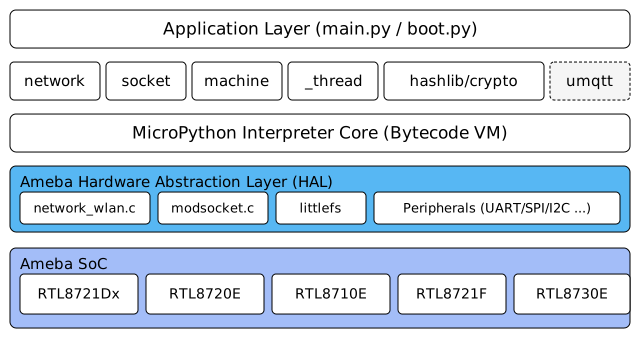
Ameba-MicroPython's software architecture has four layers from top to bottom:
- Application Layer: code can come in through two entry points — saved on the device as main.py / boot.py, loaded and run automatically at power-up; or typed line by line into an interactive session over LOGUART or WebREPL, executed as you go.
- MicroPython Interpreter Core: parses and executes the bytecode from either entry point — it's the runtime that makes "write it in Python, run it straight on the chip" actually work.
- Standard Python Module Layer: wraps the communication protocols and hardware drivers underneath into a unified Python API. When execution reaches a corresponding call, the interpreter dispatches it directly to this layer.
- Ameba Hardware Abstraction Layer (HAL): talks to Wi-Fi (network_wlan.c), sockets (modsocket.c), the filesystem (littlefs), and peripheral drivers; RTOS task scheduling and register-level details stay contained in this layer and never leak up into the Python modules above. The whole stack runs on top of the Ameba SoC.
Development Resources
| Icon | Resource | Link |
|---|---|---|
 |
GitHub Source Code (Ameba-MicroPython) | View |
 |
MicroPython Official Documentation | View |
 |
Official Forum | View |
 |
Contact Us | View |
Recommended ICs
| Features | Filter | RTL8720F | RTL8721F | RTL8721Dx | RTL8720E | RTL8710E | RTL8726E | RTL8713E | RTL8730E | RTL872xD | RTL8735B |
|---|---|---|---|---|---|---|---|---|---|---|---|
| Application Processor |
Cortex-M | Cortex-M | Cortex-M | Cortex-M | Cortex-M | Cortex-M | Cortex-M | Cortex-A | Cortex-M | Cortex-M | |
| DSP | N | N | N | N | N | Y | Y | N | N | N | |
| ISP | N | N | N | N | N | N | N | N | N | Y | |
| Arm TrustZone | Y | Y | Y | Y | N | Y | N | Y | Y | Y | |
| Dual Band | N | Y | Y | N | N | N | N | Y | Y | Y | |
| Wi-Fi 6 | Y | Y | N | Y | Y | Y | Y | Y | N | N | |
| R-MESH | Y | Y | Y | N | N | N | N | N | N | N | |
| Ultra-low Power | Y | Y | Y | N | N | N | N | N | Y | Y | |
| Ethernet | N | Y | N | N | N | N | N | N | N | N | |
| BT Dual Mode | N | N | N | N | N | Y | Y | Y | N | N | |
| HMI | N | Y | Y | Y | N | Y | Y | Y | N | N | |
| Audio ADC | N | N | N | N | N | Y | Y | Y | Y | Y | |
| Audio DAC | N | N | N | N | N | Y | Y | Y | Y | Y | |
| SDIO Host | N | Y | N | N | N | N | N | N | N | N | |
| SD/EMMC Host | N | Y | N | N | N | N | N | Y | Y | Y | |
| USB | N | Y | Y | N | N | N | N | Y | Y | Y | |
|
BT Dedicated Antenna |
N | N | N | N | N | N | N | Y | N | N | |
| CAN | N | Y | N | N | N | N | N | N | N | N |