Overview
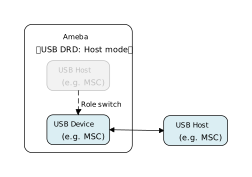
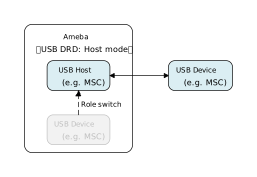
USB DRD (Dual-Role Data) is a function that allows a USB interface to dynamically switch between Host and Device roles. It breaks the limitation of fixed roles in traditional USB connections, enabling devices to flexibly change their attributes based on the connected object or application requirements.
Ameba can switch roles through software control, thereby meeting the dual system requirements for scalability and compatibility through a single physical interface.
DRD (Device mode)
DRD (Host mode)
Application Scenarios
DRD enhances device flexibility. Ameba can adjust its working mode to adapt to diverse interaction and expansion needs through a single physical interface. For example,
Smart Dashcam/Action Camera: In Host mode, Ameba actively writes GPS modules tracks to external USB drive; when connected to a PC, it switches to Device mode (MSC) to act as storage for direct file export.
Industrial Handheld Terminal: In Host mode, Ameba connects to barcode scanners or industrial sensors (HID/CDC) to collect field data; when connected to a management PC, it switches to Device mode (CDC/MSC) to batch upload collected logs and reports.
In-vehicle CarPlay interconnection terminal: When Ameba is powered on, it is in device mode and completes the necessary initial verification process. After passing the verification, it switches to host mode, actively connects to the in-vehicle device, and establishes dual-protocol communication with NCM and IAP2 to achieve full CarPlay functionality.
Protocol Introduction
In USB applications, the following two methods are commonly used to switch between host and device roles:
Hardware switching based on USB OTG (On-The-Go) protocol
The role is determined by relying on the state of the ID pin of the physical cable. This mechanism includes the following specific protocols:
SRP (Session Request Protocol): Allows a device to request the host to turn on VBUS power.
HNP (Host Negotiation Protocol): Allows both connection parties to temporarily exchange Host/Device roles through negotiation.
Software-Controlled DRD Switching
It does not rely on the physical connection status, but instead modifies the controller register directly through software to change roles. Although this method does not adhere to the standard USB transmission protocol, it has extremely high practical value.
Core advantages of DRD software switching compared to OTG
Despite the basic usability of hardware automatic detection, when building complex and highly reliable systems, DRD software switching demonstrates irreplaceable advantages:
Get rid of hardware dependence and adapt to Type-C
It does not rely on the ID pin, thus avoiding failures caused by hardware design defects or physical damage.
Especially in the Type-C specification, the HNP protocol defined by OTG has been deprecated, and there is no traditional ID pin. Software switching has become a solution that is more in line with modern interface specifications.
Flexible software switching
Support dynamic role changes without replacing physical cables, Users can choose to initiate the switch actively, or trigger it through various means such as external buttons, events, or message requests.
It has significantly improved the system’s fault tolerance, maintainability, and automated testing efficiency.
Class Driver
The software control of role switching for USB DRD essentially belongs to the application layer functionality, primarily involving changes in the controller’s working mode, and does not inherently require a specific “DRD class driver”. Its essence is to dynamically load the corresponding standard class driver based on the current USB role. Regarding the class drivers used by DRD in different roles, please refer to the class driver chapter corresponding to the specific device/host solution.
Application Example
Application Design
This section provides a introduction to the development and design process of role switching using DRD applications. The process of switching from device mode to host mode (and vice versa) can be summarized as follows:
Device driver initialization
Active switching or triggering role switching through events/messages, etc
Device driver deinitialization
Host driver initialization
Host driver deinitialization
In this DRD application instance of MSC device and MSC host, Ameba first operates in device mode, and after 20 seconds, force a switch to host mode through software, next section will introduce the specific implementation:
MSC Device Driver Initialization
Define the configuration structure and callback functions, then call the initialization interface to initialize the underlying storage, the USB device core and the MSC class driver.
static usbd_config_t usbd_msc_cfg = {
    .speed = CONFIG_USBD_MSC_SPEED,
    .isr_priority = INT_PRI_MIDDLE,
};

static usbd_msc_cb_t usbd_msc_cb = {
    .status_changed = usbd_msc_cb_status_changed  /* USB status change callback. */
};

int ret = 0;
ret = usbd_msc_disk_init();    /* Initializes the underlying storage disk. */
if (ret != HAL_OK) {
    return;
}

ret = usbd_init(&usbd_msc_cfg);     /* Initialize USB device core driver with configuration. */
if (ret != HAL_OK) {
    usbd_msc_disk_deinit();
    return;
}

ret = usbd_msc_init(&usbd_msc_cb);  /* Initializes the MSC device class. */
if (ret != HAL_OK) {
    usbd_msc_disk_deinit();
    usbd_deinit();
    return;
}
MSC Device Driver Deinitialization
Release resources in the reverse order of initialization.
/* De-initializes the underlying storage disk. */
usbd_msc_disk_deinit();
/* Deinitialize MSC device class driver. */
usbd_msc_deinit();
/* Deinitialize USB device core driver. */
usbd_deinit();
MSC Host Driver Initialization
Use the following example code to define the configuration structure and callback functions, then invoke the initialization interface to initialize the USB host core and the MSC class driver.
static usbh_config_t usbh_cfg = {
  .speed = USB_SPEED_HIGH,
  .ext_intr_enable = USBH_SOF_INTR,
  .isr_priority = INT_PRI_MIDDLE,
  .main_task_priority = 3U,
  .tick_source = USBH_SOF_TICK,
  }

static usbh_msc_cb_t usbh_msc_usr_cb = {
  .attach = usbh_msc_cb_attach,                  /* USB device attach callback */
  .setup = usbh_msc_cb_setup,                    /* USB device setup done, indicate that device is ready for bulk transfer */
};

static usbh_user_cb_t usbh_usr_cb = {
  .process = usbh_msc_cb_process
};

int ret = 0;
ret = usbh_init(&usbh_cfg, &usbh_usr_cb);   /* Initialize USB host core driver with configuration and user callback. */
if (ret != HAL_OK) {
    return;
}

ret = usbh_msc_init(&usbh_msc_usr_cb);          /* Initializes the MSC host class with MSC class user callback. */
if (ret != HAL_OK) {
    usbd_msc_disk_deinit();
    return;
}
MSC Host Driver Deinitialization
Release resources in the reverse order of initialization.
/* Deinitialize MSC host class driver. */
usbh_msc_deinit();
/* Deinitialize USB host core driver. */
usbh_deinit();
Note
For MSC device, refer to Mass Storage Device Solution.
For MSC host, refer to Mass Storage Host Solution.
Operation method
This section introduces a USB DRD (Dual Role Device) application example featuring runtime role switching capabilities. Based on the standard MSC class driver, this example integrates the functions of both a Mass Storage Host (MSC Host) and a Mass Storage Device (MSC Device).
In this example, the Ameba development board can switch between two roles:
MSC Device Mode: Acts as an MSC device when connected to a host (e.g., a PC), allowing the host to read/write to its mounted storage medium.
MSC Host Mode: Acts as an MSC host to mount and access an externally connected MSC device (e.g., a USB flash drive) formatted with the FAT32 file system.
The example code is located at: {SDK}/component/example/usb/usb_drd. It provides a complete design reference for developers creating custom USB DRD products.
Note
This example is primarily intended to demonstrate the dual-role switching logic of the protocol stack. It does not support SD card hot-plugging or USB interface hot-plugging.
Configuration and Compilation
Menuconfig Configuration
In the
amebaxxx_gcc_projectdirectory, type./menuconfig.py, follow the steps below to selectUSB DRDand the device storage medium, then save and exit.- Choose `CONFIG USB --->`: [*] Enable USB USB Mode (DRD) ---> *** USB Device Class *** [*] MSC Select storage media (SD Card (SD mode)) ---> *** USB Host Class *** [*] MSCCompilation and Flashing
Compile according to the instructions below, and flash the
imagefile to the development board.cd amebaxxx_gcc_project ./build.py -a usb_drd
Verification
This section demonstrates the verification process using an SD card as the storage medium.
Device Startup
Insert the SD card into the development board’s card slot, reset the board, and observe the serial logs for initialization information.
[DRD-I] USB DRD demo start
[DRD-I] Init disk
[DRD-I] Init disk
[MSC-I] SD init
[SDH-I] Card Detect
[SDH-I] Voltage match
[SDH-I] This is a SDHC/SDXC card...
[SDH-I] Keep 3.3V...
[SDH-I] Manufacturer ID:3
[SDH-I] OEM/Application ID:SD
[SDH-I] Manufacturing date:2021/5
[SDH-I] RCA = AAAA
[SDH-I] CSD Version:2.0
[SDH-I] User data area capacity: 14 GB
[SDH-I] Max. read data block length: 512 Bytes
[SDH-I] Max. write data block length: 512 Bytes
[SDH-I] SD specification version: 3.0X
[SDH-I] Data status after erase: 0
[SDH-I] SD card changes to the specified speed mode successfully
[SDH-I] SD card is initialized
[DRD-I] Init device driver
[USBD-A] INIT
[DRD-I] Init MSC device class
[MSC-I] Init
[DRD-I] MSC device session start
MSC Device Mode Test
Connect the development board to a PC (or another host device supporting USB MSC) using a USB cable.
Recognition and Mounting: A new removable disk drive should automatically appear in the PC’s file manager.
Read/Write Test: Within the first 20 seconds, double-click to open the drive and perform file read/write operations to verify data transmission.
Role Switching: The device mode ends when the following logs are printed, indicating the system is preparing to switch to Host mode:
[DRD-I] Role switch
[DRD-I] Deinit MSC device class
[DRD-I] Deinit device driver
[USBD-A] DEINIT
[DRD-I] Deinit disk
[MSC-I] SD deinit
[DRD-I] Init host driver
[DRD-I] Init MSC host driver
[DRD-I] MSC host session start
[DRD-I] Register USB disk
[DRD-I] FatFS USB W/R performance test start...
MSC Host Mode Test
Disconnect the development board’s USB port from the PC. Use an USB cable to connect the board to a USB flash drive (formatted as FATFS). The board will identify the MSC device and perform read/write performance tests.
[USBH-A] Device attached,speed 0
[USBH-A] PID: 0x6545
[USBH-A] VID: 0x0930
[USBH-A] Address 1 assigned
[USBH-A] MFG: TOSHIBA
[USBH-A] PROD: TransMemory
[USBH-A] SN: C03FD5F7715FE3417000DE76
[USBH-A] Enum done, total 1 cfg
[USBH-A] Switch to itf: 0
[USBH-A] Class: 0x08
[USBH-A] SubClass: 0x06
[USBH-A] Protocol: 0x50
[DRD-I] Host attach
[MSC-I] Max lun 1
[MSC-I] Lun 0
[DRD-I] Host setup
[DRD-I] Open file: 0:/TEST0.DAT
[DRD-I] W test: size 512, round 20...
[DRD-I] W rate 204.0 KB/s for 20 round @ 49 ms
[DRD-I] R test: size = 512 round = 20...
[DRD-I] R rate 476.1 KB/s for 20 round @ 21 ms
[DRD-I] W test: size 1024, round 20...
[DRD-I] W rate 540.5 KB/s for 20 round @ 37 ms
[DRD-I] R test: size = 1024 round = 20...
[DRD-I] R rate 800.0 KB/s for 20 round @ 25 ms
[DRD-I] W test: size 2048, round 20...
[DRD-I] W rate 655.7 KB/s for 20 round @ 61 ms
[DRD-I] R test: size = 2048 round = 20...
[DRD-I] R rate 1212.1 KB/s for 20 round @ 33 ms
[DRD-I] W test: size 4096, round 20...
[DRD-I] W rate 1095.8 KB/s for 20 round @ 73 ms
[DRD-I] R test: size = 4096 round = 20...
[DRD-I] R rate 1600.0 KB/s for 20 round @ 50 ms
[DRD-I] FatFS USB W/R performance test done
[DRD-I] File close OK