Overview
The Ameba series SoCs integrate multiple radio frequency (RF) modules, including Wi-Fi, Bluetooth, and IEEE 802.15.4 (Zigbee/Thread) in select models. When multiple RF modules operate simultaneously, coexistence management is performed for the following factors to ensure stable functionality and performance:
Co-frequency interference: Wi-Fi (2.4 GHz), Bluetooth, and IEEE 802.15.4 share the overlapping 2.4 GHz band. Simultaneous operation causes mutual interference, which may result in packet loss, increased retransmissions, higher latency, reduced throughput, and increased power consumption.
RF sharing: Ameba SoC RF architectures include two types: multi-module shared RF path and independent RF path. For models with a shared RF path, only one module can transmit or receive at a time; in this case, RF modules operating on different frequency bands also require coexistence management.
This document describes the RF coexistence management solutions for Ameba SoCs, covering the following topics:
RF Path Architecture: Describes the RF path design of each Ameba SoC, covering shared RF path and independent RF path architectures.
Coexistence Application Scenarios: Describes the coexistence scenarios supported by Ameba (free-run and managed coexistence, internal and external RF module coexistence), with a per-IC support matrix.
Coexistence Design: Describes the hardware PTA arbitration circuit and software TDMA strategy that enable managed coexistence.
RF Path Architecture
The RF path architectures of different Ameba SoC models are as follows:
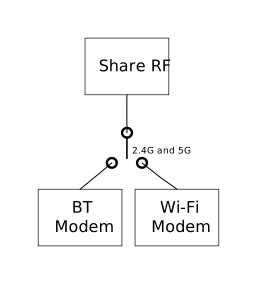
Shared RF path architecture
Wi-Fi and Bluetooth share the RF path. Only one can transmit or receive at a time. When both Wi-Fi and Bluetooth are in use simultaneously, managed coexistence is activated.
Shared RF path architecture
Wi-Fi and Bluetooth share the RF path. Only one can transmit or receive at a time. When both Wi-Fi and Bluetooth are in use simultaneously, managed coexistence is activated.
Shared RF path architecture
Wi-Fi and Bluetooth share the RF path. Only one can transmit or receive at a time. When both Wi-Fi and Bluetooth are in use simultaneously, managed coexistence is activated.
Shared RF path architecture
Wi-Fi and Bluetooth share the RF path. Only one can transmit or receive at a time. When both Wi-Fi and Bluetooth are in use simultaneously, managed coexistence is activated.
Shared RF path architecture
Wi-Fi and Bluetooth share the RF path. Only one can transmit or receive at a time. When both Wi-Fi and Bluetooth are in use simultaneously, managed coexistence is activated.
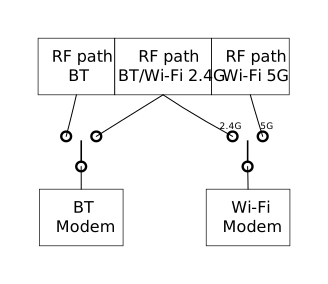
Configurable RF path architecture
This chip has multiple RF path configurations for Bluetooth and Wi-Fi. The configuration is tied to the RF front-end type selected by the developer. Once the RF front-end type is determined, it is programmed into OTP (One-Time Programmable) memory during production. The coexistence mechanism reads the type from OTP and enables the corresponding coexistence strategy. The following table describes the different RF path configurations and their coexistence modes:
Bluetooth RF Path |
Wi-Fi RF Path |
Architecture |
Recommended Coexistence Mode |
|---|---|---|---|
BT |
Wi-Fi 2.4G/BT |
Independent RF path |
Default managed coexistence; Free-run optianal with sufficient antenna isolation |
BT |
Wi-Fi 5G |
Independent RF path |
Free-run coexistence (frequency separation) |
Wi-Fi 2.4G/BT |
Wi-Fi 5G |
Independent RF path |
Free-run coexistence (frequency separation) |
Wi-Fi 2.4G/BT |
Wi-Fi 2.4G/BT |
Shared RF path |
Managed coexistence (RF path shared by BT and Wi-Fi) |
Shared RF path architecture
Wi-Fi and Bluetooth share the RF path. Only one can transmit or receive at a time. When both Wi-Fi and Bluetooth are in use simultaneously, managed coexistence is activated.
Shared RF path architecture
Wi-Fi and Bluetooth share the RF path. Only one can transmit or receive at a time. When both Wi-Fi and Bluetooth are in use simultaneously, managed coexistence is activated.
Coexistence Application Scenarios
Managed / Free-Run Coexistence
Ameba series SoCs can operate with managed coexistence, automatically allocating RF access based on the current scenario. Refer to Coexistence Design.
For Ameba SoCs with an independent RF path architecture, RF modules operating on different frequency bands — or on the same band with sufficient inter-antenna isolation — can also operate in free-run coexistence, with each module using an independent RF path without constraints, achieving optimal performance.
SingleChip-Coex / DualChip-Coex
Ameba series SoCs support coexistence among multiple on-chip RF modules and coexistence with externally connected RF chips. In DualChip-Coex, the external RF chip must support the PTA 3-wire protocol. Refer to External RF Module Coexistence.
The principles of free-run and managed coexistence apply equally to DualChip-Coex.
SingleChip-Coex Scenario Support
Wi-Fi |
Mode |
State |
BLE |
||
|---|---|---|---|---|---|
Scan |
Advertising |
Connected |
|||
Wi-Fi |
STA |
Disconnected |
Y |
Y |
Y |
Scan |
Y |
Y |
Y |
||
Connecting |
Y |
Y |
Y |
||
Connected |
Y |
Y |
Y |
||
SOFTAP |
Waiting for client |
Y |
Y |
Y |
|
Connecting |
Y |
Y |
Y |
||
Connected |
Y |
Y |
Y |
||
SOFTAP and STA Concurrent |
All states of SOFTAP and STA |
Y |
Y |
Y |
|
Wi-Fi |
Mode |
State |
BLE |
||
|---|---|---|---|---|---|
Scan |
Advertising |
Connected |
|||
Wi-Fi |
STA |
Disconnected |
Y |
Y |
Y |
Scan |
Y |
Y |
Y |
||
Connecting |
Y |
Y |
Y |
||
Connected |
Y |
Y |
Y |
||
SOFTAP |
Waiting for client |
Y |
Y |
Y |
|
Connecting |
Y |
Y |
Y |
||
Connected |
Y |
Y |
Y |
||
SOFTAP and STA Concurrent |
All states of SOFTAP and STA |
Y |
Y |
Y |
|
Wi-Fi |
Mode |
State |
BLE |
||
|---|---|---|---|---|---|
Scan |
Advertising |
Connected |
|||
Wi-Fi |
STA |
Disconnected |
Y |
Y |
Y |
Scan |
Y |
Y |
Y |
||
Connecting |
Y |
Y |
Y |
||
Connected |
Y |
Y |
Y |
||
SOFTAP |
Waiting for client |
Y |
Y |
Y |
|
Connecting |
Y |
Y |
Y |
||
Connected |
Y |
Y |
Y |
||
SOFTAP and STA Concurrent |
All states of SOFTAP and STA |
Y |
Y |
Y |
|
Wi-Fi |
Mode |
State |
BLE |
||
|---|---|---|---|---|---|
Scan |
Advertising |
Connected |
|||
Wi-Fi |
STA |
Disconnected |
Y |
Y |
Y |
Scan |
Y |
Y |
Y |
||
Connecting |
Y |
Y |
Y |
||
Connected |
Y |
Y |
Y |
||
SOFTAP |
Waiting for client |
Y |
Y |
Y |
|
Connecting |
Y |
Y |
Y |
||
Connected |
Y |
Y |
Y |
||
SOFTAP and STA Concurrent |
All states of SOFTAP and STA |
Y |
Y |
Y |
|
Wi-Fi |
Mode |
State |
BR/EDR |
||||
|---|---|---|---|---|---|---|---|
Inquiry |
Inquiry Scan |
Page |
Page Scan |
Connected |
|||
Wi-Fi |
STA |
Disconnected |
Y |
Y |
Y |
Y |
Y |
Scan |
Y |
Y |
Y |
Y |
Y |
||
Connecting |
Y |
Y |
Y |
Y |
Y |
||
Connected |
Y |
Y |
Y |
Y |
Y |
||
SOFTAP |
Waiting for client |
Y |
Y |
Y |
Y |
Y |
|
Connecting |
Y |
Y |
Y |
Y |
Y |
||
Connected |
Y |
Y |
Y |
Y |
Y |
||
SOFTAP and STA Concurrent |
All states of SOFTAP and STA |
Y |
Y |
Y |
Y |
Y |
|
Wi-Fi |
Mode |
State |
BLE |
||
|---|---|---|---|---|---|
Scan |
Advertising |
Connected |
|||
Wi-Fi |
STA |
Disconnected |
Y |
Y |
Y |
Scan |
Y |
Y |
Y |
||
Connecting |
Y |
Y |
Y |
||
Connected |
Y |
Y |
Y |
||
SOFTAP |
Waiting for client |
Y |
Y |
Y |
|
Connecting |
Y |
Y |
Y |
||
Connected |
Y |
Y |
Y |
||
SOFTAP and STA Concurrent |
All states of SOFTAP and STA |
Y |
Y |
Y |
|
Wi-Fi |
Mode |
State |
BR/EDR |
||||
|---|---|---|---|---|---|---|---|
Inquiry |
Inquiry Scan |
Page |
Page Scan |
Connected |
|||
Wi-Fi |
STA |
Disconnected |
Y |
Y |
Y |
Y |
Y |
Scan |
Y |
Y |
Y |
Y |
Y |
||
Connecting |
Y |
Y |
Y |
Y |
Y |
||
Connected |
Y |
Y |
Y |
Y |
Y |
||
SOFTAP |
Waiting for client |
Y |
Y |
Y |
Y |
Y |
|
Connecting |
Y |
Y |
Y |
Y |
Y |
||
Connected |
Y |
Y |
Y |
Y |
Y |
||
SOFTAP and STA Concurrent |
All states of SOFTAP and STA |
Y |
Y |
Y |
Y |
Y |
|
Wi-Fi |
Mode |
State |
BLE |
||
|---|---|---|---|---|---|
Scan |
Advertising |
Connected |
|||
Wi-Fi |
STA |
Disconnected |
Y |
Y |
Y |
Scan |
Y |
Y |
Y |
||
Connecting |
Y |
Y |
Y |
||
Connected |
Y |
Y |
Y |
||
SOFTAP |
Waiting for client |
Y |
Y |
Y |
|
Connecting |
Y |
Y |
Y |
||
Connected |
Y |
Y |
Y |
||
SOFTAP and STA Concurrent |
All states of SOFTAP and STA |
Y |
Y |
Y |
|
Wi-Fi |
Mode |
State |
BR/EDR |
||||
|---|---|---|---|---|---|---|---|
Inquiry |
Inquiry Scan |
Page |
Page Scan |
Connected |
|||
Wi-Fi |
STA |
Disconnected |
Y |
Y |
Y |
Y |
Y |
Scan |
Y |
Y |
Y |
Y |
Y |
||
Connecting |
Y |
Y |
Y |
Y |
Y |
||
Connected |
Y |
Y |
Y |
Y |
Y |
||
SOFTAP |
Waiting for client |
Y |
Y |
Y |
Y |
Y |
|
Connecting |
Y |
Y |
Y |
Y |
Y |
||
Connected |
Y |
Y |
Y |
Y |
Y |
||
SOFTAP and STA Concurrent |
All states of SOFTAP and STA |
Y |
Y |
Y |
Y |
Y |
|
Wi-Fi |
Mode |
State |
BLE |
||
|---|---|---|---|---|---|
Scan |
Advertising |
Connected |
|||
Wi-Fi |
STA |
Disconnected |
Y |
Y |
Y |
Scan |
Y |
Y |
Y |
||
Connecting |
Y |
Y |
Y |
||
Connected |
Y |
Y |
Y |
||
SOFTAP |
Waiting for client |
Y |
Y |
Y |
|
Connecting |
Y |
Y |
Y |
||
Connected |
Y |
Y |
Y |
||
SOFTAP and STA Concurrent |
All states of SOFTAP and STA |
Y |
Y |
Y |
|
Wi-Fi |
Mode |
State |
BLE |
||
|---|---|---|---|---|---|
Scan |
Advertising |
Connected |
|||
Wi-Fi |
STA |
Disconnected |
Y |
Y |
Y |
Scan |
Y |
Y |
Y |
||
Connecting |
Y |
Y |
Y |
||
Connected |
Y |
Y |
Y |
||
SOFTAP |
Waiting for client |
Y |
Y |
Y |
|
Connecting |
Y |
Y |
Y |
||
Connected |
Y |
Y |
Y |
||
SOFTAP and STA Concurrent |
All states of SOFTAP and STA |
Y |
Y |
Y |
|
Y: Supported, N: Not supported