Advanced Control Timer
The advanced control timer consists of a 16-bit auto-reload counter driven by a programmable prescaler. It is suitable for various applications, including measuring the pulse length of input signals (input capture) or generating output waveforms (output compare and PWM). Pulse length and waveform period can be adjusted between 25ns and 107s. Each timer is fully independent and does not share any resources with each other; different channels of the same timer share the same counter.
Capture Timer
Introduction
The capture timer is driven by a 16-bit auto-reload counter and a 16-bit programmable prescaler. It can be used for various purposes, including measuring the pulse length or count of input signals.
Features
The features of the capture timer are listed below.
Clock source is XTAL40MHz
Resolution is 16-bit
Quantity: 1
Prescaler bit width is 16-bit
Counter counting mode is up-counting
Supports pulse width measurement
Supports pulse count measurement
Supports interrupts
Block Diagram
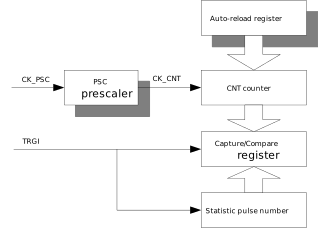
The capture timer is mainly composed of a counter, a preload register, a prescaler, and capture registers. The block diagram is shown below.
Functional Description
Up-Counting Mode
The timer is a 16-bit counter with an associated auto-reload register. Both the counter and the auto-reload register can be read and written by software. Read and write operations can be performed even when the counter is running.
The time base unit includes:
Counter register ( TIMx_CNT )
Auto-reload register ( TIMx_ARR )
Prescaler register ( TIMx_PSC )
The timer operates in upcounting mode, where the counter counts from 0 to the auto-reload value (the content of the TIMx_ARR register). When the counter reaches the auto-reload value, a counter overflow event occurs.
Pulse Width Measurement
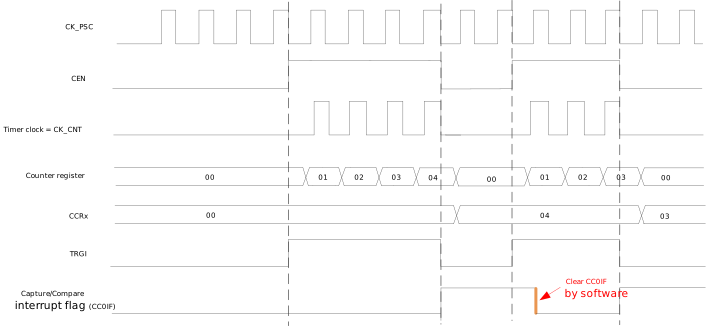
When the CC0PM bit of the TIMx_CCR0 register is set to 0, the capture timer operates in capture mode 0. In this mode, the width of the TRGI active level can be measured. When TRGI transitions from inactive level to active level, the counter is automatically enabled. When TRGI transitions from active level to inactive level, the counter is automatically disabled, CC0IF is set, and the current count value is copied to the CCR0 field of the TIMx_CCR0 register.
The figure below shows an example of the pulse width measurement mode, where the prescaler division factor is 1 and the rising edge of TRGI is used for capture.
Pulse Count Measurement
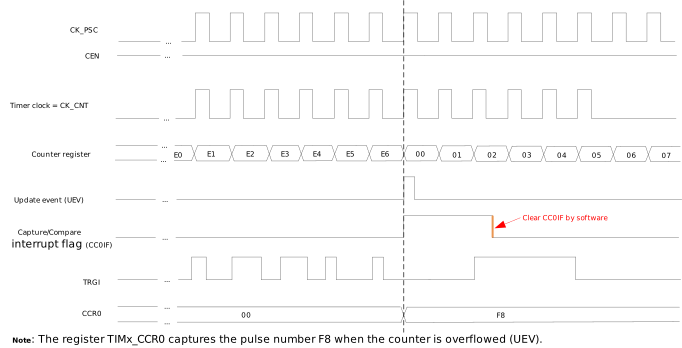
When the CC0PM bit of the TIMx_CCR0 register is set to 1, the capture timer operates in capture mode 1. In this mode, the number of valid edges of TRGI within a given period can be counted. When the counter overflows, CC0IF is set, and the count is copied to the CCR0 field of the TIMx_CCR0 register.
The diagram below shows an example of the pulse counting mode, where the prescaler divides by 1, the rising edge of TRGI is used for capture, and the ARR field is equal to E6.
Interrupt Events
There are two types of interrupt events for the capture timer:
Interrupt events in up-counting mode can be enabled by configuring the UIE bit of the TIMx_DIER register. When the UIE bit is 1, if an interrupt event occurs, it triggers a system interrupt. Both hardware overflow and software-triggered updates generate interrupts. The corresponding interrupt status can be checked through UIF in TIMx_SR , and the corresponding interrupt can be cleared by writing to UIF.
Interrupt events in capture mode can be enabled by configuring the CC0IE bit of the TIMx_DIER register. Capture mode 0: When TRGI transitions from active level to inactive level, an interrupt event is triggered, and the current count value is copied to the CCR0 field of the TIMx_CCR0 register ; Capture mode 1: When the counter overflows, an interrupt event is triggered, and the value of the counted pulse number is copied to the CCR0 field of the TIMx_CCR0 register.
PWM Timer
Introduction
The PWM timer is driven by a 16-bit auto-reload counter and a 16-bit programmable prescaler. It can be used for various purposes, including measuring the pulse frequency of input signals (input capture), single pulse mode, and output waveform generation (PWM).
Features
Clock source: XTAL40M
Resolution: 16-bit
Prescaler: 16-bit
Count mode: Up-counting
Supports one-pulse mode
Supports PWM mode with polarity selection
Interrupt generation
Sleep mode
Duty cycle range: 0 to 100%
Supports phase shift function
Quantity:
{{IC_PARAM_PWMTIMER_QUANTITY}}Number of Channels:
{{IC_PARAM_PWMTIMER_CHANNEL_NUM}}
Quantity:
{{IC_PARAM_PWMTIMER_QUANTITY}}Number of Channels:
{{IC_PARAM_PWMTIMER_CHANNEL_NUM}}
Quantity:
{{IC_PARAM_PWMTIMER_QUANTITY}}Number of Channels:
{{IC_PARAM_PWMTIMER_CHANNEL_NUM}}
Quantity:
{{IC_PARAM_PWMTIMER_QUANTITY}}Number of Channels:
{{IC_PARAM_PWMTIMER_CHANNEL_NUM}}
Quantity:
{{IC_PARAM_PWMTIMER_QUANTITY}}Number of Channels:
{{IC_PARAM_PWMTIMER_CHANNEL_NUM}}
Quantity:
{{IC_PARAM_PWMTIMER_QUANTITY}}Number of Channels:
{{IC_PARAM_PWMTIMER_CHANNEL_NUM}}
Quantity:
{{IC_PARAM_PWMTIMER_QUANTITY}}Number of Channels:
{{IC_PARAM_PWMTIMER_CHANNEL_NUM}}
Quantity:
{{IC_PARAM_PWMTIMER_QUANTITY}}Number of Channels:
{{IC_PARAM_PWMTIMER_CHANNEL_NUM}}
Block Diagram
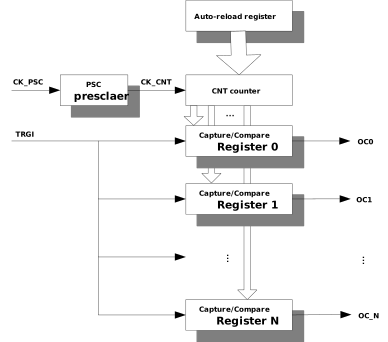
The PWM timer is mainly composed of a counter, a preload register, a prescaler, and capture/compare registers. Different channels of the same PWM timer share the same counter, and different channels can output waveforms with different duty cycles and phases. The block diagram is shown below.
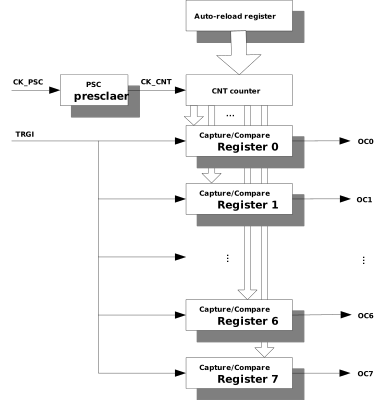
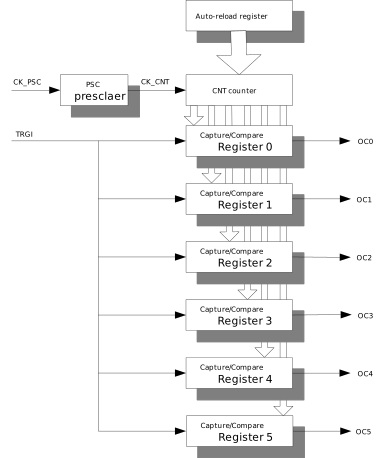
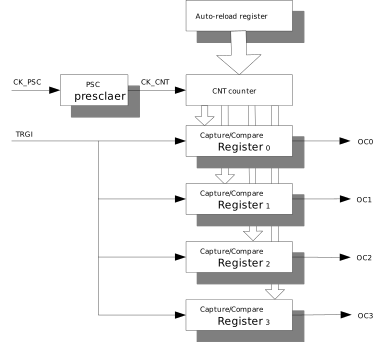
Functional Description
Upcounting Mode
The Timer is a 16-bit counter with an associated auto-reload register. Both the counter and the auto-reload register can be read and written by software. Read and write operations can be performed even while the counter is running.
The time base unit includes:
Counter register ( TIMx_CNT )
Auto-reload register ( TIMx_ARR )
Prescaler register ( TIMx_PSC )
The Timer operates in up-counting mode, where the counter counts from 0 to the auto-reload value (the content of the TIMx_ARR register). When the counter reaches the auto-reload value, a counter overflow event is generated.
Input Capture Mode
Input capture mode allows the timer to automatically latch the current counter value when a specific edge of an external trigger signal arrives. This function can be applied to application scenarios such as pulse width measurement, frequency calculation, and signal period detection.
The input capture mode is enabled by writing 1 to the CCxM bits in the TIMx_CCRx register. Once enabled, the CCRx field of the capture/compare register TIMx_CCRx will be used as a capture register to latch the counter value, and each channel has its own capture register.
When a valid transition edge of the TRGI signal is detected, the timer automatically latches the current counter value into the TIMx_CCRx register. Different channels can be configured with different polarities to capture different edges of the TRGI signal. At the same time, the CCxIF flag bit of the corresponding channel is set in the TIMx_SR status register. If the corresponding interrupt is enabled, the system will generate an interrupt request.
Software can clear this interrupt flag bit by writing 1 to the CCxIF bit.
One Pulse Mode
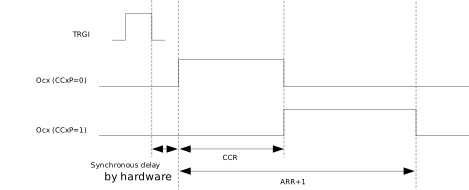
One-Pulse Mode (OPM) is a special case of PWM mode. It allows the counter to start in response to a stimulus and generate a pulse of programmable length after a programmable delay.
Starting the counter can be controlled by an active edge on TRGI, which can be a rising edge, falling edge, or both edges. The default output level in the idle state can be configured as high or low. The generated waveform can be completed in PWM mode. You can select One-Pulse Mode by setting the OPM bit in the TIMx_CR register. This will cause the counter to stop automatically at the next update.
The timing of One-Pulse Mode is shown in the following diagram.
Note
Since the channels are independent of each other, when TRGI is used to trigger one or more channels to output PWM signals, it can also be used as a capture source in the input capture mode of other channels.
PWM Mode
Pulse Width Modulation mode allows you to generate a signal whose frequency is determined by the value of the register and whose duty cycle is determined by the value of the CCRx field in the TIMx_CCRx register.
Period: TPWM = (ARR + 1) × TCNT
Duty cycle: DPWM = (CCRx × TCNT) / TPWM
Where: TCNT = TXTAL × (PSC + 1)
PWM mode can be selected independently on each channel (each OCx outputs a PWM) by setting the OCxM bits in the TIMx_CCRx register to 0. You must enable the corresponding preload register by setting the OCxPE bit in the TIMx_CCRx register, and finally enable the auto-reload preload register by setting the ARPE bit in the TIMx_CR register.
Since the preload register is only transferred to the shadow register when an update event occurs, you must initialize all registers by setting the UG bit in the TIMx_EGR register before starting the counter.
The OCx polarity can be programmed in software by the CCxP bit in the TIMx_CCRx register. It can be programmed as active high or active low.
In PWM mode, TIMx_CNT and CCRx (in TIMx_CCRx) are always compared to determine if TIMx_CNT < CCRx. As long as TIMx_CNT < CCRx, the PWM signal OCx remains active, otherwise it becomes inactive. If the comparison value in TIMx_CCRx is greater than the auto-reload value in TIMx_ARR, the PWM signal OCx output is active throughout the entire period. If the comparison value is 0, the PWM signal OCx output is inactive throughout the entire period.
This timer can only generate PWM in edge-aligned mode. The following diagram shows some examples of edge-aligned PWM waveforms, where TIMx_ARR = 8.
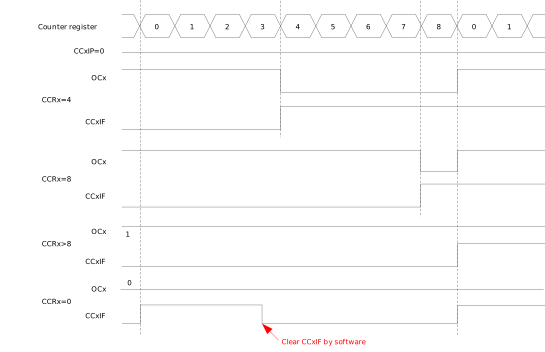
Edge-aligned PWM waveforms (ARR = 8, CCxP = 0)
Phase Synchronization Function
This function is used for users to configure specific phase shifts between channels. It only applies to PWM mode and One-Pulse mode, and input capture mode is not affected.
Note
The number of PWM channels varies by chip (see the Features section). This section uses 6 channels (channels 0 to 5) as an example.
Apart from the CNT in the TIMx_CNT register, the PWM timer provides one channel Counter for each channel. The value of a channel Counter can be obtained by reading its TIMx_PHASECNTx register (where x is the channel index). The value of each channel Counter is calculated based on the CNT value in the TIMx_CNT register. When the Counter value in TIMx_CNT changes, the channel values are updated immediately. Each channel’s waveform uses its own channel Counter as the reference.
The phase shift between channels is achieved by setting the phase shift of the channel Counter relative to the CNT value in the TIMx_CNT register. The phase shift function can be configured through the TIMx_PSYNCx register (where x is the channel index). When the phase shift function is enabled by setting the SYNCENx bit in the TIMx_PSYNCx register, the user can configure the phase shift between that channel’s Counter and the CNT value in TIMx_CNT, and the phase shift value is set by SYNCDIR and SYNCPHASE in TIMx_PSYNCx. When the phase shift function is disabled, that channel’s channel Counter value is exactly the same as CNT. The channel Counter value is:
channel Counter value = CNT - (-1)SYNCDIR* (SYNCPHASE)
The hardware always ensures that the channel values are in the 0-ARR range. When the channel Counter value is higher than ARR, it immediately becomes old value - ARR to stay in the 0-ARR range; when the channel Counter value is lower than zero, it immediately becomes old value + ARR.
Phase shift function shows the curve of the channel Counter value relative to the Counter, and the corresponding waveforms generated from the channel Counters of channels 0, 1, and 2. In the following configuration, the phase shift between every two channels is 1/3.
In the above example, for channel 0, the SYNCEN0 of channel 0 is 0, so channel counter0 is always equal to CNT. When channel counter0 is lower than CCR0 (i.e., 30), channel 0 outputs high level; when channel counter0 is higher than CCR0, channel 0 outputs low level. For channel 1, SYNCEN1 is set to 1, so channel counter1 has a phase shift with TIMx_CNT. The value of channel Counter 1 is CNT + 66, where CNT is the value of TIMx_CNT. When channel counter1 is lower than CCR1, channel 1 outputs high level, and vice versa. For channel 2, channel counter2 is CNT + 33. Under the above settings, there is a 1/3 phase shift between every two channels.
The software ensures that SYNCPHASEx is always less than the ARR value. Otherwise, a low level will be generated and output.
After the PWM timer is enabled and generates waveforms, users may need to update some parameters, such as period, duty cycle, and phase shift values. Since the ARR, PSC, CCRx, and PSYNCx registers can be configured as preloaded or non-preloaded, users have three ways to change the configuration at runtime.
Set the register as non-preloaded, then set the new value, and the new value will take effect immediately after the register value changes.
Set the register as preloaded, then set the new value, and the new value will be updated after the next UEV of CNT.
Set the register as preloaded, set the new value, and then write the UG bit, after which CNT will be cleared and start counting from 0, and the new value will take effect immediately. This is useful when multiple parameters need to be updated immediately.

Phase shift function
The following subsections explain some scenarios.
Immediate update
Change the period
Increase ARR value
waveform when ARR changes from 100 to 150 illustrates when ARR value is changed from 100 to 150. Because ARR is increased, the waveforms in the red cycle show that all three channels are in low-level state.
Decrease ARR value
waveform when ARR changes from 100 to 80 shows when ARR value is changed from 100 to 80. Before ARR is decreased, there is only one channel in high-level state at the same time. After ARR is set to 80, the waveforms in the red cycle show that channels 0 and 2 are both in high-level state in this case.
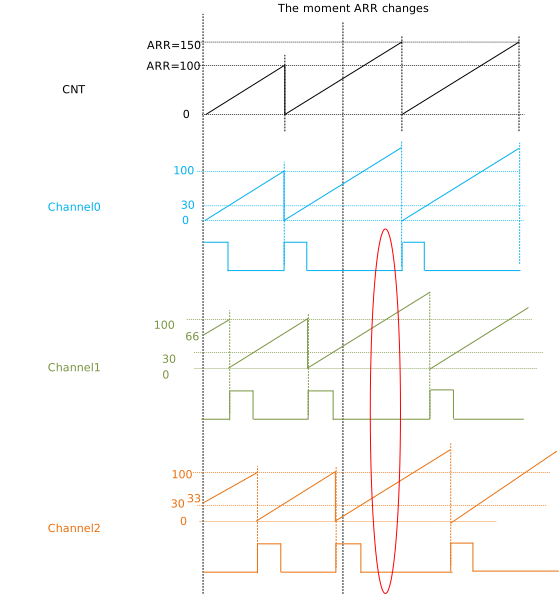
waveform when ARR changes from 100 to 150
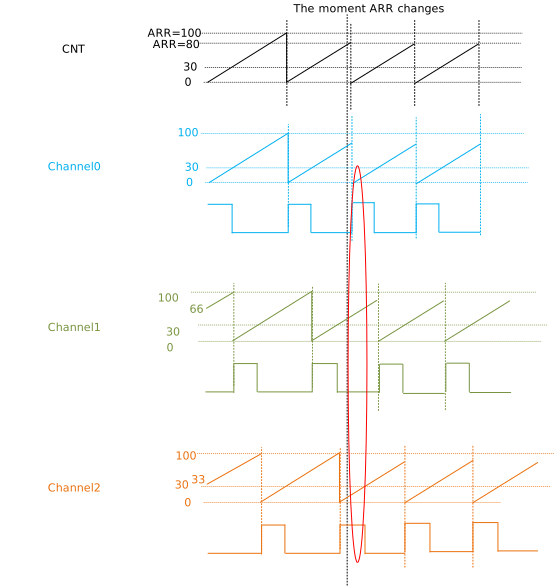
waveform when ARR changes from 100 to 80
Change the duty cycle
The duty cycle of each channel depends on its CCRx value which is configured individually in its own TIMx_CCRx registers. They can’t be updated exactly at the same time due to the time gap that CPU executes instructions. The length of this time gap is unpredictable. The following examples ignore this time gap.
Increase CCRx value
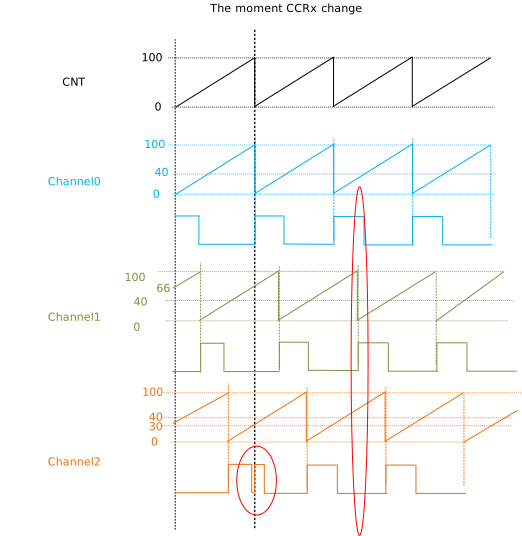
The following figure displays when CCRx changes from 30 to 40. For channel 2, CCR2 is changed when channel counter2 value is 35 and also
30 < 35 < 40, so that waveform of channel 2 falls into high level simultaneously when CCRx is updated. This causes a glitch. Also, channels 0 and 1 are both in high-level state because of increasing their CCRx in this case.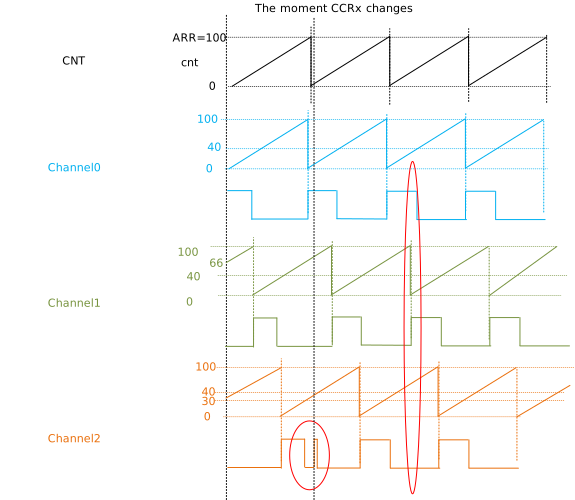
Decrease CCRx value
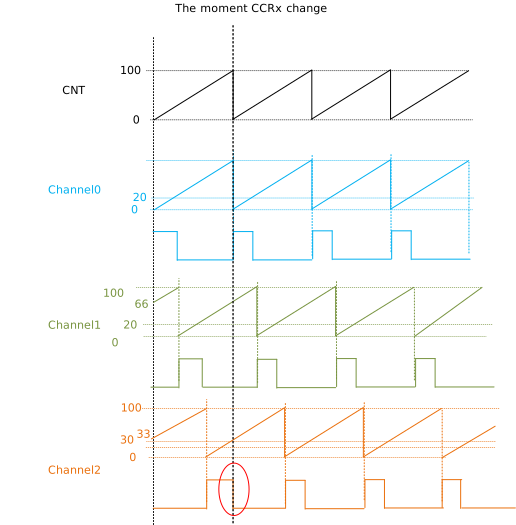
The following figure shows when CCRx changes from 30 to 20. For channel 2, CCR2 is changed when channel counter2 value is 25 and also
20 < 25 < 30, so that waveform of channel 2 falls into low level simultaneously when CCRx is updated. The duty cycle of channel 2 in this period is neither 20% nor 30%, but 25% instead.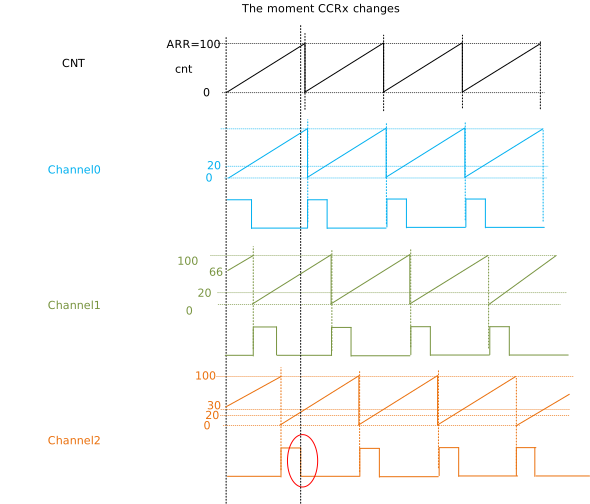
Change phase shift value
Phase shift of each channel is configured individually in TIMx_PSYNCx registers. They can’t be updated exactly at the same time and the following example ignore this time gap. Also, the change of phase shift always results in discrete channel counters and waveforms. The following figure is an example that phase shift of channel 1 changes from 66 to 36 and channel 2 from 33 to 63. For channel 1, channel counter1 is above and below CCR1 before and after changing. For channel 2, channel counter2 is below and above CCR2 before and after changing.
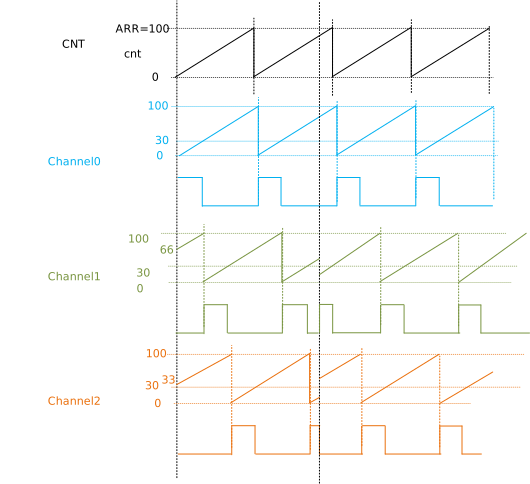
Waveforms when phase shifts change
Update after the next UEV of CNT
Change the period
Increase ARR value
Waveform when ARR changes from 100 to 150 illustrates when ARR value is changed from 100 to 150. Because ARR is increased, the waveforms in the red cycle show that all three channels are in low-level state in this case.
Decrease ARR value
Waveform when ARR changes from 100 to 80 shows when ARR value is changed from 100 to 80. Before ARR is decreased, there is only one channel in high-level state at the same time. After ARR is set to 80, the waveforms in the red cycle show that channels 0 and 2 are both in high-level state in this case.
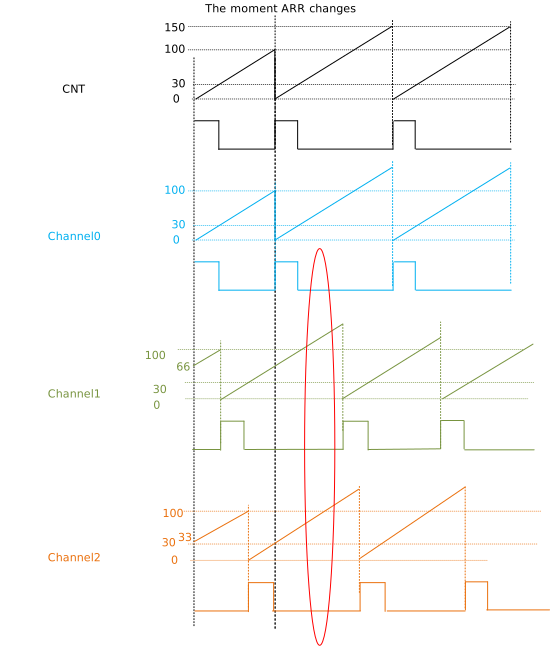
Waveform when ARR changes from 100 to 150
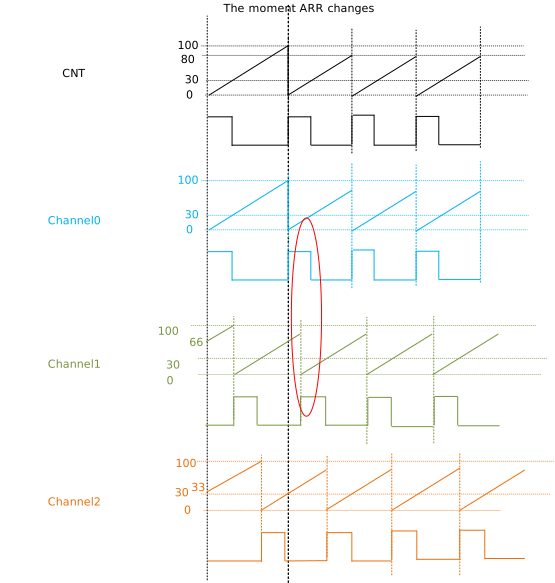
Waveform when ARR changes from 100 to 80
Change the duty cycle
The following examples ignore the time gap of configuration. The waveform is similar with cases that CCRx updates immediately.
Increase CCRx value
The following figure displays when CCRx changes from 30 to 40.
Decrease CCRx value
The following figure shows when CCRx changes from 30 to 20.
Change phase shift value
The following example ignores the time gap of configuration; the waveform is similar with cases that phase shifts update immediately.
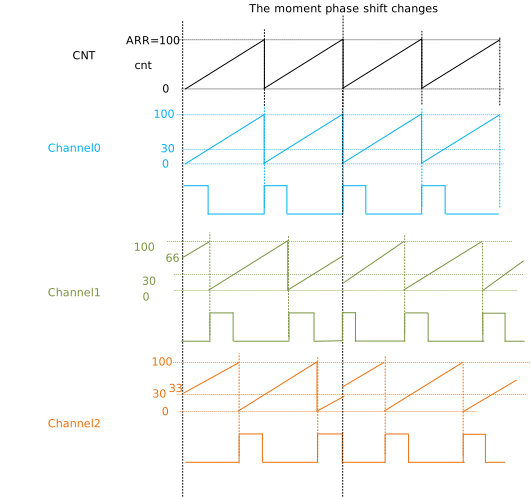
waveform when phase shift change
Update after writing the UG bit
Before writing the UG bit, the waveform was generated according to the old configuration. The new configuration comes into effect after writing the UG bit, and also CNT and channel counter are cleared to 0. In the following example, ARR changes from 100 to 150, CCRx not changed, phase shift function of channel 0 is disabled, phase shift of channel 1 changes from 66 to 33, and phase shift of channel 2 changes from 33 to 66.
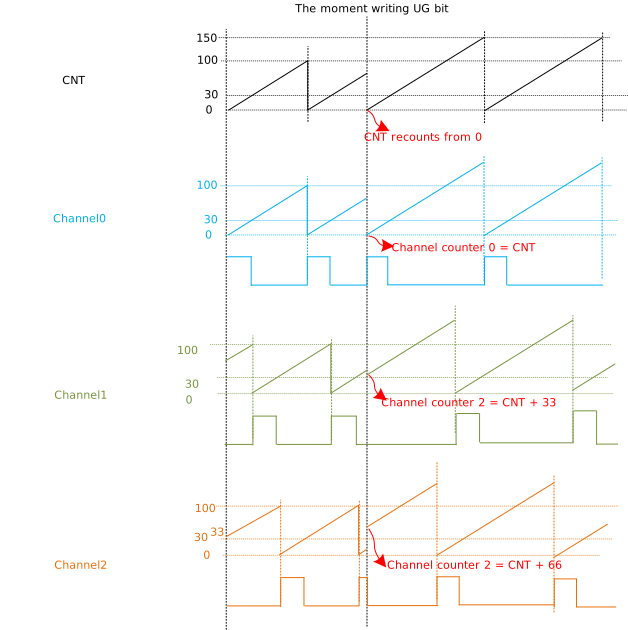
Waveform when writing UG bit
Registers
Capture Timer Registers
Base Address: 0x41100200
Name |
Address offset |
Access |
Description |
|---|---|---|---|
000h |
R/W |
Users can configure and observe the counter operation. |
|
004h |
R/W |
This register is about the update operation. |
|
008h |
R/W |
||
00Ch |
R/W |
||
010h |
R/W |
This register is about the update operation, and is user-defined. |
|
014h |
R |
This is timer count register. |
|
018h |
R/W |
This is prescaler value register. |
|
01Ch |
R/W |
This is auto-reload value register. |
|
024h |
R/W |
This is the register about input capture configuration and the data of capture. |
|
028h |
R/W |
||
02Ch |
R/W |
REG_TIM_EN
Name: TIM enable register
Size: 32
Address offset: 000h
Read/write access: R/W
Users can configure and observe the counter operation.
Bit |
Symbol |
Access |
INI |
Description |
|---|---|---|---|---|
31:17 |
RSVD |
R |
- |
Reserved |
16 |
CNT_EN |
R |
0x0 |
Counter working status
|
15:9 |
RSVD |
R |
- |
Reserved |
8 |
CEN |
R |
0x0 |
Counter run status
|
7:2 |
RSVD |
R |
- |
Reserved |
1 |
CNT_STOP |
R/W |
0x0 |
Disable the counter Poll CNT_RUN to see the counter status. If CNT_RUN is 0, it means that the counter has been disabled internally. |
0 |
CNT_START |
R/W |
0x0 |
Enable the counter Poll CNT_RUN to see the counter status. If CNT_RUN is 1, it means that the counter has been enabled internally. |
REG_TIM_CR
Name: TIM control register
Size: 32
Address offset: 004h
Read/write access: R/W
This register is about the update operation.
Bit |
Symbol |
Access |
INI |
Description |
|---|---|---|---|---|
31:5 |
RSVD |
R |
- |
Reserved |
4 |
ARPE |
R/W |
0x0 |
Enable auto-reload preloading
|
3 |
RSVD |
R |
- |
Reserved |
2 |
URS |
R/W |
0x0 |
Update request source
|
1 |
UDIS |
R/W |
0x0 |
Disable UEV Shadow registers keep their values. Otherwise, buffered registers are then loaded with their preload values when UEV happens. |
0 |
RSVD |
R |
- |
Reserved |
REG_TIM_DIER
Name: TIM interrupt enable register
Size: 32
Address offset: 008h
Read/write access: R/W
Bit |
Symbol |
Access |
INI |
Description |
|---|---|---|---|---|
31:2 |
RSVD |
R |
- |
Reserved |
1 |
CC0IE |
R/W |
0x0 |
Enable Capture/Compare 0 interrupt |
0 |
UIE |
R/W |
0x0 |
Enable update interrupt |
REG_TIM_SR
Name: TIM status register
Size: 32
Address offset: 00Ch
Read/write access: R/W
Bit |
Symbol |
Access |
INI |
Description |
|---|---|---|---|---|
31 |
UG_DONE |
R |
0x1 |
UG operation status This bit is cleared by hardware when the UG bit in the TIMx_EGR register is set. When the UG operation is done, hardware set this bit to ‘1’. So, software can poll this bit to see the UG operation status. |
30:2 |
RSVD |
R |
- |
Reserved |
1 |
CC0IF |
R/W |
0x0 |
Capture/Compare 0 interrupt flag CC0 channel configured as pulse mode 0: This bit is set when TRGI is transferred to inactive level from active level. CC0 channel configured as pulse mode 1: This bit is set by hardware when the counter overflows. It is cleared by software. |
0 |
UIF |
R/W |
0x0 |
Update interrupt flag |
REG_TIM_EGR
Name: TIM event generation register
Size: 32
Address offset: 010h
Read/write access: R/W
This register is about the update operation, and is user-defined.
Bit |
Symbol |
Access |
INI |
Description |
|---|---|---|---|---|
31:2 |
RSVD |
R |
- |
Reserved |
1 |
CC0G |
R/W |
0x0 |
Capture/Compare 0 generation This bit is set by software and is automatically cleared by hardware. A Capture/Compare event is generated on channel 0: the current value of the counter is captured in TIM_CCR0 register. The CC0IF flag is set, the corresponding interrupt or request is sent if enabled. |
0 |
UG |
R/W |
0x0 |
Update generation Re-initialize the counter and generate an update of registers. Note that the prescaler counter is cleared too. (anyway the prescaler ratio is not affected) |
REG_TIM_CNT
Name: TIM counter
Size: 32
Address offset: 014h
Read/write access: R
This is timer count register.
Bit |
Symbol |
Access |
INI |
Description |
|---|---|---|---|---|
31:16 |
RSVD |
R |
- |
Reserved |
15:0 |
CNT |
R |
0x0 |
Counter value |
REG_TIM_PSC
Name: TIM prescaler register
Size: 32
Address offset: 018h
Read/write access: R/W
This is prescaler value register.
Bit |
Symbol |
Access |
INI |
Description |
|---|---|---|---|---|
31:16 |
RSVD |
R |
- |
Reserved |
15:0 |
PSC |
R/W |
0x0 |
Prescaler value PSC contains the value to be loaded in the actual prescaler register at each UEV (including when the counter is cleared through UG bit of TIM_EGR register). |
REG_TIM_ARR
Name: TIM auto-reload register
Size: 32
Address offset: 01Ch
Read/write access: R/W
This is auto-reload value register.
Bit |
Symbol |
Access |
INI |
Description |
|---|---|---|---|---|
31:16 |
RSVD |
R |
- |
Reserved |
15:0 |
ARR |
R/W |
0xFFFF |
The value to be loaded in the actual auto-reload register. It can be preloaded by setting ARPE bit in TIM_CR. |
REG_TIM_CCR0
Name: TIM Capture register
Size: 32
Address offset: 024h
Read/write access: R/W
This is the register about input capture configuration and the data of capture.
Bit |
Symbol |
Access |
INI |
Description |
|---|---|---|---|---|
31:29 |
RSVD |
R |
- |
Reserved |
28 |
CC0PM |
R/W |
0x0 |
CC0 pulse mode
|
27 |
RSVD |
R |
- |
Reserved |
26 |
CC0P |
R/W |
0x0 |
CC0 channel configured as output:
CC0 channel configured as input:
|
25 |
RSVD |
R |
- |
Reserved |
24 |
CC0E |
R/W |
0x0 |
Enable CC0 |
23:16 |
RSVD |
R |
- |
Reserved |
15:0 |
CCR0 |
R/W |
0x0 |
Capture/Compare 0 value CC0 channel configured as pulse mode 0: the pulse width of TRGI CC0 channel configured as pulse mode 1: the pulse number of TRGI when the counter counts from 0 to ARR |
REG_TIM_PULSE_DBC
Name: Timer Pulse DBC Register
Size: 32
Address offset: 028h
Read/write access: R/W
Bit |
Symbol |
Access |
INI |
Description |
|---|---|---|---|---|
31:16 |
RSVD |
R |
- |
Reserved |
15:1 |
R_DBC_CYC |
R/W |
0x0 |
DBC cycle |
0 |
R_DBC_FEN |
R/W |
0x0 |
Enable debounce for pulse
|
REG_TIM_PULSE_DUMMY
Name: Timer Pulse Dummy Register
Size: 32
Address offset: 02Ch
Read/write access: R/W
Bit |
Symbol |
Access |
INI |
Description |
|---|---|---|---|---|
31:0 |
DUMMY |
R/W |
ffffh |
Dummy register |
Base Address: 0x41019200
Name |
Address offset |
Access |
Description |
|---|---|---|---|
000h |
R/W |
User can configure and observe the counter operation. |
|
004h |
R/W |
This is the register about the update operation. |
|
008h |
R/W |
||
00Ch |
R/W |
This is the register about timer status. |
|
010h |
R/W |
Update generation, user defined |
|
014h |
R |
||
018h |
R/W |
||
01Ch |
R/W |
||
024h |
R/W |
This is the register about input capture configuration and the data of capture. |
|
028h |
R/W |
REG_TIM_EN
Name: TIM enable register
Size: 32
Address offset: 000h
Read/write access: R/W
User can configure and observe the counter operation.
Bit |
Symbol |
Access |
INI |
Description |
|---|---|---|---|---|
31:17 |
RSVD |
R |
- |
Reserved |
16 |
CNT_EN |
R |
0x0 |
Counter working status
|
15:9 |
RSVD |
R |
- |
Reserved |
8 |
CEN |
R |
0x0 |
Counter run status
|
7:2 |
RSVD |
R |
- |
Reserved |
1 |
CNT_STOP |
R/W |
0x0 |
Disable the counter. Poll CNT_RUN to see the counter status. If CNT_RUN is 0, it means that the counter has been disabled internally. |
0 |
CNT_START |
R/W |
0x0 |
Enable the counter. Poll CNT_RUN to see the counter status. If CNT_RUN is 1, it means that the counter has been enabled internally. |
REG_TIM_CR
Name: TIM control register
Size: 32
Address offset: 004h
Read/write access: R/W
This is the register about the update operation.
Bit |
Symbol |
Access |
INI |
Description |
|---|---|---|---|---|
31:5 |
RSVD |
R |
- |
Reserved |
4 |
ARPE |
R/W |
0x0 |
Enable auto-reload preloading
|
3 |
RSVD |
R |
- |
Reserved |
2 |
URS |
R/W |
0x0 |
Update request source
|
1 |
UDIS |
R/W |
0x0 |
Disable UEV Shadow registers keep their values. Otherwise, buffered registers are then loaded with their preload values when UEV happens. |
0 |
RSVD |
R |
- |
Reserved |
REG_TIM_DIER
Name: TIM interupt enable register
Size: 32
Address offset: 008h
Read/write access: R/W
Bit |
Symbol |
Access |
INI |
Description |
|---|---|---|---|---|
31:2 |
RSVD |
R |
- |
Reserved |
1 |
CC0IE |
R/W |
0x0 |
Enable Capture/Compare 0 interrupt |
0 |
UIE |
R/W |
0x0 |
Enable update interrupt |
REG_TIM_SR
Name: TIM status register
Size: 32
Address offset: 00Ch
Read/write access: R/W
This is the register about timer status.
Bit |
Symbol |
Access |
INI |
Description |
|---|---|---|---|---|
31 |
UG_DONE |
R |
0x1 |
UG operation status This bit is cleared by hardware when the UG bit in the TIMx_EGR register is set. When the UG operation is done, hardware sets this bit to ‘1’. So, software can poll this bit to see the UG operation status. |
30:2 |
RSVD |
R |
- |
Reserved |
1 |
CC0IF |
R/W |
0x0 |
Capture/Compare 0 interrupt flag
|
0 |
UIF |
R/W |
0x0 |
Update interrupt flag |
REG_TIM_EGR
Name: TIM event generation register
Size: 32
Address offset: 010h
Read/write access: R/W
Update generation, user defined
Bit |
Symbol |
Access |
INI |
Description |
|---|---|---|---|---|
31:2 |
RSVD |
R |
- |
Reserved |
1 |
CC0G |
R/W |
0x0 |
Capture/Compare 0 generation This bit is set by software and is automatically cleared by hardware. A Capture/Compare event is generated on channel 0: the current value of the counter is captured in TIM_CCR0 register. The CC0IF flag is set, the corresponding interrupt or request is sent if enabled. |
0 |
UG |
R/W |
0x0 |
Update generation. Re-initialize the counter and generate an update of registers. Note that the prescaler counter is cleared too. (Anyway the prescaler ratio is not affected) |
REG_TIM_CNT
Name: TIM counter register
Size: 32
Address offset: 014h
Read/write access: R
Bit |
Symbol |
Access |
INI |
Description |
|---|---|---|---|---|
31:16 |
RSVD |
R |
- |
Reserved |
15:0 |
CNT |
R |
0x0 |
Counter value |
REG_TIM_PSC
Name: TIM prescaler register
Size: 32
Address offset: 018h
Read/write access: R/W
Bit |
Symbol |
Access |
INI |
Description |
|---|---|---|---|---|
31:16 |
RSVD |
R |
- |
Reserved |
15:0 |
PSC |
R/W |
0x0 |
Prescaler value PSC contains the value to be loaded in the actual prescaler register at each UEV (including when the counter is cleared through UG bit of TIM_EGR register). |
REG_TIM_ARR
Name: TIM auto-reload register
Size: 32
Address offset: 01Ch
Read/write access: R/W
Bit |
Symbol |
Access |
INI |
Description |
|---|---|---|---|---|
31:16 |
RSVD |
R |
- |
Reserved |
15:0 |
ARR |
R/W |
0xFFFF |
The value to be loaded in the actual auto-reload register. It can be preloaded by setting ARPE bit in TIM_CR. |
REG_TIM_CCR0
Name: TIM Capture register
Size: 32
Address offset: 024h
Read/write access: R/W
This is the register about input capture configuration and the data of capture.
Bit |
Symbol |
Access |
INI |
Description |
|---|---|---|---|---|
31:29 |
RSVD |
R |
- |
Reserved |
28 |
CC0PM |
R/W |
0x0 |
CC0 pulse mode
|
27 |
RSVD |
R |
- |
Reserved |
26 |
CC0P |
R/W |
0x0 |
CC0 channel configured as output:
CC0 channel configured as input:
|
25 |
RSVD |
R |
- |
Reserved |
24 |
CC0E |
R/W |
0x0 |
Enable CC0 |
23:16 |
RSVD |
R |
- |
Reserved |
15:0 |
CCR0 |
R/W |
0x0 |
Capture/Compare 0 value CC0 channel configured as pulse mode 0: the pulse width of TRGI CC0 channel configured as pulse mode 1: the pulse number of TRGI when the counter counts from 0 to ARR |
REG_TIM_PULSE_DUMMY
Name: Timer Pulse Dummy Register
Size: 32
Address offset: 028h
Read/write access: R/W
Bit |
Symbol |
Access |
INI |
Description |
|---|---|---|---|---|
31:0 |
DUMMY |
R/W |
ffffh |
Dummy register |
REGISTER_CONTENTS=RTL8720E
REGISTER_CONTENTS=RTL8720E
REGISTER_CONTENTS=RTL8720E
Base Address: 0x4100A200
Name |
Address offset |
Access |
Description |
|---|---|---|---|
000h |
R/W |
||
004h |
R/W |
||
008h |
R/W |
||
00Ch |
R/W |
||
010h |
R/W |
||
014h |
R |
||
018h |
R/W |
||
01Ch |
R/W |
||
024h |
R/W |
REG_TIM_EN
Name: TIM enable register
Size: 32
Address offset: 000h
Read/write access: R/W
Bit |
Symbol |
Access |
INI |
Description |
|---|---|---|---|---|
31:17 |
RSVD |
R |
- |
Reserved |
16 |
CNT_EN |
R |
0x0 |
Counter working status
|
15:9 |
RSVD |
R |
- |
Reserved |
8 |
CEN |
R |
0x0 |
Counter run status
|
7:2 |
RSVD |
R |
- |
Reserved |
1 |
CNT_STOP |
R/W |
0x0 |
Disable the counter. Poll CNT_RUN to see the counter status. If CNT_RUN is 0, it means that the counter has been disabled internally. |
0 |
CNT_START |
R/W |
0x0 |
Enable the counter. Poll CNT_RUN to see the counter status. If CNT_RUN is 1, it means that the counter has been enabled internally. |
REG_TIM_CR
Name: TIM control register
Size: 32
Address offset: 004h
Read/write access: R/W
Bit |
Symbol |
Access |
INI |
Description |
|---|---|---|---|---|
31:5 |
RSVD |
R |
- |
Reserved |
4 |
ARPE |
R/W |
0x0 |
Enable auto-reload preloading
|
3 |
RSVD |
R |
- |
Reserved |
2 |
URS |
R/W |
0x0 |
Update request source
|
1 |
UDIS |
R/W |
0x0 |
Disable UEV. Shadow registers keep their values. Otherwise, buffered registers are then loaded with their preload values when UEV happen. |
0 |
RSVD |
R |
- |
Reserved |
REG_TIM_DIER
Name: TIM interupt enable register
Size: 32
Address offset: 008h
Read/write access: R/W
Bit |
Symbol |
Access |
INI |
Description |
|---|---|---|---|---|
31:2 |
RSVD |
R |
- |
Reserved |
1 |
CC0IE |
R/W |
0x0 |
Enable capture/compare 0 interrupt |
0 |
UIE |
R/W |
0x0 |
Enable update interrupt |
REG_TIM_SR
Name: TIM status register
Size: 32
Address offset: 00Ch
Read/write access: R/W
Bit |
Symbol |
Access |
INI |
Description |
|---|---|---|---|---|
31 |
UG_DONE |
R |
0x1 |
UG operation status.This bit is cleared by hardware when the UG bit in the timx_EGR register is set. When the UG operation is done, hardware set this bit to ‘1’. So, software can poll this bit to see the UG operation status. |
30:2 |
RSVD |
R |
- |
Reserved |
1 |
CC0IF |
R/W |
0x0 |
Capture/compare 0 interrupt flag Cc0 channel configured as pulse mode 0: This bit is set when trgi is transferred to inactive level from active level. Cc0 channel configured as pulse mode 1: This bit is set by hardware when the counter overflows. it is cleared by software. |
0 |
UIF |
R/W |
0x0 |
Update interrupt flag |
REG_TIM_EGR
Name: TIM event generation register
Size: 32
Address offset: 010h
Read/write access: R/W
Bit |
Symbol |
Access |
INI |
Description |
|---|---|---|---|---|
31:2 |
RSVD |
R |
- |
Reserved |
1 |
CC0G |
R/W |
0x0 |
Capture/Compare 0 generation. This bit is set by software and is automatically cleared by hardware. A Capture/Compare event is generated on channel 0: the current value of the counter is captured in TIM_CCR0 register. The CC0IF flag is set, the corresponding interrupt or request is sent if enabled. |
0 |
UG |
R/W |
0x0 |
Update generation. Re-initialize the counter and generate an update of registers. Note that the prescaler counter is cleared too.(anyway the prescaler ratio is not affected) |
REG_TIM_CNT
Name: TIM counter
Size: 32
Address offset: 014h
Read/write access: R
Bit |
Symbol |
Access |
INI |
Description |
|---|---|---|---|---|
31:16 |
RSVD |
R |
- |
Reserved |
15:0 |
CNT |
R |
0x0 |
Counter value |
REG_TIM_PSC
Name: TIM prescaler register
Size: 32
Address offset: 018h
Read/write access: R/W
Bit |
Symbol |
Access |
INI |
Description |
|---|---|---|---|---|
31:16 |
RSVD |
R |
- |
Reserved |
15:0 |
PSC |
R/W |
0x0 |
Prescaler value. psc contains the value to be loaded in the actual prescaler register at each uev(including when the counter is cleared through ug bit of tim_egr register). |
REG_TIM_ARR
Name: TIM auto-reload register
Size: 32
Address offset: 01Ch
Read/write access: R/W
Bit |
Symbol |
Access |
INI |
Description |
|---|---|---|---|---|
31:16 |
RSVD |
R |
- |
Reserved |
15:0 |
ARR |
R/W |
0xFFFF |
The value to be loaded in the actual auto-reload register. it can be preloaded by setting arpe bit in tim_cr. |
REG_TIM_CCR0
Name: TIM Capture register
Size: 32
Address offset: 024h
Read/write access: R/W
Bit |
Symbol |
Access |
INI |
Description |
|---|---|---|---|---|
31:29 |
RSVD |
R |
- |
Reserved |
28 |
CC0PM |
R/W |
0x0 |
CC0 pulse mode
|
27 |
RSVD |
R |
- |
Reserved |
26 |
CC0P |
R/W |
0x0 |
CC0 channel configured as output:
CC0 channel configured as input:
|
25 |
RSVD |
R |
- |
Reserved |
24 |
CC0E |
R/W |
0x0 |
Enable cc0 |
23:16 |
RSVD |
R |
- |
Reserved |
15:0 |
CCR0 |
R/W |
0x0 |
Capture/compare 0 value Cc0 channel configured as pulse mode 0: the pulse width of trgi Cc0 channel configured as pulse mode 1: the pulse number of trgi when the counter counts from 0 to arr |
Base Address: 0x41000800
Name |
Address offset |
Access |
Description |
|---|---|---|---|
000h |
R/W |
User can configure and observe the counter operation |
|
004h |
R/W |
Registers about the update operation |
|
008h |
R/W |
Interrupt enable |
|
00Ch |
R/W |
Registers about timer status |
|
010h |
R/W |
Update generation user defined |
|
014h |
R |
Timer count |
|
018h |
R/W |
Prescaler value |
|
01Ch |
R/W |
Auto-reload value |
|
024h |
R/W |
Input capture configuration and the data of capture |
|
028h |
R/W |
||
02Ch |
R/W |
Dummy register |
REG_TIM_EN
Name: TIM enable register
Size: 32
Address offset: 000h
Read/write access: R/W
User can configure and observe the counter operation
Bit |
Symbol |
Access |
INI |
Description |
|---|---|---|---|---|
31:17 |
RSVD |
R |
- |
Reserved |
16 |
CNT_EN |
R |
0x0 |
Counter working status
|
15:9 |
RSVD |
R |
- |
Reserved |
8 |
CEN |
R |
0x0 |
Counter run status
|
7:2 |
RSVD |
R |
- |
Reserved |
1 |
CNT_STOP |
R/W |
0x0 |
Disable the counter. Poll CNT_RUN to see the counter status. If CNT_RUN is 0, it means that the counter has been disabled internally. |
0 |
CNT_START |
R/W |
0x0 |
Enable the counter. Poll CNT_RUN to see the counter status. If CNT_RUN is 1, it means that the counter has been enabled internally. |
REG_TIM_CR
Name: TIM control register
Size: 32
Address offset: 004h
Read/write access: R/W
Registers about the update operation
Bit |
Symbol |
Access |
INI |
Description |
|---|---|---|---|---|
31:5 |
RSVD |
R |
- |
Reserved |
4 |
ARPE |
R/W |
0x0 |
Enable auto-reload preloading
|
3 |
RSVD |
R |
- |
Reserved |
2 |
URS |
R/W |
0x0 |
Update request source
|
1 |
UDIS |
R/W |
0x0 |
Disable UEV. Shadow registers keep their values. Otherwise, buffered registers are then loaded with their preload values when UEV happen. |
0 |
RSVD |
R |
- |
Reserved |
REG_TIM_DIER
Name: TIM interupt enable register
Size: 32
Address offset: 008h
Read/write access: R/W
Interrupt enable
Bit |
Symbol |
Access |
INI |
Description |
|---|---|---|---|---|
31:2 |
RSVD |
R |
- |
Reserved |
1 |
CC0IE |
R/W |
0x0 |
Enable Capture/Compare 0 interrupt |
0 |
UIE |
R/W |
0x0 |
Enable update interrupt |
REG_TIM_SR
Name: TIM status register
Size: 32
Address offset: 00Ch
Read/write access: R/W
Registers about timer status
Bit |
Symbol |
Access |
INI |
Description |
|---|---|---|---|---|
31 |
UG_DONE |
R |
0x1 |
UG operation status This bit is cleared by hardware when the UG bit in the TIMx_EGR register is set. When the UG operation is done, hardware set this bit to ‘1’. So, software can poll this bit to see the UG operation status. |
30:2 |
RSVD |
R |
- |
Reserved |
1 |
CC0IF |
R/W |
0x0 |
Capture/Compare 0 interrupt flag CC0 channel configured as pulse mode 0: This bit is set when TRGI is transferred to inactive level from active level. CC0 channel configured as pulse mode 1: This bit is set by hardware when the counter overflows. It is cleared by software. |
0 |
UIF |
R/W |
0x0 |
Update interrupt flag |
REG_TIM_EGR
Name: TIM event generation register
Size: 32
Address offset: 010h
Read/write access: R/W
Update generation user defined
Bit |
Symbol |
Access |
INI |
Description |
|---|---|---|---|---|
31:2 |
RSVD |
R |
- |
Reserved |
1 |
CC0G |
R/W |
0x0 |
Capture/Compare 0 generation. This bit is set by software and is automatically cleared by hardware. A Capture/Compare event is generated on channel 0: the current value of the counter is captured in TIM_CCR0 register. The CC0IF flag is set, the corresponding interrupt or request is sent if enabled. |
0 |
UG |
R/W |
0x0 |
Update generation. Re-initialize the counter and generate an update of registers. Note that the prescaler counter is cleared too.(anyway the prescaler ratio is not affected) |
REG_TIM_CNT
Name: TIM counter
Size: 32
Address offset: 014h
Read/write access: R
Timer count
Bit |
Symbol |
Access |
INI |
Description |
|---|---|---|---|---|
31:16 |
RSVD |
R |
- |
Reserved |
15:0 |
CNT |
R |
0x0 |
Counter value |
REG_TIM_PSC
Name: TIM prescaler register
Size: 32
Address offset: 018h
Read/write access: R/W
Prescaler value
Bit |
Symbol |
Access |
INI |
Description |
|---|---|---|---|---|
31:16 |
RSVD |
R |
- |
Reserved |
15:0 |
PSC |
R/W |
0x0 |
Prescaler value. PSC contains the value to be loaded in the actual prescaler register at each UEV(including when the counter is cleared through UG bit of TIM_EGR register). |
REG_TIM_ARR
Name: TIM auto-reload register
Size: 32
Address offset: 01Ch
Read/write access: R/W
Auto-reload value
Bit |
Symbol |
Access |
INI |
Description |
|---|---|---|---|---|
31:16 |
RSVD |
R |
- |
Reserved |
15:0 |
ARR |
R/W |
0xFFFF |
The value to be loaded in the actual auto-reload register. It can be preloaded by setting ARPE bit in TIM_CR. |
REG_TIM_CCR0
Name: TIM Capture register
Size: 32
Address offset: 024h
Read/write access: R/W
Input capture configuration and the data of capture
Bit |
Symbol |
Access |
INI |
Description |
|---|---|---|---|---|
31:29 |
RSVD |
R |
- |
Reserved |
28 |
CC0PM |
R/W |
0x0 |
CC0 pulse mode
|
27 |
RSVD |
R |
- |
Reserved |
26 |
CC0P |
R/W |
0x0 |
CC0 channel configured as output:
CC0 channel configured as input:
|
25 |
RSVD |
R |
- |
Reserved |
24 |
CC0E |
R/W |
0x0 |
Enable CC0 |
23:16 |
RSVD |
R |
- |
Reserved |
15:0 |
CCR0 |
R/W |
0x0 |
Capture/Compare 0 value CC0 channel configured as pulse mode 0: the pulse width of TRGI CC0 channel configured as pulse mode 1: the pulse number of TRGI when the counter counts from 0 to ARR |
REG_TIM_PULSE_DBC
Name: Timer Pulse dbc Register
Size: 32
Address offset: 028h
Read/write access: R/W
Bit |
Symbol |
Access |
INI |
Description |
|---|---|---|---|---|
31:16 |
RSVD |
R |
- |
Reserved |
15:1 |
R_DBC_CYC |
R/W |
0x0 |
Dbc cycle |
0 |
R_DBC_FEN |
R/W |
0x0 |
Enable debounce for pluse
|
REG_TIM_PULSE_DUMMY
Name: Timer Pulse Dummy Register
Size: 32
Address offset: 02Ch
Read/write access: R/W
Dummy register
Bit |
Symbol |
Access |
INI |
Description |
|---|---|---|---|---|
31:0 |
DUMMY |
R/W |
ffffh |
Dummy register |
Base Address: 0x401C7400
Name |
Address offset |
Access |
Description |
|---|---|---|---|
000h |
R/W |
User can configure and observe the counter operation |
|
004h |
R/W |
Registers about the update operation |
|
008h |
R/W |
Interrupt enable |
|
00Ch |
R/W |
Registers about timer status |
|
010h |
R/W |
Update generation user defined |
|
014h |
R |
Timer count |
|
018h |
R/W |
Prescaler value |
|
01Ch |
R/W |
Auto-reload value |
|
024h |
R/W |
Input capture configuration and the data of capture |
|
028h |
R/W |
||
02Ch |
R/W |
Dummy register |
REG_TIM_EN
Name: TIM enable register
Size: 32
Address offset: 000h
Read/write access: R/W
User can configure and observe the counter operation
Bit |
Symbol |
Access |
INI |
Description |
|---|---|---|---|---|
31:17 |
RSVD |
R |
- |
Reserved |
16 |
CNT_EN |
R |
0x0 |
Counter working status
|
15:9 |
RSVD |
R |
- |
Reserved |
8 |
CEN |
R |
0x0 |
Counter run status
|
7:2 |
RSVD |
R |
- |
Reserved |
1 |
CNT_STOP |
R/W |
0x0 |
Disable the counter. Poll CNT_RUN to see the counter status. If CNT_RUN is 0, it means that the counter has been disabled internally. |
0 |
CNT_START |
R/W |
0x0 |
Enable the counter. Poll CNT_RUN to see the counter status. If CNT_RUN is 1, it means that the counter has been enabled internally. |
REG_TIM_CR
Name: TIM control register
Size: 32
Address offset: 004h
Read/write access: R/W
Registers about the update operation
Bit |
Symbol |
Access |
INI |
Description |
|---|---|---|---|---|
31:5 |
RSVD |
R |
- |
Reserved |
4 |
ARPE |
R/W |
0x0 |
Enable auto-reload preloading
|
3 |
RSVD |
R |
- |
Reserved |
2 |
URS |
R/W |
0x0 |
Update request source
|
1 |
UDIS |
R/W |
0x0 |
Disable UEV. Shadow registers keep their values. Otherwise, buffered registers are then loaded with their preload values when UEV happen. |
0 |
RSVD |
R |
- |
Reserved |
REG_TIM_DIER
Name: TIM interupt enable register
Size: 32
Address offset: 008h
Read/write access: R/W
Interrupt enable
Bit |
Symbol |
Access |
INI |
Description |
|---|---|---|---|---|
31:10 |
RSVD |
R |
- |
Reserved |
9 |
CC0DE |
R/W |
0x0 |
Rsvd |
8 |
UDE |
R/W |
0x0 |
Rsvd |
7:2 |
RSVD |
R |
- |
Reserved |
1 |
CC0IE |
R/W |
0x0 |
Enable Capture/Compare 0 interrupt |
0 |
UIE |
R/W |
0x0 |
Enable update interrupt |
REG_TIM_SR
Name: TIM status register
Size: 32
Address offset: 00Ch
Read/write access: R/W
Registers about timer status
Bit |
Symbol |
Access |
INI |
Description |
|---|---|---|---|---|
31 |
UG_DONE |
R |
0x1 |
UG operation status This bit is cleared by hardware when the UG bit in the TIMx_EGR register is set. When the UG operation is done, hardware set this bit to ‘1’. So, software can poll this bit to see the UG operation status. |
30:2 |
RSVD |
R |
- |
Reserved |
1 |
CC0IF |
R/W |
0x0 |
Capture/Compare 0 interrupt flag CC0 channel configured as pulse mode 0: This bit is set when TRGI is transferred to inactive level from active level. CC0 channel configured as pulse mode 1: This bit is set by hardware when the counter overflows. It is cleared by software. |
0 |
UIF |
R/W |
0x0 |
Update interrupt flag |
REG_TIM_EGR
Name: TIM event generation register
Size: 32
Address offset: 010h
Read/write access: R/W
Update generation user defined
Bit |
Symbol |
Access |
INI |
Description |
|---|---|---|---|---|
31:2 |
RSVD |
R |
- |
Reserved |
1 |
CC0G |
R/W |
0x0 |
Capture/Compare 0 generation. This bit is set by software and is automatically cleared by hardware. A Capture/Compare event is generated on channel 0: the current value of the counter is captured in TIM_CCR0 register. The CC0IF flag is set, the corresponding interrupt or request is sent if enabled. |
0 |
UG |
R/W |
0x0 |
Update generation. Re-initialize the counter and generate an update of registers. Note that the prescaler counter is cleared too.(anyway the prescaler ratio is not affected) |
REG_TIM_CNT
Name: TIM counter
Size: 32
Address offset: 014h
Read/write access: R
Timer count
Bit |
Symbol |
Access |
INI |
Description |
|---|---|---|---|---|
31:16 |
RSVD |
R |
- |
Reserved |
15:0 |
CNT |
R |
0x0 |
Counter value |
REG_TIM_PSC
Name: TIM prescaler register
Size: 32
Address offset: 018h
Read/write access: R/W
Prescaler value
Bit |
Symbol |
Access |
INI |
Description |
|---|---|---|---|---|
31:16 |
RSVD |
R |
- |
Reserved |
15:0 |
PSC |
R/W |
0x0 |
Prescaler value. PSC contains the value to be loaded in the actual prescaler register at each UEV(including when the counter is cleared through UG bit of TIM_EGR register). |
REG_TIM_ARR
Name: TIM auto-reload register
Size: 32
Address offset: 01Ch
Read/write access: R/W
Auto-reload value
Bit |
Symbol |
Access |
INI |
Description |
|---|---|---|---|---|
31:16 |
RSVD |
R |
- |
Reserved |
15:0 |
ARR |
R/W |
0xFFFF |
The value to be loaded in the actual auto-reload register. It can be preloaded by setting ARPE bit in TIM_CR. |
REG_TIM_CCR0
Name: TIM Capture register
Size: 32
Address offset: 024h
Read/write access: R/W
Input capture configuration and the data of capture
Bit |
Symbol |
Access |
INI |
Description |
|---|---|---|---|---|
31:29 |
RSVD |
R |
- |
Reserved |
28 |
CC0PM |
R/W |
0x0 |
CC0 pulse mode
|
27 |
RSVD |
R |
- |
Reserved |
26 |
CC0P |
R/W |
0x0 |
CC0 channel configured as output:
CC0 channel configured as input:
|
25 |
RSVD |
R |
- |
Reserved |
24 |
CC0E |
R/W |
0x0 |
Enable CC0 |
23:16 |
RSVD |
R |
- |
Reserved |
15:0 |
CCR0 |
R |
0x0 |
Capture/Compare 0 value CC0 channel configured as pulse mode 0: the pulse width of TRGI CC0 channel configured as pulse mode 1: the pulse number of TRGI when the counter counts from 0 to ARR |
REG_TIM_PULSE_DBC
Name: Timer Pulse dbc Register
Size: 32
Address offset: 028h
Read/write access: R/W
Bit |
Symbol |
Access |
INI |
Description |
|---|---|---|---|---|
31:16 |
RSVD |
R |
- |
Reserved |
15:1 |
R_DBC_CYC |
R/W |
0x0 |
Dbc cycle |
0 |
R_DBC_FEN |
R/W |
0x0 |
Enable debounce for pluse
|
REG_TIM_PULSE_DUMMY
Name: Timer Pulse Dummy Register
Size: 32
Address offset: 02Ch
Read/write access: R/W
Dummy register
Bit |
Symbol |
Access |
INI |
Description |
|---|---|---|---|---|
31:0 |
DUMMY |
R/W |
ffffh |
Dummy register |
PWM Timer Registers
Base Address: 0x41100000
Name |
Address offset |
Access |
Description |
|---|---|---|---|
000h |
R/W |
Users can configure and observe the counter operation. |
|
004h |
R/W |
This is the register about the update operation and the work mode configuration. |
|
008h |
R/W |
This is the interrupt Enable register. |
|
00Ch |
R/W |
This is the register about timer interrupt and update status. |
|
010h |
R/W |
This is the register about update generation, and is user-defined. |
|
014h |
R |
This is the register about timer count. |
|
018h |
R/W |
This is the register about prescaler value. |
|
01Ch |
R/W |
This is the register about auto-reload value. |
|
020h |
R |
This is a security register for TIM 0~7. |
|
024h |
R/W |
Refer to register 24h |
|
028h |
R/W |
Refer to register 24h |
|
02Ch |
R/W |
Refer to register 24h |
|
030h |
R/W |
Refer to register 24h |
|
034h |
R/W |
Refer to register 24h |
|
038h |
R/W |
Refer to register 24h |
|
03Ch |
R/W |
Refer to register 24h |
|
040h |
R/W |
Refer to register 24h |
|
044h |
R/W |
Refer to register 44h |
|
048h |
R/W |
Refer to register 44h |
|
04Ch |
R/W |
Refer to register 44h |
|
050h |
R/W |
Refer to register 44h |
|
054h |
R/W |
Refer to register 44h |
|
058h |
R/W |
Refer to register 44h |
|
05Ch |
R/W |
Refer to register 44h |
|
060h |
R/W |
Refer to register 44h |
|
064h |
R |
Refer to register 64h |
|
068h |
R |
Refer to register 64h |
|
06Ch |
R |
Refer to register 64h |
|
070h |
R |
Refer to register 64h |
|
074h |
R |
Refer to register 64h |
|
078h |
R |
Refer to register 64h |
|
07Ch |
R |
Refer to register 64h |
|
080h |
R |
Refer to register 64h |
|
084h |
R/W |
REG_TIM_EN
Name: TIM enable register
Size: 32
Address offset: 000h
Read/write access: R/W
Users can configure and observe the counter operation.
Bit |
Symbol |
Access |
INI |
Description |
|---|---|---|---|---|
31:17 |
RSVD |
R |
- |
Reserved |
16 |
CNT_EN |
R |
0x0 |
Counter working status
|
15:9 |
RSVD |
R |
- |
Reserved |
8 |
CEN |
R |
0x0 |
Counter run status
|
7:2 |
RSVD |
R |
- |
Reserved |
1 |
CNT_STOP |
R/W |
0x0 |
Disable the counter. Poll CNT_RUN to see the counter status. If CNT_RUN is 0, it means that the counter has been disabled internally. |
0 |
CNT_START |
R/W |
0x0 |
Enable the counter. Poll CNT_RUN to see the counter status. If CNT_RUN is 1, it means that the counter has been enabled internally. |
REG_TIM_CR
Name: TIM control register
Size: 32
Address offset: 004h
Read/write access: R/W
This is the register about the update operation and the work mode configuration.
Bit |
Symbol |
Access |
INI |
Description |
|---|---|---|---|---|
31:10 |
RSVD |
R |
- |
Reserved |
9:8 |
ETP |
R/W |
0x0 |
External trigger polarity (TRGI)
Note These bits are only valid in one-pulse mode. |
7:5 |
RSVD |
R |
- |
Reserved |
4 |
ARPE |
R/W |
0x0 |
Enable auto-reload preloading
|
3 |
OPM |
R/W |
0x0 |
One-pulse mode
|
2 |
URS |
R/W |
0x0 |
Update request source
|
1 |
UDIS |
R/W |
0x0 |
Disable UEV Shadow registers keep their values. Otherwise, buffered registers are then loaded with their preload values when UEV happens. |
0 |
RSVD |
R |
- |
Reserved |
REG_TIM_DIER
Name: TIM interrupt enable register
Size: 32
Address offset: 008h
Read/write access: R/W
This is the interrupt Enable register.
Bit |
Symbol |
Access |
INI |
Description |
|---|---|---|---|---|
31:24 |
RSVD |
R |
- |
Reserved |
23 |
UIE7 |
R/W |
0x0 |
Enable channel 7 update interrupt |
22 |
UIE6 |
R/W |
0x0 |
Enable channel 6 update interrupt |
21 |
UIE5 |
R/W |
0x0 |
Enable channel 5 update interrupt |
20 |
UIE4 |
R/W |
0x0 |
Enable channel 4 update interrupt |
19 |
UIE3 |
R/W |
0x0 |
Enable channel 3 update interrupt |
18 |
UIE2 |
R/W |
0x0 |
Enable channel 2 update interrupt |
17 |
UIE1 |
R/W |
0x0 |
Enable channel 1 update interrupt |
16 |
UIE0 |
R/W |
0x0 |
Enable channel 0 update interrupt |
15:9 |
RSVD |
R |
- |
Reserved |
8 |
CC7IE |
R/W |
0x0 |
Enable Capture/Compare 7 interrupt |
7 |
CC6IE |
R/W |
0x0 |
Enable Capture/Compare 6 interrupt |
6 |
CC5IE |
R/W |
0x0 |
Enable Capture/Compare 5 interrupt |
5 |
CC4IE |
R/W |
0x0 |
Enable Capture/Compare 4 interrupt |
4 |
CC3IE |
R/W |
0x0 |
Enable Capture/Compare 3 interrupt |
3 |
CC2IE |
R/W |
0x0 |
Enable Capture/Compare 2 interrupt |
2 |
CC1IE |
R/W |
0x0 |
Enable Capture/Compare 1 interrupt |
1 |
CC0IE |
R/W |
0x0 |
Enable Capture/Compare 0 interrupt |
0 |
UIE |
R/W |
0x0 |
Enable counter update interrupt |
REG_TIM_SR
Name: TIM status register
Size: 32
Address offset: 00Ch
Read/write access: R/W
This is the register about timer interrupt and update status.
Bit |
Symbol |
Access |
INI |
Description |
|---|---|---|---|---|
31 |
UG_DONE |
R |
0x1 |
UG operation status This bit is cleared by hardware when the UG bit in the TIMx_EGR register is set. When the UG operation is done, hardware sets this bit to ‘1’. So, software can poll this bit to see the UG operation status. |
30:24 |
RSVD |
R |
- |
Reserved |
23 |
UIF7 |
R/W |
0x0 |
Refer to UIF0 description |
22 |
UIF6 |
R/W |
0x0 |
Refer to UIF0 description |
21 |
UIF5 |
R/W |
0x0 |
Refer to UIF0 description |
20 |
UIF4 |
R/W |
0x0 |
Refer to UIF0 description |
19 |
UIF3 |
R/W |
0x0 |
Refer to UIF0 description |
18 |
UIF2 |
R/W |
0x0 |
Refer to UIF0 description |
17 |
UIF1 |
R/W |
0x0 |
Refer to UIF0 description |
16 |
UIF0 |
R/W |
0x0 |
Update interrupt flag of channel 0 This flag is set by hardware when the UIE0 bit in the TIMx_EGR register is set, and update interrupt of channel 0 happens. |
15:9 |
RSVD |
R |
- |
Reserved |
8 |
CC7IF |
R/W |
0x0 |
Refer to CC0IF description |
7 |
CC6IF |
R/W |
0x0 |
Refer to CC0IF description |
6 |
CC5IF |
R/W |
0x0 |
Refer to CC0IF description |
5 |
CC4IF |
R/W |
0x0 |
Refer to CC0IF description |
4 |
CC3IF |
R/W |
0x0 |
Refer to CC0IF description |
3 |
CC2IF |
R/W |
0x0 |
Refer to CC0IF description |
2 |
CC1IF |
R/W |
0x0 |
Refer to CC0IF description |
1 |
CC0IF |
R/W |
0x0 |
Capture/Compare 0 interrupt flag Channel CC0 configured as output: This flag is set by hardware when the counter TIM_CNT value matches the value of TIM_CCR0 register. It is cleared by software. Channel CC0 configured as input: This flag is set by hardware and the counter value has been captured in CCR0 field of TIM_CCR0 register when an active edge has been detected. It is cleared by software. |
0 |
UIF |
R/W |
0x0 |
Update interrupt flag |
REG_TIM_EGR
Name: TIM event generation register
Size: 32
Address offset: 010h
Read/write access: R/W
This is the register about update generation, and is user-defined.
Bit |
Symbol |
Access |
INI |
Description |
|---|---|---|---|---|
31:9 |
RSVD |
R |
- |
Reserved |
8 |
CC7G |
R/W |
0x0 |
Refer to CC0G description |
7 |
CC6G |
R/W |
0x0 |
Refer to CC0G description |
6 |
CC5G |
R/W |
0x0 |
Refer to CC0G description |
5 |
CC4G |
R/W |
0x0 |
Refer to CC0G description |
4 |
CC3G |
R/W |
0x0 |
Refer to CC0G description |
3 |
CC2G |
R/W |
0x0 |
Refer to CC0G description |
2 |
CC1G |
R/W |
0x0 |
Refer to CC0G description |
1 |
CC0G |
R/W |
0x0 |
Capture/Compare 0 generation This bit is set by software and is automatically cleared by hardware. Channel CC0 configured as output: The CC0IF flag is set, the corresponding interrupt or request is sent if enabled. Channel CC0 configured as input: The current value of counter is capture in CCR0 field of TIM_CCR0 register. The CC0IF flag is set, the corresponding interrupt or request is sent if enabled. |
0 |
UG |
R/W |
0x0 |
Update generation Re-initialize the counter and generate an update of registers. Note that the prescaler counter is cleared too. (anyway the prescaler ratio is not affected) |
REG_TIM_CNT
Name: TIM counter
Size: 32
Address offset: 014h
Read/write access: R
This is the register about timer count.
Bit |
Symbol |
Access |
INI |
Description |
|---|---|---|---|---|
31:16 |
RSVD |
R |
- |
Reserved |
15:0 |
CNT |
R |
0x0 |
Counter value |
REG_TIM_PSC
Name: TIM prescaler register
Size: 32
Address offset: 018h
Read/write access: R/W
This is the register about prescaler value.
Bit |
Symbol |
Access |
INI |
Description |
|---|---|---|---|---|
31:16 |
RSVD |
R |
- |
Reserved |
15:0 |
PSC |
R/W |
0x0 |
Prescaler value PSC contains the value to be loaded in the actual prescaler register at each UEV (including when the counter is cleared through UG bit of TIM_EGR register). |
REG_TIM_ARR
Name: TIM auto-reload register
Size: 32
Address offset: 01Ch
Read/write access: R/W
This is the register about auto-reload value.
Bit |
Symbol |
Access |
INI |
Description |
|---|---|---|---|---|
31:16 |
RSVD |
R |
- |
Reserved |
15:0 |
ARR |
R/W |
0xFFFF |
The value to be loaded in the actual auto-reload register. It can be preloaded by setting ARPE bit in the TIM_CR register. |
REG_RSVD
Name: Reserved register
Size: 32
Address offset: 020h
Read/write access: R
This is a security register for TIM 0~7.
Bit |
Symbol |
Access |
INI |
Description |
|---|---|---|---|---|
31:0 |
RSVD |
R |
- |
Reserved |
REG_TIM_CCRx
Name: TIM Capture/Compare register x
Size: 32
Address offset: 024h + 04h * x (x=0, 1, 2, 3, 4, 5, 6, 7)
Read/write access: R/W
This is the register about the configuration of input capture and output compare work mode.
Bit |
Symbol |
Access |
INI |
Description |
|---|---|---|---|---|
31:30 |
RSVD |
R |
- |
Reserved |
29 |
OPM_DLx |
R/W |
0x0 |
One-pulse mode default level
This bit takes effect only in PWM output one-pulse mode. |
28 |
RSVD |
R |
- |
Reserved |
27 |
CCxM |
R/W |
0x0 |
CCx working mode
|
26 |
CCxP |
R/W |
0x0 |
CCx channel configured as output:
CCx channel configured as input:
|
25 |
OCxPE |
R/W |
0x0 |
Enable output capture x preload
|
24 |
CCxE |
R/W |
0x0 |
Enable CCx |
23:16 |
RSVD |
R |
- |
Reserved |
15:0 |
CCRx |
R/W |
0x0 |
Capture/Compare x value CCx channel configured as output: CCRx is the value to be loaded in the actual capture/compare x register (preload value). It is loaded permanently if the preload feature is not selected in the OCxPE bit. Else the preload value is copied in the active capture/compare x register when an UEV occurs. The active capture/compare x register contains the value to be compared to the counter TIM_CNT and signalled on OCx output. CCx channel configured as pulse mode 1: CCRx is the counter value transferred by the last input capture event (TRGI) |
REG_TIM_PSYNCx
Name: TIM Phase Synchronization register x
Size: 32
Address offset: 044h + 04h * x (x=0, 1, 2, 3, 4, 5, 6, 7)
Read/write access: R/W
This is the register about the configuration of phase deviation for PWM output.
Bit |
Symbol |
Access |
INI |
Description |
|---|---|---|---|---|
31:28 |
RSVD |
R |
- |
Reserved |
27 |
SYNCENx |
R/W |
0x0 |
Enable phase sync function in channel x. Phase sync takes effect only in output PWM mode. |
26 |
SYNCDIRx |
R/W |
0x0 |
Phase sync direction to the reference counter
|
25 |
SYNCPEx |
R/W |
0x0 |
Enable sync phase parameter preload
Register at each UEV. |
24:16 |
RSVD |
R |
- |
Reserved |
15:0 |
SYNCPHASEx |
R/W |
0x0 |
The deviation value of channel x to the reference counter |
REG_TIM_PHASECNTx
Name: TIM phase counter register x
Size: 32
Address offset: 064h + 04h * x (x=0, 1, 2, 3, 4, 5, 6, 7)
Read/write access: R
This is the register about phase counter.
Bit |
Symbol |
Access |
INI |
Description |
|---|---|---|---|---|
31:16 |
RSVD |
R |
- |
Reserved |
15:0 |
CNTx |
R |
0x0 |
Phase counter value of channel x |
REG_TIM_PWM_DUMMY
Name: Timer PWM Dummy Register
Size: 32
Address offset: 084h
Read/write access: R/W
Bit |
Symbol |
Access |
INI |
Description |
|---|---|---|---|---|
31:0 |
DUMMY |
R/W |
ffffh |
Dummy register |
Base Address: 0x41019000
Name |
Address offset |
Access |
Description |
|---|---|---|---|
000h |
R/W |
User can configure and observe the counter operation. |
|
004h |
R/W |
This is the register about the update operation and the work mode configuration. |
|
008h |
R/W |
||
00Ch |
R/W |
This is the register about timer interrupt and update status. |
|
010h |
R/W |
Update generation, user defined |
|
014h |
R |
||
018h |
R/W |
||
01Ch |
R/W |
||
020h |
R |
This is a security register for TIM0-7. |
|
024h |
R/W |
Refer to register 24h |
|
028h |
R/W |
Refer to register 24h |
|
02Ch |
R/W |
Refer to register 24h |
|
030h |
R/W |
Refer to register 24h |
|
034h |
R/W |
Refer to register 24h |
|
038h |
R/W |
Refer to register 24h |
|
044h |
R/W |
Refer to register 44h |
|
048h |
R/W |
Refer to register 44h |
|
04Ch |
R/W |
Refer to register 44h |
|
050h |
R/W |
Refer to register 44h |
|
054h |
R/W |
Refer to register 44h |
|
058h |
R/W |
Refer to register 44h |
|
064h |
R |
Refer to register 64h |
|
068h |
R |
Refer to register 64h |
|
06Ch |
R |
Refer to register 64h |
|
070h |
R |
Refer to register 64h |
|
074h |
R |
Refer to register 64h |
|
078h |
R |
Refer to register 64h |
|
084h |
R/W |
REG_TIM_EN
Name: TIM enable register
Size: 32
Address offset: 000h
Read/write access: R/W
User can configure and observe the counter operation.
Bit |
Symbol |
Access |
INI |
Description |
|---|---|---|---|---|
31:17 |
RSVD |
R |
- |
Reserved |
16 |
CNT_EN |
R |
0x0 |
Counter working status
|
15:9 |
RSVD |
R |
- |
Reserved |
8 |
CEN |
R |
0x0 |
Counter run status
|
7:2 |
RSVD |
R |
- |
Reserved |
1 |
CNT_STOP |
R/W |
0x0 |
Disable the counter. Poll CNT_RUN to see the counter status. If CNT_RUN is 0, it means that the counter has been disabled internally. |
0 |
CNT_START |
R/W |
0x0 |
Enable the counter. Poll CNT_RUN to see the counter status. If CNT_RUN is 1, it means that the counter has been enabled internally. |
REG_TIM_CR
Name: TIM control register
Size: 32
Address offset: 004h
Read/write access: R/W
This is the register about the update operation and the work mode configuration.
Bit |
Symbol |
Access |
INI |
Description |
|---|---|---|---|---|
31:10 |
RSVD |
R |
- |
Reserved |
9:8 |
ETP |
R/W |
0x0 |
External trigger polarity (TRGI)
Note These bits are only valid in one-pulse mode. |
7:5 |
RSVD |
R |
- |
Reserved |
4 |
ARPE |
R/W |
0x0 |
Enable auto-reload preloading
|
3 |
OPM |
R/W |
0x0 |
One-pulse mode
|
2 |
URS |
R/W |
0x0 |
Update request source
|
1 |
UDIS |
R/W |
0x0 |
Disable UEV Shadow registers keep their values. Otherwise, buffered registers are then loaded with their preload values when UEV happens. |
0 |
RSVD |
R |
- |
Reserved |
REG_TIM_DIER
Name: TIM interupt enable register
Size: 32
Address offset: 008h
Read/write access: R/W
Bit |
Symbol |
Access |
INI |
Description |
|---|---|---|---|---|
31:24 |
RSVD |
R |
- |
Reserved |
23 |
UIE7 |
R/W |
0x0 |
Enable channel 7 update interrupt |
22 |
UIE6 |
R/W |
0x0 |
Enable channel 6 update interrupt |
21 |
UIE5 |
R/W |
0x0 |
Enable channel 5 update interrupt |
20 |
UIE4 |
R/W |
0x0 |
Enable channel 4 update interrupt |
19 |
UIE3 |
R/W |
0x0 |
Enable channel 3 update interrupt |
18 |
UIE2 |
R/W |
0x0 |
Enable channel 2 update interrupt |
17 |
UIE1 |
R/W |
0x0 |
Enable channel 1 update interrupt |
16 |
UIE0 |
R/W |
0x0 |
Enable channel 0 update interrupt |
15:9 |
RSVD |
R |
- |
Reserved |
8 |
CC7IE |
R/W |
0x0 |
Enable Capture/Compare 7 interrupt |
7 |
CC6IE |
R/W |
0x0 |
Enable Capture/Compare 6 interrupt |
6 |
CC5IE |
R/W |
0x0 |
Enable Capture/Compare 5 interrupt |
5 |
CC4IE |
R/W |
0x0 |
Enable Capture/Compare 4 interrupt |
4 |
CC3IE |
R/W |
0x0 |
Enable Capture/Compare 3 interrupt |
3 |
CC2IE |
R/W |
0x0 |
Enable Capture/Compare 2 interrupt |
2 |
CC1IE |
R/W |
0x0 |
Enable Capture/Compare 1 interrupt |
1 |
CC0IE |
R/W |
0x0 |
Enable Capture/Compare 0 interrupt |
0 |
UIE |
R/W |
0x0 |
Enable counter update interrupt |
REG_TIM_SR
Name: TIM status register
Size: 32
Address offset: 00Ch
Read/write access: R/W
This is the register about timer interrupt and update status.
Bit |
Symbol |
Access |
INI |
Description |
|---|---|---|---|---|
31 |
UG_DONE |
R |
0x1 |
UG operation status This bit is cleared by hardware when the UG bit in the TIMx_EGR register is set. When the UG operation is done, hardware sets this bit to ‘1’. So, software can poll this bit to see the UG operation status. |
30:24 |
RSVD |
R |
- |
Reserved |
23 |
UIF7 |
R/W |
0x0 |
Refer to UIF0 description |
22 |
UIF6 |
R/W |
0x0 |
Refer to UIF0 description |
21 |
UIF5 |
R/W |
0x0 |
Refer to UIF0 description |
20 |
UIF4 |
R/W |
0x0 |
Refer to UIF0 description |
19 |
UIF3 |
R/W |
0x0 |
Refer to UIF0 description |
18 |
UIF2 |
R/W |
0x0 |
Refer to UIF0 description |
17 |
UIF1 |
R/W |
0x0 |
Refer to UIF0 description |
16 |
UIF0 |
R/W |
0x0 |
Update interrupt flag of channel0 This flag is set by hardware when the UIE0 bit in the TIMx_EGR register is set, and update interrupt of channel0 happens. |
15:9 |
RSVD |
R |
- |
Reserved |
8 |
CC7IF |
R/W |
0x0 |
Refer to CC0IF description |
7 |
CC6IF |
R/W |
0x0 |
Refer to CC0IF description |
6 |
CC5IF |
R/W |
0x0 |
Refer to CC0IF description |
5 |
CC4IF |
R/W |
0x0 |
Refer to CC0IF description |
4 |
CC3IF |
R/W |
0x0 |
Refer to CC0IF description |
3 |
CC2IF |
R/W |
0x0 |
Refer to CC0IF description |
2 |
CC1IF |
R/W |
0x0 |
Refer to CC0IF description |
1 |
CC0IF |
R/W |
0x0 |
Capture/Compare 0 interrupt flag
|
0 |
UIF |
R/W |
0x0 |
Update interrupt flag |
REG_TIM_EGR
Name: TIM event generation register
Size: 32
Address offset: 010h
Read/write access: R/W
Update generation, user defined
Bit |
Symbol |
Access |
INI |
Description |
|---|---|---|---|---|
31:9 |
RSVD |
R |
- |
Reserved |
8 |
CC7G |
R/W |
0x0 |
Refer to CC0G description |
7 |
CC6G |
R/W |
0x0 |
Refer to CC0G description |
6 |
CC5G |
R/W |
0x0 |
Refer to CC0G description |
5 |
CC4G |
R/W |
0x0 |
Refer to CC0G description |
4 |
CC3G |
R/W |
0x0 |
Refer to CC0G description |
3 |
CC2G |
R/W |
0x0 |
Refer to CC0G description |
2 |
CC1G |
R/W |
0x0 |
Refer to CC0G description |
1 |
CC0G |
R/W |
0x0 |
Capture/Compare 0 generation This bit is set by software and is automatically cleared by hardware.
|
0 |
UG |
R/W |
0x0 |
Update generation. Re-initialize the counter and generate an Update of registers. Note that the prescaler counter is cleared too. (Anyway the prescaler ratio is not affected) |
REG_TIM_CNT
Name: TIM counter register
Size: 32
Address offset: 014h
Read/write access: R
Bit |
Symbol |
Access |
INI |
Description |
|---|---|---|---|---|
31:16 |
RSVD |
R |
- |
Reserved |
15:0 |
CNT |
R |
0x0 |
Counter value |
REG_TIM_PSC
Name: TIM prescaler register
Size: 32
Address offset: 018h
Read/write access: R/W
Bit |
Symbol |
Access |
INI |
Description |
|---|---|---|---|---|
31:16 |
RSVD |
R |
- |
Reserved |
15:0 |
PSC |
R/W |
0x0 |
Prescaler value. PSC contains the value to be loaded in the actual prescaler register at each UEV (including when the counter is cleared through UG bit of TIM_EGR register). |
REG_TIM_ARR
Name: TIM auto-reload register
Size: 32
Address offset: 01Ch
Read/write access: R/W
Bit |
Symbol |
Access |
INI |
Description |
|---|---|---|---|---|
31:16 |
RSVD |
R |
- |
Reserved |
15:0 |
ARR |
R/W |
0xFFFF |
The value to be loaded in the actual auto-reload register. It can be preloaded by setting ARPE bit in TIM_CR. |
REG_RSVD
Name: Reserved register
Size: 32
Address offset: 020h
Read/write access: R
This is a security register for TIM0-7.
Bit |
Symbol |
Access |
INI |
Description |
|---|---|---|---|---|
31:0 |
RSVD |
R |
- |
Reserved |
REG_TIM_CCRx
Name: TIM Capture/Compare register x
Size: 32
Address offset: 024h + 04h * x (x=0, 1, 2, 3, 4, 5)
Read/write access: R/W
The configuration of input capture and output compare work mode
Bit |
Symbol |
Access |
INI |
Description |
|---|---|---|---|---|
31:30 |
RSVD |
R |
- |
Reserved |
29 |
OPM_DLx |
R/W |
0x0 |
One-pulse mode default level
This bit takes effect only in PWM output one-pulse mode. |
28 |
RSVD |
R |
- |
Reserved |
27 |
CCxM |
R/W |
0x0 |
CCx working mode
|
26 |
CCxP |
R/W |
0x0 |
CCx channel configured as output:
CCx channel configured as input:
|
25 |
OCxPE |
R/W |
0x0 |
Enable output capture x preload
|
24 |
CCxE |
R/W |
0x0 |
Enable CCx |
23:16 |
RSVD |
R |
- |
Reserved |
15:0 |
CCRx |
R/W |
0x0 |
Capture/Compare x value
|
REG_TIM_PSYNCx
Name: TIM Phase Synchronization register x
Size: 32
Address offset: 044h + 04h * x (x=0, 1, 2, 3, 4, 5)
Read/write access: R/W
The configuration of phase dievation for PWM output
Bit |
Symbol |
Access |
INI |
Description |
|---|---|---|---|---|
31:28 |
RSVD |
R |
- |
Reserved |
27 |
SYNCENx |
R/W |
0x0 |
Enable phase sync function in channel x. Phase sync takes effect only in output PWM mode. |
26 |
SYNCDIRx |
R/W |
0x0 |
Phase sync direction to the reference counter
|
25 |
SYNCPEx |
R/W |
0x0 |
Enable sync phase parameter preload
|
24:16 |
RSVD |
R |
- |
Reserved |
15:0 |
SYNCPHASEx |
R/W |
0x0 |
The deviation value of channelx to the reference counter |
REG_TIM_PHASECNTx
Name: TIM phase counter register x
Size: 32
Address offset: 064h + 04h * x (x=0, 1, 2, 3, 4, 5)
Read/write access: R
Bit |
Symbol |
Access |
INI |
Description |
|---|---|---|---|---|
31:16 |
RSVD |
R |
- |
Reserved |
15:0 |
CNTx |
R |
0x0 |
Phase counter value of channelx |
REG_TIM_PWM_DUMMY
Name: Timer PWM Dummy Register
Size: 32
Address offset: 084h
Read/write access: R/W
Bit |
Symbol |
Access |
INI |
Description |
|---|---|---|---|---|
31:0 |
DUMMY |
R/W |
ffffh |
Dummy register |
REGISTER_CONTENTS=RTL8720E
REGISTER_CONTENTS=RTL8720E
REGISTER_CONTENTS=RTL8720E
Base Address: 0x4100A000
Name |
Address offset |
Access |
Description |
|---|---|---|---|
000h |
R/W |
||
004h |
R/W |
||
008h |
R/W |
||
00Ch |
R/W |
||
010h |
R/W |
||
014h |
R |
||
018h |
R/W |
||
01Ch |
R/W |
||
020h |
R |
||
024h |
R/W |
||
028h |
R/W |
||
02Ch |
R/W |
||
030h |
R/W |
||
034h |
R/W |
||
038h |
R/W |
||
03Ch |
R/W |
||
040h |
R/W |
||
044h |
R/W |
||
048h |
R/W |
||
04Ch |
R/W |
||
050h |
R/W |
||
054h |
R |
||
058h |
R |
||
05Ch |
R |
||
060h |
R |
||
064h |
R |
||
068h |
R |
REG_TIM_EN
Name: TIM enable register
Size: 32
Address offset: 000h
Read/write access: R/W
Bit |
Symbol |
Access |
INI |
Description |
|---|---|---|---|---|
31:17 |
RSVD |
R |
- |
Reserved |
16 |
CNT_EN |
R |
0x0 |
Counter working status
|
15:9 |
RSVD |
R |
- |
Reserved |
8 |
CEN |
R |
0x0 |
Counter run status
|
7:2 |
RSVD |
R |
- |
Reserved |
1 |
CNT_STOP |
R/W |
0x0 |
Disable the counter. Poll cnt_run to see the counter status. If cnt_run is 0, it means that the counter has been disabled internally. |
0 |
CNT_START |
R/W |
0x0 |
Enable the counter. Poll cnt_run to see the counter status. If cnt_run is 1, it means that the counter has been enabled internally. |
REG_TIM_CR
Name: TIM control register
Size: 32
Address offset: 004h
Read/write access: R/W
Bit |
Symbol |
Access |
INI |
Description |
|---|---|---|---|---|
31:10 |
RSVD |
R |
- |
Reserved |
9:8 |
ETP |
R/W |
0x0 |
External trigger polarity (TRGI)
Note these bits are only valid in one-pulse mode. |
7:5 |
RSVD |
R |
- |
Reserved |
4 |
ARPE |
R/W |
0x0 |
Enable auto-reload preloading
|
3 |
OPM |
R/W |
0x0 |
One-pulse mode
|
2 |
URS |
R/W |
0x0 |
Update request source
|
1 |
UDIS |
R/W |
0x0 |
Disable uev. Shadow registers keep their values. Otherwise, buffered registers are then loaded with their preload values when uev happens. |
0 |
RSVD |
R |
- |
Reserved |
REG_TIM_DIER
Name: TIM interupt enable register
Size: 32
Address offset: 008h
Read/write access: R/W
Bit |
Symbol |
Access |
INI |
Description |
|---|---|---|---|---|
31:22 |
RSVD |
R |
- |
Reserved |
21 |
UIE5 |
R/W |
0x0 |
Enable channel 5 update interrupt |
20 |
UIE4 |
R/W |
0x0 |
Enable channel 4 update interrupt |
19 |
UIE3 |
R/W |
0x0 |
Enable channel 3 update interrupt |
18 |
UIE2 |
R/W |
0x0 |
Enable channel 2 update interrupt |
17 |
UIE1 |
R/W |
0x0 |
Enable channel 1 update interrupt |
16 |
UIE0 |
R/W |
0x0 |
Enable channel 0 update interrupt |
15:7 |
RSVD |
R |
- |
Reserved |
6 |
CC5IE |
R/W |
0x0 |
Enable capture/compare 5 interrupt |
5 |
CC4IE |
R/W |
0x0 |
Enable capture/compare 4 interrupt |
4 |
CC3IE |
R/W |
0x0 |
Enable capture/compare 3 interrupt |
3 |
CC2IE |
R/W |
0x0 |
Enable capture/compare 2 interrupt |
2 |
CC1IE |
R/W |
0x0 |
Enable capture/compare 1 interrupt |
1 |
CC0IE |
R/W |
0x0 |
Enable capture/compare 0 interrupt |
0 |
UIE |
R/W |
0x0 |
Enable counter update interrupt |
REG_TIM_SR
Name: TIM status register
Size: 32
Address offset: 00Ch
Read/write access: R/W
Bit |
Symbol |
Access |
INI |
Description |
|---|---|---|---|---|
31 |
UG_DONE |
R |
0x1 |
UG operation status.This bit is cleared by hardware when the ug bit in the timx_egr register is set. When the ug operation is done, hardware set this bit to ‘1’. So, software can poll this bit to see the ug operation status. |
30:22 |
RSVD |
R |
- |
Reserved |
21 |
UIF5 |
R/W |
0x0 |
Refer to uif0 description |
20 |
UIF4 |
R/W |
0x0 |
Refer to uif0 description |
19 |
UIF3 |
R/W |
0x0 |
Refer to uif0 description |
18 |
UIF2 |
R/W |
0x0 |
Refer to uif0 description |
17 |
UIF1 |
R/W |
0x0 |
Refer to uif0 description |
16 |
UIF0 |
R/W |
0x0 |
Update interrupt flag of channel0.this flag is set by hardware when the uie0 bit in the timx_egr register is set, and update interrupt of channel 0 happens. |
15:7 |
RSVD |
R |
- |
Reserved |
6 |
CC5IF |
R/W |
0x0 |
Refer to cc0if description |
5 |
CC4IF |
R/W |
0x0 |
Refer to cc0if description |
4 |
CC3IF |
R/W |
0x0 |
Refer to cc0if description |
3 |
CC2IF |
R/W |
0x0 |
Refer to cc0if description |
2 |
CC1IF |
R/W |
0x0 |
Refer to cc0if description |
1 |
CC0IF |
R/W |
0x0 |
Capture/compare 0 interrupt flag. Channel cc0 configured as output,this flag is set by hardware when the counter tim_cnt value matches the value of tim_ccr0 register. It is cleared by software. Channel cc0 configured as input,this flag is set by hardware and the counter value has been captured in ccr0 field of tim_ccr0 register when an active edge has been detected. It is cleared by software. |
0 |
UIF |
R/W |
0x0 |
Update interrupt flag |
REG_TIM_EGR
Name: TIM event generation register
Size: 32
Address offset: 010h
Read/write access: R/W
Bit |
Symbol |
Access |
INI |
Description |
|---|---|---|---|---|
31:7 |
RSVD |
R |
- |
Reserved |
6 |
CC5G |
R/W |
0x0 |
Refer to cc0g description |
5 |
CC4G |
R/W |
0x0 |
Refer to cc0g description |
4 |
CC3G |
R/W |
0x0 |
Refer to cc0g description |
3 |
CC2G |
R/W |
0x0 |
Refer to cc0g description |
2 |
CC1G |
R/W |
0x0 |
Refer to cc0g description |
1 |
CC0G |
R/W |
0x0 |
Capture/compare 0 generation.this bit is set by software and is automatically cleared by hardware. Channel cc0 configured as output,the cc0if flag is set, the corresponding interrupt or request is sent if enabled. Channel cc0 configured as input,the current value of counter is capture in ccr0 field of tim_ccr0 register. The cc0if flag is set, the corresponding interrupt or request is sent if enabled. |
0 |
UG |
R/W |
0x0 |
Update generation. Re-initialize the counter and generate an update of registers. Note that the prescaler counter is cleared too (anyway the prescaler ratio is not affected). |
REG_TIM_CNT
Name: TIM counter
Size: 32
Address offset: 014h
Read/write access: R
Bit |
Symbol |
Access |
INI |
Description |
|---|---|---|---|---|
31:16 |
RSVD |
R |
- |
Reserved |
15:0 |
CNT |
R |
0x0 |
Counter value |
REG_TIM_PSC
Name: TIM prescaler register
Size: 32
Address offset: 018h
Read/write access: R/W
Bit |
Symbol |
Access |
INI |
Description |
|---|---|---|---|---|
31:16 |
RSVD |
R |
- |
Reserved |
15:0 |
PSC |
R/W |
0x0 |
Prescaler value. Psc contains the value to be loaded in the actual prescaler register at each uev (including when the counter is cleared through ug bit of tim_egr register). |
REG_TIM_ARR
Name: TIM auto-reload register
Size: 32
Address offset: 01Ch
Read/write access: R/W
Bit |
Symbol |
Access |
INI |
Description |
|---|---|---|---|---|
31:16 |
RSVD |
R |
- |
Reserved |
15:0 |
ARR |
R/W |
0xFFFF |
The value to be loaded in the actual auto-reload register. It can be preloaded by setting arpe bit in tim_cr. |
REG_RSVD
Name: Reserved register
Size: 32
Address offset: 020h
Read/write access: R
Bit |
Symbol |
Access |
INI |
Description |
|---|---|---|---|---|
31:0 |
RSVD |
R |
- |
Reserved |
REG_TIM_CCRx
Name: TIM Capture/Compare register x
Size: 32
Address offset: 024h + 04h * x (x=0, 1, 2, 3, 4, 5)
Read/write access: R/W
Bit |
Symbol |
Access |
INI |
Description |
|---|---|---|---|---|
31:30 |
RSVD |
R |
- |
Reserved |
29 |
OPM_DLx |
R/W |
0x0 |
One Pulse Mode default level
This bit takes effect only in PWM output mode’s One-Pulse-Mode. |
28 |
RSVD |
R |
- |
Reserved |
27 |
CCxM |
R/W |
0x0 |
CCx working mode
|
26 |
CCxP |
R/W |
0x0 |
CCx channel configured as output:
CCx channel configured as input:
|
25 |
OCxPE |
R/W |
0x0 |
Enable output capture x preload
|
24 |
CCxE |
R/W |
0x0 |
Enable CCx |
23:16 |
RSVD |
R |
- |
Reserved |
15:0 |
CCRx |
R/W |
0x0 |
Capture/Compare x value CCx channel configured as output: CCRx is the value to be loaded in the actual capture/compare x register (preload value). It is loaded permanently if the preload feature is not selected in the OCxPE bit. Else the preload value is copied in the active capture/compare x register when an UEV occurs. The active Capture/compare x register contains the value to be compared to the counter TIM_CNT and signalled on OCx output. CCx channel configured as pulse mode 1: CCRx is the counter value transferred by the last input capture event (TRGI) |
REG_TIM_PSYNCx
Name: TIM Phase Synchronization register x
Size: 32
Address offset: 03Ch + 04h * x (x=0, 1, 2, 3, 4, 5)
Read/write access: R/W
Bit |
Symbol |
Access |
INI |
Description |
|---|---|---|---|---|
31:28 |
RSVD |
R |
- |
Reserved |
27 |
SYNCENx |
R/W |
0x0 |
Enable phase sync function in channel x. Phase sync takes effect only in output PWM mode. |
26 |
SYNCDIRx |
R/W |
0x0 |
Phase sync direction to the reference counter:
|
25 |
SYNCPEx |
R/W |
0x0 |
Enable sync phase parameter preload
|
24:16 |
RSVD |
R |
- |
Reserved |
15:0 |
SYNCPHASEx |
R/W |
0x0 |
The deviation value of channelx to the reference counter |
REG_TIM_PHASECNTx
Name: TIM phase counter register x
Size: 32
Address offset: 054h + 04h * x (x=0, 1, 2, 3, 4, 5)
Read/write access: R
Bit |
Symbol |
Access |
INI |
Description |
|---|---|---|---|---|
31:16 |
RSVD |
R |
- |
Reserved |
15:0 |
CNTx |
R |
0x0 |
Phase counter value of channelx |
Base Address:
TIMER4_REG : 0x41000000
TIMER5_REG : 0x41000200
TIMER6_REG : 0x41000400
TIMER7_REG : 0x41000600
Name |
Address offset |
Access |
Description |
|---|---|---|---|
000h |
R/W |
User can configure and observe the counter operation |
|
004h |
R/W |
Registers about the update operation and the work mode configuration |
|
008h |
R/W |
Interrupt enable |
|
00Ch |
R/W |
Registers about timer interrupt and update status |
|
010h |
R/W |
Update generation user defined |
|
014h |
R |
Timer count |
|
018h |
R/W |
Prescaler value |
|
01Ch |
R/W |
Auto-reload value |
|
020h |
R |
This is a security register for TIM0-7. |
|
024h |
R/W |
Refer to register 24h |
|
028h |
R/W |
Refer to register 24h |
|
02Ch |
R/W |
Refer to register 24h |
|
030h |
R/W |
Refer to register 24h |
|
034h |
R/W |
Refer to register 44h |
|
038h |
R/W |
Refer to register 44h |
|
03Ch |
R/W |
Refer to register 44h |
|
040h |
R/W |
Refer to register 44h |
|
044h |
R |
Refer to register 64h |
|
048h |
R |
Refer to register 64h |
|
04Ch |
R |
Refer to register 64h |
|
050h |
R |
Refer to register 64h |
|
054h |
R/W |
Dummy register |
REG_TIM_EN
Name: TIM enable register
Size: 32
Address offset: 000h
Read/write access: R/W
User can configure and observe the counter operation
Bit |
Symbol |
Access |
INI |
Description |
|---|---|---|---|---|
31:17 |
RSVD |
R |
- |
Reserved |
16 |
CNT_EN |
R |
0x0 |
Counter working status
|
15:9 |
RSVD |
R |
- |
Reserved |
8 |
CEN |
R |
0x0 |
Counter run status
|
7:2 |
RSVD |
R |
- |
Reserved |
1 |
CNT_STOP |
R/W |
0x0 |
Disable the counter. Poll CNT_RUN to see the counter status. If CNT_RUN is 0, it means that the counter has been disabled internally. |
0 |
CNT_START |
R/W |
0x0 |
Enable the counter. Poll CNT_RUN to see the counter status. If CNT_RUN is 1, it means that the counter has been enabled internally. |
REG_TIM_CR
Name: TIM control register
Size: 32
Address offset: 004h
Read/write access: R/W
Registers about the update operation and the work mode configuration
Bit |
Symbol |
Access |
INI |
Description |
|---|---|---|---|---|
31:10 |
RSVD |
R |
- |
Reserved |
9:8 |
ETP |
R/W |
0x0 |
External trigger polarity(TRGI)
Note these bits are only valid in one-pulse mode. |
7:5 |
RSVD |
R |
- |
Reserved |
4 |
ARPE |
R/W |
0x0 |
Enable auto-reload preloading
|
3 |
OPM |
R/W |
0x0 |
One-pulse mode
|
2 |
URS |
R/W |
0x0 |
Update request source
|
1 |
UDIS |
R/W |
0x0 |
Disable UEV. Shadow registers keep their values. Otherwise, buffered registers are then loaded with their preload values when UEV happen. |
0 |
RSVD |
R |
- |
Reserved |
REG_TIM_DIER
Name: TIM interupt enable register
Size: 32
Address offset: 008h
Read/write access: R/W
Interrupt enable
Bit |
Symbol |
Access |
INI |
Description |
|---|---|---|---|---|
31:20 |
RSVD |
R |
- |
Reserved |
19 |
UIE3 |
R/W |
0x0 |
Enable channel 3 update interrupt |
18 |
UIE2 |
R/W |
0x0 |
Enable channel 2 update interrupt |
17 |
UIE1 |
R/W |
0x0 |
Enable channel 1 update interrupt |
16 |
UIE0 |
R/W |
0x0 |
Enable channel 0 update interrupt |
15:5 |
RSVD |
R |
- |
Reserved |
4 |
CC3IE |
R/W |
0x0 |
Enable Capture/Compare 3 interrupt |
3 |
CC2IE |
R/W |
0x0 |
Enable Capture/Compare 2 interrupt |
2 |
CC1IE |
R/W |
0x0 |
Enable Capture/Compare 1 interrupt |
1 |
CC0IE |
R/W |
0x0 |
Enable Capture/Compare 0 interrupt |
0 |
UIE |
R/W |
0x0 |
Enable counter update interrupt |
REG_TIM_SR
Name: TIM status register
Size: 32
Address offset: 00Ch
Read/write access: R/W
Registers about timer interrupt and update status
Bit |
Symbol |
Access |
INI |
Description |
|---|---|---|---|---|
31 |
UG_DONE |
R |
0x1 |
UG operation status This bit is cleared by hardware when the UG bit in the TIMx_EGR register is set. When the UG operation is done, hardware set this bit to ‘1’. So, software can poll this bit to see the UG operation status. |
30:20 |
RSVD |
R |
- |
Reserved |
19 |
UIF3 |
R/W |
0x0 |
Refer to UIF0 description |
18 |
UIF2 |
R/W |
0x0 |
Refer to UIF0 description |
17 |
UIF1 |
R/W |
0x0 |
Refer to UIF0 description |
16 |
UIF0 |
R/W |
0x0 |
Update interrupt flag of channel0 This flag is set by hardware when the UIE0 bit in the TIMx_EGR register is set, and update interrupt of channel0 happens. |
15:5 |
RSVD |
R |
- |
Reserved |
4 |
CC3IF |
R/W |
0x0 |
Refer to CC0IF description |
3 |
CC2IF |
R/W |
0x0 |
Refer to CC0IF description |
2 |
CC1IF |
R/W |
0x0 |
Refer to CC0IF description |
1 |
CC0IF |
R/W |
0x0 |
Capture/Compare 0 interrupt flag Channel CC0 configured as output: This flag is set by hardware when the counter TIM_CNT value matches the value of TIM_CCR0 register. It is cleared by software. Channel CC0 configured as input: This flag is set by hardware and the counter value has been captured in CCR0 field of TIM_CCR0 register when an active edge has been Detected. It is cleared by software. |
0 |
UIF |
R/W |
0x0 |
Update interrupt flag |
REG_TIM_EGR
Name: TIM event generation register
Size: 32
Address offset: 010h
Read/write access: R/W
Update generation user defined
Bit |
Symbol |
Access |
INI |
Description |
|---|---|---|---|---|
31:5 |
RSVD |
R |
- |
Reserved |
4 |
CC3G |
R/W |
0x0 |
Refer to CC0G description |
3 |
CC2G |
R/W |
0x0 |
Refer to CC0G description |
2 |
CC1G |
R/W |
0x0 |
Refer to CC0G description |
1 |
CC0G |
R/W |
0x0 |
Capture/Compare 0 generation This bit is set by software and is automatically cleared by hardware. Channel CC0 configured as output: The CC0IF flag is set, the corresponding interrupt or request is sent if enabled. Channel CC0 configured as input: The current value of counter is capture in CCR0 field of TIM_CCR0 register. The CC0IF flag is set, the corresponding interrupt or request is sent if enabled. |
0 |
UG |
R/W |
0x0 |
Update generation. Re-initialize the counter and generate an update of registers. Note that the prescaler counter is cleared too.(anyway the prescaler ratio is not affected) |
REG_TIM_CNT
Name: TIM counter
Size: 32
Address offset: 014h
Read/write access: R
Timer count
Bit |
Symbol |
Access |
INI |
Description |
|---|---|---|---|---|
31:16 |
RSVD |
R |
- |
Reserved |
15:0 |
CNT |
R |
0x0 |
Counter value |
REG_TIM_PSC
Name: TIM prescaler register
Size: 32
Address offset: 018h
Read/write access: R/W
Prescaler value
Bit |
Symbol |
Access |
INI |
Description |
|---|---|---|---|---|
31:16 |
RSVD |
R |
- |
Reserved |
15:0 |
PSC |
R/W |
0x0 |
Prescaler value. PSC contains the value to be loaded in the actual prescaler register at each UEV(including when the counter is cleared through UG bit of TIM_EGR register). |
REG_TIM_ARR
Name: TIM auto-reload register
Size: 32
Address offset: 01Ch
Read/write access: R/W
Auto-reload value
Bit |
Symbol |
Access |
INI |
Description |
|---|---|---|---|---|
31:16 |
RSVD |
R |
- |
Reserved |
15:0 |
ARR |
R/W |
0xFFFF |
The value to be loaded in the actual auto-reload register. It can be preloaded by setting ARPE bit in TIM_CR. |
REG_RSVD
Name: Reserved register
Size: 32
Address offset: 020h
Read/write access: R
This is a security register for TIM0-7.
Bit |
Symbol |
Access |
INI |
Description |
|---|---|---|---|---|
31:0 |
RSVD |
R |
- |
Reserved |
REG_TIM_CCR0
Name: TIM Capture/Compare register 0
Size: 32
Address offset: 024h
Read/write access: R/W
Refer to register 24h
Bit |
Symbol |
Access |
INI |
Description |
|---|---|---|---|---|
31:30 |
RSVD |
R |
- |
Reserved |
29 |
OPM_DL0 |
R/W |
0x0 |
One Pulse Mode default level
This bit takes effect only in PWM output mode’s One-Pulse-Mode |
28 |
RSVD |
R |
- |
Reserved |
27 |
CC0M |
R/W |
0x0 |
CC0 working mode
|
26 |
CC0P |
R/W |
0x0 |
CC0 channel configured as output:
CC0 channel configured as input:
|
25 |
OC0PE |
R/W |
0x0 |
Enable output capture 0 preload
Register at each UEV. |
24 |
CC0E |
R/W |
0x0 |
Enable CC0 |
23:16 |
RSVD |
R |
- |
Reserved |
15:0 |
CCR0 |
R/W |
0x0 |
Capture/Compare 0 value CC0 channel configured as output: CCR0 is the value to be loaded in the actual capture/compare 0 register(preload value). It is loaded permanently if the preload feature Is not selected in the OC0PE bit.Else the preload value is copied in the active capture/compare 0 register when an UEV occurs.The active Capture/compare 0 register contains the value to be compared to the counter TIM_CNT and signalled on OC0 output. CC0 channel configured as pulse mode 1: CCR0 is the counter value transferred by the last input capture event(TRGI) |
REG_TIM_CCR1
Name: TIM Capture/Compare register 1
Size: 32
Address offset: 028h
Read/write access: R/W
Refer to register 24h
Bit |
Symbol |
Access |
INI |
Description |
|---|---|---|---|---|
31:30 |
RSVD |
R |
- |
Reserved |
29 |
OPM_DL1 |
R/W |
0x0 |
One Pulse Mode default level
This bit takes effect only in PWM output mode’s One-Pulse-Mode |
28 |
RSVD |
R |
- |
Reserved |
27 |
CC1M |
R/W |
0x0 |
CC1 working mode
|
26 |
CC1P |
R/W |
0x0 |
CC1 channel configured as output:
CC1 channel configured as input:
|
25 |
OC1PE |
R/W |
0x0 |
Enable output capture 1 preload
Register at each UEV. |
24 |
CC1E |
R/W |
0x0 |
Enable CC1 |
23:16 |
RSVD |
R |
- |
Reserved |
15:0 |
CCR1 |
R/W |
0x0 |
Capture/Compare 1 value CC1 channel configured as output: CCR1 is the value to be loaded in the actual capture/compare 1 register(preload value). It is loaded permanently if the preload feature Is not selected in the OC1PE bit.Else the preload value is copied in the active capture/compare 1 register when an UEV occurs.The active Capture/compare 1 register contains the value to be compared to the counter TIM_CNT and signalled on OC1 output. CC1 channel configured as pulse mode 1: CCR1 is the counter value transferred by the last input capture event(TRGI) |
REG_TIM_CCR2
Name: TIM Capture/Compare register 2
Size: 32
Address offset: 02Ch
Read/write access: R/W
Refer to register 24h
Bit |
Symbol |
Access |
INI |
Description |
|---|---|---|---|---|
31:30 |
RSVD |
R |
- |
Reserved |
29 |
OPM_DL2 |
R/W |
0x0 |
One Pulse Mode default level
This bit takes effect only in PWM output mode’s One-Pulse-Mode |
28 |
RSVD |
R |
- |
Reserved |
27 |
CC2M |
R/W |
0x0 |
CC2 working mode
|
26 |
CC2P |
R/W |
0x0 |
CC2 channel configured as output:
CC2 channel configured as input:
|
25 |
OC2PE |
R/W |
0x0 |
Enable output capture 2 preload
Register at each UEV. |
24 |
CC2E |
R/W |
0x0 |
Enable CC2 |
23:16 |
RSVD |
R |
- |
Reserved |
15:0 |
CCR2 |
R/W |
0x0 |
Capture/Compare 2 value CC2 channel configured as output: CCR2 is the value to be loaded in the actual capture/compare 2 register(preload value). It is loaded permanently if the preload feature Is not selected in the OC2PE bit.Else the preload value is copied in the active capture/compare 2 register when an UEV occurs.The active Capture/compare 2 register contains the value to be compared to the counter TIM_CNT and signalled on OC2 output. CC2 channel configured as pulse mode 1: CCR2 is the counter value transferred by the last input capture event(TRGI) |
REG_TIM_CCR3
Name: TIM Capture/Compare register 3
Size: 32
Address offset: 030h
Read/write access: R/W
Refer to register 24h
Bit |
Symbol |
Access |
INI |
Description |
|---|---|---|---|---|
31:30 |
RSVD |
R |
- |
Reserved |
29 |
OPM_DL3 |
R/W |
0x0 |
One Pulse Mode default level
This bit takes effect only in PWM output mode’s One-Pulse-Mode |
28 |
RSVD |
R |
- |
Reserved |
27 |
CC3M |
R/W |
0x0 |
CC3 working mode
|
26 |
CC3P |
R/W |
0x0 |
CC3 channel configured as output:
CC3 channel configured as input:
|
25 |
OC3PE |
R/W |
0x0 |
Enable output capture 3 preload
Register at each UEV. |
24 |
CC3E |
R/W |
0x0 |
Enable CC3 |
23:16 |
RSVD |
R |
- |
Reserved |
15:0 |
CCR3 |
R/W |
0x0 |
Capture/Compare 3 value CC3 channel configured as output: CCR3 is the value to be loaded in the actual capture/compare 3 register(preload value). It is loaded permanently if the preload feature Is not selected in the OC3PE bit.Else the preload value is copied in the active capture/compare 3 register when an UEV occurs.The active Capture/compare 3 register contains the value to be compared to the counter TIM_CNT and signalled on OC3 output. CC3 channel configured as pulse mode 1: CCR3 is the counter value transferred by the last input capture event(TRGI) |
REG_TIM_PSYNC0
Name: TIM Phase Synchronization register 0
Size: 32
Address offset: 034h
Read/write access: R/W
Refer to register 44h
Bit |
Symbol |
Access |
INI |
Description |
|---|---|---|---|---|
31:28 |
RSVD |
R |
- |
Reserved |
27 |
SYNCEN0 |
R/W |
0x0 |
Enable phase sync function in channel 0. Phase sync takes effect only in output PWM mode. |
26 |
SYNCDIR0 |
R/W |
0x0 |
Phase sync direction to the reference counter:
|
25 |
SYNCPE0 |
R/W |
0x0 |
Enable sync phase parameter preload
Register at each UEV. |
24:16 |
RSVD |
R |
- |
Reserved |
15:0 |
SYNCPHASE0 |
R/W |
0x0 |
The deviation value of channel0 to the reference counter |
REG_TIM_PSYNC1
Name: TIM Phase Synchronization register 1
Size: 32
Address offset: 038h
Read/write access: R/W
Refer to register 44h
Bit |
Symbol |
Access |
INI |
Description |
|---|---|---|---|---|
31:28 |
RSVD |
R |
- |
Reserved |
27 |
SYNCEN1 |
R/W |
0x0 |
Enable phase sync function in channel 1. Phase sync takes effect only in output PWM mode. |
26 |
SYNCDIR1 |
R/W |
0x0 |
Phase sync direction to the reference counter:
|
25 |
SYNCPE1 |
R/W |
0x0 |
Enable sync phase parameter preload
Register at each UEV. |
24:16 |
RSVD |
R |
- |
Reserved |
15:0 |
SYNCPHASE1 |
R/W |
0x0 |
The deviation value of channel1 to the reference counter |
REG_TIM_PSYNC2
Name: TIM Phase Synchronization register 2
Size: 32
Address offset: 03Ch
Read/write access: R/W
Refer to register 44h
Bit |
Symbol |
Access |
INI |
Description |
|---|---|---|---|---|
31:28 |
RSVD |
R |
- |
Reserved |
27 |
SYNCEN2 |
R/W |
0x0 |
Enable phase sync function in channel 2. Phase sync takes effect only in output PWM mode. |
26 |
SYNCDIR2 |
R/W |
0x0 |
Phase sync direction to the reference counter:
|
25 |
SYNCPE2 |
R/W |
0x0 |
Enable sync phase parameter preload
Register at each UEV. |
24:16 |
RSVD |
R |
- |
Reserved |
15:0 |
SYNCPHASE2 |
R/W |
0x0 |
The deviation value of channel2 to the reference counter |
REG_TIM_PSYNC3
Name: TIM Phase Synchronization register 3
Size: 32
Address offset: 040h
Read/write access: R/W
Refer to register 44h
Bit |
Symbol |
Access |
INI |
Description |
|---|---|---|---|---|
31:28 |
RSVD |
R |
- |
Reserved |
27 |
SYNCEN3 |
R/W |
0x0 |
Enable phase sync function in channel 3. Phase sync takes effect only in output PWM mode. |
26 |
SYNCDIR3 |
R/W |
0x0 |
Phase sync direction to the reference counter:
|
25 |
SYNCPE3 |
R/W |
0x0 |
Enable sync phase parameter preload
Register at each UEV. |
24:16 |
RSVD |
R |
- |
Reserved |
15:0 |
SYNCPHASE3 |
R/W |
0x0 |
The deviation value of channel3 to the reference counter |
REG_TIM_PHASECNT0
Name: TIM phase counter register 0
Size: 32
Address offset: 044h
Read/write access: R
Refer to register 64h
Bit |
Symbol |
Access |
INI |
Description |
|---|---|---|---|---|
31:16 |
RSVD |
R |
- |
Reserved |
15:0 |
CNT0 |
R |
0x0 |
Phase counter value of channel0 |
REG_TIM_PHASECNT1
Name: TIM phase counter register 1
Size: 32
Address offset: 048h
Read/write access: R
Refer to register 64h
Bit |
Symbol |
Access |
INI |
Description |
|---|---|---|---|---|
31:16 |
RSVD |
R |
- |
Reserved |
15:0 |
CNT1 |
R |
0x0 |
Phase counter value of channel1 |
REG_TIM_PHASECNT2
Name: TIM phase counter register 2
Size: 32
Address offset: 04Ch
Read/write access: R
Refer to register 64h
Bit |
Symbol |
Access |
INI |
Description |
|---|---|---|---|---|
31:16 |
RSVD |
R |
- |
Reserved |
15:0 |
CNT2 |
R |
0x0 |
Phase counter value of channel2 |
REG_TIM_PHASECNT3
Name: TIM phase counter register 3
Size: 32
Address offset: 050h
Read/write access: R
Refer to register 64h
Bit |
Symbol |
Access |
INI |
Description |
|---|---|---|---|---|
31:16 |
RSVD |
R |
- |
Reserved |
15:0 |
CNT3 |
R |
0x0 |
Phase counter value of channel3 |
REG_TIM_PWM_DUMMY
Name: Timer PWM Dummy Register
Size: 32
Address offset: 054h
Read/write access: R/W
Dummy register
Bit |
Symbol |
Access |
INI |
Description |
|---|---|---|---|---|
31:0 |
DUMMY |
R/W |
ffffh |
Dummy register |
Base Address:
TIMER4_REG : 0x401C7000
TIMER5_REG : 0x401C7200
Name |
Address offset |
Access |
Description |
|---|---|---|---|
000h |
R/W |
User can configure and observe the counter operation |
|
004h |
R/W |
Registers about the update operation and the work mode configuration |
|
008h |
R/W |
Interrupt enable |
|
00Ch |
R/W |
Registers about timer interrupt and update status |
|
010h |
R/W |
Update generation user defined |
|
014h |
R |
Timer count |
|
018h |
R/W |
Prescaler value |
|
01Ch |
R/W |
Auto-reload value |
|
020h |
R |
This is a security register for TIM0-7. |
|
024h |
R/W |
Refer to register 24h |
|
028h |
R/W |
Refer to register 24h |
|
02Ch |
R/W |
Refer to register 24h |
|
030h |
R/W |
Refer to register 24h |
|
034h |
R/W |
The configuration of input capture and output compare work mode |
|
038h |
R/W |
The configuration of input capture and output compare work mode |
|
03Ch |
R/W |
Refer to register 44h |
|
040h |
R/W |
Refer to register 44h |
|
044h |
R/W |
Refer to register 44h |
|
048h |
R/W |
Refer to register 44h |
|
04Ch |
R/W |
The configuration of phase dievation for pwm output |
|
050h |
R/W |
The configuration of phase dievation for pwm output |
|
054h |
R |
Refer to register 64h |
|
058h |
R |
Refer to register 64h |
|
05Ch |
R |
Refer to register 64h |
|
060h |
R |
Refer to register 64h |
|
064h |
R |
Phase counter |
|
068h |
R |
Phase counter |
|
06Ch |
R/W |
Dummy register |
|
070h |
R/W |
Dummy register |
|
074h |
R/W |
Dummy register |
|
078h |
R/W |
Dummy register |
|
07Ch |
R/W |
Dummy register |
|
080h |
R/W |
Dummy register |
|
084h |
R/W |
||
088h |
R/W |
||
08Ch |
R/W |
||
090h |
R/W |
||
094h |
R/W |
||
098h |
R/W |
REG_TIM_EN
Name: TIM enable register
Size: 32
Address offset: 000h
Read/write access: R/W
User can configure and observe the counter operation
Bit |
Symbol |
Access |
INI |
Description |
|---|---|---|---|---|
31:17 |
RSVD |
R |
- |
Reserved |
16 |
CNT_EN |
R |
0x0 |
Counter working status
|
15:9 |
RSVD |
R |
- |
Reserved |
8 |
CEN |
R |
0x0 |
Counter run status
|
7:2 |
RSVD |
R |
- |
Reserved |
1 |
CNT_STOP |
R/W |
0x0 |
Disable the counter. Poll CNT_RUN to see the counter status. If CNT_RUN is 0, it means that the counter has been disabled internally. |
0 |
CNT_START |
R/W |
0x0 |
Enable the counter. Poll CNT_RUN to see the counter status. If CNT_RUN is 1, it means that the counter has been enabled internally. |
REG_TIM_CR
Name: TIM control register
Size: 32
Address offset: 004h
Read/write access: R/W
Registers about the update operation and the work mode configuration
Bit |
Symbol |
Access |
INI |
Description |
|---|---|---|---|---|
31:10 |
RSVD |
R |
- |
Reserved |
9:8 |
ETP |
R/W |
0x0 |
External trigger polarity(TRGI)
Note these bits are only valid in one-pulse mode. |
7:5 |
RSVD |
R |
- |
Reserved |
4 |
ARPE |
R/W |
0x0 |
Enable auto-reload preloading
|
3 |
OPM |
R/W |
0x0 |
One-pulse mode
|
2 |
URS |
R/W |
0x0 |
Update request source
|
1 |
UDIS |
R/W |
0x0 |
Disable UEV. Shadow registers keep their values. Otherwise, buffered registers are then loaded with their preload values when UEV happen. |
0 |
RSVD |
R |
- |
Reserved |
REG_TIM_DIER
Name: TIM interupt enable register
Size: 32
Address offset: 008h
Read/write access: R/W
Interrupt enable
Bit |
Symbol |
Access |
INI |
Description |
|---|---|---|---|---|
31:22 |
RSVD |
R |
- |
Reserved |
21 |
UIE5 |
R/W |
0x0 |
Enable channel 5 update interrupt |
20 |
UIE4 |
R/W |
0x0 |
Enable channel 4 update interrupt |
19 |
UIE3 |
R/W |
0x0 |
Enable channel 3 update interrupt |
18 |
UIE2 |
R/W |
0x0 |
Enable channel 2 update interrupt |
17 |
UIE1 |
R/W |
0x0 |
Enable channel 1 update interrupt |
16 |
UIE0 |
R/W |
0x0 |
Enable channel 0 update interrupt |
15:7 |
RSVD |
R |
- |
Reserved |
6 |
CC5IE |
R/W |
0x0 |
Enable Capture/Compare 5 interrupt |
5 |
CC4IE |
R/W |
0x0 |
Enable Capture/Compare 4 interrupt |
4 |
CC3IE |
R/W |
0x0 |
Enable Capture/Compare 3 interrupt |
3 |
CC2IE |
R/W |
0x0 |
Enable Capture/Compare 2 interrupt |
2 |
CC1IE |
R/W |
0x0 |
Enable Capture/Compare 1 interrupt |
1 |
CC0IE |
R/W |
0x0 |
Enable Capture/Compare 0 interrupt |
0 |
UIE |
R/W |
0x0 |
Enable counter update interrupt |
REG_TIM_SR
Name: TIM status register
Size: 32
Address offset: 00Ch
Read/write access: R/W
Registers about timer interrupt and update status
Bit |
Symbol |
Access |
INI |
Description |
|---|---|---|---|---|
31 |
UG_DONE |
R |
0x1 |
UG operation status This bit is cleared by hardware when the UG bit in the TIMx_EGR register is set. When the UG operation is done, hardware set this bit to ‘1’. So, software can poll this bit to see the UG operation status. |
30:22 |
RSVD |
R |
- |
Reserved |
21 |
UIF5 |
R/W |
0x0 |
Refer to UIF0 description |
20 |
UIF4 |
R/W |
0x0 |
Refer to UIF0 description |
19 |
UIF3 |
R/W |
0x0 |
Refer to UIF0 description |
18 |
UIF2 |
R/W |
0x0 |
Refer to UIF0 description |
17 |
UIF1 |
R/W |
0x0 |
Refer to UIF0 description |
16 |
UIF0 |
R/W |
0x0 |
Update interrupt flag of channel0 This flag is set by hardware when the UIE0 bit in the TIMx_EGR register is set, and update interrupt of channel0 happens. |
15:7 |
RSVD |
R |
- |
Reserved |
6 |
CC5IF |
R/W |
0x0 |
Refer to CC0IF description |
5 |
CC4IF |
R/W |
0x0 |
Refer to CC0IF description |
4 |
CC3IF |
R/W |
0x0 |
Refer to CC0IF description |
3 |
CC2IF |
R/W |
0x0 |
Refer to CC0IF description |
2 |
CC1IF |
R/W |
0x0 |
Refer to CC0IF description |
1 |
CC0IF |
R/W |
0x0 |
Capture/Compare 0 interrupt flag Channel CC0 configured as output: This flag is set by hardware when the counter TIM_CNT value matches the value of TIM_CCR0 register. It is cleared by software. Channel CC0 configured as input: This flag is set by hardware and the counter value has been captured in CCR0 field of TIM_CCR0 register when an active edge has been Detected. It is cleared by software. |
0 |
UIF |
R/W |
0x0 |
Update interrupt flag |
REG_TIM_EGR
Name: TIM event generation register
Size: 32
Address offset: 010h
Read/write access: R/W
Update generation user defined
Bit |
Symbol |
Access |
INI |
Description |
|---|---|---|---|---|
31:7 |
RSVD |
R |
- |
Reserved |
6 |
CC5G |
R/W |
0x0 |
Refer to CC0G description |
5 |
CC4G |
R/W |
0x0 |
Refer to CC0G description |
4 |
CC3G |
R/W |
0x0 |
Refer to CC0G description |
3 |
CC2G |
R/W |
0x0 |
Refer to CC0G description |
2 |
CC1G |
R/W |
0x0 |
Refer to CC0G description |
1 |
CC0G |
R/W |
0x0 |
Capture/Compare 0 generation This bit is set by software and is automatically cleared by hardware. Channel CC0 configured as output: The CC0IF flag is set, the corresponding interrupt or request is sent if enabled. Channel CC0 configured as input: The current value of counter is capture in CCR0 field of TIM_CCR0 register. The CC0IF flag is set, the corresponding interrupt or request is sent if enabled. |
0 |
UG |
R/W |
0x0 |
Update generation. Re-initialize the counter and generate an update of registers. Note that the prescaler counter is cleared too.(anyway the prescaler ratio is not affected) |
REG_TIM_CNT
Name: TIM counter
Size: 32
Address offset: 014h
Read/write access: R
Timer count
Bit |
Symbol |
Access |
INI |
Description |
|---|---|---|---|---|
31:16 |
RSVD |
R |
- |
Reserved |
15:0 |
CNT |
R |
0x0 |
Counter value |
REG_TIM_PSC
Name: TIM prescaler register
Size: 32
Address offset: 018h
Read/write access: R/W
Prescaler value
Bit |
Symbol |
Access |
INI |
Description |
|---|---|---|---|---|
31:16 |
RSVD |
R |
- |
Reserved |
15:0 |
PSC |
R/W |
0x0 |
Prescaler value. PSC contains the value to be loaded in the actual prescaler register at each UEV(including when the counter is cleared through UG bit of TIM_EGR register). |
REG_TIM_ARR
Name: TIM auto-reload register
Size: 32
Address offset: 01Ch
Read/write access: R/W
Auto-reload value
Bit |
Symbol |
Access |
INI |
Description |
|---|---|---|---|---|
31:16 |
RSVD |
R |
- |
Reserved |
15:0 |
ARR |
R/W |
0xFFFF |
The value to be loaded in the actual auto-reload register. It can be preloaded by setting ARPE bit in TIM_CR. |
REG_RSVD
Name: Reserved register
Size: 32
Address offset: 020h
Read/write access: R
This is a security register for TIM0-7.
Bit |
Symbol |
Access |
INI |
Description |
|---|---|---|---|---|
31:0 |
RSVD |
R |
- |
Reserved |
REG_TIM_CCR0
Name: TIM Capture/Compare register 0
Size: 32
Address offset: 024h
Read/write access: R/W
Refer to register 24h
Bit |
Symbol |
Access |
INI |
Description |
|---|---|---|---|---|
31:30 |
RSVD |
R |
- |
Reserved |
29 |
OPM_DL0 |
R/W |
0x0 |
One Pulse Mode default level
This bit takes effect only in PWM output mode’s One-Pulse-Mode |
28 |
RSVD |
R |
- |
Reserved |
27 |
CC0M |
R/W |
0x0 |
CC0 working mode
|
26 |
CC0P |
R/W |
0x0 |
CC0 channel configured as output:
CC0 channel configured as input:
|
25 |
OC0PE |
R/W |
0x0 |
Enable output capture 0 preload
Register at each UEV. |
24 |
CC0E |
R/W |
0x0 |
Enable CC0 |
23:16 |
RSVD |
R |
- |
Reserved |
15:0 |
CCR0 |
R/W |
0x0 |
Capture/Compare 0 value CC0 channel configured as output: CCR0 is the value to be loaded in the actual capture/compare 0 register(preload value). It is loaded permanently if the preload feature Is not selected in the OC0PE bit.Else the preload value is copied in the active capture/compare 0 register when an UEV occurs.The active Capture/compare 0 register contains the value to be compared to the counter TIM_CNT and signalled on OC0 output. CC0 channel configured as pulse mode 1: CCR0 is the counter value transferred by the last input capture event(TRGI) |
REG_TIM_CCR1
Name: TIM Capture/Compare register 1
Size: 32
Address offset: 028h
Read/write access: R/W
Refer to register 24h
Bit |
Symbol |
Access |
INI |
Description |
|---|---|---|---|---|
31:30 |
RSVD |
R |
- |
Reserved |
29 |
OPM_DL1 |
R/W |
0x0 |
One Pulse Mode default level
This bit takes effect only in PWM output mode’s One-Pulse-Mode |
28 |
RSVD |
R |
- |
Reserved |
27 |
CC1M |
R/W |
0x0 |
CC1 working mode
|
26 |
CC1P |
R/W |
0x0 |
CC1 channel configured as output:
CC1 channel configured as input:
|
25 |
OC1PE |
R/W |
0x0 |
Enable output capture 1 preload
Register at each UEV. |
24 |
CC1E |
R/W |
0x0 |
Enable CC1 |
23:16 |
RSVD |
R |
- |
Reserved |
15:0 |
CCR1 |
R/W |
0x0 |
Capture/Compare 1 value CC1 channel configured as output: CCR1 is the value to be loaded in the actual capture/compare 1 register(preload value). It is loaded permanently if the preload feature Is not selected in the OC1PE bit.Else the preload value is copied in the active capture/compare 1 register when an UEV occurs.The active Capture/compare 1 register contains the value to be compared to the counter TIM_CNT and signalled on OC1 output. CC1 channel configured as pulse mode 1: CCR1 is the counter value transferred by the last input capture event(TRGI) |
REG_TIM_CCR2
Name: TIM Capture/Compare register 2
Size: 32
Address offset: 02Ch
Read/write access: R/W
Refer to register 24h
Bit |
Symbol |
Access |
INI |
Description |
|---|---|---|---|---|
31:30 |
RSVD |
R |
- |
Reserved |
29 |
OPM_DL2 |
R/W |
0x0 |
One Pulse Mode default level
This bit takes effect only in PWM output mode’s One-Pulse-Mode |
28 |
RSVD |
R |
- |
Reserved |
27 |
CC2M |
R/W |
0x0 |
CC2 working mode
|
26 |
CC2P |
R/W |
0x0 |
CC2 channel configured as output:
CC2 channel configured as input:
|
25 |
OC2PE |
R/W |
0x0 |
Enable output capture 2 preload
Register at each UEV. |
24 |
CC2E |
R/W |
0x0 |
Enable CC2 |
23:16 |
RSVD |
R |
- |
Reserved |
15:0 |
CCR2 |
R/W |
0x0 |
Capture/Compare 2 value CC2 channel configured as output: CCR2 is the value to be loaded in the actual capture/compare 2 register(preload value). It is loaded permanently if the preload feature Is not selected in the OC2PE bit.Else the preload value is copied in the active capture/compare 2 register when an UEV occurs.The active Capture/compare 2 register contains the value to be compared to the counter TIM_CNT and signalled on OC2 output. CC2 channel configured as pulse mode 1: CCR2 is the counter value transferred by the last input capture event(TRGI) |
REG_TIM_CCR3
Name: TIM Capture/Compare register 3
Size: 32
Address offset: 030h
Read/write access: R/W
Refer to register 24h
Bit |
Symbol |
Access |
INI |
Description |
|---|---|---|---|---|
31:30 |
RSVD |
R |
- |
Reserved |
29 |
OPM_DL3 |
R/W |
0x0 |
One Pulse Mode default level
This bit takes effect only in PWM output mode’s One-Pulse-Mode |
28 |
RSVD |
R |
- |
Reserved |
27 |
CC3M |
R/W |
0x0 |
CC3 working mode
|
26 |
CC3P |
R/W |
0x0 |
CC3 channel configured as output:
CC3 channel configured as input:
|
25 |
OC3PE |
R/W |
0x0 |
Enable output capture 3 preload
Register at each UEV. |
24 |
CC3E |
R/W |
0x0 |
Enable CC3 |
23:16 |
RSVD |
R |
- |
Reserved |
15:0 |
CCR3 |
R/W |
0x0 |
Capture/Compare 3 value CC3 channel configured as output: CCR3 is the value to be loaded in the actual capture/compare 3 register(preload value). It is loaded permanently if the preload feature Is not selected in the OC3PE bit.Else the preload value is copied in the active capture/compare 3 register when an UEV occurs.The active Capture/compare 3 register contains the value to be compared to the counter TIM_CNT and signalled on OC3 output. CC3 channel configured as pulse mode 1: CCR3 is the counter value transferred by the last input capture event(TRGI) |
REG_TIM_CCR4
Name: TIM Capture/Compare register 4
Size: 32
Address offset: 034h
Read/write access: R/W
The configuration of input capture and output compare work mode
Bit |
Symbol |
Access |
INI |
Description |
|---|---|---|---|---|
31:30 |
RSVD |
R |
- |
Reserved |
29 |
OPM_DL4 |
R/W |
0x0 |
One Pulse Mode default level
This bit takes effect only in PWM output mode’s One-Pulse-Mode |
28 |
RSVD |
R |
- |
Reserved |
27 |
CC4M |
R/W |
0x0 |
CC4 working mode
|
26 |
CC4P |
R/W |
0x0 |
CC4 channel configured as output:
CC4 channel configured as input:
|
25 |
OC4PE |
R/W |
0x0 |
Enable output capture 4 preload
Register at each UEV. |
24 |
CC4E |
R/W |
0x0 |
Enable CC4 |
23:16 |
RSVD |
R |
- |
Reserved |
15:0 |
CCR4 |
R/W |
0x0 |
Capture/Compare 4 value CC4 channel configured as output: CCR4 is the value to be loaded in the actual capture/compare 4 register(preload value). It is loaded permanently if the preload feature Is not selected in the OC4PE bit.Else the preload value is copied in the active capture/compare 4 register when an UEV occurs.The active Capture/compare 4 register contains the value to be compared to the counter TIM_CNT and signalled on OC4 output. CC4 channel configured as pulse mode 1: CCR4 is the counter value transferred by the last input capture event(TRGI) |
REG_TIM_CCR5
Name: TIM Capture/Compare register 5
Size: 32
Address offset: 038h
Read/write access: R/W
The configuration of input capture and output compare work mode
Bit |
Symbol |
Access |
INI |
Description |
|---|---|---|---|---|
31:30 |
RSVD |
R |
- |
Reserved |
29 |
OPM_DL5 |
R/W |
0x0 |
One Pulse Mode default level
This bit takes effect only in PWM output mode’s One-Pulse-Mode |
28 |
RSVD |
R |
- |
Reserved |
27 |
CC5M |
R/W |
0x0 |
CC5 working mode
|
26 |
CC5P |
R/W |
0x0 |
CC5 channel configured as output:
CC5 channel configured as input:
|
25 |
OC5PE |
R/W |
0x0 |
Enable output capture 5 preload
Register at each UEV. |
24 |
CC5E |
R/W |
0x0 |
Enable CC5 |
23:16 |
RSVD |
R |
- |
Reserved |
15:0 |
CCR5 |
R/W |
0x0 |
Capture/Compare 5 value CC5 channel configured as output: CCR5 is the value to be loaded in the actual capture/compare 5 register(preload value). It is loaded permanently if the preload feature Is not selected in the OC5PE bit.Else the preload value is copied in the active capture/compare 5 register when an UEV occurs.The active Capture/compare 5 register contains the value to be compared to the counter TIM_CNT and signalled on OC5 output. CC5 channel configured as pulse mode 1: CCR5 is the counter value transferred by the last input capture event(TRGI) |
REG_TIM_PSYNC0
Name: TIM Phase Synchronization register 0
Size: 32
Address offset: 03Ch
Read/write access: R/W
Refer to register 44h
Bit |
Symbol |
Access |
INI |
Description |
|---|---|---|---|---|
31:28 |
RSVD |
R |
- |
Reserved |
27 |
SYNCEN0 |
R/W |
0x0 |
Enable phase sync function in channel 0. Phase sync takes effect only in output PWM mode. |
26 |
SYNCDIR0 |
R/W |
0x0 |
Phase sync direction to the reference counter:
|
25 |
SYNCPE0 |
R/W |
0x0 |
Enable sync phase parameter preload
Register at each UEV. |
24:16 |
RSVD |
R |
- |
Reserved |
15:0 |
SYNCPHASE0 |
R/W |
0x0 |
The deviation value of channel0 to the reference counter |
REG_TIM_PSYNC1
Name: TIM Phase Synchronization register 1
Size: 32
Address offset: 040h
Read/write access: R/W
Refer to register 44h
Bit |
Symbol |
Access |
INI |
Description |
|---|---|---|---|---|
31:28 |
RSVD |
R |
- |
Reserved |
27 |
SYNCEN1 |
R/W |
0x0 |
Enable phase sync function in channel 1. Phase sync takes effect only in output PWM mode. |
26 |
SYNCDIR1 |
R/W |
0x0 |
Phase sync direction to the reference counter:
|
25 |
SYNCPE1 |
R/W |
0x0 |
Enable sync phase parameter preload
Register at each UEV. |
24:16 |
RSVD |
R |
- |
Reserved |
15:0 |
SYNCPHASE1 |
R/W |
0x0 |
The deviation value of channel1 to the reference counter |
REG_TIM_PSYNC2
Name: TIM Phase Synchronization register 2
Size: 32
Address offset: 044h
Read/write access: R/W
Refer to register 44h
Bit |
Symbol |
Access |
INI |
Description |
|---|---|---|---|---|
31:28 |
RSVD |
R |
- |
Reserved |
27 |
SYNCEN2 |
R/W |
0x0 |
Enable phase sync function in channel 2. Phase sync takes effect only in output PWM mode. |
26 |
SYNCDIR2 |
R/W |
0x0 |
Phase sync direction to the reference counter:
|
25 |
SYNCPE2 |
R/W |
0x0 |
Enable sync phase parameter preload
Register at each UEV. |
24:16 |
RSVD |
R |
- |
Reserved |
15:0 |
SYNCPHASE2 |
R/W |
0x0 |
The deviation value of channel2 to the reference counter |
REG_TIM_PSYNC3
Name: TIM Phase Synchronization register 3
Size: 32
Address offset: 048h
Read/write access: R/W
Refer to register 44h
Bit |
Symbol |
Access |
INI |
Description |
|---|---|---|---|---|
31:28 |
RSVD |
R |
- |
Reserved |
27 |
SYNCEN3 |
R/W |
0x0 |
Enable phase sync function in channel 3. Phase sync takes effect only in output PWM mode. |
26 |
SYNCDIR3 |
R/W |
0x0 |
Phase sync direction to the reference counter:
|
25 |
SYNCPE3 |
R/W |
0x0 |
Enable sync phase parameter preload
Register at each UEV. |
24:16 |
RSVD |
R |
- |
Reserved |
15:0 |
SYNCPHASE3 |
R/W |
0x0 |
The deviation value of channel3 to the reference counter |
REG_TIM_PSYNC4
Name: TIM Phase Synchronization register 4
Size: 32
Address offset: 04Ch
Read/write access: R/W
The configuration of phase dievation for pwm output
Bit |
Symbol |
Access |
INI |
Description |
|---|---|---|---|---|
31:28 |
RSVD |
R |
- |
Reserved |
27 |
SYNCEN4 |
R/W |
0x0 |
Enable phase sync function in channel 4. Phase sync takes effect only in output PWM mode. |
26 |
SYNCDIR4 |
R/W |
0x0 |
Phase sync direction to the reference counter:
|
25 |
SYNCPE4 |
R/W |
0x0 |
Enable sync phase parameter preload
Register at each UEV. |
24:16 |
RSVD |
R |
- |
Reserved |
15:0 |
SYNCPHASE4 |
R/W |
0x0 |
The deviation value of channel4 to the reference counter |
REG_TIM_PSYNC5
Name: TIM Phase Synchronization register 5
Size: 32
Address offset: 050h
Read/write access: R/W
The configuration of phase dievation for pwm output
Bit |
Symbol |
Access |
INI |
Description |
|---|---|---|---|---|
31:28 |
RSVD |
R |
- |
Reserved |
27 |
SYNCEN5 |
R/W |
0x0 |
Enable phase sync function in channel 5. Phase sync takes effect only in output PWM mode. |
26 |
SYNCDIR5 |
R/W |
0x0 |
Phase sync direction to the reference counter:
|
25 |
SYNCPE5 |
R/W |
0x0 |
Enable sync phase parameter preload
Register at each UEV. |
24:16 |
RSVD |
R |
- |
Reserved |
15:0 |
SYNCPHASE5 |
R/W |
0x0 |
The deviation value of channel5 to the reference counter |
REG_TIM_PHASECNT0
Name: TIM phase counter register 0
Size: 32
Address offset: 054h
Read/write access: R
Refer to register 64h
Bit |
Symbol |
Access |
INI |
Description |
|---|---|---|---|---|
31:16 |
RSVD |
R |
- |
Reserved |
15:0 |
CNT0 |
R |
0x0 |
Phase counter value of channel0 |
REG_TIM_PHASECNT1
Name: TIM phase counter register 1
Size: 32
Address offset: 058h
Read/write access: R
Refer to register 64h
Bit |
Symbol |
Access |
INI |
Description |
|---|---|---|---|---|
31:16 |
RSVD |
R |
- |
Reserved |
15:0 |
CNT1 |
R |
0x0 |
Phase counter value of channel1 |
REG_TIM_PHASECNT2
Name: TIM phase counter register 2
Size: 32
Address offset: 05Ch
Read/write access: R
Refer to register 64h
Bit |
Symbol |
Access |
INI |
Description |
|---|---|---|---|---|
31:16 |
RSVD |
R |
- |
Reserved |
15:0 |
CNT2 |
R |
0x0 |
Phase counter value of channel2 |
REG_TIM_PHASECNT3
Name: TIM phase counter register 3
Size: 32
Address offset: 060h
Read/write access: R
Refer to register 64h
Bit |
Symbol |
Access |
INI |
Description |
|---|---|---|---|---|
31:16 |
RSVD |
R |
- |
Reserved |
15:0 |
CNT3 |
R |
0x0 |
Phase counter value of channel3 |
REG_TIM_PHASECNT4
Name: TIM phase counter register 4
Size: 32
Address offset: 064h
Read/write access: R
Phase counter
Bit |
Symbol |
Access |
INI |
Description |
|---|---|---|---|---|
31:16 |
RSVD |
R |
- |
Reserved |
15:0 |
CNT4 |
R |
0x0 |
Phase counter value of channel4 |
REG_TIM_PHASECNT5
Name: TIM phase counter register 5
Size: 32
Address offset: 068h
Read/write access: R
Phase counter
Bit |
Symbol |
Access |
INI |
Description |
|---|---|---|---|---|
31:16 |
RSVD |
R |
- |
Reserved |
15:0 |
CNT5 |
R |
0x0 |
Phase counter value of channel5 |
REG_TIM_AUD0
Size: 32
Address offset: 06Ch
Read/write access: R/W
Dummy register
Bit |
Symbol |
Access |
INI |
Description |
|---|---|---|---|---|
31:20 |
RSVD |
R |
- |
Reserved |
19:9 |
CH0_DEADZONE_TIM |
R/W |
11’d0 |
Deadzone time. The count cycle is same as the ARR count clock. |
8 |
CH0_FIFO_EMPTY_MODE_SEL |
R/W |
0x0 |
When the counter is working and FIFO is empty, two working states can be selected
|
7 |
CH0_DEADZONE_EN |
R/W |
0x0 |
Enable dead zone control function |
6 |
CH0_PAD_OUT_MODE_SEL |
R/W |
0x0 |
Used to select the correspondence between ch and output pad.
|
5 |
CH0_PHASE_SEL |
R/W |
0x0 |
Select output phase in audio/motor scenario
|
4 |
CH0_CCR_DATA_SEL |
R/W |
0x0 |
Select CCR data source
|
3 |
CH0_EMG_BRK_EN |
R/W |
0x0 |
Enable ch emergency braking function |
2 |
CH0_EMG_BRK_ST |
R/W |
0x0 |
Emergency braking state |
1 |
RSVD |
R |
- |
Reserved |
0 |
CH0_BRK_ST |
R/W |
0x0 |
Ini and braking state |
REG_TIM_AUD1
Size: 32
Address offset: 070h
Read/write access: R/W
Dummy register
Bit |
Symbol |
Access |
INI |
Description |
|---|---|---|---|---|
31:20 |
RSVD |
R |
- |
Reserved |
19:9 |
CH1_DEADZONE_TIM |
R/W |
11’d0 |
Deadzone time. The count cycle is same as the ARR count clock. |
8 |
CH1_FIFO_EMPTY_MODE_SEL |
R/W |
0x0 |
When the counter is working and FIFO is empty, two working states can be selected
|
7 |
CH1_DEADZONE_EN |
R/W |
0x0 |
Enable dead zone control function |
6 |
CH1_PAD_OUT_MODE_SEL |
R/W |
0x0 |
Used to select the correspondence between ch and output pad.
|
5 |
CH1_PHASE_SEL |
R/W |
0x0 |
Select output phase in audio/motor scenario
|
4 |
CH1_CCR_DATA_SEL |
R/W |
0x0 |
Select CCR data source
|
3 |
CH1_EMG_BRK_EN |
R/W |
0x0 |
Enable ch emergency braking function |
2 |
CH1_EMG_BRK_ST |
R/W |
0x0 |
Emergency braking state |
1 |
RSVD |
R |
- |
Reserved |
0 |
CH1_BRK_ST |
R/W |
0x0 |
Ini and braking state |
REG_TIM_AUD2
Size: 32
Address offset: 074h
Read/write access: R/W
Dummy register
Bit |
Symbol |
Access |
INI |
Description |
|---|---|---|---|---|
31:20 |
RSVD |
R |
- |
Reserved |
19:9 |
CH2_DEADZONE_TIM |
R/W |
11’d0 |
Deadzone time. The count cycle is same as the ARR count clock. |
8 |
CH2_FIFO_EMPTY_MODE_SEL |
R/W |
0x0 |
When the counter is working and FIFO is empty, two working states can be selected
|
7 |
CH2_DEADZONE_EN |
R/W |
0x0 |
Enable dead zone control function |
6 |
CH2_PAD_OUT_MODE_SEL |
R/W |
0x0 |
Used to select the correspondence between ch and output pad.
|
5 |
CH2_PHASE_SEL |
R/W |
0x0 |
Select output phase in audio/motor scenario
|
4 |
CH2_CCR_DATA_SEL |
R/W |
0x0 |
Select CCR data source
|
3 |
CH2_EMG_BRK_EN |
R/W |
0x0 |
Enable ch emergency braking function |
2 |
CH2_EMG_BRK_ST |
R/W |
0x0 |
Emergency braking state |
1 |
RSVD |
R |
- |
Reserved |
0 |
CH2_BRK_ST |
R/W |
0x0 |
Ini and braking state |
REG_TIM_AUD3
Size: 32
Address offset: 078h
Read/write access: R/W
Dummy register
Bit |
Symbol |
Access |
INI |
Description |
|---|---|---|---|---|
31:20 |
RSVD |
R |
- |
Reserved |
19:9 |
CH3_DEADZONE_TIM |
R/W |
11’d0 |
Deadzone time. The count cycle is same as the ARR count clock. |
8 |
CH3_FIFO_EMPTY_MODE_SEL |
R/W |
0x0 |
When the counter is working and FIFO is empty, two working states can be selected
|
7 |
CH3_DEADZONE_EN |
R/W |
0x0 |
Enable dead zone control function |
6 |
CH3_PAD_OUT_MODE_SEL |
R/W |
0x0 |
Used to select the correspondence between ch and output pad.
|
5 |
CH3_PHASE_SEL |
R/W |
0x0 |
Select output phase in audio/motor scenario
|
4 |
CH3_CCR_DATA_SEL |
R/W |
0x0 |
Select CCR data source
|
3 |
CH3_EMG_BRK_EN |
R/W |
0x0 |
Enable ch emergency braking function |
2 |
CH3_EMG_BRK_ST |
R/W |
0x0 |
Emergency braking state |
1 |
RSVD |
R |
- |
Reserved |
0 |
CH3_BRK_ST |
R/W |
0x0 |
Ini and braking state |
REG_TIM_AUD4
Size: 32
Address offset: 07Ch
Read/write access: R/W
Dummy register
Bit |
Symbol |
Access |
INI |
Description |
|---|---|---|---|---|
31:20 |
RSVD |
R |
- |
Reserved |
19:9 |
CH4_DEADZONE_TIM |
R/W |
11’d0 |
Deadzone time. The count cycle is same as the ARR count clock. |
8 |
CH4_FIFO_EMPTY_MODE_SEL |
R/W |
0x0 |
When the counter is working and FIFO is empty, two working states can be selected
|
7 |
CH4_DEADZONE_EN |
R/W |
0x0 |
Enable dead zone control function |
6 |
CH4_PAD_OUT_MODE_SEL |
R/W |
0x0 |
Used to select the correspondence between ch and output pad.
|
5 |
CH4_PHASE_SEL |
R/W |
0x0 |
Select output phase in audio/motor scenario
|
4 |
CH4_CCR_DATA_SEL |
R/W |
0x0 |
Select CCR data source
|
3 |
CH4_EMG_BRK_EN |
R/W |
0x0 |
Enable ch emergency braking function |
2 |
CH4_EMG_BRK_ST |
R/W |
0x0 |
Emergency braking state |
1 |
RSVD |
R |
- |
Reserved |
0 |
CH4_BRK_ST |
R/W |
0x0 |
Ini and braking state |
REG_TIM_AUD5
Size: 32
Address offset: 080h
Read/write access: R/W
Dummy register
Bit |
Symbol |
Access |
INI |
Description |
|---|---|---|---|---|
31:20 |
RSVD |
R |
- |
Reserved |
19:9 |
CH5_DEADZONE_TIM |
R/W |
11’d0 |
Deadzone time. The count cycle is same as the ARR count clock. |
8 |
CH5_FIFO_EMPTY_MODE_SEL |
R/W |
0x0 |
When the counter is working and FIFO is empty, two working states can be selected
|
7 |
CH5_DEADZONE_EN |
R/W |
0x0 |
Enable dead zone control function |
6 |
CH5_PAD_OUT_MODE_SEL |
R/W |
0x0 |
Used to select the correspondence between ch and output pad.
|
5 |
CH5_PHASE_SEL |
R/W |
0x0 |
Select output phase in audio/motor scenario
|
4 |
CH5_CCR_DATA_SEL |
R/W |
0x0 |
Select CCR data source
|
3 |
CH5_EMG_BRK_EN |
R/W |
0x0 |
Enable ch emergency braking function |
2 |
CH5_EMG_BRK_ST |
R/W |
0x0 |
Emergency braking state |
1 |
RSVD |
R |
- |
Reserved |
0 |
CH5_BRK_ST |
R/W |
0x0 |
Ini and braking state |
REG_TIM_ISR
Size: 32
Address offset: 084h
Read/write access: R/W
Bit |
Symbol |
Access |
INI |
Description |
|---|---|---|---|---|
31:4 |
RSVD |
R |
- |
Reserved |
3 |
IMR_EMG_BRK_RELEASE |
R/W |
0x0 |
|
2 |
IMR_WORK_FIFO_EMPTY |
R/W |
0x0 |
|
1 |
ISR_EMG_BRK_RELEASE |
R/W |
0x0 |
Emergency brake release event triggers the int this interrupt. |
0 |
ISR_WORK_FIFO_EMPTY |
R/W |
0x0 |
When the counter is working and encounters an empty FIFO, it will trigger this interrupt |
REG_TIM_CFG
Size: 32
Address offset: 088h
Read/write access: R/W
Bit |
Symbol |
Access |
INI |
Description |
|---|---|---|---|---|
31 |
CH_BRK_UP |
R/W |
0 |
After configuring the braking status of all CHs, the software needs to raise this signal, and the hardware update will lower this signal. |
30:28 |
CH_ID_DEADZONE_MAX |
R/W |
0 |
Reserved |
27 |
EMG_BRK_TRIG_POLARITY |
R/W |
0 |
|
26:17 |
RSVD |
R |
- |
Reserved |
16:1 |
EMG_BRK_DBC_CNT |
R/W |
0 |
Debounce count for UPS funciton |
0 |
EMG_BRK_DBC_FEN |
R/W |
0 |
Debounce count for UPS funciton |
REG_TIM_DMA
Size: 32
Address offset: 08Ch
Read/write access: R/W
Bit |
Symbol |
Access |
INI |
Description |
|---|---|---|---|---|
31:7 |
RSVD |
R |
- |
Reserved |
6:4 |
TXDMA_MSIZE |
R/W |
0 |
Txdma burst size. When fifo reach certain entry depth , controller will req dma operation.
N: 2**(N+1) Note this setting must be same with GDMA burst len , or fifo will underflow or overflow. |
3:1 |
RSVD |
R |
- |
Reserved |
0 |
TXDMA_EN |
R/W |
0 |
Note dma interface must used GDMA as flow control , IP flow control is not support . |
REG_TIM_FIFO
Size: 32
Address offset: 090h
Read/write access: R/W
Bit |
Symbol |
Access |
INI |
Description |
|---|---|---|---|---|
31:9 |
RSVD |
R |
- |
Reserved |
8:3 |
FIFO_AF_LEVEL |
R/W |
6’d1 |
When writing a FIFO for the first time, you can configure this reg to allow the FIFO to reach a certain number before starting to read. Generally greater than the number of ch working in FIFO. The calculation method is 32-fifo_af_level. |
2 |
FIFO_WFULL |
R |
0x0 |
Fifo full |
1 |
FIFO_EMPTY |
R |
0x0 |
Fifo empty |
0 |
FIFO_CLR |
R/W |
0x0 |
Clean fifo |
REG_TIM_FIFO_DATA
Size: 32
Address offset: 094h
Read/write access: R/W
Bit |
Symbol |
Access |
INI |
Description |
|---|---|---|---|---|
31:16 |
RSVD |
R |
- |
Reserved |
15:0 |
FIFO_DATA |
R/W |
0x0 |
Fifo wdata |
REG_TIM_DUMMY
Size: 32
Address offset: 098h
Read/write access: R/W
Bit |
Symbol |
Access |
INI |
Description |
|---|---|---|---|---|
31:0 |
DUMMY |
R/W |
ffffh |
Dummy register |