DSP SDK Architecture
SoC System Architecture Introduction
Realtek Ameba SoC adopts a heterogeneous multi-core architecture composed of MCU cores and DSP cores, which work together to implement complete system functions. Traditional single-chip microcontroller architectures often suffer from insufficient performance or task interference when handling compute-intensive tasks (such as AI inference, complex audio processing). The heterogeneous multi-core architecture solves this problem through division of labor:
MCU cores: Focus on system control and communication, responsible for Wi-Fi/Bluetooth protocol stacks, peripheral drivers, etc., ensuring system stability and real-time performance;
DSP cores: Focus on algorithm computation, responsible for AI algorithms, audio processing, sensor data fusion, and other compute-intensive tasks, leveraging the performance advantages of hardware accelerators.
The DSP SDK cannot run independently and must be used in conjunction with the MCU SDK (FreeRTOS SDK). The overall system architecture of Ameba SDK is as follows:
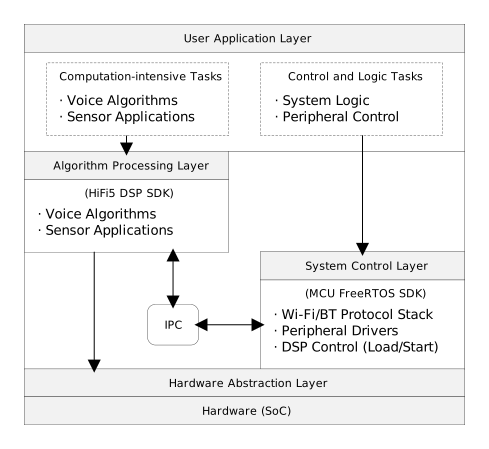
Description of system layers:
Architecture Layer |
Responsible Modules |
Function Description |
|---|---|---|
Application Layer |
DSP Core + MCU Core |
Responsible for compute-intensive tasks such as voice algorithms and sensor applications, as well as control tasks such as peripheral control and system logic |
Algorithm Processing Layer |
DSP Core (HiFi 5) |
Responsible for compute-intensive tasks such as AI algorithms, audio processing, and data fusion. Does not directly access sensors or peripherals. |
Inter-Process Communication Layer |
IPC (Inter-Process Communication) |
Data transfer and control communication between DSP and MCU |
System Control Layer |
MCU Core |
Responsible for Boot, Wi-Fi/Bluetooth protocol stacks, peripheral drivers, and audio recording/playback. |
Hardware Abstraction Layer |
HAL & Drivers |
Unified hardware access interface |
Hardware Layer |
SoC |
Actual chip hardware |
DSP Dependencies on MCU:
Dependency Type |
Description |
MCU Role |
|---|---|---|
Boot Dependency |
DSP has no bootstrap capability and cannot start independently |
MCU loads DSP firmware into memory and triggers startup during system boot |
Hardware Resource Sharing |
Peripheral clock speeds are relatively slow; it is not recommended for DSP to directly access all hardware peripherals |
MCU provides driver services, DSP calls via IPC |
Memory Management |
Memory regions used by DSP need to be pre-configured |
MCU completes memory configuration and allocation during Boot phase |
Clock and Power |
DSP requires independent clock domain management |
MCU responsible for DSP clock enable and power management |
DSP SDK Focuses on Algorithm Processing:
DSP Core: Cadence HiFi 5 high-performance audio/voice DSP processor
Algorithm Libraries: AIVoice, TFLite Micro, Neural Network Library
Driver Support: iDMA, GDMA, and other dedicated accelerator drivers
Development Tools: Xplorer IDE, debugging plugins, ISS simulator
MCU SDK Provides Complete System Functions:
Wireless Connectivity: Wi-Fi and Bluetooth protocol stacks, providing network communication capabilities
Peripheral Drivers: UART, I2C, SPI, GPIO, Timer, etc., which DSP can indirectly call via IPC
Security Functions: Secure Boot, TrustZone, encryption engines, etc.
DSP Management: DSP firmware loading, startup, monitoring
Note
For detailed content about MCU SDK, please refer to: MCU SDK User Guide .
DSP SDK Composition Structure
This section introduces the directory structure of DSP SDK and the functional positioning of each component.
DSP SDK Overall Structure:
SDK
├── bsp                   Peripheral drivers (IPC, GDMA, GPIO, Timer, OTP, etc.)
├── configurations        Build configuration packages for Windows and Linux platforms
├── example               Usage examples for GDMA, iDMA, etc.
├── lib                   Library files for FreeRTOS, IPC, HiFi 5, etc.
└── project               DSP project workspace
Note
For advanced features such as AIVoice and TFLite Micro, they are hosted and maintained in separate repositories:
Project Workspace
The project directory is the workspace for Xplorer IDE, containing main program entry, linker scripts, project configuration files, etc.:
project
 ├── auto_build             Linux command-line build scripts and intermediate files
 ├── image                  Firmware and disassembly files generated by compilation
 ├── img_utility            Post-processing scripts, LSP modification scripts
 ├── project_dsp            DSP project files (main function, MPU configuration, etc.)
 └── RTK_LSP                Linker Scripts
Example Samples
The example directory contains usage methods for basic peripherals. Examples for advanced applications such as AIVoice and TFLM are located in their respective repositories.
For compilation methods and compilation mechanism descriptions of examples, please refer to:
Example Compilation
Example Name |
Function Type |
Introduction |
|---|---|---|
example_gdma |
DMA Operation |
Demonstrates single-block and multi-block transfer modes of GDMA |
example_idma |
DMA Operation |
Demonstrates iDMA transferring data from PSRAM to DTCM |
example_idma_nn |
Algorithm Acceleration |
Demonstrates iDMA ping-pong strategy for accelerating neural network computation |
Library Files
The lib directory contains component libraries and algorithm libraries required for DSP development, providing compiled versions for different ABIs (Call0/Window) and toolchains, including aivoice, ipc, freertos, HiFi 5, tflite_micro, xa_nnlib, etc.
For detailed descriptions and usage methods of library files, please refer to:
DSP Libraries
Version Compatibility
DSP SDK and MCU SDK have version dependencies. Since the two SDKs are maintained independently and involve tight collaboration of heterogeneous multi-core architecture, using incompatible version combinations may cause issues.
Cadence Official Documentation
Cadence provides complete HiFi 5 DSP official documentation, including configuration information, user manuals, compiler/linker manuals, simulation and debugging manuals, etc. After installing the Xplorer toolchain, the documentation is located at the following paths:
DSP usage instructions:
C:\usr\xtensa\XtDevTools\downloads\RI-2021.8\docs
DSP architecture documentation (Call0 ABI):
C:\usr\xtensa\XtDevTools\install\builds\RI-2021.8-win32\HIFI5_PROD_1123_asic_UPG\index.html
DSP architecture documentation (Window ABI):
C:\usr\xtensa\XtDevTools\install\builds\RI-2021.8-win32\HIFI5_PROD_1123_asic_wUPG\index.html
DSP usage instructions:
/opt/xtensa/XtDevTools/downloads/RI-2021.8/docs
DSP architecture documentation (Call0 ABI):
/opt/xtensa/XtDevTools/install/builds/RI-2021.8-linux/HIFI5_PROD_1123_asic_UPG/index.html
DSP architecture documentation (Window ABI):
/opt/xtensa/XtDevTools/install/builds/RI-2021.8-linux/HIFI5_PROD_1123_asic_wUPG/index.html
In the docs directory mentioned above, the following documents are most commonly used during development:
Application Scenario |
Document Name |
Description |
|---|---|---|
Debugging Related |
|
Xtensa Debugging Guide |
Debugging Related |
|
GDB Debugging Tool User Manual |
ISS Simulation |
|
Instruction Set Simulator Usage |
Performance Analysis |
|
Profile Result Analysis Tool User Guide |
Memory Layout |
|
Linker Script and Memory Layout Reference Manual |
iDMA Usage |
|
The Integrated DMA Library API |
Exception Analysis |
|
Exception Causes |
Note
When encountering Crash Dump and needing to analyze exception causes, please refer to Table-94 in isa_rm.pdf.