DSP Memory
DSP Memory Architecture
HiFi 5 DSP memory is divided into two regions: on-chip and off-chip.
DSP On-chip Memory (DSP exclusive)
ICache
DCache
DTCM
DSP Off-chip Memory (shared with KM4, KR4)
SRAM
PSRAM
These memories exhibit significant differences in access speed and capacity.
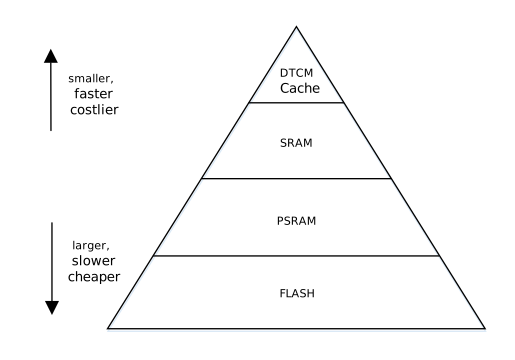
In terms of access performance:
DTCM and DCache provide optimal real-time performance, running at the same frequency as the DSP, enabling single-cycle data access;
SRAM provides secondary performance at 240MHz frequency with 64-bit width;
Although PSRAM is rated at 250MHz frequency, it has the lowest actual bandwidth due to its 16-bit physical width (8-bit DDR).
In terms of capacity configuration, there is an inverse relationship:
PSRAM provides up to 16MB of expandable space (specific capacity depends on the chip model). By default, the DSP runs in PSRAM, occupying the PSRAM space remaining after KM4 and KR4, so it can obtain a larger heap;
SRAM has a total capacity of 512KB, shared by KM4, KR4, and DSP. Under the default layout, the DSP only places frequently accessed code/data into SRAM (the
sram_dspsegment) for acceleration. The size of each segment is determined by the MCU-side layout configuration (see the DSP Memory Layout section below for details);DTCM and DCache serve as dedicated high-speed storage with the smallest capacity but lowest latency. The DTCM consists of DRAM0 and DRAM1, two physically separate 128KB banks.
DSP Memory Access Speed
Source |
Target |
Memory Access Speed (MB/s) |
Transfer Method |
|---|---|---|---|
SRAM |
DTCM |
1899 |
iDMA |
SRAM |
DCache |
1791 |
memcpy |
PSRAM |
DTCM |
430 |
iDMA |
PSRAM |
DCache |
425 |
memcpy |
Note
Experimental conditions: DSP 500MHz, SRAM 240MHz, PSRAM 250MHz.
Under different experimental conditions, memory access speeds may vary. The data in the table represents the measured maximum values.
DSP Memory Access Methods
Since memory access speed affects DSP computing performance and can even become a bottleneck, algorithms running on the DSP should prioritize using DTCM and SRAM, then PSRAM.
There are two ways to place data in fast memory:
Static placement at link time: use a section attribute to pin a variable or function to a specific memory (for example
.dram0.dataor.sram_dsp.data). The address is fixed at link time, which suits resident data. See DSP Memory Layout below.Dynamic allocation at run time: use the type-selected heap API to request a buffer from a specific memory. This suits cases where the size or the number of buffers is only known at run time. See Allocating from a Specific Memory below.
In practical applications, you can choose different data storage locations based on the algorithm model size. For example:
If the model is smaller than 256KB, after program startup, you can preload all data into DTCM and keep it resident.
If the model is very large, you can transfer data between PSRAM and DTCM.
There are two ways to actively transfer data from PSRAM to DTCM:
memcpy
iDMA
Compared to memcpy, the advantage of iDMA is that it can free up CPU computing power. During iDMA transfer, the DSP can continue executing other tasks. However, iDMA does not have a significant advantage in PSRAM access speed.
When transferring large data blocks (64KB/128KB), iDMA is slightly faster.
When transferring small data blocks (8KB/16KB/32KB), memcpy is actually faster.
Allocating from a Specific Memory
The default heap behavior of the DSP is unchanged: malloc / calloc / realloc / free still allocate from the default heap. The default heap resides in PSRAM (on chips without PSRAM, at the tail of SRAM).
On top of that, a set of type-selected heap APIs is provided to allocate from one specific memory. The header file is bsp/include/dsp_heap_types.h.
typedef enum {
    TYPE_DTCM0 = 0,  /* DRAM0, DSP exclusive, non-cacheable */
    TYPE_DTCM1,      /* DRAM1, DSP exclusive, non-cacheable */
    TYPE_SRAM        /* SRAM, cacheable writeback           */
} MALLOC_TYPES;

void *rtos_heap_types_malloc (uint32_t size, MALLOC_TYPES type);
void *rtos_heap_types_zmalloc(uint32_t size, MALLOC_TYPES type);   /* zeroed */
void *rtos_heap_types_calloc (uint32_t num, uint32_t size, MALLOC_TYPES type);
void *rtos_heap_types_realloc(void *pbuf, uint32_t size, MALLOC_TYPES type);
void  rtos_heap_types_free   (void *pbuf);   /* no type argument */
Example: place a filter scratch buffer in DTCM0, and fall back to the default heap on failure.
#include "dsp_heap_types.h"

int16_t *buf = rtos_heap_types_malloc(4096, TYPE_DTCM0);
if (buf == NULL) {
    buf = malloc(4096);      /* the caller decides whether to fall back; the API never does */
}
/* ... */
rtos_heap_types_free(buf);   /* works for buffers from either source */
Note the following when using these APIs:
A failed allocation returns NULL instead of falling back to another memory. A caller asks for DTCM because it wants DTCM latency; silently returning PSRAM would make the resulting performance problem hard to find. Whether to fall back is the caller’s decision.
Freeing does not require a type. Ownership is resolved from the address, so a default-heap pointer (including one obtained from plain
malloc) is also freed correctly byrtos_heap_types_free.The returned buffer is always 16-byte aligned, so HiFi5 wide vector accesses on it are legal.
Task context only, the same restriction as
malloc/free. Do not call from an interrupt.Cache maintenance is the caller’s responsibility. DTCM is non-cacheable; SRAM and PSRAM are writeback. If a buffer is shared with KM4/KR4 or with a DMA engine, call
xthal_dcache_region_writeback_inv()yourself.Query interfaces such as
rtos_heap_types_get_free_size(),rtos_heap_types_get_largest_free_block()andrtos_heap_types_get_min_ever_free_size()are also available for sizing a memory budget;dsp_heap_types_dump()prints the current state of every memory.
Range of Each Memory Pool
Pool bounds come from the LSP segment symbols (_memmap_seg_<seg>_end .. _memmap_seg_<seg>_max), that is, the tail of the segment that is not occupied by .data / .bss. A pool therefore never overlaps statically placed data, no matter how the LSP is regenerated. Conversely, the more data you statically place in DTCM, the less DTCM remains available for dynamic allocation.
Type |
Source segment |
Description |
|---|---|---|
|
Tail of |
Fastest, DSP exclusive, non-cacheable |
|
Tail of |
Same as above, physically a separate 128KB bank |
|
Tail of |
Second fastest, bus shared with KM4/KR4; behavior varies with the LSP, see below |
Note
The behavior of TYPE_SRAM depends on the active LSP:
RTK_LSP/RTK_LSP_XIP(default heap in PSRAM): allocates from a dedicated SRAM pool that is isolated from the default heap. The pool occupies the upper 256KB of SRAM (from0x20040040up toSRAM_END); the lower part is left for the link-time.sram_dsp.*sections.RTK_LSP_SRAM(chips without PSRAM, where the default heap itself is in SRAM): creating another SRAM pool here would overlap itself, soTYPE_SRAMforwards directly to the default heap, taking the same path asmalloc. Usedsp_heap_types_sram_is_alias()to determine which mode is active at run time.
In both cases TYPE_SRAM returns SRAM; the difference is whether it shares space with the default heap. One extra caution in forwarding mode: exhausting the default heap triggers an assert rather than returning NULL, so in that mode TYPE_SRAM no longer guarantees “returns NULL on failure”.
iDMA Double Buffer Data Transfer Example
For details on using iDMA, refer to Xtensa documentation.
This example demonstrates using double buffers to transfer data from PSRAM to DTCM, achieving acceleration through simultaneous transfer and computation.
Pseudo Code
 1#define ALIGN(x) __attribute__((aligned(x)))
 2#define DRAM0 __attribute__((section(".dram0.data")))
 3#define DRAM1 __attribute__((section(".dram1.data")))
 4
 5int8_t ALIGN(16) DRAM0 dst_ping[USER_BUFFER_SIZE];
 6int8_t ALIGN(16) DRAM1 dst_pong[USER_BUFFER_SIZE];
 7
 8#define NUM_DESCRIPTORS 2
 9IDMA_BUFFER_DEFINE(dmaBuffer, NUM_DESCRIPTORS, IDMA_1D_DESC);
10
11void idma_pingpong_buffers_example(void) {
12    idma_init(0, MAX_BLOCK_16, 16, TICK_CYCLES_1, 0, NULL);
13    idma_init_loop(dmaBuffer, IDMA_1D_DESC, NUM_DESCRIPTORS, NULL, NULL);
14
15    // prepare the first data
16    idma_copy_desc(dst_ping, ...);
17
18    // wait for the first idma finish
19    while (idma_buffer_status() > 0) {}
20
21                                            // prepare the second data
22                                            idma_copy_desc(dst_pong, src, size, 0);
23
24    // do the first process
25    user_process_1(dst_ping,....)
26
27                                            // wait for the second idma finish
28                                            while (idma_buffer_status() > 0) {}
29
30    // prepare the third data
31    idma_copy_desc(dst_ping, ...);
32
33                                            // do the second process
34                                            user_process_2(dst_pong,....)
35
36    // wait for the third idma finish
37    while (idma_buffer_status() > 0) {}
38                                            // prepare the fourth data
39                                            idma_copy_desc(dst_pong, src, size, 0);
40    // do the third process
41    user_process_3(dst_ping,....)
42                                            // wait for the fourth idma finish
43                                            while (idma_buffer_status() > 0) {}
44    // prepare the fifth data
45    idma_copy_desc(dst_ping, ...);
46                                            // do the fourth process
47                                            user_process_4(dst_pong,....)
48    ......
49}
The code consists of the following parts:
Define iDMA buffers
#define NUM_DESCRIPTORS 2
IDMA_BUFFER_DEFINE(dmaBuffer, NUM_DESCRIPTORS, IDMA_1D_DESC);
Initialize iDMA
idma_init(0, MAX_BLOCK_16, 16, TICK_CYCLES_1, 0, NULL);
idma_init_loop(dmaBuffer, IDMA_1D_DESC, NUM_DESCRIPTORS, NULL, NULL);
Define two data buffers located on DTCM
#define ALIGN(x) __attribute__((aligned(x)))
#define DRAM0 __attribute__((section(".dram0.data")))
#define DRAM1 __attribute__((section(".dram1.data")))

int8_t ALIGN(16) DRAM0 dst_ping[USER_BUFFER_SIZE];
int8_t ALIGN(16) DRAM1 dst_pong[USER_BUFFER_SIZE];
Nth transfer, update descriptor and schedule
idma_copy_desc(dst_X, src, size, 0);
while (idma_buffer_status() > 0) {}
user_process_N(dst_X,....)
In the pseudo code, for ease of understanding, the sequentially executed code is divided into two columns:
The left side shows odd-numbered transfers (1, 3, 5, …) and computations, using the ping data buffer.
The right side shows even-numbered transfers (2, 4, 6, …) and computations, using the pong data buffer.
The Nth transfer and computation are interleaved with the Nth and N+1th operations. While transferring the Nth data, the N-1th data is being computed, thereby achieving the goal of simultaneous transfer and computation.
Note
When using iDMA, a small amount of iDMA descriptor data (approximately several hundred bytes) needs to be placed in DTCM, so the DTCM space available to users is slightly less than 256KB.
DSP Memory Layout
Warning
After changing any Kconfig that affects the memory layout, you must regenerate the DSP’s LSP with the Python script and rebuild the DSP.
This is not limited to CONFIG_DSP_* : the location of IMG1 ( CONFIG_IMG1_SRAM / CONFIG_IMG1_FLASH ),
TrustZone ( CONFIG_TRUSTZONE , CONFIG_IMG3_SRAM , CONFIG_TZ_S_SIZE ),
CONFIG_DATA_HEAP_SRAM / CONFIG_DATA_HEAP_PSRAM , and CONFIG_SRAM_END
all move the base address of the DSP segment. Reusing an outdated firmware leaves the DSP linked against a wrong base address, which causes an exception or wastes memory.
It is recommended to use the ameba-dsp-development Agent Skill to help adjust and check LSP issues.
DSP Default Layout
DSP projects use the Linker Support Package (LSP) to describe memory layout. The LSP specifies the object files used to generate executable files and their memory distribution, providing configuration convenience for linkers in specific target environments. For details, refer to Xtensa documentation.
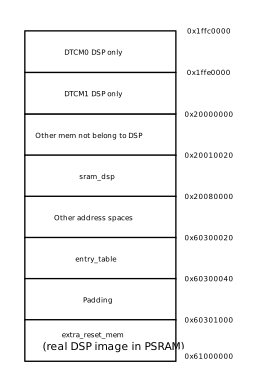
The default layout diagram is shown below:
An example of LSP as seen in Xplorer:
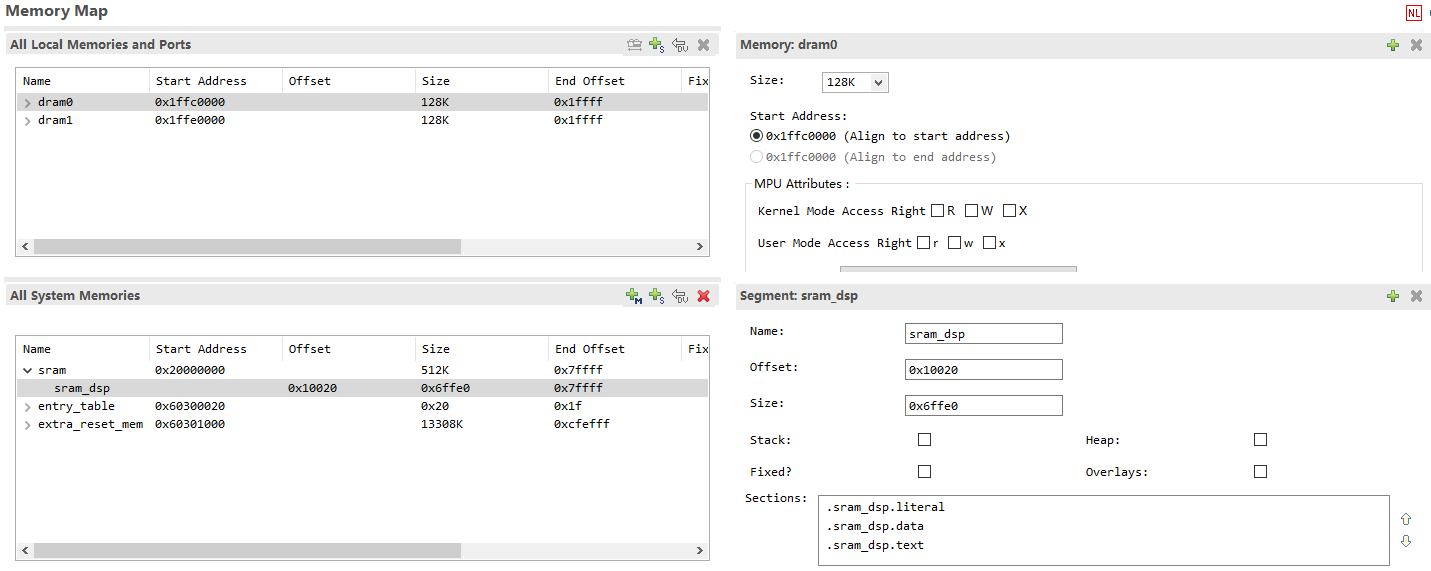
DSP can use sram_dsp, entry_table, and extra_reset_mem as system memory, and DRAM0/1 as local data memory. The Reset vector is stored in entry_table. DRAM0/1 can only store data.
Call0 ABI: Code and data can be placed in both sram_dsp and extra_reset_mem.
Window ABI: Code can only be placed in extra_reset_mem, while data can be placed in both sram_dsp and extra_reset_mem.
Placing Code/Data in SRAM
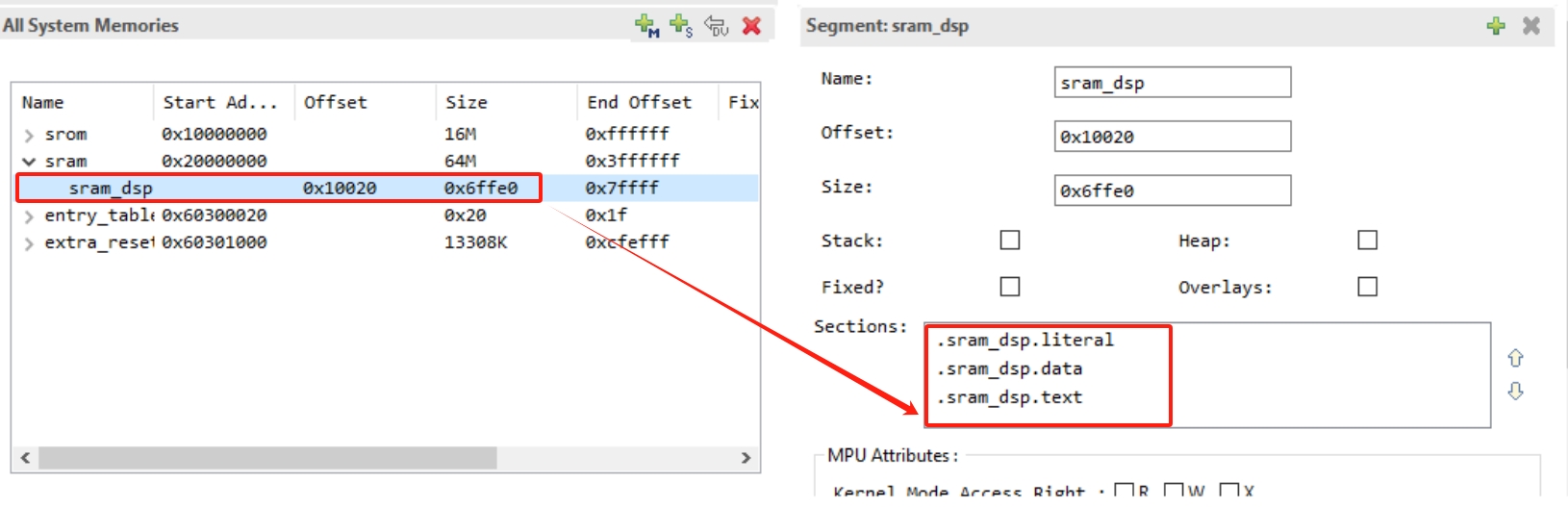
The bandwidth and latency of SRAM are significantly better than those of PSRAM. The default LSP (RTK_LSP) includes a segment named sram_dsp. Placing code or data in SRAM helps improve computation speed.
As shown in the figure below, RTK_LSP defines three segment memory regions in SRAM by default: .sram_dsp.text, .sram_dsp.data, and .sram_dsp.literal.
To place a single function in SRAM, declare and define it as follows:
extern void place_into_sram()__attribute__ ((section(".sram_dsp.text")));
void place_into_sram(){
       //detailed implentation
   }
To place data (such as an array) in SRAM, do this:
__attribute__ ((section(".sram_dsp.data"))) int array_in_psram[100];
To place all functions in a source file (such as
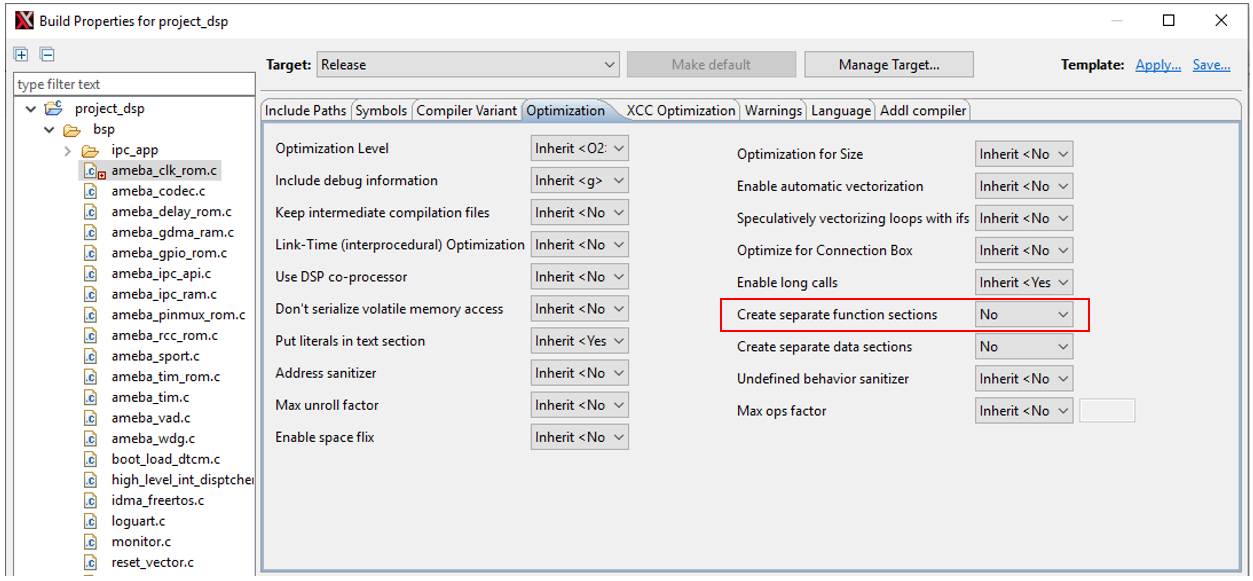
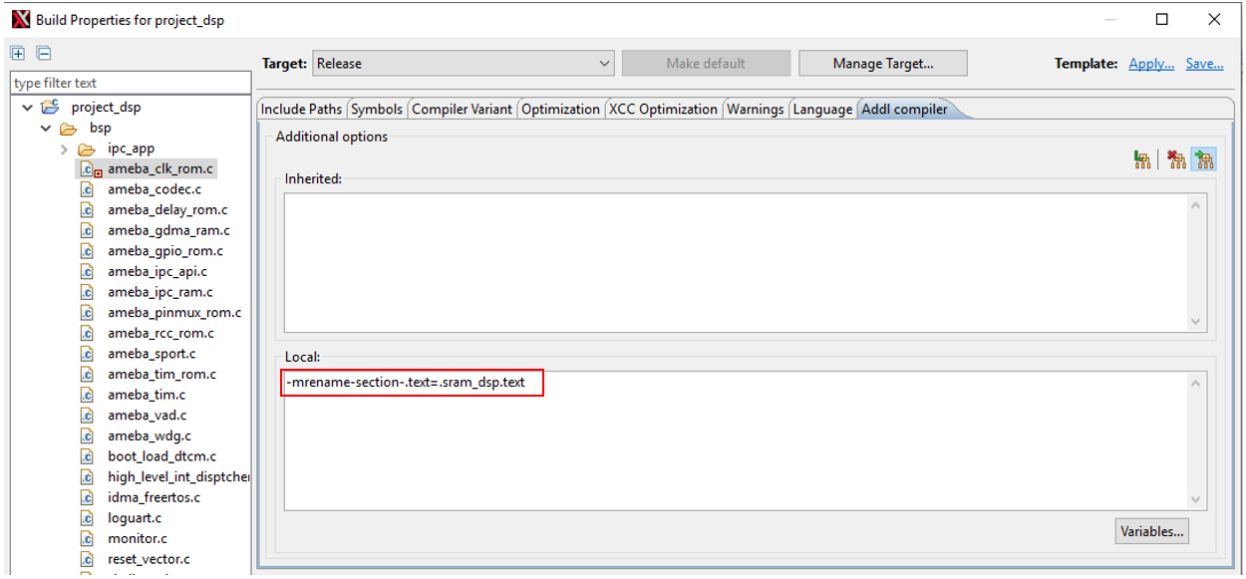
ameba_clk_rom.c) in SRAM:Right-click the file and select
Build Properties, then set the relevant options to No in the pop-up window.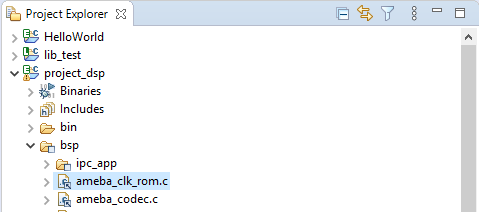
Then switch to the Addl compiler tab and add custom compilation parameters as shown below:
Adjusting Memory Layout
MCU and DSP share PSRAM and SRAM, while DTCM is exclusively used by DSP.
The MCU-side menuconfig configuration ( .config ) and ameba_layout.ld are the single source of truth for the memory layout, and the DSP’s LSP must stay consistent with them.
Therefore, adjusting the layout follows a fixed workflow: first modify the layout on the MCU side, then synchronize the DSP’s LSP, and finally rebuild both the MCU and DSP projects.
There is no need to manually edit the address macros in ameba_layout.ld , nor to manually run lsp_modify.py . The layout is driven by Kconfig, and the DSP’s LSP is automatically generated by the synchronization script.
By default, the DSP runs in PSRAM. From low to high addresses, PSRAM is arranged as TrustZone → KR4 → KM4 → DSP , and the DSP segment automatically extends upward to the top of PSRAM, with a default start address of 0x60300000 . The space left for the DSP can be changed by adjusting the size of the KM4 segment:
Kconfig |
Meaning |
Default (KB) |
|---|---|---|
|
KR4(NP) segment, immediately following TZ; adjusting it does not move the base address of KM4/DSP |
1536 |
|
KM4(AP) segment (including TZ); reducing it leaves more space for the DSP |
1536 |
DSP segment size = PSRAM top − (TZ + KR4 + KM4).
Operating steps:
Modify the layout on the MCU side : Enter the MCU SDK menuconfig and adjust the above configuration in
CONFIG Link Option. For example, reducing the KM4 segment leaves more PSRAM for the DSP.Synchronize the DSP’s LSP : Run the synchronization script in the MCU SDK root directory. It reads the latest
.configandameba_layout.ld, regenerates the matching DSP LSP (RTK_LSP), and synchronizes the MPU table:python3 tools/scripts/dsp_layout_sync.pyNote
Generating the LSP does not require pre-building the entire MCU firmware; it only requires
.configto be up to date (it takes effect as soon as the Kconfig value is changed).Rebuild both projects : Neither the DSP nor the MCU can be omitted. First rebuild the DSP to generate the new
dsp.bin/dsp_all.bin; then rebuild the MCU and package it. During MCU packaging, the load address of the DSP bin is verified against the current layout, and a mismatch causes a direct error (indicating that the DSP bin is outdated and the DSP needs to be rebuilt).
Note
Before using the synchronization script, ensure that the Xtensa toolchain’s bin directory has been added to the system
PATH, otherwise the executable files cannot be found.If you need to switch the LSP used on the DSP side (for example, a chip without PSRAM switching to the SRAM version
RTK_LSP_SRAM), please select the corresponding LSP in Xplorer through the project properties (Linker settings).If you have previously modified other MPU properties, please make the same modifications to the
mpu_table.cnewly generated by the synchronization script, and confirm that it has been added to the compilation project.