引脚复用和控制
引脚复用
概述
因为引脚资源有限,为了提升设计的灵活性,本芯片提供了引脚复用(Pinmux)功能。各内部 IP 模块的信号均可通过配置灵活映射至指定引脚。
具体引脚与 IP 电路的对应关系,请查阅 引脚复用表。
查阅引脚复用表可获得以下关键信息:
不同料号下的引脚分布
各引脚支持连接的片上外设信号
上电锁存引脚(Trap Pin)的分配
J-Link 调试接口(SWD)的默认引脚分配
固件下载、命令交互及日志功能所用串口(LOGUART)的默认引脚分配
各 I/O ports 的供电信息等
功能复用
使用方法
开发者可以通过调用编程接口 Pinmux_Config(PinName, PinFuncID) 将片上外设信号连接到指定引脚。
参数说明:
- PinName:
引脚标识符
- PinFuncID:
片上外设控制器的指定信号 ID
根据所设置的 Function ID,引脚既可将芯片内部的信号输出到外部设备,也可接收外部设备的信号输入到芯片内部模块。
具体 Function ID 与引脚的对应关系,请参考 引脚复用表。
功能组类型
专用引脚功能组:特点:特定外设信号只能映射到对应的专用引脚。虽然可配置的功能数量相对有限,但这种专用化设计能够充分发挥各 IP 模块的性能,满足外设信号质量和速率性能要求。
功能组:专用引脚通常按"功能组"进行组织,每个功能组包含了一组相关的引脚。
配置原则:需要选择同一功能组内的引脚组合以达到最佳性能。
全矩阵引脚功能组:特点:外设信号可灵活映射到多个引脚,提供了更大的配置自由度,但部分 IP 模块的性能(如最大传输速率)相对受限。
Function ID
Function ID 0~{{IC_PARAM_FUNCID_DEDICATE_END}}
当 Function ID 为
0~{{IC_PARAM_FUNCID_DEDICATE_END}}时,需使用专用引脚。备注
例如:Function ID {{IC_PARAM_FUNCID_DEDICATE_SPI0}} 与 Function ID {{IC_PARAM_FUNCID_FULL_MATRIX_SPI1_CLK}}~{{IC_PARAM_FUNCID_FULL_MATRIX_SPI1_CS}} 均为 SPI 功能。
Function ID {{IC_PARAM_FUNCID_DEDICATE_SPI0}} 为专用引脚,因此 SPI 功能的最大速率可达 50 MHz(主机模式);
Function ID {{IC_PARAM_FUNCID_FULL_MATRIX_SPI1_CLK}}~{{IC_PARAM_FUNCID_FULL_MATRIX_SPI1_CS}} 为对应的全矩阵引脚,能达到的最大速率仅为 25 MHz(主机模式)。
以
PB30为例:如果将其 Function ID 配置为1,UART1 的UART1_RXD信号将通过引脚复用直接连接到该引脚。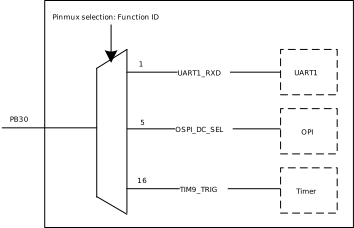
PB30 引脚复用连接示意图
Function ID {{IC_PARAM_FUNCID_FULL_MATRIX_START}}~{{IC_PARAM_FUNCID_FULL_MATRIX_END}}
当 Function ID 为
{{IC_PARAM_FUNCID_FULL_MATRIX_START}}~{{IC_PARAM_FUNCID_FULL_MATRIX_END}}时,需使用全矩阵引脚。以
PA27为例:将
PA27的 Function ID 配置为19时,可以将 UART0 的UART0_TXD信号连接到PA27;将
PA27的 Function ID 配置为20时,则可以将 UART0 的UART0_RXD信号连接到该引脚。
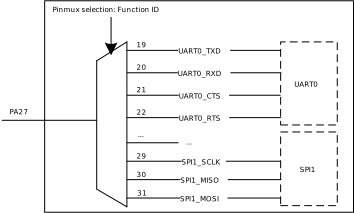
PA27 引脚复用连接示意图
使用方法
开发者可以通过调用编程接口 Pinmux_Config(PinName, PinFuncID) 将片上外设信号连接到指定引脚。
参数说明:
- PinName:
引脚标识符
- PinFuncID:
片上外设控制器的指定信号 ID
根据所设置的 Function ID,引脚既可将芯片内部的信号输出到外部设备,也可接收外部设备的信号输入到芯片内部模块。
具体 Function ID 与引脚的对应关系,请参考 引脚复用表。
功能组类型
专用引脚功能组:特点:特定外设信号只能映射到对应的专用引脚。虽然可配置的功能数量相对有限,但这种专用化设计能够充分发挥各 IP 模块的性能,满足外设信号质量和速率性能要求。
功能组:专用引脚通常按"功能组"进行组织,每个功能组包含了一组相关的引脚。
配置原则:需要选择同一功能组内的引脚组合以达到最佳性能。
全矩阵引脚功能组:特点:外设信号可灵活映射到多个引脚,提供了更大的配置自由度,但部分 IP 模块的性能(如最大传输速率)相对受限。
Function ID
Function ID 0~{{IC_PARAM_FUNCID_DEDICATE_END}}
当 Function ID 为
0~{{IC_PARAM_FUNCID_DEDICATE_END}}时,需使用专用引脚。备注
例如:Function ID {{IC_PARAM_FUNCID_DEDICATE_SPI0}} 与 Function ID {{IC_PARAM_FUNCID_FULL_MATRIX_SPI1_CLK}}~{{IC_PARAM_FUNCID_FULL_MATRIX_SPI1_CS}} 均为 SPI 功能。
Function ID {{IC_PARAM_FUNCID_DEDICATE_SPI0}} 为专用引脚,因此 SPI 功能的最大速率可达 50 MHz(主机模式);
Function ID {{IC_PARAM_FUNCID_FULL_MATRIX_SPI1_CLK}}~{{IC_PARAM_FUNCID_FULL_MATRIX_SPI1_CS}} 为对应的全矩阵引脚,能达到的最大速率仅为 25 MHz(主机模式)。
以
PB5为例:如果将其 Function ID 配置为6,SPI 的SPI1_CS信号将通过引脚复用直接连接到该引脚。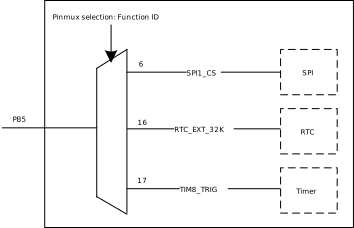
PB5 引脚复用连接示意图
Function ID {{IC_PARAM_FUNCID_FULL_MATRIX_START}}~{{IC_PARAM_FUNCID_FULL_MATRIX_END}}
当 Function ID 为
{{IC_PARAM_FUNCID_FULL_MATRIX_START}}~{{IC_PARAM_FUNCID_FULL_MATRIX_END}}时,需使用全矩阵引脚。以
PA11为例:将
PA11的 Function ID 配置为20时,可以将 UART0 的UART0_TXD信号连接到PA11;将
PA11的 Function ID 配置为21时,则可以将 UART0 的UART0_RXD信号连接到该引脚。
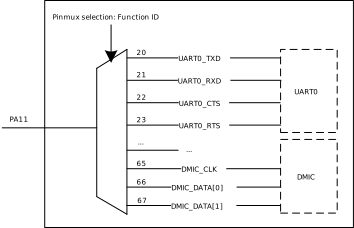
PA11 引脚复用连接示意图
Audio 功能
PB11~PB19 默认用作 Audio 功能,使用时请注意:
在引脚资源充足的情况下,不建议将其复用为数字功能,以避免对 Audio 信号造成干扰。
若确需同时用于 Audio 与数字功能,需合理规划 PCB 布局,确保数字信号走线与 Audio 信号走线保持足够间距,以降低相互干扰的风险。
使用方法
开发者可以通过调用编程接口 Pinmux_Config(PinName, PinFuncID) 将片上外设信号连接到指定引脚。
参数说明:
- PinName:
引脚标识符
- PinFuncID:
片上外设控制器的指定信号 ID
根据所设置的 Function ID,引脚既可将芯片内部的信号输出到外部设备,也可接收外部设备的信号输入到芯片内部模块。
具体 Function ID 与引脚的对应关系,请参考 引脚复用表。
功能组类型
专用引脚功能组:特点:特定外设信号只能映射到对应的专用引脚。虽然可配置的功能数量相对有限,但这种专用化设计能够充分发挥各 IP 模块的性能,满足外设信号质量和速率性能要求。
功能组:专用引脚通常按"功能组"进行组织,每个功能组包含了一组相关的引脚。
配置原则:需要选择同一功能组内的引脚组合以达到最佳性能。
全矩阵引脚功能组:特点:外设信号可灵活映射到多个引脚,提供了更大的配置自由度,但部分 IP 模块的性能(如最大传输速率)相对受限。
Function ID
Function ID 0~{{IC_PARAM_FUNCID_DEDICATE_END}}
当 Function ID 为
0~{{IC_PARAM_FUNCID_DEDICATE_END}}时,需使用专用引脚。备注
例如:Function ID {{IC_PARAM_FUNCID_DEDICATE_SPI0}} 与 Function ID {{IC_PARAM_FUNCID_FULL_MATRIX_SPI1_CLK}}~{{IC_PARAM_FUNCID_FULL_MATRIX_SPI1_CS}} 均为 SPI 功能。
Function ID {{IC_PARAM_FUNCID_DEDICATE_SPI0}} 为专用引脚,因此 SPI 功能的最大速率可达 50 MHz(主机模式);
Function ID {{IC_PARAM_FUNCID_FULL_MATRIX_SPI1_CLK}}~{{IC_PARAM_FUNCID_FULL_MATRIX_SPI1_CS}} 为对应的全矩阵引脚,能达到的最大速率仅为 25 MHz(主机模式)。
以
PB5为例:如果将其 Function ID 配置为6,SPI 的SPI1_CS信号将通过引脚复用直接连接到该引脚。
PB5 引脚复用连接示意图
Function ID {{IC_PARAM_FUNCID_FULL_MATRIX_START}}~{{IC_PARAM_FUNCID_FULL_MATRIX_END}}
当 Function ID 为
{{IC_PARAM_FUNCID_FULL_MATRIX_START}}~{{IC_PARAM_FUNCID_FULL_MATRIX_END}}时,需使用全矩阵引脚。以
PA11为例:将
PA11的 Function ID 配置为20时,可以将 UART0 的UART0_TXD信号连接到PA11;将
PA11的 Function ID 配置为21时,则可以将 UART0 的UART0_RXD信号连接到该引脚。
PA11 引脚复用连接示意图
Audio 功能
PB11~PB19 默认用作 Audio 功能,使用时请注意:
在引脚资源充足的情况下,不建议将其复用为数字功能,以避免对 Audio 信号造成干扰。
若确需同时用于 Audio 与数字功能,需合理规划 PCB 布局,确保数字信号走线与 Audio 信号走线保持足够间距,以降低相互干扰的风险。
使用方法
开发者可以通过调用编程接口 Pinmux_Config(PinName, PinFuncID) 将片上外设信号连接到指定引脚。
参数说明:
- PinName:
引脚标识符
- PinFuncID:
片上外设控制器的指定信号 ID
根据所设置的 Function ID,引脚既可将芯片内部的信号输出到外部设备,也可接收外部设备的信号输入到芯片内部模块。
具体 Function ID 与引脚的对应关系,请参考 引脚复用表。
功能组类型
专用引脚功能组:特点:特定外设信号只能映射到对应的专用引脚。虽然可配置的功能数量相对有限,但这种专用化设计能够充分发挥各 IP 模块的性能,满足外设信号质量和速率性能要求。
功能组:专用引脚通常按"功能组"进行组织,每个功能组包含了一组相关的引脚。
配置原则:需要选择同一功能组内的引脚组合以达到最佳性能。
全矩阵引脚功能组:特点:外设信号可灵活映射到多个引脚,提供了更大的配置自由度,但部分 IP 模块的性能(如最大传输速率)相对受限。
Function ID
Function ID 0~{{IC_PARAM_FUNCID_DEDICATE_END}}
当 Function ID 为
0~{{IC_PARAM_FUNCID_DEDICATE_END}}时,需使用专用引脚。备注
例如:Function ID {{IC_PARAM_FUNCID_DEDICATE_SPI0}} 与 Function ID {{IC_PARAM_FUNCID_FULL_MATRIX_SPI1_CLK}}~{{IC_PARAM_FUNCID_FULL_MATRIX_SPI1_CS}} 均为 SPI 功能。
Function ID {{IC_PARAM_FUNCID_DEDICATE_SPI0}} 为专用引脚,因此 SPI 功能的最大速率可达 50 MHz(主机模式);
Function ID {{IC_PARAM_FUNCID_FULL_MATRIX_SPI1_CLK}}~{{IC_PARAM_FUNCID_FULL_MATRIX_SPI1_CS}} 为对应的全矩阵引脚,能达到的最大速率仅为 25 MHz(主机模式)。
以
PB5为例:如果将其 Function ID 配置为6,SPI 的SPI1_CS信号将通过引脚复用直接连接到该引脚。
PB5 引脚复用连接示意图
Function ID {{IC_PARAM_FUNCID_FULL_MATRIX_START}}~{{IC_PARAM_FUNCID_FULL_MATRIX_END}}
当 Function ID 为
{{IC_PARAM_FUNCID_FULL_MATRIX_START}}~{{IC_PARAM_FUNCID_FULL_MATRIX_END}}时,需使用全矩阵引脚。以
PA11为例:将
PA11的 Function ID 配置为20时,可以将 UART0 的UART0_TXD信号连接到PA11;将
PA11的 Function ID 配置为21时,则可以将 UART0 的UART0_RXD信号连接到该引脚。
PA11 引脚复用连接示意图
Audio 功能
PB11~PB19 默认用作 Audio 功能,使用时请注意:
在引脚资源充足的情况下,不建议将其复用为数字功能,以避免对 Audio 信号造成干扰。
若确需同时用于 Audio 与数字功能,需合理规划 PCB 布局,确保数字信号走线与 Audio 信号走线保持足够间距,以降低相互干扰的风险。
使用方法
开发者可以通过调用编程接口 Pinmux_Config(PinName, PinFuncID) 将片上外设信号连接到指定引脚。
参数说明:
- PinName:
引脚标识符
- PinFuncID:
片上外设控制器的指定信号 ID
根据所设置的 Function ID,引脚既可将芯片内部的信号输出到外部设备,也可接收外部设备的信号输入到芯片内部模块。
具体 Function ID 与引脚的对应关系,请参考 引脚复用表。
功能组类型
专用引脚功能组:特点:特定外设信号只能映射到对应的专用引脚。虽然可配置的功能数量相对有限,但这种专用化设计能够充分发挥各 IP 模块的性能,满足外设信号质量和速率性能要求。
功能组:专用引脚通常按"功能组"进行组织,每个功能组包含了一组相关的引脚。
配置原则:需要选择同一功能组内的引脚组合以达到最佳性能。
全矩阵引脚功能组:特点:外设信号可灵活映射到多个引脚,提供了更大的配置自由度,但部分 IP 模块的性能(如最大传输速率)相对受限。
Function ID
Function ID 0~{{IC_PARAM_FUNCID_DEDICATE_END}}
当 Function ID 为
0~{{IC_PARAM_FUNCID_DEDICATE_END}}时,需使用专用引脚。备注
例如:Function ID {{IC_PARAM_FUNCID_DEDICATE_SPI0}} 与 Function ID {{IC_PARAM_FUNCID_FULL_MATRIX_SPI1_CLK}}~{{IC_PARAM_FUNCID_FULL_MATRIX_SPI1_CS}} 均为 SPI 功能。
Function ID {{IC_PARAM_FUNCID_DEDICATE_SPI0}} 为专用引脚,因此 SPI 功能的最大速率可达 50 MHz(主机模式);
Function ID {{IC_PARAM_FUNCID_FULL_MATRIX_SPI1_CLK}}~{{IC_PARAM_FUNCID_FULL_MATRIX_SPI1_CS}} 为对应的全矩阵引脚,能达到的最大速率仅为 25 MHz(主机模式)。
以
PB5为例:如果将其 Function ID 配置为6,SPI 的SPI1_CS信号将通过引脚复用直接连接到该引脚。
PB5 引脚复用连接示意图
Function ID {{IC_PARAM_FUNCID_FULL_MATRIX_START}}~{{IC_PARAM_FUNCID_FULL_MATRIX_END}}
当 Function ID 为
{{IC_PARAM_FUNCID_FULL_MATRIX_START}}~{{IC_PARAM_FUNCID_FULL_MATRIX_END}}时,需使用全矩阵引脚。以
PA11为例:将
PA11的 Function ID 配置为20时,可以将 UART0 的UART0_TXD信号连接到PA11;将
PA11的 Function ID 配置为21时,则可以将 UART0 的UART0_RXD信号连接到该引脚。
PA11 引脚复用连接示意图
Audio 功能
PB11~PB19 默认用作 Audio 功能,使用时请注意:
在引脚资源充足的情况下,不建议将其复用为数字功能,以避免对 Audio 信号造成干扰。
若确需同时用于 Audio 与数字功能,需合理规划 PCB 布局,确保数字信号走线与 Audio 信号走线保持足够间距,以降低相互干扰的风险。
使用方法
开发者可以通过调用编程接口 Pinmux_Config(PinName, PinFuncID) 将片上外设信号连接到指定引脚。
参数说明:
- PinName:
引脚标识符
- PinFuncID:
片上外设控制器的指定信号 ID
根据所设置的 Function ID,引脚既可将芯片内部的信号输出到外部设备,也可接收外部设备的信号输入到芯片内部模块。
具体 Function ID 与引脚的对应关系,请参考 引脚复用表。
功能组类型
专用引脚功能组:特点:特定外设信号只能映射到对应的专用引脚。虽然可配置的功能数量相对有限,但这种专用化设计能够充分发挥各 IP 模块的性能,满足外设信号质量和速率性能要求。
功能组:专用引脚通常按"功能组"进行组织,每个功能组包含了一组相关的引脚。
配置原则:需要选择同一功能组内的引脚组合以达到最佳性能。
备注
RTL8730E 不含全矩阵引脚功能组。
Function ID
Function ID 0~{{IC_PARAM_FUNCID_DEDICATE_END}}
以
PA0为例:如果将其 Function ID 配置为1,UART2 的UART2_RXD信号将通过引脚复用直接连接到该引脚。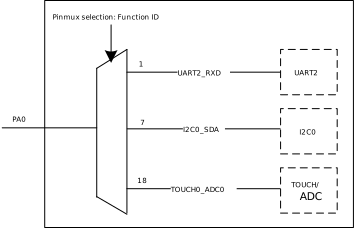
PA0 引脚复用连接示意图
Audio 功能
PA18~PB6 默认用作 Audio 功能,使用时请注意:
在引脚资源充足的情况下,不建议将其复用为数字功能,以避免对 Audio 信号造成干扰。
若确需同时用于 Audio 与数字功能,需合理规划 PCB 布局,确保数字信号走线与 Audio 信号走线保持足够间距,以降低相互干扰的风险。
使用方法
开发者可以通过调用编程接口 Pinmux_Config(PinName, PinFuncID) 将片上外设信号连接到指定引脚。
参数说明:
- PinName:
引脚标识符
- PinFuncID:
片上外设控制器的指定信号 ID
根据所设置的 Function ID,引脚既可将芯片内部的信号输出到外部设备,也可接收外部设备的信号输入到芯片内部模块。
具体 Function ID 与引脚的对应关系,请参考 引脚复用表。
功能组类型
专用引脚功能组:特点:特定外设信号只能映射到对应的专用引脚。虽然可配置的功能数量相对有限,但这种专用化设计能够充分发挥各 IP 模块的性能,满足外设信号质量和速率性能要求。
功能组:专用引脚通常按"功能组"进行组织,每个功能组包含了一组相关的引脚。
配置原则:需要选择同一功能组内的引脚组合以达到最佳性能。
全矩阵引脚功能组:特点:外设信号可灵活映射到多个引脚,提供了更大的配置自由度,但部分 IP 模块的性能(如最大传输速率)相对受限。
Function ID
Function ID 0~{{IC_PARAM_FUNCID_DEDICATE_END}}
当 Function ID 为
0~{{IC_PARAM_FUNCID_DEDICATE_END}}时,需使用专用引脚。备注
例如:Function ID {{IC_PARAM_FUNCID_DEDICATE_SPI0}} 与 Function ID {{IC_PARAM_FUNCID_FULL_MATRIX_SPI1_CLK}}~{{IC_PARAM_FUNCID_FULL_MATRIX_SPI1_CS}} 均为 SPI 功能。
Function ID {{IC_PARAM_FUNCID_DEDICATE_SPI0}} 为专用引脚,因此 SPI 功能的最大速率可达 50 MHz(主机模式);
Function ID {{IC_PARAM_FUNCID_FULL_MATRIX_SPI1_CLK}}~{{IC_PARAM_FUNCID_FULL_MATRIX_SPI1_CS}} 为对应的全矩阵引脚,能达到的最大速率仅为 25 MHz(主机模式)。
以
PB16为例:如果将其 Function ID 配置为10,SPI 的SPI1_CS信号将通过引脚复用直接连接到该引脚。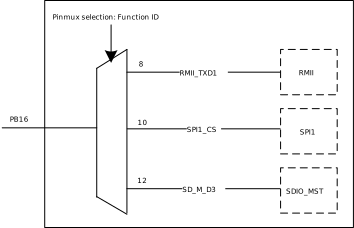
PB16 引脚复用连接示意图
Function ID {{IC_PARAM_FUNCID_FULL_MATRIX_START}}~{{IC_PARAM_FUNCID_FULL_MATRIX_END}}
当 Function ID 为
{{IC_PARAM_FUNCID_FULL_MATRIX_START}}~{{IC_PARAM_FUNCID_FULL_MATRIX_END}}时,需使用全矩阵引脚。以
PB19为例:将
PB19的 Function ID 配置为95时,可以将 UART0 的UART0_TXD信号连接到PB19;将
PB19的 Function ID 配置为96时,则可以将 UART0 的UART0_RXD信号连接到该引脚。
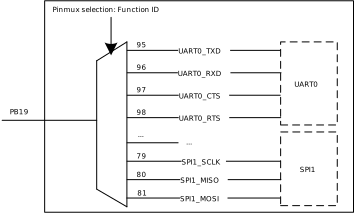
PB19 引脚复用连接示意图
使用方法
开发者可以通过调用编程接口 Pinmux_Config(PinName, PinFuncID) 将片上外设信号连接到指定引脚。
参数说明:
- PinName:
引脚标识符
- PinFuncID:
片上外设控制器的指定信号 ID
根据所设置的 Function ID,引脚既可将芯片内部的信号输出到外部设备,也可接收外部设备的信号输入到芯片内部模块。
具体 Function ID 与引脚的对应关系,请参考 引脚复用表。
功能组类型
专用引脚功能组:特点:特定外设信号只能映射到对应的专用引脚。虽然可配置的功能数量相对有限,但这种专用化设计能够充分发挥各 IP 模块的性能,满足外设信号质量和速率性能要求。
功能组:专用引脚通常按"功能组"进行组织,每个功能组包含了一组相关的引脚。
配置原则:需要选择同一功能组内的引脚组合以达到最佳性能。
全矩阵引脚功能组:特点:外设信号可灵活映射到多个引脚,提供了更大的配置自由度,但部分 IP 模块的性能(如最大传输速率)相对受限。
Function ID
Function ID 0~{{IC_PARAM_FUNCID_DEDICATE_END}}
当 Function ID 为
0~{{IC_PARAM_FUNCID_DEDICATE_END}}时,需使用专用引脚。备注
例如:Function ID {{IC_PARAM_FUNCID_DEDICATE_SPI0}} 与 Function ID {{IC_PARAM_FUNCID_FULL_MATRIX_SPI1_CLK}}~{{IC_PARAM_FUNCID_FULL_MATRIX_SPI1_CS}} 均为 SPI 功能。
Function ID {{IC_PARAM_FUNCID_DEDICATE_SPI0}} 为专用引脚,因此 SPI 功能的最大速率可达 50 MHz(主机模式);
Function ID {{IC_PARAM_FUNCID_FULL_MATRIX_SPI1_CLK}}~{{IC_PARAM_FUNCID_FULL_MATRIX_SPI1_CS}} 为对应的全矩阵引脚,能达到的最大速率仅为 25 MHz(主机模式)。
以
PA9为例:如果将其 Function ID 配置为9,SDIO_DEVICE 的SD_S_CMD信号将通过引脚复用直接连接到该引脚。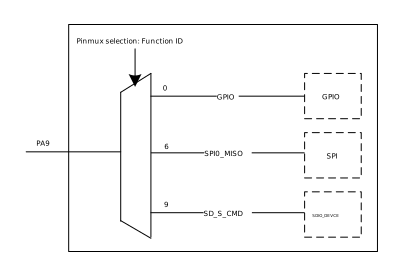
PA9 引脚复用连接示意图
Function ID {{IC_PARAM_FUNCID_FULL_MATRIX_START}}~{{IC_PARAM_FUNCID_FULL_MATRIX_END}}
当 Function ID 为
{{IC_PARAM_FUNCID_FULL_MATRIX_START}}~{{IC_PARAM_FUNCID_FULL_MATRIX_END}}时,需使用全矩阵引脚。以
PA24为例:将
PA24的 Function ID 配置为65时,可以将 UART0 的UART0_TXD信号连接到PA24;将
PA24的 Function ID 配置为66时,则可以将 UART0 的UART0_RXD信号连接到该引脚。
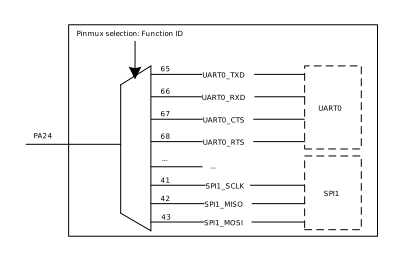
PA24 引脚复用连接示意图
使用方法
开发者可以通过调用编程接口 Pinmux_Config(PinName, PinFuncID) 将片上外设信号连接到指定引脚。
参数说明:
- PinName:
引脚标识符
- PinFuncID:
片上外设控制器的指定信号 ID
根据所设置的 Function ID,引脚既可将芯片内部的信号输出到外部设备,也可接收外部设备的信号输入到芯片内部模块。
具体引脚与 Function ID 的对应关系,请参考 引脚复用表。
Function ID
Function ID 0-15
每个引脚仅能连接到特定 IP 的固定信号。
以
PA0为例:将其 Function ID 配置为0时,ADC0将通过引脚复用直接连接到该引脚。各引脚支持的具体功能分配请参考 引脚复用表。
Trap 引脚
备注
在进行开发前,请务必注意以下引脚复用相关事项,以避免意外行为导致使用问题。
在上电过程中,芯片内部电路会锁存若干引脚的电平状态,并据此决定芯片进入的工作模式。因此请在硬件设计和使用开发板时根据相应芯片的硬件设计指南进行正确的配置,避免芯片工作异常。启动完成后,Trap 引脚与其他引脚无异,可正常配置为其他功能。
引脚名称 |
符号 |
有效电平 |
描述 |
|---|---|---|---|
PB31 |
TM_DIS |
低电平 |
|
PB5 |
UD_DIS |
低电平 |
备注 禁用下载模式受到 OTP 相关栏位控制,当 OTP 禁用 UART 下载后,该引脚上电锁存状态无效。 |
引脚名称 |
符号 |
有效电平 |
描述 |
|---|---|---|---|
PA1 |
TM_DIS |
低电平 |
|
PA20 |
UD_DIS |
低电平 |
备注 禁用下载模式受到 OTP 相关栏位控制,当 OTP 禁用 UART 下载后,该引脚上电锁存状态无效。 |
PA22 |
PSO_SEL |
- |
|
引脚名称 |
符号 |
有效电平 |
描述 |
|---|---|---|---|
PA1 |
TM_DIS |
低电平 |
|
PA20 |
UD_DIS |
低电平 |
备注 禁用下载模式受到 OTP 相关栏位控制,当 OTP 禁用 UART 下载后,该引脚上电锁存状态无效。 |
PA22 |
PSO_SEL |
- |
|
引脚名称 |
符号 |
有效电平 |
描述 |
|---|---|---|---|
PA1 |
TM_DIS |
低电平 |
|
PA20 |
UD_DIS |
低电平 |
备注 禁用下载模式受到 OTP 相关栏位控制,当 OTP 禁用 UART 下载后,该引脚上电锁存状态无效。 |
PA22 |
PSO_SEL |
- |
|
引脚名称 |
符号 |
有效电平 |
描述 |
|---|---|---|---|
PA1 |
TM_DIS |
低电平 |
|
PA20 |
UD_DIS |
低电平 |
备注 禁用下载模式受到 OTP 相关栏位控制,当 OTP 禁用 UART 下载后,该引脚上电锁存状态无效。 |
PA22 |
PSO_SEL |
- |
|
引脚名称 |
符号 |
有效电平 |
描述 |
|---|---|---|---|
PB22 |
TM_DIS |
低电平 |
|
PB24 |
UD_DIS |
低电平 |
备注 当 OTP 禁用 UART 下载后,该引脚上电锁存状态无效。 |
PB21 |
BOOT_SEL |
- |
备注 当 OTP 相关栏位被编程后,优先根据 OTP 的编程状态进行选择。 |
引脚名称 |
符号 |
有效电平 |
描述 |
|---|---|---|---|
PA3 |
TM_DIS |
低电平 |
|
PB20 |
UD_DIS |
低电平 |
备注 禁用下载模式受到 OTP 相关栏位控制,当 OTP 禁用 UART 下载后,该引脚上电锁存状态无效。 |
PB18 |
BOOT_SEL |
- |
备注 BOOT_SEL 会受到 OTP 相关栏位控制,当 OTP 相关栏位被编程后,优先根据 OTP 的编程状态进行选择。 |
引脚名称 |
符号 |
有效电平 |
描述 |
|---|---|---|---|
PA22 |
TM_DIS |
低电平 |
|
PA19 |
UD_DIS |
低电平 |
备注 禁用下载模式受到 OTP 相关栏位控制,当 OTP 禁用 UART 下载后,该引脚上电锁存状态无效。 |
引脚名称 |
符号 |
有效电平 |
描述 |
|---|---|---|---|
PA4 |
OTPBYP |
高电平 |
|
PA5 |
TEST_MODE_SEL |
高电平 |
|
PE16 |
PG_MODE_SEL |
高电平 |
|
PE2 |
BOOT_SOURCE |
- |
|
PE0 |
TEST_MODE_ID_0 |
- |
|
PE13 |
TEST_MODE_ID_1 |
- |
|
PE14 |
TEST_MODE_ID_2 |
- |
|
备注
当 OTP 相关栏位被编程后,优先根据已编程的 OTP 状态进行选择。
备注
请正确配置各 Trap 引脚的外部上下拉,以确保上电期间引脚的逻辑电平符合预期,详细信息请参考数据手册。
Wakeup 引脚
普通 GPIO 引脚支持将系统从 CG 和 PG 睡眠模式唤醒。
唤醒引脚(
PB30和PB31)因直连唤醒电路,除可唤醒 CG、PG 睡眠模式,还可唤醒系统自深度睡眠模式。
警告
若需将这些引脚配置为其他外设功能,请先禁用唤醒功能,以避免引脚信号变化触发意外唤醒。
唤醒引脚可能与 Trap 引脚复用。复用时,需确保唤醒后 Trap 引脚的逻辑电平不会使系统进入非预期工作模式。
普通 GPIO 引脚支持将系统从 CG 和 PG 睡眠模式唤醒。
唤醒引脚(
PA0和PA1)因直连唤醒电路,除可唤醒 CG、PG 睡眠模式,还可唤醒系统自深度睡眠模式。
警告
若需将这些引脚配置为其他外设功能,请先禁用唤醒功能,以避免引脚信号变化触发意外唤醒。
唤醒引脚可能与 Trap 引脚复用。复用时,需确保唤醒后 Trap 引脚的逻辑电平不会使系统进入非预期工作模式。
普通 GPIO 引脚支持将系统从 CG 和 PG 睡眠模式唤醒。
唤醒引脚(
PA0和PA1)因直连唤醒电路,除可唤醒 CG、PG 睡眠模式,还可唤醒系统自深度睡眠模式。
警告
若需将这些引脚配置为其他外设功能,请先禁用唤醒功能,以避免引脚信号变化触发意外唤醒。
唤醒引脚可能与 Trap 引脚复用。复用时,需确保唤醒后 Trap 引脚的逻辑电平不会使系统进入非预期工作模式。
普通 GPIO 引脚支持将系统从 CG 和 PG 睡眠模式唤醒。
唤醒引脚(
PA0和PA1)因直连唤醒电路,除可唤醒 CG、PG 睡眠模式,还可唤醒系统自深度睡眠模式。
警告
若需将这些引脚配置为其他外设功能,请先禁用唤醒功能,以避免引脚信号变化触发意外唤醒。
唤醒引脚可能与 Trap 引脚复用。复用时,需确保唤醒后 Trap 引脚的逻辑电平不会使系统进入非预期工作模式。
普通 GPIO 引脚支持将系统从 CG 和 PG 睡眠模式唤醒。
唤醒引脚(
PA0和PA1)因直连唤醒电路,除可唤醒 CG、PG 睡眠模式,还可唤醒系统自深度睡眠模式。
警告
若需将这些引脚配置为其他外设功能,请先禁用唤醒功能,以避免引脚信号变化触发意外唤醒。
唤醒引脚可能与 Trap 引脚复用。复用时,需确保唤醒后 Trap 引脚的逻辑电平不会使系统进入非预期工作模式。
普通 GPIO 引脚支持将系统从 CG 和 PG 睡眠模式唤醒。
唤醒引脚(
PB21~PB24)因直连唤醒电路,除可唤醒 CG、PG 睡眠模式,还可唤醒系统自深度睡眠模式。
警告
若需将这些引脚配置为其他外设功能,请先禁用唤醒功能,以避免引脚信号变化触发意外唤醒。
唤醒引脚可能与 Trap 引脚复用。复用时,需确保唤醒后 Trap 引脚的逻辑电平不会使系统进入非预期工作模式。
普通 GPIO 引脚支持将系统从 CG 和 PG 睡眠模式唤醒。
唤醒引脚(
PA0~PA3)因直连唤醒电路,除可唤醒 CG、PG 睡眠模式,还可唤醒系统自深度睡眠模式。
警告
若需将这些引脚配置为其他外设功能,请先禁用唤醒功能,以避免引脚信号变化触发意外唤醒。
唤醒引脚可能与 Trap 引脚复用。复用时,需确保唤醒后 Trap 引脚的逻辑电平不会使系统进入非预期工作模式。
普通 GPIO 引脚支持将系统从 CG 和 PG 睡眠模式唤醒。
唤醒引脚(
PA19~PA22)因直连唤醒电路,除可唤醒 CG、PG 睡眠模式,还可唤醒系统自深度睡眠模式。
警告
若需将这些引脚配置为其他外设功能,请先禁用唤醒功能,以避免引脚信号变化触发意外唤醒。
唤醒引脚可能与 Trap 引脚复用。复用时,需确保唤醒后 Trap 引脚的逻辑电平不会使系统进入非预期工作模式。
唤醒引脚(
PA0~PA3)因直连唤醒电路,可唤醒系统自深度休眠(DSLP)和自省电(PG)模式。唤醒引脚(
PF0~PF17)因直连唤醒电路,可唤醒系统自省电(PG)模式。
警告
若需复用引脚功能,请先禁用唤醒功能。
唤醒引脚可能与 Trap 引脚复用。复用时应确保唤醒后 Trap 引脚电平状态不会使系统进入非预期模式。
备注
如需了解唤醒功能的具体配置方法(如启用/禁用唤醒源、配置唤醒触发条件等),请参阅 低功耗开发 章节。
SWD 引脚
{{IC_PARAM_SWD_CLK_PIN}} 和 {{IC_PARAM_SWD_DATA_PIN}} 为 SWD 调试接口的默认引脚。
备注
当出现如下日志信息,表示 {{IC_PARAM_SWD_CLK_PIN}} 或 {{IC_PARAM_SWD_DATA_PIN}} 引脚已经被连接至其他模块,此时无法继续通过该引脚与调试器连接。
SWD PAD PortX_PinYY is configured to funcIDZZ
如仍需连接调试器,请参考 功能复用 为 SWD 信号重新配置引脚。
{{IC_PARAM_SWD_CLK_PIN}} 和 {{IC_PARAM_SWD_DATA_PIN}} 为 SWD 调试接口的默认引脚。
备注
当出现如下日志信息,表示 {{IC_PARAM_SWD_CLK_PIN}} 或 {{IC_PARAM_SWD_DATA_PIN}} 引脚已经被连接至其他模块,此时无法继续通过该引脚与调试器连接。
SWD PAD PortX_PinYY is configured to funcIDZZ
如仍需连接调试器,请参考 功能复用 为 SWD 信号重新配置引脚。
{{IC_PARAM_SWD_CLK_PIN}} 和 {{IC_PARAM_SWD_DATA_PIN}} 为 SWD 调试接口的默认引脚。
备注
当出现如下日志信息,表示 {{IC_PARAM_SWD_CLK_PIN}} 或 {{IC_PARAM_SWD_DATA_PIN}} 引脚已经被连接至其他模块,此时无法继续通过该引脚与调试器连接。
SWD PAD PortX_PinYY is configured to funcIDZZ
如仍需连接调试器,请参考 功能复用 为 SWD 信号重新配置引脚。
{{IC_PARAM_SWD_CLK_PIN}} 和 {{IC_PARAM_SWD_DATA_PIN}} 为 SWD 调试接口的默认引脚。
备注
当出现如下日志信息,表示 {{IC_PARAM_SWD_CLK_PIN}} 或 {{IC_PARAM_SWD_DATA_PIN}} 引脚已经被连接至其他模块,此时无法继续通过该引脚与调试器连接。
SWD PAD PortX_PinYY is configured to funcIDZZ
如仍需连接调试器,请参考 功能复用 为 SWD 信号重新配置引脚。
{{IC_PARAM_SWD_CLK_PIN}} 和 {{IC_PARAM_SWD_DATA_PIN}} 为 SWD 调试接口的默认引脚。
备注
当出现如下日志信息,表示 {{IC_PARAM_SWD_CLK_PIN}} 或 {{IC_PARAM_SWD_DATA_PIN}} 引脚已经被连接至其他模块,此时无法继续通过该引脚与调试器连接。
SWD PAD PortX_PinYY is configured to funcIDZZ
如仍需连接调试器,请参考 功能复用 为 SWD 信号重新配置引脚。
{{IC_PARAM_SWD_CLK_PIN}} 和 {{IC_PARAM_SWD_DATA_PIN}} 为 SWD 调试接口的默认引脚。
备注
当出现如下日志信息,表示 {{IC_PARAM_SWD_CLK_PIN}} 或 {{IC_PARAM_SWD_DATA_PIN}} 引脚已经被连接至其他模块,此时无法继续通过该引脚与调试器连接。
SWD PAD PortX_PinYY is configured to funcIDZZ
如仍需连接调试器,请参考 功能复用 为 SWD 信号重新配置引脚。
{{IC_PARAM_SWD_CLK_PIN}} 和 {{IC_PARAM_SWD_DATA_PIN}} 为 SWD 调试接口的默认引脚。
备注
当出现如下日志信息,表示 {{IC_PARAM_SWD_CLK_PIN}} 或 {{IC_PARAM_SWD_DATA_PIN}} 引脚已经被连接至其他模块,此时无法继续通过该引脚与调试器连接。
SWD PAD PortX_PinYY is configured to funcIDZZ
如仍需连接调试器,请参考 功能复用 为 SWD 信号重新配置引脚。
{{IC_PARAM_SWD_CLK_PIN}} 和 {{IC_PARAM_SWD_DATA_PIN}} 为 SWD 调试接口的默认引脚。
备注
当出现如下日志信息,表示 {{IC_PARAM_SWD_CLK_PIN}} 或 {{IC_PARAM_SWD_DATA_PIN}} 引脚已经被连接至其他模块,此时无法继续通过该引脚与调试器连接。
SWD PAD PortX_PinYY is configured to funcIDZZ
如仍需连接调试器,请参考 功能复用 为 SWD 信号重新配置引脚。
PE_1 和 PE_2 引脚默认强制锁定为 SWD 功能。如果复用这两个引脚,需要先关闭 SWD 功能,这一点在编程接口 Pinmux_Config() 已为您处理好。
备注
当出现如下日志信息,表示 PE_1 或 PE_2 引脚已经被连接至其他模块,此时无法继续通过该引脚与调试器连接。
如仍需连接调试器,请参考 功能复用 为 SWD 信号重新配置引脚。
SWD PAD PortX_PinYY is configured to funcIDZZ
Raw API
PINMUX Exported Constants
PINMUX Peripheral Location Definitions
/* Peripheral pinmux location selection 0. */
#define PINMUX_S0 (0)

/* Peripheral pinmux location selection 1. */
#define PINMUX_S1 (1)

/* Peripheral pinmux location selection 2. */
#define PINMUX_S2 (2)

/* Peripheral pinmux location selection 3. */
#define PINMUX_S3 (3)

/* Peripheral pinmux location selection 4. */
#define PINMUX_S4 (4)

/* Peripheral pinmux location selection 5. */
#define PINMUX_S5 (5)
PINMUX Port and Pin Definitions
/* Extract port number from pin name. */
#define PORT_NUM ((pin>>5) & 0x03)

/* Extract pin number from pin name. */
#define PIN_NUM (pin & 0x1f)
PINMUX Exported Functions
-
void Pinmux_Config(u8 PinName, u32 PinFunc)
Set the function type of one pin.
- 参数:
PinName -- Target pin. This parameter must be one of the values defined in PINMUX_Pin_Name_definitions.
PinFunc -- The function type for the pin, value of PINMUX_Function_definitions.
-
u32 Pinmux_ConfigGet(u8 PinName)
Get the function type of one pin.
- 参数:
PinName -- Target pin. This parameter must be one of the values defined in PINMUX_Pin_Name_definitions.
- 返回:
The function type for the pin, value of PINMUX_Function_definitions.
-
void Pinmux_Swdoff(void)
Turn off pinmux SWD function.
备注
When multiplexing shared SWD pins to other functions, this function must be called.
引脚控制
概述
根据使用者的不同需求,可对芯片的 I/O ports 进行灵活配置。详见 I/O 框图 所示。
本节主要介绍 I/O ports 支持的功能与编程方法。有关 I/O ports 连接片上外设信号的配置方法,请参阅 引脚复用 章节。
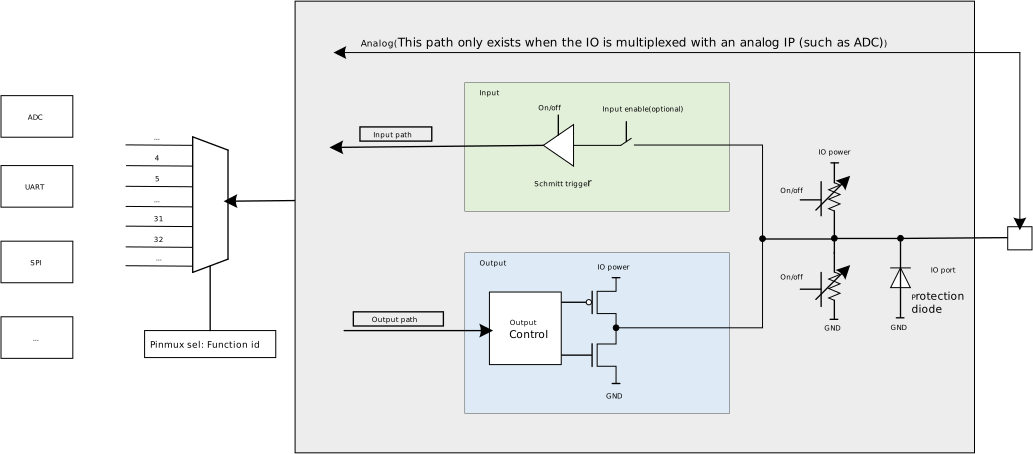
I/O 框图
功能特性
各引脚支持以下电气特性配置:
内部上拉/下拉电阻
支持独立的上拉/下拉/高阻控制
部分引脚上下拉阻值可调
不同驱动能力挡位
提供多档驱动能力可选,无特殊说明时默认为最大挡位。
可调的边沿斜率控制
支持不同斜率的信号边沿输出,仅部分引脚支持此功能。
备注
有关 I/O ports 特性参数,如上下拉阻值、驱动能力、电压特性及信号边沿斜率等,请查询 芯片数据手册。不同引脚的驱动能力数值和挡位数量可能不同。
低功耗模式引脚状态管理
I/O ports 的上下拉(PU/PD)状态在 Active 模式与低功耗模式下由各自独立的寄存器控制。初始化阶段各引脚的默认上下拉状态统一在
ameba_pinmapcfg
中定义,并由 pinmap_init() 在系统启动时完成加载。
引脚输入状态
普通睡眠模式(PG 或 CG)
所有 I/O ports 的 PU/PD 功能均生效。
深度睡眠模式(DSLP)
大多数 I/O ports 的 PU/PD 功能仍然生效;
某些 I/O ports 的供电会被关闭,导致这些引脚的 PU/PD 失效,引脚将呈浮空状态。
如果与这些 I/O ports 相连的电路需要被拉到高或低状态,则需要在芯片外部电路设计单独的上拉/下拉电路。
备注
深度睡眠模式下 PU/PD 功能失效的 I/O ports,请查询 芯片数据手册。
引脚输出状态
普通睡眠模式(PG 或 CG)
I/O ports 输出将 保持进入睡眠前的电平。
例如,在睡眠之前,如果 I/O 设置为输出 1,系统进入 PG 或 CG 后,此 I/O 仍将保持输出 1 不变。
深度睡眠模式(DSLP)
Active 阶段设置的高/低电平 输出状态将失效。
例如,在睡眠之前,如果 I/O 设置为输出 1,系统进入深度睡眠后,则 I/O 将无法保持输出 1 状态。
I/O ports 特殊供电分组
I/O ports 按供电域分组管理,各分组支持的工作电压有所差异(如部分分组兼容 1.8V 与 3.3V,部分仅支持 3.3V 等)。完整的引脚供电分组信息请参考 芯片数据手册。
本节仅列出具有特殊供电约束的引脚分组。
无。
PB11~PB19:默认用作 Audio 功能,I/O 供电电压固定为 1.8V,与实际复用功能无关。
PB11~PB19:默认用作 Audio 功能,I/O 供电电压固定为 1.8V,与实际复用功能无关。
PB11~PB19:默认用作 Audio 功能,I/O 供电电压固定为 1.8V,与实际复用功能无关。
PB11~PB19:默认用作 Audio 功能,I/O 供电电压固定为 1.8V,与实际复用功能无关。
PA18~PB6:默认用作 Audio 功能,I/O 供电电压固定为 1.8V,与实际复用功能无关。
无。
PA23 与 PA24 (G3 组)的 I/O 供电电压支持 5V、3.3V 或 1.8V,默认为 5V,可通过 PAD_G3IOVoltCtrl 接口调整。
模拟数字共用引脚使用规范
部分 I/O ports 设计为既可连接到模拟电路,也可与数字电路通信。为确保模拟信号的完整性,这些 I/O ports 用作模拟功能时,需断开与数字路径连接(例如,作为 ADC 的输入)。
ADC 引脚
这部分 I/O ports 支持连接到 ADC 模拟电路或数字电路,默认作为数字功能使用。
备注
支持该功能的 I/O ports,请查询 ADC 章节。
配置为 ADC 引脚时,需执行以下操作:
步骤 1:关闭数字通路连接
PAD_InputCtrl(PinName, DISABLE);步骤 2:上下拉配置为浮空状态
PAD_PullCtrl(PinName, GPIO_PuPd_NOPULL);备注
与 ADC 引脚功能相关的其他配置,详见 ADC 章节。
配置为数字功能时,需执行以下操作:
需先调用如下接口使能数字通路连接,再按需进行引脚复用即可。
PAD_InputCtrl(PinName, ENABLE);
Raw API
PAD Exported Constants
PAD Drive Strength Definitions
/* PAD drive strength lowest level. */
#define PAD_DRV_ABILITITY_LOW (0)

/* PAD drive strength mid-low level. */
#define PAD_DRV_ABILITITY_MID_LOW (1)

/* PAD drive strength mid-high level. */
#define PAD_DRV_ABILITITY_MID_HIGH (2)

/* PAD drive strength highest level. */
#define PAD_DRV_ABILITITY_HIGH (3)
PAD Pull Resistor Definitions
/* PAD large pull resistor. */
#define PAD_Resistor_LARGE 0x00

/* PAD small pull resistor. */
#define PAD_Resistor_SMALL 0x01
PAD Slew Rate Definitions
/* PAD output slew rate fast. */
#define PAD_SlewRate_Fast (0)

/* PAD output slew rate slow. */
#define PAD_SlewRate_Slow (1)
PAD Exported Functions
-
void PAD_CMD(u8 PinName, u8 NewStatus)
Set the Internal pad shutdown or enable mode.
- 参数:
PinName -- Target pin. This parameter must be one of the values defined in PINMUX_Pin_Name_definitions.
NewStatus -- Enable or disable (shutdown)
-
void PAD_DrvStrength(u8 PinName, u32 DrvStrength)
Set the driving strength of the specified PAD.
- 参数:
PinName -- Target pin. This parameter must be one of the values defined in PINMUX_Pin_Name_definitions.
DrvStrength -- PAD driving strength. This parameter can be a value of PAD Drive Strength Definitions.
-
void PAD_InputCtrl(u8 PinName, u32 NewState)
Control digital path input.
- 参数:
PinName -- Target pin. This parameter must be one of the values defined in PINMUX_Pin_Name_definitions.
NewState --
Digital path input status.
ENABLE: Enable digital path input.
DISABLE: Disable digital path input.
-
void PAD_PullCtrl(u8 PinName, u8 PullType)
Set the internal PAD pull type.
- 参数:
PinName -- Target pin. This parameter must be one of the values defined in PINMUX_Pin_Name_definitions.
PullType --
Pull type for the pin. This parameter can be one of the following values:
GPIO_PuPd_NOPULL
GPIO_PuPd_DOWN
GPIO_PuPd_UP
-
void PAD_ResistorCtrl(u8 PinName, u8 RType)
Set the internal PAD resistor type.
- 参数:
PinName -- Target pin. This parameter must be one of the values defined in PINMUX_Pin_Name_definitions.
RType --
Resistor type for the pin. This parameter can be one of the following values:
PAD_Resistor_LARGE
PAD_Resistor_SMALL
-
void PAD_SchmitCtrl(u8 PinName, u32 NewState)
Set the PAD Schmitt trigger control status.
- 参数:
PinName -- Target pin. This parameter must be one of the values defined in PINMUX_Pin_Name_definitions.
NewState -- Specify the control status. Refer to the datasheet for detail informations. This parameter can be: ENABLE or DISABLE.
-
void PAD_SleepPullCtrl(u8 PinName, u8 PullType)
Set the internal PAD pull type in sleep and deepsleep mode. The hardware will automatically switch to the sleep pull control when the system enters sleep or deepsleep mode. The hardware will automatically switch to the function pull control when the system wakes up from sleep mode.
- 参数:
PinName -- Target pin. This parameter must be one of the values defined in PINMUX_Pin_Name_definitions.
PullType --
Pull type for the pin. This parameter can be one of the following values:
GPIO_PuPd_NOPULL
GPIO_PuPd_DOWN
GPIO_PuPd_UP
-
void PAD_SlewRateCtrl(u8 PinName, u32 NewState)
Set the PAD slew rate control status.
- 参数:
PinName -- Target pin. This parameter must be one of the values defined in PINMUX_Pin_Name_definitions.
NewState --
Specify the slew rate control status. Refer to the datasheet for detail informations. This parameter can be one of the following values:
PAD_SlewRate_Slow
PAD_SlewRate_Fast
Not supported.
-
void APAD_InputCtrl(u8 PinName, u32 NewState)
Control digital path input for Audio share PAD.
- 参数:
PinName -- Pin of Audio share PAD or 0xFF.
NewState --
Digital path input status.
ENABLE: Enable digital path input.
DISABLE: Disable digital path input.
备注
Only valid for Audio share PADs.
If PinName is 0xFF, all the pins of Audio share PAD will be controlled.
FUNCTION_REF=APAD_InputCtrl
FUNCTION_REF=APAD_InputCtrl
FUNCTION_REF=APAD_InputCtrl
FUNCTION_REF=APAD_InputCtrl
Not supported.
Not supported.