Pin Multiplexing (PINMUX)
Introduction
In modern SoC designs, the number of peripherals continues to grow while the number of physical pins is constrained by package cost and size. To maximize system functionality within limited pin resources, the chip integrates a PINMUX (Pin Multiplexing) feature: through software configuration, a single physical pin can be flexibly assigned to different peripheral modules.
Therefore, before using a peripheral (such as UART, SPI, I2C, etc.), users must first map the peripheral’s signals to the designated physical pins via PINMUX, establishing a connection path between the peripheral and the pins.
Functional Description
The core of PINMUX is to equip each I/O port with an independent multiplexer. This multiplexer is responsible for selecting among multiple peripheral signals, ensuring that only one peripheral signal occupies the pin at any given time, thereby avoiding signal conflicts caused by multiple peripherals contending for the same pin.
The selection behavior of the multiplexer is controlled by a function ID:
The function ID is the configuration value written to the pin multiplexing register, used to specify the peripheral signal currently connected to the pin.
Each I/O port has a corresponding function ID field. Writing different values to this field connects the corresponding peripheral signal (e.g., UART1_RXD, SPI0_CLK, GPIO, etc.) to the pin.
Based on the range of function ID values, pin functions can be divided into two categories: the dedicated pin function group and the full-matrix pin function group.
For the specific values of function IDs and their corresponding signal mappings, refer to the Pinmux Table.
Note
When using special pins such as TrapPin, WakePin, and SWDPin, be sure to read the relevant notes in the hardware design guide beforehand to avoid functional anomalies caused by improper configuration.
Dedicated Pin Function Group
In the dedicated pin function group, the fixed signals of specific peripheral modules can only be connected to their corresponding dedicated pins. The number of configurable functions is relatively limited, but this dedicated design allows each IP module to perform optimally and meet the signal quality and speed requirements of peripherals.
The function ID range for the dedicated pin function group is 0~{{IC_PARAM_FUNCID_DEDICATE_END}}.
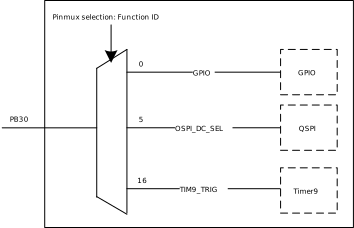
Taking PB30 as an example, all peripheral signals shown in the figure below can be connected to this pin through pin mux. If the function ID is configured as 16, the TIM9_TRIG signal of TIM9 will be directly connected to this pin through pin mux.
The function ID range for dedicated pin function groups is 0~{{IC_PARAM_FUNCID_DEDICATE_END}}.
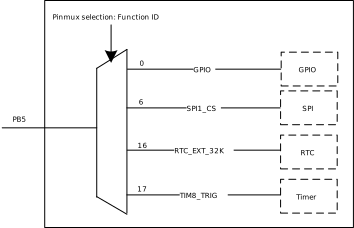
Taking PB5 as an example, the peripheral signals shown in the figure below can all be connected to this pin through pin multiplexing. If the function ID is configured to 6, the SPI1_CS signal of SPI1 will be directly connected to this pin through pin multiplexing.
The function ID range for dedicated pin function groups is 0~{{IC_PARAM_FUNCID_DEDICATE_END}}.
Taking PB5 as an example, the peripheral signals shown in the figure below can all be connected to this pin through pin multiplexing. If the function ID is configured to 6, the SPI1_CS signal of SPI1 will be directly connected to this pin through pin multiplexing.
The function ID range for dedicated pin function groups is 0~{{IC_PARAM_FUNCID_DEDICATE_END}}.
Taking PB5 as an example, the peripheral signals shown in the figure below can all be connected to this pin through pin multiplexing. If the function ID is configured to 6, the SPI1_CS signal of SPI1 will be directly connected to this pin through pin multiplexing.
The function ID range for dedicated pin function groups is 0~{{IC_PARAM_FUNCID_DEDICATE_END}}.
Taking PB5 as an example, the peripheral signals shown in the figure below can all be connected to this pin through pin multiplexing. If the function ID is configured to 6, the SPI1_CS signal of SPI1 will be directly connected to this pin through pin multiplexing.
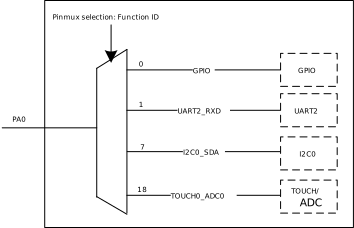
The function ID range for the dedicated pin function group is 0~{{IC_PARAM_FUNCID_DEDICATE_END}}.
Taking PA0 as an example, all peripheral signals shown in the figure below can be connected to this pin through pin multiplexing. If the function ID is configured to 1, the UART2_RXD signal of UART2 will be directly connected to this pin through pin multiplexing.
The function ID value range for the dedicated pin function group is 0~{{IC_PARAM_FUNCID_DEDICATE_END}}.
Taking PB16 as an example, all peripheral signals shown in the figure below can be connected to this pin via pin multiplexing. If the function ID is configured as 10, the SPI1_CS signal of SPI1 will be directly connected to this pin via pin multiplexing.
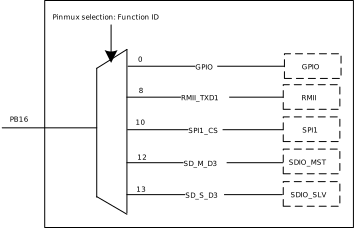
The Function ID range for the Dedicated Pin Function Group is 0~{{IC_PARAM_FUNCID_DEDICATE_END}}.
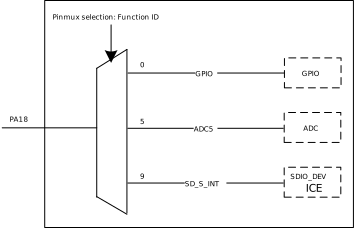
Taking PA18 as an example, all peripheral signals shown in the figure below can be connected to this pin through pin multiplexing. If the Function ID is configured to 5, the ADC5 signal of the ADC will be directly connected to this pin through pin multiplexing.
Note
Dedicated pins are typically organized by function group, where each function group contains a set of related pins. For optimal performance, pins should be selected within the same function group to avoid mixing pins across different groups.
For detailed information on function group divisions, refer to the Group-related descriptions in the Pinmux Table annotations.
Full-Matrix Pin Function Group
In the full-matrix pin function group, signals from almost all peripheral modules within the group can be flexibly mapped to any pin by configuring the function ID. This design provides greater configuration flexibility and is suitable for application scenarios where pin resources are constrained and flexible allocation is required.
Note
A small number of I/O ports do not support full-matrix functions; for details, refer to the Pinmux Table.
The flexibility of the full-matrix pin function group comes at a certain performance cost: some IP modules may have a lower maximum transfer rate when using full-matrix pins compared to the theoretical maximum when using dedicated pins. Users should make their selection based on actual requirements.
Additionally, a small number of pins in the full-matrix pin function group may not support certain peripherals; these are marked with
0in the Pinmux Table.
The Function ID range for the Full-Matrix Pin Function Group is {{IC_PARAM_FUNCID_FULL_MATRIX_START}}~{{IC_PARAM_FUNCID_FULL_MATRIX_END}}.
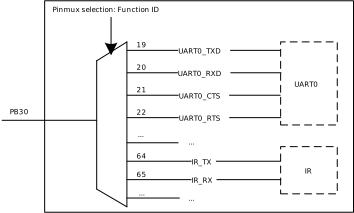
Taking PB30 as an example:
When the Function ID of
PB30is configured to19,PB30can be connected to theUART0_TXDsignal of UART0;When the Function ID of
PB30is configured to20, it can be connected to theUART0_RXDsignal of UART0.By analogy,
PB30can be configured to any Function ID in the Full-Matrix Pin Function Group.
The Function ID of the Full-Matrix Pin Function Group ranges from {{IC_PARAM_FUNCID_FULL_MATRIX_START}}~{{IC_PARAM_FUNCID_FULL_MATRIX_END}}.
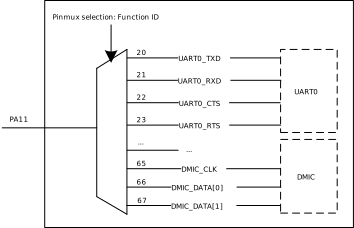
Taking PA11 as an example:
When the Function ID of
PA11is configured to20,PA11can be connected to theUART0_TXDsignal of UART0;When the Function ID of
PA11is configured to21, it can be connected to theUART0_RXDsignal of UART0.By analogy,
PA11can be configured to any Function ID in the Full-Matrix Pin Function Group.
The Function ID of the Full-Matrix Pin Function Group ranges from {{IC_PARAM_FUNCID_FULL_MATRIX_START}}~{{IC_PARAM_FUNCID_FULL_MATRIX_END}}.
Taking PA11 as an example:
When the Function ID of
PA11is configured to20,PA11can be connected to theUART0_TXDsignal of UART0;When the Function ID of
PA11is configured to21, it can be connected to theUART0_RXDsignal of UART0.By analogy,
PA11can be configured to any Function ID in the Full-Matrix Pin Function Group.
The Function ID of the Full-Matrix Pin Function Group ranges from {{IC_PARAM_FUNCID_FULL_MATRIX_START}}~{{IC_PARAM_FUNCID_FULL_MATRIX_END}}.
Taking PA11 as an example:
When the Function ID of
PA11is configured to20,PA11can be connected to theUART0_TXDsignal of UART0;When the Function ID of
PA11is configured to21, it can be connected to theUART0_RXDsignal of UART0.By analogy,
PA11can be configured to any Function ID in the Full-Matrix Pin Function Group.
The Function ID of the Full-Matrix Pin Function Group ranges from {{IC_PARAM_FUNCID_FULL_MATRIX_START}}~{{IC_PARAM_FUNCID_FULL_MATRIX_END}}.
Taking PA11 as an example:
When the Function ID of
PA11is configured to20,PA11can be connected to theUART0_TXDsignal of UART0;When the Function ID of
PA11is configured to21, it can be connected to theUART0_RXDsignal of UART0.By analogy,
PA11can be configured to any Function ID in the Full-Matrix Pin Function Group.
Not supported.
The function ID range for the full-matrix pin function group is {{IC_PARAM_FUNCID_FULL_MATRIX_START}}~{{IC_PARAM_FUNCID_FULL_MATRIX_END}}.
Taking PB16 as an example:
When the function ID of
PB16is configured as95, theUART0_TXDsignal of UART0 can be routed toPB16;When the function ID of
PB16is configured as96, theUART0_RXDsignal of UART0 can be routed to that pin.Similarly,
PB16can be configured to any function ID in the full-matrix pin function group.
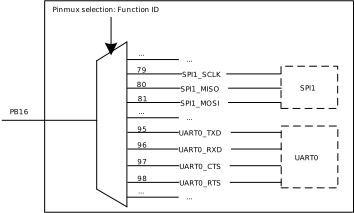
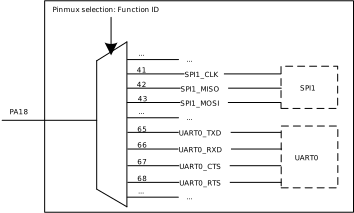
The Function ID value range for the Full-Matrix Pin Function Group is {{IC_PARAM_FUNCID_FULL_MATRIX_START}}~{{IC_PARAM_FUNCID_FULL_MATRIX_END}}.
Taking PA18 as an example:
When the Function ID of
PA18is configured to65,PA18can be connected to theUART0_TXDsignal of UART0;When the Function ID of
PA18is configured to66, it can be connected to theUART0_RXDsignal of UART0.By analogy,
PA18can be configured to any Function ID in the Full-Matrix Pin Function Group.