Chip Enable
Supported ICs [ RTL8721Dx ][ RTL8720E ][ RTL8710E ][ RTL8726E ][ RTL8713E ][ RTL8730E ][ RTL8721F ]
Introduction
CHIP_EN (Chip Enable) is a dedicated external pin on the SoC that controls the reset state of the entire chip at the hardware level. In Level Reset Mode (the default mode), CHIP_EN can reliably reset the system without depending on any software, even when the operating system or application has already crashed.
CHIP_EN supports three operating modes to meet the interaction requirements of different products:
Operating Mode |
Trigger Mechanism |
Typical Use Case |
|---|---|---|
Level Reset Mode (Default) |
Holds reset while CHIP_EN is low; resumes operation after CHIP_EN goes high |
System power-on initialization, hardware-level safety fallback |
Interrupt Reset Mode |
Short press triggers an interrupt; long press triggers a reset if software does not respond |
Power button on smart devices (e.g., phones): short press to wake/sleep, long press to force reboot |
Pulse Reset Mode |
Triggers a reset immediately after the low level is detected and releases; software determines the press duration after reboot |
Reset button on routers: short press to reboot, long press to restore factory settings |
Note
A CHIP_EN reset controls the SWR (Switching Regulator) and other power domains in the correct sequence to ensure that off-chip circuits are properly reset.
For the initial power-on sequence, refer to the “CHIP_EN Reset Sequence” section in the datasheet.
By default, CHIP_EN operates in Level Reset Mode. To switch to Interrupt Reset Mode or Pulse Reset Mode, configure the CHIPEN_INTR_MODE[17:16] field of the REG_AON_CHIPEN_CTRL register during the bootloader or application initialization stage (see the Registers section for details). Before the configuration takes effect, CHIP_EN always runs in Level Reset Mode.
In addition, CHIP_EN has the ability to wake the system from sleep and deep-sleep low-power modes. After waking up, the system can identify a CHIP_EN-triggered wake-up event by reading the wake-up reason register provided by the PMC (Power Management Controller).
Functional Description
Debounce
Mechanical buttons typically produce brief level glitches at the moment of pressing or releasing. Without filtering, the system would misinterpret these as trigger events. CHIP_EN has a built-in hardware debounce function that automatically filters out glitch signals shorter than Tdb (Debounce Time).
By default, the debounce function is enabled with a default Tdb of 100 μs, configurable from 100 μs to 16 ms (via the CHIPEN_TDBC[2:0] field). Only when a continuous low level or high level persists for longer than Tdb will the hardware recognize it as a valid level change.
The debounce function is effective in Level Reset Mode, Interrupt Reset Mode, and Pulse Reset Mode. Its working principle is illustrated in the figure below.

Level Reset Mode
Level Reset Mode is the hardware default mode and takes effect without any software configuration.
During system power-on, once the CHIP_EN pin level transitions from low to high, the hardware PMC exits the reset state and powers up the system to complete the boot process.
During operation, as long as CHIP_EN detects a low level, the entire system immediately enters the reset state and reboots after CHIP_EN returns to a high level. This mode has no dependency on software state and is the most thorough hardware reset mechanism.
Interrupt Reset Mode
Interrupt Reset Mode is designed for product scenarios that need to distinguish between a “short press” and a “long press”, such as the power button on a smartphone: short press to enter/exit low-power mode, long press to force a system reboot.

In this mode, a level change on the CHIP_EN pin no longer directly resets the system; instead, it triggers an interrupt, and software responds and decides the next action. The decision logic is based on the following three time thresholds (all configurable via registers):
Tsp: Short press time threshold. The default value is 0 ms (
CHIPEN_TSP[6:4] = 000), meaning any low-level duration is treated as a short press trigger condition. It is recommended to configure this to 50 ms or more based on the product’s button feel.Tlp: Long press time threshold (counted after Tsp). The default value is 1000 ms (
CHIPEN_TLP[10:8] = 000).Tack: Software acknowledgment window. Software must clear the long press interrupt within this time; otherwise, hardware triggers a reset. The default value is 50 ms (
CHIPEN_TACK[13:12] = 00).
Case 1: Press duration < Tsp
The short press threshold is not reached, no interrupt is triggered, and the system operates normally. In sleep mode, such a brief touch does not wake the system.

Case 2: Tsp ≤ Press duration < Tsp + Tlp (Short Press)
A short press interrupt is triggered. If the system is in sleep mode, this interrupt also wakes the system; hardware sets the corresponding wake-up reason flag, and software can read this flag during interrupt handling or the boot process.

Case 3: Press duration ≥ Tsp + Tlp, and software acknowledges within Tack (Long Press + Software Normal)
A short press interrupt is triggered first, followed by a long press interrupt. When software is running normally, it must clear the long press interrupt within the Tack window to prevent a hardware reset. After the interrupt is cleared, no new interrupts are generated regardless of how long the button continues to be held.
If the long press interrupt occurs while the system is in sleep mode, it will also wake the system and set the wake-up reason flag.

Case 4: Press duration ≥ Tsp + Tlp, and software does not acknowledge within Tack (Long Press + Software Crash or Unresponsive)
If software does not clear the long press interrupt within the Tack window, hardware forces a system reset after Tsp + Tlp + Tack expires.
If CHIP_EN has returned to a high level when the reset is triggered, the system reboots immediately.
If CHIP_EN is still at a low level when the reset is triggered, the system remains in the reset state until CHIP_EN goes high, at which point it reboots.
After a system reset, hardware resets the CHIP_EN operating mode to Level Reset Mode (the default), and software must reconfigure the target mode during the bootloader or application initialization stage.

Pulse Reset Mode
Pulse Reset Mode is suitable for product scenarios that require “short press to reboot immediately, long press to restore factory settings”, such as the reset button on a router.

The difference from Level Reset Mode is that in Pulse Reset Mode, the system reboots immediately after a low level is detected, rather than waiting for CHIP_EN to return to a high level. After rebooting, software can read the CHIPEN_ST[18] bit during the boot process to detect the current level state of the CHIP_EN pin, thereby determining whether the user is still holding the button. This allows the system to distinguish between a short press (reboot) and a long press (restore factory settings) and execute different boot paths accordingly.
Warning
Once Pulse Reset Mode is entered, it cannot be changed to any other mode. The system can only return to the default Level Reset Mode by power cycling.
Registers
The base address of CHIP_EN registers is 0x41008000.
The base address of CHIP_EN registers is 0x4100C000.
The base address of CHIP_EN registers is 0x4100C000.
The base address of CHIP_EN registers is 0x4100C000.
The base address of CHIP_EN registers is 0x4100C000.
The base address of CHIP_EN registers is 0x42008000.
The base address of CHIP_EN registers is 0x4080A000.
Not supported.
Name |
Offset |
Access |
Description |
|---|---|---|---|
0x50 |
R/W |
CHIP_EN Function Control Register |
|
0x54 |
R/W1C |
CHIP_EN Interrupt Clear Register |
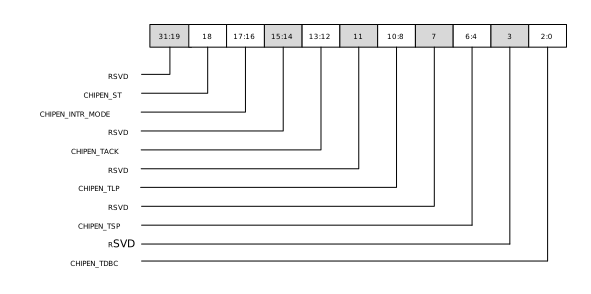
REG_AON_CHIPEN_CTRL
Name: CHIP_EN Function Control Register
Size: 32 bits
Address offset: 0x50
Read/write access: read/write
Bit |
Symbol |
Access |
Reset |
Description |
|---|---|---|---|---|
31:19 |
RSVD |
- |
- |
Reserved |
18 |
CHIPEN_ST |
R |
0 |
CHIP_EN pin status
|
17:16 |
CHIPEN_INTR_MODE |
R/W/ES |
0 |
Chipen operation mode
|
15:14 |
RSVD |
- |
0 |
Reserved |
13:12 |
CHIPEN_TACK |
R/W |
0 |
|
11 |
RSVD |
- |
- |
Reserved |
10:8 |
CHIPEN_TLP |
R/W |
0 |
|
7 |
RSVD |
- |
- |
Reserved |
6:4 |
CHIPEN_TSP |
R/W |
0 |
|
3 |
RSVD |
- |
- |
Reserved |
2:0 |
CHIPEN_TDBC |
R/W |
001 |
|
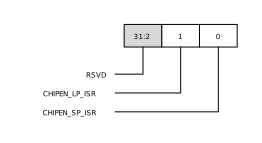
REG_AON_CHIPEN_ISR
Name: CHIP_EN Interrupt Clear Register
Size: 32 bits
Address offset: 0x54
Read/write access: Read/write to clear
Bit |
Symbol |
Access |
Description |
|---|---|---|---|
31:2 |
RSVD |
- |
Reserved |
1 |
CHIPEN_LP_ISR |
R/W1C |
Chipen long press interrupt status.
|
0 |
CHIPEN_SP_ISR |
R/W1C |
Chipen short press interrupt status.
|