Ameba AI Introduction
Overview
Ameba AI is a comprehensive artificial intelligence (AI) solution designed for Realtek AmebaAIoT SoC. It provides developers with powerful tools and libraries to implement AI functionalities in their applications. With the help of the NN hardware engine to accelerate the inference process, SoCs support a wide range of AI applications, including audio classification, object detection, and more. It is optimized for performance and efficiency, allowing developers to run NN models on resource-constrained devices without compromising on functionality. Ameba AI is designed to be user-friendly and accessible, with comprehensive documentation and examples to help developers get started quickly. Whether you are a beginner or an experienced AI developer, Ameba AI provides the tools and resources you need to bring your AI projects to life.
Ameba NN
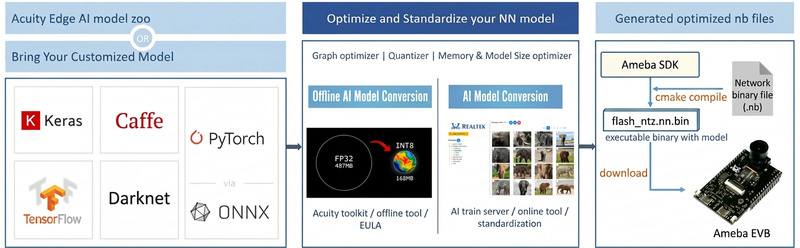
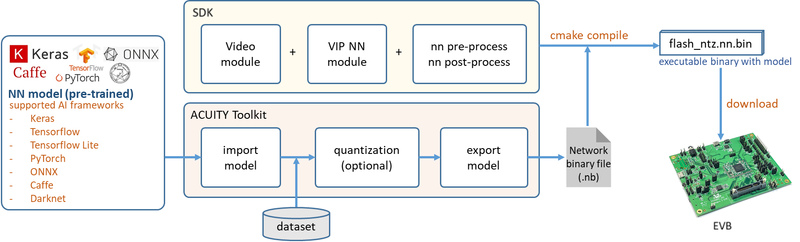
RTL8735B has an NN H/W engine to accelerate the neural network
inference process. NN models obtained from different AI frameworks, such
as Keras, TensorFlow, TensorFlow Lite, PyTorch, Caffe, ONNX, Darknet and
others, can be converted to a network binary graph (.nb) file by Verisilicon’s
Acuity Toolkit. The converted model can then be deployed on RTL8735B
and executed using the provided SDK examples.
The following figure illustrates the overall NN model deployment workflow:
NN model workflow
Using Customized NN Models
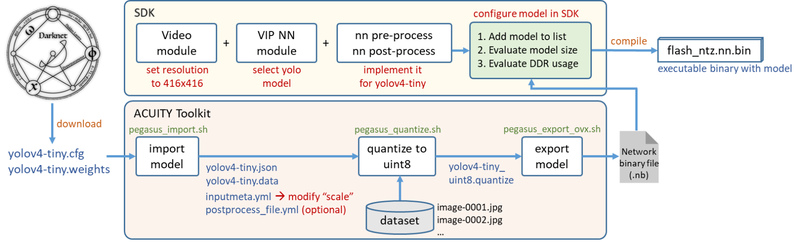
This section provides a high-level overview of deploying a pre-trained model on Ameba. The detailed step-by-step instructions are covered in later sections of this guide.
YOLOv4-tiny deployment workflow
The general deployment workflow consists of the following stages:
Model Training: Choose a suitable NN model based on your target AI application and train it using a compatible framework.
Model Conversion: Use the Acuity Toolkit to convert and quantize the trained model into an
.nbnetwork binary file.Model Deployment: Integrate the
.nbfile into the SDK, implement pre-processing and post-processing, and build the firmware.Inference Execution: Run the deployed model on the device to perform AI inference.
Supported NN Models
The FreeRTOS and Arduino SDKs support the following NN model types. Customized models can be added following the deployment guides.
Category |
Model |
Repository |
|---|---|---|
Object detection |
Yolov3-tiny, Yolov4-tiny, Yolov7-tiny |
|
Object detection |
YOLOv7-tiny-pt |
|
Face detection |
SCRFD |
https://github.com/deepinsight/insightface/tree/master/detection/scrfd |
Face Recognition |
MobileFaceNet |
https://github.com/deepinsight/insightface/tree/master/recognition |
Sound classification |
YAMNet |
https://github.com/tensorflow/models/tree/master/research/audioset/yamnet |
Reference: NN Model Zoo
Supported AI Frameworks
The Acuity Toolkit supports model conversion from the following AI frameworks:
AI Framework |
Import File Format |
|---|---|
Caffe |
.caffemodel |
TensorFlow |
.pb |
TensorFlow Lite |
.tflite |
Darknet |
.cfg |
ONNX |
.onnx |
PyTorch |
.pt |
Keras |
.h5 |
Note
No quantization is needed on Acuity Networks converted from ONNX, TensorFlow and TensorFlow Lite models that have been already quantized. Kindly note that per-channel quantized models are NOT supported on the NPU — please ensure your model uses per-tensor quantization.
Tip
For PyTorch framework, you are highly recommended to export your model in .onnx format first
to ensure successful conversion.
Supported Model Quantization Types
To run an NN model with the full capability of the HW accelerator, the model must be quantized with a supported quantization type.
Supported quantization types are as follows:
Quantizer |
Qtype |
Per-channel or per-tensor |
|---|---|---|
asymmetric_affine |
uint8 |
only per-tensor |
dynamic_fixed_point |
int8/int16 |
only per-tensor |
The NPU has three main units: NN, TP, and PPU (SHADER). NN and TP are HW accelerators; PPU(SHADER) is a general programmable unit. NN/TP only support the quantization types listed above. Other quantization types will run on PPU, which is significantly slower.
Use the NBinfo tool (included in the Acuity Toolkit) to check which unit each operation in your exported model will run on.
Note
Vendor recommends importing the original float32 model into Acuity Toolkit and performing quantization with Acuity’s quantization script. Models quantized by other training frameworks (e.g., TensorFlow) should still use the supported quantization types listed above.
Next Steps
To install the Offline Acuity Toolkit and convert your model, see Introduction to Offline AI Model Conversion Toolkit.
For online model conversion, see Introduction to Online AI Model Conversion.
To deploy a model using the Arduino SDK, see Customized Model Deployment Guide for Arduino SDK.
To deploy a model using the FreeRTOS SDK, see Customized Model Deployment Guide for FreeRTOS SDK.
For advanced topics (model security, pre/post-process customization, post-process PC tool), see Advanced New Model Deployment Guide.
For model training toolkit, see Introduction to AI Training Server.