音频主机方案
概述
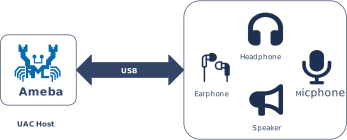
USB 音频类 (USB Audio Class, UAC) 协议定义了通过 USB 接口传输音频数据的工业标准。在主机 (Host) 模式下,Ameba 平台能够通过该协议识别并驱动外部 USB 音频设备。
当前 Ameba 平台的 UAC 主机协议栈专注于 音频播放 (Playback) 场景。它集成了符合 USB-IF 标准的 UAC 1.0 协议,将外接的 USB UAC 设备抽象为系统本地音频输出接口。该方案支持即插即用,能够与系统内置音频处理框架无缝对接,为设备提供便捷、高质量的音频输出扩展能力。
特性
Ameba UAC Host 驱动旨在提供稳定、兼容的音频输出能力,主要特性如下:
广泛的设备兼容性:支持符合 UAC 1.0 标准的 USB 设备(如 USB 音箱、USB 耳机、USB 转 3.5mm 适配器)。
自动化枚举配置:自动解析设备描述符,识别音频流端点,并建立等时 (Isochronous) 传输通道。
支持主流音频格式:参考 支持的音频格式 了解更多信息。
系统级深度集成:向上层应用暴露统一的 API 接口,屏蔽底层 USB 传输细节。
热插拔支持 (Hot-Plug):支持 USB 外设的即插即用与动态移除,无需重启系统。
应用场景
作为 USB 主机,Ameba 负责枚举 UAC 设备、解析音频描述符,并建立稳定的数据传输通道。该方案适用于对音频播放质量有要求,同时追求低开发复杂度的嵌入式应用,例如:
智能音频播报终端:Ameba 通过外接 UAC 设备(如有源音箱或耳机),用于语音提示、广告播报或公共广播系统。
数字标牌与信息亭:结合本地存储或网络流媒体,通过 USB 高保真设备播放背景音乐或多媒体解说,提升用户体验。
IoT 音频网关:作为轻量级音频响应节点,接收来自 Wi-Fi 或云端的音频指令/内容,并通过通用 USB 音频外设进行输出。
协议简介
备注
当前主机方案仅支持 UAC 1.0
UAC (USB Audio Class) 是由 USB-IF 定义的通用音频设备类标准,旨在规范数字音频数据流在 USB 接口上的封装与传输方式。 USB 音频设备(如 USB 音响、耳机、麦克风)通过 数据传输 与 功能控制 的标准接口,能够在主机系统中被自动识别为标准的音频输入/输出终端,无需安装专有驱动。
版本对比
USB-IF 官方已发布多个 UAC 协议版本。各主流版本的规范文档下载链接如下表所示:
版本 |
文档 |
|---|---|
1.0 |
|
2.0 |
术语定义
本文档涉及的通用 UAC 技术术语定义如下:
术语 |
描述 |
|---|---|
AC Interface (Audio Control Interface) |
音频控制接口。负责管理音频设备的拓扑结构(如 Input/Output Terminal、Feature Unit),并通过控制端点(Control Endpoint)实现音量调节、静音开关等控制指令的下发。 |
AS Interface (Audio Streaming Interface) |
音频流接口。负责音频负载数据的实际传输,通常使用等时(Isochronous)端点。一个 AS 接口可以包含多个备用设置(Alternate Settings),分别对应不同的采样率、位宽或通道配置。 |
Terminal Type |
终端类型。用于标识音频信号源或接收器的物理/逻辑属性(例如:USB Streaming Terminal 代表 USB 数据流,Speaker Terminal 代表扬声器)。 |
Feature Unit |
功能单元。音频拓扑中的处理节点,提供具体的音频控制能力(如主音量调节、各声道增益、静音控制)。 |
Sample Rate / Bit Resolution |
采样率与位宽。U 音频格式的核心参数。UAC 1.0 常见组合包括 48 kHz / 16-bit、44.1 kHz / 16-bit 等。 |
本文档涉及的通用音频技术术语定义如下:
术语 |
描述 |
|---|---|
PCM |
脉冲编码调制(Pulse Code Modulation),一种将模拟音频信号转换为数字信号的编码方式。 |
声道数(Channel) |
指独立的音频信号流。声道数通常对应声源或扬声器的数量(如单声道、立体声)。 |
位深(Bit Depth) |
音频采样时的量化精度,表示每个采样点所占用的位数。位深越大,动态范围越大,音质越精细。 |
采样率(Sampling Rate) |
每秒钟对音频信号进行采样的次数。采样率越高,能还原的高频信号越多,音频保真度越高。 |
协议框架
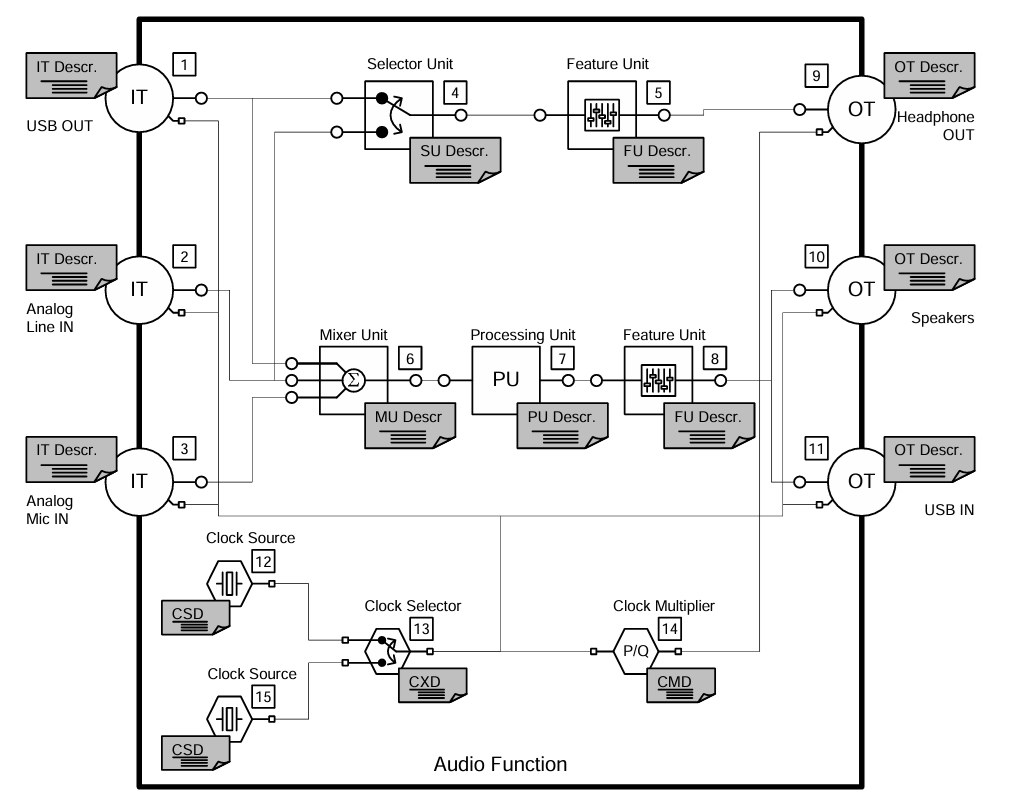
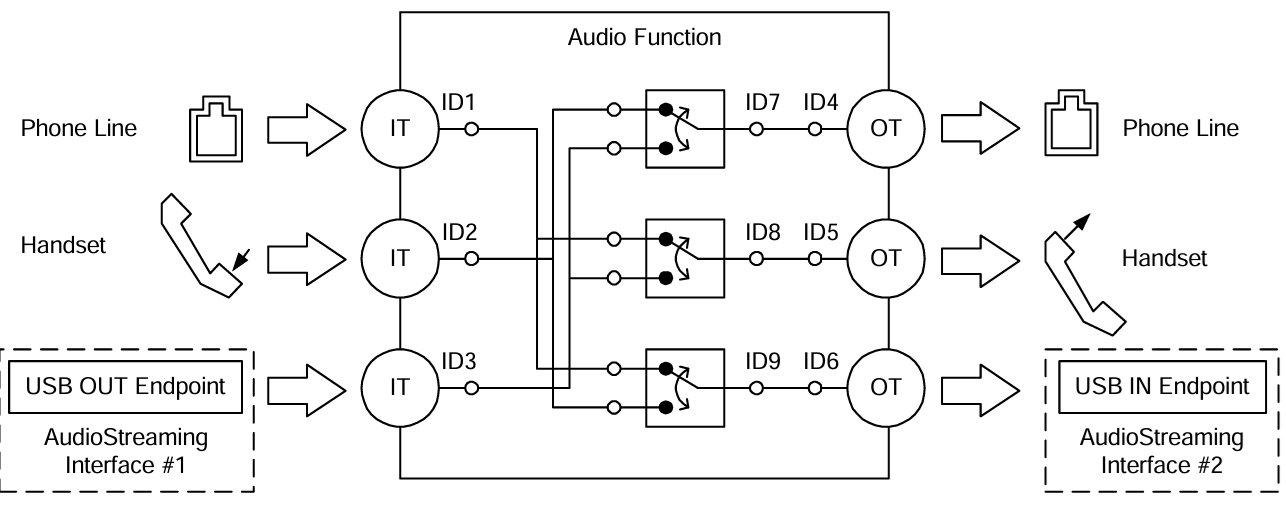
UAC 系统架构通过定义不同的接口集合来支持音频数据的传输与控制。从逻辑功能上,UAC 设备接口主要分为两大类:音频控制接口 (Audio Control Interface) 和 音频流接口 (Audio Streaming Interface)。
音频控制接口(AC Interface)
负责管理音频设备的整体功能行为,例如音量调节、静音控制、输入源选择等。
一个 AC 接口内部包含定义的拓扑结构(Topology),用于描述音频信号从输入终端(Input Terminal)到输出终端(Output Terminal)的流向及处理过程。
音频流接口 (AS Interface)
负责传输实际的音频负载数据。
一个 UAC 设备可包含多个 AS 接口,每个接口可配置为传输不同格式、不同采样率或不同位深的音频数据。
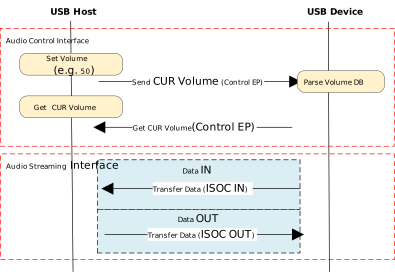
协议交互示例:
描述符结构
UAC 设备除遵循标准的 USB 描述符(如设备描述符、配置描述符、端点描述符)外,还定义了类特定描述符 (Class-Specific Descriptors)。这些描述符依据其所属接口,分为类特定控制接口描述符和类特定音频流接口描述符。
不同协议版本在描述符的定义上存在差异:
Descriptor Topology
Device Descriptor
└── Identifies basic device information (USB Version 2.00)

Configuration Descriptor
├── Contains total length of the entire configuration, power supply information, etc.
│
├── Interface Association Descriptor (IAD)
│       └── Binds audio control and streaming interfaces into a single functional unit
│
├── Audio Control (AC) Interface Descriptor (Interface 0)
│       ├── Standard Interface Descriptor (Interface 0, Control Class)
│       └── Class-Specific Descriptor Collection
│               ├── Audio Control Interface Header (declares UAC version)
│               ├── Clock Source (internal clock or external clock)
│               ├── Clock Source (internal clock or external clock)
│               ├── Input Terminal (source of audio stream)
│               ├── Feature Unit (volume/mute controls, etc.)
│               ├── Output Terminal (destination of audio stream)
│               ├── Input Terminal (source of audio stream)
│               ├── Feature Unit (volume/mute controls, etc.)
│               └── Output Terminal (destination of audio stream)
│
├── Audio Streaming (AS) Interface Descriptor (Interface 1)
│       ├── Alternate Setting 0: Control transfer active state (control transfer only)
│       │
│       ├── Alternate Setting 1: Data transfer active state (with data endpoint)
│       │ ├── Standard Interface Descriptor (Interface 1, Streaming Class)
│       │ ├── Class-Specific AS Interface (associated USB streaming terminal, audio format, number of channels)
│       │ ├── Format Descriptor (audio format and bit width)
│       │ ├── Standard Endpoint Descriptor (ISO OUT endpoint)
│       │ └── Class-Specific Endpoint Descriptor (no special control)
│       │
│       ├── Alternate Setting 2
│       │ ...... Can configure multiple different setting as needed
│
└── Audio Streaming (AS) Interface Descriptor (Interface 2)
        ├── Alternate Setting 0: Control transfer active state (control transfer only)
        │
        ├── Alternate Setting 1: Data transfer active state (with data endpoint)
        │ ├── Standard Interface Descriptor (Interface 2, Streaming Class)
        │ ├── Class-Specific AS Interface (associated USB streaming terminal, audio format, number of channels)
        │ ├── Format Descriptor (audio format and bit width)
        │ ├── Standard Endpoint Descriptor (ISO IN endpoint)
        │ └── Class-Specific Endpoint Descriptor (no special control)
        │
        ├── Alternate Setting 2
        │ ...... Can configure multiple different setting as needed

Device Qualifier Descriptor
└── Device information while running in another speed mode

Other Speed Configuration Descriptor
├── Configuration information while running in another speed mode.
│
├── Interface Association Descriptor (IAD)
│       └── Binds audio control and streaming interfaces into a single functional unit
│
├── Audio Control (AC) Interface Descriptor (Interface 0)
│       ├── Standard Interface Descriptor (Interface 0, Control Class)
│       └── Class-Specific Descriptor Collection
│               ├── Audio Control Interface Header (declares UAC version)
│               ├── Clock Source (internal clock or external clock)
│               ├── Clock Source (internal clock or external clock)
│               ├── Input Terminal (source of audio stream)
│               ├── Feature Unit (volume/mute controls, etc.)
│               ├── Output Terminal (destination of audio stream)
│               ├── Input Terminal (source of audio stream)
│               ├── Feature Unit (volume/mute controls, etc.)
│               └── Output Terminal (destination of audio stream)
│
├── Audio Streaming (AS) Interface Descriptor (Interface 1)
│       ├── Alternate Setting 0: Control transfer active state (control transfer only)
│       │
│       ├── Alternate Setting 1: Data transfer active state (with data endpoint)
│       │ ├── Standard Interface Descriptor (Interface 1, Streaming Class)
│       │ ├── Class-Specific AS Interface (associated USB streaming terminal, audio format, number of channels)
│       │ ├── Format Descriptor (audio format and bit width)
│       │ ├── Standard Endpoint Descriptor (ISO OUT endpoint)
│       │ └── Class-Specific Endpoint Descriptor (no special control)
│       │
│       ├── Alternate Setting 2
│       │ ...... Can configure multiple different setting as needed
│
└── Audio Streaming (AS) Interface Descriptor (Interface 2)
        ├── Alternate Setting 0: Control transfer active state (control transfer only)
        │
        ├── Alternate Setting 1: Data transfer active state (with data endpoint)
        │ ├── Standard Interface Descriptor (Interface 2, Streaming Class)
        │ ├── Class-Specific AS Interface (associated USB streaming terminal, audio format, number of channels)
        │ ├── Format Descriptor (audio format and bit width)
        │ ├── Standard Endpoint Descriptor (ISO IN endpoint)
        │ └── Class-Specific Endpoint Descriptor (no special control)
        │
        ├── Alternate Setting 2
        │ ...... Can configure multiple different setting as needed
UAC Audio Control (AC) Interface Descriptor
Audio Control Interface Header
Audio Control Interface Header Descriptor
├── bLength            : 1 byte  → Total descriptor length (fixed = 9)
├── bDescriptorType    : 1 byte  → 0x24 (CS_INTERFACE)
├── bDescriptorSubtype : 1 byte  → 0x01 (HEADER)
├── bcdADC             : 2 bytes → Audio Device Class Specification Release Number
├── bCategory          : 1 byte  → Indicates the classification/function of the device
├── wTotalLength       : 2 bytes → Total length of all AC Class-Specific descriptors, including this one
└── bmControls         : 1 byte  → Bitmap indicating the availability of non-addressable control functions
Clock Source Descriptor
Clock Source Descriptor
├── bLength            : 1 byte  → Total descriptor length (fixed = 8)
├── bDescriptorType    : 1 byte  → 0x24 (CS_INTERFACE)
├── bDescriptorSubtype : 1 byte  → 0x0A (Clock Source)
├── bClockID           : 1 byte  → Unique Clock ID, ranging from 1 to 255
├── bmAttributes       : 1 byte  → Clock type (0=Internal, 1=External)
├── bmControls         : 1 byte  → Bitmap indicating the control attributes of the clock
└── iClockSource       : 1 byte  → String descriptor index
Input Terminal Descriptor
Input Terminal Descriptor
├─ bLength                : 1 byte   → Total descriptor length (fixed = 17)
├─ bDescriptorType        : 1 byte   → 0x24 (CS_INTERFACE)
├─ bDescriptorSubtype     : 1 byte   → 0x02 (INPUT_TERMINAL)
├─ bTerminalID            : 1 byte   → Unique ID of this terminal (referenced in topology)
├─ wTerminalType          : 2 bytes  → Terminal type (little-endian)
│                           ├─ 0x0101 = USB Streaming (Host audio stream input)
│                           └─ Other values refer to UAC2.0 Appendix B (e.g., Microphone)
├─ bAssocTerminal         : 1 byte   → Associated Output Terminal ID (0 = no pairing)
├─ bCSourceID             : 1 byte   → Associated Clock Source ID
├─ bNrChannels            : 1 byte   → Number of logical output channels (e.g., 2 = stereo)
├─ bmChannelConfig        : 4 bytes  → Spatial location bitmap for channels
├─ iChannelNames          : 1 byte   → String index for channel names
├─ bmControls             : 2 byte   → Control bitmap
└─ iTerminal              : 1 byte   → String index for describing this terminal
Feature Unit Descriptor
Feature Unit Descriptor
├─ bLength                : 1 byte   → otal descriptor length in bytes
│                                      = 6 + (1 + bNrChannels) × 4
├─ bDescriptorType        : 1 byte   → = 0x24 (CS_INTERFACE)
├─ bDescriptorSubtype     : 1 byte   → = 0x06 (FEATURE_UNIT)
├─ bUnitID                : 1 byte   → Unique ID of this Feature Unit
├─ bSourceID              : 1 byte   → ID of the connected Source Unit or Terminal
├─ bmaControls[0]         : 4 bytes  → Master Channel Control Bitmap
├─ bmaControls[1]         : 4 bytes  → Logical Channel 1 Control Bitmap
├─ bmaControls[2]         : 4 bytes  → Logical Channel 2 Control Bitmap
│    ⋮
├─ bmaControls[N]         : 4 bytes  → Logical Channel N Control Bitmap (Total bNrChannels entries)
└─ iFeature               : 1 byte   → String descriptor index
Output Terminal Descriptor
Output Terminal Descriptor
├─ bLength                : 1 byte   → Total descriptor length (fixed = 12 bytes)
├─ bDescriptorType        : 1 byte   → 0x24 (CS_INTERFACE)
├─ bDescriptorSubtype     : 1 byte   → 0x03 (OUTPUT_TERMINAL)
├─ bTerminalID            : 1 byte   → Unique ID of this terminal
├─ wTerminalType          : 2 bytes  → Terminal type
│                           ├─ 0x0301 = Speaker
│                           ├─ 0x0302 = Headphones
│                           ├─ 0x0603 = SPDIF
│                           └─ Other values refer to Appendix B
├─ bAssocTerminal         : 1 byte   → Associated Input Terminal ID
├─ bSourceID              : 1 byte   → ID of the connected Source Unit or Terminal
├─ bCSourceID             : 1 byte   → Associated Clock Source ID
└─ iTerminal              : 1 byte   → String index for describing this terminal
Audio Streaming Interface Descriptor
Class-Specific AS Interface Descriptor
Class-Specific AS Interface Descriptor
├─ bLength                : 1 byte   → Fixed as 0x10 (16 bytes)
├─ bDescriptorType        : 1 byte   → 0x24(CS_INTERFACE)
├─ bDescriptorSubtype     : 1 byte   → 0x01(AS_GENERAL)
├─ bTerminalLink          : 1 byte   → Associated Terminal ID (Input or Output Terminal)
├─ bmControls             : 1 bytes  → Bitmap of endpoint control capabilities
├─ bFormatType            : 1 byte   → Format type
│                           └─ 0x01 = FORMAT_TYPE_I(PCM)
├─ bmFormats              : 4 bytes  → Bitmap of supported audio formats
├─ bNrChannels            : 1 bytes  → Number of supported audio channels
├─ bmChannelConfig        : 4 bytes  → Supported audio channel configuration bitmap
└─ iChannelNames          : 1 byte   → String index for channel names
Audio Streaming Format Type Descriptor
Audio Streaming Format Type Descriptor
├─ bLength            : 1 byte   → Total length of descriptor in bytes (6 bytes)
├─ bDescriptorType    : 1 byte   → = 0x24(CS_INTERFACE)
├─ bDescriptorSubtype : 1 byte   → = 0x02(FORMAT_TYPE)
├─ bFormatType        : 1 byte   → = 0x01(FORMAT_TYPE_I)
├─ bSubslotSize       : 1 byte   → Container size for each audio sample (in bytes)
│                                   • Typical values: 1, 2, 3, 4
├─ bBitResolution     : 1 byte   → Number of valid bits in each sample(≤ bSubslotSize × 8)
└─                                  • Example: 16 represents 16-bit PCM
Descriptor Topology
Device Descriptor
└── Identifies basic device information (USB Version 1.10)

Configuration Descriptor
├── Contains total length of the entire configuration, power supply information, etc.
│
├── Audio Control (AC) Interface Descriptor (Interface 0)
│       ├── Standard Interface Descriptor (AlternateSetting 0, Control Class)
│       └── Class-Specific Descriptor Collection
│               ├── Audio Control Interface Header (declares UAC version)
│               ├── Input Terminal (source of audio stream)
│               ├── Feature Unit (volume/mute controls, etc.)
│               ├── Output Terminal (destination of audio stream)
│               ├── Input Terminal (source of audio stream)
│               ├── Feature Unit (volume/mute controls, etc.)
│               └── Output Terminal (destination of audio stream)
│
├── Audio Streaming (AS) Interface Descriptor (Interface 1)
│       ├── Alternate Setting 0: Control transfer active state (control transfer only)
│       │
│       ├── Alternate Setting 1: Data transfer active state (with data endpoint)
│       │ ├── Standard Interface Descriptor (Interface 1, Streaming Class)
│       │ ├── Class-Specific AS Interface (associated USB streaming terminal)
│       │ ├── Format Descriptor (audio format:channel, bit width and frequency)
│       │ ├── Standard Endpoint Descriptor (ISO OUT endpoint)
│       │ └── Class-Specific Endpoint Descriptor (no special control)
│       │
│       ├── Alternate Setting 2
│       │ ...... Can configure multiple different setting as needed
│
└── Audio Streaming (AS) Interface Descriptor  (Interface 2)
        ├── Alternate Setting 0: Control transfer active state (control transfer only)
        │
        ├── Alternate Setting 1: Data transfer active state (with data endpoint)
        │ ├── Standard Interface Descriptor (Interface 2, Streaming Class)
        │ ├── Class-Specific AS Interface (associated USB streaming terminal)
        │ ├── Format Descriptor (audio format:channel, bit width and frequency)
        │ ├── Standard Endpoint Descriptor (ISO IN endpoint)
        │ └── Class-Specific Endpoint Descriptor (no special control)
        │
        ├── Alternate Setting 2
        │ ...... Can configure multiple different setting as needed
UAC Audio Control (AC) Interface Descriptor
Audio Control Interface Header
Audio Control Interface Header Descriptor
├── bLength            : 1 byte  → Total descriptor length (typically 9 + bInCollection × 1)
├── bDescriptorType    : 1 byte  → 0x24 (CS_INTERFACE)
├── bDescriptorSubtype : 1 byte  → 0x01 (HEADER)
├── bcdADC             : 2 bytes → Audio Device Class Specification Release Number (0x0100)
├── wTotalLength       : 2 byte  → Total number of bytes for all AC descriptors (including this header and all Unit/Terminal descriptors)
├── baInterfaceNr(1)   : 1 byte  → Interface number of the first AudioStreaming or MIDIStreaming interface in the Collection.
│    ⋮
└── baInterfaceNr(N)   : 1 byte  → Interface number of the last AudioStreaming or MIDIStreaming interface in the Collection.
Input Terminal Descriptor
Clock Source Descriptor
├── bLength            : 1 byte  → Total descriptor length (fixed = 12)
├── bDescriptorType    : 1 byte  → 0x24 (CS_INTERFACE)
├── bDescriptorSubtype : 1 byte  → 0x0A (Clock Source)
├── bTerminalID        : 1 byte  → Constant uniquely identifying the Terminal within the audio function.
├── wTerminalType      : 2 bytes → Constant characterizing the type of Terminal.
├── bAssocTerminal     : 1 byte  → D of the Output Terminal to which this Input Terminal is associated.
├── bNrChannels        : 1 byte  → Number of logical output channels in the Terminal’s output audio channel cluster.
├── wChannelConfig     : 2 bytes → Describes the spatial location of the logical channels.
├── iChannelNames      : 1 byte  → Index of a string descriptor, d
└── iTerminal          : 1 byte  → String descriptor index
Feature Unit Descriptor
Feature Unit Descriptor
├─ bLength                : 1 byte   → otal descriptor length in bytes = 7+(ch+1)*n
├─ bDescriptorType        : 1 byte   → = 0x24 (CS_INTERFACE)
├─ bDescriptorSubtype     : 1 byte   → = 0x06 (FEATURE_UNIT)
├─ bUnitID                : 1 byte   → Unique ID of this Feature Unit
├─ bSourceID              : 1 byte   → ID of the connected Source Unit or Terminal
├─ bControlSize           : 1 byte   → Size in bytes of an element of the bmaControls() array: n
├─ bmaControls[0]         : n bytes  → A bit set to 1 indicates that the mentioned Control is supported for master channel
├─ bmaControls[1]         : n bytes  → A bit set to 1 indicates that the mentioned Control is supported for logical channel1
│    ⋮
├─ bmaControls[N]         : n bytes  → A bit set to 1 indicates that the mentioned Control is supported for logical channel ch
└─ iFeature               : 1 byte   → String descriptor index
Output Terminal Descriptor
Output Terminal Descriptor
├─ bLength                : 1 byte   → Total descriptor length (fixed = 9 bytes)
├─ bDescriptorType        : 1 byte   → 0x24 (CS_INTERFACE)
├─ bDescriptorSubtype     : 1 byte   → 0x03 (OUTPUT_TERMINAL)
├─ bTerminalID            : 1 byte   → Unique ID of this terminal
├─ wTerminalType          : 2 bytes  → Terminal type
│                           ├─ 0x0301 = Speaker
│                           ├─ 0x0302 = Headphones
│                           ├─ 0x0603 = SPDIF
│                           └─ Other values refer to Appendix B
├─ bAssocTerminal         : 1 byte   → Associated Input Terminal ID
├─ bSourceID              : 1 byte   → ID of the connected Source Unit or Terminal
└─ iTerminal              : 1 byte   → String index for describing this terminal
Audio Streaming Interface Descriptor
Class-Specific AS Interface Descriptor
Class-Specific AS Interface Descriptor
├─ bLength                : 1 byte   → Fixed as 0x07 (7 bytes)
├─ bDescriptorType        : 1 byte   → 0x24(CS_INTERFACE)
├─ bDescriptorSubtype     : 1 byte   → 0x01(AS_GENERAL)
├─ bTerminalLink          : 1 byte   → Associated Terminal ID (Input or Output Terminal)
├─ bDelay                 : 1 bytes  → Delay introduced by this interface (in number of frames)
└─ wFormatTag             : 2 byte   → Audio data format (e.g., 0x0001 = PCM)
Audio Streaming Format Type Descriptor
Audio Streaming Format Type Descriptor
├─ bLength            : 1 byte   → Total length of descriptor in bytes (8 + (num_freq × 3))
├─ bDescriptorType    : 1 byte   → = 0x24(CS_INTERFACE)
├─ bDescriptorSubtype : 1 byte   → = 0x02(FORMAT_TYPE)
├─ bFormatType        : 1 byte   → = 0x01(FORMAT_TYPE_I)
├─ bNrChannels        : 1 byte   → Number of channels (e.g., 2)
├─ bSubslotSize       : 1 byte   → Container size for each audio sample (in bytes)
│                                   • Typical values: 1, 2, 3, 4
├─ bBitResolution     : 1 byte   → Number of valid bits in each sample(≤ bSubslotSize × 8)
├─                                  • Example: 16 represents 16-bit PCM
├─ bSamFreqType       : 1 byte   → sampling frequency count
└─ tSamFreq(n)        : 3×n byte → Sample rates in little-endian 3-byte format
备注
详细的字段定义请参考 USB-IF 官方 UAC 协议文档。
类特定请求
UAC 主机对设备的控制请求分为 标准请求(Standard Requests) 和 类特定请求 (Class-Specific Requests) 。
本节主要介绍 UAC 特有的 类特定请求,这些请求用于实现音频设备的特有功能,主要包括音频控制请求(针对 AC 接口)和音频流请求(针对 AS 接口)
音频控制请求 (AC 请求)
音频控制请求是主机通过端点 0 发送的类专用控制传输,用于在 USB 音频设备内动态配置和管理音频功能。
音频控制类型 |
要求 |
描述 |
|---|---|---|
Mute Control Request |
可选 |
操作音频功能中功能单元的静音控制 |
Volume Control Request |
可选 |
操作音频功能中功能单元的音量控制 |
Sampling Frequency Control |
可选 |
操作时钟信号的实际采样频率 |
Mixer Unit Control Request |
可选 |
操作音频功能中混音单元的内部控制 |
Terminal Control Request |
可选 |
操作音频功能中混音单元的内部控制 |
Selector Unit Control Request |
可选 |
操作音频功能中选择器单元的内部控制 |
Effect Unit Control Request |
可选 |
操作音频功能中效果单元的内部控制 |
Processing Unit Control Request |
可选 |
操作音频功能中处理单元的内部控制 |
Extension Unit Control Requests |
可选 |
操作音频功能中扩展单元的内部控制 |
音频流请求(AS 请求)
音频流请求是主机通过端点 0 发起的类专用控制传输,用于配置和管理音频数据流相关参数的核心类请求,其作用聚焦于音频流的建立、参数配置、状态管理等。
音频控制类型 |
要求 |
描述 |
|---|---|---|
Interface Control Request |
可选 |
操作音频功能中音频流接口内的控制项 |
Encoder Control Request |
可选 |
操作音频功能中音频流接口内的编码器控制项 |
Decoder Control Request |
可选 |
操作音频功能中音频流接口内的解码器控制项 |
Endpoint Control Request |
可选 |
操作音频功能中音频流端点内的控制项 |
音频控制请求 (AC 请求)
音频控制请求是主机通过端点 0 发送的类专用控制传输,用于在 USB 音频设备内动态配置和管理音频功能。
音频控制类型 |
要求 |
描述 |
|---|---|---|
Mute Control Request |
可选 |
操作音频功能中功能单元内的静音控制项 |
Volume Control Request |
可选 |
操作音频功能中功能单元内的音量控制项 |
Mixer Unit Control Request |
可选 |
操作音频功能中混音单元内的控制项 |
Selector Unit Control Request |
可选 |
操作音频功能中选择器单元内的控制项 |
Processing Unit Control Request |
可选 |
操作音频功能中处理单元内的控制项 |
Extension Unit Control Requests |
可选 |
操作音频功能中扩展单元内的控制项 |
音频流请求(AS 请求)
音频流请求是主机通过端点 0 发起的类专用控制传输,用于配置和管理音频数据流相关参数的核心类请求,其作用聚焦于音频流的建立、参数配置、状态管理等。
音频控制类型 |
要求 |
描述 |
|---|---|---|
Interface Control Request |
可选 |
操作音频功能中音频流接口内的控制项 |
Endpoint Control Request |
可选 |
描述音频功能可为其音频流端点支持的请求 |
数据传输格式
UAC 音频数据流通常采用 线性 PCM (Linear PCM) 编码,并以 多声道交错 (Interleaved) 的方式进行封装。具体的数据排列顺序取决于通道数量和位深。
更多支持格式细节请参考 支持的音频格式 了解更多细节。
两声道 (2-Channel) 交错数据示例如下图:
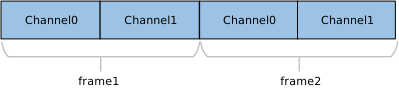
四声道 (4-Channel) 交错数据示例:

N 声道 (N-Channel) 交错数据示例:

备注
声道对齐规则:
UAC 协议要求传输的声道数通常应为 2 的幂次(如 2, 4, 8, 16 等)。如果实际物理声道数(如 10 声道)不符合此规则,则必须向上取整至最近的 2 的幂次(配置为 16 声道)进行传输,多余的通道位置填充无效数据。
类驱动
本节详细阐述了 USB Host UAC 1.0 驱动栈的内部架构、关键模块职责、类特定请求的支持情况以及底层通道资源的分配策略。
驱动框架
USB Host UAC 1.0 驱动栈采用分层模块化设计,通过清晰定义的接口实现音频子系统与 USB 硬件控制器之间的高效交互。该架构重点优化了 等时传输 (ISOC Transfer) 的实时性处理,确保高保真音频流的稳定输出。
系统自上而下分为以下核心功能模块:
音频适配层 (Audio Adapter Layer)
作为 USB 驱动与上层音频框架的中间件,该层主要负责:
写音频数据 (Write):当数据的生产者 (Producer),从上层音频缓冲区读取 PCM 数据,并写到 UAC 类驱动的环形缓冲区。
控制交互:将上层应用的音量调节、静音开关等操作,映射为 UAC 类驱动的控制 API 调用。
UAC 类驱动架构
这是 UAC 类驱动的核心组件,由协议处理逻辑与 环形缓冲管理 (Ringbuffer Management) 协同构成。
枚举与配置解析:自动识别 Audio Control (AC) 和 Audio Streaming (AS) 接口,解析 Terminal 类型、Feature Unit 及采样率/位宽等参数。
流管理:根据目标音频参数,动态选择 AS 接口的备用设置 (Alternate Setting),激活对应的等时 OUT 端点。
缓冲调度:维护环形缓冲区,处理数据的封包与调度,确保持续、无抖动的数据供给。
协议封装:封装标准 USB 请求与 UAC 类特定请求(如 SET_CUR),实现对设备的控制。
USB Core 驱动
实时响应硬件中断,负责处理 USB 标准枚举、传输管理以及底层的物理数据传输调度等。
核心交互接口
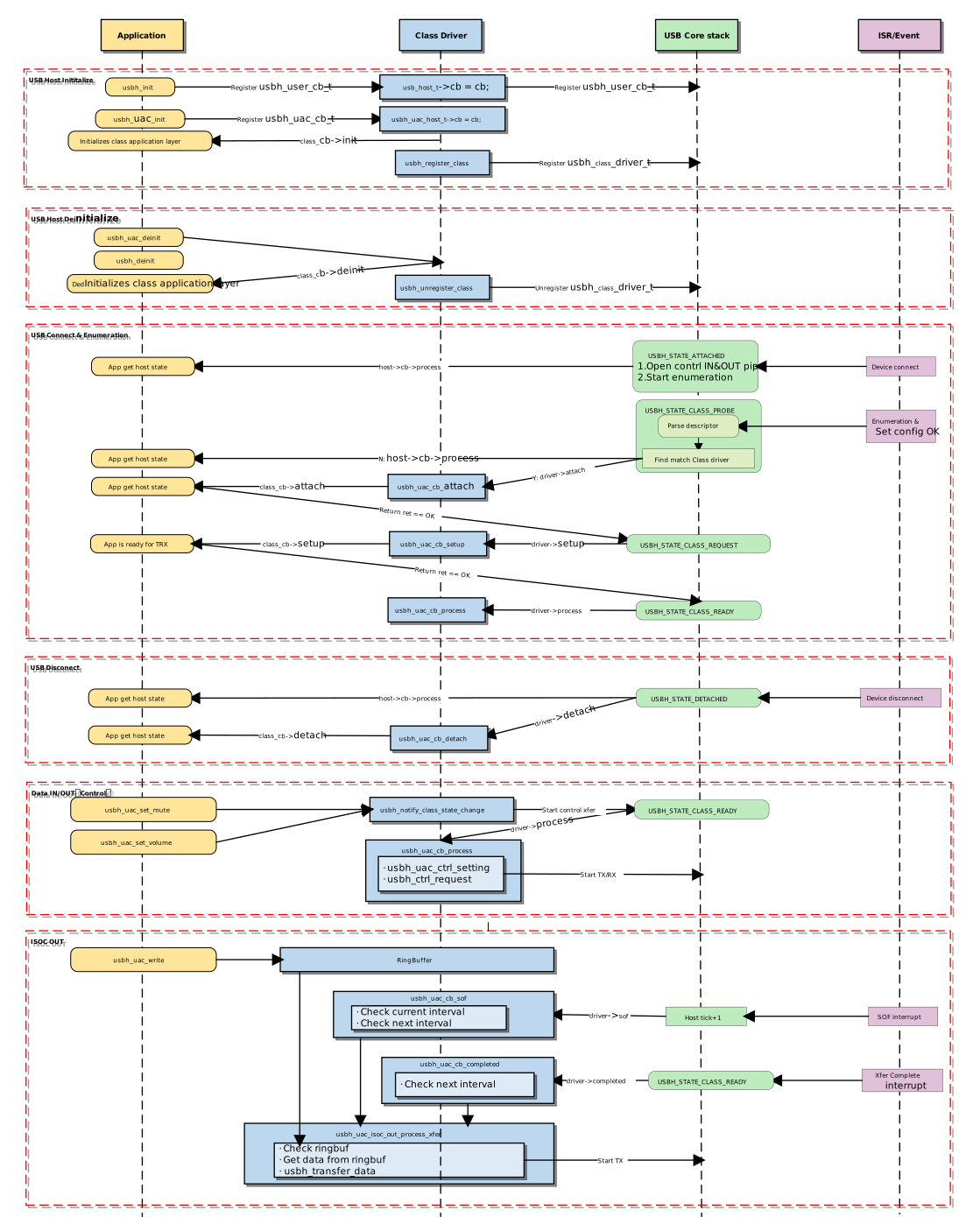
UAC Host 类驱动在系统架构中起着承上启下的作用,其实现逻辑主要围绕以下三个核心交互接口展开:
主机类驱动回调 API:类驱动通过定义并注册一个标准的
usbh_class_driver_t结构体与底层 USB Core 进行交互。面向应用的回调 API:类驱动通过
usbh_uac_cb_t回调结构体向上层应用提供异步事件通知机制。面向应用的 API:应用层调用这些 API 后,驱动会切换内部状态机的状态,开启数据传输的调度。
驱动回调机制:
加载与卸载类驱动
这两个函数负责内存资源的分配与释放,以及类驱动向 USB 核心的注册与注销。
usbh_uac_init() 是加载 UAC 主机类驱动的顶层函数,主要完成以下任务:
保存用户提供的回调函数,并调用用户
init回调。保存用户配置的环形缓冲区的帧数
frame_cnt分配内存,包括用于控制传输的缓冲和用于 TX 音频传输的缓冲。
调用
usbh_register_class()注册 UAC 类驱动到 USB 主机核心。
示例:
int usbh_uac_init(usbh_uac_cb_t *cb, int frame_cnt)
{
    /* 1. Save the frame count param */
    uac->frame_cnt = frame_cnt;

    /* 2. Allocate memory */
    uac->audio_ctrl_buf = (u8 *)usb_os_malloc(UBSH_UAC_AUDIO_CTRL_BUF_MAX_LEN);
    uac->isoc_tx_buf = (u8 *)usb_os_malloc(USBH_UAC_ISOC_BUF_LENGTH);

    /* 3. Save the user callback and call the user's ``init`` callback */
    if (cb != NULL) {
      uac->cb = cb;
      if (cb->init != NULL) {
        ret = cb->init();
        if (ret != HAL_OK) {
          RTK_LOGS(TAG, RTK_LOG_ERROR, "User init err %d\n", ret);
          return ret;
        }
      }
    }

    /* 4. Register class driver*/
    usbh_register_class(&usbh_uac_driver);

    return HAL_OK;
}
usbh_uac_deinit() 是用于卸载 UAC 主机类驱动的顶层函数,负责清理资源:
调用
usbh_uac_stop_play()通知 UAC 类驱动停止数据发送调用
usbh_unregister_class()注销 UAC 类驱动。调用用户
deinit回调,告知应用层。如果设备处于连接状态,强制关闭所有打开的管道(ISOC OUT)。
释放之前分配的所有内存,包括循环缓冲区,描述符解析内存等。
示例:
int usbh_uac_deinit(void)
{
   /* 1. Stop ISOC data transmission */
   usbh_uac_stop_play();

  /* 2. Unregister class driver*/
  usbh_unregister_class(&usbh_uac_driver);

  /* 3. Call the user's ``deinit`` callback  */
  if ((uac->cb != NULL) && (uac->cb->deinit != NULL)) {
    uac->cb->deinit();
  }

  /* 4. Close all open pipes */
  usbh_uac_deinit_all_pipe();

  /* 5. Free ringbuffer */
  usbh_uac_ep_buf_ctrl_deinit(&(uac->isoc_out));

  /* 6. Free memory */
  if (uac->audio_ctrl_buf != NULL) {
      usb_os_mfree(uac->audio_ctrl_buf);
      uac->audio_ctrl_buf = NULL;
  }
  if (uac->isoc_tx_buf != NULL) {
      usb_os_mfree(uac->isoc_tx_buf);
      uac->isoc_tx_buf = NULL;
  }
  /****/

  return ret;
}
连接与断连处理
当 USB 核心检测到匹配 UAC 类的设备插入或拔出时,会触发相应的回调函数。
usbh_uac_cb_attach 是设备枚举的关键步骤,负责解析接口描述符并分配管道资源:
查找音频控制接口 (AC Interface):解析获取音频控制信息,包括音量范围、静音控制能力等。
查找音频数据接口 (AS Interface):解析获取音频格式信息及端点描述符。
打开管道:根据获取到的描述符信息,分配并打开 ISOC OUT 管道。
初始化状态机:将状态置为
UAC_STATE_GET_MUTE初始状态,准备获取音频信息。通知应用层:调用用户
attach回调,告知应用层连接状态。
static int usbh_uac_cb_attach(usb_host_t *host)
{
  /* 1. Parse descriptors to get AC and AS information */
  status = usbh_uac_parse_interface_desc(host);
  if (status) {
    return status;
  }

  /* 2. Open the pipe for steaming transfer */
  if (uac->as_isoc_out) {
      as_itf = uac->as_isoc_out;
      as_itf->choose_alt_idx = 0;

      pipe = &(as_itf->pipe);
      ep_desc = &(as_itf->itf_info_array[as_itf->choose_alt_idx].ep_desc);

      usbh_open_pipe(host, pipe, ep_desc);
  }

  /* 3. Initialize the state machine */
  uac->ctrl_state = UAC_STATE_GET_MUTE;

  /* 4. Notify the user layer */
  if ((uac->cb != NULL) && (uac->cb->attach != NULL)) {
      uac->cb->attach();
  }
  return HAL_OK;
}
usbh_uac_cb_detach 在设备拔出时被调用。它负责通知上层应用设备已移除。
static int usbh_uac_cb_detach(usb_host_t *host)
{
  /* 1. Notify the user layer */
  if ((uac->cb != NULL) && (uac->cb->detach != NULL)) {
      uac->cb->detach();
  }

  /* 2. Reset xfer status */
  uac->xfer_state = UAC_STATE_IDLE;

  return HAL_OK;
}
类驱动状态机
usbh_uac_cb_process 回调函数是主机端 UAC 类的核心状态机处理函数。
与设备端被动响应请求不同,主机端驱动需要主动维护设备状态。它的核心职责是维护类驱动的生命周期状态,并分发传输任务。
状态机管理与调度
usbh_uac_cb_process 根据当前类驱动状态管理控制传输(如采样率配置)和数据传输的调度。
状态枚举 |
描述 |
关键动作 |
|---|---|---|
IDLE |
空闲状态 |
等待用户指令或数据传输请求。 |
TRANSFER |
数据传输中 |
根据管道号分发任务到具体的 TX/RX 处理函数。 |
ERROR |
错误状态 |
尝试清除端点特征 (Clear Feature) 以恢复通信。 |
传输处理分发示例
当处于 TRANSFER 状态时,根据触发事件的管道号(Pipe ID),将处理分发给具体的传输处理函数。
示例:
case UAC_STATE_TRANSFER:
     /* Distribute transmission tasks according to pipe numbers */
     if (event.msg.pipe_num == 0) {
         ret = usbh_uac_ctrl_setting(host, 0);      // Handle ctrl message transfer
     }
  break;
错误恢复
在其他状态处理发生错误时,驱动会尝试发送 Clear Feature 请求并恢复到 IDLE 状态。
示例:
/* ... Error state ... */
case UAC_STATE_ERROR:
    /* Error recovery mechanism */
    ret = usbh_ctrl_clear_feature(host, 0x00U);
    if (ret == HAL_OK) {
        uac->xfer_state = UAC_STATE_IDLE;
    }
break;
数据传输处理
UAC 数据传输主要分为两类:音频控制接口数据传输 和 音频数据流传输。
音频控制传输(Control Transfer),
负责管理音频设备的功能行为,驱动实现了如下状态机流程来处理配置请求:
case UAC_STATE_SET_OUT_ALT:
    ret = usbh_uac_process_set_out_alt(host);
    if (ret == HAL_OK) {
        uac->ctrl_state = UAC_STATE_SET_OUT_FREQ;
    } else if (ret != HAL_BUSY) {
        RTK_LOGS(TAG, RTK_LOG_ERROR, "OUT alt err\n");
        uac->ctrl_state = UAC_STATE_SET_OUT_FREQ;
    }
    break;
case UAC_STATE_SET_OUT_FREQ:
    ret = usbh_uac_process_set_out_freq(host);
    if (ret == HAL_OK) {
        uac->ctrl_state = UAC_STATE_CTRL_IDLE;
        ret_status = HAL_OK;
    } else if (ret != HAL_BUSY) {
        RTK_LOGS(TAG, RTK_LOG_ERROR, "OUT freq err\n");
        uac->ctrl_state = UAC_STATE_CTRL_IDLE;
        ret_status = HAL_OK;
    }
    break;
case UAC_STATE_SET_MUTE:
    ret = usbh_uac_process_set_mute(host);
    if (ret == HAL_OK) {
        uac->ctrl_state = UAC_STATE_CTRL_IDLE;
        ret_status = HAL_OK;
    } else if (ret != HAL_BUSY) {
        RTK_LOGS(TAG, RTK_LOG_ERROR, "Set mute err\n");
        uac->ctrl_state = UAC_STATE_CTRL_IDLE;
        ret_status = HAL_OK;
    }
    break;
case UAC_STATE_SET_VOLUME:
    ret = usbh_uac_process_set_volume(host);
    if (ret == HAL_OK) {
        uac->ctrl_state = UAC_STATE_CTRL_IDLE;
        ret_status = HAL_OK;
    } else if (ret != HAL_BUSY) {
        RTK_LOGS(TAG, RTK_LOG_ERROR, "Set vol err\n");
        uac->ctrl_state = UAC_STATE_CTRL_IDLE;
        ret_status = HAL_OK;
    }
    break;
音频数据流传输(ISOC Transfer):
为确保音频流的实时性与低延迟,UAC 类驱动通过 USB 硬件中断机制(帧首中断 SOF 或传输完成中断 Complete)来精准触发下一帧数据的传输调度。
Completed (传输完成):传输完成中断,表示当前数据已成功发送至总线。
当端点传输间隔 (bInterval) 为 1 时(即每帧都需要传输),为了最大化带宽利用率并降低延迟,驱动采取 紧凑调度策略:在上一帧数据的 Completed 回调中,立即填装并提交下一帧的数据传输请求。
SOF (Start Of Frame):帧起始中断。
当端点传输间隔 (bInterval) 大于 1 时(即每隔 N 帧传输一次),驱动采取 间隔调度策略,利用 SOF 中断计数器跟踪帧号,一旦达到预定的发送间隔,立即准备并提交下一帧数据传输请求。
代码示例 (Completed 回调逻辑):
static usbh_class_driver_t usbh_uac_driver = {
    .completed = usbh_uac_cb_completed,
};

static int usbh_uac_cb_completed(usb_host_t *host, u8 pipe_num)
{
    u32 cur_frame = usbh_get_current_frame_number(host);

    if (pdata_ctrl->next_xfer == 1) {
        /* Check if this is the audio streaming pipe */
        if ((uac->as_isoc_out) && (pipe_num == uac->as_isoc_out->pipe.pipe_num)) {
            pipe->xfer_state = USBH_EP_XFER_IDLE;

            /* If ring buffer has data, prepare next transfer */
            if (!usb_ringbuf_is_empty(&(pdata_ctrl->buf_manager))) {

                /* Trigger next xfer logic: check if interval is met */
                if (usbh_uac_frame_num_dec(usbh_uac_frame_num_inc(cur_frame, 1), pipe->frame_num) >= pipe->ep_interval) {
                    usbh_uac_isoc_out_process_xfer(host, cur_frame);
                } else {
                    /* Wait for next SOF if interval not met yet */
                    pipe->xfer_state = USBH_EP_XFER_WAIT_SOF;
                }
            } else {
                /* Buffer empty, go idle */
                pipe->xfer_state = USBH_EP_XFER_IDLE;
            }
        }
    }

    return HAL_OK;
}
代码示例 (SOF 回调逻辑):
static usbh_class_driver_t usbh_uac_driver = {
    .sof = usbh_uac_cb_sof,
};

/**
  * @brief  SOF (Start of Frame) callback handler for UAC.
  *         Responsible for scheduling ISOC transfers when bInterval > 1.
  */
static int usbh_uac_cb_sof(usb_host_t *host)
{
    u32 cur_frame = usbh_get_current_frame_number(host);

    /* Check if audio streaming is active */
    if (pdata_ctrl->next_xfer == 1) {
        /* Check Condition 1: Standard Interval Check
                Has the time elapsed since the last transfer met the endpoint interval? */
        /* Check Condition 2: Pre-scheduling (Lookahead)
               If the previous transfer finished early (state is WAIT_SOF), check if the
               NEXT frame (cur_frame + 1) will hit the interval target.
               This allows preparing data slightly ahead of time. */
        if ((usbh_get_elapsed_frame_cnt(host, pipe->frame_num) >= pipe->ep_interval) ||
            ((pipe->xfer_state == USBH_EP_XFER_WAIT_SOF) &&
             (usbh_uac_frame_num_dec(usbh_uac_frame_num_inc(cur_frame, 1), pipe->frame_num) >= pipe->ep_interval))) {
            /* Execute transfer if either condition is met */
            usbh_uac_isoc_out_process_xfer(host, cur_frame);
        }
    }

    return HAL_OK;
}
面向应用的 API
提供给上层应用的接口,用于获取信息、配置设备和传输数据。
配置类
usbh_uac_get_alt_setting():返回当前 UAC 设备支持的所有音频格式列表。usbh_uac_set_alt_setting():从支持列表中选择一个格式,通过 UAC 类驱动配置给设备。usbh_uac_set_volume():设置音量。参数范围 0~100,驱动会将其转换为 dB 值发送给设备。usbh_uac_set_mute():开启或关闭静音模式。
数据流类
usbh_uac_write():将 PCM 数据写入驱动内部的环形缓冲区。类驱动会自动根据音频格式将大数据包分割为符合 USB 帧大小的小包。usbh_uac_start_play():启动播放流程,驱动开始从环形缓冲区提取数据并发送。usbh_uac_stop_play():停止播放,终止 ISOC OUT 传输。
类特定请求实现
本驱动栈已内置 USB Audio Class 1.0 规范定义的核心请求封装。当前实现重点支持音频播放场景,默认启用了针对 Feature Unit 的控制请求。
开发者可在 {SDK}/component/usb/host/uac 路径下查看源码,并根据需求扩展更多请求类型。
类特定请求类型 |
备注 |
|---|---|
Mute Control |
静音控制。发送 SET_CUR 请求至 Feature Unit 的 Mute Control Selector,实现静音/取消静音。 |
Volume Control |
音量控制。发送 SET_CUR 请求至 Feature Unit 的 Volume Control Selector,设置增益值。 |
通道配置
在设备枚举阶段,驱动会解析配置描述符。当检测到音频流接口 (AS Interface) 处于活动状态时,驱动将自动申请相应的 USB 管道 (Pipe) 资源。
管道类型 |
用途描述 |
|---|---|
控制 IN/OUT 通道 |
用于发送标准设备请求(枚举、配置)以及 UAC 类特定请求(音量、采样率设置)。 |
等时 OUT 通道 |
归属于 Audio Streaming (AS) 接口的 Active Alternate Setting(通常为 Alt 1)。用于主机向 UAC 设备发送 PCM 音频数据流(TX Data)。 |
API 说明
应用示例
应用设计
本节详细介绍开发一个完整的 USB UAC 1.0 主机应用所需的流程,涵盖驱动初始化、热插拔事件处理、音频数据写入机制以及资源释放策略。
驱动初始化
在使用 UAC 1.0 Host 驱动前,必须按顺序完成硬件参数配置、回调函数注册以及核心协议栈的初始化。
步骤说明:
硬件配置:设置 USB 速度模式(Full Speed)及中断/任务优先级。
回调注册:定义用户回调结构体,挂载各个阶段(连接、断开、数据传输)的处理函数。
核心启动:依次调用
usbh_init()和usbh_uac_init()启动协议栈。
/*
 * 1. Configure USB speed (Full Speed) ,isr priority and main task priority.
 */
static usbh_config_t usbh_cfg = {
    .speed = USB_SPEED_FULL,
    .isr_priority = INT_PRI_MIDDLE,
    .main_task_priority = USBH_UAC_MAIN_THREAD_PRIORITY,
    .ext_intr_enable = USBH_SOF_INTR,
};
/*
 * Define USB user-level callbacks.
 */
static usbh_user_cb_t usbh_usr_cb = {
    .process = usbh_uac_cb_process,            /* USB callback to handle class-independent events in the application */
};

/*
 * 2. Define user callbacks for UAC events.
 */
static usbh_uac_cb_t usbh_uac_cfg = {
    .init   = usbh_uac_cb_init,                /* USB init callback */
    .deinit = usbh_uac_cb_deinit,              /* USB deinit callback */
    .attach = usbh_uac_cb_attach,              /* USB attach callback */
    .detach = usbh_uac_cb_detach,              /* USB detach callback */
    .setup  = usbh_uac_cb_setup,               /* USB setup callback */
    .isoc_transmitted     = usbh_uac_cb_isoc_transmitted,    /* Data transmission complet callback */
};

int ret = 0;

/**
 * 3. Initialize USB host core driver with configuration.
 */
ret = usbh_init(&usbh_cfg, &usbh_usr_cb);
if (ret != HAL_OK) {
    return;
}

/*
 * 4. Initialize UAC class driver.
 */
ret = usbh_uac_init(&usbh_uac_cfg, USBH_UAC_FRAME_CNT);
if (ret != HAL_OK) {
    /* If class driver init fails, clean up the core driver */
    usbh_deinit();

    return;
}
热插拔事件处理
系统必须具备健壮的热插拔处理机制,以应对 UAC 设备的动态移除与重新插入。SDK 提供了标准的状态机与回调机制来通知上层应用。
处理逻辑:
设备拔出 (Detach):触发回调释放信号量,应用线程捕获后执行反初始化,并释放堆内存。
设备插入 (Attach):USB 核心检测到设备,重新执行枚举和驱动加载流程。
/* USB detach callback */
static usbh_uac_cb_t usbh_uac_cfg = {
    .detach = usbh_uac_cb_detach,
};

/* Callback executed in main task */
static int usbh_uac_cb_detach(void)
{
    RTK_LOGS(TAG, RTK_LOG_INFO, "DETACH\n");
    rtos_sema_give(usbh_uac_detach_sema);
    usbh_uac_is_ready = 0;
    return HAL_OK;
}

/* Thread Context: Handle the state machine */
static void usbh_uac_hotplug_thread(void *param)
{
    int ret = 0;

    UNUSED(param);

    for (;;) {
        usb_os_sema_take(usbh_uac_detach_sema, USB_OS_SEMA_TIMEOUT);
        RTK_LOGS(TAG, RTK_LOG_INFO, "Hot plug\n");

        /* Stop transfer, release resource */
        usbh_uac_deinit();
        usbh_deinit();

        rtos_time_delay_ms(10);
        RTK_LOGS(TAG, RTK_LOG_INFO, "Free heap size: 0x%08x\n", usb_os_get_free_heap_size());

        /* Re-init */
        ret = usbh_init(&usbh_cfg, &usbh_usr_cb);
        if (ret != HAL_OK) {
            break;
        }

        ret = usbh_uac_init(&usbh_uac_cfg, USBH_UAC_FRAME_CNT);
        if (ret < 0) {
            usbh_deinit();
            break;
        }
    }
}
音频数据流机制
UAC 类驱动采用环形缓冲区 (Ring Buffer) 机制来缓冲上层应用产生的音频数据,并通过 SOF (Start of Frame) 和传输完成中断来驱动数据的持续发送。
数据写入 (Audio Write)
上层应用调用 usbh_uac_write() 接口将 PCM 数据填入环形缓冲区。如果缓冲区已满,该函数将根据设定的 timeout_ms 进行阻塞等待。
static int usbh_uac_write_ring_buf(usbh_uac_buf_ctrl_t *pdata_ctrl, u8 *buffer, u32 size, u32 *written_len)
{
    u32 written_size = handle->written;

    /* Fill it into the end of the data that was not completed last time to form a whole package */
    if (written_size) {
        xfer_len = usbh_uac_next_packet_size(pdata_ctrl);
        can_copy_len = xfer_len - written_size;
        copy_len = size < can_copy_len ? size : can_copy_len;

        usb_ringbuf_write_partial(handle, buffer, copy_len);
        offset += copy_len;
        *written_len += copy_len;

        if (size >= can_copy_len) {
            size -= copy_len;
            usb_ringbuf_finish_write(handle);
            pdata_ctrl->sample_accum = pdata_ctrl->last_sample_accum;
        } else {
            return 0;
        }
    }

    /* Fill the entire package in a cycle */
    do {
        if (usb_ringbuf_is_full(handle)) {
            return 1;
        }

        xfer_len = usbh_uac_next_packet_size(pdata_ctrl);

        if (size >= xfer_len) {
            usb_ringbuf_add_tail(handle, buffer + offset, xfer_len);

            *written_len += xfer_len;
            size -= xfer_len;
            offset += xfer_len;

            pdata_ctrl->sample_accum = pdata_ctrl->last_sample_accum;
        } else {
            break;
        }
    } while (1);

    /* Write the remaining data at the end */
    if (size > 0) {
        if (usb_ringbuf_is_full(handle)) {
            return 1;
        }

        usb_ringbuf_write_partial(handle, buffer + offset, size);

        *written_len += size;
    }
    return 0;
}

/* Tansfer APi, used for Audio */
u32 usbh_uac_write(u8 *buffer, u32 size, u32 timeout_ms)
{
    /* check usb status */
    if (usbh_uac_usb_status_check() != HAL_OK) {
        return 0;
    }

    /* loop to write data to the ringbuffer */
    while (written_len < size && pdata_ctrl->next_xfer) {

        if (usb_ringbuf_is_full()) {
            if (usbh_uac_wait_isoc_with_status_check(pdata_ctrl, timeout_ms) != HAL_OK) {
                break;
            }
        }

        try_len = size - written_len;
        just_written = 0;

        usbh_uac_write_ring_buf(pdata_ctrl, buffer + written_len, try_len, &just_written);

        if (just_written > 0) {
            written_len += just_written;
            last_zero = 0;
        } else {
            //wait sema and retry
            last_zero = 1;
        }
    }

    return written_len;
}
数据发送 (Audio Output)
底层驱动通过中断回调自动从环形缓冲区取出数据并发送至 USB 总线。
SOF 中断:周期性触发。检查当前帧号是否达到发送间隔(Interval),若是,则从 RingBuffer 取数据并提交传输。
Commplete 中断:上一次传输完成后触发。检查 RingBuffer 是否有剩余数据,如有则安排下一帧的发送任务。
static usbh_class_driver_t usbh_uac_driver = {
    .sof = usbh_uac_cb_sof,
    .completed = usbh_uac_cb_completed,
};

static void usbh_uac_isoc_out_process_xfer(usb_host_t *host, u32 cur_frame)
{
    if (!usb_ringbuf_is_empty(&(pdata_ctrl->buf_list))) {
        /* check valid data */
        pbuf = usb_ringbuf_get_head(&(pdata_ctrl->buf_list));
        if (pbuf && pbuf->buf_len > 0) {
            pipe->frame_num = usbh_uac_frame_num_inc(cur_frame, 1);
            pipe->xfer_buf = pbuf->buf;
            pipe->xfer_len = pbuf->buf_len;
            usbh_transfer_data(host, pipe);
            pipe->xfer_state = USBH_EP_XFER_BUSY;
        }
}

static int usbh_uac_cb_sof(usb_host_t *host)
{
    /* this class right not just support isoc out */
    if (pdata_ctrl->next_xfer == 1) {
        /* check the condition for transmission */
        if ((usbh_get_elapsed_frame_cnt(host, pipe->frame_num) >= pipe->ep_interval) ||
            ((pipe->xfer_state == USBH_EP_XFER_WAIT_SOF) &&
             (usbh_uac_frame_num_dec(usbh_uac_frame_num_inc(cur_frame, 1), pipe->frame_num) >= pipe->ep_interval))) {
            usbh_uac_isoc_out_process_xfer(host, cur_frame);
        }
    }
    return HAL_OK;
}

static int usbh_uac_cb_completed(usb_host_t *host, u8 pipe_num)
{
    if (pdata_ctrl->next_xfer == 1) {
        if ((uac->as_isoc_out) && (pipe_num == uac->as_isoc_out->pipe.pipe_num)) {
            usbh_uac_isoc_out_process_complete(host);
            if (!usb_ringbuf_is_empty(&(pdata_ctrl->buf_list))) {
                /* trigger next xfer after binterval */
                if (usbh_uac_frame_num_dec(usbh_uac_frame_num_inc(cur_frame, 1), pipe->frame_num) >= pipe->ep_interval) {
                    usbh_uac_isoc_out_process_xfer(host, cur_frame);
                } else {
                    pipe->xfer_state = USBH_EP_XFER_WAIT_SOF;
                }
            } else {
                /* TX ISOC OUT token only when play*/
                pipe->xfer_state = USBH_EP_XFER_IDLE;
            }
        }
    }

    return HAL_OK;
}
驱动卸载
在系统关闭或需要完全重置 USB 栈时,必须严格按照 先类驱动,后核心驱动 的反向顺序释放资源,以避免内存泄漏或指针错误。
/* 1. Deinitialize UAC class driver first */
usbh_uac_deinit();

/* 2. Deinitialize USB host core driver */
usbh_deinit();
运行方式
本节以 Ameba 连接 USB 耳机播放音频 为例,演示如何将 Ameba 开发板配置为 USB UAC 1.0 主机,并通过外接标准 USB 耳机输出音频。
该示例默认行为:识别 UAC 设备 -> 配置为 48 kHz / 16-bit / 2-channels -> 循环播放一段预置的 PCM 音频。
该示例路径: {SDK}/example/usb/usbh_uac,可为开发者设计语音播报、音频网关等产品提供完整的设计参考。
备注
本示例需要 XDK (Extended Development Kit) 支持。XDK 下载请参考 SDK Download.
配置与编译
编译与烧录
在 SDK 根目录下执行以下命令以配置环境,选择目标 SoC,编译工程,然后将生成的
Image文件烧录至开发板。# Initialize environment (required for every new terminal) source env.sh or env.bat(Windows system) # Select Target SoC (replace xxx with your specific SoCs) ameba.py soc xxx ameba.py build -a usbh_uac -p
Menuconfig 配置确认
若编译失败,请执行
ameba.py menuconfig,确认已选择USBH UAC。- Choose `CONFIG USB --->`: [*] Enable USB USB Mode (Host) ---> [*] UAC
结果验证
启动设备
复位开发板,观察串口日志(Log UART)。当出现以下 Log 时,表示 USB Host 初始化成功:
[UAC-I] USBH UAC demo start
连接设备
将兼容 UAC 1.0 的 USB 耳机插入开发板。
功能测试
自动播放测试
连接成功后,系统会自动开始音频流传输。
预期结果:耳机中听到预置的音频片段(默认循环播放 60 次,每次 1 秒)。
备注
可在 example_usbh_uac.c 中修改循环次数配置。
静音控制测试 (Mute)
在串口控制台输入命令:
uach_mute 1:耳机静音。
uach_mute 0:取消静音,恢复声音。
音量控制测试 (Volume)
在串口控制台输入命令:
uach_vol 10:设置音量为 10%(声音变小)。
uach_vol 90:设置音量为 90%(声音变大)。