音频设备方案
概述
USB Audio Class (UAC) 协议定义了 USB 音频设备(如 USB 耳机、麦克风、声卡及其他音频接口设备)的标准接口与功能控制规范。
Ameba 基于 USB-IF 官方发布的 UAC 协议标准,实现了完备的 USB 音频设备功能,能够为系统提供便捷、高质量的音频数据传输能力。
特性
支持 USB 热插拔
支持描述符全定制
支持全双工音频数据传输
支持音量、静音控制
支持配置速度模式等参数
应用场景
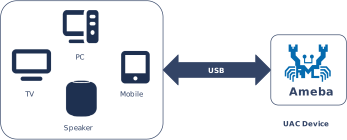
Ameba 作为标准的 USB 音频设备 (USB Audio Device),支持与主设备(Host,如 PC、智能电视或游戏主机)建立全双工(Full-Duplex)高速数据链路。它不仅能够实时接收下行音频流(Playback)并采集上行麦克风数据(Record),还能充当无线协议网关,将 USB 音频流无缝桥接至 Wi-Fi 或蓝牙模块,从而赋能多种创新应用场景,例如:
Wi-Fi 无线多声道音响系统:Ameba 作为 USB 音频接收端,从主设备(如电视/PC)获取多声道音频数据,并通过 Wi-Fi 组播或单播至多个从属播放设备。每个播放设备解析并播放指定声道的音频流,共同组成无线环绕声系统。
蓝牙音频发射器(Dongle):Ameba 充当 USB 声卡插入 PC,获取系统播放的音频数据,并通过板载蓝牙协议栈将音频流转发至蓝牙耳机或蓝牙音箱。
智能家居语音交互终端:通过 USB 接收云端指令音频,同时采集本地麦克风阵列数据回传,组成高品质的智能音箱或会议系统。
支持的音频格式
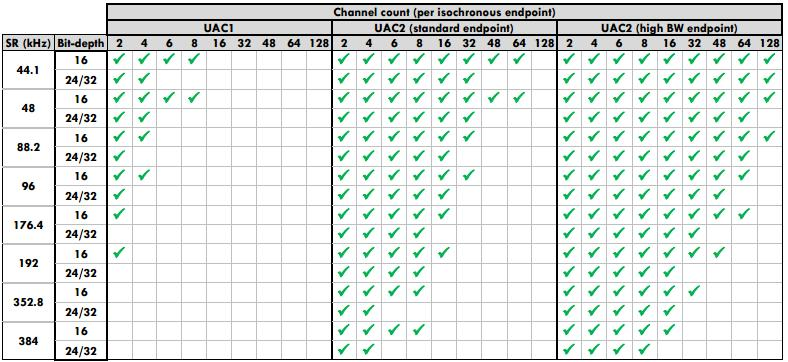
UAC 不同协议版本(1.0/2.0)在音频格式支持上存在差异,具体概览如下图所示:
协议栈支持详情
Ameba USB 协议栈提供了完整的 UAC 设备类驱动,支持多种主流音频格式及采样率。具体支持的特性及参数如下:
支持高速和全速 UAC 2.0 扬声器功能,默认支持以下音频格式,可在应用层灵活配置:
采样率(kHz) |
位宽 |
声道 |
|||
|---|---|---|---|---|---|
2 |
4 |
6 |
8 |
||
44.1 |
16 |
Y |
Y |
Y |
Y |
24/32 |
Y |
Y |
Y |
Y |
|
48 |
16 |
Y |
Y |
Y |
Y |
24/32 |
Y |
Y |
Y |
Y |
|
96 |
16 |
Y |
Y |
||
24/32 |
Y |
Y |
|||
192 |
16 |
Y |
|||
24/32 |
Y |
||||
支持音量、静音控制
支持描述符全定制
支持全双工音频数据传输
支持 USB 热插拔
支持速度模式配置
备注
USB 设备核心驱动目前不支持 UAC 2.0 高带宽端点,即每个帧/微帧最多只支持一笔等时传输,传输大小不超过等时 OUT 端点的最大包长
整条音频通路支持的音频格式由 UAC 主机、UAC 设备硬件及软件框架、音频硬件及软件框架、基于 UAC 的音频应用共同决定
支持全速 UAC 1.0 扬声器功能,默认支持以下音频格式,可在应用层灵活配置:
采样率(kHz) |
位宽 |
声道 |
|||
|---|---|---|---|---|---|
2 |
4 |
6 |
8 |
||
44.1 |
16 |
Y |
Y |
Y |
Y |
24/32 |
Y |
Y |
|||
48 |
16 |
Y |
Y |
Y |
Y |
24/32 |
Y |
Y |
|||
96 |
16 |
Y |
Y |
||
24/32 |
Y |
||||
192 |
16 |
Y |
|||
24/32 |
|||||
支持音量、静音控制
支持描述符全定制
支持 USB 热插拔
支持速度模式配置
备注
整条音频通路支持的音频格式由 UAC 主机、UAC 设备硬件及软件框架、音频硬件及软件框架、基于 UAC 的音频应用共同决定
协议简介
UAC (USB Audio Class) 是由 USB-IF 定义的通用音频设备类标准,旨在规范数字音频数据流在 USB 接口上的封装与传输方式。 USB 音频设备(如 USB 音响、耳机、麦克风)通过 数据传输 与 功能控制 的标准接口,能够在主机系统中被自动识别为标准的音频输入/输出终端,无需安装专有驱动。
版本对比
USB-IF 官方已发布多个 UAC 协议版本。各主流版本的规范文档下载链接如下表所示:
版本 |
文档 |
|---|---|
1.0 |
|
2.0 |
术语定义
本文档涉及的通用 UAC 技术术语定义如下:
术语 |
描述 |
|---|---|
AC Interface (Audio Control Interface) |
音频控制接口。负责管理音频设备的拓扑结构(如 Input/Output Terminal、Feature Unit),并通过控制端点(Control Endpoint)实现音量调节、静音开关等控制指令的下发。 |
AS Interface (Audio Streaming Interface) |
音频流接口。负责音频负载数据的实际传输,通常使用等时(Isochronous)端点。一个 AS 接口可以包含多个备用设置(Alternate Settings),分别对应不同的采样率、位宽或通道配置。 |
Terminal Type |
终端类型。用于标识音频信号源或接收器的物理/逻辑属性(例如:USB Streaming Terminal 代表 USB 数据流,Speaker Terminal 代表扬声器)。 |
Feature Unit |
功能单元。音频拓扑中的处理节点,提供具体的音频控制能力(如主音量调节、各声道增益、静音控制)。 |
Sample Rate / Bit Resolution |
采样率与位宽。U 音频格式的核心参数。UAC 1.0 常见组合包括 48 kHz / 16-bit、44.1 kHz / 16-bit 等。 |
本文档涉及的通用音频技术术语定义如下:
术语 |
描述 |
|---|---|
PCM |
脉冲编码调制(Pulse Code Modulation),一种将模拟音频信号转换为数字信号的编码方式。 |
声道数(Channel) |
指独立的音频信号流。声道数通常对应声源或扬声器的数量(如单声道、立体声)。 |
位深(Bit Depth) |
音频采样时的量化精度,表示每个采样点所占用的位数。位深越大,动态范围越大,音质越精细。 |
采样率(Sampling Rate) |
每秒钟对音频信号进行采样的次数。采样率越高,能还原的高频信号越多,音频保真度越高。 |
协议框架
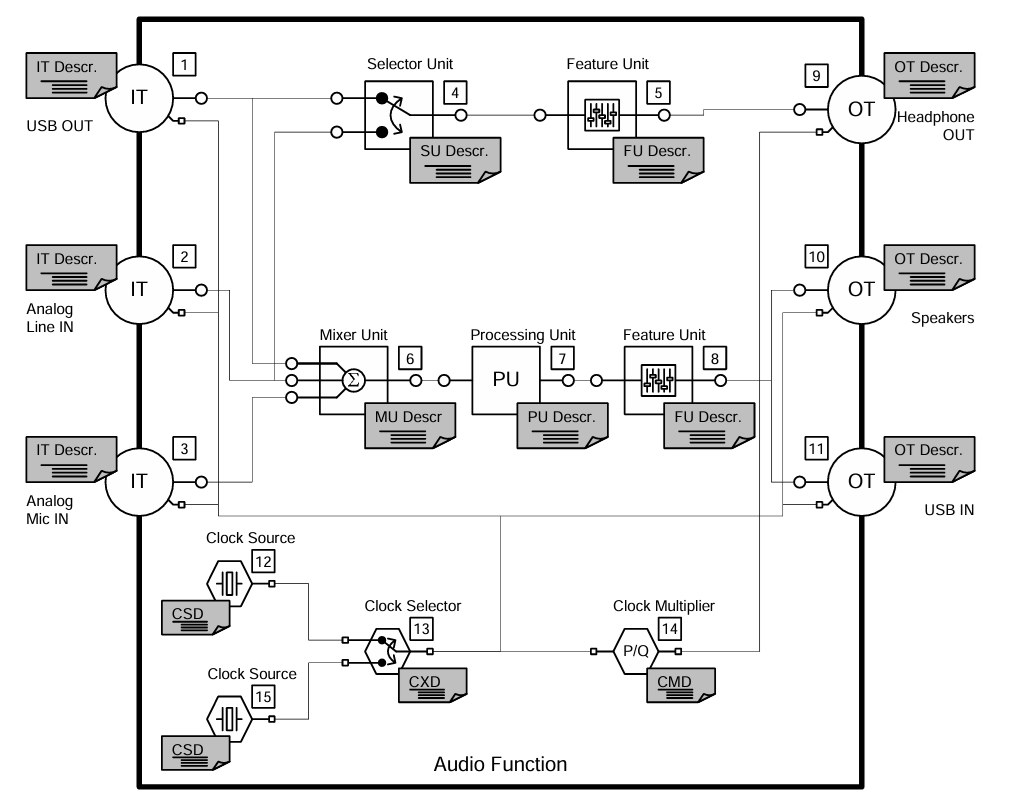
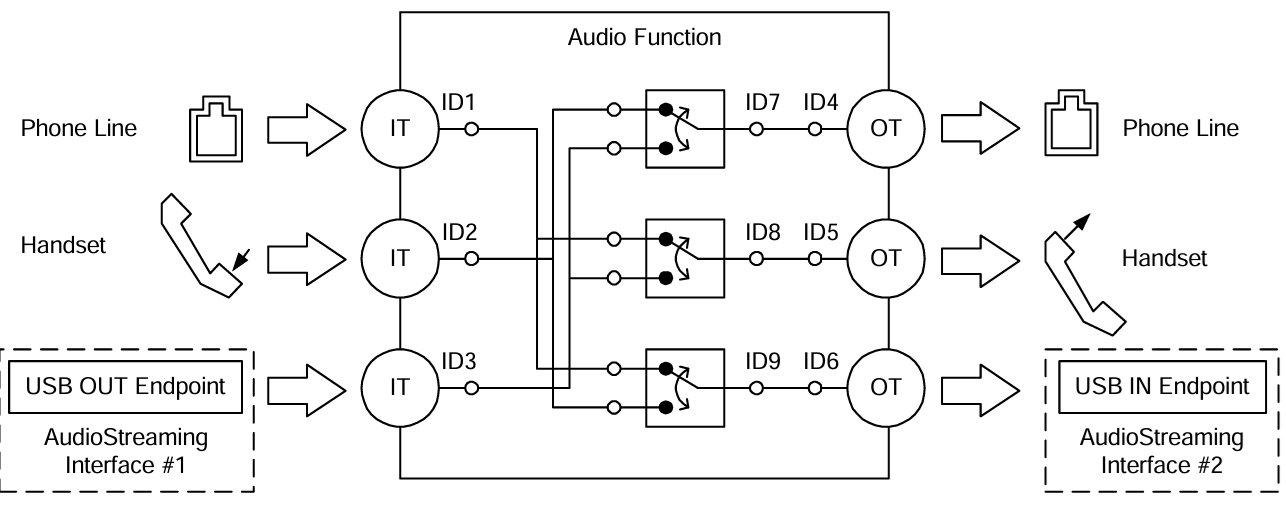
UAC 系统架构通过定义不同的接口集合来支持音频数据的传输与控制。从逻辑功能上,UAC 设备接口主要分为两大类:音频控制接口 (Audio Control Interface) 和 音频流接口 (Audio Streaming Interface)。
音频控制接口(AC Interface)
负责管理音频设备的整体功能行为,例如音量调节、静音控制、输入源选择等。
一个 AC 接口内部包含定义的拓扑结构(Topology),用于描述音频信号从输入终端(Input Terminal)到输出终端(Output Terminal)的流向及处理过程。
音频流接口 (AS Interface)
负责传输实际的音频负载数据。
一个 UAC 设备可包含多个 AS 接口,每个接口可配置为传输不同格式、不同采样率或不同位深的音频数据。
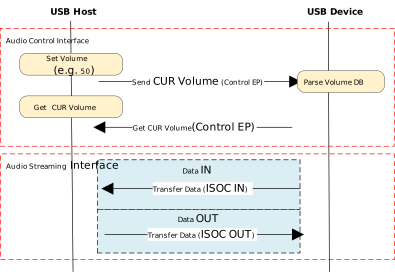
协议交互示例:
描述符结构
UAC 设备除遵循标准的 USB 描述符(如设备描述符、配置描述符、端点描述符)外,还定义了类特定描述符 (Class-Specific Descriptors)。这些描述符依据其所属接口,分为类特定控制接口描述符和类特定音频流接口描述符。
不同协议版本在描述符的定义上存在差异:
Descriptor Topology
Device Descriptor
└── Identifies basic device information (USB Version 2.00)

Configuration Descriptor
├── Contains total length of the entire configuration, power supply information, etc.
│
├── Interface Association Descriptor (IAD)
│       └── Binds audio control and streaming interfaces into a single functional unit
│
├── Audio Control (AC) Interface Descriptor (Interface 0)
│       ├── Standard Interface Descriptor (Interface 0, Control Class)
│       └── Class-Specific Descriptor Collection
│               ├── Audio Control Interface Header (declares UAC version)
│               ├── Clock Source (internal clock or external clock)
│               ├── Clock Source (internal clock or external clock)
│               ├── Input Terminal (source of audio stream)
│               ├── Feature Unit (volume/mute controls, etc.)
│               ├── Output Terminal (destination of audio stream)
│               ├── Input Terminal (source of audio stream)
│               ├── Feature Unit (volume/mute controls, etc.)
│               └── Output Terminal (destination of audio stream)
│
├── Audio Streaming (AS) Interface Descriptor (Interface 1)
│       ├── Alternate Setting 0: Control transfer active state (control transfer only)
│       │
│       ├── Alternate Setting 1: Data transfer active state (with data endpoint)
│       │ ├── Standard Interface Descriptor (Interface 1, Streaming Class)
│       │ ├── Class-Specific AS Interface (associated USB streaming terminal, audio format, number of channels)
│       │ ├── Format Descriptor (audio format and bit width)
│       │ ├── Standard Endpoint Descriptor (ISO OUT endpoint)
│       │ └── Class-Specific Endpoint Descriptor (no special control)
│       │
│       ├── Alternate Setting 2
│       │ ...... Can configure multiple different setting as needed
│
└── Audio Streaming (AS) Interface Descriptor (Interface 2)
        ├── Alternate Setting 0: Control transfer active state (control transfer only)
        │
        ├── Alternate Setting 1: Data transfer active state (with data endpoint)
        │ ├── Standard Interface Descriptor (Interface 2, Streaming Class)
        │ ├── Class-Specific AS Interface (associated USB streaming terminal, audio format, number of channels)
        │ ├── Format Descriptor (audio format and bit width)
        │ ├── Standard Endpoint Descriptor (ISO IN endpoint)
        │ └── Class-Specific Endpoint Descriptor (no special control)
        │
        ├── Alternate Setting 2
        │ ...... Can configure multiple different setting as needed

Device Qualifier Descriptor
└── Device information while running in another speed mode

Other Speed Configuration Descriptor
├── Configuration information while running in another speed mode.
│
├── Interface Association Descriptor (IAD)
│       └── Binds audio control and streaming interfaces into a single functional unit
│
├── Audio Control (AC) Interface Descriptor (Interface 0)
│       ├── Standard Interface Descriptor (Interface 0, Control Class)
│       └── Class-Specific Descriptor Collection
│               ├── Audio Control Interface Header (declares UAC version)
│               ├── Clock Source (internal clock or external clock)
│               ├── Clock Source (internal clock or external clock)
│               ├── Input Terminal (source of audio stream)
│               ├── Feature Unit (volume/mute controls, etc.)
│               ├── Output Terminal (destination of audio stream)
│               ├── Input Terminal (source of audio stream)
│               ├── Feature Unit (volume/mute controls, etc.)
│               └── Output Terminal (destination of audio stream)
│
├── Audio Streaming (AS) Interface Descriptor (Interface 1)
│       ├── Alternate Setting 0: Control transfer active state (control transfer only)
│       │
│       ├── Alternate Setting 1: Data transfer active state (with data endpoint)
│       │ ├── Standard Interface Descriptor (Interface 1, Streaming Class)
│       │ ├── Class-Specific AS Interface (associated USB streaming terminal, audio format, number of channels)
│       │ ├── Format Descriptor (audio format and bit width)
│       │ ├── Standard Endpoint Descriptor (ISO OUT endpoint)
│       │ └── Class-Specific Endpoint Descriptor (no special control)
│       │
│       ├── Alternate Setting 2
│       │ ...... Can configure multiple different setting as needed
│
└── Audio Streaming (AS) Interface Descriptor (Interface 2)
        ├── Alternate Setting 0: Control transfer active state (control transfer only)
        │
        ├── Alternate Setting 1: Data transfer active state (with data endpoint)
        │ ├── Standard Interface Descriptor (Interface 2, Streaming Class)
        │ ├── Class-Specific AS Interface (associated USB streaming terminal, audio format, number of channels)
        │ ├── Format Descriptor (audio format and bit width)
        │ ├── Standard Endpoint Descriptor (ISO IN endpoint)
        │ └── Class-Specific Endpoint Descriptor (no special control)
        │
        ├── Alternate Setting 2
        │ ...... Can configure multiple different setting as needed
UAC Audio Control (AC) Interface Descriptor
Audio Control Interface Header
Audio Control Interface Header Descriptor
├── bLength            : 1 byte  → Total descriptor length (fixed = 9)
├── bDescriptorType    : 1 byte  → 0x24 (CS_INTERFACE)
├── bDescriptorSubtype : 1 byte  → 0x01 (HEADER)
├── bcdADC             : 2 bytes → Audio Device Class Specification Release Number
├── bCategory          : 1 byte  → Indicates the classification/function of the device
├── wTotalLength       : 2 bytes → Total length of all AC Class-Specific descriptors, including this one
└── bmControls         : 1 byte  → Bitmap indicating the availability of non-addressable control functions
Clock Source Descriptor
Clock Source Descriptor
├── bLength            : 1 byte  → Total descriptor length (fixed = 8)
├── bDescriptorType    : 1 byte  → 0x24 (CS_INTERFACE)
├── bDescriptorSubtype : 1 byte  → 0x0A (Clock Source)
├── bClockID           : 1 byte  → Unique Clock ID, ranging from 1 to 255
├── bmAttributes       : 1 byte  → Clock type (0=Internal, 1=External)
├── bmControls         : 1 byte  → Bitmap indicating the control attributes of the clock
└── iClockSource       : 1 byte  → String descriptor index
Input Terminal Descriptor
Input Terminal Descriptor
├─ bLength                : 1 byte   → Total descriptor length (fixed = 17)
├─ bDescriptorType        : 1 byte   → 0x24 (CS_INTERFACE)
├─ bDescriptorSubtype     : 1 byte   → 0x02 (INPUT_TERMINAL)
├─ bTerminalID            : 1 byte   → Unique ID of this terminal (referenced in topology)
├─ wTerminalType          : 2 bytes  → Terminal type (little-endian)
│                           ├─ 0x0101 = USB Streaming (Host audio stream input)
│                           └─ Other values refer to UAC2.0 Appendix B (e.g., Microphone)
├─ bAssocTerminal         : 1 byte   → Associated Output Terminal ID (0 = no pairing)
├─ bCSourceID             : 1 byte   → Associated Clock Source ID
├─ bNrChannels            : 1 byte   → Number of logical output channels (e.g., 2 = stereo)
├─ bmChannelConfig        : 4 bytes  → Spatial location bitmap for channels
├─ iChannelNames          : 1 byte   → String index for channel names
├─ bmControls             : 2 byte   → Control bitmap
└─ iTerminal              : 1 byte   → String index for describing this terminal
Feature Unit Descriptor
Feature Unit Descriptor
├─ bLength                : 1 byte   → otal descriptor length in bytes
│                                      = 6 + (1 + bNrChannels) × 4
├─ bDescriptorType        : 1 byte   → = 0x24 (CS_INTERFACE)
├─ bDescriptorSubtype     : 1 byte   → = 0x06 (FEATURE_UNIT)
├─ bUnitID                : 1 byte   → Unique ID of this Feature Unit
├─ bSourceID              : 1 byte   → ID of the connected Source Unit or Terminal
├─ bmaControls[0]         : 4 bytes  → Master Channel Control Bitmap
├─ bmaControls[1]         : 4 bytes  → Logical Channel 1 Control Bitmap
├─ bmaControls[2]         : 4 bytes  → Logical Channel 2 Control Bitmap
│    ⋮
├─ bmaControls[N]         : 4 bytes  → Logical Channel N Control Bitmap (Total bNrChannels entries)
└─ iFeature               : 1 byte   → String descriptor index
Output Terminal Descriptor
Output Terminal Descriptor
├─ bLength                : 1 byte   → Total descriptor length (fixed = 12 bytes)
├─ bDescriptorType        : 1 byte   → 0x24 (CS_INTERFACE)
├─ bDescriptorSubtype     : 1 byte   → 0x03 (OUTPUT_TERMINAL)
├─ bTerminalID            : 1 byte   → Unique ID of this terminal
├─ wTerminalType          : 2 bytes  → Terminal type
│                           ├─ 0x0301 = Speaker
│                           ├─ 0x0302 = Headphones
│                           ├─ 0x0603 = SPDIF
│                           └─ Other values refer to Appendix B
├─ bAssocTerminal         : 1 byte   → Associated Input Terminal ID
├─ bSourceID              : 1 byte   → ID of the connected Source Unit or Terminal
├─ bCSourceID             : 1 byte   → Associated Clock Source ID
└─ iTerminal              : 1 byte   → String index for describing this terminal
Audio Streaming Interface Descriptor
Class-Specific AS Interface Descriptor
Class-Specific AS Interface Descriptor
├─ bLength                : 1 byte   → Fixed as 0x10 (16 bytes)
├─ bDescriptorType        : 1 byte   → 0x24(CS_INTERFACE)
├─ bDescriptorSubtype     : 1 byte   → 0x01(AS_GENERAL)
├─ bTerminalLink          : 1 byte   → Associated Terminal ID (Input or Output Terminal)
├─ bmControls             : 1 bytes  → Bitmap of endpoint control capabilities
├─ bFormatType            : 1 byte   → Format type
│                           └─ 0x01 = FORMAT_TYPE_I(PCM)
├─ bmFormats              : 4 bytes  → Bitmap of supported audio formats
├─ bNrChannels            : 1 bytes  → Number of supported audio channels
├─ bmChannelConfig        : 4 bytes  → Supported audio channel configuration bitmap
└─ iChannelNames          : 1 byte   → String index for channel names
Audio Streaming Format Type Descriptor
Audio Streaming Format Type Descriptor
├─ bLength            : 1 byte   → Total length of descriptor in bytes (6 bytes)
├─ bDescriptorType    : 1 byte   → = 0x24(CS_INTERFACE)
├─ bDescriptorSubtype : 1 byte   → = 0x02(FORMAT_TYPE)
├─ bFormatType        : 1 byte   → = 0x01(FORMAT_TYPE_I)
├─ bSubslotSize       : 1 byte   → Container size for each audio sample (in bytes)
│                                   • Typical values: 1, 2, 3, 4
├─ bBitResolution     : 1 byte   → Number of valid bits in each sample(≤ bSubslotSize × 8)
└─                                  • Example: 16 represents 16-bit PCM
Descriptor Topology
Device Descriptor
└── Identifies basic device information (USB Version 1.10)

Configuration Descriptor
├── Contains total length of the entire configuration, power supply information, etc.
│
├── Audio Control (AC) Interface Descriptor (Interface 0)
│       ├── Standard Interface Descriptor (AlternateSetting 0, Control Class)
│       └── Class-Specific Descriptor Collection
│               ├── Audio Control Interface Header (declares UAC version)
│               ├── Input Terminal (source of audio stream)
│               ├── Feature Unit (volume/mute controls, etc.)
│               ├── Output Terminal (destination of audio stream)
│               ├── Input Terminal (source of audio stream)
│               ├── Feature Unit (volume/mute controls, etc.)
│               └── Output Terminal (destination of audio stream)
│
├── Audio Streaming (AS) Interface Descriptor (Interface 1)
│       ├── Alternate Setting 0: Control transfer active state (control transfer only)
│       │
│       ├── Alternate Setting 1: Data transfer active state (with data endpoint)
│       │ ├── Standard Interface Descriptor (Interface 1, Streaming Class)
│       │ ├── Class-Specific AS Interface (associated USB streaming terminal)
│       │ ├── Format Descriptor (audio format:channel, bit width and frequency)
│       │ ├── Standard Endpoint Descriptor (ISO OUT endpoint)
│       │ └── Class-Specific Endpoint Descriptor (no special control)
│       │
│       ├── Alternate Setting 2
│       │ ...... Can configure multiple different setting as needed
│
└── Audio Streaming (AS) Interface Descriptor  (Interface 2)
        ├── Alternate Setting 0: Control transfer active state (control transfer only)
        │
        ├── Alternate Setting 1: Data transfer active state (with data endpoint)
        │ ├── Standard Interface Descriptor (Interface 2, Streaming Class)
        │ ├── Class-Specific AS Interface (associated USB streaming terminal)
        │ ├── Format Descriptor (audio format:channel, bit width and frequency)
        │ ├── Standard Endpoint Descriptor (ISO IN endpoint)
        │ └── Class-Specific Endpoint Descriptor (no special control)
        │
        ├── Alternate Setting 2
        │ ...... Can configure multiple different setting as needed
UAC Audio Control (AC) Interface Descriptor
Audio Control Interface Header
Audio Control Interface Header Descriptor
├── bLength            : 1 byte  → Total descriptor length (typically 9 + bInCollection × 1)
├── bDescriptorType    : 1 byte  → 0x24 (CS_INTERFACE)
├── bDescriptorSubtype : 1 byte  → 0x01 (HEADER)
├── bcdADC             : 2 bytes → Audio Device Class Specification Release Number (0x0100)
├── wTotalLength       : 2 byte  → Total number of bytes for all AC descriptors (including this header and all Unit/Terminal descriptors)
├── baInterfaceNr(1)   : 1 byte  → Interface number of the first AudioStreaming or MIDIStreaming interface in the Collection.
│    ⋮
└── baInterfaceNr(N)   : 1 byte  → Interface number of the last AudioStreaming or MIDIStreaming interface in the Collection.
Input Terminal Descriptor
Clock Source Descriptor
├── bLength            : 1 byte  → Total descriptor length (fixed = 12)
├── bDescriptorType    : 1 byte  → 0x24 (CS_INTERFACE)
├── bDescriptorSubtype : 1 byte  → 0x0A (Clock Source)
├── bTerminalID        : 1 byte  → Constant uniquely identifying the Terminal within the audio function.
├── wTerminalType      : 2 bytes → Constant characterizing the type of Terminal.
├── bAssocTerminal     : 1 byte  → D of the Output Terminal to which this Input Terminal is associated.
├── bNrChannels        : 1 byte  → Number of logical output channels in the Terminal’s output audio channel cluster.
├── wChannelConfig     : 2 bytes → Describes the spatial location of the logical channels.
├── iChannelNames      : 1 byte  → Index of a string descriptor, d
└── iTerminal          : 1 byte  → String descriptor index
Feature Unit Descriptor
Feature Unit Descriptor
├─ bLength                : 1 byte   → otal descriptor length in bytes = 7+(ch+1)*n
├─ bDescriptorType        : 1 byte   → = 0x24 (CS_INTERFACE)
├─ bDescriptorSubtype     : 1 byte   → = 0x06 (FEATURE_UNIT)
├─ bUnitID                : 1 byte   → Unique ID of this Feature Unit
├─ bSourceID              : 1 byte   → ID of the connected Source Unit or Terminal
├─ bControlSize           : 1 byte   → Size in bytes of an element of the bmaControls() array: n
├─ bmaControls[0]         : n bytes  → A bit set to 1 indicates that the mentioned Control is supported for master channel
├─ bmaControls[1]         : n bytes  → A bit set to 1 indicates that the mentioned Control is supported for logical channel1
│    ⋮
├─ bmaControls[N]         : n bytes  → A bit set to 1 indicates that the mentioned Control is supported for logical channel ch
└─ iFeature               : 1 byte   → String descriptor index
Output Terminal Descriptor
Output Terminal Descriptor
├─ bLength                : 1 byte   → Total descriptor length (fixed = 9 bytes)
├─ bDescriptorType        : 1 byte   → 0x24 (CS_INTERFACE)
├─ bDescriptorSubtype     : 1 byte   → 0x03 (OUTPUT_TERMINAL)
├─ bTerminalID            : 1 byte   → Unique ID of this terminal
├─ wTerminalType          : 2 bytes  → Terminal type
│                           ├─ 0x0301 = Speaker
│                           ├─ 0x0302 = Headphones
│                           ├─ 0x0603 = SPDIF
│                           └─ Other values refer to Appendix B
├─ bAssocTerminal         : 1 byte   → Associated Input Terminal ID
├─ bSourceID              : 1 byte   → ID of the connected Source Unit or Terminal
└─ iTerminal              : 1 byte   → String index for describing this terminal
Audio Streaming Interface Descriptor
Class-Specific AS Interface Descriptor
Class-Specific AS Interface Descriptor
├─ bLength                : 1 byte   → Fixed as 0x07 (7 bytes)
├─ bDescriptorType        : 1 byte   → 0x24(CS_INTERFACE)
├─ bDescriptorSubtype     : 1 byte   → 0x01(AS_GENERAL)
├─ bTerminalLink          : 1 byte   → Associated Terminal ID (Input or Output Terminal)
├─ bDelay                 : 1 bytes  → Delay introduced by this interface (in number of frames)
└─ wFormatTag             : 2 byte   → Audio data format (e.g., 0x0001 = PCM)
Audio Streaming Format Type Descriptor
Audio Streaming Format Type Descriptor
├─ bLength            : 1 byte   → Total length of descriptor in bytes (8 + (num_freq × 3))
├─ bDescriptorType    : 1 byte   → = 0x24(CS_INTERFACE)
├─ bDescriptorSubtype : 1 byte   → = 0x02(FORMAT_TYPE)
├─ bFormatType        : 1 byte   → = 0x01(FORMAT_TYPE_I)
├─ bNrChannels        : 1 byte   → Number of channels (e.g., 2)
├─ bSubslotSize       : 1 byte   → Container size for each audio sample (in bytes)
│                                   • Typical values: 1, 2, 3, 4
├─ bBitResolution     : 1 byte   → Number of valid bits in each sample(≤ bSubslotSize × 8)
├─                                  • Example: 16 represents 16-bit PCM
├─ bSamFreqType       : 1 byte   → sampling frequency count
└─ tSamFreq(n)        : 3×n byte → Sample rates in little-endian 3-byte format
备注
详细的字段定义请参考 USB-IF 官方 UAC 协议文档。
类特定请求
UAC 主机对设备的控制请求分为 标准请求(Standard Requests) 和 类特定请求 (Class-Specific Requests) 。
本节主要介绍 UAC 特有的 类特定请求,这些请求用于实现音频设备的特有功能,主要包括音频控制请求(针对 AC 接口)和音频流请求(针对 AS 接口)
音频控制请求 (AC 请求)
音频控制请求是主机通过端点 0 发送的类专用控制传输,用于在 USB 音频设备内动态配置和管理音频功能。
音频控制类型 |
要求 |
描述 |
|---|---|---|
Mute Control Request |
可选 |
操作音频功能中功能单元的静音控制 |
Volume Control Request |
可选 |
操作音频功能中功能单元的音量控制 |
Sampling Frequency Control |
可选 |
操作时钟信号的实际采样频率 |
Mixer Unit Control Request |
可选 |
操作音频功能中混音单元的内部控制 |
Terminal Control Request |
可选 |
操作音频功能中混音单元的内部控制 |
Selector Unit Control Request |
可选 |
操作音频功能中选择器单元的内部控制 |
Effect Unit Control Request |
可选 |
操作音频功能中效果单元的内部控制 |
Processing Unit Control Request |
可选 |
操作音频功能中处理单元的内部控制 |
Extension Unit Control Requests |
可选 |
操作音频功能中扩展单元的内部控制 |
音频流请求(AS 请求)
音频流请求是主机通过端点 0 发起的类专用控制传输,用于配置和管理音频数据流相关参数的核心类请求,其作用聚焦于音频流的建立、参数配置、状态管理等。
音频控制类型 |
要求 |
描述 |
|---|---|---|
Interface Control Request |
可选 |
操作音频功能中音频流接口内的控制项 |
Encoder Control Request |
可选 |
操作音频功能中音频流接口内的编码器控制项 |
Decoder Control Request |
可选 |
操作音频功能中音频流接口内的解码器控制项 |
Endpoint Control Request |
可选 |
操作音频功能中音频流端点内的控制项 |
音频控制请求 (AC 请求)
音频控制请求是主机通过端点 0 发送的类专用控制传输,用于在 USB 音频设备内动态配置和管理音频功能。
音频控制类型 |
要求 |
描述 |
|---|---|---|
Mute Control Request |
可选 |
操作音频功能中功能单元内的静音控制项 |
Volume Control Request |
可选 |
操作音频功能中功能单元内的音量控制项 |
Mixer Unit Control Request |
可选 |
操作音频功能中混音单元内的控制项 |
Selector Unit Control Request |
可选 |
操作音频功能中选择器单元内的控制项 |
Processing Unit Control Request |
可选 |
操作音频功能中处理单元内的控制项 |
Extension Unit Control Requests |
可选 |
操作音频功能中扩展单元内的控制项 |
音频流请求(AS 请求)
音频流请求是主机通过端点 0 发起的类专用控制传输,用于配置和管理音频数据流相关参数的核心类请求,其作用聚焦于音频流的建立、参数配置、状态管理等。
音频控制类型 |
要求 |
描述 |
|---|---|---|
Interface Control Request |
可选 |
操作音频功能中音频流接口内的控制项 |
Endpoint Control Request |
可选 |
描述音频功能可为其音频流端点支持的请求 |
数据传输格式
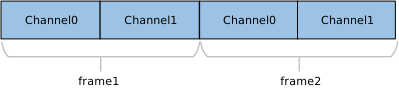
UAC 音频数据流通常采用 线性 PCM (Linear PCM) 编码,并以 多声道交错 (Interleaved) 的方式进行封装。具体的数据排列顺序取决于通道数量和位深。
更多支持格式细节请参考 支持的音频格式 了解更多细节。
两声道 (2-Channel) 交错数据示例如下图:
四声道 (4-Channel) 交错数据示例:

N 声道 (N-Channel) 交错数据示例:

备注
声道对齐规则:
UAC 协议要求传输的声道数通常应为 2 的幂次(如 2, 4, 8, 16 等)。如果实际物理声道数(如 10 声道)不符合此规则,则必须向上取整至最近的 2 的幂次(配置为 16 声道)进行传输,多余的通道位置填充无效数据。
类驱动
备注
本模块专注于实现标准的 USB 音频播放设备(USB Speaker)。若需支持 双向音频流(即播放与录音),请参考 HID + UAC 复合设备(Composite Device) 的实现方案,源码路径如下:
{SDK}/component/usb/device/composite/usbd_composite_uac2.c
驱动描述符结构
本节展示了驱动层定义的 UAC 类特定描述符结构体。这些结构体对应于 USB 协议规范中的标准描述符定义。
Device Descriptor
└─ USB Version 2.00

Configuration Descriptor(Interfaces 2)
│
├─ Interface Association Descriptor (IAD)
├── Binds audio control and streaming interfaces into a single functional unit
│
├─ AudioControl Interface (IF 0, Alt 0)
│  ├─ Audio Control Interface Header (Header 2.0, desktop speaker)
│  ├─ Clock Source (ID=0x15, Internal, Sync to SOF)
│  ├─ Input Terminal (ID=0x01, USB Streaming)
│  ├─ Feature Unit (ID=0x05, Mute+Volume, 8 ch)
│  └─ Output Terminal (ID=0x09, Speaker, clocked=0x15)
│
└─ AudioStreaming Interface (IF 1)
   ├─ Alt 0: Inactive (no endpoints)
   │
   ├─ Alt 1: 16-bit | 2 ch | PCM
   │        AS Interface: TerminalLink(0x01) channels(2)
   │        AS Format: BitResolution(16)
   │        Endpoint: ISO OUT, maxpkt=0x001C (28 bytes)
   │
   ├─ Alt 2: 16-bit | 4 ch | PCM
   │        AS Interface: TerminalLink(0x01) channels(4)
   │        AS Format: BitResolution(16)
   │        Endpoint: ISO OUT, maxpkt=0x0038 (56 bytes)
   │
   ├─ Alt 3: 16-bit | 6 ch | PCM
   │        AS Interface: TerminalLink(0x01) channels(6)
   │        AS Format: BitResolution(16)
   │        Endpoint: ISO OUT, maxpkt=0x0054 (84 bytes)
   │
   ├─ Alt 4: 16-bit | 8 ch | PCM
   │        AS Interface: TerminalLink(0x01) channels(8)
   │        AS Format: BitResolution(16)
   └        Endpoint: ISO OUT, maxpkt=0x0070 (112 bytes)

Device Qualifier Descriptor
└─ USB 2.0

Other Speed Configuration Descriptor(Interfaces 2)
│
├─ Interface Association Descriptor (IAD)
├── Binds audio control and streaming interfaces into a single functional unit
│
├─ AudioControl Interface (IF 0, Alt 0)
│  ├─ Audio Control Interface Header (Header 2.0, desktop speaker)
│  ├─ Clock Source (ID=0x15, Internal, Sync to SOF)
│  ├─ Input Terminal (ID=0x01, USB Streaming)
│  ├─ Feature Unit (ID=0x05, Mute+Volume, 8 ch)
│  └─ Output Terminal (ID=0x09, Speaker, clocked=0x15)
│
└─ AudioStreaming Interface (IF 1)
   ├─ Alt 0: Inactive (no endpoints)
   │
   ├─ Alt 1: 16-bit | 2 ch | PCM
   │        AS Interface: TerminalLink(0x01) channels(2)
   │        AS Format: BitResolution(16)
   │        Endpoint: ISO OUT, maxpkt=0x00C4 (196 bytes)
   │
   ├─ Alt 2: 16-bit | 4 ch | PCM
   │        AS Interface: TerminalLink(0x01) channels(4)
   │        AS Format: BitResolution(16)
   │        Endpoint: ISO OUT, maxpkt=0x0188 (392 bytes)
   │
   ├─ Alt 3: 16-bit | 6 ch | PCM
   │        AS Interface: TerminalLink(0x01) channels(6)
   │        AS Format: BitResolution(16)
   │        Endpoint: ISO OUT, maxpkt=0x024C (588 bytes)
   │
   ├─ Alt 4: 16-bit | 8 ch | PCM
   │        AS Interface: TerminalLink(0x01) channels(8)
   │        AS Format: BitResolution(16)
   └        Endpoint: ISO OUT, maxpkt=0x0310 (784 bytes)
Device Descriptor
└─ USB Version 1.10

Configuration Descriptor(Interfaces 2)
│
├─ AudioControl Interface (Interfaces 0, Alt 0)
│  ├─ Audio Control Interface Header (bcdADC 0x0110)
│  ├─ Input Terminal (ID=0x01, USB Streaming)
│  ├─ Feature Unit (ID=0x05, Mute+Volume, 8 ch)
│  └─ Output Terminal (ID=0x09, Speaker)
│
└─ AudioStreaming Interface (Interfaces 1)
   ├─ Alt 0: Inactive (no endpoints)
   │
   ├─ Alt 1: 16-bit | 2 ch | PCM
   │        AS Interface: TerminalLink(0x01)
   │        AS Format: Channels(2), BBitResolution(16), SamFreq(44100,48000)
   │        Endpoint: ISO OUT, maxpkt=0x00C4 (196 bytes)
   │
   ├─ Alt 2: 16-bit | 4 ch | PCM
   │        AS Interface: TerminalLink(0x01)
   │        AS Format: Channels(4), BitResolution(16), SamFreq(44100,48000)
   │        Endpoint: ISO OUT, maxpkt=0x0188 (392 bytes)
   │
   ├─ Alt 3: 16-bit | 6 ch | PCM
   │        AS Interface: TerminalLink(0x01)
   │        AS Format: Channels(6), BitResolution(16), SamFreq(44100,48000)
   │        Endpoint: ISO OUT, maxpkt=0x024C (588 bytes)
   │
   ├─ Alt 4: 16-bit | 8 ch | PCM
   │        AS Interface: TerminalLink(0x01)
   │        AS Format: Channels(8), BitResolution(16), SamFreq(44100,48000)
   └        Endpoint: ISO OUT, maxpkt=0x0310 (784 bytes)
类特定请求实现
驱动已实现了 UAC 规范定义的核心类特定请求(Class-Specific Requests),主要包括 采样率控制(Sampling Rate)、音量控制(Volume) 和 静音控制(Mute)。
开发者可参考现有实现来扩展其他类型的请求。UAC 驱动源码路径: {SDK}/component/usb/device/uac
音频控制请求 (AC 请求)
音频控制类型 |
要求 |
备注 |
|---|---|---|
Mute Control Request |
可选 |
控制静音功能 |
Volume Control Request |
可选 |
控制音量大小 |
Sampling Frequency Control Request |
可选 |
控制音频采样率 |
音频流请求(AS 请求)
音频控制类型 |
要求 |
备注 |
|---|---|---|
Interface Control Request |
可选 |
切换接口改变音频格式 |
音频控制请求 (AC 请求)
音频控制类型 |
要求 |
备注 |
|---|---|---|
Mute Control Request |
可选 |
控制静音功能 |
Volume Control Request |
可选 |
控制音量大小 |
Sampling Frequency Control Request |
可选 |
控制音频采样率 |
音频流请求(AS 请求)
音频控制类型 |
要求 |
备注 |
|---|---|---|
Interface Control Request |
可选 |
切换接口改变音频格式 |
端点配置
端点 |
数量 |
描述 |
|---|---|---|
控制 IN/OUT 端点 |
1 |
EP0,用于处理 USB 主机发送的标准请求及类特定控制请求。 |
等时 OUT 端点 |
1 |
用于接收来自 USB 主机的下行音频流数据。 |
等时 IN 端点 |
1 |
用于发送 USB 设备上报主机的上行音频流数据。 |
API 说明
应用示例
应用设计
本节概述 UAC 驱动的完整使用流程,涵盖驱动加载、热插拔管理、音频数据处理及配置变更等核心环节。
加载驱动
定义配置结构体并注册回调函数,随后调用初始化接口加载 USB 设备核心及 UAC 类驱动。
/*
        Configure different USB speeds according to different UAC applications
        UAC 1.0 only support full speed, while UAC 2.0 can support both full speed and high speed
*/
static usbd_config_t uac_cfg = {
        .speed = CONFIG_USBD_UAC_SPEED,
        .isr_priority = INT_PRI_MIDDLE,
};

static usbd_uac_cb_t uac_cb = {
        .in = {.enable = 1,},                      /* Audio out params */
        .out = {.enable = 0,},                     /* Audio in params */
        .init = uac_cb_init,                       /* USB init callback */
        .deinit = uac_cb_deinit,                   /* USB deinit callback */
        .setup = uac_cb_setup,                     /* USB setup callback */
        .set_config = uac_cb_set_config,           /* USB set_config callback */
        .status_changed = uac_cb_status_changed,   /* USB status change callback */
        .mute_changed = uac_cb_mute_changed,       /* Audio mute change callback */
        .volume_changed = uac_cb_volume_changed,   /* Audio volume change callback */
        .format_changed = uac_cb_format_changed,   /* Audio format change callback */
};

int ret = 0;

/**
 * Initialize USB device core driver with configuration.
 * param[in] cfg: USB device configuration.
 * return 0 on success, non-zero on failure.
 */
ret = usbd_init(&uac_cfg);
if (ret != HAL_OK) {
        return;
}

/**
 * Initializes class driver with application callback handler.
 * param[in] cb: Pointer to the user-defined callback structure.
 * return 0 on success, non-zero on failure.
 */
ret = usbd_uac_init(&uac_cb);
if (ret != HAL_OK) {
        /**
         * Deinitialize USB device core driver.
         * return 0 on success, non-zero on failure.
         */
        usbd_deinit();

        return;
}
热插拔事件处理
通过注册 status_changed 回调函数来监听 USB 连接状态变化(连接/断开)。建议使用信号量(Semaphore)通知专用任务线程进行处理,避免在中断上下文中执行耗时操作。
参考 设备连接状态检测 获取更多细节,下面是示例代码:
/* USB status change callback */
static usbd_uac_cb_t uac_cb = {
        .status_changed = uac_cb_status_changed,
};

/* Callback executed in ISR context */
static void uac_cb_status_changed(u8 old_status, u8 status)
{
        uac_attach_status = status;
        rtos_sema_give(uac_attach_status_changed_sema);
}

/* Thread handling the state machine */
static void uac_hotplug_thread(void *param)
{
        int ret = 0;
        UNUSED(param);

        for (;;) {
                if (rtos_sema_take(uac_attach_status_changed_sema, RTOS_SEMA_MAX_COUNT) == RTK_SUCCESS) {
                        if (uac_attach_status == USBD_ATTACH_STATUS_DETACHED) {
                                RTK_LOGS(TAG, RTK_LOG_INFO, "DETACHED\n");

                                /* Clean up resources */
                                usbd_uac_deinit();
                                ret = usbd_deinit();
                                if (ret != 0) {
                                        break;
                                }

                                /* Re-initialize for next connection */
                                ret = usbd_init(&uac_cfg);
                                if (ret != 0) {
                                        break;
                                }
                                ret = usbd_uac_init(&uac_cb);
                                if (ret != 0) {
                                        usbd_deinit();
                                        break;
                                }
                        } else if (uac_attach_status == USBD_ATTACH_STATUS_ATTACHED) {
                                RTK_LOGS(TAG, RTK_LOG_INFO, "ATTACHED\n");
                        } else {
                                RTK_LOGS(TAG, RTK_LOG_INFO, "INIT\n");
                        }
                }
        }
        RTK_LOGS(TAG, RTK_LOG_INFO, "Hotplug thread fail\n");
        rtos_task_delete(NULL);
}
音频数据接收流程
当 UAC 启动后,主机(Host)会下发配置请求并开始传输音频流。处理流程如下:
响应格式变更
主机下发配置时会触发 format_changed 回调,需在此保存采样率、位宽等参数。
static void uac_cb_format_changed(u32 sampling_freq, u8 ch_cnt, u8 byte_width)
{
        if (sampling_freq != 0U) {
                out.sampling_freq = sampling_freq;
        }
        if (ch_cnt != 0U) {
                out.ch_cnt = ch_cnt;
        }
        if (byte_width != 0U) {
                out.byte_width = byte_width;
        }

        ...
}
配置并启动数据接收
调用
usbd_uac_config()应用新的参数,并调用usbd_uac_start_play()开启数据接收。建议在循环中检查启动状态,以应对线缆连接不稳定的情况。
usbd_uac_config(&(out), 0, 0);

do {
        if (usbd_uac_start_play() == HAL_OK) {
                break;
        }
} while (uac_attach_status == USBD_ATTACH_STATUS_ATTACHED);

if(uac_attach_status != USBD_ATTACH_STATUS_ATTACHED ) {
        RTK_LOGS(TAG, RTK_LOG_INFO, "USB Detached\n");
        return;
}
读取音频数据
使用
usbd_uac_read()读取缓冲区数据。
while (!audio_task_stop) {
        read_dat_len = usbd_uac_read(recv_buf, USB_AUDIO_BUF_SIZE, 500);
        if (read_dat_len > 0) {
                total_len += read_dat_len;
        } else {
                rtos_time_delay_ms(1);
        }
}
备注
完整的播放逻辑(包括与硬件 Codec 的交互)请参考 SDK 示例代码:{SDK}/example/usb/usbd_uac/example_usbd_uac.c,请确保 CONFIG_USBD_AUDIO_EN 已置为 1。
动态音频格式切换
当用户在主机端(如 Windows 声音设置)更改采样率或声道数时,设备端需执行“停止-重配-重启”流程。
停止播放:在回调函数
uac_cb_format_changed()中置位停止标志,通知循环读取数据退出。停止接口:调用
usbd_uac_stop_play()停止接收数据。重新配置:调用
usbd_uac_config()应用新的音频参数。重启播放:调用
usbd_uac_start_play()开始接收数据,并恢复循环读取数据。
/* In callback: Signal stop */
static void uac_cb_format_changed(u32 sampling_freq, u8 ch_cnt, u8 byte_width)
{
        .......
        audio_task_stop = 1;
}

/* In task loop: Handle restart */
// 1. Exit read loop
while (!audio_task_stop) {
        read_dat_len = usbd_uac_read(recv_buf, USB_AUDIO_BUF_SIZE, 500);
        ......
}

// 2. Stop UAC interface
usbd_uac_stop_play();

// 3. Re-configure
usbd_uac_config(&(out), 0, 0);

// 4. Restart UAC interface
do {
        if (usbd_uac_start_play() == HAL_OK) {
                break;
        }
} while (uac_attach_status == USBD_ATTACH_STATUS_ATTACHED);

if(uac_attach_status != USBD_ATTACH_STATUS_ATTACHED ) {
        RTK_LOGS(TAG, RTK_LOG_INFO, "USB Detached\n");
        return;
}

// 5. Resume reading
while (!audio_task_stop) {
        read_dat_len = usbd_uac_read(recv_buf, USB_AUDIO_BUF_SIZE, 500);
        ....
}
卸载驱动
在不再需要音频功能或系统关机时,按加载的反序释放资源。
/* Deinitialize UAC class driver. */
usbd_uac_deinit();

/* Deinitialize USB device core driver. */
usbd_deinit();
运行方式
本节介绍了一个完整的 USB 音频类(UAC)扬声器应用示例,该示例演示了如何通过 UAC 协议栈,将 Ameba 开发板配置为 USB 音频输出设备。
当开发板连接至 PC 时,系统将其识别为扬声器;PC 端播放的数字音频流将通过 USB 传输至开发板,并经由板载 Codec/扬声器进行模拟输出。
该示例代码路径: {SDK}/example/usb/usbd_uac,可为开发者设计自定义 USB 音频产品提供完整的参考方案。
备注
本示例需要 XDK (Extended Development Kit) 支持。XDK 下载请参考 SDK Download.
配置与编译
编译与烧录
在 SDK 根目录下执行以下命令以配置环境,选择目标 SoC,编译工程,然后将生成的
Image文件烧录至开发板。# Initialize environment (required for every new terminal) source env.sh or env.bat(Windows system) # Select Target SoC (replace xxx with your specific SoCs) ameba.py soc xxx ameba.py build -a usbd_uac -p
Menuconfig 配置确认
若编译失败,请执行
ameba.py menuconfig,确认已选择USBD UAC和Audio Framework。- Choose `CONFIG USB --->`: [*] Enable USB USB Mode (Device) ---> - Choose UAC version 1.0 or 2.0 : [*] UAC Select UAC Version (UAC 2.0) ---> - Choose `CONFIG APPLICATION --->` `Audio Config --->`: [*] Enable Audio Framework Select Audio Interfaces (PassThrough) --->
备注
如果音频播放出现卡顿或不流畅,修改 Audio Framework 的配置为 Select Audio Interfaces (Mixer),以优化缓冲处理。
结果验证
启动设备
重启开发板,观察串口日志,应显示如下启动信息:
[UAC-I] USBD uac demo start
连接主机
使用 USB 线缆将开发板连接至 PC(如 Windows 电脑)
系统识别
Windows 声音设置中应出现名为"Realtek UAC Device speaker device"的音频设备。
若未自动切换,请手动将其设置为"默认设备"。
备注
如果看不到 Ameba 音频设备,请打开电脑声音控制面板,找到"Realtek UAC Device speaker device"设备
确保是使能状态(如果不是,鼠标右键选择
启用)。设置是默认设备(鼠标右键选择
设置为默认设备)。
格式切换测试
在 Windows 声音属性 -> 高级选项卡中,尝试切换不同的位深和采样率(如 16-bit 48000Hz),验证设备能否正常重新配置并播放。