网络通信设备方案
概述
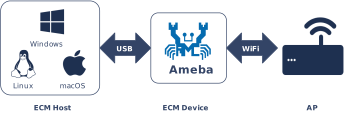
USB 通信设备类 (CDC) 下的以太网控制模型 (ECM) 定义了一套通过 USB 接口传输以太网帧的标准协议。在设备 (Device) 模式下,Ameba 将自身模拟为一块标准 USB 网络适配器,由连接的 USB 主机(另一块 Ameba 开发板或 PC,或其他支持 CDC ECM 的主机)加载驱动,并将其识别为本地网络接口。
Ameba 平台集成了符合 USB-IF 标准的 CDC ECM 设备协议栈,支持与系统内置 LwIP 网络协议栈的无缝对接。Ameba 在此方案中以 静态 IP 工作,并内置 DHCP Server,可自动为连接的 USB 主机分配 IP 地址,开箱即用。
特性
模拟标准 USB 以太网适配器,主机侧原生支持(Linux/macOS 无需额外驱动,Windows 10+ 内置支持)
内置 DHCP Server,为 CDC ECM 主机自动分配 IP 地址
设备使用静态 IP,保证网络地址稳定,适合调试与管理场景
与 LwIP 协议栈深度集成,抽象为标准网络接口 (Netif)
支持 USB 热插拔,断开重连后自动重新枚举与 DHCP 分配
支持描述符全定制,包括设备 MAC 地址、VID/PID 等
应用场景
作为 USB 设备 (Device),Ameba 向连接的主机呈现一个虚拟以太网接口,并作为默认网关为主机提供网络服务:
嵌入式网络调试终端:CDC ECM 主机通过 USB 连接即可建立 TCP/IP 通道,无需独立以太网端口,可进行日志监控、参数配置及 OTA 固件升级。
USB 无线网关:借助 Ameba 内置的 Wi-Fi 模块,将 USB 主机通过 Ameba 接入无线网络,Ameba 兼作 DHCP Server 与网络路由网关。
板间高速通信:两块 Ameba 开发板通过 USB 直连,一端运行 CDC ECM Device(本方案),另一端运行 CDC ECM Host,建立高速、低延迟的以太网通道,用于多模组协同或数据透传。
协议简介
CDC (Communication Device Class) 是 USB 规范定义的通用通信设备类标准。ECM (Ethernet Control Model) 作为其子类(Subclass),专门定义了如何在 USB 接口上封装和传输以太网数据帧,使 USB 设备能够在操作系统中被识别为标准的网络接口控制器 (NIC)。
协议文档
USB-IF 官方发布了 CDC 类基础协议及 ECM 子类规范。开发过程中请参考以下核心文档:
规范类型 |
文档 |
|---|---|
CDC 1.2 (通信类基础协议) |
|
ECM 1.2 (以太网控制模型) |
包含在上述 CDC 1.2 压缩包中的 ECM120.pdf。 |
术语定义
本文档涉及的通用 CDC ECM 技术术语定义如下:
术语 |
描述 |
|---|---|
CCI (Communication Class Interface) |
通信类接口。用于管理设备的连接状态、发送控制命令和接收网络状态通知(如网线插拔)。通常使用控制端点和中断端点。 |
DCI (Data Class Interface) |
数据类接口。用于实际传输以太网数据包。通常使用批量 (Bulk) 输入和输出端点。 |
以太网帧 (Ethernet Frame) |
CDC ECM 传输的数据载荷,通常遵循 IEEE 802.3 标准(包含目标 MAC、源 MAC、EtherType 及 Payload)。 |
通知 (Notification) |
设备通过中断端点主动向主机报告的异步事件,例如 NETWORK_CONNECTION (连接状态改变) 或 CONNECTION_SPEED_CHANGE (速率改变)。 |
功能描述符 (Functional Descriptor) |
CDC 特有的描述符,嵌入在标准配置描述符中,用于描述网络设备的具体能力(如 MAC 地址、最大段长度)。 |
协议框架
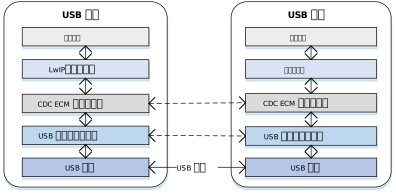
CDC ECM Host 协议栈采用分层架构设计,旨在实现 USB 传输层与 LwIP 网络协议栈的解耦。
组件职责
网络应用层
位于架构最上层,它是一个具体的网络应用。
LwIP/网络协议栈 (Network Stack)
网络协议栈不感知底层的 USB 细节,仅操作一个抽象的标准网络接口 (Netif),给上层提供网络服务。负责处理 TCP/IP、UDP、DHCP 等网络层协议逻辑。
CDC ECM 类驱动 (Class Driver)
核心中间层,实现了 ECM 规范定义的行为:
枚举解析:解析 CDC 功能描述符以获取 MAC 地址。
控制管理:配置数据包过滤器 (Packet Filter),处理网络状态中断通知。
数据收发:将网络栈下发的 pbuf 封装为 USB 传输请求 (URB/Transfer),并将接收到的 USB 数据包还原为以太网帧上交 LwIP。
USB Core & HCD (Host Controller Driver)
底层驱动,负责处理 USB 标准枚举、端点管理以及底层的物理数据传输调度(如 DMA 操作),向类驱动屏蔽不同硬件控制器的差异。
通信机制
标准的 CDC ECM 设备通常由两个 USB 接口 (Interface) 组成,两者通过 联合功能描述符 (Union Functional Descriptor) 关联:
通信接口 (CCI) - 控制与通知
控制传输 (Control Transfer)
映射端点: 默认控制端点 0 (Endpoint 0)。
枚举与配置: 传输标准的 USB 描述符以及 CDC 特有的功能描述符。
类特定请求: 处理 ECM 协议控制命令,最核心的是 SetEthernetPacketFilter,用于配置设备接收广播、多播或单播包。
中断传输 (Interrupt Transfer)
中断输入 (Interrupt IN): 必选。用于设备向主机发送通知 (Notification)。
典型应用:
NETWORK_CONNECTION: 报告网线插入 (Link Up) 或拔出 (Link Down) 状态。 CONNECTION_SPEED_CHANGE: 报告当前的上下行连接速率。
数据接口 (DCI) - 批量管道
数据接口通常包含两个替代设置 (Alternate Settings),这是 ECM 协议设计的关键点:
Alt Setting 0:空闲模式。不包含任何端点。当网络未连接或驱动未加载时,主机应将接口切换至此模式以节省总线带宽。
Alt Setting 1:工作模式。包含一对批量端点 (Bulk IN / Bulk OUT)。
Bulk IN:设备 -> 主机。上传接收到的网络数据包。
Bulk OUT:主机 -> 设备。发送要转发到网络的以太网帧。
描述符结构
CDC ECM 设备在标准配置描述符中,通过 类特定接口描述符 (Class-Specific Interface Descriptor) 来详细定义网络能力。这些描述符通常被统称为 功能描述符 (Functional Descriptors)。
CDC ECM 描述符拓扑 (Descriptor Topology)
Device Descriptor
└── Identifies basic device information (USB Version 2.00)

Configuration Descriptor
├── Contains total length of the entire configuration, power supply information, etc.
│
├── CDC Control (CDC Control) Interface Descriptor (Interface 0)
│       ├── Standard Interface Descriptor (AlternateSetting 0, Control Class)
│       ├── Header Functional Descriptor
│       ├── Union Functional Descriptor
│       ├── Ethernet Networking Functional Descriptor
│       └── Endpoint Descriptor(Interrupt IN)
│
└── CDC Data (CDC-Data) Interface Descriptor (Interface 1)
        ├── Alternate Setting 0: Control transfer active state (control transfer only)
        │
        ├── Alternate Setting 1: Data transfer active state (with data endpoint)
        ├── Endpoint Descriptor(Bulk In)
        └── Endpoint Descriptor(Bulk Out)

Device Qualifier Descriptor
└── Device information while running in another speed mode

Other Speed Configuration Descriptor
├── Configuration information while running in another speed mode.
│
├── CDC Control (CDC Control) Interface Descriptor (Interface 0)
│       ├── Standard Interface Descriptor (AlternateSetting 0, Control Class)
│       ├── Header Functional Descriptor
│       ├── Union Functional Descriptor
│       ├── Ethernet Networking Functional Descriptor
│       └── Endpoint Descriptor(Interrupt IN)
│
└── CDC Data (CDC-Data) Interface Descriptor (Interface 1)
        ├── Alternate Setting 0: Control transfer active state (control transfer only)
        │
        ├── Alternate Setting 1: Data transfer active state (with data endpoint)
        ├── Endpoint Descriptor(Bulk In)
        └── Endpoint Descriptor(Bulk Out)
功能描述符 (Functional Descriptor)
Header Functional Descriptor
Header Functional Descriptor
├── bLength (1 byte): Fixed 0x05
├── bDescriptorType (1 byte): 0x24 (CS_INTERFACE)
├── bDescriptorSubtype (1 byte): 0x00 (HEADER)
└── bcdCDC (2 bytes): CDC specification version
Union Functional Descriptor
Union Functional Descriptor
├── bLength (1 byte): 0x05 + n (n = number of subordinate interfaces)
├── bDescriptorType (1 byte): 0x24 (CS_INTERFACE)
├── bDescriptorSubtype (1 byte): 0x06 (UNION)
├── bControlInterface (1 byte): Master interface number
└── bSubordinateInterface[n] (n bytes): One or more slave interface numbers
Ethernet Networking Functional Descriptor
Ethernet Networking Functional Descriptor
├── bLength (1 byte): Total descriptor length
├── bDescriptorType (1 byte): 0x24 (CS_INTERFACE)
├── bDescriptorSubtype (1 byte): 0x0F
├── iMACAddress (1 byte): MAC address string index
├── bmEthernetStatistics (4 bytes): Supported statistics counters
├── wMaxSegmentSize (2 bytes): Maximum frame size (e.g., 1518)
├── wNumberMCFilters (2 bytes): Multicast filtering capability
└── bNumberPowerFilters (1 byte): Number of wake patterns
类特定请求
CDC ECM Host 驱动通过控制端点 0 发送以下请求控制设备行为。
请求名称 (Request) |
要求 |
描述 |
|---|---|---|
SendEncapsulatedCommand |
可选 |
发送封装命令 |
GetEncapsulatedResponse |
可选 |
获取封装响应 |
SetEthernetMulticastFilters |
可选 |
设置组播地址列表过滤。 |
SetEthernetPowerManagementPatternFilter |
可选 |
配置电源管理模式(如网络唤醒 WoL)。 |
GetEthernetPowerManagementPatternFilter |
可选 |
获取电源管理模式过滤器 |
SetEthernetPacketFilter |
必选 |
设置数据包过滤器。主机使用此命令通知设备需要接收哪些类型的包(单播、广播、多播、混杂模式等)。 |
GetEthernetStatistic |
可选 |
获取设备的传输统计信息(如丢包数、错误帧数)。 |
数据传输格式
CDC ECM 的数据传输非常直接,USB 载荷 (Payload) 即为原始的 以太网帧 (Ethernet Frame),不包含额外的头部封装(这一点不同于 RNDIS 或 NCM)。下图显示了一个完整的以太网满帧(长度 1514)被分割成 3 个 USB 包传输。

备注
ZLP (Zero Length Packet)
如果传输的以太网帧长度恰好是 USB 端点最大包长 (wMaxPacketSize, 如 HS 下为 512 字节) 的整数倍,主机或设备需要发送一个零长包 (ZLP) 来标识传输结束。
类驱动
驱动描述符结构
本节展示了驱动层定义的 CDC ECM 类特定描述符结构体,对应于 USB CDC 1.2 规范中的标准描述符定义。
Device Descriptor
└─ USB Version 2.00 (CDC ECM)

Configuration Descriptor (Interfaces 2)
│
├─ Communication Interface (IF 0, CCI)
│  ├─ Header Functional (CDC 1.20)
│  ├─ Union Functional (Master=0, Slave=1)
│  ├─ Ethernet Networking Functional (MAC Address String Index)
│  └─ Endpoint: INTR IN, maxpkt=16, Interval=8
│
└─ Data Interface (IF 1, DCI)
   ├─ Endpoint: BULK OUT, maxpkt=0x0200 (512 bytes)
   └─ Endpoint: BULK IN,  maxpkt=0x0200 (512 bytes)

Device Qualifier Descriptor
└─ USB 2.0

Other Speed Configuration Descriptor (Interfaces 2)
│
├─ Communication Interface (IF 0, CCI)
│  ├─ Header Functional (CDC 1.20)
│  ├─ Union Functional (Master=0, Slave=1)
│  ├─ Ethernet Networking Functional (MAC Address String Index)
│  └─ Endpoint: INTR IN, maxpkt=16, Interval=8
│
└─ Data Interface (IF 1, DCI)
   ├─ Endpoint: BULK OUT, maxpkt=0x0040 (64 bytes)
   └─ Endpoint: BULK IN,  maxpkt=0x0040 (64 bytes)
端点配置
端点 |
数量 |
描述 |
|---|---|---|
控制 IN/OUT 端点 |
1 |
EP0,用于处理主机发送的标准请求及 CDC 类特定请求。 |
中断 IN 端点 |
1 |
归属于通信接口 (CCI),用于向主机主动上报网络通知 (如 NetworkConnection、SpeedChange)。 |
批量 OUT 端点 |
1 |
归属于数据接口 (DCI),用于接收来自主机下行的以太网数据帧。 |
批量 IN 端点 |
1 |
归属于数据接口 (DCI),用于向主机发送 Ameba 上行的以太网数据帧。 |
关键数据结构
驱动对外暴露两个主要结构体:
包含设备私有配置,当前版本含以下字段:
mac_value:指向 6 字节 MAC 地址缓冲区的指针。Device 端通过描述符中的 iMACAddress 字符串索引将该 MAC 地址提供给 Host,Host 会将其设置到本地的 LwIP 网络接口中。
应用层回调集合,包含
priv私有数据指针及以下事件回调:
init/deinit:驱动初始化与反初始化时调用。
setup:处理类特定 SETUP 请求(在 ISR 中调用,不可执行耗时操作)。
received:Bulk OUT 数据到达时调用(由专用 RX 线程上下文调用)。
status_changed:USB 连接状态变化时调用(在 ISR 中调用,不可执行耗时操作)。
API 说明
应用示例
应用设计
本节概述 CDC ECM 驱动的完整使用流程,涵盖驱动加载、热插拔管理、网络链路状态监控、以太网帧收发处理及驱动卸载等核心环节。
加载驱动
定义配置结构体、MAC 地址私有数据及回调函数,随后依次调用初始化接口,加载 USB 设备核心驱动及 CDC ECM 类驱动。
步骤说明:
MAC 配置:通过
usbd_cdc_ecm_priv_data_t.mac_value提供 6 字节设备 MAC 地址。该地址将通过描述符向主机公告,并同步至 LwIP 网络接口。加载核心驱动:调用
usbd_init()加载 USB 设备核心驱动。加载类驱动:调用
usbd_cdc_ecm_init()注册回调并启动类驱动。
// USB speed
#ifdef CONFIG_SUPPORT_USB_FS_ONLY
#define CONFIG_USBD_CDC_ECM_SPEED   USB_SPEED_FULL
#else
#define CONFIG_USBD_CDC_ECM_SPEED   USB_SPEED_HIGH
#endif

/*
 * Configure hardware-specific FIFO depth and interrupt settings.
 * Values vary by SoC; refer to SDK defaults for your target chip.
 */
static usbd_config_t cdc_ecm_cfg = {
    .speed = CONFIG_USBD_CDC_ECM_SPEED,
    .isr_priority = INT_PRI_MIDDLE,
    .ext_intr_enable = USBD_SOF_INTR,
};

/* Device MAC address (6 bytes). */
static u8 dongle_mac[6] = {0x02, 0x11, 0x22, 0x33, 0x44, 0x55};

/*
 * Private data: supplies the device MAC address to the class driver.
 * The MAC is also exported to the host via the Ethernet Networking
 * Functional descriptor's iMACAddress string.
 */
static usbd_cdc_ecm_priv_data_t ecm_priv = {
    .mac_value = dongle_mac,
};

static usbd_cdc_ecm_cb_t cdc_ecm_cb = {
    .priv = &ecm_priv,
    .init = cdc_ecm_cb_init,                       /* Initialization callback */
    .deinit = cdc_ecm_cb_deinit,                   /* De-initialization callback */
    .setup = cdc_ecm_cb_setup,                     /* Class SETUP request callback */
    .received = cdc_ecm_cb_received,               /* Bulk OUT data received callback */
    .status_changed = cdc_ecm_cb_status_changed,   /* USB attach status change callback */
};

int ret = 0;

/**
 * Initialize USB device core driver.
 * param[in] cfg: USB device hardware configuration.
 * return 0 on success, non-zero on failure.
 */
ret = usbd_init(&cdc_ecm_cfg);
if (ret != HAL_OK) {
    return;
}

/**
 * Initialize CDC ECM class driver with application callbacks.
 * param[in] cb: Pointer to user callback structure (includes priv MAC config).
 * return 0 on success, non-zero on failure.
 */
ret = usbd_cdc_ecm_init(&cdc_ecm_cb);
if (ret != HAL_OK) {
    usbd_deinit();
    return;
}
热插拔事件处理
通过注册 status_changed 回调函数来监听 USB 连接状态变化(连接/断开)。建议使用信号量(Semaphore)通知专用任务线程进行处理,避免在中断上下文中执行耗时操作。
参考 设备连接状态检测 获取更多细节,下面是示例代码:
/* USB attach status change callback — runs in ISR context */
static void cdc_ecm_cb_status_changed(u8 old_status, u8 status)
{
    /*
     * State transitions:
     *   INIT(0) -> ATTACHED(1): cold boot, device enumerated for the first time.
     *   ATTACHED(1) -> DETACHED(2): host disconnects, suspends, or system sleeps.
     *   DETACHED(2) -> ATTACHED(1): hot-plug in, remote wakeup, or host resumes.
     */
    cdc_ecm_attach_status = status;
    cdc_ecm_attach_old_status = old_status;

    if (cdc_ecm_attach_status_changed_sema != NULL) {
        rtos_sema_give(cdc_ecm_attach_status_changed_sema);
    }

    /* Mark link as down immediately on detach so the link-state thread
     * can stop the DHCP server without waiting for the next poll. */
    if (status == USBD_ATTACH_STATUS_DETACHED) {
        cdc_ecm_link_disconnected = 1;
    }
}

/* Hotplug detection thread — runs in task context */
static void cdc_ecm_hotplug_thread(void *param)
{
    int ret = 0;
    UNUSED(param);

    cdc_ecm_hotplug_thread_running = 1;

    while (cdc_ecm_hotplug_thread_running) {
        if (rtos_sema_take(cdc_ecm_attach_status_changed_sema, RTOS_SEMA_MAX_COUNT) != RTK_SUCCESS) {
            continue;
        }

        RTK_LOGS(TAG, RTK_LOG_INFO, "Status change %d -> %d\n", cdc_ecm_attach_old_status, cdc_ecm_attach_status);

        if (cdc_ecm_attach_status == USBD_ATTACH_STATUS_DETACHED) {
            RTK_LOGS(TAG, RTK_LOG_INFO, "DETACHED\n");

            /* Tear down the stack in reverse init order */
            usbd_cdc_ecm_deinit();

            ret = usbd_deinit();
            if (ret != HAL_OK) {
                RTK_LOGS(TAG, RTK_LOG_ERROR, "Deinit core fail %d\n", ret);
                break;
            }

            rtos_time_delay_ms(100);
            RTK_LOGS(TAG, RTK_LOG_INFO, "Free heap 0x%x\n", rtos_mem_get_free_heap_size());

            /* Re-initialize for the next connection */
            ret = usbd_init(&cdc_ecm_cfg);
            if (ret != HAL_OK) {
                break;
            }

            ret = usbd_cdc_ecm_init(&cdc_ecm_cb);
            if (ret != HAL_OK) {
                usbd_deinit();
                break;
            }

            RTK_LOGS(TAG, RTK_LOG_INFO, "Reinit done\n");
        } else if (cdc_ecm_attach_status == USBD_ATTACH_STATUS_ATTACHED) {
            RTK_LOGS(TAG, RTK_LOG_INFO, "Attached\n");
        }
    }

    cdc_ecm_hotplug_thread_running = 0;
    rtos_task_delete(NULL);
}
网络链路状态监控
链路状态监控线程 ecm_link_change_thread 独立运行,通过轮询 usbd_cdc_ecm_get_connect_status() 跟踪主机是否激活了数据接口(Alt-Setting 1)。
链路上线流程(Link UP):
通过
usbd_cdc_ecm_get_mac_str()获取设备 MAC 地址并写入 LwIP 网络接口。调用
lwip_set_ip()为设备配置静态 IP / 子网掩码 / 网关(默认192.168.45.1/24)。调用
netifapi_netif_set_link_up/set_up/set_default激活网络接口。调用
dhcps_init()+dhcps_start()启动内置 DHCP Server,为 USB 主机自动分配 IP。
链路下线流程(Link DOWN):
调用
dhcps_stop()+dhcps_deinit()停止 DHCP Server。调用
netifapi_netif_set_down/set_link_down将网络接口下线。
static u8 dhcp_server_mac[6] = {0x02, 0x11, 0x22, 0x33, 0x44, 0x56};
/*
 * Link-state monitoring thread.
 * Polls usbd_cdc_ecm_get_connect_status() every 1 s to track whether
 * the host has activated the data interface (alt-setting 1).
 * When the link comes up it assigns a static IP, brings up the LwIP netif,
 * and starts the built-in DHCP server so the host obtains an IP automatically.
 * When the link goes down it tears down the DHCP server and brings the netif down.
 */
static void ecm_link_change_thread(void *param)
{
    eth_state_t ethernet_state = ETH_STATUS_IDLE;
    u8 link_is_up = 0;
    u8 *mac;
    UNUSED(param);

    while (1) {
        link_is_up = usbd_cdc_ecm_get_connect_status();

        /* cdc_ecm_link_disconnected is set to 1 in the status_changed ISR
         * callback on DETACH, forcing link_is_up to 0 immediately. */
        if (cdc_ecm_link_disconnected) {
            cdc_ecm_link_disconnected = 0;
            link_is_up = 0;
        }

        if (link_is_up && (ethernet_state < ETH_STATUS_INIT)) {
            /* --- Link UP: configure netif and start DHCP server --- */
            if (!dhcp_server_started) {

                /* Copy MAC address into LwIP netif */
                memcpy(pnetif_usb_eth->hwaddr, dhcp_server_mac, 6);
                pnetif_usb_eth->hwaddr_len = ETHARP_HWADDR_LEN;

                /* Assign static IP / netmask / gateway */
                u32 ip_addr = CONCAT_TO_UINT32(192, 168, 45, 1);
                u32 netmask = CONCAT_TO_UINT32(255, 255, 255, 0);
                u32 gw      = CONCAT_TO_UINT32(192, 168, 45, 1);
                lwip_set_ip(NETIF_USB_ETH_INDEX, ip_addr, netmask, gw);

                RTK_LOGS(TAG, RTK_LOG_INFO, "Device IP: 192.168.45.1\n");

                /* Activate netif */
                netifapi_netif_set_link_up(pnetif_usb_eth);
                netifapi_netif_set_up(pnetif_usb_eth);
                netifapi_netif_set_default(pnetif_usb_eth);

                /* Start DHCP server — host receives an IP from Ameba */
                dhcps_init(pnetif_usb_eth);
                dhcps_start(pnetif_usb_eth);

                RTK_LOGS(TAG, RTK_LOG_INFO, "DHCP Server started\n");
                ethernet_state = ETH_STATUS_INIT;
            }
        } else if (!link_is_up && (ethernet_state >= ETH_STATUS_INIT)) {
            ethernet_state = ETH_STATUS_DEINIT;
            // USB disconnected, stop DHCP server
            if (dhcp_server_started) {
                RTK_LOGS(TAG, RTK_LOG_INFO, "Stopping USB ECM DHCP Server...\n");

                // 1. Stop DHCP service first
                dhcps_stop(pnetif_usb_eth);
                dhcps_deinit(pnetif_usb_eth);

                // 2. Bring down network interface (similar to WHC stop ap)
                netifapi_netif_set_down(pnetif_usb_eth);
                netifapi_netif_set_link_down(pnetif_usb_eth);

                dhcp_server_started = 0;
                RTK_LOGS(TAG, RTK_LOG_INFO, "DHCP Server stopped\n");
            }
        } else {
            rtos_time_delay_ms(1000);
        }
    }
}
以太网帧接收流程 (Ethernet Input)
当主机向 Ameba 发送以太网数据帧时,数据通过 Bulk OUT 端点到达,由类驱动 RX 专用线程上下文触发 received 回调。
流程说明:
USB 接收:类驱动内置乒乓缓冲(ping-pong rx_buf)机制,ISR 将帧放入空闲缓冲区,RX 线程将缓冲区指针传给回调,避免在 ISR 中执行内存操作。
上交协议栈:回调调用
netif_adapter_usb_eth_recv(),由适配层完成 pbuf 申请及netif->input()调用,将以太网帧递交给 LwIP 协议栈处理。
/*
 * Bulk OUT received callback — called by the class driver when the
 * host sends an ethernet frame to Ameba.
 * Delegates directly to the USB Ethernet netif adapter which allocates
 * a pbuf and hands the frame up to LwIP for IP/ARP processing.
 */
static int cdc_ecm_cb_received(u8 *buf, u32 length)
{
    if (buf == NULL || length == 0) {
        return HAL_ERR_PARA;
    }

    /* netif_adapter_usb_eth_recv() wraps pbuf allocation + netif->input().
     * It must NOT be called from an ISR context. The class driver
     * dispatches this callback from its dedicated RX thread. */
    netif_adapter_usb_eth_recv(buf, length);

    return HAL_OK;
}
以太网帧发送流程 (Ethernet Output)
当 LwIP 协议栈有数据包需要发送至 USB 主机时,调用注册的 linkoutput 函数,最终调用 usbd_cdc_ecm_transmit()。
流程说明:
block参数为1时,函数阻塞等待 Bulk IN 传输完成信号量再返回;为0时立即返回。若 USB 未连接(
bulk_tx_block被设置),函数会安全返回,防止死锁。
/*
 * Transmit an ethernet frame to the host via Bulk IN endpoint.
 * This wrapper is registered as the LwIP netif's linkoutput function
 * by the USB Ethernet adapter layer (rltk_usb_eth_init).
 *
 * param[in] buf:   Pointer to the raw ethernet frame buffer.
 * param[in] len:   Frame length in bytes.
 * param[in] block: 1 = blocking (waits for transfer completion semaphore);
 *                  0 = non-blocking (returns immediately after submit).
 */
int usb_ethernet_transmit(u8 *buf, u32 len, u8 block)
{
    return usbd_cdc_ecm_transmit(buf, len, block);
}
备注
完整的收发逻辑请参考 SDK 示例代码:{SDK}/example/usb/usbd_cdc_ecm/example_usbd_cdc_ecm.c。
卸载驱动
在不再需要 CDC ECM 功能或系统关机时,按加载驱动的反序释放资源。
/* Deinitialize CDC ECM class driver. */
usbd_cdc_ecm_deinit();

/* Deinitialize USB device core driver. */
usbd_deinit();
运行方式
本节以 Ameba 作为 USB CDC ECM 设备与另一块 Ameba 互联 为例,演示如何将 Ameba 配置为 USB 以太网适配器,对端(CDC ECM 主机)连接后自动获取 IP 地址并完成网络连通性测试。
对端是另一块运行 CDC ECM Host 示例的 Ameba 开发板(参见 CDC ECM 主机方案 )
该示例代码路径:{SDK}/example/usb/usbd_cdc_ecm。
配置与编译
编译与烧录
在 SDK 根目录下执行以下命令以配置环境,选择目标 SoC,编译工程,然后将生成的
Image文件烧录至开发板:# Initialize environment (required for every new terminal) source env.sh or env.bat(Windows system) # Select Target SoC (replace xxx with your specific SoC) ameba.py soc xxx ameba.py build -a usbd_cdc_ecm -p
Menuconfig 配置确认
若编译失败,请执行
ameba.py menuconfig,确认已选择USBD CDC ECM:- Choose `CONFIG USB --->`: [*] Enable USB USB Mode (Device) ---> [*] CDC ECM
结果验证
启动设备
重启开发板,观察串口日志,应先显示驱动启动信息:
[ECM-I] ECM demo start
[ECM-I] Enter link status task!
[ECM-I] Attached
[ECM-I] USB ECM MAC: 00:11:22:33:44:55
[ECM-I] Device IP: 192.168.45.1
[ECM-I] DHCP Server started
备注
Attached、Device IP及DHCP Server started三条日志需在 USB 线缆连接后才会出现。连接对端
使用 USB 线缆将开发板 USB 口连接至对端主机(另一块 Ameba),硬件拓扑如下:
[Ameba (CDC ECM Device)] ───USB Cable─── [Ameba (CDC ECM Host)]
功能测试
USB 枚举成功后,主机侧会自动从 Ameba 内置的 DHCP Server 获取 IP 地址(子网
192.168.45.0/24)。