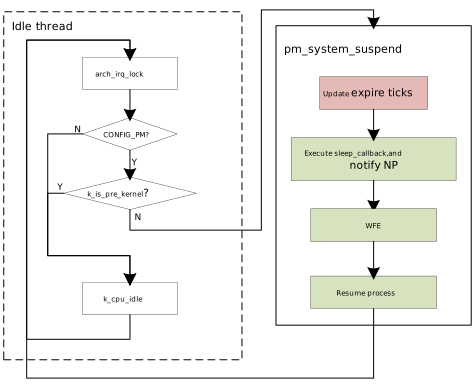
Overview
For Power Management Architecture and Low Power Modes, please refer to the relevant chapters in Power Saving Guide .
Zephyr Support Status
Management Mechanisms:
Supported: System-Managed Device Power Management
Not Supported: Device Runtime Power Management
Device-level management under System-Managed Management is not yet supported
Low Power Levels:
PM_STATE_SUSPEND_TO_IDLE: Corresponds to Clock GatingPM_STATE_SUSPEND_TO_RAM0: Corresponds to Power GatingDefault: CPU idle (
WFI)
Wake Source Support Status:
Device |
State |
|---|---|
BT_WAKE_HOST |
YES |
CAN |
YES |
SDIO_HOST |
YES |
RMII |
YES |
CAPTOUCH |
YES |
ADC |
YES |
RTC |
YES |
GPIO |
YES |
UART_LOG |
YES |
UART |
YES |
Timer |
YES |
IWDG |
YES |
SDIO_WIFI |
NO |
BT_SCB |
NO |
SDIO_BT |
NO |
AON_WAKEPIN |
NO |
AON_TIM |
NO |
PWR_DOWN |
NO |
USB |
NO |
BOR |
NO |
Low Power Entry Strategies
Zephyr supports two strategies for entering low power modes: Residency Based and Application Defined. Refer to Power Management Policies.
We have added additional check logic based on Zephyr’s Residency Based policy. The process is as follows:
First, check that modules such as BT/WiFi allow entering low power mode
Then compare
expire tickswith the predefined states in DTS. If the residency time is satisfied, enter the selected state. For example, the following state definitions:power-states { pm_cg: pm_cg { compatible = "zephyr,power-state"; power-state-name = "suspend-to-idle"; min-residency-us = <3000>; exit-latency-us = <2000>; }; pm_pg: pm_pg { compatible = "zephyr,power-state"; power-state-name = "suspend-to-ram"; min-residency-us = <5000>; exit-latency-us = <2500>; }; };Iterate through all states. When the idle time is greater than
min-residency-us + exit-latency-us, that state is selected, until the condition is no longer met. For more details, refer to Residency Based Policy.
Sleep and Wake-up Flow
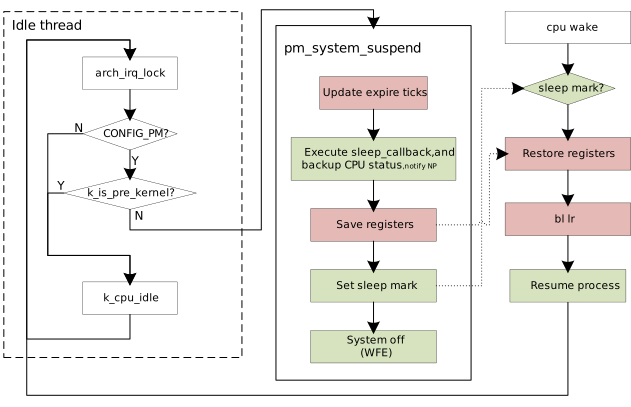
The following diagram mainly illustrates the flow of the AP (Zephyr OS). For how the AP coordinates with the NP core before entering sleep and during the wake-up process, please refer to Power Saving Developer Guide .
PG:
CG: