快速入门
本文档引导用户完成 Ameba Rust SDK 的环境搭建,并通过 Hello World 示例完成第一次编译、烧录与日志验证。
备注
下面的编译步骤编译的是 Rust SDK 中已有的 examples/hello-world 示例工程。如果要新建自己的项目,推荐使用
ameba-generate
一键生成,而不是手动复制示例工程。
准备工作
硬件:
Ameba 开发板(RTL8721F EVB)
USB Type-C 数据线
开发主机:Linux (Ubuntu 22.04+)、Windows 10/11 或 macOS (13 Ventura+,仅限 Apple Silicon / M 系列芯片),磁盘空间 ≥ 10 GB
软件:
Git 2.0+
VS Code 或其他代码编辑器
USB 转串口驱动(若开发主机未自动识别)
硬件连接
用 USB Type-C 数据线连接开发板与开发主机,既用于烧录固件,也用于串口日志。
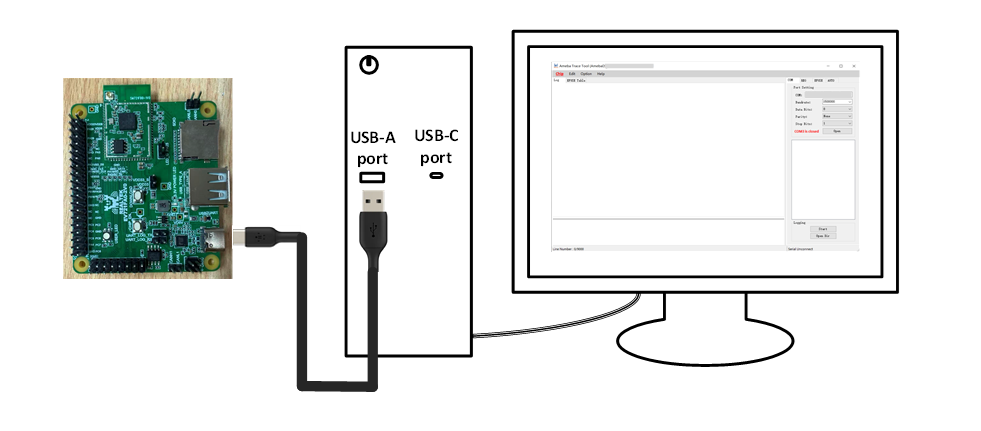
开发板详细用户指南:EVB User Guide
下载 SDK
Rust SDK 仓库包含固件源码与编译工具,以及每个应用打包和烧录时所需的预编译 Bootloader、Wi-Fi 核固件和 Flash Loader。
环境搭建
安装 rustup 即可,stable 工具链和交叉编译 target 会依据 rust-toolchain.toml 自动安装。
编译
在 Rust SDK 根目录执行:
$ cd <workdir>/rust
$ cargo xtask build example --name hello-world
--name 为 examples/ 下的目录名,嵌套的示例用斜杠分隔,例如 --name gpio/basic。
编译成功后输出:
[run] cd ".../examples/hello-world" && CARGO_TARGET_DIR=".../build/rtl8721f/cargo" "cargo" "build" "--release" "--target" "thumbv8m.main-none-eabi"
   Compiling hello-world v0.1.0 (.../examples/hello-world)
    Finished `release` profile [optimized] target(s) in ...
[package] xip=...B  sram=...B  psram=...B  total=...B
[package] build/rtl8721f/km4tz_image2_all.bin
[pack] cert=4096B  manifest=4096B  km4ns=...B  km4tz=...B  app=...B
[pack] ota image_size=...B  checksum=...

[done] app.bin → build/rtl8721f/app.bin  (... bytes)
[done] ota_all.bin → build/rtl8721f/ota_all.bin  (... bytes)
编译产出两个文件:
build/rtl8721f/app.bin:烧录用固件,包含 Wi-Fi 核固件和 Rust 应用固件。build/rtl8721f/ota_all.bin:加了 OTA 头的同一份固件,用于 OTA 升级(见 OTA 指南 )。
烧录与日志监控
一条命令完成串口烧录并打开串口监视:
$ cargo xtask run example --name hello-world --port /dev/ttyUSB0
cargo xtask run example --name hello-world --port COM29
$ cargo xtask run example --name hello-world --port /dev/cu.usbserial-xxxx
cargo xtask run example 会重新编译示例,将 boot.bin 和 app.bin 写入 Flash 并复位开发板,随后以 1500000 波特率持续打印串口日志,按 Ctrl-C 退出。开发板正在运行正常固件时会自动重启进入下载模式,无需按任何按键;否则请先手动让开发板进入下载模式再烧录。
不传 --port 时会读取环境变量 RTK_SERIAL_PORT,设置一次即可省略:
$ export RTK_SERIAL_PORT=/dev/ttyUSB0
$ cargo xtask run example --name hello-world
$env:RTK_SERIAL_PORT = "COM29"
cargo xtask run example --name hello-world
$ export RTK_SERIAL_PORT=/dev/cu.usbserial-xxxx
$ cargo xtask run example --name hello-world
Hello World 预期输出:
[package] xip=...B  sram=...B  psram=...B  total=...B
[package] build/rtl8721f/km4tz_image2_all.bin
[pack] cert=4096B  manifest=4096B  km4ns=...B  km4tz=...B  app=...B
[pack] ota image_size=...B  checksum=...

[done] app.bin → build/rtl8721f/app.bin  (... bytes)
[done] ota_all.bin → build/rtl8721f/ota_all.bin  (... bytes)
[run] flashing on /dev/ttyUSB0 ...
[run] ROM handshake ...
[run] not in download mode, rebooting into UART burn mode ...
[run] loading floader ...
[run] floader handshake ...
[run] pre-flight checks ...
[run] downloading boot.bin ...
[run]   boot.bin: 100%
[run] downloading app.bin ...
[run]   app.bin: 100%
[run] resetting device ...
[run] flash done.
[run] monitoring /dev/ttyUSB0 @ 1500000 (Ctrl-C to stop) ...
Hello World
Hello World
...
其中 [run] not in download mode, rebooting into UART burn mode ... 表示 ameba-flash 正在自动让开发板重启进入下载模式,属正常现象。上面省略了 [package] 之前 cargo 的编译输出。
备注
各示例的 .cargo/config.toml 也已将 ameba-flash 配置为 cargo runner。安装一次 ameba-flash 后(见
开发环境搭建
),可以直接在示例目录下用 cargo run 完成编译、烧录和日志监控:
$ cd <workdir>/rust/examples/hello-world
$ cargo run --release -- --port <串口>
其中的 -- 不能省略,它用于分隔 cargo run 自身的参数与转发给 ameba-flash 的参数。
如只需查看日志而不重新烧录,可用任意串口工具以 1500000 波特率连接开发板,复位后即可看到运行日志。