Upgrade Mechanism
MCUboot supports multiple firmware upgrade methods, as shown in the following table. For details, please refer to MCUboot official documentation .
Upgrade Method |
Characteristics |
Upgrade only |
Directly overwrites old firmware with new firmware, no swap, no rollback |
Swap using scratch |
Uses scratch partition as intermediate storage to complete new/old firmware swap, rollback supported |
Swap using offset |
Relies on offset layout within partitions for swapping, no scratch partition needed, rollback supported |
Swap using move |
Completes swap by moving data, no scratch partition needed, rollback supported |
Direct XIP |
Execute in place, no swap needed |
RAM load |
Load firmware completely into RAM before execution |
Firmware loader |
Upgrade through dedicated loader |
Currently, the following two upgrade methods are supported:
Swap_using_move
Swap_using_move is a firmware swap algorithm that does not require temporary storage (scratch), suitable for dual-slot (primary slot/secondary slot) OTA upgrade scenarios. Its core is to complete firmware swap by moving all primary slot sectors down by one position and alternately copying primary and secondary slot contents.
This upgrade method can be enabled by configuring the macro CONFIG_BOOT_SWAP_USING_MOVE. When using –sysbuild, configure SB_CONFIG_MCUBOOT_MODE_SWAP_USING_MOVE=y in the application’s sysbuild.conf
Working Principle:
Sector Move Down: First, move all primary slot sectors down by one sector position.
Alternate Copy: Starting from the 1st sector, copy secondary slot sector N to primary slot sector N, and repeat sector by sector until all sectors are swapped.
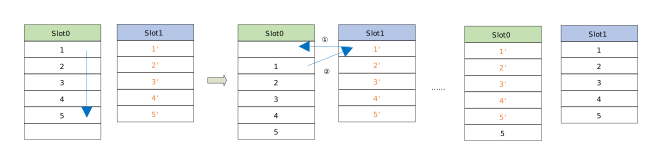
From the diagram, each sector swap has 3 states:
Primary slot[N] → Primary slot[N+1] completed
Secondary slot[N] → Primary slot[N] completed
Primary slot[N+1] → Secondary slot[N] completed
Swap_using_offset
Swap_using_offset is a firmware swap algorithm that does not require temporary storage (scratch), an enhanced version of Swap_using_move. Its core is to use one sector of the secondary slot as a buffer and alternately copy primary and secondary slot contents to complete firmware swap.
Enable by configuring the macro CONFIG_BOOT_SWAP_USING_OFFSET; when using –sysbuild, configure SB_CONFIG_MCUBOOT_MODE_SWAP_USING_OFFSET=y in the application’s sysbuild.conf.
Working Principle:
Firmware Placement: The new firmware to be upgraded must be stored starting from the second sector of the secondary slot.
Alternate Copy: Starting from the 1st sector, for each sector N execute in turn:
Copy primary slot sector N to secondary slot sector N;
Copy secondary slot sector N+1 to primary slot sector N.
Repeat sector by sector until all sectors are swapped.
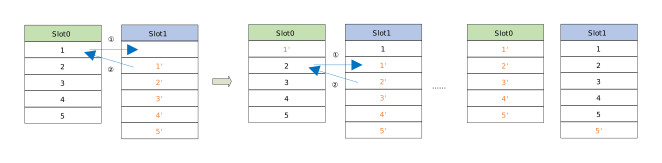
From the diagram, each sector swap has 2 states:
Primary slot[N] → Secondary slot[N] completed
Secondary slot[N+1] → Primary slot[N] completed
Swap Type and Status
Swap Type
In non-recovery scenarios (no abnormal interruption during the upgrade process), MCUboot determines the swap type to execute based on the flag bits in the firmware Trailer. The swap types are:
BOOT_SWAP_TYPE_NONE: No upgrade, directly boot primary slot firmware.BOOT_SWAP_TYPE_TEST: Test run; if not confirmed (write image-ok=0x01), revert on next boot.BOOT_SWAP_TYPE_PERM: Permanent swap; no need to set image-ok=0x01 for confirmation.BOOT_SWAP_TYPE_REVERT: Previous TEST was not confirmed, revert to the previous old firmware.BOOT_SWAP_TYPE_FAIL: Target firmware is invalid (verification failed, etc.).BOOT_SWAP_TYPE_PANIC: Swap encountered unrecoverable error (abort).
Due to Flash hardware limitations, the Trailer design is not intuitive, and directly reading its bytes makes it difficult to restore the device state. Therefore, MCUboot maps “various possible Trailer combination states” to the swap types above and determines them in priority order: a lower State number indicates higher priority; once a state is matched, the corresponding swap type is immediately determined and matching stops.
State I scenario: During the risk window before executing REVERT in Swap_using_offset, recording magic and copy-done to the secondary slot, the next boot will continue to execute REVERT. This is an intermediate state during offset-mode revert, ensuring the revert can resume after a power loss.
State I (swap using offset only)
                 | primary slot | secondary slot |
-----------------+--------------+----------------|
           magic | Any          | Good           |
        image-ok | Any          | Unset          |
       copy-done | Any          | Set            |
-----------------+--------------+----------------'
 result: BOOT_SWAP_TYPE_REVERT                   |
-------------------------------------------------'
State II scenario: Secondary slot firmware is valid and unconfirmed, execute “test swap”. The system will swap from secondary slot to primary slot and boot. The new firmware needs to set image-ok in the application for confirmation; if not confirmed, the next boot will revert.
State II
                 | primary slot | secondary slot |
-----------------+--------------+----------------|
           magic | Any          | Good           |
        image-ok | Any          | Unset          |
       copy-done | Any          | Any            |
-----------------+--------------+----------------'
 result: BOOT_SWAP_TYPE_TEST                     |
-------------------------------------------------'
State III scenario: Secondary slot firmware is pre-marked as image-ok, execute “permanent swap”, no rollback after upgrade.
State III
                 | primary slot | secondary slot |
-----------------+--------------+----------------|
           magic | Any          | Good           |
        image-ok | Any          | 0x01           |
       copy-done | Any          | Any            |
-----------------+--------------+----------------'
 result: BOOT_SWAP_TYPE_PERM                     |
-------------------------------------------------'
State IV scenario: Primary slot has completed copy (copy-done=Set), but new firmware is unconfirmed (image-ok=Unset), so revert is executed on this boot, restoring to the old firmware.
State IV
                 | primary slot | secondary slot |
-----------------+--------------+----------------|
           magic | Good         | Any            |
        image-ok | 0xff         | Any            |
       copy-done | 0x01         | Any            |
-----------------+--------------+----------------'
 result: BOOT_SWAP_TYPE_REVERT                   |
-------------------------------------------------'
If none of the above State I-IV match, MCUboot will not attempt to swap images, but will execute one of the three swap types in the State V table.
State V
                 | primary slot | secondary slot |
-----------------+--------------+----------------|
           magic | Any          | Any            |
        image-ok | Any          | Any            |
       copy-done | Any          | Any            |
-----------------+--------------+----------------'
 result: BOOT_SWAP_TYPE_NONE,                    |
         BOOT_SWAP_TYPE_FAIL, or                 |
         BOOT_SWAP_TYPE_PANIC                    |
-------------------------------------------------'
Swap Status
Swap status is used for power-loss recovery and is recorded in the primary slot’s Trailer. When a reboot occurs during firmware swap, MCUboot can restore the state based on the recorded swap status and continue the unfinished swap operation. This area consists of a series of “single-byte records”, each written independently and aligned according to the device’s minimum write granularity. The normal swap process is as follows:
Initialization: Erase both primary and secondary slot Trailers; then write Swap info, Swap size, and MAGIC markers in the primary slot Trailer.
Per-sector Swap: Only swap sectors actually occupied by firmware (including TLV), and record the status of each sector according to the selected algorithm.
Finalization: After completion, write Copy done in the primary slot Trailer to mark the swap as complete.
0                   1                   2                   3
0 1 2 3 4 5 6 7 8 9 0 1 2 3 4 5 6 7 8 9 0 1 2 3 4 5 6 7 8 9 0 1
+-+-+-+-+-+-+-+-+-+-+-+-+-+-+-+-+-+-+-+-+-+-+-+-+-+-+-+-+-+-+-+-+
|sec127,state 0 |sec127,state 1 |sec127,state 2 |sec126,state 0 |
+-+-+-+-+-+-+-+-+-+-+-+-+-+-+-+-+-+-+-+-+-+-+-+-+-+-+-+-+-+-+-+-+
|sec126,state 1 |sec126,state 2 |sec125,state 0 |sec125,state 1 |
+-+-+-+-+-+-+-+-+-+-+-+-+-+-+-+-+-+-+-+-+-+-+-+-+-+-+-+-+-+-+-+-+
|sec125,state 2 |                                               |
+-+-+-+-+-+-+-+-+                                               +
~                                                               ~
~               [Records for indices 124 through 1              ~
~                                                               ~
~               +-+-+-+-+-+-+-+-+-+-+-+-+-+-+-+-+-+-+-+-+-+-+-+-+
~               |sec000,state 0 |sec000,state 1 |sec000,state 2 |
+-+-+-+-+-+-+-+-+-+-+-+-+-+-+-+-+-+-+-+-+-+-+-+-+-+-+-+-+-+-+-+-+
Note
The diagram assumes min-write-size = 1, where each “sector index” corresponds to 3 state records, applicable to Swap_using_move mode; whereas in Swap_using_offset mode, each sector has only 2 state records, requiring less total space.