Amazon KVS WebRTC V2
Introduction
Amazon KVS WebRTC V2 (kvs_webrtc_v2_mmf) is an updated version of the KVS WebRTC demo based on the FreeRTOS WebRTC Reference Implementation for AmebaPro2. We integrated the new version into pro2 sdk as an example.
Download Source Code
Navigate to the example directory:
cd component/example/kvs_webrtc_v2_mmf
Run the fetch script to download the necessary libraries:
./fetch_aws_lib.sh
The libraries will be downloaded to
project/realtek_amebapro2_v0_example/src/amazon_kvs/lib_amazon_v2/libraries.Note
For the full library list, refer to freertos-webrtc-reference-on-amebapro-for-amazon-kinesis-video-streams.
Set mbedtls Version
KVS WebRTC V2 supports mbedtls-2.16.6 or mbedtls-3.0.0. Set the version in project/realtek_amebapro2_v0_example/GCC-RELEASE/config.cmake:
set(mbedtls "mbedtls-2.16.6")
or
set(mbedtls "mbedtls-3.0.0")
Modify lwipopts.h
Enable IPv6 support in
component/lwip/api/lwipopts.h:#define LWIP_IPV6 1Enable Amazon common in
component/lwip/api/lwipopts.h:#ifndef ENABLE_AMAZON_COMMON #define ENABLE_AMAZON_COMMON #endif
Modify mbedtls_config.h (mbedtls-3.0.0 Only)
If using mbedtls-3.0.0, modify mbedtls-3.0.0/include/mbedtls/mbedtls_config.h:
#define MBEDTLS_FS_IO
Configure the Example
Configure the AWS key and channel name in
component/example/kvs_webrtc_v2_mmf/webrtc_v2_src/demo_config/demo_config.h:/* Enter your AWS KVS key here */ #define AWS_ACCESS_KEY_ID "xxxxxxxxxx" #define AWS_SECRET_ACCESS_KEY "xxxxxxxxxx" /* Setting your signaling channel name */ #define AWS_KVS_CHANNEL_NAME "xxxxxxxxxx"
Configure the video parameters in
component/example/kvs_webrtc_v2_mmf/example_kvs_webrtc_v2_mmf.c:#define V1_RESOLUTION VIDEO_HD #define V1_FPS 30 #define V1_GOP 30 #define V1_BPS 1024*1024
Select Camera Sensor
Check your camera sensor model and define it in <AmebaPro2_SDK>/project/realtek_amebapro2_v0_example/inc/sensor.h:
#define USE_SENSOR SENSOR_GC2053
Using AWS IoT Credential (Optional)
To use AWS IoT Thing credentials for more secure management:
Refer to the following resources:
Configure the AWS Credential Certificate in
component/example/kvs_webrtc_v2_mmf/webrtc_v2_src/demo_config/demo_config.h:#define AWS_CREDENTIALS_ENDPOINT "xxxxxxxxxx" #define AWS_IOT_THING_NAME "xxxxxxxxxx" #define AWS_IOT_THING_ROLE_ALIAS "xxxxxxxxxx" #define AWS_IOT_THING_CERT "xxxxxxxxxx" #define AWS_IOT_THING_PRIVATE_KEY "xxxxxxxxxx"
Build the Project
Run the following commands to build the image with the
kvs_webrtc_v2_mmfexample:cd project/realtek_amebapro2_v0_example/GCC-RELEASE mkdir build cd build cmake .. -G"Unix Makefiles" -DCMAKE_TOOLCHAIN_FILE=../toolchain.cmake -DEXAMPLE=kvs_webrtc_v2_mmf cmake --build . --target flash -j4
Use the image tool to download the image to AmebaPro2 and reboot.
Configure the Wi-Fi connection using the following UART commands:
ATW0=<WiFi_SSID>     : Set the WiFi AP to be connected
ATW1=<WiFi_Password> : Set the WiFi AP password
ATWC                 : Initiate the connection
If everything works fine, you should see output similar to the following:
[INFO][kvs_webrtc_: kvs_webrtc_v2_main_thread: 140] [KVS WebRTC v2 module]: === KVS WebRTC V2 Start ===
[INFO][MasterTask: Master_Task: 171] Start Master_Task.
[INFO][MasterTask: platform_init: 172] waiting get epoch timer
[INFO][MasterTask: AppMediaSourcePort_Init: 34] [WebRTC Port] AppMediaSourcePort_Init called. Hardware is ready.
[INFO][SigControll: DescribeSignalingChannel: 642] Describing Signaling Channel.
[INFO][SigControll: tlsHandshake: 593] (Network connection 0x704b9778) TLS handshake successful.
...
[INFO][SigControll: Websocket_Connect: 1641] Successfully connect with WSS endpoint wss://...
[INFO][SigControll: OnSignalingConnectionStateChange: 1457] Unblock signaling connection barrier.
[INFO][SigControll: SendWebsocketPing: 1267] wss ping ==>
[INFO][SigControll: HandleWslayControlMessage: 176] <== wss pong
Validate Result
Use the KVS WebRTC Test Page to validate the result. Set up the test page as shown below:
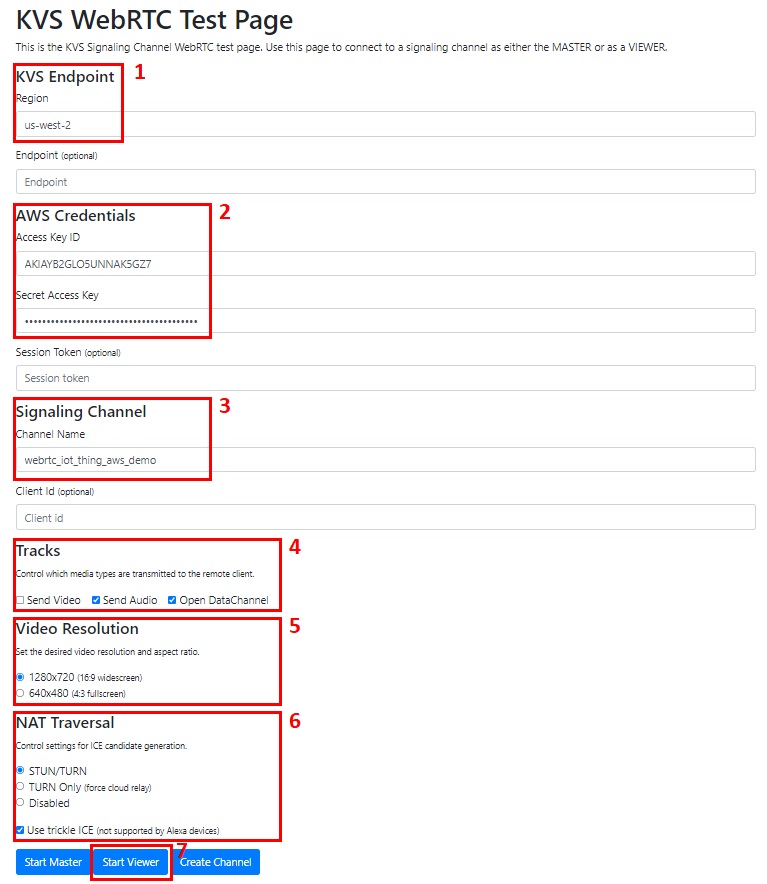
Reference
For more information about the feature options of AWS WebRTC V2, refer to: