Secure Boot
Introduction
Secure boot aims at firmware protection, which prevents attackers from modifying or replacing firmware maliciously. When the chip is powered on, the secure boot ROM executes to check the validation of the image signature.
If the signature is valid, authentication will be successful, which means that the firmware is safe and the subsequent operations can be continued. Otherwise, the SoC clears the stack and goes into an endless loop.
This chapter illustrates the usage of Linux verified boot.
ROM Boot Mechanism
Linux secure boot should be guided to start from ROM code, which verifies the bootloader using Root of Trusted Key (RoT) saved in the OTP. Bootloader shall verify the KM0/KM4 images and cert.bin in firmware. Except for RoT, all the keys are saved in cert.bin (Key Cert).
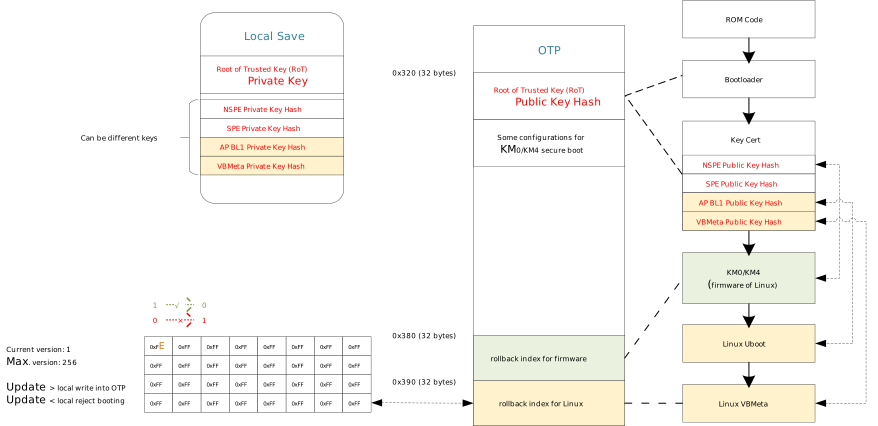
Secure boot flow
Chain Verification
Linux secure boot is based on ROM/KM0/KM4 secure boot. The secure boot flow of Linux part is illustrated below.
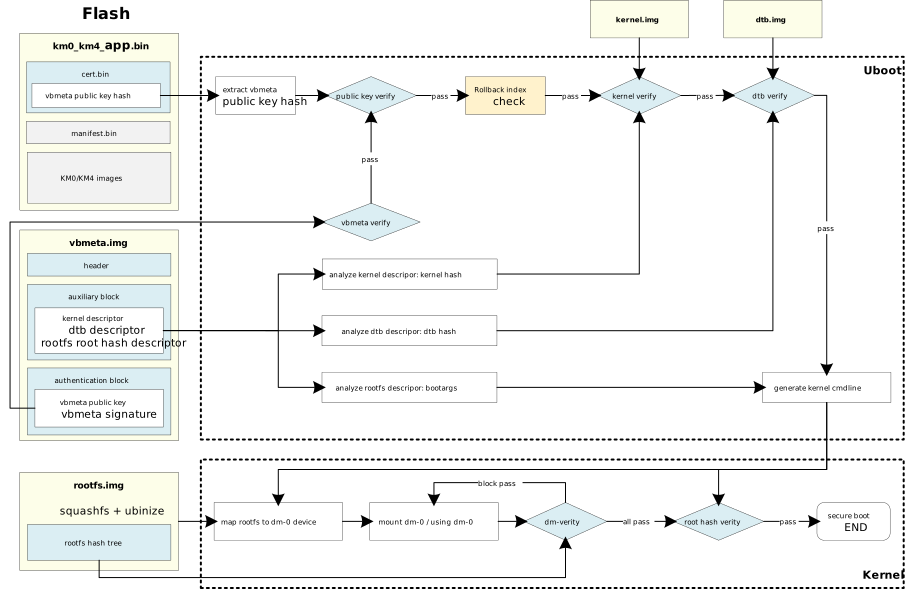
Note
Normally, the kernel cmdline will be Kernel command line: console=ttyS0,1500000 earlycon psci=enable ubi.mtd=8 ubi.block=0,0 ubi.mtd=9 dm-mod.create="system,,0,ro, 0 55928 verity 1 /dev/ubiblock0_0 /dev/ubiblock0_0 4096 4096 6991 6991 sha512 <salt> <hash> 2 ignore_corruption ignore_zero_blocks" root=/dev/dm-0 rootfstype=squashfs.
The cmdline is shown when kernel initializing and the content is given by <sdk>/sources/boot/uboot/cmd/realtek_avb.c.
Function realtek_organize_cmdline() will abstract the key information and organize a new cmdline for secure boot.
The
ubi.mtd=8means the index of rootfs block in mtd, which is used to make mtd8 as character-device ubi0.The
ubi.block=0,0means make character-device ubi0 as block-device ubiblock0, because the dm verity can only be done for block-devices.The
dm-mod.createparameters are defined by dm-verity driver. Including the block-device to verify, the size of hash block, the numbers of hash block, the start address of rootfs hash tree, the salt and digest of verification and so on. The digest is the root hash of rootfs which has been verified by VBmeta in uboot.The
ubi.block0_0is attached to dm-0.root=/dev/dm-0mounts dm-0 to root-filesystem which also means make informations in mtd8 area as rootfs. The dm-verity will do a dynamic hash calculation for any block and its related blocks when user accesses to some blocks in rootfs.
For more details on dm-verity, refer to dm verify.
This section describes the Construction Parameters, Theory of operation, Hash Tree, On-disk format and some examples. The kernel command line is the only start-point for the hash-tree verification of rootfs, and the digest of root-hash for hash-tree will be inserted to VBmeta whose validity is confirmed by the former flow.
Codes of the above framework can be divided into three parts: Flash area, U-Boot area and kernel area. Only the core code directories of each part are listed below.
Area |
Directory |
Introduction |
|---|---|---|
Flash |
<sdk>/sources/yocto/meta-realtek/tools/verified_boot |
The script of making secure related images. |
U-Boot |
<uboot>/cmd/mtd.c |
The operations of reading NAND Flash. |
<uboot>/cmd/realtek-avb.c |
The verification of vbmeta/public key/kernel/dtb. |
|
Kernel |
<linux>/drivers/md/* |
This directory is provided by GPI Linux kernel named dm-verity, used to verify the hash tree of rootfs. |
More for android verified boot, refer to android avb.
Usage
The following steps illustrate how to use secure boot.
Enable uboot secure boot configs
Prepare secure boot keys
Make secure images
Enable verified boot
Enable UBoot Secure Boot Config
To enable Linux secure boot, make sure uboot related secure boot configs are enabled, the uboot config listed at <sdk>/sources/boot/uboot/configs and secure boot related configs are listed below
CONFIG_VERIFIED_BOOT=y
CONFIG_OTP_RTK_AMEBA=y
Currently we have enabled the configs by default.
Prepare Secure Boot Key
To use Linux verified boot, secure keys should be prepared.
The default manifest/key files are located at <sdk>/sources/yocto/meta-realtek/tools/verified_boot/security_keys/test. The default key can be used directly during the development phase. However, a custom secure key must be generated for mass production.
Linux SDK provides tool make_key in path <sdk>/sources/yocto/meta-realtek/tools/verified_boot for users to generate their own secure keys under specific key path.
Use the following command to generate secure keys, which will be generated under the path <key path> :
make_key <key path>
Secure keys are listed below:
File |
Description |
|---|---|
manifest.json5 |
Used to store all secure boot key information |
vbmeta.priv.key |
Private key information for the Linux vbmeta secure firmware |
vbmeta.pub.key |
Public key information for the Linux vbmeta secure firmware |
soc_info.json |
SOC information |
Make Secure Image
Before making secure images, all the raw images need to be generated first.
Yocto SDK uses mksecure.sh to compile secure images. The script is lacated at <sdk>/sources/yocto/meta-realtek/tools/verified_boot .
The usage of this script is described as below:
mksecure.sh
--key_dir=<secure key path>
--output_dir=<secure image output path>
--input_dir=<directory of the normal images>
--boot_image=<boot image path>
--dtb_image=<device tree blob image path>
--dtb_part_size=<tree blob image partition size>
--kernel_image=<kernel image path>
--kernel_part_size=<kernel partition size>
--recovery_dtb_image=<recovery device tree blob image path>
--recovery_dtb_part_size=<recovery device tree  blob partition size>
--recovery_kernel_image=<recovery kernel image path>
--recovery_kernel_part_size=<recovery kernel partition size>
--root_image=<rootfs image path>
--root_part_size=<rootfs partition size>
--km4_boot=<firmware boot image path>
--km4_app=<firmware app image path>
--imgtool_flashloader=<imgtool flashloader path>
--use_dtb_size =<enable the auto parse of image size>
The parameters are illustrated below:
Parameter |
Mandatory/Optional |
Description |
|---|---|---|
key_dir |
Mandatory |
Indicates where the secure keys locate at. Ddefault is |
output_dir |
Mandatory |
Indicates the output path of the secure images. |
input_dir |
Optional |
Indicates the directory of the normal images.
|
dtb_image |
Mandatory |
Indicates the path of non-secure device tree blob images. |
recovery_dtb_image |
Mandatory if recovery is enabled |
Indicates the path of recovery device tree blob image, and this parameter is not mandatory if non-secure recovery images
need to be flashed.
|
boot_image |
Optional if input_dir is given |
Indicates the path of non-secure boot images. |
kernel_image |
Optional if input_dir is given |
Indicates the path of non-secure kernal images. |
recovery_kernel_image |
Optional if input_dir is given |
Indicates the path of non-secure recovery kernal images, and this parameter is not mandatory if non-secure recovery images
need to be flashed.
|
root_image |
Optional if input_dir is given |
Indicates the path of non-secure rootfs squashfs image, and only squashfs image is needed. |
km4_boot |
Optional if input_dir is given |
Indicates the path of non-secure firmware boot image. |
km4_app |
Optional if input_dir is given |
Indicates the path of non-secure firmware APP image. |
imgtool_flashloader |
Optional if input_dir is given |
Indicates the path of |
use_dtb_size |
Optional, also named as -s |
Set to 1 to enable automatically dtb parse.
|
dtb_part_size |
Only useful when -s is not set |
Indicates the partition size of device tree blob partition, which is described in
<dts_dir>/rtl8730e-spi-nand-256m.dtsi (rtl8730e-spi-nand-128m.dtsi). |
kernel_part_size |
Only useful when -s is not set |
Indicates the partition size of kernel partition described in |
recovery_dtb_part_size |
Only useful when -s is not set |
Indicates the partition size of recovery device tree blob described in
rtl8730e-spi-nand-256m.dtsi (rtl8730e-spi-nand-128m.dtsi),and this parameter is not mandatory if non-secure recovery images need to be flashed.
|
recovery_kernel_part_size |
Only useful when -s is not set |
Indicates the partition size of recovery kernel described in
rtl8730e-spi-nand-256m.dtsi (rtl8730e-spi-nand-128m.dtsi),and this parameter is not mandatory if non-secure recovery images need to be flashed.
|
root_part_size |
Indicates the partition size of rootfs described in |
Where <dts_dir> means the directory of dts files, which is <sdk>/kernel/linux-5.4/arch/arm/boot/dts for kernel 5.4.x, and <sdk>/kernel/linux-6.6/arch/arm/boot/dts/realtek/ameba for kernel 6.6.x.
Enable Verified Boot
After flashing the secure images and system boots up, enable secure boot via programming OTP bit.
The specific key information in the example is the default key included with the Linux SDK.
Ensure that the key information described in Prepare Secure Boot Key is correctly used to compile the secure image, and that the key information in that path will be written to the OTP.
Program secure boot root public key hash in OTP.
The root public key hash value is from the file
manifest.json5described in Prepare Secure Boot Key . Find the fieldsboot_public_key_hashinimage1.image1: { img_id: 0, img_ver_major: 1, img_ver_minor: 1, huk_epoch: 1, rsip_iv: "0102030405060708", sboot_private_key: "A3508C1155602F2C7B5DAC524868A4667B63D2097482786838EFD1046E31404E", sboot_public_key: "63C64A234E15B11E7C4A9227F151C640637AEF0699774DCAA7D38BB565172896", sboot_public_key_hash: "B7A307DCE8C5967983D55A9E3EB0E0617C48775383753A6D26EA6E13B1187BD3", },Use the following command to program OTP PK1:
efuse wraw 320 32 B7A307DCE8C5967983D55A9E3EB0E0617C48775383753A6D26EA6E13B1187BD3Enable secure boot in OTP.
Use
efuse rmapfirst to check value in 0x2 and 0x3:$efuse rmap 0 16
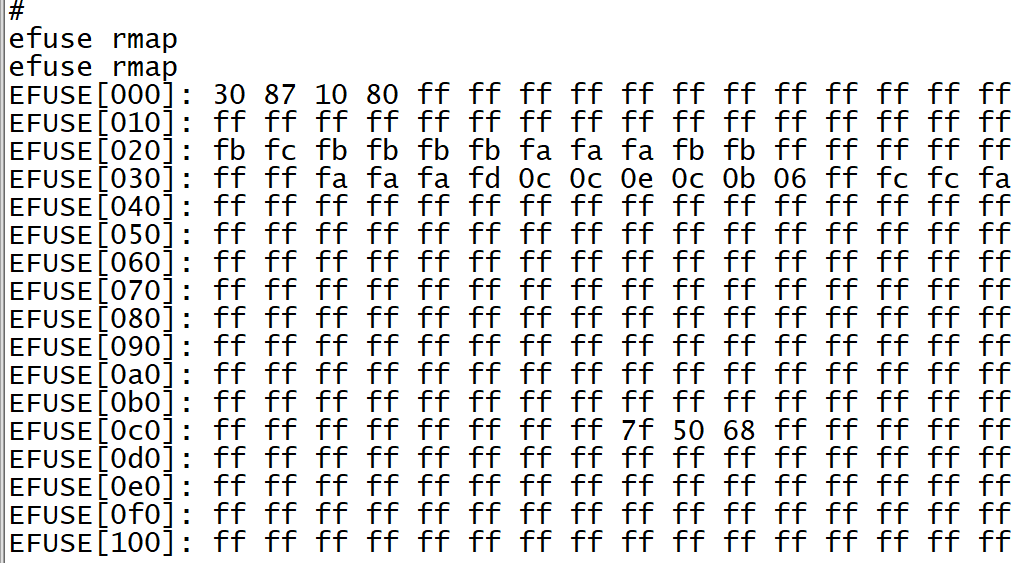
For example, we can see that the values at addresses 0x2 and 0x3 are 0x10 and 0xa0, respectively.
Set 0x3[2] to 1 to enable the secure boot enable bit. Taking 0x10 0xa0 as an example, we would need to write 0x10 0xa4 to addresses 0x2 and 0x3.
$efuse wmap 2 2 10a4
Use
efuse rmapagain to check if the secure boot bit has been successfully set.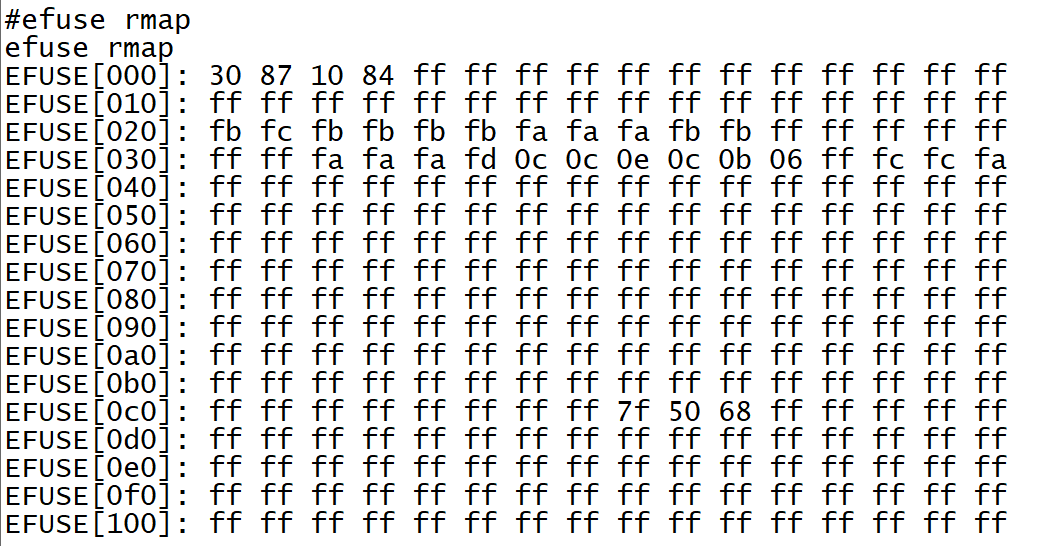
Reset the board.
When secure boot is successful, you can see the following logs:
IMG1 SBOOT EN: secure boot is enabled
IMG1(OTA1) VALID, ret: 0: bootloader authentication pass
IMG2 VERIFY PASS: IMAGE2 authentication pass
AP BL1&FIP VERIFY PASS: AP uboot authentication pass
Public Key Hash Verified Success
Rollback Index: Version PASS!: rollback authentication pass
VbMeta Signature Verified Success!: vbmeta authentication pass
Kernel Image verified success!: linux kernel authentication pass
DTB/FDT Image verified success!: Linux DTB authentication pass
linux verified boot: success!