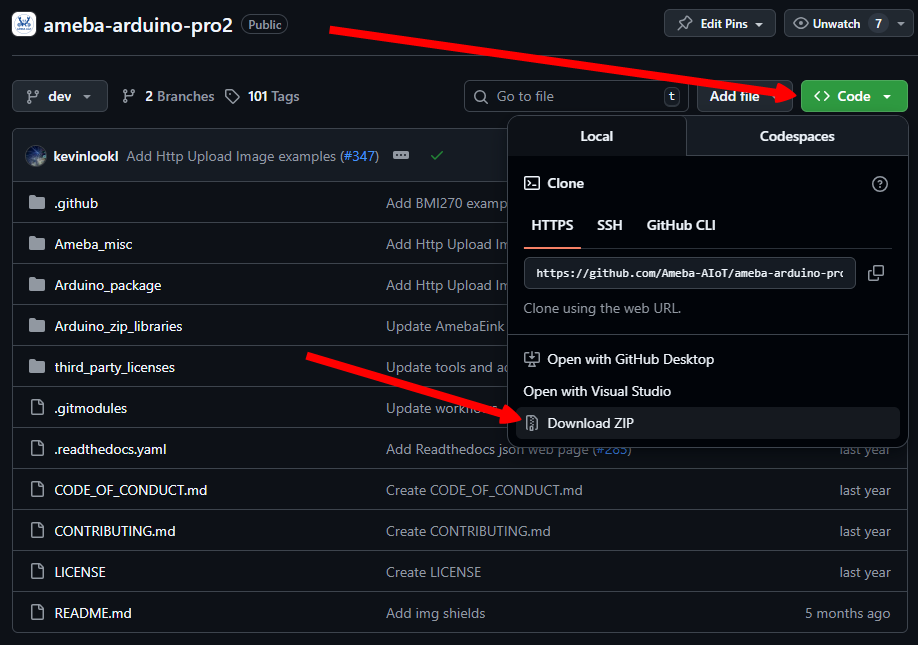
This guide is for developers who want to download, build, and develop the Arduino SDK source code. It provides instructions for obtaining the SDK, setting up the development environment, and working with the source code for customization, debugging, or extension.
You can choose to download the SDK directly from GitHub for full source-level development, or use the Arduino IDE for a faster setup and testing workflow. The following sections describe each approach and help you select the method that best fits your development needs.
No additional environment setup is required to download the SDK source code when using GitHub. Developers can simply clone or download the repository directly from the GitHub repo and start working with the source code.
All development, bug fixes, and feature enhancements can be contributed through GitHub. Developers are encouraged to submit Pull Requests (PRs) for code changes or open Issues to report bugs, request features, or discuss improvements.
To develop using the Arduino IDE, you must first install the Arduino IDE and the Ameba Arduino SDK. After installation, the SDK is integrated into the Arduino IDE environment.
Once installed, locate the SDK path within the Arduino IDE directory to access the SDK source code. Developers can modify, debug, and extend the source code directly from this location for development and testing purposes.
If you want your changes to be merged into the official SDK, you must submit your modifications as a Pull Request (PR) to the GitHub repository. Changes made locally in the Arduino IDE environment alone will not be included in the official release.
Responses are provided by Realtek's AI chatbot and may contain inaccuracies. Realtek is not liable for any damages from its use and offers no warranties.