In this example, the development board will demo the non retention Deep Sleep Mode for power save. There are 3 wake-up sources for Deep Sleep Mode which are: AON Timer, AON GPIO, and RTC. The system will count down 5s then go to Deep Sleep mode. Upon the wake-up source being triggered, the system will be reboot and wake up again.
The module and board power consumption report under Deep Sleep mode are listed in these two tables below.
RTL8735B module power consumption test results
Wake-up
source
Module power consumption
(uA)
Deep Sleep Mode (measure at 3V3)
AON timer
32.78
AON GPIO
40.98
RTC
41.08
AMB82 MINI board Power Consumption
Wake-up
source
Development board power
consumption Approximate
measurement
(mA)
Normal Mode
Standby Mode
AON timer
53.01
4.59
AON GPIO
52.97
4.74
RTC
53.05
4.65
Open example in “File” -> “Examples” -> “AmebaPowerMode” -> “DeepSleepMode”.
Next is setting up the system and entering the power mode. Please refer to the following steps for entering Deep Sleep mode.
Step 1. Ensure RETENTION is “#define RETENTION 0” in this example.
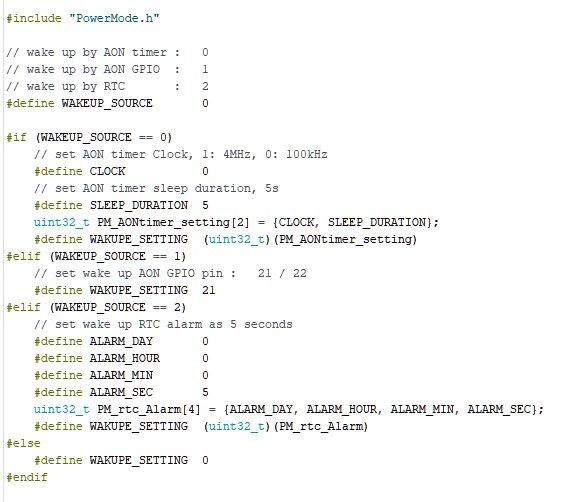
Step 2. Set up the “WAKEUP_SOURCE”, AON timer: 0; AON GPIO: 1; RTC: 2.
Step 3. Set up the wake-up source setting. There are 3 wake-up sources, each one has its own settings.
For AON timer, at section “#if (WAKEUP_SOURCE == 0)”, set value to “CLOCK” and “SLEEP_DURATION”. “CLOCK” can be 4MHz or 100kHz. “SLEEP_DURATION” unit is in seconds.
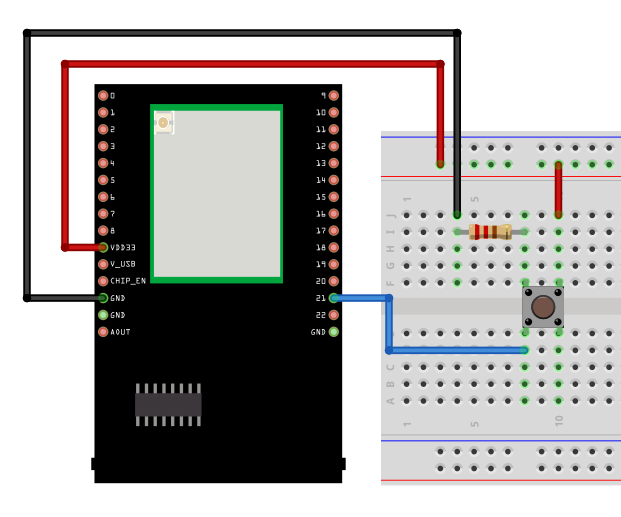
For AON GPIO, at section “#elif (WAKEUP_SOURCE == 1)”, set value to “WAKUPE_SETTING”. “WAKUPE_SETTING” in this case is the Pin number, that can be 21 or 22. The GPIO pin is set to active high, please refer to the following connection.
For RTC, at section “#elif (WAKEUP_SOURCE == 2)”, set value to “ALARM_DAY”, “ALARM_HOUR”, “ALARM_MIN”, or “ALARM_SEC”. All alarm values set the duration of RTC wake-up. The range is “1day, 0h, 0m, 0s” to “365day, 23h, 59min, 59s”.
Step 3. Start the Deep Sleep mode. There is only 1 optional setting for this step. When the wake-up source is set to RTC, use “PowerMode.start(1970, 1, 1, 0, 0, 0);” to replace “PowerMode.start();” for setting the start time. (Default is 1970.1.1 00:00:00).
To wake up, all timers will automatically wake up when the duration is finished, all GPIO pins must active high by pressing the push button.
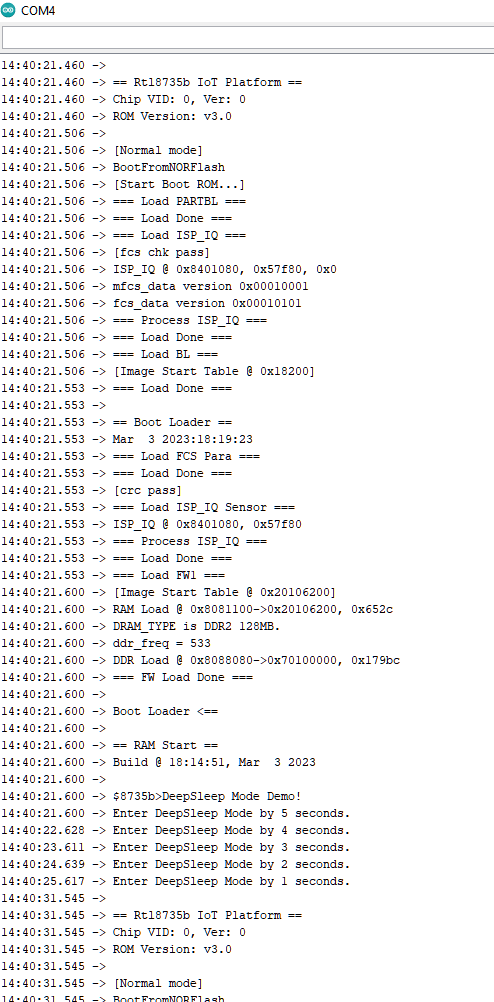
The correct boot, enter deep sleep, and reboot cycle will be same as following picture.
Ameba AI Assistant
Responses are provided by Realtek's AI chatbot and may contain inaccuracies. Realtek is not liable for any damages from its use and offers no warranties.